alarm LEXUS LS600H 2017 User Guide
[x] Cancel search | Manufacturer: LEXUS, Model Year: 2017, Model line: LS600H, Model: LEXUS LS600H 2017Pages: 676, PDF Size: 35.25 MB
Page 156 of 676
1563-2. Opening, closing and locking the doors and trunk
LS600h/LS600hL_EE(OM50G20E)
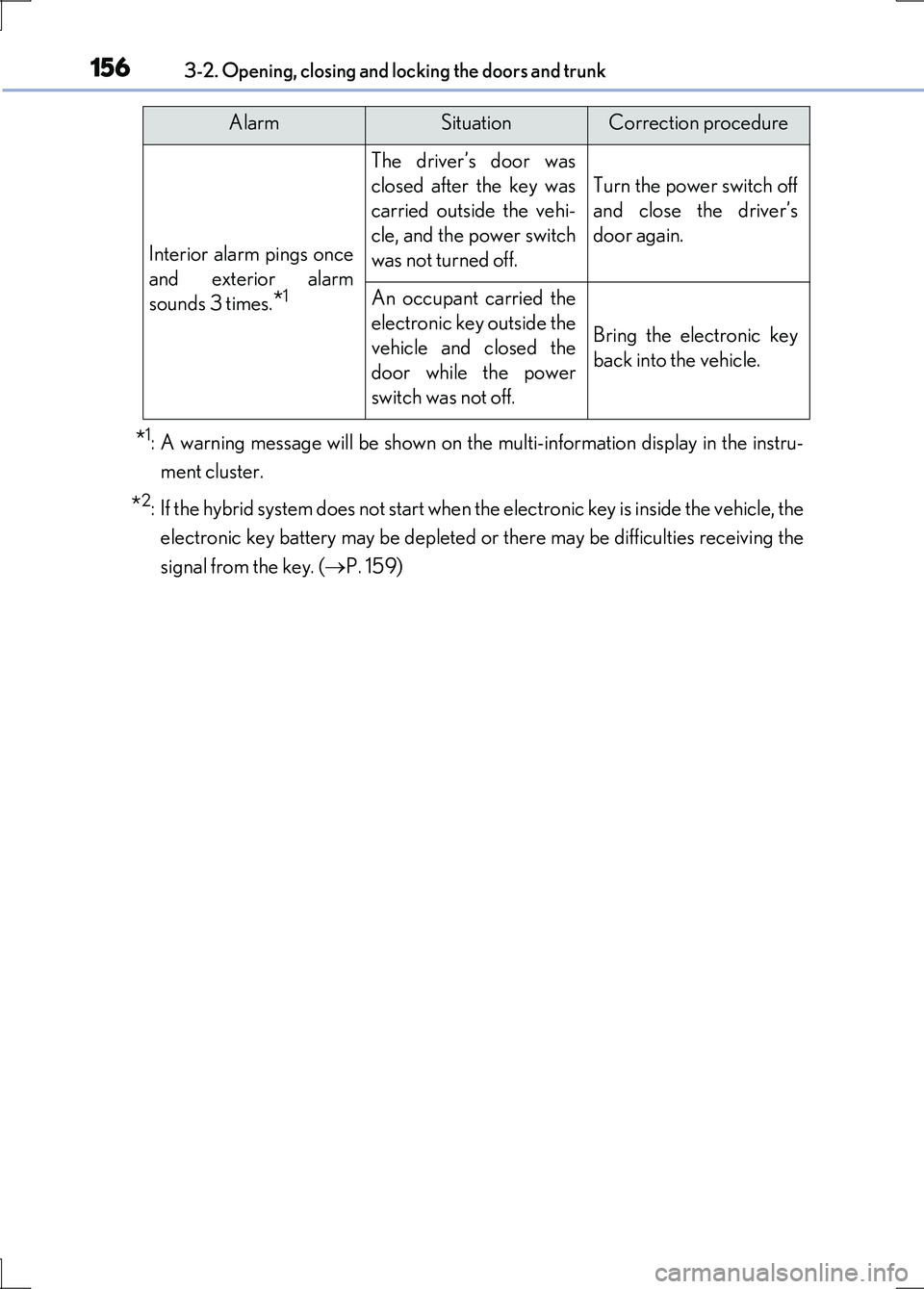
*1: A warning message will be shown on the multi-information display in the instru-
ment cluster.
*2: If the hybrid system does not start when the electronic key is inside the vehicle, the
electronic key battery may be depleted or there may be difficulties receiving the
signal from the key. ( P. 159)
Interior alarm pings once
and exterior alarm
sounds 3 times.*1
The driver’s door was
closed after the key was
carried outside the vehi-
cle, and the power switch
was not turned off.
Turn the power switch off
and close the driver’s
door again.
An occupant carried the
electronic key outside the
vehicle and closed the
door while the power
switch was not off.
Bring the electronic key
back into the vehicle.
AlarmSituationCorrection procedure
Page 157 of 676
1573-2. Opening, closing and locking the doors and trunk
3
Operation of each component
LS600h/LS600hL_EE(OM50G20E)
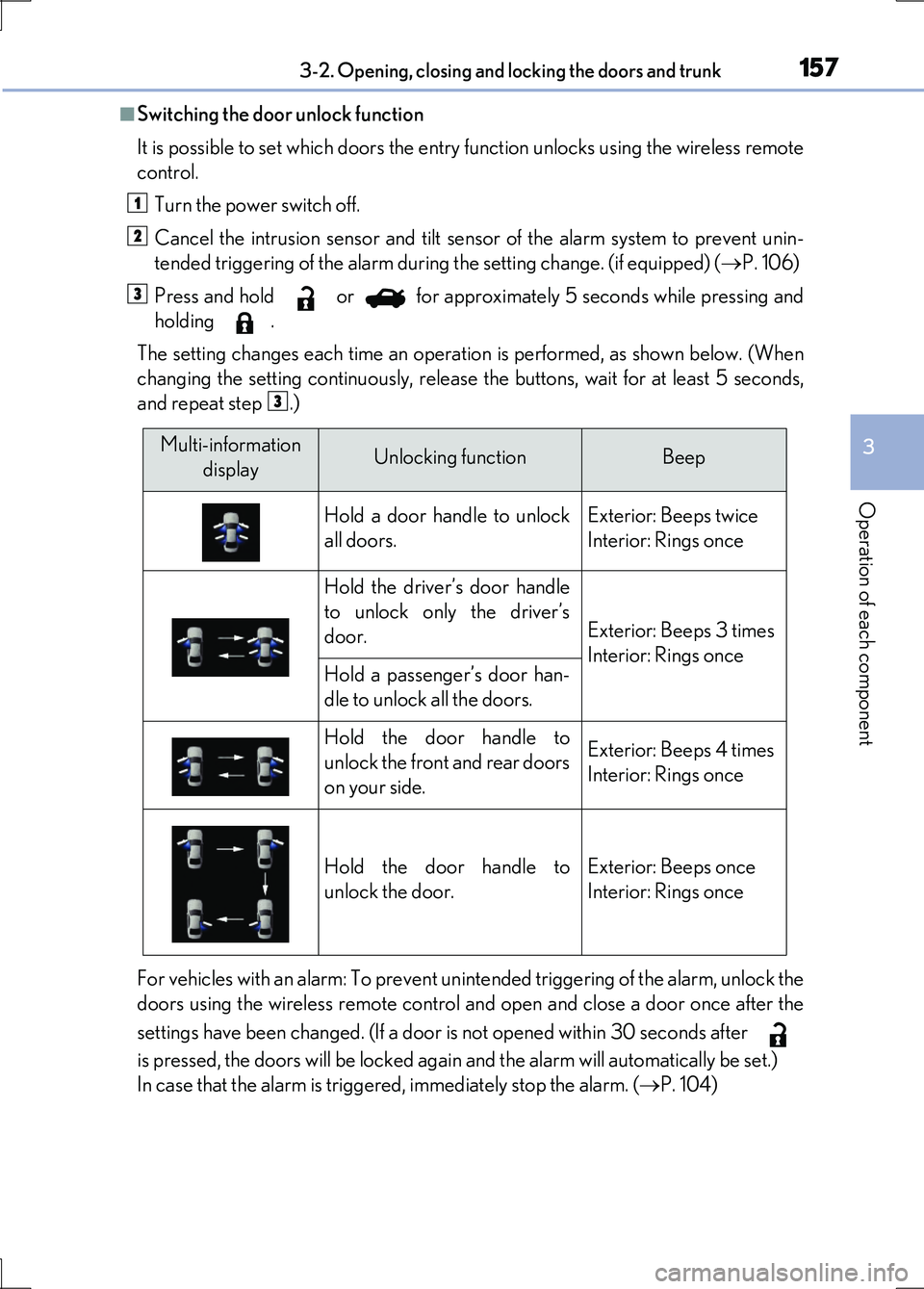
■Switching the door unlock function
It is possible to set which doors the entry function unlocks using the wireless remote
control.
Turn the power switch off.
Cancel the intrusion sensor and tilt sensor of the alarm system to prevent unin-
tended triggering of the alarm during the setting change. (if equipped) ( P. 106)
Press and hold or for approximately 5 seconds while pressing and
holding .
The setting changes each time an operation is performed, as shown below. (When
changing the setting continuously, release the buttons, wait for at least 5 seconds,
and repeat step .)
For vehicles with an alarm: To prevent unintended triggering of the alarm, unlock the
doors using the wireless remote control an d open and close a door once after the
settings have been changed. (If a door is not opened within 30 seconds after
is pressed, the doors will be locked again and the alarm will automatically be set.)
In case that the alarm is triggered, immediately stop the alarm. ( P. 104)
1
2
3
3
Multi-information
displayUnlocking functionBeep
Hold a door handle to unlock
all doors.
Exterior: Beeps twice
Interior: Rings once
Hold the driver’s door handle
to unlock only the driver’s
door.Exterior: Beeps 3 times
Interior: Rings onceHold a passenger’s door han-
dle to unlock all the doors.
Hold the door handle to
unlock the front and rear doors
on your side.
Exterior: Beeps 4 times
Interior: Rings once
Hold the door handle to
unlock the door.
Exterior: Beeps once
Interior: Rings once
Page 161 of 676
1613-2. Opening, closing and locking the doors and trunk
3
Operation of each component
LS600h/LS600hL_EE(OM50G20E)
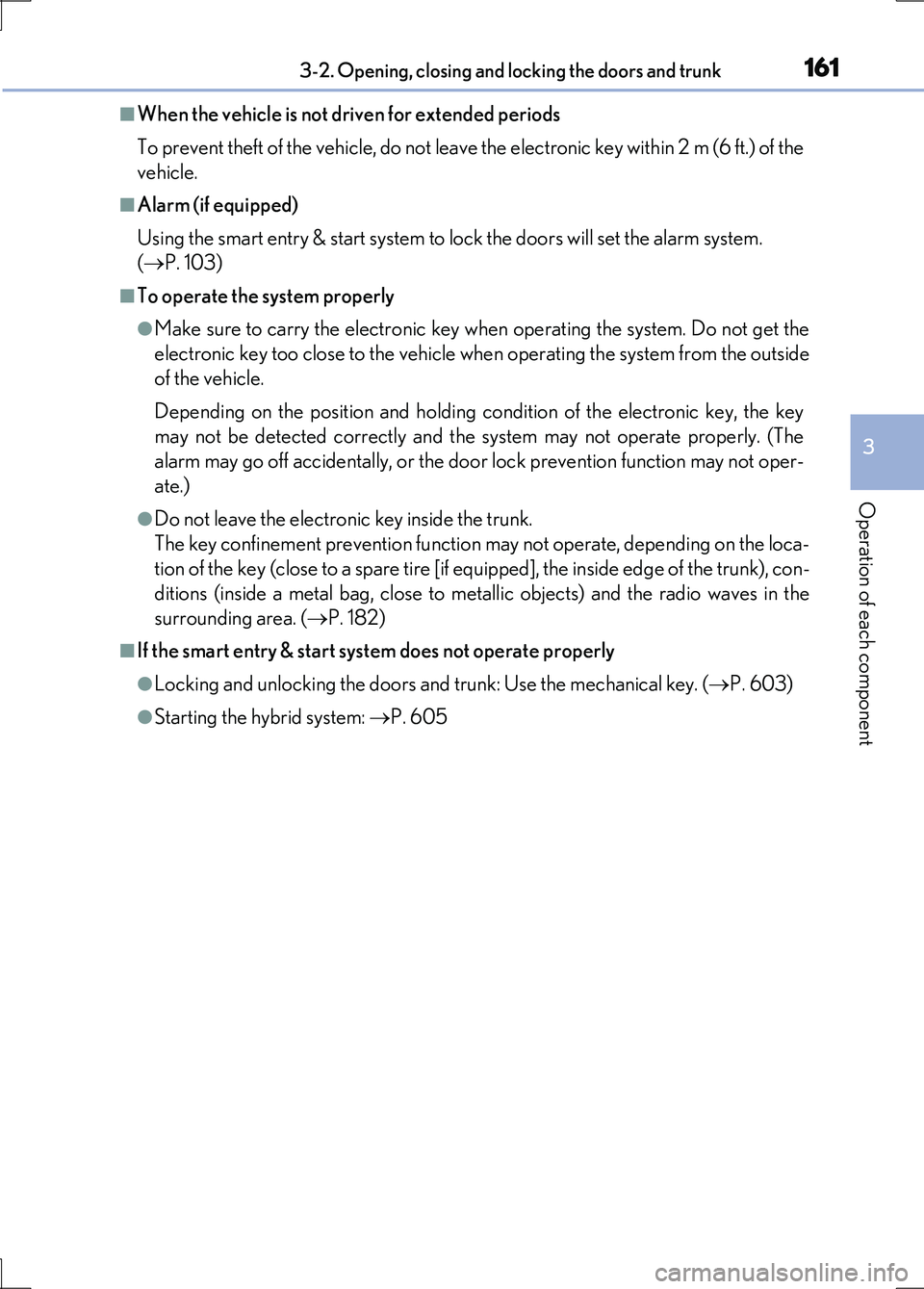
■When the vehicle is not driven for extended periods
To prevent theft of the vehicle, do not leave the electronic key within 2 m (6 ft.) of the
vehicle.
■Alarm (if equipped)
Using the smart entry & start system to lock the doors will set the alarm system.
( P. 103)
■To operate the system properly
●Make sure to carry the electronic key when operating the system. Do not get the
electronic key too close to the vehicle when operating the system from the outside
of the vehicle.
Depending on the position and holding condition of the electronic key, the key
may not be detected correctly and the system may not operate properly. (The
alarm may go off accidentally, or the door lock prevention function may not oper-
ate.)
●Do not leave the electronic key inside the trunk.
The key confinement prevention function may not operate, depending on the loca-
tion of the key (close to a spare tire [if equipped], the inside edge of the trunk), con-
ditions (inside a metal bag, close to metallic objects) and the radio waves in the
surrounding area. ( P. 182)
■If the smart entry & start system does not operate properly
●Locking and unlocking the doors and trunk: Use the mechanical key. (P. 603)
●Starting the hybrid system: P. 605
Page 162 of 676
1623-2. Opening, closing and locking the doors and trunk
LS600h/LS600hL_EE(OM50G20E)
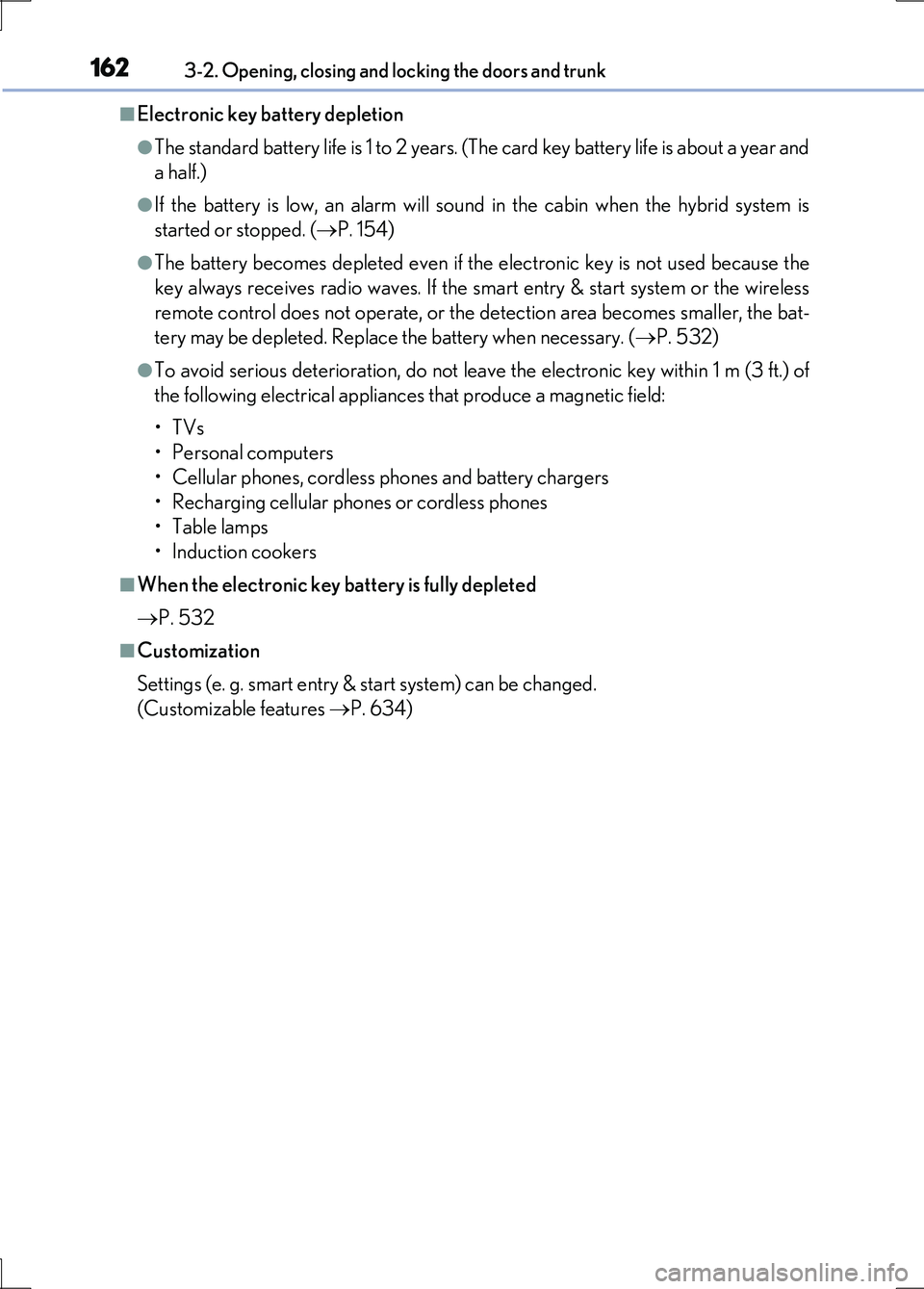
■Electronic key battery depletion
●The standard battery life is 1 to 2 years. (The card key battery life is about a year and
a half.)
●If the battery is low, an alarm will sound in the cabin when the hybrid system is
started or stopped. ( P. 154)
●The battery becomes depleted even if the electronic key is not used because the
key always receives radio waves. If the smart entry & start system or the wireless
remote control does not operate, or the detection area becomes smaller, the bat-
tery may be depleted. Replace the battery when necessary. ( P. 532)
●To avoid serious deterioration, do not leave the electronic key within 1 m (3 ft.) of
the following electrical appliances that produce a magnetic field:
•TVs
• Personal computers
• Cellular phones, cordless phones and battery chargers
• Recharging cellular phones or cordless phones
• Table lamps
• Induction cookers
■When the electronic key battery is fully depleted
P. 532
■Customization
Settings (e. g. smart entry & start system) can be changed.
(Customizable features P. 634)
Page 172 of 676
1723-2. Opening, closing and locking the doors and trunk
LS600h/LS600hL_EE(OM50G20E)
■Operation signals
Doors:
The emergency flashers flash to indicate that the doors have been locked/unlocked.
(Locked: once; Unlocked: twice)
Windows and moon roof:
A buzzer sounds to indicate that th e windows and moon roof are operating.
■Welcome light illumination control
P. 150
■Door lock buzzer
If an attempt to lock the doors is made when a door is not fully closed, a buzzer
sounds continuously for 5 seconds. Fully close the door to stop the buzzer, and lock
the vehicle once more.
■Security feature
P. 150
■Alarm (if equipped)
Using the wireless remote control to lock the doors will set the alarm system.
( P. 103)
■Conditions affecting operation
P. 159
■If the wireless remote control does not operate properly
Locking and unlocking the doors and trunk: Use the mechanical key. ( P. 603)
■Electronic key battery depletion
P. 162
■When the electronic key battery is fully depleted
P. 532
■Customization
Settings (e.g. wireless remote control system) can be changed.
(Customizable features P. 634)
Page 182 of 676
1823-2. Opening, closing and locking the doors and trunk
LS600h/LS600hL_EE(OM50G20E)
■Trunk lid light/trunk light
The trunk lid light/trunk light turns on when the trunk is opened.
■Trunk easy closer
In the event that the trunk lid is left slightly open, the trunk easy closer will automati-
cally close it to the fully closed position.
■Function to prevent the trunk being locked with the electronic key inside (when all
the doors are locked)
Closing the trunk lid with the electronic key left inside the trunk will sound an alarm.
In this case, the trunk lid can be opened by pressing the button on the trunk lid.
■Overload protection function
The trunk lid will not operate when excessive load is present on the top of the trunk
lid.
■Fall-down protection function
While the trunk lid is opening automatically, applying excessive force to it will stop
the opening operation to prevent the trunk lid from rapidly falling down.
■Jam protection function
While the trunk lid is closing automatically, the trunk lid will stop closing and open if
something gets caught.
■Using the mechanical key
The trunk can be also opened using the mechanical key. ( P. 604)
■When leaving a key to the vehicle with a parking attendant
P. 142
Page 209 of 676
2093-3. Adjusting the seats
3
Operation of each component
LS600h/LS600hL_EE(OM50G20E)
■Operating the driving position memory after turning the power switch off
Driver’s seat:
Recorded driving positions (except the steering wheel position) can be recalled up
to 180 seconds after the driver’s door is opened and up to 60 seconds after it is
closed again.
Front passenger’s seat:
Recorded seat positions can be recalled up to 180 seconds after the front passen-
ger’s door is opened.
■In order to correctly use the driving position memory function
If a seat position is already in the furthest possible position and the seat is operated in
the same direction, the recorded position may be slightly different when it is recalled.
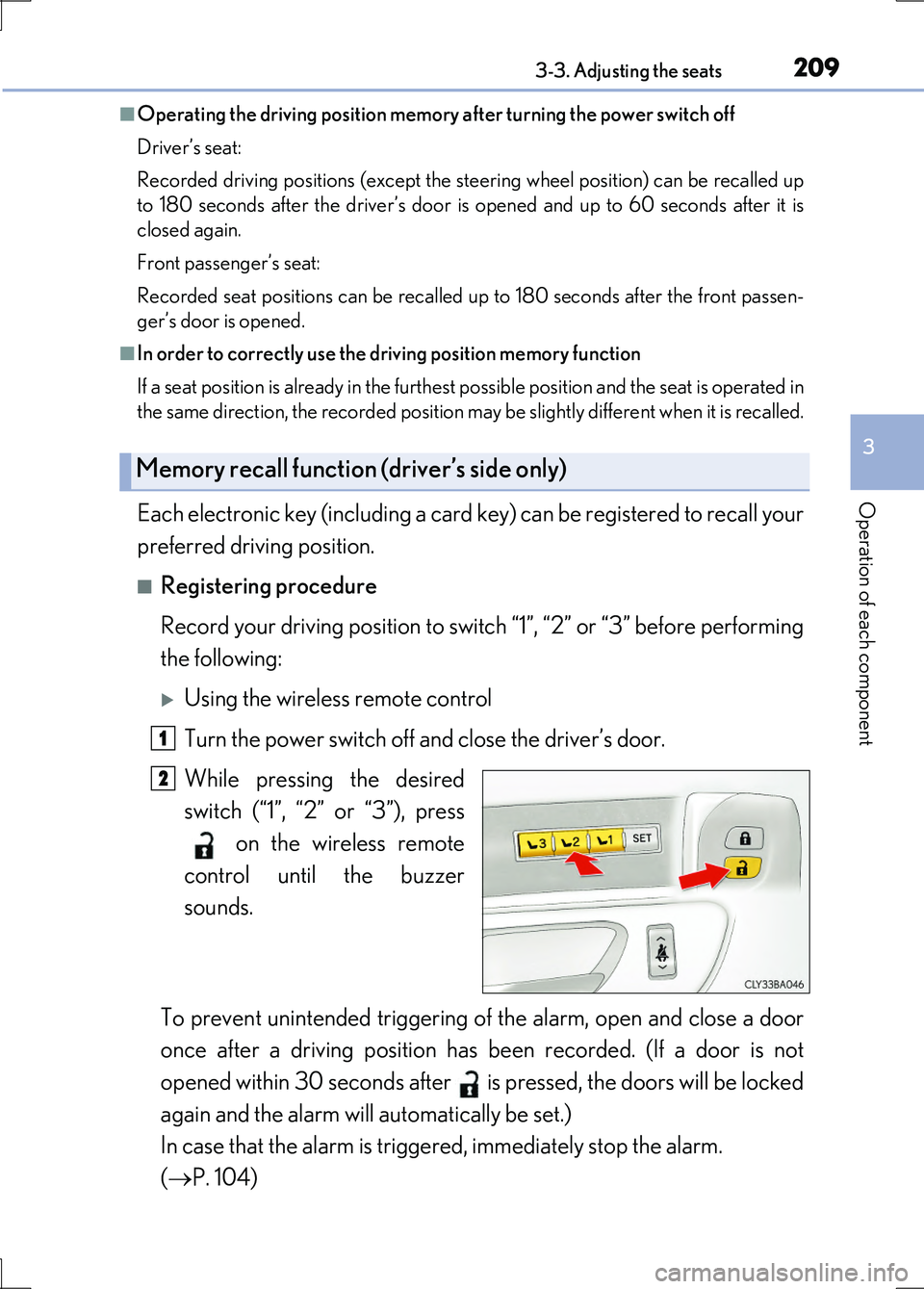
Each electronic key (including a card key) can be registered to recall your
preferred driving position.
■Registering procedure
Record your driving position to switch “1”, “2” or “3” before performing
the following:
Using the wireless remote control
Turn the power switch off and close the driver’s door.
While pressing the desired
switch (“1”, “2” or “3”), press
on the wireless remote
control until the buzzer
sounds.
To prevent unintended triggering of the alarm, open and close a door
once after a driving position has been recorded. (If a door is not
opened within 30 seconds after is pressed, the doors will be locked
again and the alarm will automatically be set.)
In case that the alarm is triggered, immediately stop the alarm.
( P. 104)
Memory recall function (driver’s side only)
1
2
Page 359 of 676
3594-5. Using the driving support systems
4
Driving
LS600h/LS600hL_EE(OM50G20E)
CAUTION
■Cautions regarding the assist contents of the system
By means of alarms and brake control, the pre-crash safety system is intended to
assist the driver in avoiding collisions through the process of LOOK-JUDGE-ACT.
There are limits to the degree of assistance the system can provide, so please keep
in mind the following important points.
●Assisting the driver in watching the road
The pre-crash safety system is only able to detect obstacles directly in front of the
vehicle, and only within a limited range. It is not a mechanism that allows careless
or inattentive driving, and it is not a system that can assist the driver in low-visibil-
ity conditions. It is still necessary for the driver to pay close attention to the vehi-
cle’s surroundings.
●Assisting the driver in making correct judgment
When attempting to estimate the likelihood of a collision, the only data available
to the pre-crash safety system is that from obstacles it has detected directly in
front of the vehicle. Therefore, it is absolutely necessary for the driver to remain
vigilant and to determine whether or not there is a possibility of collision in any
given situation.
●Assisting the driver in taking action
The pre-crash safety system’s braking assist feature is designed to help reduce
the severity of a collision, and so only acts when the system has judged that a col-
lision is unavoidable. This system is not capable of automatically avoiding a colli-
sion or bringing the vehi cle to a stop safely without appropriate operations
performed by the driver. For this reason, when encountering a dangerous situa-
tion the driver must take direct and immediate action in order to ensure the safety
of all involved.
NOTICE
■Precautions for cleaning the driver monitor sensor (vehicles with driver monitor
system)
●Gently wipe the sensor with a soft cloth to prevent damage.
●Wipe any excess dirt with a cloth dampened with neutral detergent, all liquids
having been wringed out of the cloth. After that, wipe again with a dry cloth.
●Do not use benzene, thinner, glass cleaners, wax, etc.
Page 603 of 676
6037-2. Steps to take in an emergency
7
When trouble arises
LS600h/LS600hL_EE(OM50G20E)
Use the mechanical key built in to the electronic keys to operate the
doors. ( P. 141)
Vehicles with an alarm: An alarm will sound if the alarm is set when the trunk or
doors are unlocked. ( P. 103)
■Doors
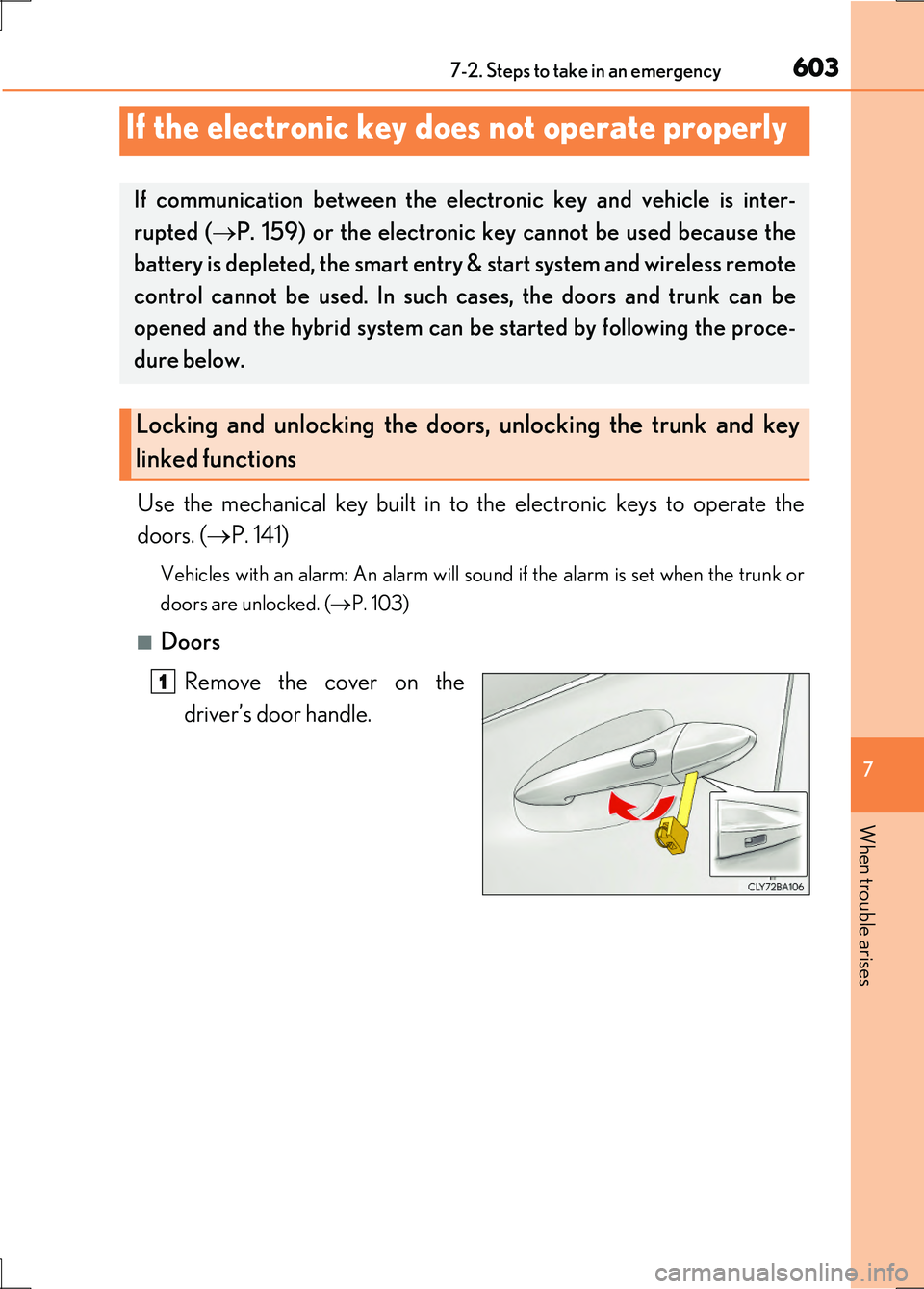
Remove the cover on the
driver’s door handle.
If the electronic key does not operate properly
If communication between the electronic key and vehicle is inter-
rupted ( P. 159) or the electronic key cannot be used because the
battery is depleted, the smart entry & start system and wireless remote
control cannot be used. In such cases, the doors and trunk can be
opened and the hybrid system can be started by following the proce-
dure below.
Locking and unlocking the doors, unlocking the trunk and key
linked functions
1
Page 605 of 676
6057-2. Steps to take in an emergency
7
When trouble arises
LS600h/LS600hL_EE(OM50G20E)
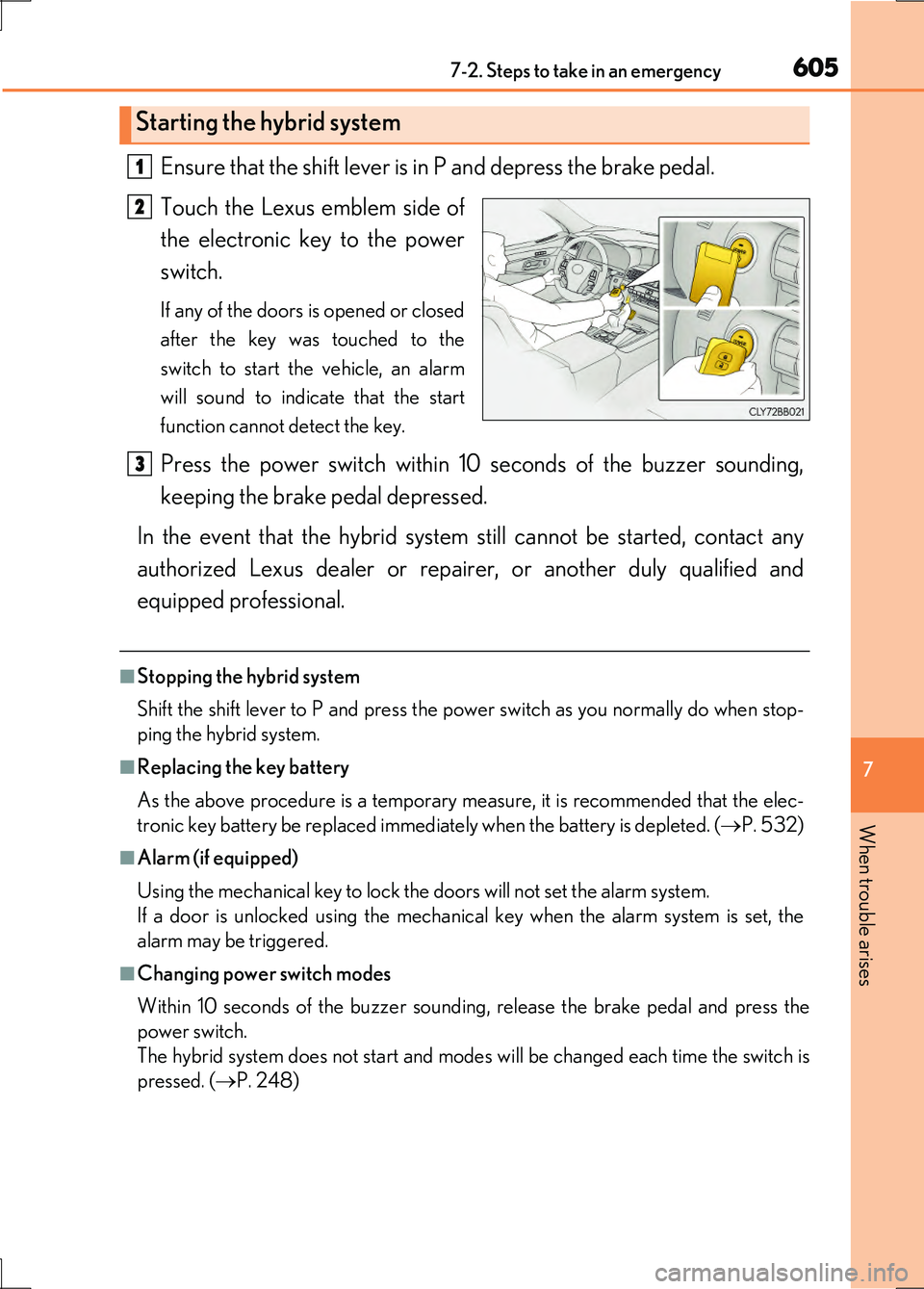
Ensure that the shift lever is in P and depress the brake pedal.
Touch the Lexus emblem side of
the electronic key to the power
switch.
If any of the doors is opened or closed
after the key was touched to the
switch to start the vehicle, an alarm
will sound to indicate that the start
function cannot detect the key.
Press the power switch within 10 seconds of the buzzer sounding,
keeping the brake pedal depressed.
In the event that the hybrid system still cannot be started, contact any
authorized Lexus dealer or repairer, or another duly qualified and
equipped professional.
■Stopping the hybrid system
Shift the shift lever to P and press the power switch as you normally do when stop-
ping the hybrid system.
■Replacing the key battery
As the above procedure is a temporary measure, it is recommended that the elec-
tronic key battery be replaced immediately when the battery is depleted. ( P. 532)
■Alarm (if equipped)
Using the mechanical key to lock the doors will not set the alarm system.
If a door is unlocked using the mechanical key when the alarm system is set, the
alarm may be triggered.
■Changing power switch modes
Within 10 seconds of the buzzer sounding, release the brake pedal and press the
power switch.
The hybrid system does not start and modes will be changed each time the switch is
pressed. ( P. 248)
Starting the hybrid system
1
2
3