audio LEXUS LS600H 2017 User Guide
[x] Cancel search | Manufacturer: LEXUS, Model Year: 2017, Model line: LS600H, Model: LEXUS LS600H 2017Pages: 676, PDF Size: 35.25 MB
Page 394 of 676
3945-1. Remote Touch screen
LS600h/LS600hL_EE(OM50G20E)
■Full screen display
The following functions can be displayed full screen:
•Initial screen
•“Menu” screen ( P. 393)
•Map screen*
•Audio screen*
• Energy monitor or fuel consumption screen ( P. 130)
• Air conditioning control screen ( P. 399)
*: For details, refer to “NAVIGATION AND MULTIMEDIA SYSTEM OWNER’S
MANUAL”.
12.3-inch display
12.3-inch display overview
Page 395 of 676
3955-1. Remote Touch screen
5
Interior features
LS600h/LS600hL_EE(OM50G20E)
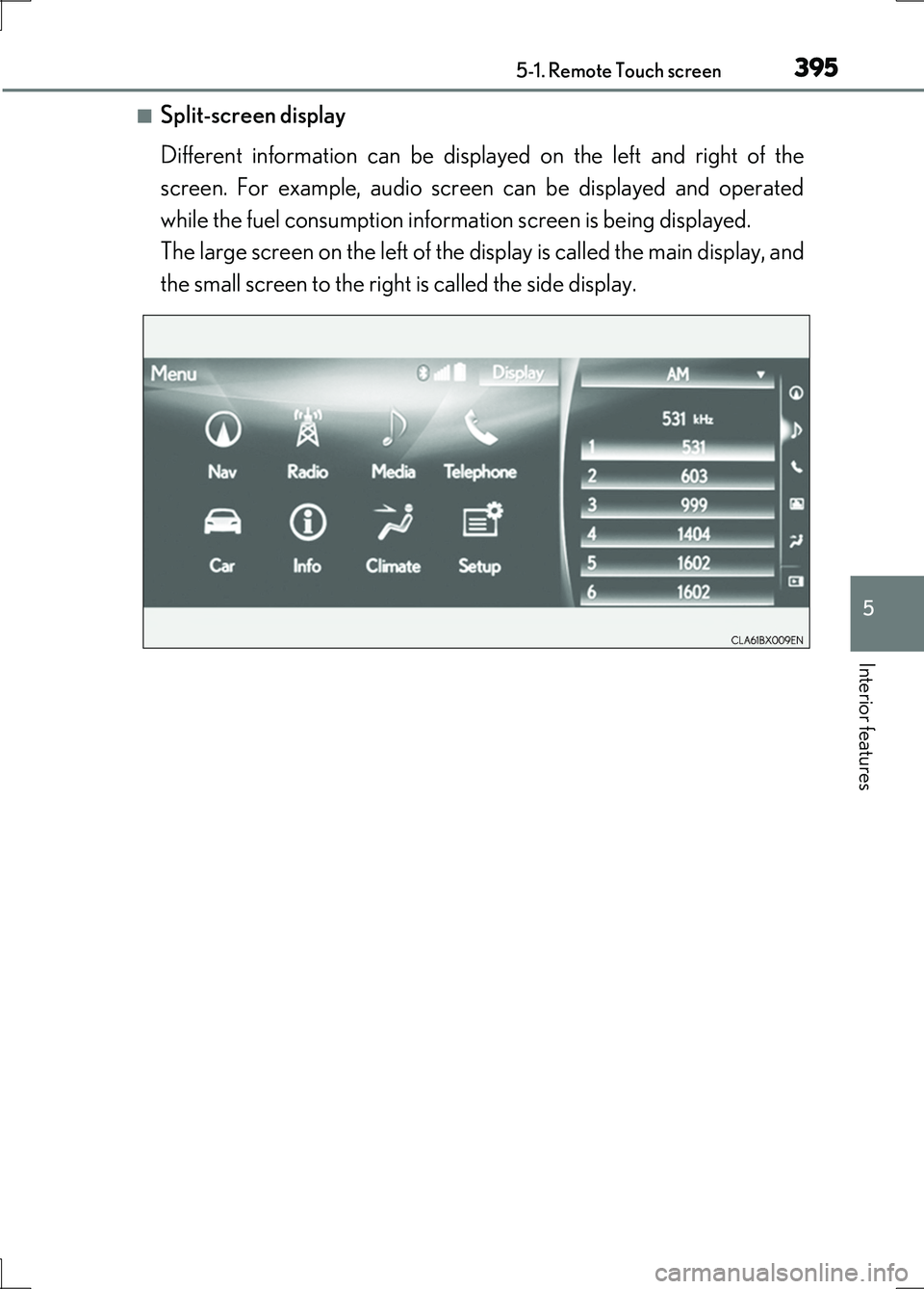
■Split-screen display
Different information can be displayed on the left and right of the
screen. For example, audio screen can be displayed and operated
while the fuel consumption information screen is being displayed.
The large screen on the left of the display is called the main display, and
the small screen to the right is called the side display.
Page 396 of 676
3965-1. Remote Touch screen
LS600h/LS600hL_EE(OM50G20E)
■Selecting the operation screen
When selecting the main display, move the Remote Touch knob to the
left. When selecting the side display, move the Remote Touch knob to
the right.
■ Main display
For details about the functions and operation of the main display, refer
to the respective section and “NAVIGATION AND MULTIMEDIA
SYSTEM OWNER’S MANUAL”.
■Side display
Basic screens
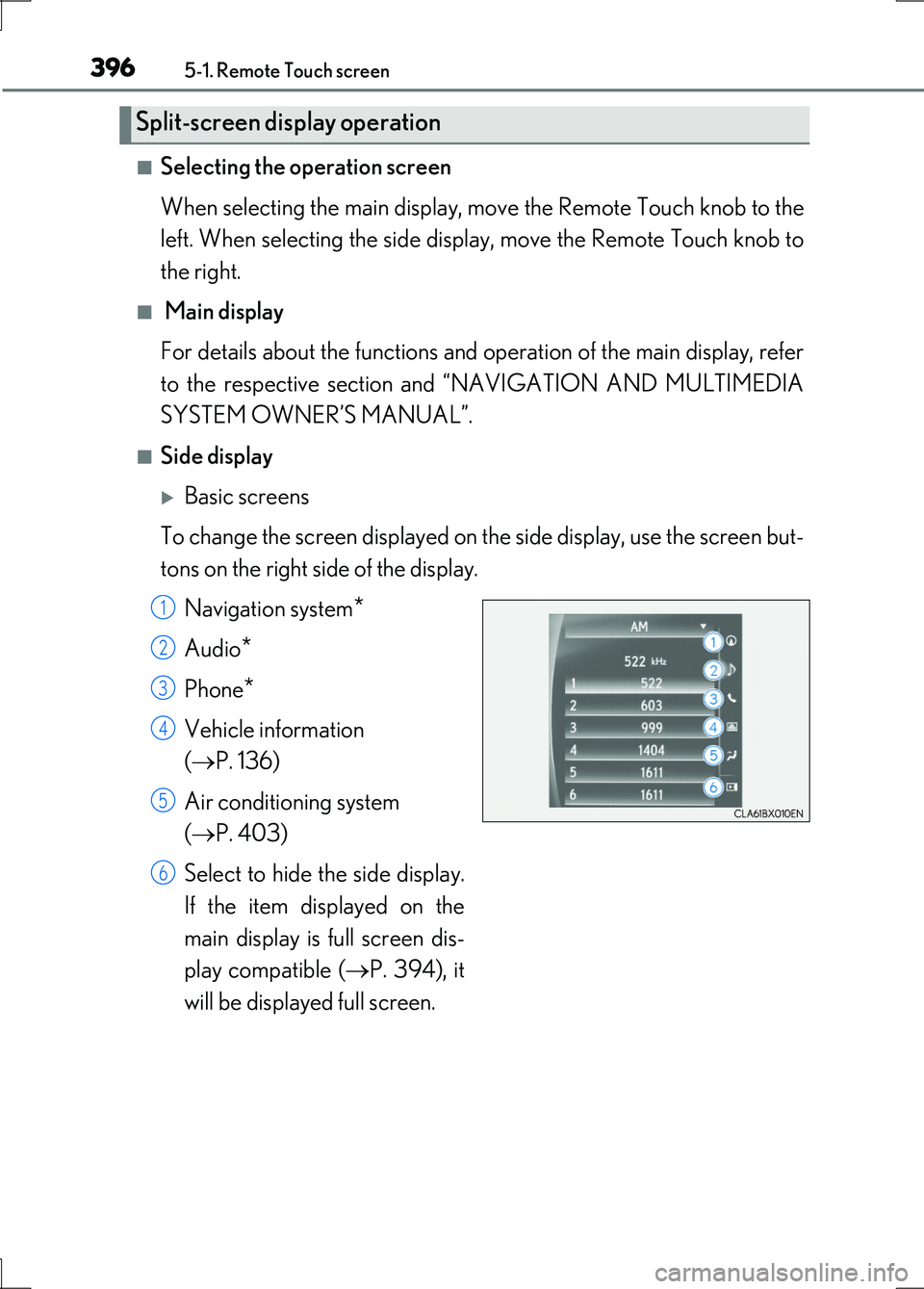
To change the screen displayed on th e side display, use the screen but-
tons on the right side of the display.
Navigation system*
Audio*
Phone*
Vehicle information
( P. 136)
Air conditioning system
( P. 403)
Select to hide the side display.
If the item displayed on the
main display is full screen dis-
play compatible ( P. 394), it
will be displayed full screen.
Split-screen display operation
1
2
3
4
5
6
Page 424 of 676
4245-3. Using the air conditioning system and defogger
LS600h/LS600hL_EE(OM50G20E)
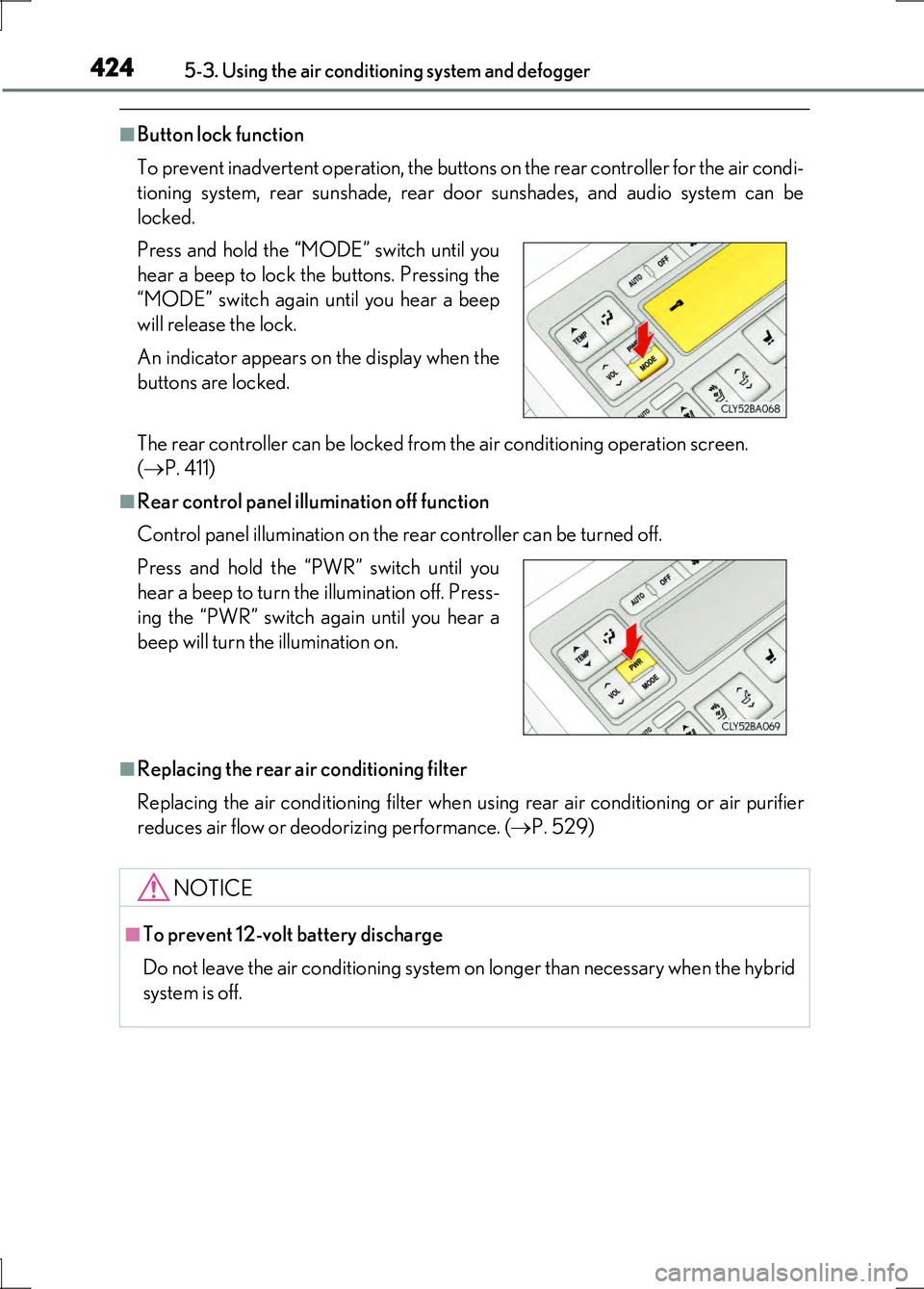
■Button lock function
To prevent inadvertent operation, the buttons on the rear controller for the air condi-
tioning system, rear sunshade, rear door sunshades, and audio system can be
locked.
The rear controller can be locked from the air conditioning operation screen.
( P. 411)
■Rear control panel illumination off function
Control panel illumination on the rear controller can be turned off.
■Replacing the rear air conditioning filter
Replacing the air conditioning filter when using rear air conditioning or air purifier
reduces air flow or deodorizing performance. ( P. 529)
Press and hold the “MODE” switch until you
hear a beep to lock the buttons. Pressing the
“MODE” switch again until you hear a beep
will release the lock.
An indicator appears on the display when the
buttons are locked.
Press and hold the “PWR” switch until you
hear a beep to turn the illumination off. Press-
ing the “PWR” switch again until you hear a
beep will turn the illumination on.
NOTICE
■To prevent 12-volt battery discharge
Do not leave the air conditioning system on longer than necessary when the hybrid
system is off.
Page 482 of 676
4826-1. Maintenance and care
LS600h/LS600hL_EE(OM50G20E)
NOTICE
■Cleaning detergents
●Do not use the following types of detergent, as they may discolor the vehicle inte-
rior or cause streaks or damage to painted surfaces:
• Non-seat portions: Organic substances such as benzene or gasoline, alkaline
or acidic solutions, dye, and bleach
• Seats: Alkaline or acidic solutions, such as thinner, benzene, and alcohol
●Do not use polish wax or polish cleaner. The instrument panel’s or other interior
part’s painted surface may be damaged.
■Preventing damage to leather surfaces
Observe the following precautions to avoid damage to and deterioration of
leather surfaces:
●Remove any dust or dirt from leather surfaces immediately.
●Do not expose the vehicle to direct sun light for extended periods of time. Park
the vehicle in the shade, especially during summer.
●Do not place items made of vinyl, plastic, or containing wax on the upholstery, as
they may stick to the leather surface if the vehicle interior heats up significantly.
■Water on the floor
Do not wash the vehicle floor with water.
Vehicle systems such as the audio system may be damaged if water comes into
contact with electrical components such as the audio system above or under the
floor of the vehicle. Water may also cause the body to rust.
■When cleaning the inside of the windshield (vehicles with LKA [Lane-Keeping
Assist])
Be careful not to touch the camera sensor ( P. 324).
If the camera is accidentally scratched or hit, LKA may not operate properly or
may cause a malfunction.
■Cleaning the inside of the rear window
●Do not use glass cleaner to clean the rear window, as this may cause damage to
the rear window defogger heater wires or antenna. Use a cloth dampened with
lukewarm water to gently wipe the window clean. Wipe the window in strokes
running parallel to the heater wires or antenna.
●Be careful not to scratch or damage the heater wires or antenna.
Page 561 of 676
5617-2. Steps to take in an emergency
7
When trouble arises
LS600h/LS600hL_EE(OM50G20E)
■When a tire is replaced with a spare tire (vehicles with a spare tire)
The spare tire is also equipped with a tire pressure warning valve and transmitter. The
tire pressure warning light will turn on if the tire inflation pressure of the spare tire is
low. If a tire goes flat, the tire pressure warning light will not turn off even though the
flat tire has been replaced with the spare tire.
■Conditions that the tire pressure warning system may not function properly
P. 511
■If the tire pressure warning light frequently comes on after blinking for 1 minute
If the tire pressure warning light frequently comes on after blinking for 1 minute when
the power switch is turned to ON mode, have it checked by any authorized Lexus
dealer or repairer, or another duly qualified and equipped professional.
■Warning buzzer
In some cases, the buzzer may not be heard due to ambient noise or sounds from the
audio system.
Page 566 of 676
5667-2. Steps to take in an emergency
LS600h/LS600hL_EE(OM50G20E)
■If “Hybrid System Overheat” is shown
Coping method: P. 611
This message may be displayed when driving under severe operating conditions.
(For example, when driving up a long steep hill.)
■Warning buzzer
In some cases, the buzzer may not be heard due to ambient noise or sounds from the
audio system.
Page 609 of 676
6097-2. Steps to take in an emergency
7
When trouble arises
LS600h/LS600hL_EE(OM50G20E)
■Starting the hybrid system when the 12-volt battery is discharged
The hybrid system cannot be started by push-starting.
■To prevent 12-volt battery discharge
●Turn off the headlights and the audio system while the hybrid system is off.
●Turn off any unnecessary electrical components when the vehicle is running at a
low speed for an extended period, such as in heavy traffic.
■When the 12-volt battery is removed or discharged
The hybrid system may not start. ( P. 504)
■Charging the 12-volt battery
The electricity stored in the 12-volt battery will discharge gradually even when the
vehicle is not in use, due to natural discharge and the draining effects of certain elec-
trical appliances. If the vehicle is left for a long time, the 12-volt battery may dis-
charge, and the hybrid system may be unable to start. (The 12-volt battery recharges
automatically while the hybrid system is operating.)
■When recharging or replacing the 12-volt battery
In some cases, it may not be possible to unlock the doors using the smart entry &
start system when the 12-volt battery is discharged. Use the wireless remote control
or the mechanical key to lock or unlock the doors.
■If the 12-volt battery is discharged
The information stored in the computer will be deleted.
If the 12-volt battery is discharged, have the vehicle inspected by your Lexus dealer.
Page 647 of 676
647
Index
LS600h/LS600hL_EE(OM50G20E)
What to do if...
(Troubleshooting)............................... 648
Alphabetical index................................. 654
For information regarding the equipment listed below, refer to
“NAVIGATION AND MULTIMEDIA SYSTEM OWNER’S
MANUAL”.
• Navigation system
• Audio/visual system
• Rear seat entertainment sys-
tem
• Lexus parking assist-sensor
•Lexus parking assist monitor
Page 655 of 676
655Alphabetical index
LS600h/LS600hL_EE(OM50G20E)
Alarm
Alarm ........................................................ 103
Warning buzzer .................... 555, 563
Anchor brackets .............................. 74, 75
Antennas (smart entry &
start system) ......................................... 152
Anti-lock Brake System (ABS) ...... 338
Function ..................................................338
Warning light ...................................... 556
Approach warning ..................... 299, 314
Armrest ...................................................... 461
Ashtrays ....................................................448
Assist grips .............................................. 473
Audio/visual system*
Automatic headlight leveling
system ................................................... 272
Automatic light control system ...... 269
Auxiliary boxes ...................................... 439
Back-up lights
Replacing light bulbs ....................... 543
Battery (12-volt battery) .................... 502
If the 12-volt battery is
discharged ........................................ 607
Preparing and checking
before winter.................................... 384
Warning light....................................... 556
Battery (traction battery) ..................... 89
Blind Spot Monitor (BSM) .............. 366
Brake
Brake Hold ........................................... 266
Emergency brake signal................ 339
Fluid .......................................................... 630
Parking brake ...................................... 263
Regenerative braking..........................87
Warning light.......................... 555, 557
Brake assist ............................................ 338
Brake Hold .............................................. 266
Break-in tips ........................................... 235
Brightness control
Instrument panel li ght control ......... 117
BSM (Blind Spot Monitor) ............... 366
B
*: Refer to “NAVIGATION AND MULTIMEDIA SYSTEM OWNER’S
MANUAL”.