rear view mirror LEXUS LS600H 2017 User Guide
[x] Cancel search | Manufacturer: LEXUS, Model Year: 2017, Model line: LS600H, Model: LEXUS LS600H 2017Pages: 676, PDF Size: 35.25 MB
Page 114 of 676
1142. Instrument cluster
LS600h/LS600hL_EE(OM50G20E)
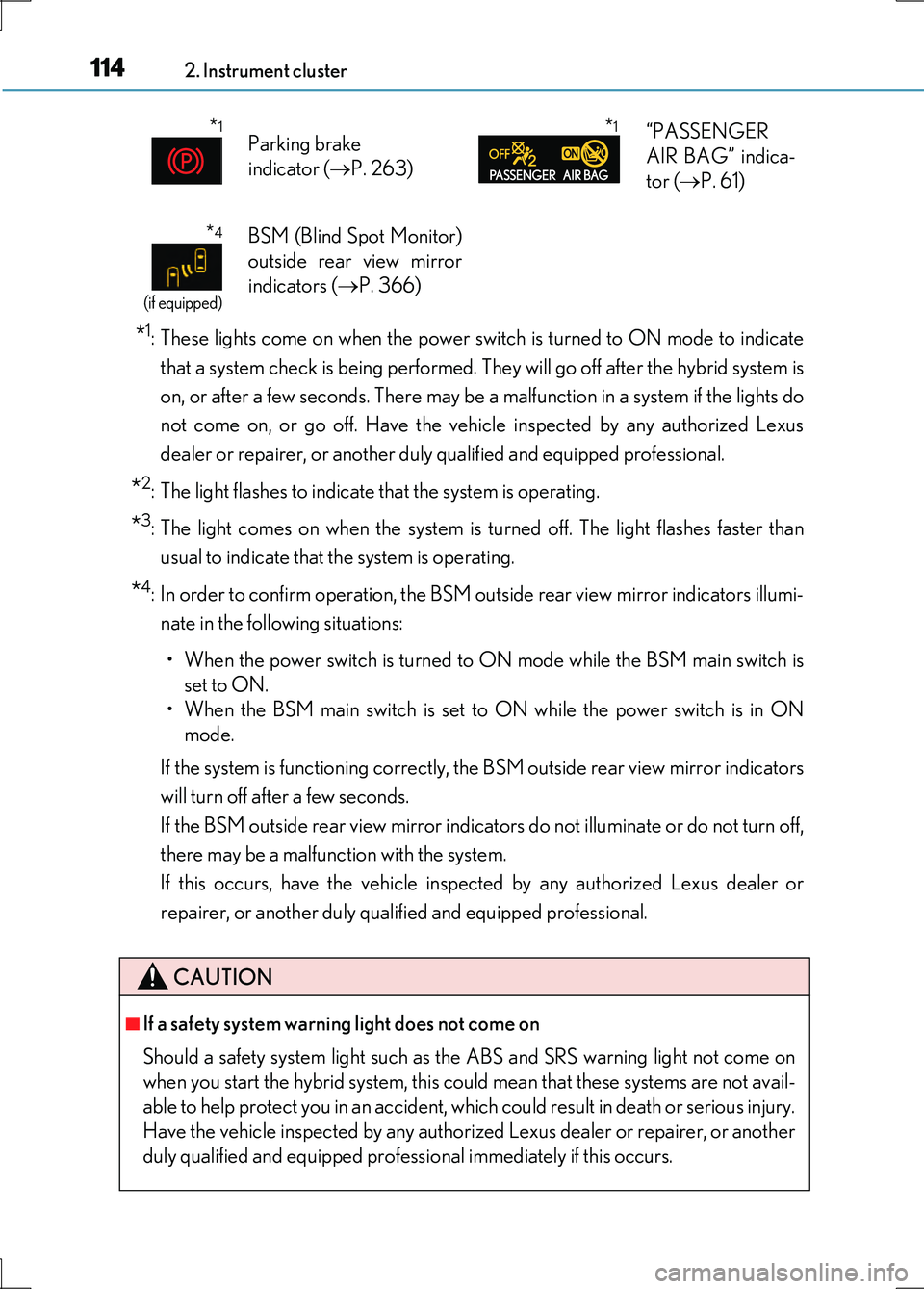
*1: These lights come on when the power switch is turned to ON mode to indicate
that a system check is being performed. They will go off after the hybrid system is
on, or after a few seconds. There may be a malfunction in a system if the lights do
not come on, or go off. Have the vehi cle inspected by any authorized Lexus
dealer or repairer, or another duly qualified and equipped professional.
*2: The light flashes to indicate that the system is operating.
*3: The light comes on when the system is turned off. The light flashes faster than
usual to indicate that the system is operating.
*4: In order to confirm operation, the BSM outside rear view mirror indicators illumi-
nate in the following situations:
• When the power switch is turned to ON mode while the BSM main switch is
set to ON.
• When the BSM main switch is set to ON while the power switch is in ON
mode.
If the system is functioning correctly, the BSM outside rear view mirror indicators
will turn off after a few seconds.
If the BSM outside rear view mirror indicators do not illuminate or do not turn off,
there may be a malfunction with the system.
If this occurs, have the vehicle inspected by any authorized Lexus dealer or
repairer, or another duly qualified and equipped professional.
*1Parking brake
indicator ( P. 263)
*1“PASSENGER
AIR BAG” indica-
tor ( P. 61)
*4
(if equipped)
BSM (Blind Spot Monitor)
outside rear view mirror
indicators ( P. 366)
CAUTION
■If a safety system warning light does not come on
Should a safety system light such as the ABS and SRS warning light not come on
when you start the hybrid system, this could mean that these systems are not avail-
able to help protect you in an accident, which could result in death or serious injury.
Have the vehicle inspected by any authorized Lexus dealer or repairer, or another
duly qualified and equipped professional immediately if this occurs.
Page 139 of 676
139
3
Operation of
each component
LS600h/LS600hL_EE(OM50G20E)
3-1. Key information
Keys .................................................. 140
3-2. Opening, closing and
locking the doors
and trunk
Smart entry & start system ...... 149
Wireless remote control............ 171
Doors ................................................176
Trunk ................................................ 180
3-3. Adjusting the seats
Front seats...................................... 187
Power rear seat ........................... 194
Driving position memory ........ 207
Rear seat position memory......212
Head restraints .............................214
3-4. Adjusting the steering
wheel and mirrors
Steering wheel ............................. 218
Inside rear view mirror ..............219
Outside rear view mirrors........221
3-5. Opening, closing the
windows and moon roof
Power windows .......................... 225
Moon roof ..................................... 229
Page 207 of 676
2073-3. Adjusting the seats
3
Operation of each component
LS600h/LS600hL_EE(OM50G20E)
Your preferred driving position (the position of the driver’s seat, steering
wheel, outside rear view mirrors and he ight of seat belt shoulder anchor)
can be recorded and recalled by pressing a switch.
Three different driving positions can be recorded into memory.
■Recording procedure
Check that the shift lever is in P.
Turn the power switch to ON mode.
Adjust the driver’s seat, steering wheel, outside rear view mirrors and
seat belt shoulder anchor height to the desired positions.
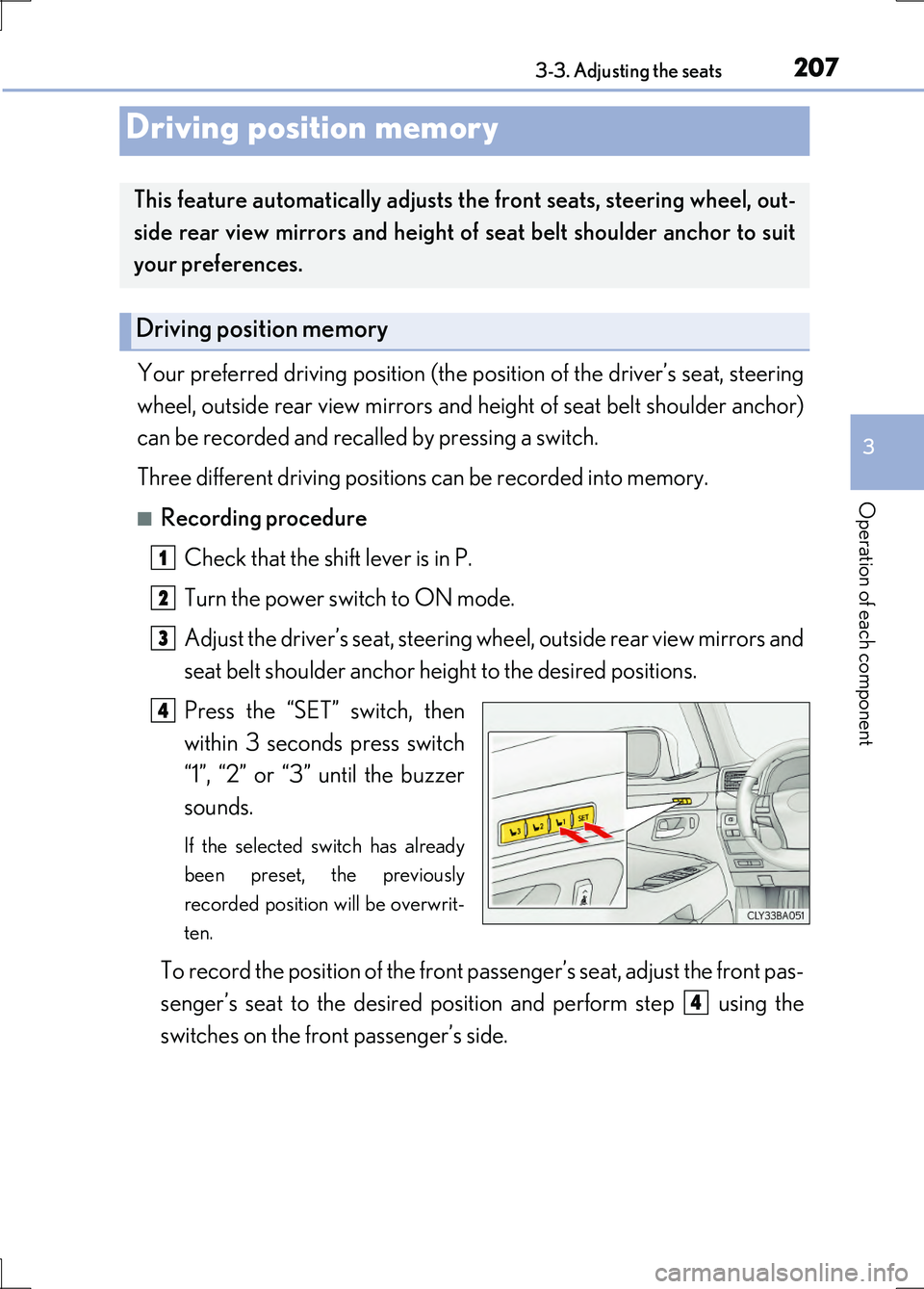
Press the “SET” switch, then
within 3 seconds press switch
“1”, “2” or “3” until the buzzer
sounds.
If the selected switch has already
been preset, the previously
recorded position will be overwrit-
ten.
To record the position of the front passenger’s seat, adjust the front pas-
senger’s seat to the desired posi tion and perform step using the
switches on the front passenger’s side.
Driving position memory
This feature automatically adjusts the front seats, steering wheel, out-
side rear view mirrors and height of seat belt shoulder anchor to suit
your preferences.
Driving position memory
1
2
3
4
4
Page 210 of 676
2103-3. Adjusting the seats
LS600h/LS600hL_EE(OM50G20E)
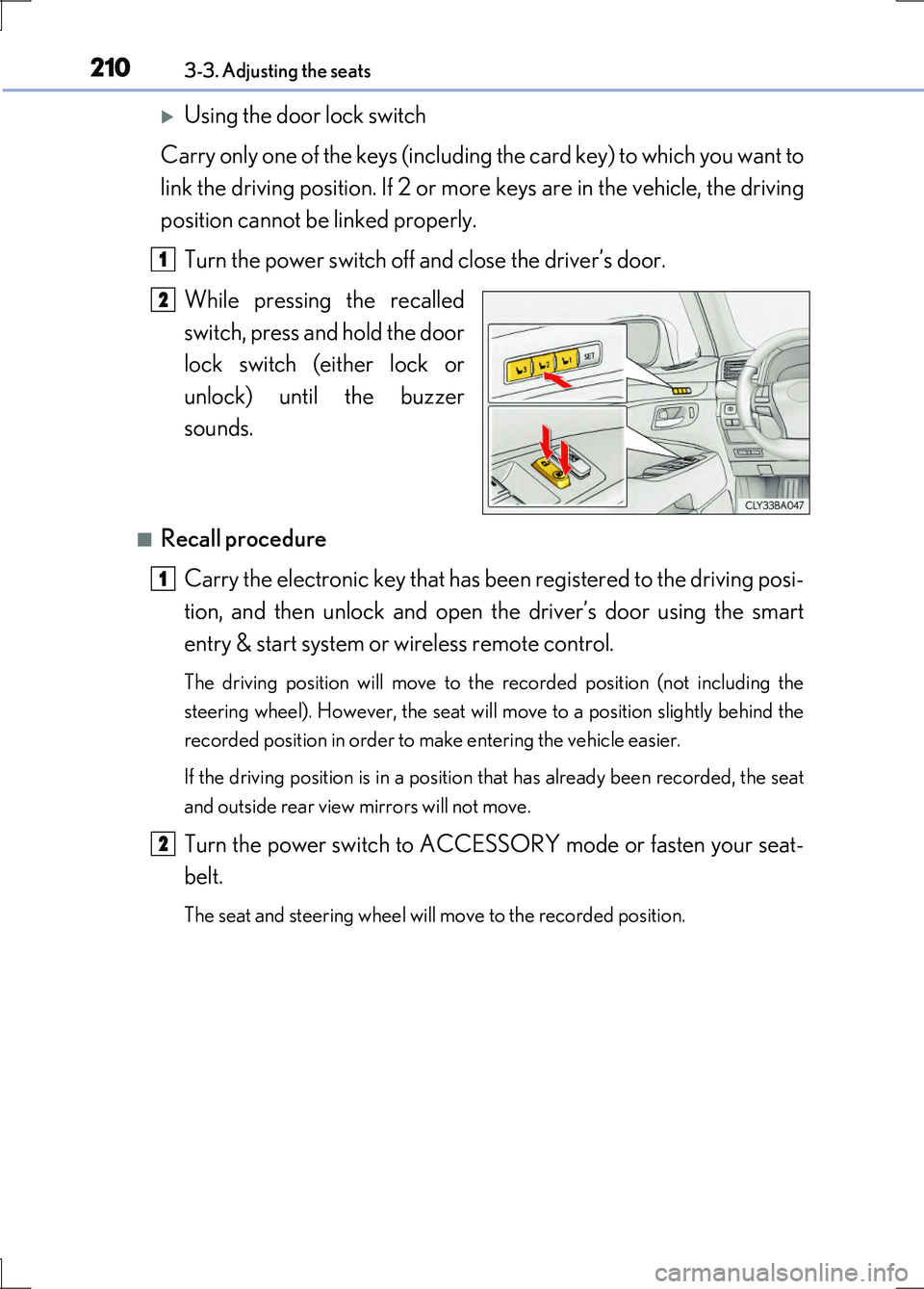
Using the door lock switch
Carry only one of the keys (including the card key) to which you want to
link the driving position. If 2 or more keys are in the vehicle, the driving
position cannot be linked properly.
Turn the power switch off and close the driver’s door.
While pressing the recalled
switch, press and hold the door
lock switch (either lock or
unlock) until the buzzer
sounds.
■Recall procedure
Carry the electronic key that has be en registered to the driving posi-
tion, and then unlock and open the driver’s door using the smart
entry & start system or wireless remote control.
The driving position will move to the recorded position (not including the
steering wheel). However, the seat will move to a position slightly behind the
recorded position in order to make entering the vehicle easier.
If the driving position is in a position that has already been recorded, the seat
and outside rear view mirrors will not move.
Turn the power switch to ACCESSORY mode or fasten your seat-
belt.
The seat and steering wheel will move to the recorded position.
1
2
1
2
Page 219 of 676
2193-4. Adjusting the steering wheel and mirrors
3
Operation of each component
LS600h/LS600hL_EE(OM50G20E)
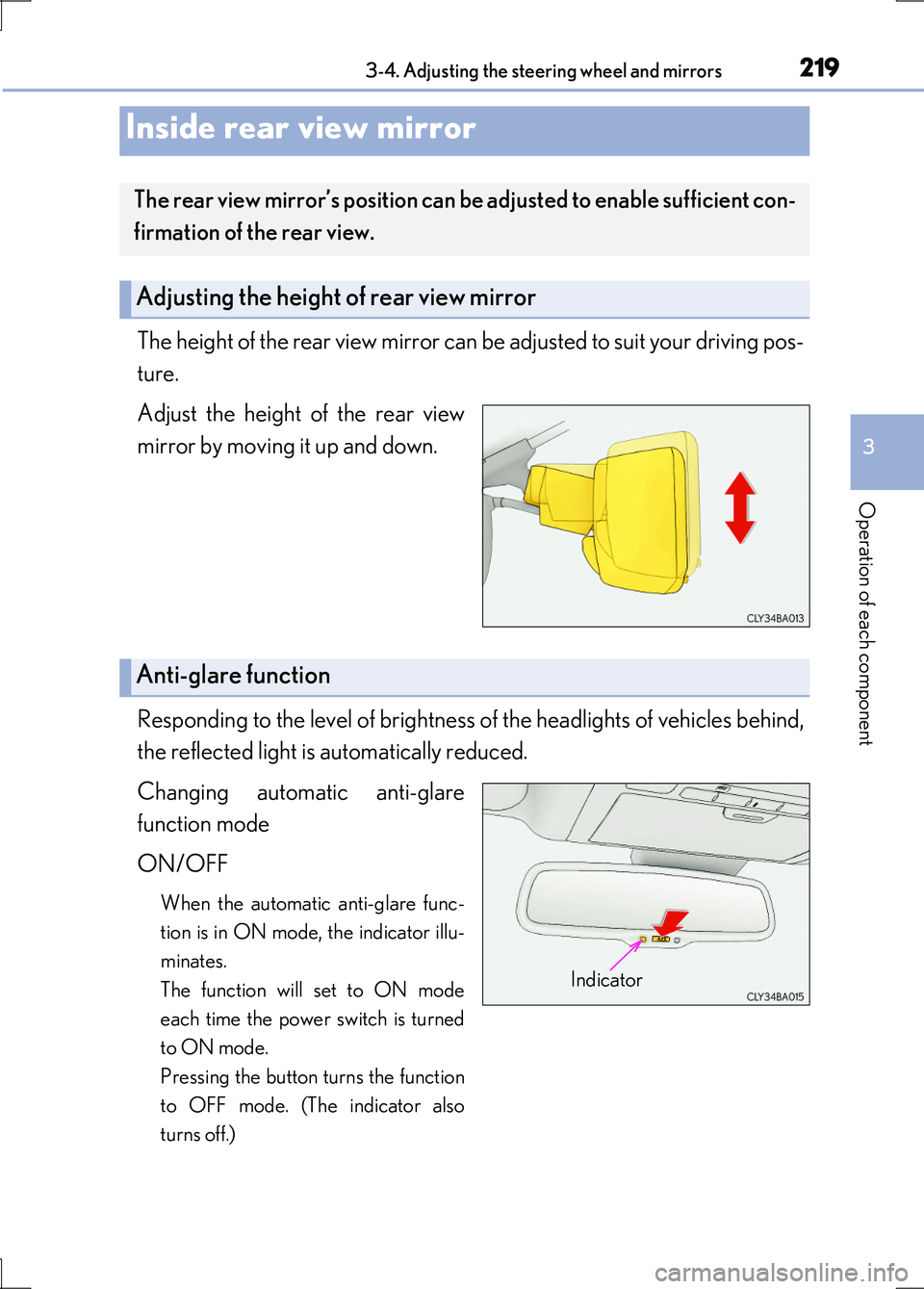
The height of the rear view mirror can be adjusted to suit your driving pos-
ture.
Adjust the height of the rear view
mirror by moving it up and down.
Responding to the level of brightness of the headlights of vehicles behind,
the reflected light is automatically reduced.
Changing automatic anti-glare
function mode
ON/OFF
When the automatic anti-glare func-
tion is in ON mode, the indicator illu-
minates.
The function will set to ON mode
each time the power switch is turned
to ON mode.
Pressing the button turns the function
to OFF mode. (The indicator also
turns off.)
Inside rear view mirror
The rear view mirror’s position can be adjusted to enable sufficient con-
firmation of the rear view.
Adjusting the height of rear view mirror
Anti-glare function
Indicator
Page 221 of 676
2213-4. Adjusting the steering wheel and mirrors
3
Operation of each component
LS600h/LS600hL_EE(OM50G20E)
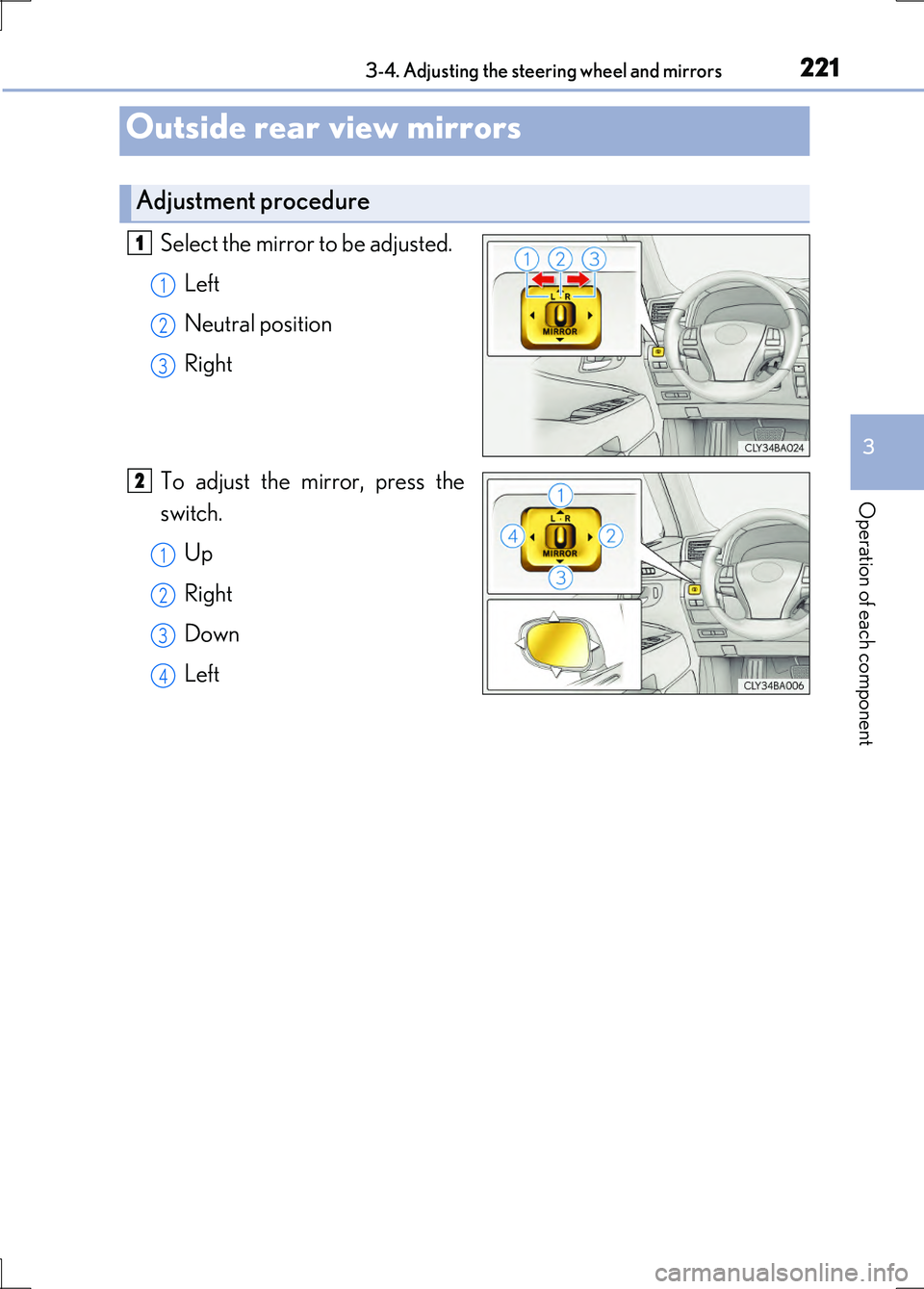
Select the mirror to be adjusted.
Left
Neutral position
Right
To adjust the mirror, press the
switch.
Up
Right
Down
Left
Outside rear view mirrors
Adjustment procedure
1
1
2
3
2
1
2
3
4
Page 223 of 676
2233-4. Adjusting the steering wheel and mirrors
3
Operation of each component
LS600h/LS600hL_EE(OM50G20E)
When the mirror select switch is in the “L” or “R” position, the outside rear
view mirrors will automatically angle downwards when the vehicle is
reversing in order to give a better view of the ground.
To disable this function, move the mirror select switch to the neutral posi-
tion (between “L” and “R”).
■Adjusting the mirror angle when the vehicle is reversing
With the shift lever in R, adjust the mirror angle at a desired position.
The adjusted angle will be memorized and the mirror will automatically tilt to
the memorized angle whenever the shift lever is shifted to R from next time.
The memorized downward tilt position of the mirror is linked to the normal
position (angle adjusted with the shift lever in other than R). Therefore, if the
normal position is changed after adjustment, the tilt position will also change.
When the normal position is changed, readjust the angle in reversing.
■Mirror angle can be adjusted when
The power switch is in ACCESSORY or ON mode.
■When the mirrors are fogged up
The outside rear view mirrors can be cleared using the mirror defoggers. Turn on the
rear window defogger to turn on the outside rear view mirror defoggers. ( P. 425)
■Automatic adjustment of the mirror angle
A desired mirror face angle can be entered to memory and recalled automatically
by the driving position memory. ( P. 207)
■Auto anti-glare function
When the anti-glare inside rear view mirror is set to automatic mode, the outside
rear view mirrors will activate in conjunction with the anti-glare inside rear view mir-
ror to reduce reflected light. ( P. 219)
■Using automatic mode in cold weather
When automatic mode is used in cold weather, the door mirror could freeze up and
automatic stowing and return may not be possible. In this event, remove any ice and
snow from the door mirror, then either operate the mirror using manual mode or
move the mirror by hand.
Linked mirror function when reversing
Page 224 of 676
2243-4. Adjusting the steering wheel and mirrors
LS600h/LS600hL_EE(OM50G20E)
CAUTION
■Important points while driving
Observe the following precautions while driving.
Failure to do so may result in loss of control of the vehicle and cause an accident,
resulting in death or serious injury.
●Do not adjust the mirrors while driving.
●Do not drive with the mirrors folded.
●Both the driver and passenger side mirrors must be extended and properly
adjusted before driving.
■When a mirror is moving
To avoid personal injury and mirror malfunction, be careful not to get your hand
caught by the moving mirror.
■When the mirror defoggers are operating
Do not touch the rear view mirror surfaces, as they can become very hot and burn
you.
Page 238 of 676
2384-1. Before driving
LS600h/LS600hL_EE(OM50G20E)
CAUTION
Observe the following precautions.
Failure to do so may result in death or serious injury.
■When driving the vehicle
●During normal driving, do not turn off the hybrid system. Turning the hybrid sys-
tem off while driving will not cause loss of steering or braking control, however,
power assist to the steering will be lost. This will make it more difficult to steer
smoothly, so you should pull over and stop the vehicle as soon as it is safe to do so.
In the event of an emergency, such as if it becomes impossible to stop the vehicle
in the normal way: P. 547
●Use engine braking (downshift) to maintain a safe speed when driving down a
steep hill.
Using the brakes continuously may cause the brakes to overheat and lose effec-
tiveness. ( P. 255)
●Do not adjust the positions of the steering wheel, the seat, or the inside or outside
rear view mirrors while driving.
Doing so may result in a loss of vehicle control.
●Always check that all passengers’ arms, heads or other parts of their body are not
outside the vehicle.
Page 278 of 676
2784-3. Operating the lights and wipers
LS600h/LS600hL_EE(OM50G20E)
●In the situations below, the system may not be able to correctly detect the sur-
rounding brightness levels, and may flash or expose oncoming or preceding vehi-
cles to the high beam or may continue using the low beam. Therefore, in these
situations you should consider turning the high beams on or off manually rather
than relying on the Adaptive High-beam System.
• In bad weather (rain, snow, fog, sandstorms etc.)
• The windshield is obscured by fog, mist, ice, dirt etc.
• The windshield is cracked or damaged.
• The inside rear view mirror or camera sensor is deformed or dirty.
• The camera sensor temperature is extremely high.
• Surrounding brightness levels are equal to those of headlights, tail lights or fog
lights.
• Vehicles ahead have headlights that are either switched off, dirty, are changing
color, or have are not aimed properly.
• When driving through an area of intermittently changing brightness and dark-
ness.
• When frequently and repeatedly driving ascending/descending roads, or roads
with rough, bumpy or uneven surfaces (such as stone-paved roads, gravel tracks
etc.).
• When frequently and repeatedly taking curves or driving on a winding road.
• There is a highly reflective object ahead of the vehicle, such as a sign or a mirror.
• The back of a vehicle ahead is highly reflective, such as a container on a truck.
• The vehicle’s headlights are damaged or dirty.
• The vehicle is listing or tilting, due to a flat tire, a trailer being towed etc.
■Turning the high beam on during Adaptive High-beam System operation (vehicles
without near-infrared ray transmitters)
When the vehicle is traveling at a high speed, the system will turn on the inner high
beam together with the outer high beam.
■Customization
The variable shade beam can be turned off. (Customizable features P. 634)