air condition LEXUS LS600H 2017 Owner's Manual
[x] Cancel search | Manufacturer: LEXUS, Model Year: 2017, Model line: LS600H, Model: LEXUS LS600H 2017Pages: 676, PDF Size: 35.25 MB
Page 385 of 676
3854-6. Driving tips
4
Driving
LS600h/LS600hL_EE(OM50G20E)
Perform the following according to the driving conditions:
●Do not try to forcibly open a window or move a wiper that is frozen.
Pour warm water over the frozen area to melt the ice. Wipe away the
water immediately to prevent it from freezing.
●To ensure proper operation of the climate control system fan, remove
any snow that has accumulated on the air inlet vents in front of the wind-
shield.
●Check for and remove any excess ice or snow that may have accumu-
lated on the exterior lights, vehicle’s roof, chassis, around the tires or on
the brakes.
●Remove any snow or mud from the bottom of your shoes before getting
in the vehicle.
Accelerate the vehicle slowly, keep a safe distance between you and the
vehicle ahead, and drive at a reduced speed suitable to road conditions.
●Park the vehicle and move the shift lever to P without setting the park-
ing brake. The parking brake may free ze up, preventing it from being
released. If the vehicle is parked without setting the parking brake,
make sure to block the wheels.
Failure to do so may be dangerous because it may cause the vehicle to
move unexpectedly, possibly leading to an accident.
●If the vehicle is parked without setting the parking brake, confirm that
the shift lever cannot be moved out of P*.
*: The shift lever will be locked if it is attempted to be shifted from P to any other
position without depressing the brake pedal. If the shift lever can be shifted
from P, there may be a problem with the shift lock system. Have the vehicle
inspected by any authorized Lexus dealer or repairer, or another duly qualified
and equipped professional.
Before driving the vehicle
When driving the vehicle
When parking the vehicle
Page 389 of 676
389
5Interior features
LS600h/LS600hL_EE(OM50G20E)
5-1. Remote Touch screen
Remote Touch ............................ 390
12.3-inch display.........................394
5-2. Lexus Climate Concierge
Lexus Climate Concierge..... 398
5-3. Using the air conditioning
system and defogger
Front automatic air
conditioning system ...............399
Rear air conditioning
system ........................................... 418
Rear window and
outside rear view
mirror defoggers .....................425
Windshield wiper de-icer ....... 426
5-4. Using the interior lights
Interior lights list.......................... 427
• Interior lights ..........................428
• Personal lights ....................... 429
5-5. Using the storage
features
List of storage features ............. 431
• Glove box ............................... 433
• Coin holder ............................ 434
• Door pockets......................... 434
• Cup holders ........................... 435
• Console box .......................... 437
• Auxiliary boxes ..................... 439
Trunk features ............................. 442
5-6. Other interior features
Sun visors and vanity
mirrors ......................................... 445
Clock .............................................. 447
Ashtrays .........................................448
Cigarette lighters....................... 449
Power outlets................................ 451
Heated steering wheel ............ 454
Climate control seats/
seat heaters ............................... 456
Armrest............................................461
Retractable table........................ 462
Rear sunshade ............................ 464
Rear door sunshades ............... 468
Coat hooks ................................... 472
Assist grips.................................... 473
Page 393 of 676
3935-1. Remote Touch screen
5
Interior features
LS600h/LS600hL_EE(OM50G20E)
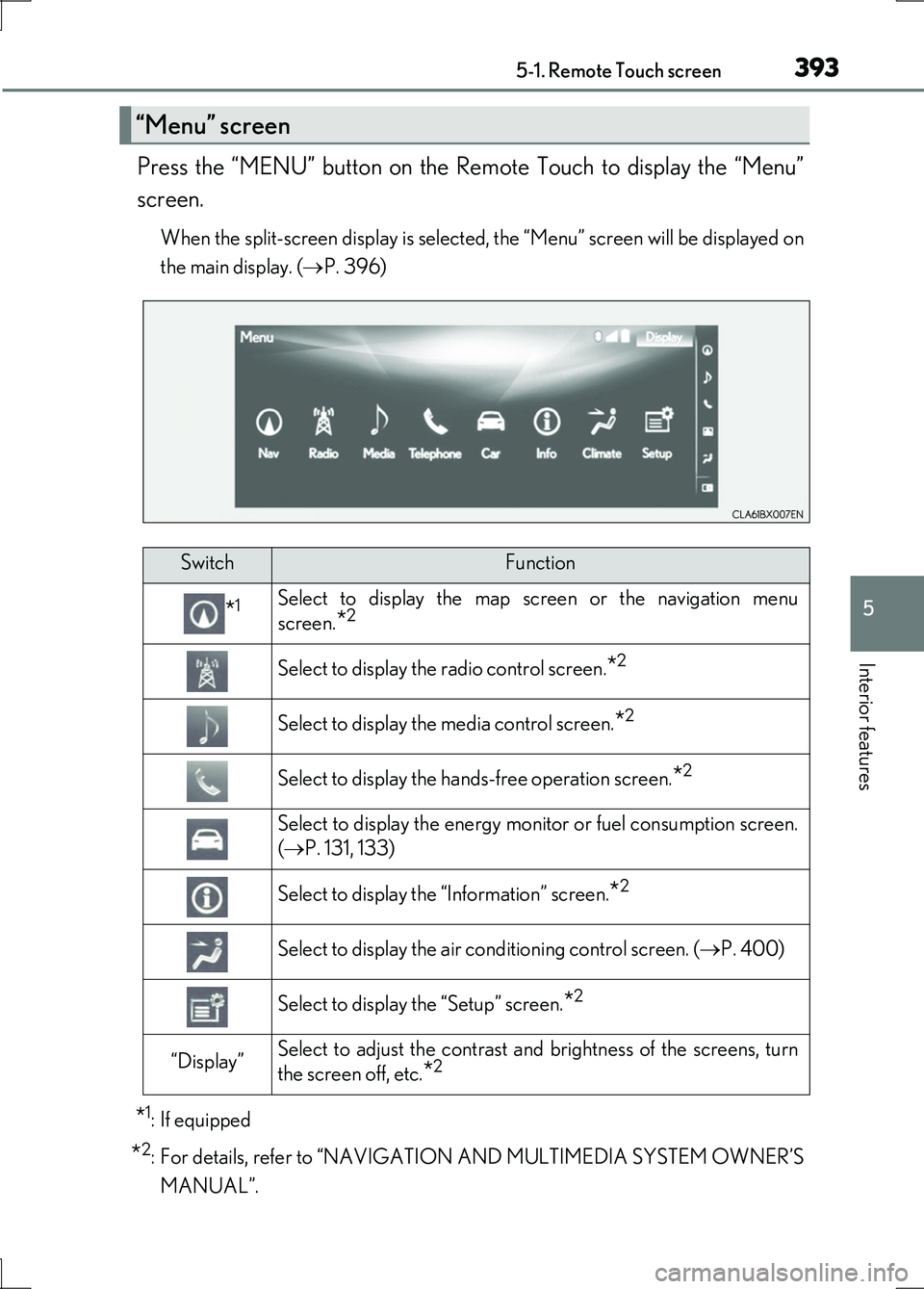
Press the “MENU” button on the Remote Touch to display the “Menu”
screen.
When the split-screen display is selected, the “Menu” screen will be displayed on
the main display. ( P. 396)
*1: If equipped
*2: For details, refer to “NAVIGATION AND MULTIMEDIA SYSTEM OWNER’S
MANUAL”.
“Menu” screen
SwitchFunction
*1Select to display the map screen or the navigation menu
screen.*2
Select to display the radio control screen.*2
Select to display the media control screen.*2
Select to display the hands-free operation screen.*2
Select to display the energy monitor or fuel consumption screen.
( P. 131, 133)
Select to display the “Information” screen.*2
Select to display the air conditioning control screen. (P. 400)
Select to display the “Setup” screen.*2
“Display”Select to adjust the contrast and brightness of the screens, turn
the screen off, etc.*2
Page 394 of 676
3945-1. Remote Touch screen
LS600h/LS600hL_EE(OM50G20E)
■Full screen display
The following functions can be displayed full screen:
•Initial screen
•“Menu” screen ( P. 393)
•Map screen*
•Audio screen*
• Energy monitor or fuel consumption screen ( P. 130)
• Air conditioning control screen ( P. 399)
*: For details, refer to “NAVIGATION AND MULTIMEDIA SYSTEM OWNER’S
MANUAL”.
12.3-inch display
12.3-inch display overview
Page 396 of 676
3965-1. Remote Touch screen
LS600h/LS600hL_EE(OM50G20E)
■Selecting the operation screen
When selecting the main display, move the Remote Touch knob to the
left. When selecting the side display, move the Remote Touch knob to
the right.
■ Main display
For details about the functions and operation of the main display, refer
to the respective section and “NAVIGATION AND MULTIMEDIA
SYSTEM OWNER’S MANUAL”.
■Side display
Basic screens
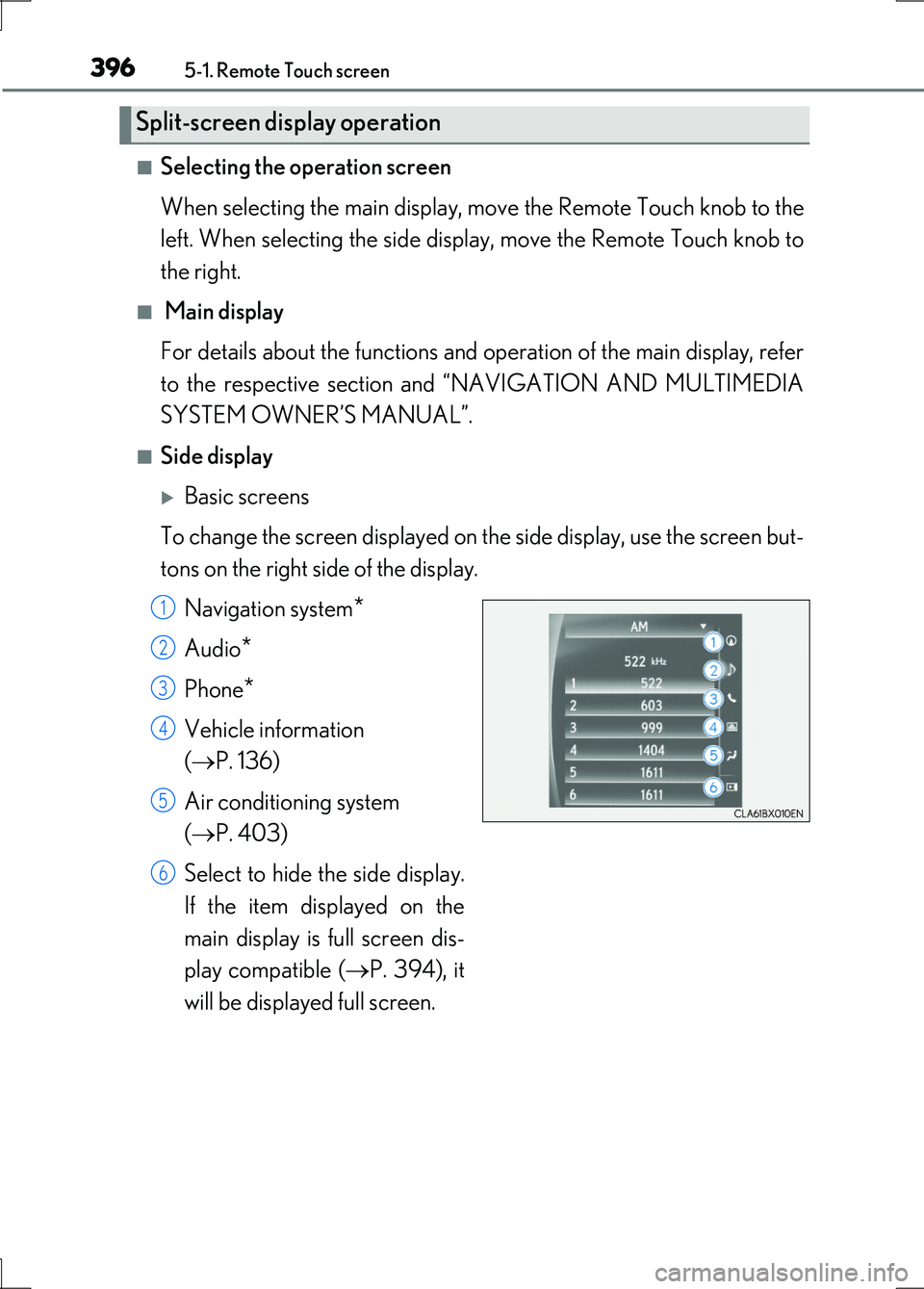
To change the screen displayed on th e side display, use the screen but-
tons on the right side of the display.
Navigation system*
Audio*
Phone*
Vehicle information
( P. 136)
Air conditioning system
( P. 403)
Select to hide the side display.
If the item displayed on the
main display is full screen dis-
play compatible ( P. 394), it
will be displayed full screen.
Split-screen display operation
1
2
3
4
5
6
Page 398 of 676
398
LS600h/LS600hL_EE(OM50G20E)
5-2. Lexus Climate Concierge
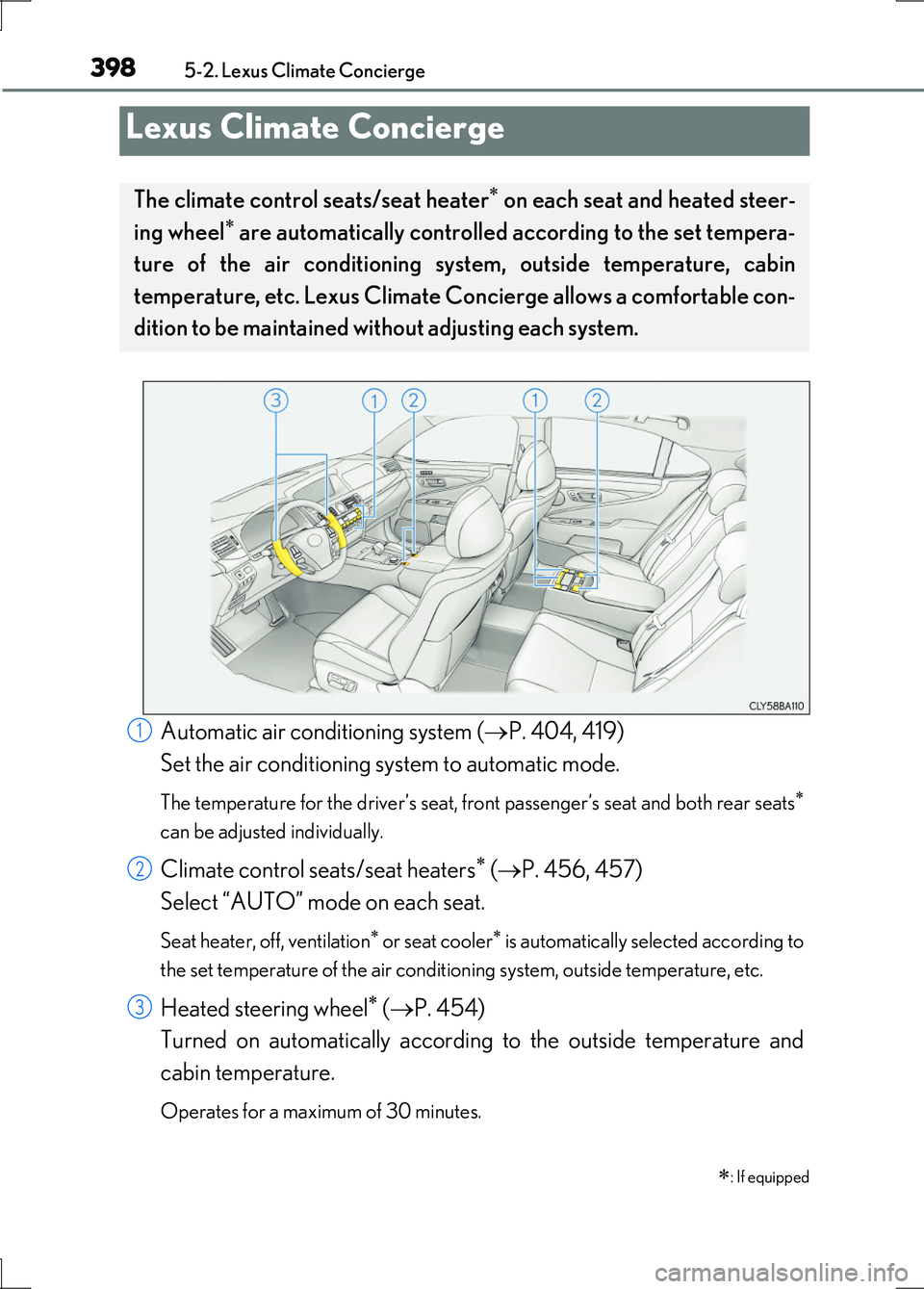
Automatic air conditioning system (P. 404, 419)
Set the air conditioning system to automatic mode.
The temperature for the driver’s seat, front passenger’s seat and both rear seats
can be adjusted individually.
Climate control seats/seat heaters ( P. 456, 457)
Select “AUTO” mode on each seat.
Seat heater, off, ventilation or seat cooler is automatically selected according to
the set temperature of the air conditioning system, outside temperature, etc.
Heated steering wheel ( P. 454)
Turned on automatically according to the outside temperature and
cabin temperature.
Operates for a maximum of 30 minutes.
Lexus Climate Concierge
: If equipped
The climate control seats/seat heater on each seat and heated steer-
ing wheel are automatically controlled according to the set tempera-
ture of the air conditioning system, outside temperature, cabin
temperature, etc. Lexus Climate Co ncierge allows a comfortable con-
dition to be maintained wi thout adjusting each system.
1
2
3
Page 399 of 676
399
5
Interior features
LS600h/LS600hL_EE(OM50G20E)
5-3. Using the air conditioning system and defogger
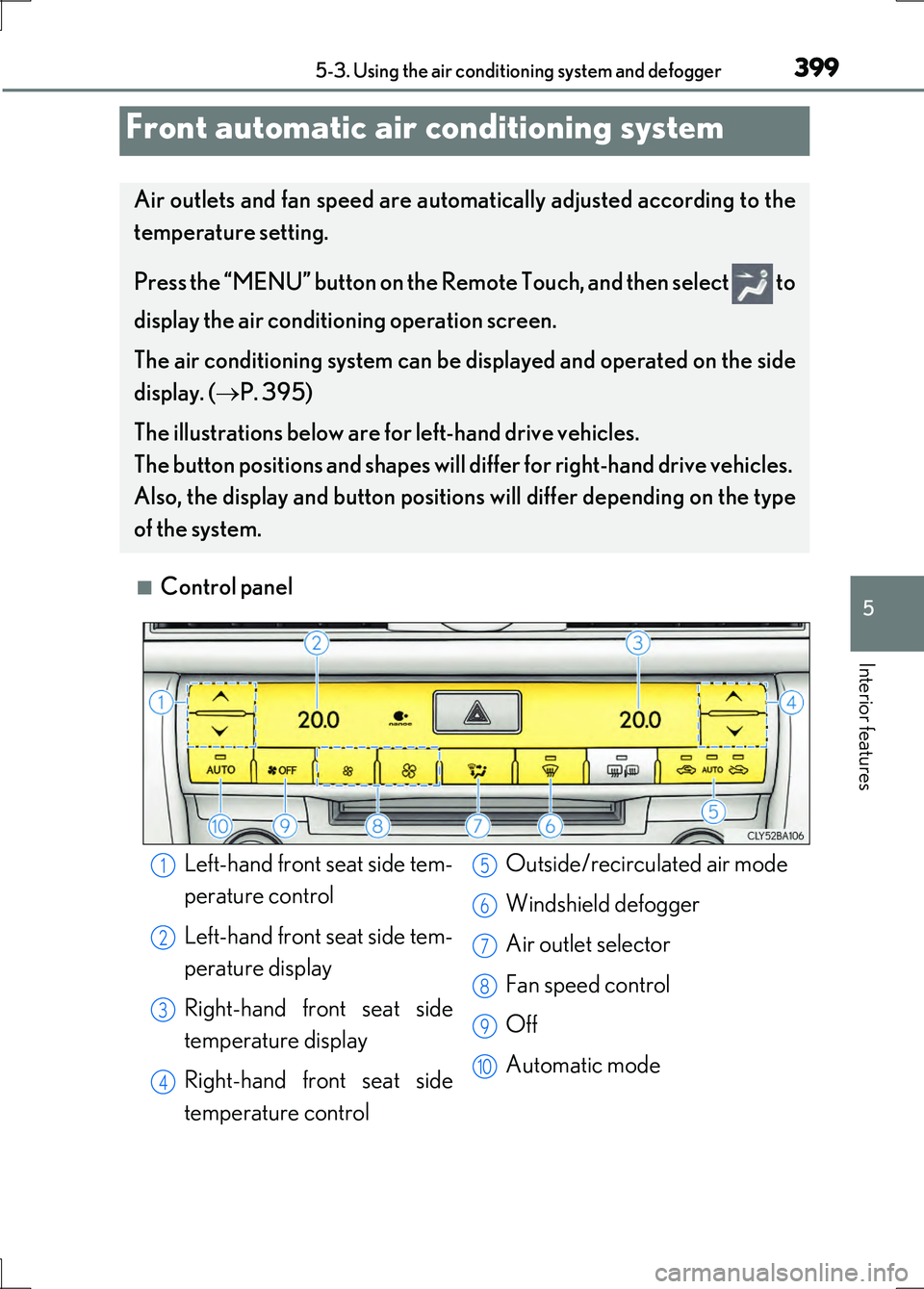
■Control panel
Front automatic air conditioning system
Air outlets and fan speed are automatically adjusted according to the
temperature setting.
Press the “MENU” button on the Remo te Touch, and then select to
display the air conditioning operation screen.
The air conditioning system can be displayed and operated on the side
display. ( P. 395)
The illustrations below are for left-hand drive vehicles.
The button positions and shapes will differ for right-hand drive vehicles.
Also, the display and button positions will differ depending on the type
of the system.
Left-hand front seat side tem-
perature control
Left-hand front seat side tem-
perature display
Right-hand front seat side
temperature display
Right-hand front seat side
temperature control
Outside/recirculated air mode
Windshield defogger
Air outlet selector
Fan speed control
Off
Automatic mode
1
2
3
4
5
6
7
8
9
10
Page 400 of 676
4005-3. Using the air conditioning system and defogger
LS600h/LS600hL_EE(OM50G20E)
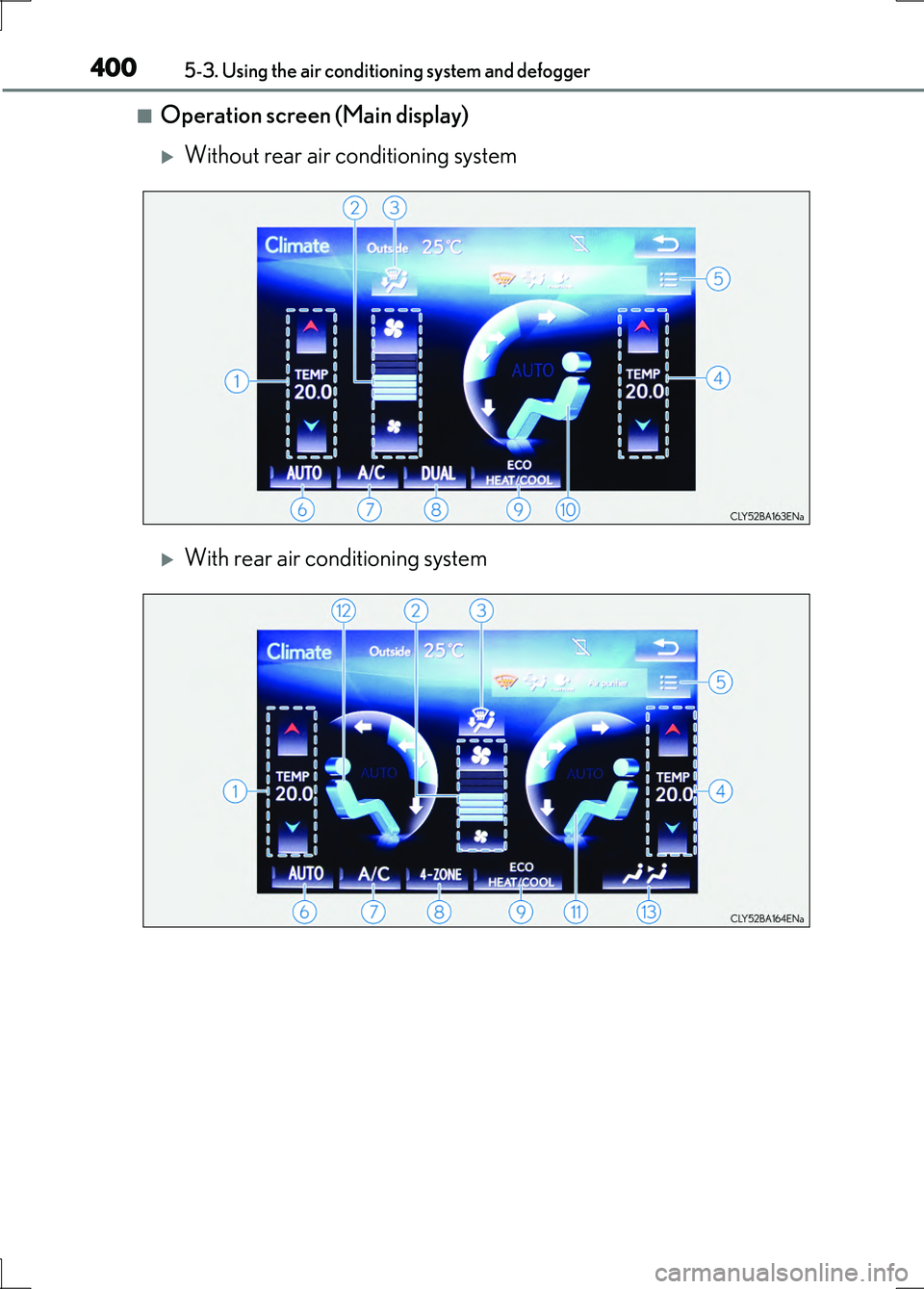
■Operation screen (Main display)
Without rear air conditioning system
With rear air conditioning system
Page 401 of 676
4015-3. Using the air conditioning system and defogger
5
Interior features
LS600h/LS600hL_EE(OM50G20E)
Left-hand front seat side tem-
perature control
Fan speed control
Air flows to the feet and the
windshield defogger operates
Right-hand front seat side tem-
perature control
Option control screen
Automatic mode
Select to set cooling and dehu-
midification function on/off
DUAL/4-ZONE mode on/off
Eco mode on/off
Front seat air outlet selector
Right-hand front seat side air
outlet selector
Left-hand front seat side air out-
let selector
Rear air conditioning operation
screen
1
2
3
4
5
6
7
8
9
10
11
12
13
Page 402 of 676
4025-3. Using the air conditioning system and defogger
LS600h/LS600hL_EE(OM50G20E)
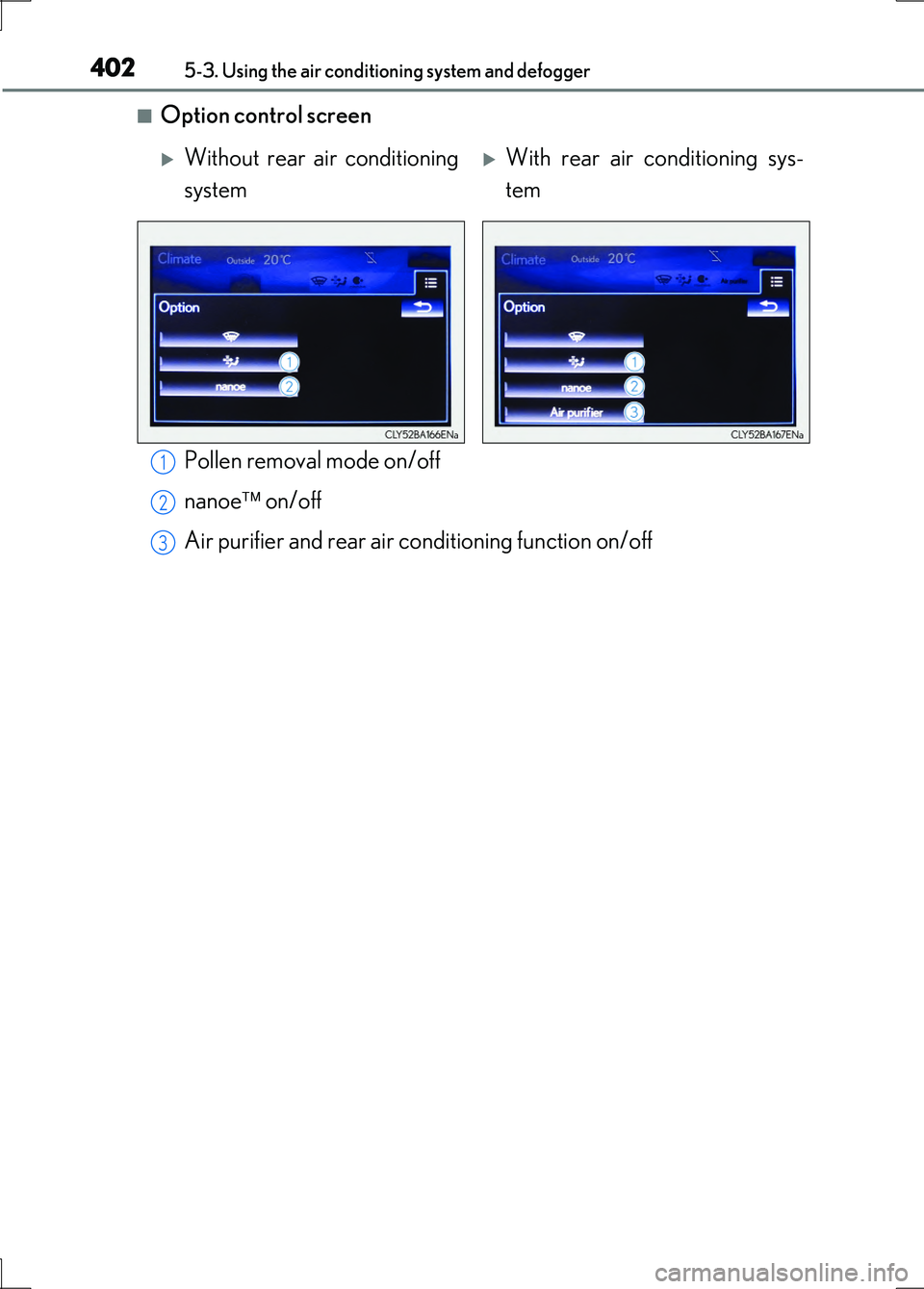
■Option control screen
Pollen removal mode on/off
nanoe on/off
Air purifier and rear air conditioning function on/off
Without rear air conditioning
system
With rear air conditioning sys-
tem
1
2
3