wheel LEXUS LS600H 2017 Owner's Guide
[x] Cancel search | Manufacturer: LEXUS, Model Year: 2017, Model line: LS600H, Model: LEXUS LS600H 2017Pages: 676, PDF Size: 35.25 MB
Page 243 of 676
2434-1. Before driving
4
Driving
LS600h/LS600hL_EE(OM50G20E)
NOTICE
■When driving the vehicle
●Do not depress the accelerator and brake pedals at the same time during driving,
as this may restrain the hybrid system output.
●Do not use the accelerator pedal or depress the accelerator and brake pedals at
the same time to hold the vehicle on a hill.
■When parking the vehicle
Always set the parking brake, and shift the shift lever to P. Failure to do so may
cause the vehicle to move or the vehicle may accelerate suddenly if the accelera-
tor pedal is accidentally depressed.
■Avoiding damage to vehicle parts
●Do not turn the steering wheel fully in either direction and hold it there for an
extended period of time.
Doing so may damage the power steering motor.
●When driving over bumps in the road, drive as slowly as possible to avoid damag-
ing the wheels, underside of the vehicle, etc.
■If you get a flat tire while driving
A flat or damaged tire may cause the following situations. Hold the steering wheel
firmly and gradually depress the brake pedal to slow down the vehicle.
●It may be difficult to control your vehicle.
●The vehicle will make abnormal sounds or vibrations.
●The vehicle will lean abnormally.
Information on what to do in case of a flat tire ( P. 567, 578)
Page 246 of 676
2464-1. Before driving
LS600h/LS600hL_EE(OM50G20E)
Trailer towing
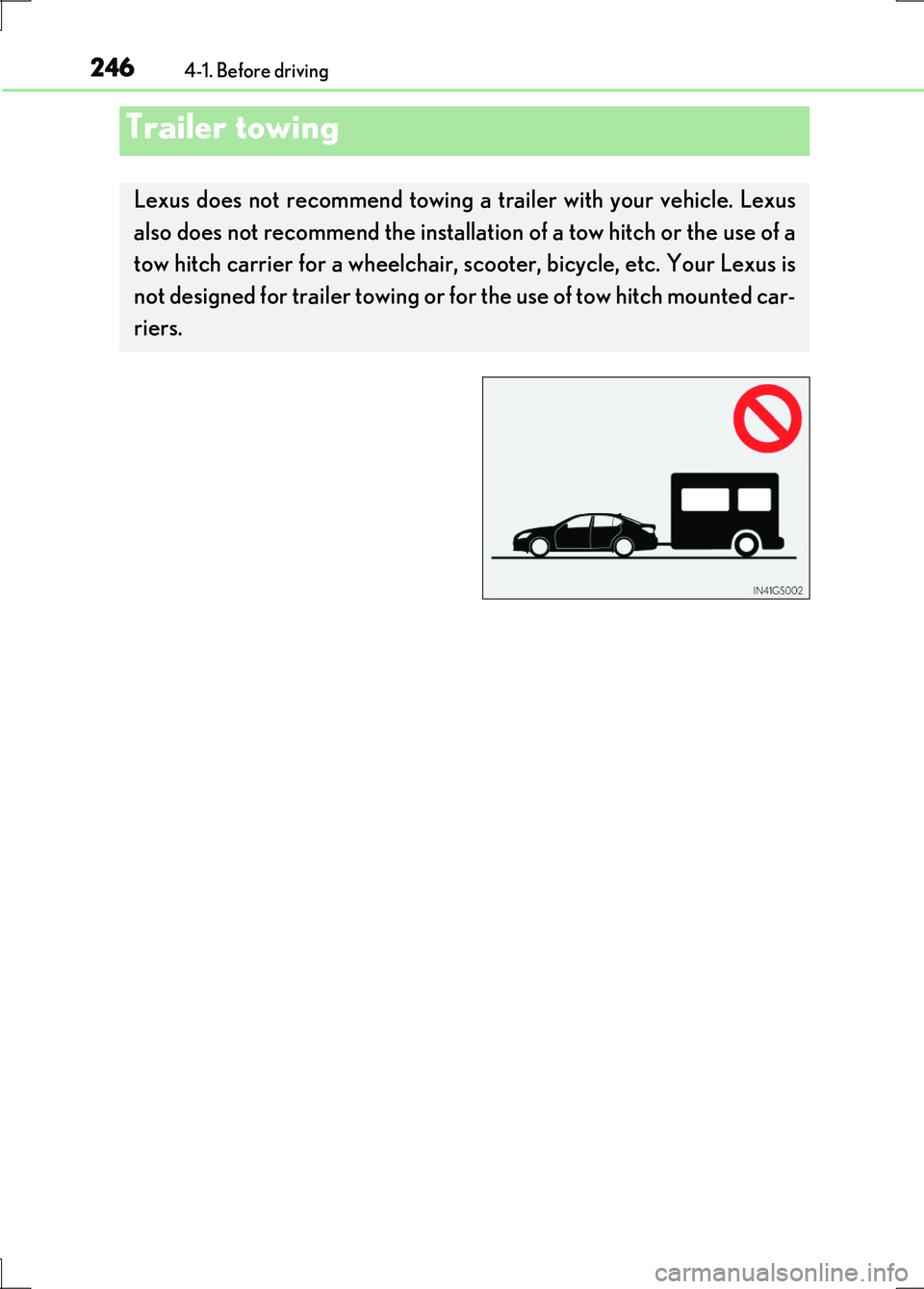
Lexus does not recommend towing a trailer with your vehicle. Lexus
also does not recommend the installati on of a tow hitch or the use of a
tow hitch carrier for a wheelchair, sc ooter, bicycle, etc. Your Lexus is
not designed for trailer towing or for the use of tow hitch mounted car-
riers.
Page 249 of 676
2494-2. Driving procedures
4
Driving
LS600h/LS600hL_EE(OM50G20E)
■Auto power off function
If the vehicle is left in ACCESSORY mode for more than 20 minutes with the shift
lever in P, the power switch will automatically turn off.
■Sounds and vibrations specific to a hybrid vehicle
P. 88
■Electronic key battery depletion
P. 162
■When the ambient temperature is low, such as during winter driving conditions
It may take time until the “READY” indicator comes on.
■Conditions affecting operation
P. 159
■Notes for the entry function
P. 160
■If the hybrid system does not start
The immobilizer system may not have been deactivated. ( P. 96)
Contact any authorized Lexus dealer or repairer, or another duly qualified and
equipped professional.
■Steering lock
After turning the power switch off and opening and closing the doors, the steering
wheel will be locked due to the steering lock function. Operating the power switch
again automatically cancels the steering lock.
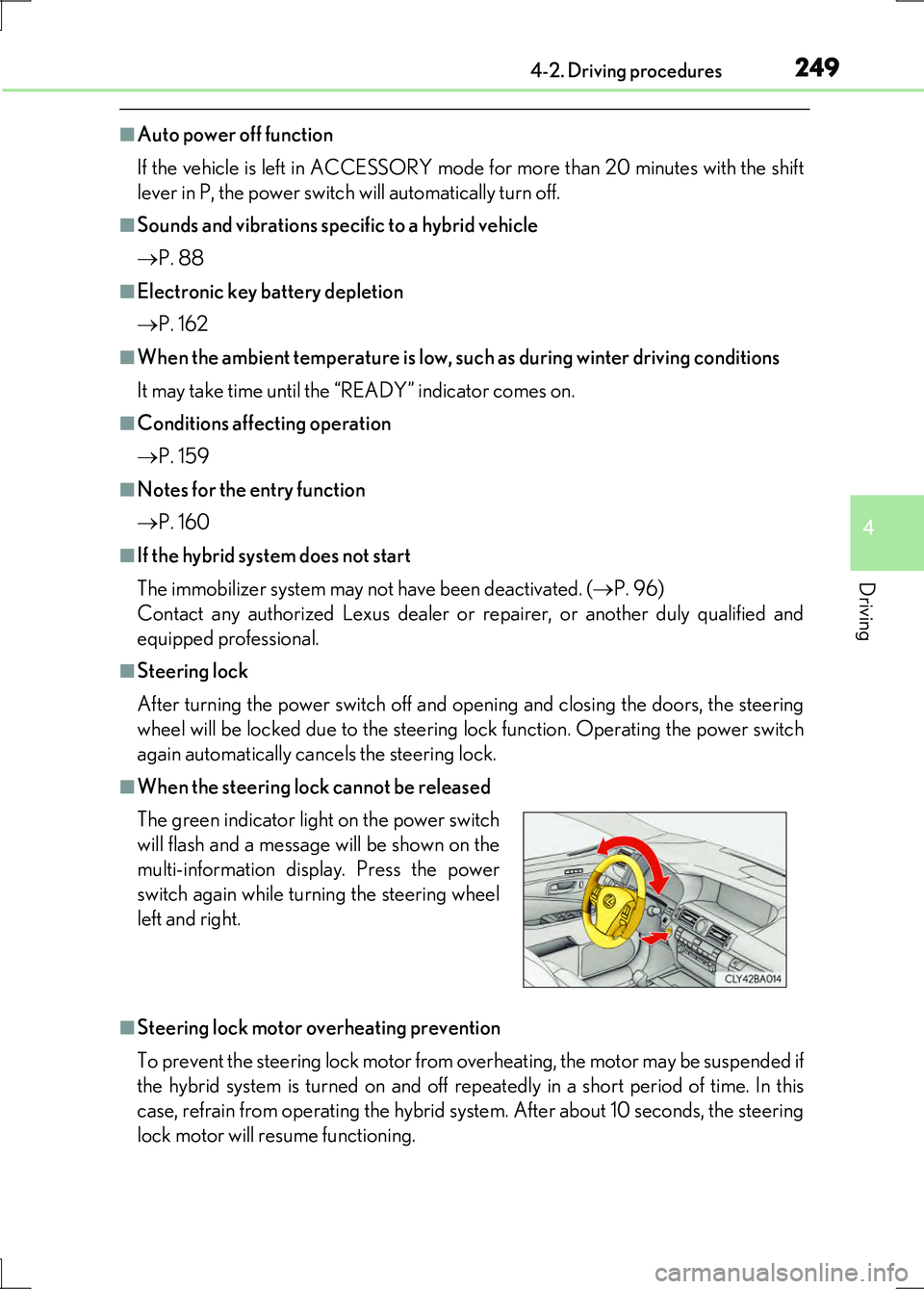
■When the steering lock cannot be released
■Steering lock motor overheating prevention
To prevent the steering lock motor from overheating, the motor may be suspended if
the hybrid system is turned on and off repe atedly in a short period of time. In this
case, refrain from operating the hybrid system. After about 10 seconds, the steering
lock motor will resume functioning.
The green indicator light on the power switch
will flash and a message will be shown on the
multi-information display. Press the power
switch again while turning the steering wheel
left and right.
Page 277 of 676
2774-3. Operating the lights and wipers
4
Driving
LS600h/LS600hL_EE(OM50G20E)
■The Adaptive High-beam System can be operated when
The power switch is in ON mode.
■Camera sensor detection information
●High beam may not be automatically turned off or changed to variable shade beam
in the following situations:
• When oncoming vehicles suddenly appear from a curve
• When the vehicle is cut in front of by another
• When oncoming or preceding vehicles are hidden from sight due to repeated
curves, road dividers or roadside trees
●High beam may be turned off or variable shade beam may be changed to if an
oncoming vehicle that is using fog lights without using the headlights is detected.
●House lights, street lights, red traffic signals, and illuminated billboards or signs may
cause the high beam to turn off or variable shade beam to be changed to and may
change the area that is shielded.
●The following factors may affect the amount of time taken to turn high beam on or
off, or the speed by which the shielded areas change:
• The brightness of headlights, fog lights, and tail lights of oncoming and preced-
ing vehicles
• The movement and direction of oncoming and preceding vehicles
• When a oncoming or preceding vehicle only has operational lights on one side
• When a oncoming or preceding vehicle is a two-wheeled vehicle
• The condition of the road (gradient, curve, condition of the road surface etc.)
• The number of passengers and amount of luggage
●High beam and variable shade beam may be turned on or off when unexpected by
the driver.
●Small vehicles, such as bicycles, may not be detected.
Page 305 of 676
3054-5. Using the driving support systems
4
Driving
LS600h/LS600hL_EE(OM50G20E)
CAUTION
■When the sensor may not be correctly detecting the vehicle ahead
Apply the brakes as necessary when any of the following types of vehicles are in
front of you.
As the sensor may not be able to correctly detect these types of vehicles, the
approach warning ( P. 299) will not be activated, and a fatal or serious accident
may result.
●Vehicles that cut in suddenly
●Vehicles traveling at low speeds
●Vehicles that are not moving
●Vehicles with small rear ends (trailers with no load on board etc.)
●Motorcycles traveling in the same lane
■Conditions under which the vehicle-to-veh icle distance control may not function
correctly
Apply the brakes as necessary in the following conditions as the radar sensor may
not be able to correctly detect vehicles ahead, and a fatal or serious accident may
result:
●When water or snow thrown up by the surrounding vehicles hinders the function-
ing of the sensor
●When your vehicle is pointing upwards (caused by a heavy load in the trunk etc.)
●When the road curves or when the lanes are narrow
●When steering wheel operation or your position in the lane is unstable
●When the vehicle ahead of you decelerates suddenly
Page 322 of 676
3224-5. Using the driving support systems
LS600h/LS600hL_EE(OM50G20E)
CAUTION
■When the sensor may not be correctly detecting the vehicle ahead
Apply the brakes as necessary when any of the following types of vehicles are in
front of you.
As the sensor may not be able to correctly detect these types of vehicles, the
approach warning ( P. 314) will not be activated, and a fatal or serious accident
may result.
●Vehicles that cut in suddenly
●Vehicles traveling at low speeds
●Vehicles that are not moving
●Vehicles with small rear ends (trailers with no load on board etc.)
●Motorcycles traveling in the same lane
■Conditions under which the vehicle-to-veh icle distance control may not function
correctly
Apply the brakes as necessary in the following conditions as the radar sensor may
not be able to correctly detect vehicles ahead, and a fatal or serious accident may
result:
●When water or snow thrown up by the surrounding vehicles hinders the function-
ing of the sensor
●When your vehicle is pointing upwards (caused by a heavy load in the trunk etc.)
●When the road curves or when the lanes are narrow
●When steering wheel operation or your position in the lane is unstable
●When the vehicle ahead of you decelerates suddenly
Page 325 of 676
3254-5. Using the driving support systems
4
Driving
LS600h/LS600hL_EE(OM50G20E)
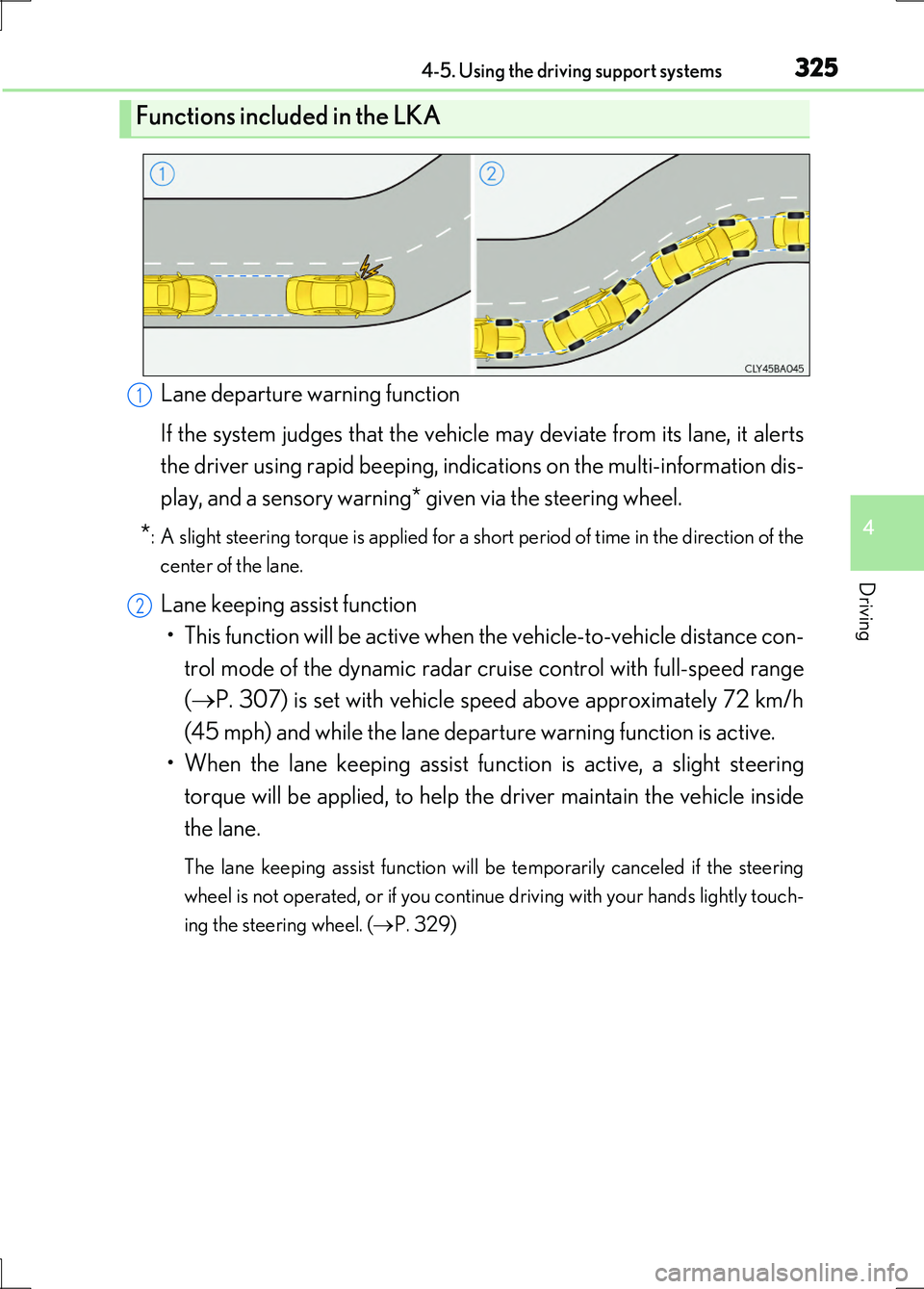
Lane departure warning function
If the system judges that the vehicle may deviate from its lane, it alerts
the driver using rapid beeping, indications on the multi-information dis-
play, and a sensory warning* given via the steering wheel.
*: A slight steering torque is applied for a short period of time in the direction of the
center of the lane.
Lane keeping assist function
• This function will be active when the vehicle-to-vehicle distance con-
trol mode of the dynamic radar crui se control with full-speed range
( P. 307) is set with vehicle speed above approximately 72 km/h
(45 mph) and while the lane departure warning function is active.
• When the lane keeping assist function is active, a slight steering
torque will be applied, to help th e driver maintain the vehicle inside
the lane.
The lane keeping assist function will be temporarily canceled if the steering
wheel is not operated, or if you continue driving with your hands lightly touch-
ing the steering wheel. ( P. 329)
Functions included in the LKA
1
2
Page 328 of 676
3284-5. Using the driving support systems
LS600h/LS600hL_EE(OM50G20E)
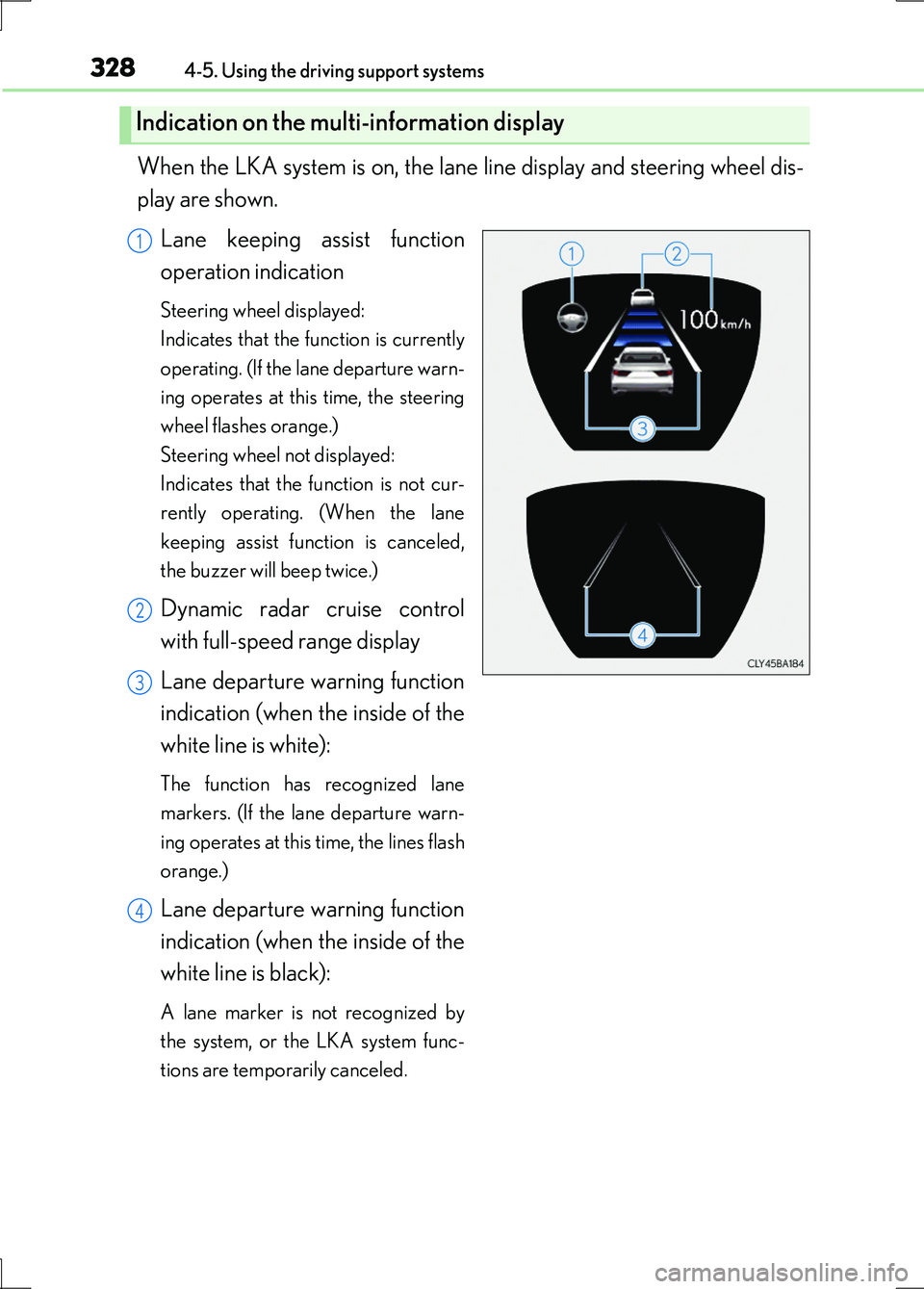
When the LKA system is on, the lane line display and steering wheel dis-
play are shown.
Lane keeping assist function
operation indication
Steering wheel displayed:
Indicates that the function is currently
operating. (If the lane departure warn-
ing operates at this time, the steering
wheel flashes orange.)
Steering wheel not displayed:
Indicates that the function is not cur-
rently operating. (When the lane
keeping assist function is canceled,
the buzzer will beep twice.)
Dynamic radar cruise control
with full-speed range display
Lane departure warning function
indication (when the inside of the
white line is white):
The function has recognized lane
markers. (If the lane departure warn-
ing operates at this time, the lines flash
orange.)
Lane departure warning function
indication (when the inside of the
white line is black):
A lane marker is not recognized by
the system, or the LKA system func-
tions are temporarily canceled.
Indication on the multi-information display
1
2
3
4
Page 329 of 676
3294-5. Using the driving support systems
4
Driving
LS600h/LS600hL_EE(OM50G20E)
■Temporary cancelation of the LKA system functions
If any of the following occurs, the LKA system functions will be temporarily canceled.
The functions will resume after the necessary operating conditions have returned.
●The steering wheel is turned as far as necessary to cause the vehicle to change
lanes.
●When the system detects no-handed driving. (The lane keeping assist function will
be temporarily canceled, but the lane departure warning function will continue.)
●The turn signal lever is operated.
●The vehicle speed deviates from the operating range of the LKA system functions.
(The buzzer will beep twice when the lane keeping assist function is being
canceled.)
●When the lane lines cannot be recognized while driving. (The buzzer will beep
twice when the lane keeping assist function is being canceled.)
●When the wiper switch is in the high spee d position or is set to “AUTO” mode with
the wipers operating at high speed. (The lane keeping assist function will be tempo-
rarily canceled, but the lane departure warning function will continue.)
●If the vehicle crosses a line for approximately half a minute or more. (The lane keep-
ing assist function will be temporarily canceled, but the lane departure warning
function will continue.)
●When the lane departure warning function is activated.
The lane departure warning function will not operate again for several seconds
after it has been activated, even if the vehicle leaves the lane again.
■The lane departure warning
It may be difficult to feel the sensory warning depending on the road conditions.
■No-handed driving warning
If the steering wheel is not operated for approximately 15 seconds on a straight road
or approximately 5 seconds on a curve, the buzzer will beep twice, indicators on the
multi-information display will flash, and the lane keeping assist function will be tem-
porarily canceled. If you drive the vehicle with your hands lightly touching the steer-
ing wheel, this may also be detected as no-handed driving.
Page 331 of 676
3314-5. Using the driving support systems
4
Driving
LS600h/LS600hL_EE(OM50G20E)
●When driving on a road surface that is wet due to rain, previous rainfall, standing
water, etc.
●When the vehicle experiences strong up-and-down motion such as when driving
on an extremely rough road or on a seam in the pavement
●When headlight brightness at nighttime is reduced due to dirt on the lenses, or
when the headlights are misaligned
●When driving with a strong crosswind
●When driving on winding roads or roads that are uneven
●When driving on rough or unpaved roads
■When changing the tires
Depending on the tires used, such as snow tires, etc., sufficient performance may not
be maintainable.
■Warning messages for LKA
Warning messages are used to indicate a system malfunction or to inform the driver
of the need for caution while driving. ( P. 563)
CAUTION
■Before using the LKA system
Do not rely solely on the LKA system. The LKA system does not drive the vehicle
automatically, nor does it reduce the amount of care you need to take. As such, the
driver must always assume full responsibility for understanding his/her
surroundings, for operating the steering wheel to correct the driving line, and for
driving safely.
Inappropriate or negligent driving could lead to an accident.
■To avoid operating the LKA by mistake
Switch the LKA off using the LKA switch when not in use.