light LEXUS LS600H 2017 Repair Manual
[x] Cancel search | Manufacturer: LEXUS, Model Year: 2017, Model line: LS600H, Model: LEXUS LS600H 2017Pages: 676, PDF Size: 35.25 MB
Page 195 of 676
1953-3. Adjusting the seats
3
Operation of each component
LS600h/LS600hL_EE(OM50G20E)
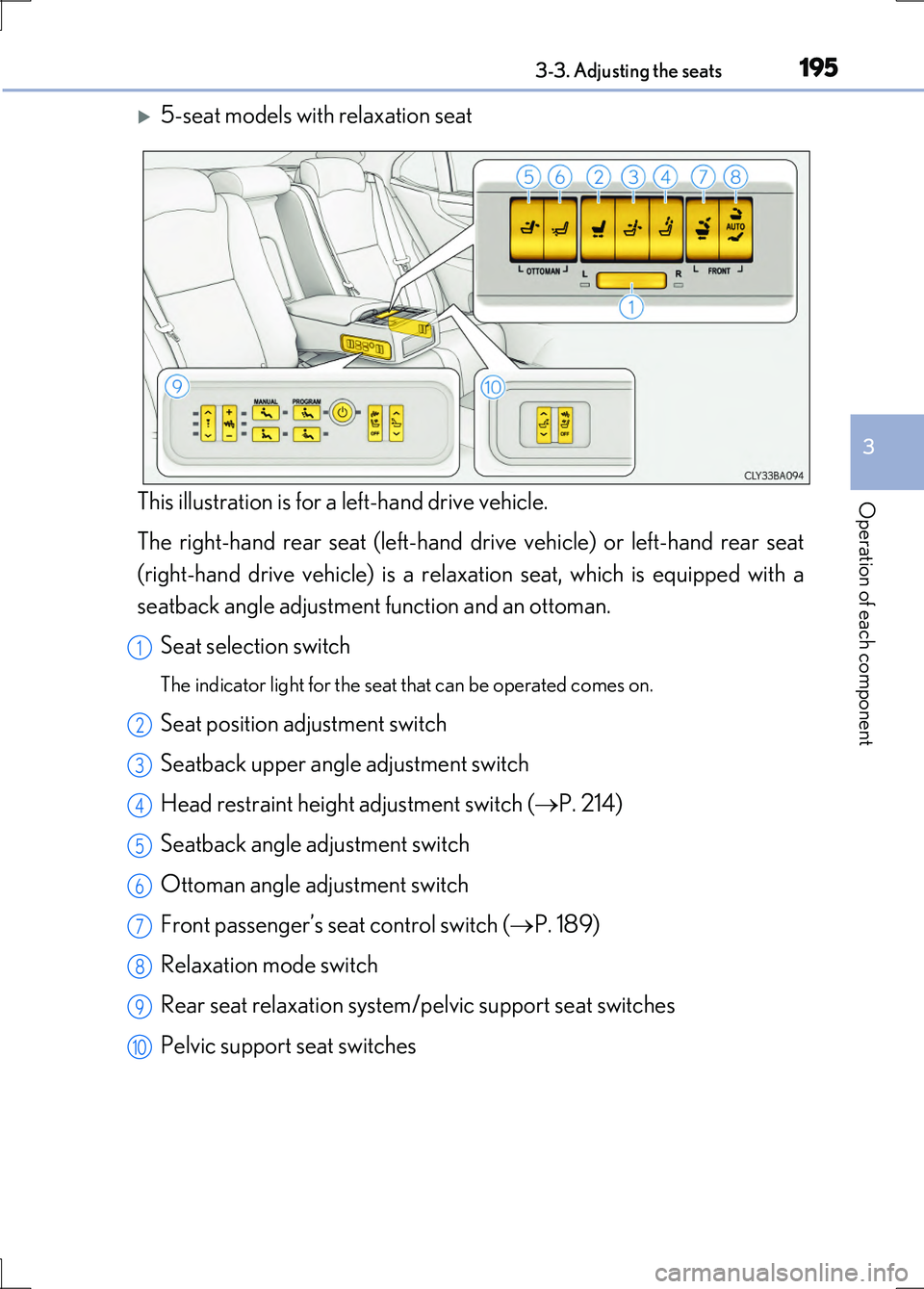
5-seat models with relaxation seat
This illustration is for a left-hand drive vehicle.
The right-hand rear seat (left-hand drive vehicle) or left-hand rear seat
(right-hand drive vehicle) is a relaxation seat, which is equipped with a
seatback angle adjustment function and an ottoman.
Seat selection switch
The indicator light for the seat that can be operated comes on.
Seat position adjustment switch
Seatback upper angle adjustment switch
Head restraint height adjustment switch ( P. 214)
Seatback angle adjustment switch
Ottoman angle adjustment switch
Front passenger’s seat control switch ( P. 189)
Relaxation mode switch
Rear seat relaxation system/pelvic support seat switches
Pelvic support seat switches
1
2
3
4
5
6
7
8
9
10
Page 196 of 676
1963-3. Adjusting the seats
LS600h/LS600hL_EE(OM50G20E)
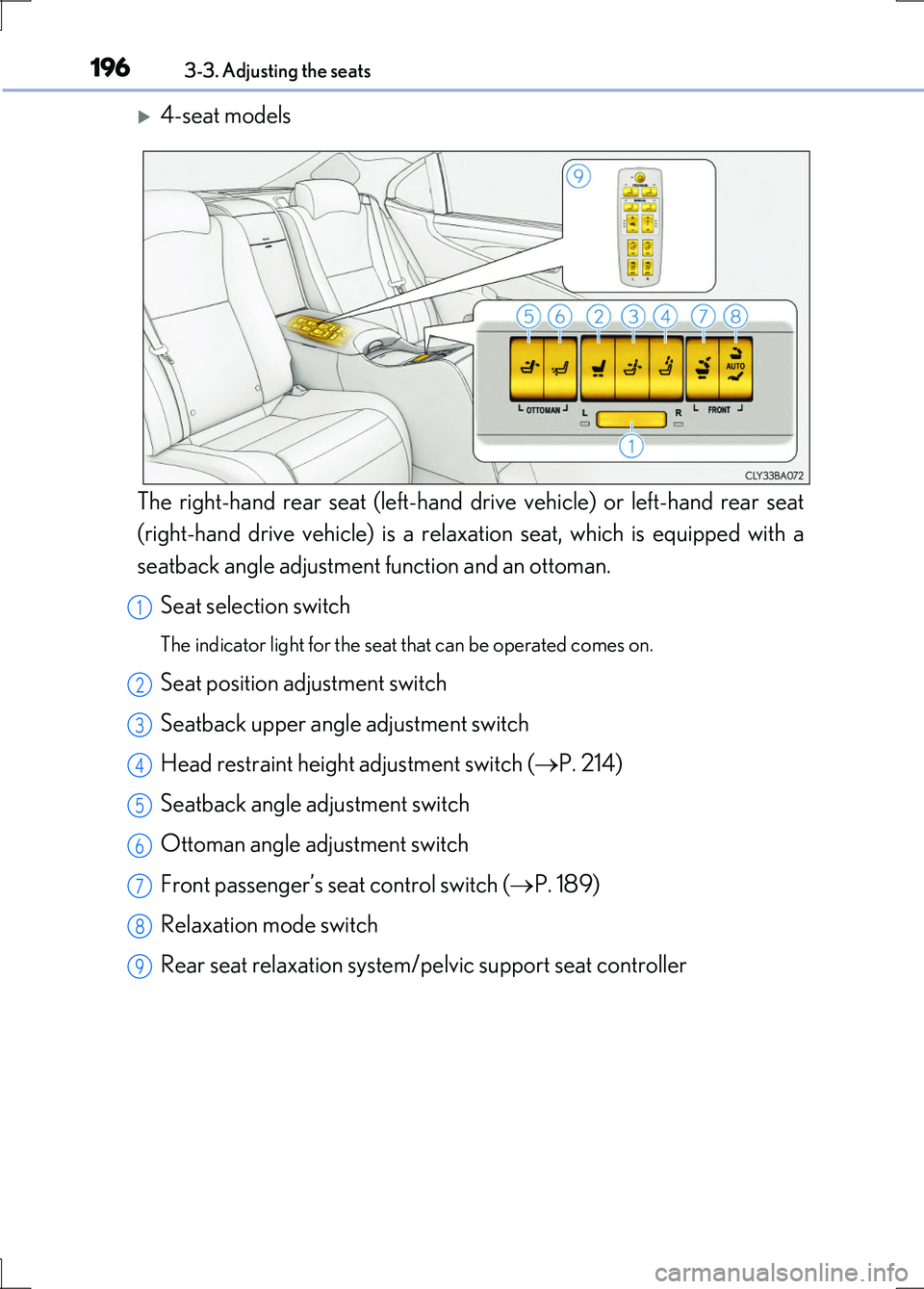
4-seat models
The right-hand rear seat (left-hand drive vehicle) or left-hand rear seat
(right-hand drive vehicle) is a relaxation seat, which is equipped with a
seatback angle adjustment function and an ottoman.
Seat selection switch
The indicator light for the seat that can be operated comes on.
Seat position adjustment switch
Seatback upper angle adjustment switch
Head restraint height adjustment switch ( P. 214)
Seatback angle adjustment switch
Ottoman angle adjustment switch
Front passenger’s seat control switch ( P. 189)
Relaxation mode switch
Rear seat relaxation system/pelvic support seat controller
1
2
3
4
5
6
7
8
9
Page 203 of 676
2033-3. Adjusting the seats
3
Operation of each component
LS600h/LS600hL_EE(OM50G20E)
■Seat return function linked to the door opening operation
●Operating conditions
The power switch is in ON mode.
●Canceling operation partway through
During the seat return operation, performing either of the following actions cancels
the operation:
• Pressing the “SET”, “M” or “C” button ( P. 212)
• Pressing any of the seat adjustment switches
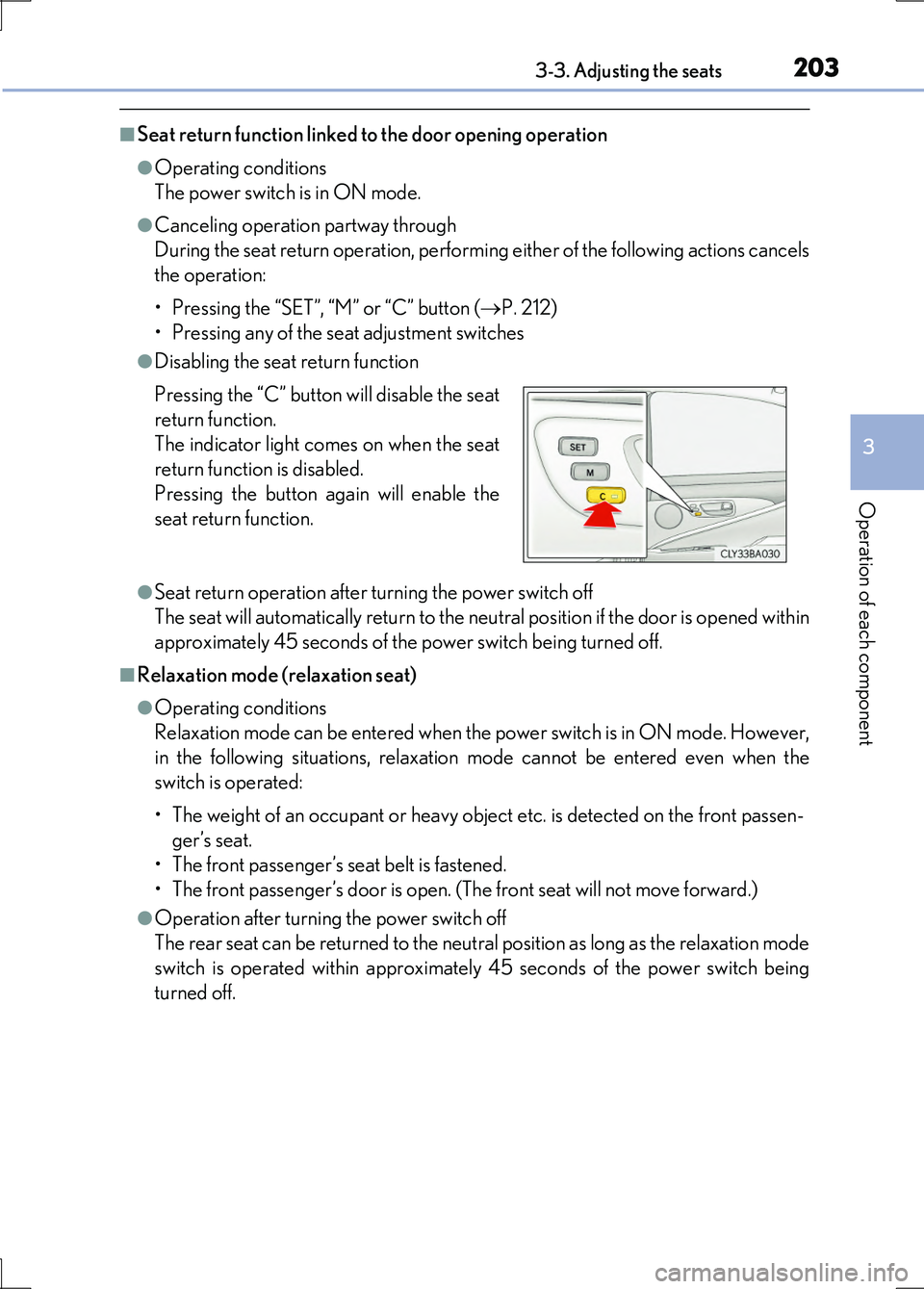
●Disabling the seat return function
●Seat return operation after turning the power switch off
The seat will automatically return to the neutral position if the door is opened within
approximately 45 seconds of the power switch being turned off.
■Relaxation mode (relaxation seat)
●Operating conditions
Relaxation mode can be entered when the power switch is in ON mode. However,
in the following situations, relaxation mode cannot be entered even when the
switch is operated:
• The weight of an occupant or heavy obje ct etc. is detected on the front passen-
ger’s seat.
• The front passenger’s seat belt is fastened.
• The front passenger’s door is open. (T he front seat will not move forward.)
●Operation after turning the power switch off
The rear seat can be returned to the neutral position as long as the relaxation mode
switch is operated within approximately 45 seconds of the power switch being
turned off.
Pressing the “C” button will disable the seat
return function.
The indicator light comes on when the seat
return function is disabled.
Pressing the button again will enable the
seat return function.
Page 209 of 676
2093-3. Adjusting the seats
3
Operation of each component
LS600h/LS600hL_EE(OM50G20E)
■Operating the driving position memory after turning the power switch off
Driver’s seat:
Recorded driving positions (except the steering wheel position) can be recalled up
to 180 seconds after the driver’s door is opened and up to 60 seconds after it is
closed again.
Front passenger’s seat:
Recorded seat positions can be recalled up to 180 seconds after the front passen-
ger’s door is opened.
■In order to correctly use the driving position memory function
If a seat position is already in the furthest possible position and the seat is operated in
the same direction, the recorded position may be slightly different when it is recalled.
Each electronic key (including a card key) can be registered to recall your
preferred driving position.
■Registering procedure
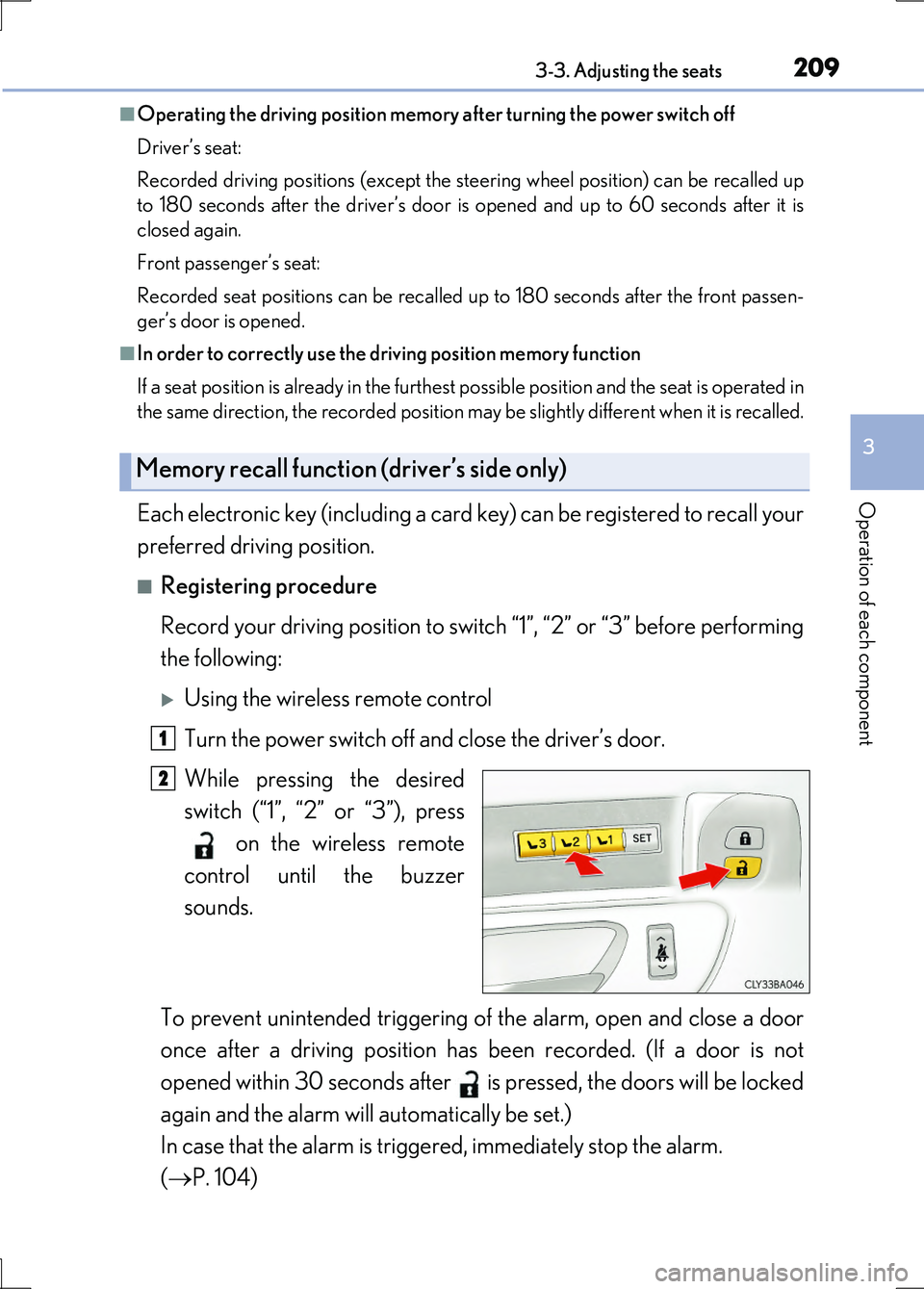
Record your driving position to switch “1”, “2” or “3” before performing
the following:
Using the wireless remote control
Turn the power switch off and close the driver’s door.
While pressing the desired
switch (“1”, “2” or “3”), press
on the wireless remote
control until the buzzer
sounds.
To prevent unintended triggering of the alarm, open and close a door
once after a driving position has been recorded. (If a door is not
opened within 30 seconds after is pressed, the doors will be locked
again and the alarm will automatically be set.)
In case that the alarm is triggered, immediately stop the alarm.
( P. 104)
Memory recall function (driver’s side only)
1
2
Page 210 of 676
2103-3. Adjusting the seats
LS600h/LS600hL_EE(OM50G20E)
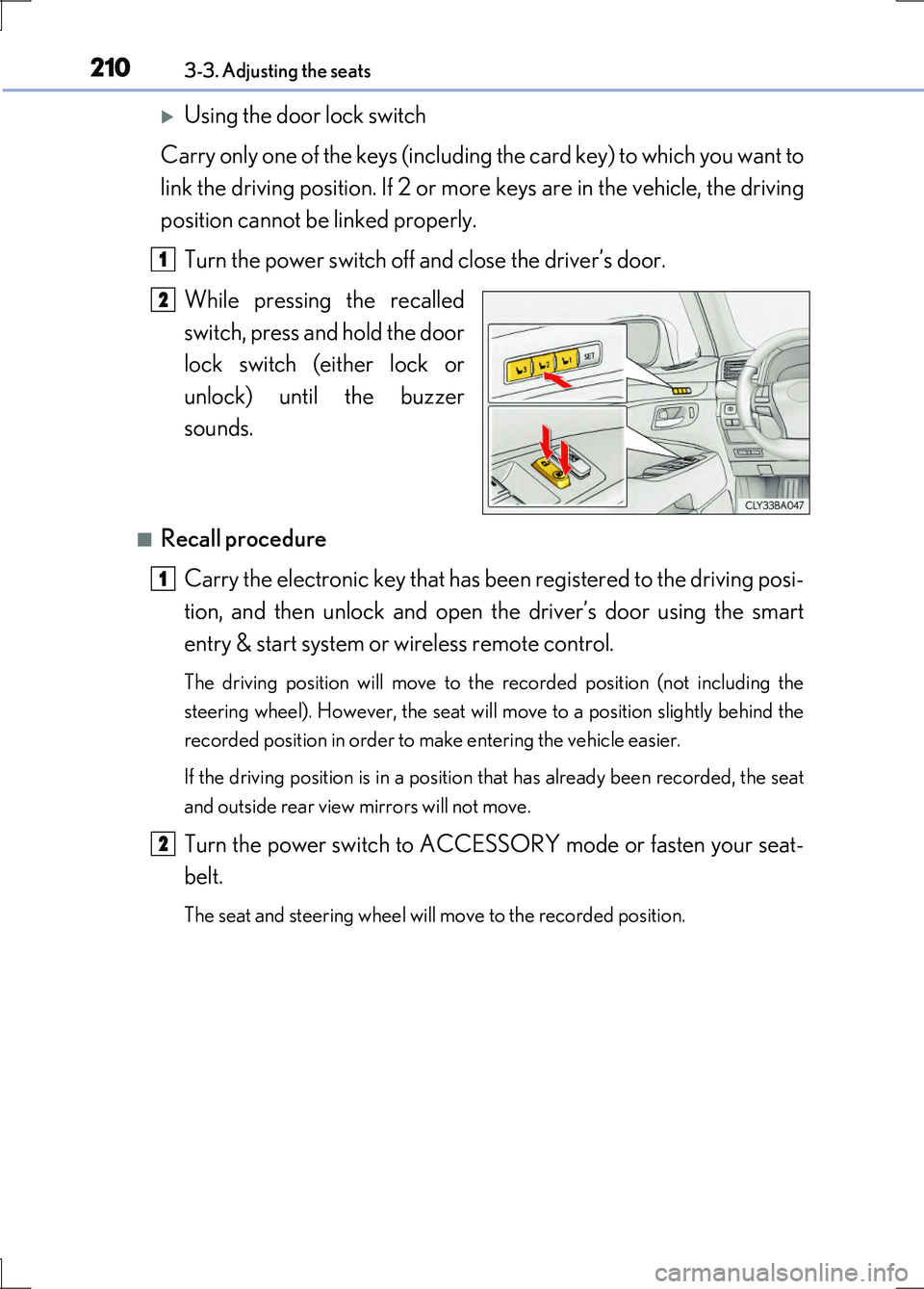
Using the door lock switch
Carry only one of the keys (including the card key) to which you want to
link the driving position. If 2 or more keys are in the vehicle, the driving
position cannot be linked properly.
Turn the power switch off and close the driver’s door.
While pressing the recalled
switch, press and hold the door
lock switch (either lock or
unlock) until the buzzer
sounds.
■Recall procedure
Carry the electronic key that has be en registered to the driving posi-
tion, and then unlock and open the driver’s door using the smart
entry & start system or wireless remote control.
The driving position will move to the recorded position (not including the
steering wheel). However, the seat will move to a position slightly behind the
recorded position in order to make entering the vehicle easier.
If the driving position is in a position that has already been recorded, the seat
and outside rear view mirrors will not move.
Turn the power switch to ACCESSORY mode or fasten your seat-
belt.
The seat and steering wheel will move to the recorded position.
1
2
1
2
Page 213 of 676
2133-3. Adjusting the seats
3
Operation of each component
LS600h/LS600hL_EE(OM50G20E)
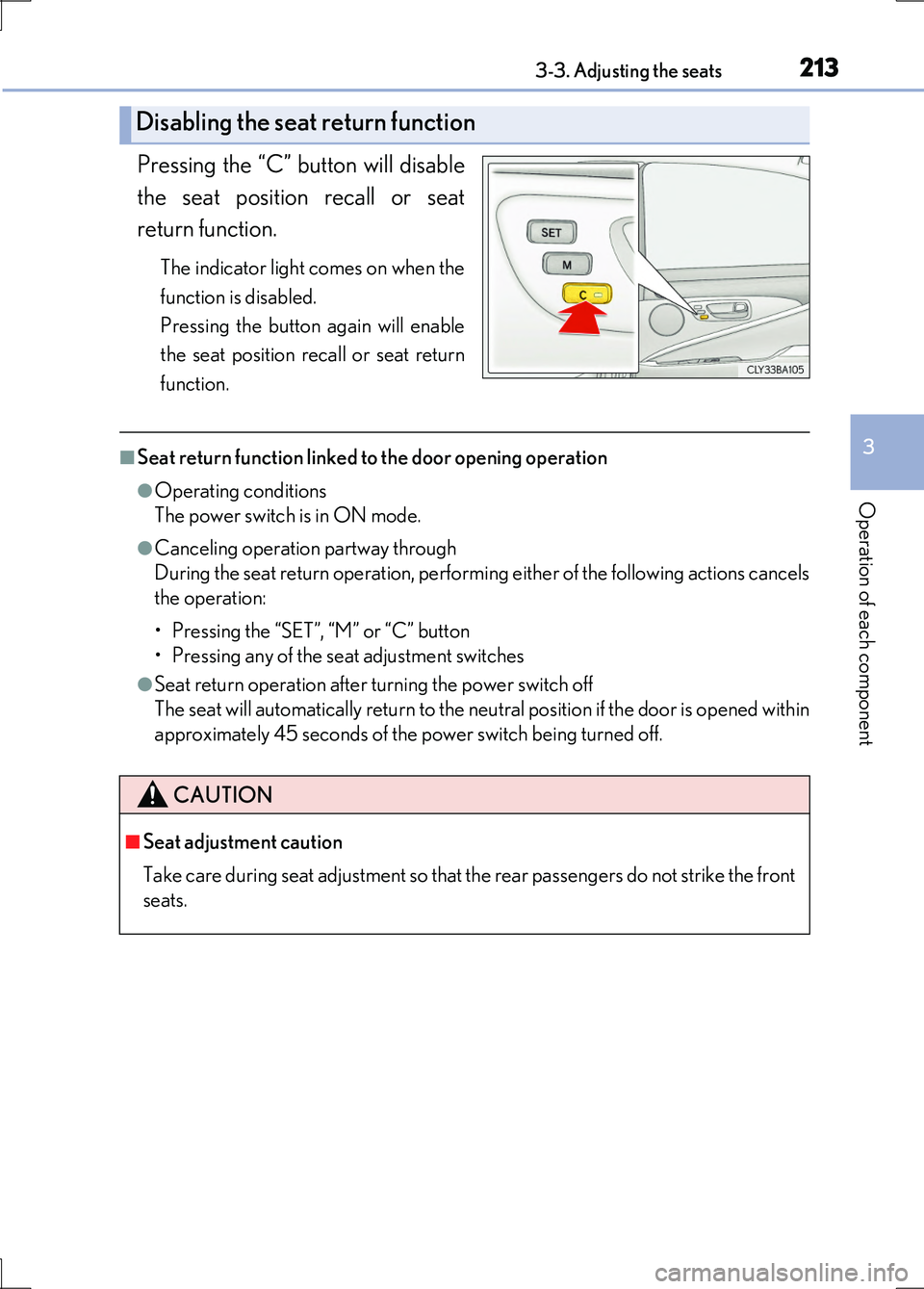
Pressing the “C” button will disable
the seat position recall or seat
return function.
The indicator light comes on when the
function is disabled.
Pressing the button again will enable
the seat position recall or seat return
function.
■Seat return function linked to the door opening operation
●Operating conditions
The power switch is in ON mode.
●Canceling operation partway through
During the seat return operation, performing either of the following actions cancels
the operation:
• Pressing the “SET”, “M” or “C” button
• Pressing any of the seat adjustment switches
●Seat return operation after turning the power switch off
The seat will automatically return to the neutral position if the door is opened within
approximately 45 seconds of the power switch being turned off.
Disabling the seat return function
CAUTION
■Seat adjustment caution
Take care during seat adjustment so that the rear passengers do not strike the front
seats.
Page 219 of 676
2193-4. Adjusting the steering wheel and mirrors
3
Operation of each component
LS600h/LS600hL_EE(OM50G20E)
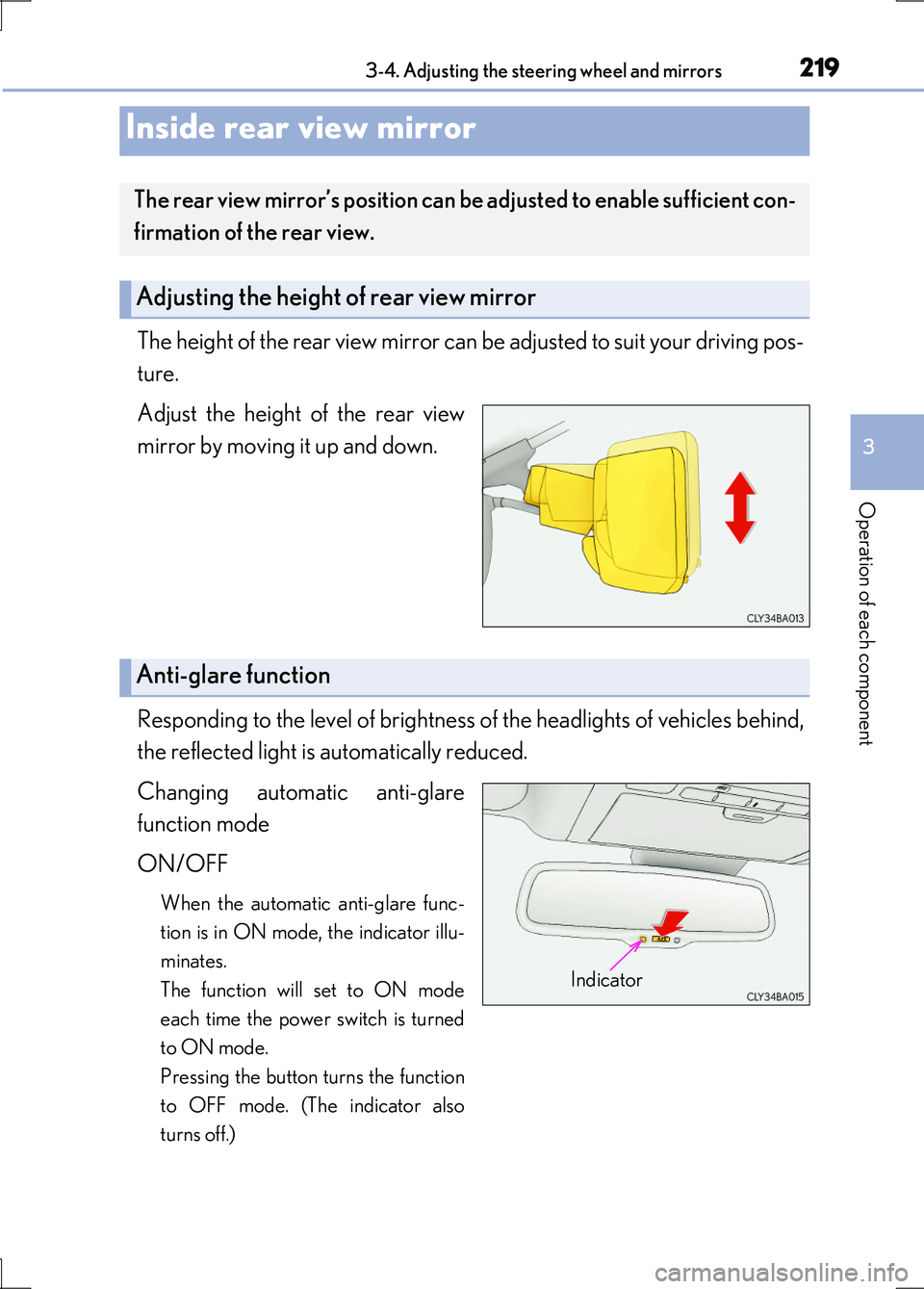
The height of the rear view mirror can be adjusted to suit your driving pos-
ture.
Adjust the height of the rear view
mirror by moving it up and down.
Responding to the level of brightness of the headlights of vehicles behind,
the reflected light is automatically reduced.
Changing automatic anti-glare
function mode
ON/OFF
When the automatic anti-glare func-
tion is in ON mode, the indicator illu-
minates.
The function will set to ON mode
each time the power switch is turned
to ON mode.
Pressing the button turns the function
to OFF mode. (The indicator also
turns off.)
Inside rear view mirror
The rear view mirror’s position can be adjusted to enable sufficient con-
firmation of the rear view.
Adjusting the height of rear view mirror
Anti-glare function
Indicator
Page 223 of 676
2233-4. Adjusting the steering wheel and mirrors
3
Operation of each component
LS600h/LS600hL_EE(OM50G20E)
When the mirror select switch is in the “L” or “R” position, the outside rear
view mirrors will automatically angle downwards when the vehicle is
reversing in order to give a better view of the ground.
To disable this function, move the mirror select switch to the neutral posi-
tion (between “L” and “R”).
■Adjusting the mirror angle when the vehicle is reversing
With the shift lever in R, adjust the mirror angle at a desired position.
The adjusted angle will be memorized and the mirror will automatically tilt to
the memorized angle whenever the shift lever is shifted to R from next time.
The memorized downward tilt position of the mirror is linked to the normal
position (angle adjusted with the shift lever in other than R). Therefore, if the
normal position is changed after adjustment, the tilt position will also change.
When the normal position is changed, readjust the angle in reversing.
■Mirror angle can be adjusted when
The power switch is in ACCESSORY or ON mode.
■When the mirrors are fogged up
The outside rear view mirrors can be cleared using the mirror defoggers. Turn on the
rear window defogger to turn on the outside rear view mirror defoggers. ( P. 425)
■Automatic adjustment of the mirror angle
A desired mirror face angle can be entered to memory and recalled automatically
by the driving position memory. ( P. 207)
■Auto anti-glare function
When the anti-glare inside rear view mirror is set to automatic mode, the outside
rear view mirrors will activate in conjunction with the anti-glare inside rear view mir-
ror to reduce reflected light. ( P. 219)
■Using automatic mode in cold weather
When automatic mode is used in cold weather, the door mirror could freeze up and
automatic stowing and return may not be possible. In this event, remove any ice and
snow from the door mirror, then either operate the mirror using manual mode or
move the mirror by hand.
Linked mirror function when reversing
Page 226 of 676
2263-5. Opening, closing the windows and moon roof
LS600h/LS600hL_EE(OM50G20E)
■Jam protection function
If an object becomes jammed between the window and the window frame while the
window is closing, window movement is stopped and the window is opened slightly.
■Catch protection function
If an object becomes caught between the door and window while the window is
opening, window movement is stopped.
■When the window cannot be opened or closed
When the jam protection function or catch protection function operates unusually and
the door window cannot be opened or closed , perform the following operations with the power window switch of that door.
●Stop the vehicle. With the power switch in ON mode, within 4 seconds of the jam pro-
tection function or catch protection function activating, continuously operate the power window switch in the one-touch clos ing direction or one-touch opening direc- tion so that the door window can be opened and closed.
●If the door window cannot be opened and closed even when performing the above operations, perform the following pr ocedure for function initialization.
Turn the power switch to ON mode.
Pull and hold the power window switch in the one-touch closing direction and com- pletely close the door window.
Release the power window switch for a moment, resume pulling the switch in the
one-touch closing direction, and hold it there for approximately 6 seconds or more.
Press and hold the power window switch in the one-touch opening direction. After the door window is completely opened, cont inue holding the switch for an additional
1 second or more.
Release the power window switch for a moment, resume pressing the switch in the
one-touch opening direction, and hold it there for approximately 4 seconds or more.
Pull and hold the power window switch in the one-touch closing direction again.
After the door window is completely clos ed, continue holding the switch for a fur- ther 1 second or more.
If you release the switch while the window is moving, start again from the beginning.
If the window reverses and cannot be fully closed or opened, have the vehicle inspected by any authorized Lexus dealer or repairer , or another duly qualified and equipped pro- fessional.
1
2
3
4
5
6
Page 229 of 676
2293-5. Opening, closing the windows and moon roof
3
Operation of each component
LS600h/LS600hL_EE(OM50G20E)
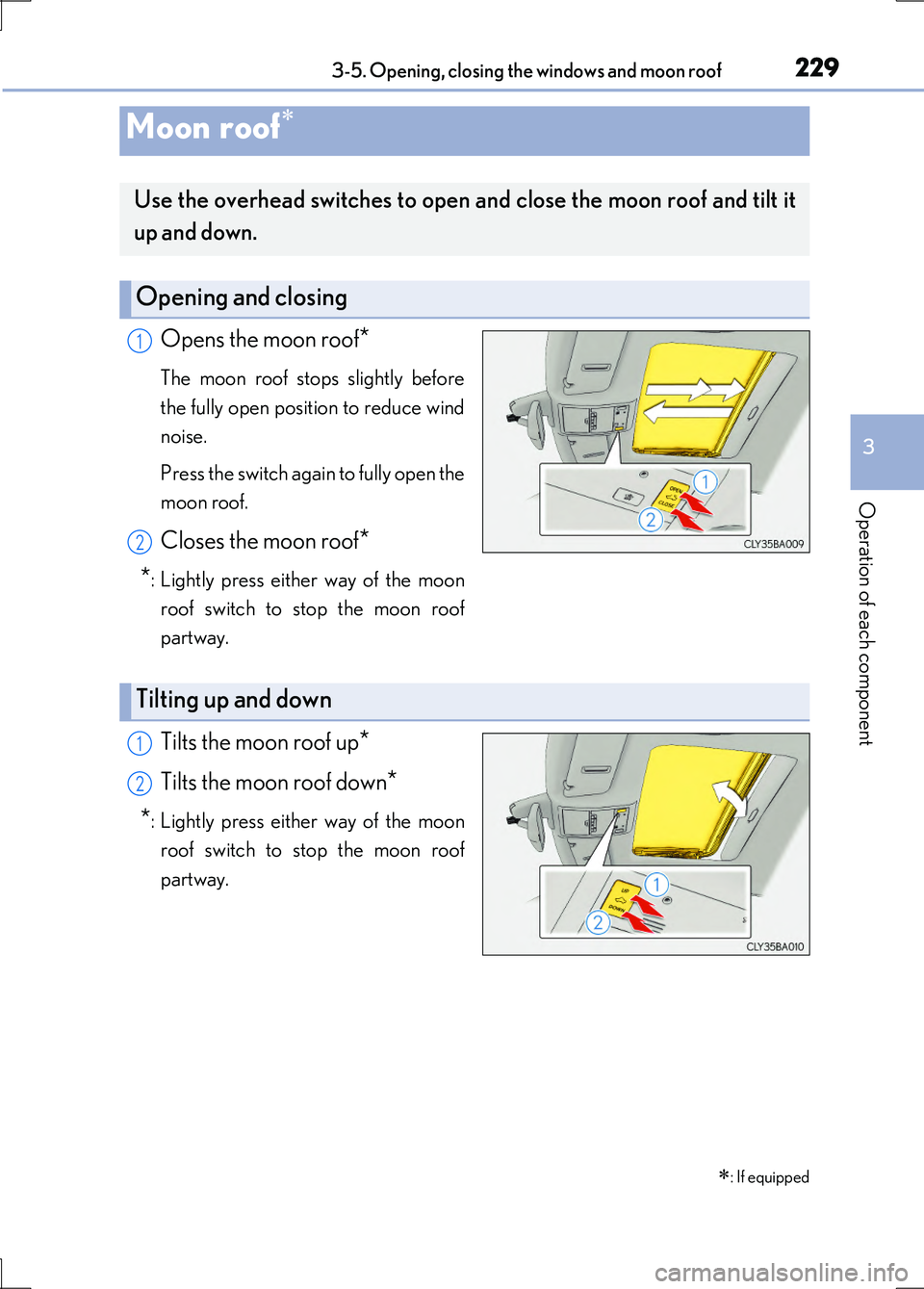
Opens the moon roof*
The moon roof stops slightly before
the fully open position to reduce wind
noise.
Press the switch again to fully open the
moon roof.
Closes the moon roof*
*: Lightly press either way of the moon
roof switch to stop the moon roof
partway.
Tilts the moon roof up*
Tilts the moon roof down*
*: Lightly press either way of the moon
roof switch to stop the moon roof
partway.
Moon roof
: If equipped
Use the overhead switches to open and close the moon roof and tilt it
up and down.
Opening and closing
1
2
Tilting up and down
1
2