seats LEXUS LS600H 2017 Repair Manual
[x] Cancel search | Manufacturer: LEXUS, Model Year: 2017, Model line: LS600H, Model: LEXUS LS600H 2017Pages: 676, PDF Size: 35.25 MB
Page 410 of 676
4105-3. Using the air conditioning system and defogger
LS600h/LS600hL_EE(OM50G20E)
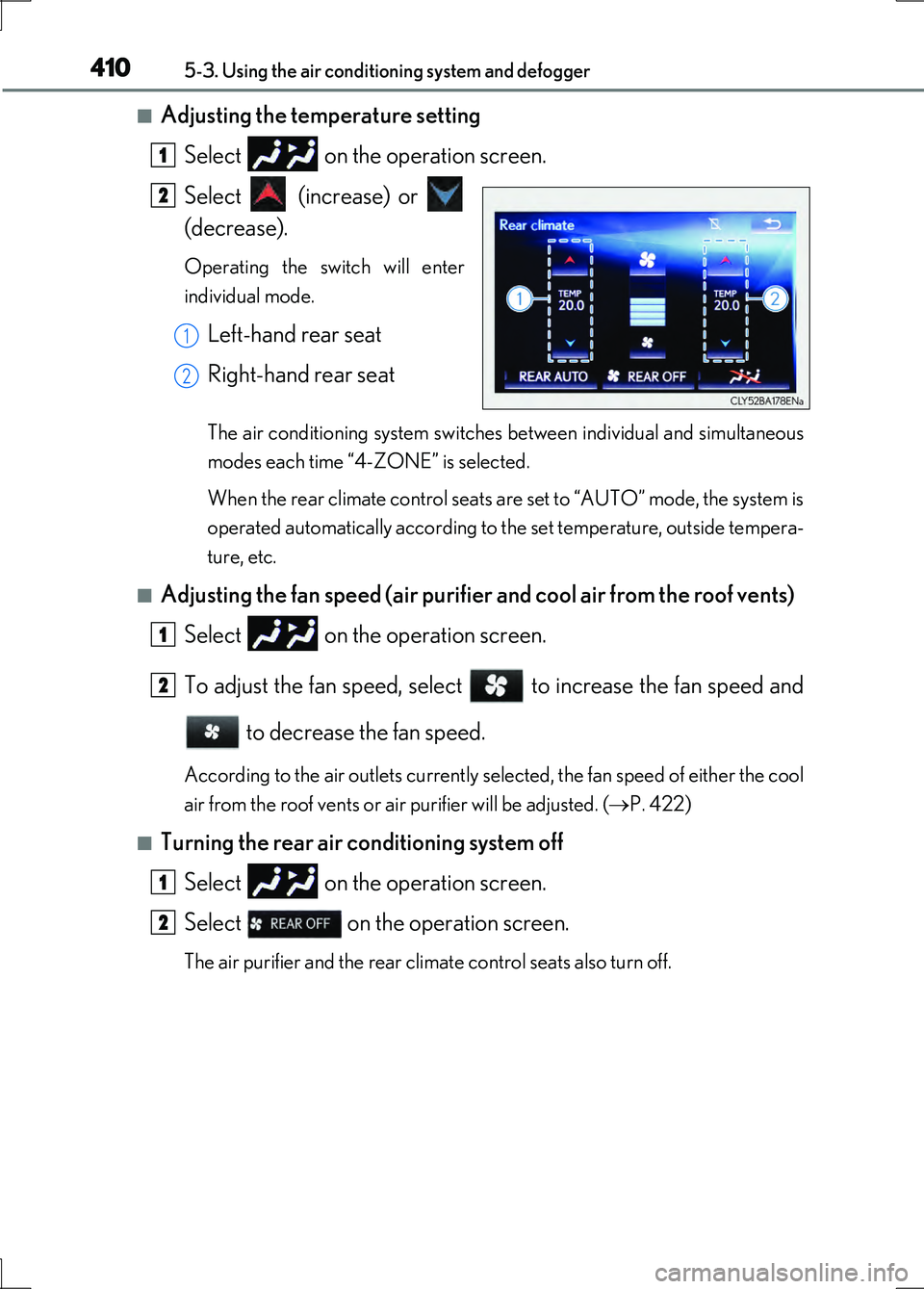
■Adjusting the temperature setting Select on the operation screen.
Select (increase) or
(decrease).
Operating the switch will enter
individual mode.
Left-hand rear seat
Right-hand rear seat
The air conditioning system switches between individual and simultaneous
modes each time “4-ZONE” is selected.
When the rear climate control seats are set to “AUTO” mode, the system is
operated automatically according to the set temperature, outside tempera-
ture, etc.
■Adjusting the fan speed (air purifier and cool air from the roof vents)
Select on the operation screen.
To adjust the fan speed, select to increase the fan speed and to decrease the fan speed.
According to the air outlets currently selected, the fan speed of either the cool
air from the roof vents or air purifier will be adjusted. ( P. 422)
■Turning the rear air conditioning system off
Select on the operation screen.
Select on the operation screen.
The air purifier and the rear climate control seats also turn off.
1
2
1
2
1
2
1
2
Page 411 of 676
4115-3. Using the air conditioning system and defogger
5
Interior features
LS600h/LS600hL_EE(OM50G20E)
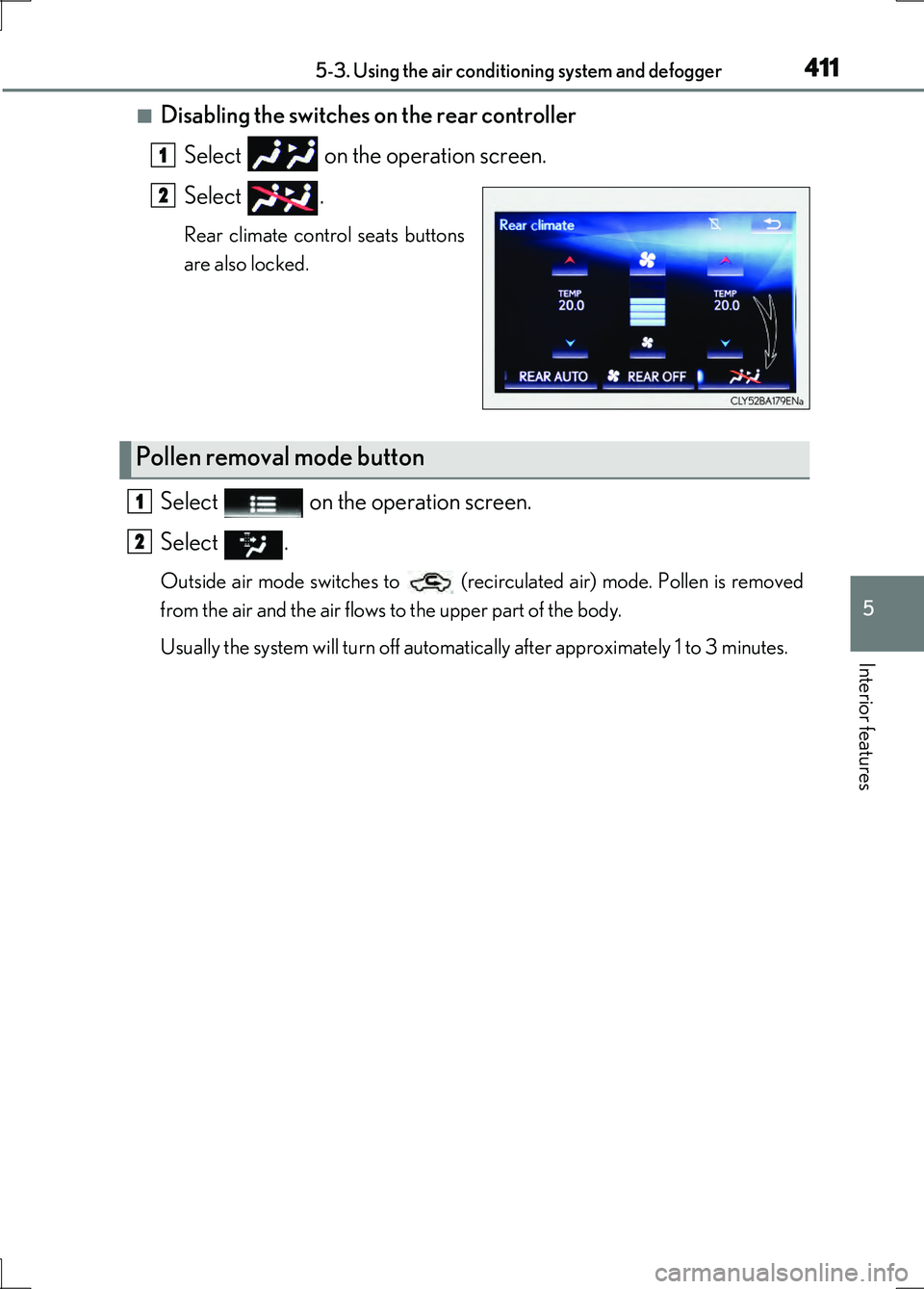
■Disabling the switches on the rear controller Select on the operation screen.
Select .
Rear climate control seats buttons
are also locked.
Select on the operation screen.
Select .
Outside air mode switches to (recirculated air) mode. Pollen is removed
from the air and the air flows to the upper part of the body.
Usually the system will turn off automatically after approximately 1 to 3 minutes.
1
2
Pollen removal mode button
1
2
Page 419 of 676
4195-3. Using the air conditioning system and defogger
5
Interior features
LS600h/LS600hL_EE(OM50G20E)
Press the “AUTO” button.
The air conditioning system will operate, and air outlets and fan speed will be
adjusted automatically.
“AUTO” will be displayed on the control panel.
Press “ ” on “TEMP” to increase the temperature and “” to decrease
the temperature.
The temperature for the right-hand and left-hand seats can be adjusted sepa-
rately.
Air outlets for the right-hand and left-hand seats may be set separately depend-
ing on the temperature setting.
When the rear climate control seats are set to “AUTO” mode, the system is oper-
ated automatically according to the set temperature, outside temperature, etc.
■Adjusting the temperature setting
Press “ ” on “TEMP” to increase the temperature and “” to decrease
the temperature.
The temperature for the right-hand and left-hand seats can be adjusted sepa-
rately.
When the rear climate control seats are set to “AUTO” mode, the system is
operated automatically according to the set temperature, outside tempera-
ture, etc.
Using automatic air conditioning system
Adjusting the settings manually
1
2
Page 420 of 676
4205-3. Using the air conditioning system and defogger
LS600h/LS600hL_EE(OM50G20E)
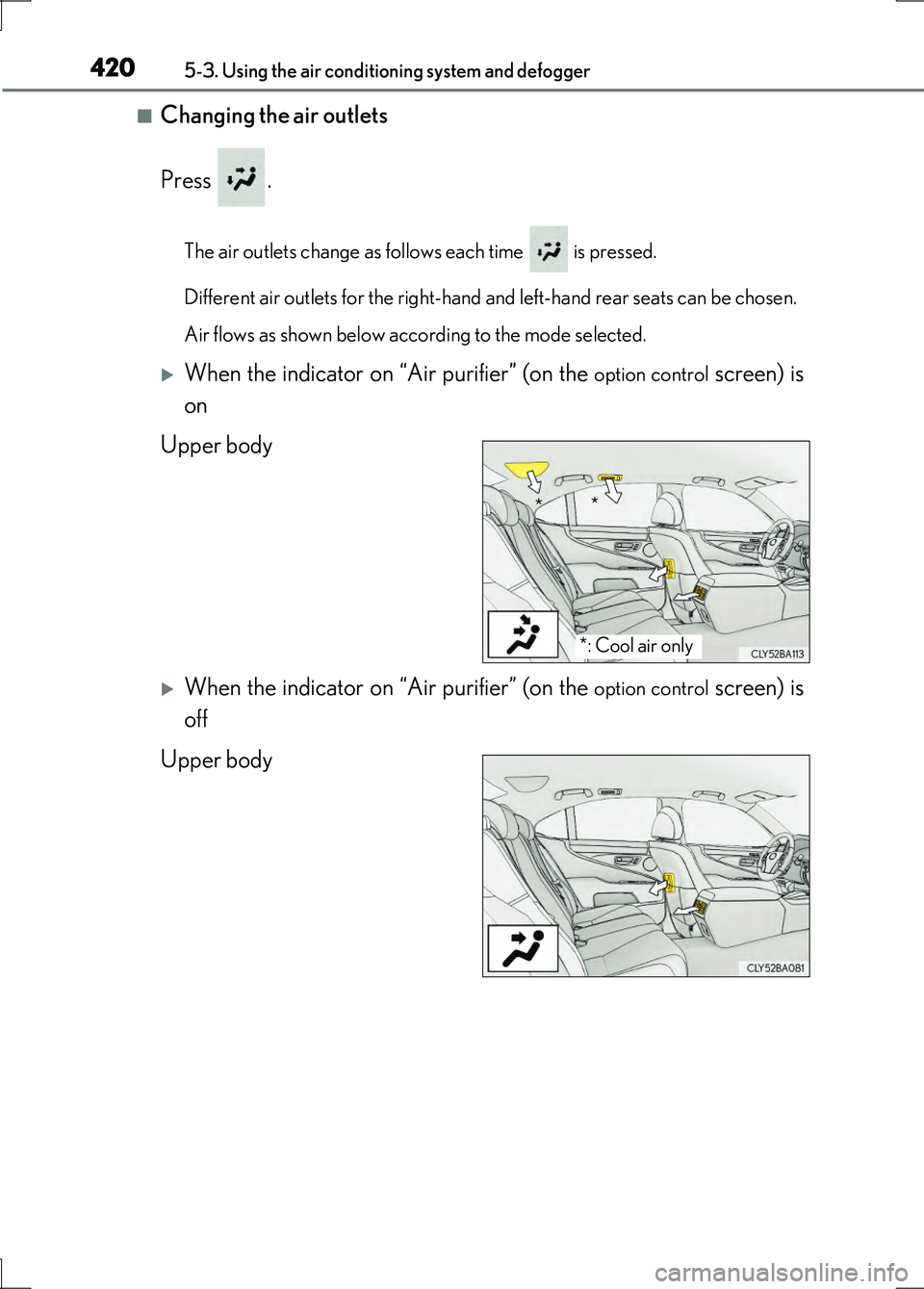
■Changing the air outlets
Press .
The air outlets change as follows each time is pressed.
Different air outlets for the right-hand and left-hand rear seats can be chosen.
Air flows as shown below according to the mode selected.
When the indicator on “Air purifier” (on the option control screen) is
on
Upper body
When the indicator on “Air purifier” (on the option control screen) is
off
Upper body
*: Cool air only
* *
Page 456 of 676
4565-6. Other interior features
LS600h/LS600hL_EE(OM50G20E)
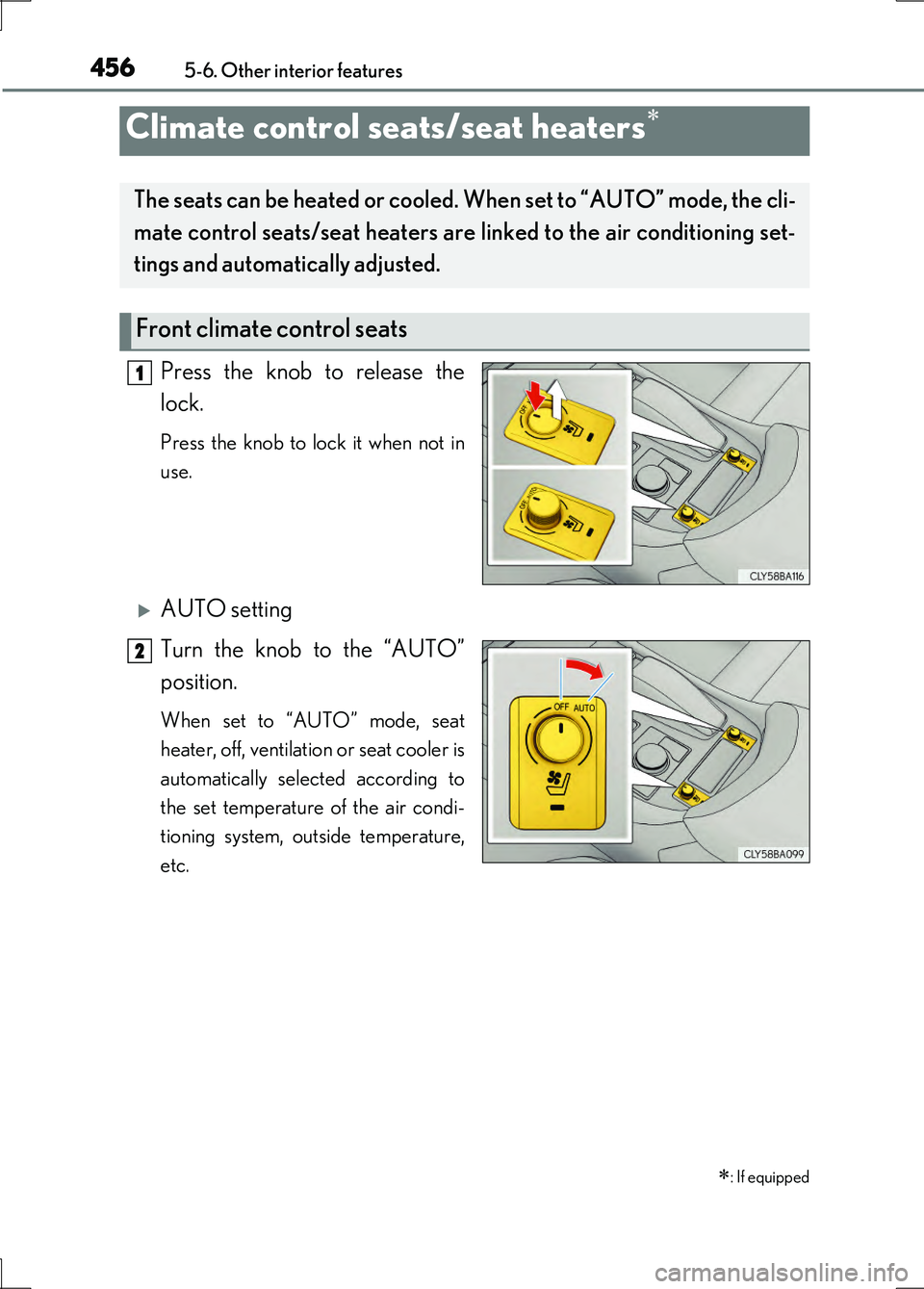
Press the knob to release the
lock.
Press the knob to lock it when not in
use.
AUTO setting
Turn the knob to the “AUTO”
position.
When set to “AUTO” mode, seat
heater, off, ventilation or seat cooler is
automatically selected according to
the set temperature of the air condi-
tioning system, outside temperature,
etc.
Climate control seats/seat heaters
: If equipped
The seats can be heated or cooled. When set to “AUTO” mode, the cli-
mate control seats/seat heaters are linked to the air conditioning set-
tings and automatically adjusted.
Front climate control seats
1
2
Page 457 of 676
4575-6. Other interior features
5
Interior features
LS600h/LS600hL_EE(OM50G20E)
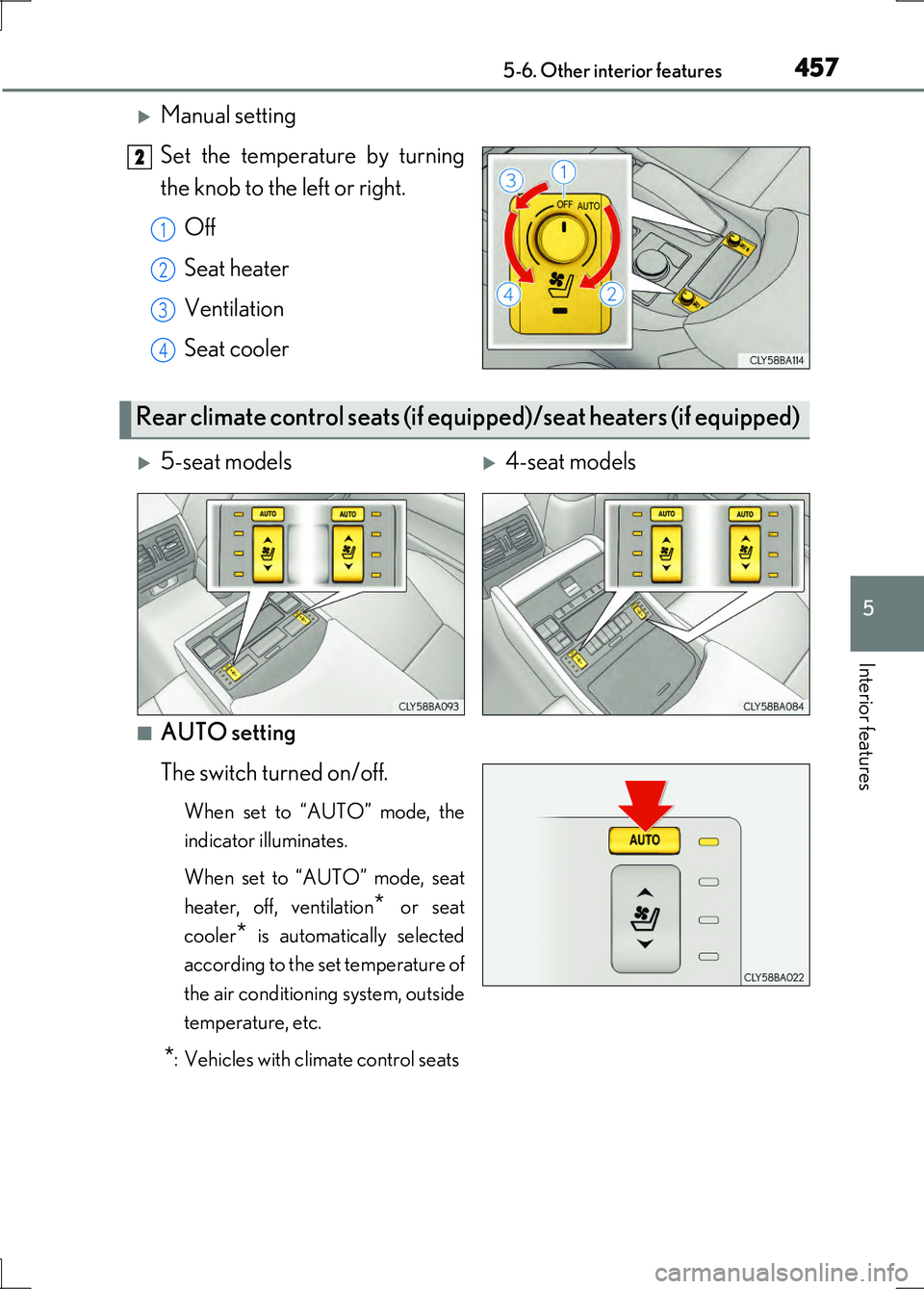
Manual setting
Set the temperature by turning
the knob to the left or right.
Off
Seat heater
Ventilation
Seat cooler
■AUTO setting
The switch turned on/off.
When set to “AUTO” mode, the
indicator illuminates.
When set to “AUTO” mode, seat
heater, off, ventilation* or seat
cooler* is automatically selected
according to the set temperature of
the air conditioning system, outside
temperature, etc.
*: Vehicles with climate control seats
2
1
2
3
4
Rear climate control seats (if eq uipped)/seat heaters (if equipped)
5-seat models4-seat models
Page 458 of 676
4585-6. Other interior features
LS600h/LS600hL_EE(OM50G20E)
■Manual setting
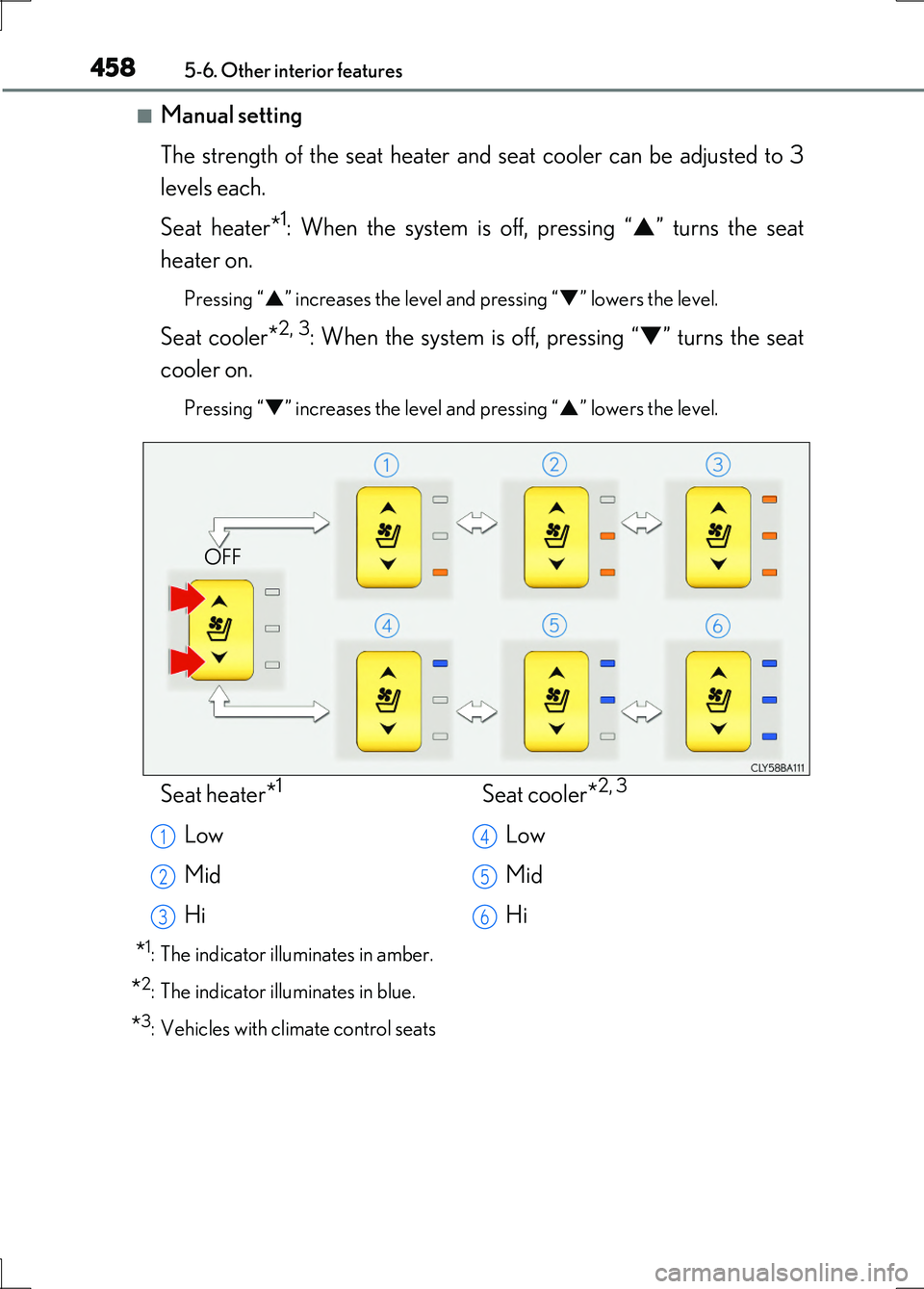
The strength of the seat heater and seat cooler can be adjusted to 3
levels each.
Seat heater*1: When the system is off, pressing “ ” turns the seat
heater on.
Pressing “ ” increases the level and pressing “” lowers the level.
Seat cooler*2, 3: When the system is off, pressing “” turns the seat
cooler on.
Pressing “ ” increases the level and pressing “” lowers the level.
*1: The indicator illuminates in amber.
*2: The indicator illuminates in blue.
*3: Vehicles with climate control seats
OFF
Seat heater*1
Low
Mid
Hi
Seat cooler*2, 3
Low
Mid
Hi
1
2
3
4
5
6
Page 459 of 676
4595-6. Other interior features
5
Interior features
LS600h/LS600hL_EE(OM50G20E)
■Operating condition
The power switch is in ON mode.
■Climate control seat/seat heater operation
Depending on the outside temperature and the temperature of the seat surface,
there are cases when heating operation is stronger than usual.
■Operating the rear climate control seats from the front seats.
P. 409
■Disabling the switches on the rear controller
P. 411
■Replacing the air filters
Filters are installed in the climate control se ats. For replacement of the filters, contact
any authorized Lexus dealer or repairer, or another duly qualified and equipped pro-
fessional.
■Customization
Automatic operation settings can be customized. (Customizable features P. 634)
Page 462 of 676
4625-6. Other interior features
LS600h/LS600hL_EE(OM50G20E)
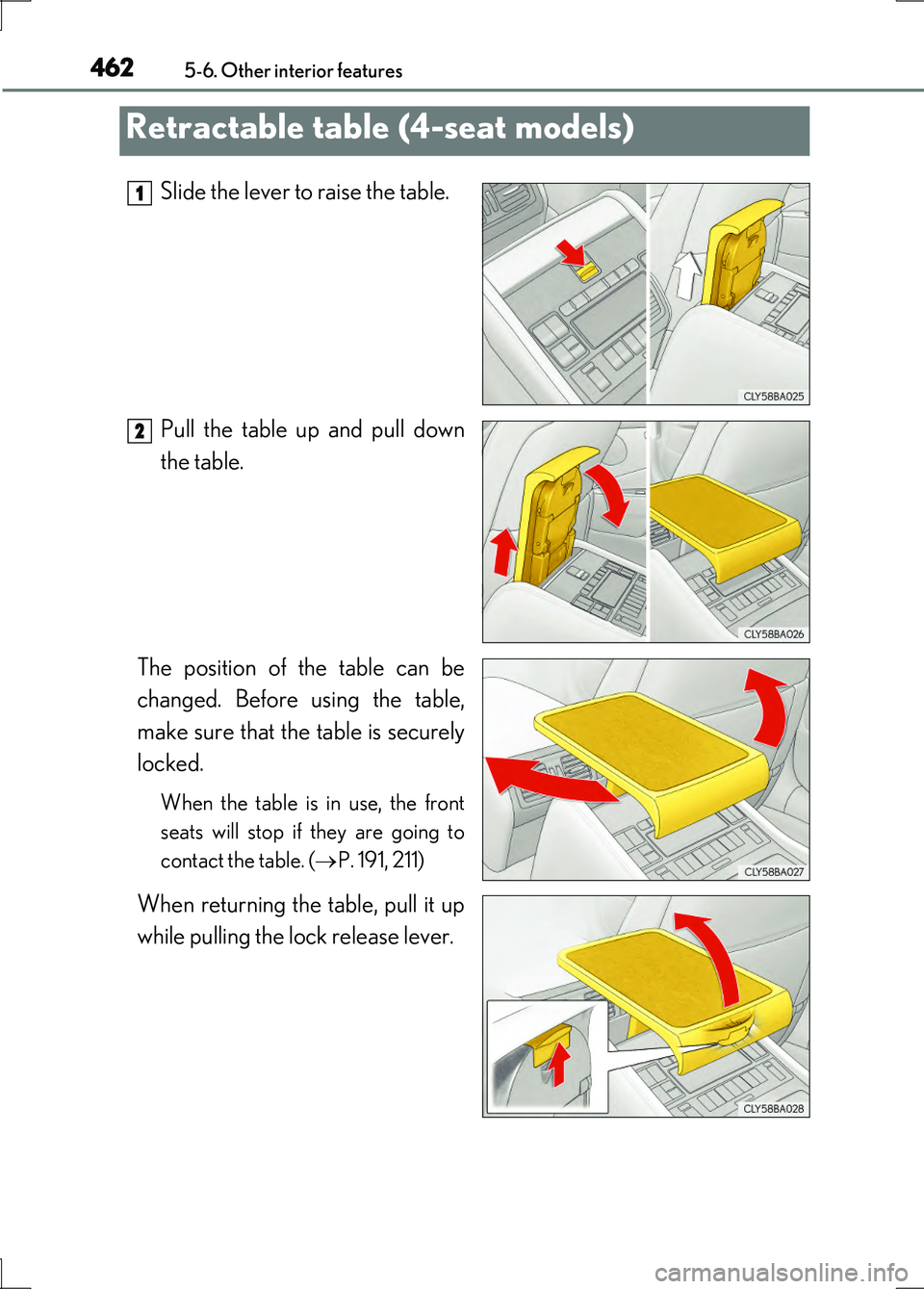
Slide the lever to raise the table.
Pull the table up and pull down
the table.
The position of the table can be
changed. Before using the table,
make sure that the table is securely
locked.
When the table is in use, the front
seats will stop if they are going to
contact the table. ( P. 191, 211)
When returning the table, pull it up
while pulling the lock release lever.
Retractable table (4-seat models)
1
2
Page 482 of 676
4826-1. Maintenance and care
LS600h/LS600hL_EE(OM50G20E)
NOTICE
■Cleaning detergents
●Do not use the following types of detergent, as they may discolor the vehicle inte-
rior or cause streaks or damage to painted surfaces:
• Non-seat portions: Organic substances such as benzene or gasoline, alkaline
or acidic solutions, dye, and bleach
• Seats: Alkaline or acidic solutions, such as thinner, benzene, and alcohol
●Do not use polish wax or polish cleaner. The instrument panel’s or other interior
part’s painted surface may be damaged.
■Preventing damage to leather surfaces
Observe the following precautions to avoid damage to and deterioration of
leather surfaces:
●Remove any dust or dirt from leather surfaces immediately.
●Do not expose the vehicle to direct sun light for extended periods of time. Park
the vehicle in the shade, especially during summer.
●Do not place items made of vinyl, plastic, or containing wax on the upholstery, as
they may stick to the leather surface if the vehicle interior heats up significantly.
■Water on the floor
Do not wash the vehicle floor with water.
Vehicle systems such as the audio system may be damaged if water comes into
contact with electrical components such as the audio system above or under the
floor of the vehicle. Water may also cause the body to rust.
■When cleaning the inside of the windshield (vehicles with LKA [Lane-Keeping
Assist])
Be careful not to touch the camera sensor ( P. 324).
If the camera is accidentally scratched or hit, LKA may not operate properly or
may cause a malfunction.
■Cleaning the inside of the rear window
●Do not use glass cleaner to clean the rear window, as this may cause damage to
the rear window defogger heater wires or antenna. Use a cloth dampened with
lukewarm water to gently wipe the window clean. Wipe the window in strokes
running parallel to the heater wires or antenna.
●Be careful not to scratch or damage the heater wires or antenna.