change time LEXUS LX470 2007 User Guide
[x] Cancel search | Manufacturer: LEXUS, Model Year: 2007, Model line: LX470, Model: LEXUS LX470 2007Pages: 426, PDF Size: 10.95 MB
Page 210 of 426

192
3-2. Using the audio system
Contact the XM® Listener Care Center at (800) 967-2346 during the following
hours*.
Monday - Saturday: 6 a.m. - 2 a.m. Sunday: 8 a.m. - 8 p.m. Central Standard Time
*: Subject to change without notice.
■Certifications for the radio tuner
This equipment has been tested and found to comply with the limits for a class B
digital device, pursuant to Part 15 of the FCC Rules. These limits are designed to
provide reasonable protection against harmful interference in a residential installa-
tion. This equipment generate s, uses and can radiate radio frequency energy and, if
not installed and used in accordance with the instructions, may cause harmful inter-
ference to radio communications. However, there is no guarantee that interference
will not occur in a particular installation.
If this equipment does cause harmful interf erence to radio or television reception,
which can be determined by turning the eq uipment off and on, the user is encour-
aged to try to correct the interference by trying one or more of the following:
●Reorienting or relocating the receiving antenna.
●Increasing the separation between the equipment and receiver.
●Connecting the equipment into an outlet on a circuit different from that to which
the receiver connected.
●Consulting the dealer or an experienced radio/TV technician for help.
---
The channel you selected is no longer available. Wait
for about 2 seconds until the radio returns to the previ-
ous channel or “CH001. If it does not change auto-
matically, select another channel.
Page 219 of 426
201
3-2. Using the audio system
3
Interior features
Switching the displayPress .
Each time the button is pressed, the display changes in the order of Track no./
Elapsed time CD title Track name.
■Canceling random, repeat and scan playback
Press (RAND), (RPT), or once again.
■ When LOAD, ERROR or WAIT is shown on the display
LOAD: This indicates that the CD player has completed loading the CD.
ERROR: This indicates is a trouble either in the CD or inside the player.
The CD may be dirty, damaged, or inserted up-side down.
WAIT: Operation is stopped due to a high temperature inside the player. Wait for a while and then press . Contact your Lexus
dealer if the CD still cannot be played back.
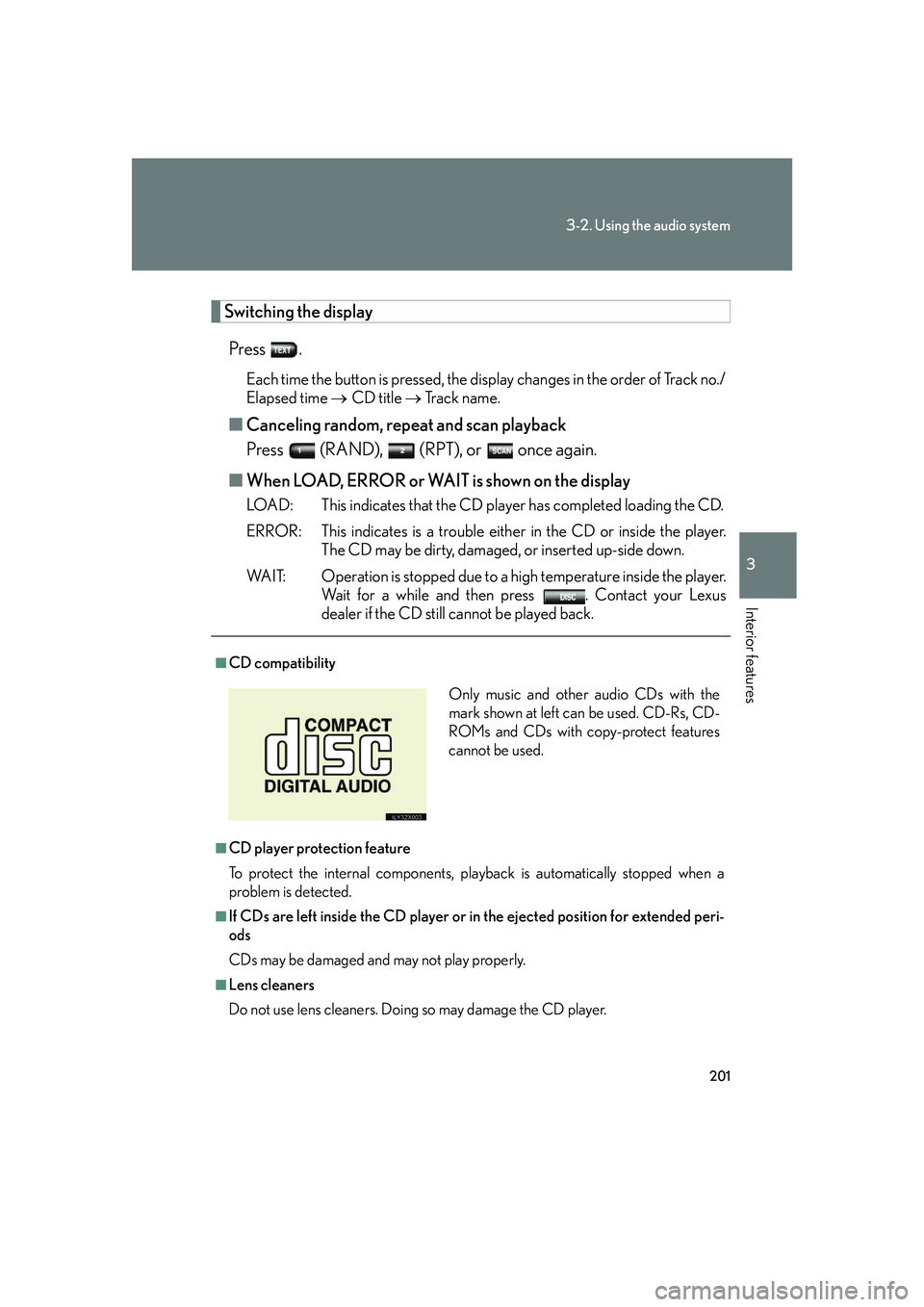
■CD compatibility
■CD player protection feature
To protect the internal components, play back is automatically stopped when a
problem is detected.
■If CDs are left inside the CD player or in the ejected position for extended peri-
ods
CDs may be damaged and may not play properly.
■Lens cleaners
Do not use lens cleaners. Doing so may damage the CD player.
Only music and other audio CDs with the
mark shown at left can be used. CD-Rs, CD-
ROMs and CDs with copy-protect features
cannot be used.
Page 224 of 426
![LEXUS LX470 2007 User Guide 206
3-2. Using the audio system
Using the steering switches
]
Turning on the powerPress when the audio system is turned OFF.
Changing the audio source
Press when the audio system is turned ON. T](/img/36/58005/w960_58005-223.png "LEXUS LX470 2007 User Guide 206
3-2. Using the audio system
Using the steering switches
]
Turning on the powerPress when the audio system is turned OFF.
Changing the audio source
Press when the audio system is turned ON. T")
206
3-2. Using the audio system
Using the steering switches
]
Turning on the powerPress when the audio system is turned OFF.
Changing the audio source
Press when the audio system is turned ON. The audio source
changes as follows each time the bu tton is pressed. If a cassette tape or
CD is not inserted, that mode will be skipped.
Vehicles with CD player:
FM(1, 2) cassette player CD player AM SAT (1, 2, 3)
Vehicles with DVD player:
FM(1, 2) cassette player DVD player AM SAT (1, 2, 3)
Some audio features can be controlled using the switches on the steering
wheel.
Vo l u m e
Radio: Select radio stations
Cassette: Fast forward, rewind
and selecting tracks
CD: Select tracks and discs
DVD*: Select tracks, discs and chapter
Power on, select audio
source
*: If equipped
Page 230 of 426

212
3-3. Using the interior lights
Interior lights list
■Customization
Setting (e.g. The time elapsed before lights turn off) can be changed. (
P. 3 8 9 )
Illuminated entry system: The various lights automatically turn on/off
whether the doors are locked/unlocked and whether the doors are open/
closed.
Running board lights
Vanity lights
Front personal lights (P. 213)
Rear personal lights ( P. 213)
Front interior light ( P. 213)
Rear interior light ( P. 213)
Door courtesy lights
Glove box light
Page 275 of 426

257
3-5. Other interior features
3
Interior features
●Tips for entering a phone number using the “Dial” and “Store” commands
• You do not need to say “Dial”, “Store” or “Verify” after the phone number.
• If the phone number entered is not 7, 10, or 11 digits, use the “Dial” or “Store”
command.
• Do not pause between the digits.
• Speech recognition does not recognize the words “Hundred” or “Thousand”. Instead, say each digit.
• Speech recognition often works better when the digits are combined
smoothly into a single phrase.
• If the system does not recognize your command properly, use the “Digit dial” command to enter one digit at a time.
●If problems continue
• Say each one of the syllables in the word clearly.
• Be sure to articulate each sound in the word.
• If the system is confusing 2 commands th at are similar, be sure to pronounce
the distinction.
• Avoid clipping short words and syllables.
• Try speaking louder to prevent background noise from drowning out your
voice.
●Audible voice prompts
Some of the voice guidance instructions can be changed to Spanish. Press the
button and ask a Lexus Link Advisor.
■Information on Advanced services See the Lexus Link area of the Lexus website at www.lexus.com/lexuslink/
or call
the Lexus Link Call Center at 1-800-25-LEXUS (1-800-255-3987)(toll-free)
for more information.
■Certification for the Lexus Link System
NOTE:
This device complies with Part 15 of the FCC Rules. Operation is subject to the fol-
lowing two conditions: (1) this device ma y not cause harmful interference and (2)
this device must accept any interference received, including interference that may
cause undesired operation.
FCC ID: SCWTR-423-A2
Page 276 of 426

258
3-5. Other interior features
■Lexus Link transceiver antenna
●Use only the supplied or an approved antenna. Unauthorized antennas, modifi-
cations, or attachments could damage the Lexus Link System and may violate
FCC regulations.
CAUTION
■FCC WARNING
Changes or modifications in construction not expressly approved by the party
responsible for compliance could void the user's authority to operate the equip-
ment.
Radio Frequency Exposure. This device is approved for Mobile Application only
and, to comply with applicable FCC radi o frequency exposure regulations, must be
used with a distance of at least 7.9 in. (20 cm) between the antenna and the body of
any person at all time during use.
■Caution regarding interference with electronic devices
Persons using medical devices such as a pacemaker should not touch or come in
close contact with the antenna while the vehicle ignition is on. Otherwise, the cellu-
lar signals may cause a malfunction in the medical devices.
NOTICE
■To avoid damage to the system
●Do not touch the antenna unless necessary, as this may affect transceiver quality
and may cause the unit to operate at a higher power level than necessary.
●Make sure the antenna is removed before driving through an automatic car wash.
■To ensure the Lexus Link System functions correctly
Be sure to reattach the Lexus Link transceiver antenna.
●Before using an automatic car wash,
disconnect the antenna by unscrewing
it from the roof mount.
When you remove the antenna, make
sure the ignition is turned off.
Page 407 of 426

389
6
Vehicle specifications
6-2. Customization
Customizable features
ItemFunctionDefault settingCustomizedsetting
Wireless
remote con-
trol
(
P. 3 )
Wireless remote controlONOFF
Unlocking operation
Driver's door
unlocked in
one step, all
doors
unlocked
in 2-steps
All doors
unlocked in 1-step
Time elapsed before auto-
matic door lock function is
activated if door is not
opened after being
unlocked
30 seconds60 seconds
Operation indicator
(Emergency flashers)ONOFF
Operation indicator
(Buzzer) ONOFF
Panic functionONOFF
Buzzer sounds when
pushing
LO C K with any
door not closed.ONOFF
Your vehicle includes a variety of elec tronic features that can be personal-
ized to your preferences. Programming these preferences requires spe-
cialized equipment and may be performed by an authorized Lexus
dealership.
Some function settings are changed simultaneously with other functions
being customized. Contact your Lexus dealer for further details.
Page 417 of 426

399
Alphabetical index
CareExterior ................................................... 260
Interior......................................................262
Seat belts ............................................... 263
Card holder .............................................. 215
Cargo capacity ........................................ 151
Cargo net hooks .................................. 235
CD player/changer .............................. 197
Chains.........................................................158
Child-protectors ...................................6,10
Child restraint system (CRS) Definition.................................................... 72
Installation..................................................75
Front passenger occupant classification system .........................67
Installing CRS with lower anchorages .......................................... 80
Installing CRS with seatbelts ...........76
Installing CRS with top straps ........ 82
Child safety Airbag precautions ............................... 61
Battery precautions ...............276, 362
Child-protectors.................................6,10
Child restraint system ......................... 72
How your child should wear the seatbelt ............................................ 27
Installing child restraints .....................75
Moon roof precautions ......................43
Power window lock switch ............. 38
Power window precautions............ 39
Removed wireless remote control battery precautions ........310
Seat belt extender precautions ......29
Seat belt precautions.......................... 28
Seat heater precautions ................. 230
Cigarette lighter .................................... 227 Cleaning
Exterior................................................... 260
Interior ..................................................... 262
Seat belts ................................................263
Clock ......................................................... 223
Coat hooks .............................................. 232
Compass .................................................. 242
Condenser ..............................................283
Console box ............................................ 216
Cooling system Engine overheating...........................363
Cruise control ......................................... 120
Cup holder ............................................... 218
Curtain shield airbags............................ 54
Customizable features ...................... 389
Daytime running light system .............113
Defogger Rear window ......................................... 182
Side mirror.............................................. 182
Dimension................................................368
Dinghy towing ......................................... 169
Display Trip information ..................................... 110
Do-it-yourself maintenance ...............271
Door courtesy lights Door courtesy lights ........................... 212
Wattage .................................................. 377
Door lock Back door .................................................... 9
Side door...................................................... 5
Wireless remote control ...................... 3
Doors Back door .................................................... 9
Side door...................................................... 5
Side mirrors ............................................. 32C
D