ECU LEXUS LX470 2007 Owner's Manual
[x] Cancel search | Manufacturer: LEXUS, Model Year: 2007, Model line: LX470, Model: LEXUS LX470 2007Pages: 426, PDF Size: 10.95 MB
Page 111 of 426
93
2-1. Driving procedures
2
When driving
CAUTION
■When taking a nap in the vehicle
Always turn the engine off.
Otherwise, you may accidentally move the shift lever or press the accelerator
pedal, which could cause an accident or fire due to abnormal engine overheating.
Additionally, if the vehicle is parked in a poorly ventilated area, exhaust fumes may
enter the vehicle and cause gas poisoning.
■When braking the vehicle
●When the brakes are wet, drive more cautiously.
Braking distance increases when the brakes are wet, and may cause one side of
the vehicle to brake differently than the other side. Also the parking brake may
not securely hold the vehicle.
●If the brake assist function does not operate, do not follow other vehicles closely
and avoid downhill or sharp turns that require braking.
In this case, braking is still possible, but it will require more force on the pedal than
usual. Braking distance may also increase.
●Do not pump the brake pedal if the engine stalls.
Each push on the pedal uses up your reserved brake fluid pressure.
●The brake system consists of 2 individual hydraulic systems: if one of the systems
fails, the other will still operate. In this case, the brake pedal should be depressed
more firmly than usual and braking distance becomes longer.
Do not drive your vehicle with only a single brake system. Have your brakes fixed
immediately.
Page 142 of 426

124
2-4. Using other driving systems
■Rear view monitor system camera
■Smear effect
In the following cases, it may be difficult to
see the images on the screen, even when the
system is functioning correctly.
• In the dark (e.g. at night).
• If the temperature near the lens isextremely high or low.
• If water droplets get on the camera, or when humidity is high (e.g. when it rains).
• If foreign matter (e.g. snow or mud) get
on the camera lens.
• If the sun or headlights are shining directly
into the camera lens.
If a bright light (e.g., sunlight reflected off the
vehicle body) is picked up by the camera, a
smear effect* peculiar to the camera may
occur.
*: Smear effect—A phenomenon that occurs when a bright light (e.g., sunlight reflected
off the vehicle body) is picked up by the
camera; when transmitted by the camera,
the light source appears to have a vertical
streak above and below it.
Page 147 of 426

129
2-4. Using other driving systems
2
When driving
NOTICE
■To avoid damaging the head-up display
●Do not put anything in front of the head-up display shutter. It may hinder the open-
ing or closing of the shutter.
●Do not let drinks spill on the head-up display.
●If an object gets caught in the shutter and it dose not close securely, open the shut-
ter with your hand and remove the object. The shutter will function properly after
you turn the ignition off and then on.
Page 169 of 426

151
2-5. Driving information
2
When driving
Cargo and luggage
Capacity and distributionCargo capacity depends on the to tal weight of the occupants.
(Cargo capacity) = (Total load capa city) — (Total weight of occupants)
Steps for Determining Correct Load Limit—
(1) Locate the statement “The combined weight of occupants and cargo should never exceed XXX kg or XXX lbs.” on your vehicle’s
placard.
(2) Determine the combined weight of the driver and passengers that
will be riding in your vehicle.
(3) Subtract the combined weight of the driver and passengers from
XXX kg or XXX lbs.
(4) The resulting figure equals the av ailable amount of cargo and lug-
gage load capacity.
For example, if the “XXX” amount equals 1400 lbs. and there will be
five 150 lb passengers in your vehi cle, the amount of available cargo
and luggage load capacity is 650 lbs. (1400 - 750 (5 150) = 650
lbs.)
(5) Determine the combined weight of luggage and cargo being
loaded on the vehicle.
That weight may not safely exc eed the available cargo and luggage
load capacity calculated in Step 4.
Take notice of the following information about storage precautions, cargo
capacity and load.
● Stow cargo and luggage in the luggage compartment whenever
possible. Be sure all items are secured in place.
● Be careful to keep the vehicle level. Placing the weight as far for-
ward as possible helps maintain vehicle balance.
● For better fuel economy, do not carry unnecessary weight.
Page 172 of 426
154
2-5. Driving information
CAUTION
■Storage precautions
●Do not stack anything in the luggage compartment higher than the seatbacks.
Such items may be thrown about and possibly injure people in the vehicle during
sudden braking or in an accident.
●Do not drive with objects on top of the instrument panel.
They may interfere with the driver’s field of view or move during sharp accelera-
tion or turning, thus impairing the driver ’s control of the vehicle. In an accident
they may injure the vehicle occupants.
●Secure all items in the occupant compartment, as they may shift and injure some-
one during an accident or sudden braking.
●Never allow anyone to ride in the luggage compartment. It is not designed for
passengers. They should ride in their seat s with their seat belts properly fastened.
Otherwise, they are much more likely to suffer serious injury, in the event of sud-
den braking or a collision.
■Weight of the load
●Do not exceed the maximum axle weight ra ting or the total vehicle weight rating.
●Even if the total load of occupant's weight and the cargo load is less than the total
load capacity, do not apply the load unevenly. Improper loading may cause dete-
rioration of steering or braking control which may cause death or serious injury.
Page 182 of 426
164
2-5. Driving information
■Before towing
Check that the following conditions are met:
●The vehicle’s tires are properly inflated. (P. 3 0 2 )
●Trailer tires are inflated according to the trailer manufacturer’s recommenda-
tion.
●All trailer lights work.
●All lights work each time you connect them.
●The trailer ball is set up at the proper height for the coupler on the trailer.
●The vehicle remains level when a loaded or unloaded trailer is hitched. Do not
drive if the vehicle is not level, and check for improper tongue load, overloading,
worn suspension, or other possible causes.
●The trailer cargo is securely loaded.
●The rear view mirrors conform to all applicable federal, state/provincial or local
regulations. If they do not, install rear view mirrors appropriate for towing pur-
poses.
■Break-in schedule
Lexus recommends that you do not use a new vehicle or a vehicle with any new
power train components (engine, transmission, differential, wheel bearings, etc.) to
tow a trailer for the first 500 miles (800 km) of driving.
■Maintenance
●If you tow a trailer, your vehicle will require more frequent maintenance due to
the additional load. (See “Warranty and Services Guide/ Owner’s Manual Sup-
plement/ Scheduled Maintenance”.)
●Retighten the fixing bolts of the towing ball and bracket after approximately
600 miles (1000 km) of trailer towing.
Page 183 of 426

165
2-5. Driving information
2
When driving
CAUTION
■To avoid accident or injury
●The total trailer weight (trailer weight plus the weight of cargo) must not exceed
6500 lb. (2948 kg).
●If a trailer and cargo weight over 2000 lb. (907 kg), use a sway control device
with sufficient capacity.
●The gross combined weight (sum of your vehicle weight plus its load and the total
trailer weight) must not exceed 12400 lb. (5625 kg).
●Do not exceed the trailer hitch assembly weight, gross vehicle weight, gross axle
weight and trailer tongue load capacities.
●Never load more weight in the back than in the front of the trailer. About 60% of
the load should be in the front half of the trailer, and the remaining 40% in the
rear.
●Set the vehicle height to the “LO” mode an d turn off the active height control sus-
pension to prevent the vehicle heig ht from automatically changing.
●The tow hitch receiver installed on your vehicle must never be used on another
vehicle.
■Hitches
●If you wish to install a trailer hitch, contact your Lexus dealer.
●Use only a hitch that conforms to the total trailer weight requirement.
●Follow the directions supplied by the hitch manufacturer.
●Lubricate the hitch ball with a light coat of grease.
●Remove the trailer hitch whenever you are not towing a trailer. After removing
the hitch, seal any mounting hole in the vehicle body to prevent entry of any sub-
stances into the vehicle.
■When towing a trailer
●If the total trailer weight exceeds 1000 lb . (453 kg), trailer brakes are required.
●Never tap into your vehicle’s hydraulic system, as this will lower the vehicle’s brak-
ing effectiveness.
●Never tow a trailer without using a safety chain securely attached to both the
trailer and the vehicle. If damage occurs to the coupling unit or hitch ball, there is
danger of the trailer wandering into another lane.
Page 209 of 426
191
3-2. Using the audio system
3
Interior features
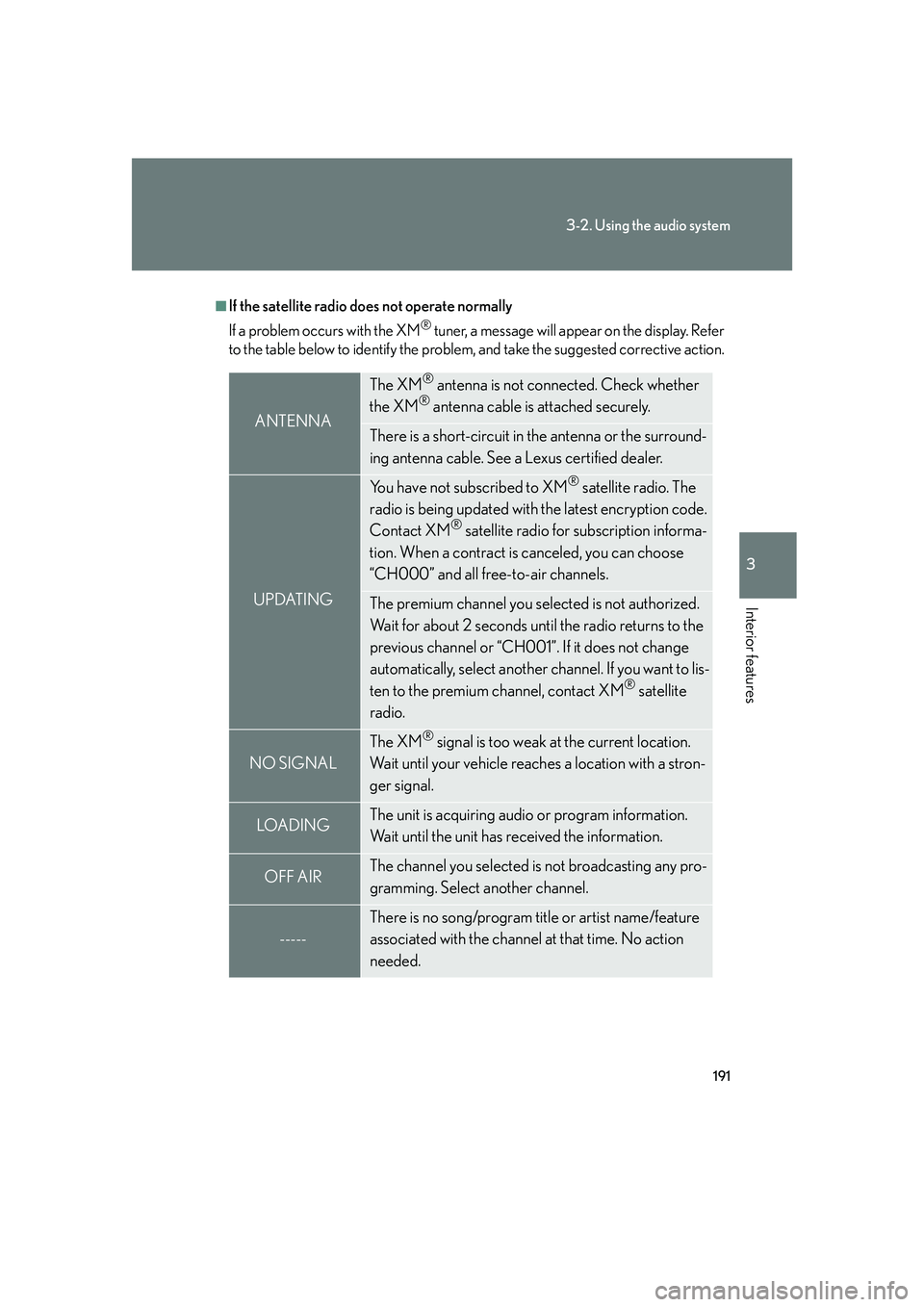
■If the satellite radio does not operate normally
If a problem occurs with the XM
® tuner, a message will appear on the display. Refer
to the table below to identify the problem, and take the suggested corrective action.
ANTENNA
The XM® antenna is not connected. Check whether
the XM® antenna cable is attached securely.
There is a short-circuit in the antenna or the surround-
ing antenna cable. See a Lexus certified dealer.
UPDATING
You have not subscribed to XM® satellite radio. The
radio is being updated with the latest encryption code.
Contact XM
® satellite radio for subscription informa-
tion. When a contract is canceled, you can choose
“CH000” and all free-to-air channels.
The premium channel you selected is not authorized.
Wait for about 2 seconds until the radio returns to the
previous channel or “CH001”. If it does not change
automatically, select another channel. If you want to lis-
ten to the premium channel, contact XM
® satellite
radio.
NO SIGNAL
The XM® signal is too weak at the current location.
Wait until your vehicle reaches a location with a stron-
ger signal.
LOADIN GThe unit is acquiring audio or program information.
Wait until the unit has received the information.
OFF AIRThe channel you selected is not broadcasting any pro-
gramming. Select another channel.
-----
There is no song/program title or artist name/feature
associated with the channel at that time. No action
needed.
Page 252 of 426

234
3-5. Other interior features
Floor mats
CAUTION
■When inserting the floor mat
Make sure the floor mat is properly placed on the vehicle carpet. If the floor mat
slips and interferes with the movement of the pedals during driving, it may cause an
accident.
Securely place a mat that matches the size of the space on the carpet.
Secure the floor mat using the
hooks provided.
Page 253 of 426

235
3-5. Other interior features
3
Interior features
Luggage compartment features
■Tie-down hooks
Tie-down hooks are provided
for securing loose items.
■ Cargo net hooks
To hang the cargo net, use the
cargo net hooks and rear tie-
down hooks.
The cargo net itself is not included
as an original equipment.
■Warning reflector holder
Hold the warning reflector with
a band.
The warning reflector itself is not
included as an original equipment.