lights LEXUS LX470 2007 Owner's Manual
[x] Cancel search | Manufacturer: LEXUS, Model Year: 2007, Model line: LX470, Model: LEXUS LX470 2007Pages: 426, PDF Size: 10.95 MB
Page 135 of 426
117
2-3. Operating the lights and windshield wipers
2
When driving
NOTICE
■When the windshield is dry
Do not use the wipers, as they may damage the windshield.
■When there is no washer fluid spray from the nozzle
Damage to the washer fluid pump may be caused if the lever is pulled toward you
and held continually.
Page 136 of 426
118
2-3. Operating the lights and windshield wipers
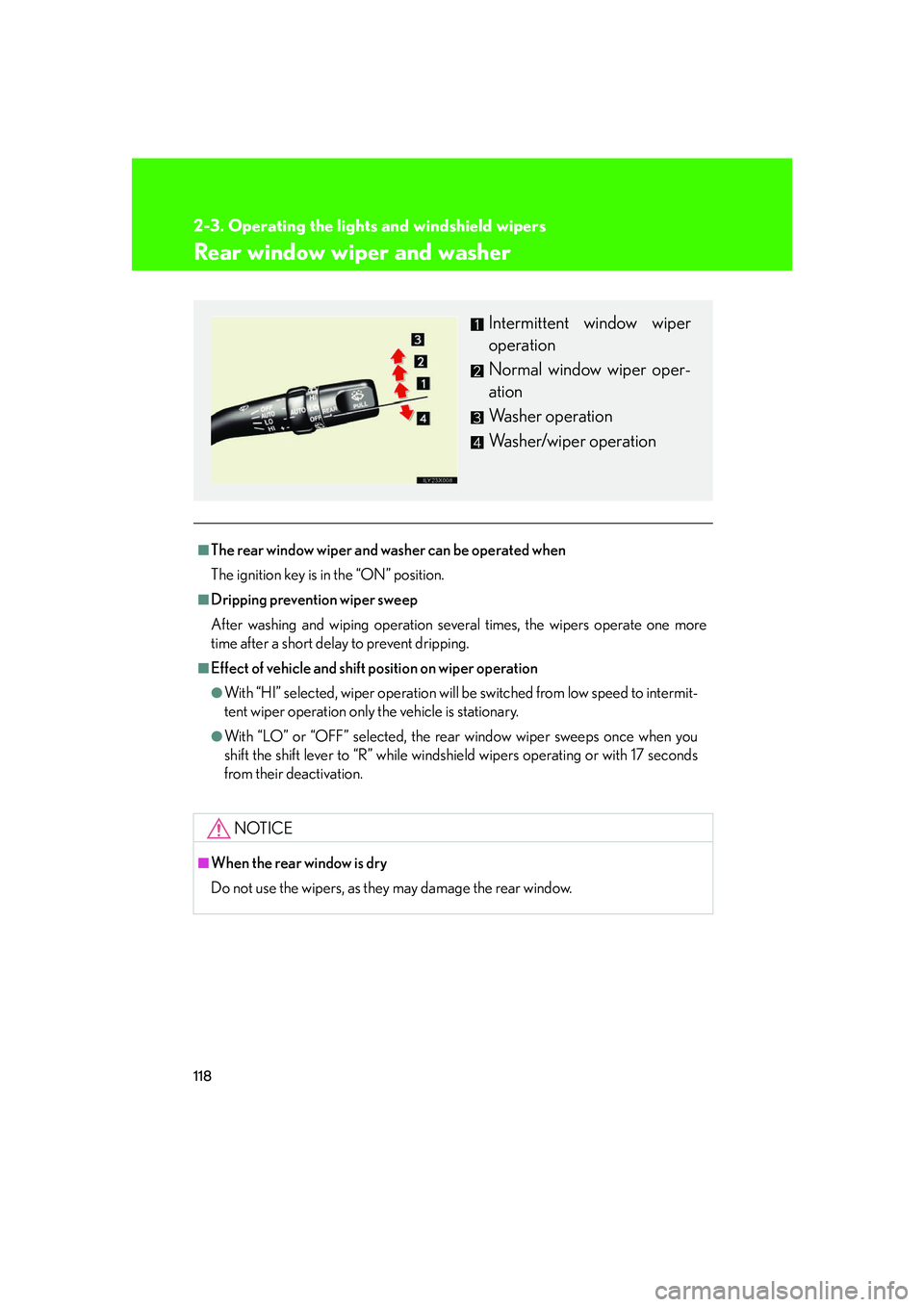
Rear window wiper and washer
■The rear window wiper and washer can be operated when
The ignition key is in the “ON” position.
■Dripping prevention wiper sweep
After washing and wiping operation several times, the wipers operate one more
time after a short delay to prevent dripping.
■Effect of vehicle and shift position on wiper operation
●With “HI” selected, wiper operation will be switched from low speed to intermit-
tent wiper operation only the vehicle is stationary.
●With “LO” or “OFF” selected, the rear window wiper sweeps once when you
shift the shift lever to “R” while windshield wipers operating or with 17 seconds
from their deactivation.
NOTICE
■When the rear window is dry
Do not use the wipers, as they may damage the rear window.
Intermittent window wiper
operation
Normal window wiper oper-
ation
Washer operation
Washer/wiper operation
Page 137 of 426

119
2-3. Operating the lights and windshield wipers
2
When driving
Headlight cleaner switch (if equipped)
■The headlight cleaner can be operated when
When the ignition key is in the “ON” po sition and the headlight switch is turned
ON.
NOTICE
■When the washer fluid tank is empty
Do not use this function when the washer fluid tank is empty. This may cause the
washer cleaner motor to overheat.
Washer fluid can be sprayed on the headlights.
Press the switch to clean the
headlights.
Page 142 of 426

124
2-4. Using other driving systems
■Rear view monitor system camera
■Smear effect
In the following cases, it may be difficult to
see the images on the screen, even when the
system is functioning correctly.
• In the dark (e.g. at night).
• If the temperature near the lens isextremely high or low.
• If water droplets get on the camera, or when humidity is high (e.g. when it rains).
• If foreign matter (e.g. snow or mud) get
on the camera lens.
• If the sun or headlights are shining directly
into the camera lens.
If a bright light (e.g., sunlight reflected off the
vehicle body) is picked up by the camera, a
smear effect* peculiar to the camera may
occur.
*: Smear effect—A phenomenon that occurs when a bright light (e.g., sunlight reflected
off the vehicle body) is picked up by the
camera; when transmitted by the camera,
the light source appears to have a vertical
streak above and below it.
Page 145 of 426

127
2-4. Using other driving systems
2
When driving
■The Lexus night view system can be operated when
●The ignition key is in the “ON” position.
●It is dark outside.
●The headlights are on.
When all the above conditions are met, the head-up display shutter opens automat-
ically and the image sent from the head -up display is shown on the windshield.
■“BEAM” indicator
●When the vehicle starts moving with th e system on, the near-infrared floodlight
is irradiated and the “BEAM” indicator light comes on.
■Conditions unfavorable to correct operation
In the following conditions, the image may not be clear or the view of the road
ahead may not be shown at all.
●Driving on hills with many up and down slopes.
●Driving on road with curves.
●In severe weather conditions such as rain, fog or snow.
●Strong near-infrared light emission, such as the light coming from a vehicle run-
ning in the opposite lane, enters the near-infrared camera.
●An object or clothing of a pedestrian is made of a certain kind of material (ex.
leather).
●The windshield or the lens of the near-infrared floodlight is dirty. (Always keep
the windshield and the lens clean.)
●Double vision of image reduces clarity in some situation.
●The top of the windshield fogs up.
Page 148 of 426

130
2-4. Using other driving systems
AHC (Active Height Control Suspension)
AHC adjusts the vehicle height in accordance with driving conditions.
There are 3 selectable modes, “HI” (high), “N” (normal), and “LO” (low).
■Height control switch
“▲ ” (Up) switch
“ ▼ ” (Down) switch
“OFF” switch
Push while the vehicle is
stopped. The “OFF” indicator
light will come on, and the vehi-
cle height will be fixed in the
current mode. Push the switch
again to turn the system back
on.
■ AHC indicator lights
Height control mode indica-
tors
Height control “OFF” indica-
tor
Page 150 of 426

132
2-4. Using other driving systems
AHC indicator lightsIf you change the vehicle height mode, the indicator lights change as fol-
lows: • The current mode indicator light w ill turn off, and the selected mode
indicator light will begin flashing.
• Once the change in vehicle height is complete, the selected mode indicator light will change fr om flashing to continuously lit.
If you press the height control switch while AHC is off, the current mode
indicator light will turn on and the selected mode indicator light will begin
flashing while the system starts up.
Once the system has star ted, the current mode indi cator light will turn off.
■Operating conditions
●The engine must be running.
●All side doors and the back door must be closed.
■Automatic change in vehicle height when in the high mode
●If the vehicle speed exceeds 19 mph (30 km/h) with the four-wheel drive con-
trol lever in the “H” position, normal mode is automatically selected.
●If the vehicle speed exceeds 30 mph (50 km/h) with the four-wheel drive con-
trol lever in the “L” position, the vehicle height is lowered to 1.0 in. (25 mm)
higher than the normal mode height. If the vehicle speed drops to 12 mph (20
km/h) or less, high mode is automatically resumed.
Page 152 of 426

134
2-4. Using other driving systems
■If the vehicle height does not change
If the vehicle is loaded too heavily, or the undercarriage has come into contact with
the road surface, the vehicle height cannot be raised/lowered. In this case, the indi-
cator lights will change as follows:
●The current mode indicator light will turn off, and the target mode indicator light
will begin flashing.
●The target mode indicator light will turn off, and the original mode indicator light
will be lit once more. (The vehicle height does not change.)
■In the following cases AHC will not operate
●The brake pedal has been depressed for longer than 5 seconds while the vehi-
cle is stopped.
●The suspension fluid temperature is lower than -22°F (-30°C).
●Driving on bumpy roads which may cause the suspension to fully elongate.
●If the steering wheel is abruptly turned more than 3/4 of a revolution with the
center differential lock system activated.
■Cold weather operation
It may take longer for the vehicle height to change if the suspension fluid tempera-
ture drops below -5°F (-15°C).
AHC does not operate when the suspension fluid temperature drops below -22°F
(-30°C).
●In this case, the selected height mode indicator light will flash when the height
mode select switch is pressed, however the vehicle height will not change.
Once the engine has warmed the suspension fluid to within normal operating
limits, AHC will begin operating and the vehicle height will automatically
change to the selected mode.
●When the suspension fluid is around -22°F (-30°C), the vehicle height may not
be able to be raised, even if AHC is operating. In this case, push “ ▼” then “▲ ”
on the height mode select switch after further warming the engine to select the
desired vehicle height.
Page 161 of 426

143
2-4. Using other driving systems
2
When driving
When the TRAC system is operatingIf the 4 wheels spin, the active trac-
tion control system indicator light
flashes to indicate that the TRAC
system have been engaged.
To disable VSC system
If the vehicle gets stuck in fresh snow or mud, VSC system may reduce
power from the engine to the wheels. You may need to turn the system off
to enable you to rock the vehicle in order to free it. Push the center differential lock/
unlock switch to turn off VSC sys-
tem.
The center differential lock and
“VSC OFF” indicator lights should
come on.
Push the switch again to turn the
system back on.
U.S.A
Canada
Page 181 of 426

163
2-5. Driving information
2
When driving
Connecting trailer lightsUse the wire harness stored in the rear end under body.
■When connecting and disconnecting a trailer Connecting
Set the active height control suspension to “LO” mode.
Turn off the ignition switch or th e active height control suspension.
Connect the trailer.
Turn on the switch that was turned off on step 2.
Set the active height control suspension to “N” mode.
Disconnecting
Set the active height control suspension to “LO” mode.
Turn off the ignition switch or th e active height control suspension.
Set the supporting leg of the trailer on the ground and raise the hitch by 4
in. (100 mm).
Turn on the switch that was turned off on step 2.
Wait until vehicle height is stabilized.
Make sure the hitch is disconnected. If the hitch does not disconnect, raise
the hitch higher and repeat steps 2 through 5.
Move the vehicle forward in the “LO” mode to a point where the hitch
does not touch anything in the “N” mode.
Set the active height control suspension in the “N” mode.
STEP1STEP1
STEP2STEP2
STEP1STEP3STEP3
STEP1STEP4STEP4
STEP1STEP5STEP5
STEP1STEP1
STEP2STEP2
STEP1STEP3STEP3
STEP1STEP4STEP4
STEP1STEP5STEP5
STEP1STEP5STEP6STEP6
STEP1STEP5STEP6STEP7STEP7
STEP1STEP5STEP6STEP8STEP8