audio LEXUS LX570 2014 Owners Manual
[x] Cancel search | Manufacturer: LEXUS, Model Year: 2014, Model line: LX570, Model: LEXUS LX570 2014Pages: 956, PDF Size: 16.4 MB
Page 538 of 956

5383-3. Using the audio system
LX570_OM_OM60L21U_(U) Status display
You can check such indicators as sig nal strength and battery charge on
the screen.
Connection status
Battery charge
Indicators Conditions
Connection status Good No
connection
Battery charge Full Empty
Page 539 of 956

5393-3. Using the audio system
3
Interior features
LX570_OM_OM60L21U_(U) Connecting Bluetooth ®
audio player
To use the Bluetooth ®
audio system, you need to enter your portable
player into the system. Once registered , you can enjoy your music on the
vehicle’s audio system. ( P. 670)
For the operation procedure for the po rtable player, consult your player’s
accompanying instruction manual.
■ When “Bluetooth* Power” is turned on
When the portable player is on st andby for the connection, it will be
automatically connected whenever the “ENGINE START STOP”
switch is in either ACCESSORY or IGNITION ON mode.
■ When “Bluetooth* Power” is turned off
Manually connect the portable player in accordance with the following
procedure.
Touch “Connect”.
*: Bluetooth is a registered tr ademark of Bluetooth SIG, Inc.STEP 1
Page 540 of 956

5403-3. Using the audio system
LX570_OM_OM60L21U_(U) Touch the desired portable player.
When the connection is com-
pleted, this screen is displayed. It is
now possible to use the portable
player.STEP 2
STEP 3
Page 541 of 956
5413-3. Using the audio system
3
Interior features
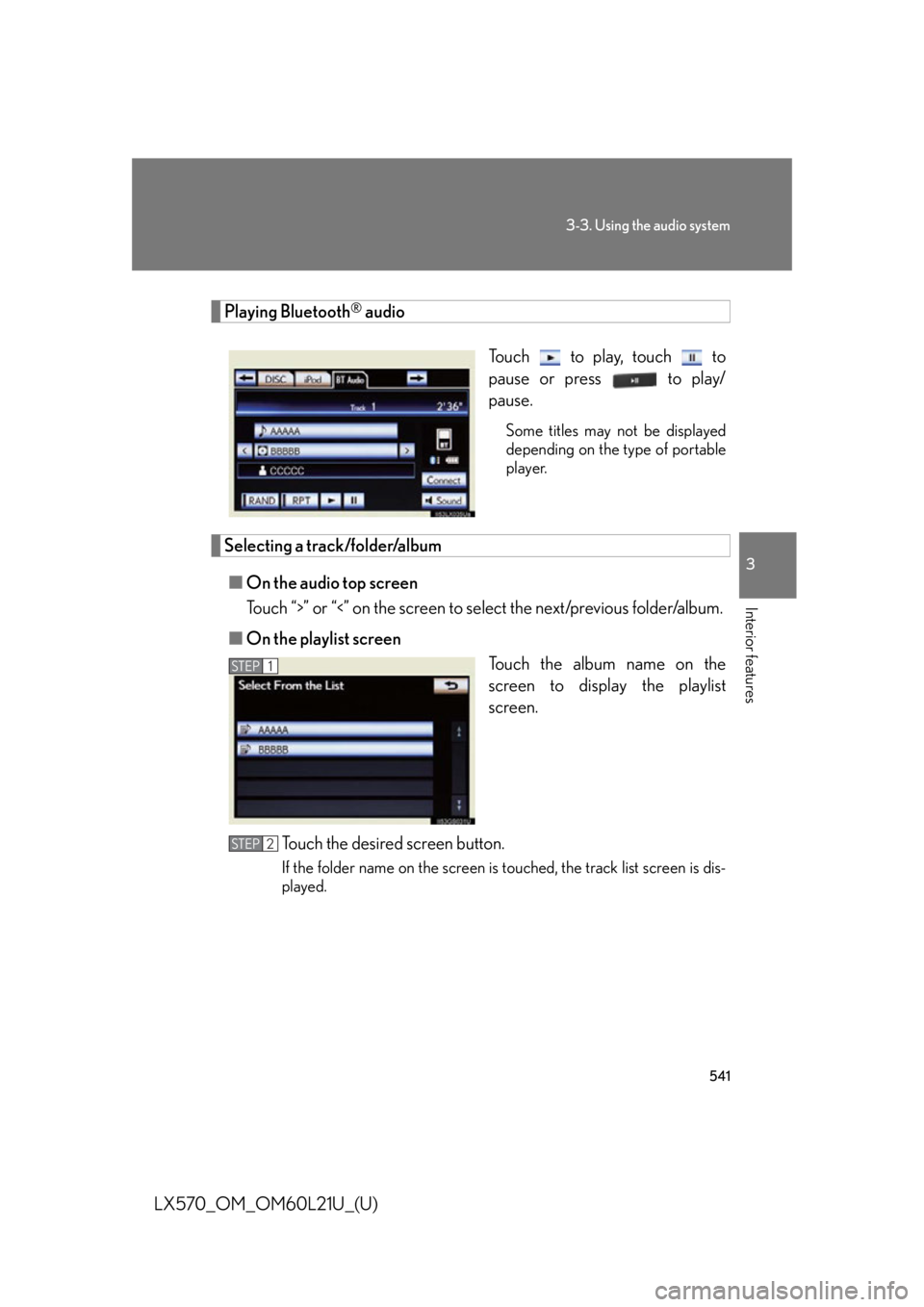
LX570_OM_OM60L21U_(U) Playing Bluetooth ®
audio
Touch to play, touch to
pause or press to play/
pause. Some titles may not be displayed
depending on the type of portable
player.
Selecting a track/folder/album
■ On the audio top screen
Touch “>” or “<” on the screen to select the next/previous folder/album.
■ On the playlist screen
Touch the album name on the
screen to display the playlist
screen.
Touch the desired screen button. If the folder name on the screen is touched, the track list screen is dis-
played. STEP 1
STEP 2
Page 542 of 956
5423-3. Using the audio system
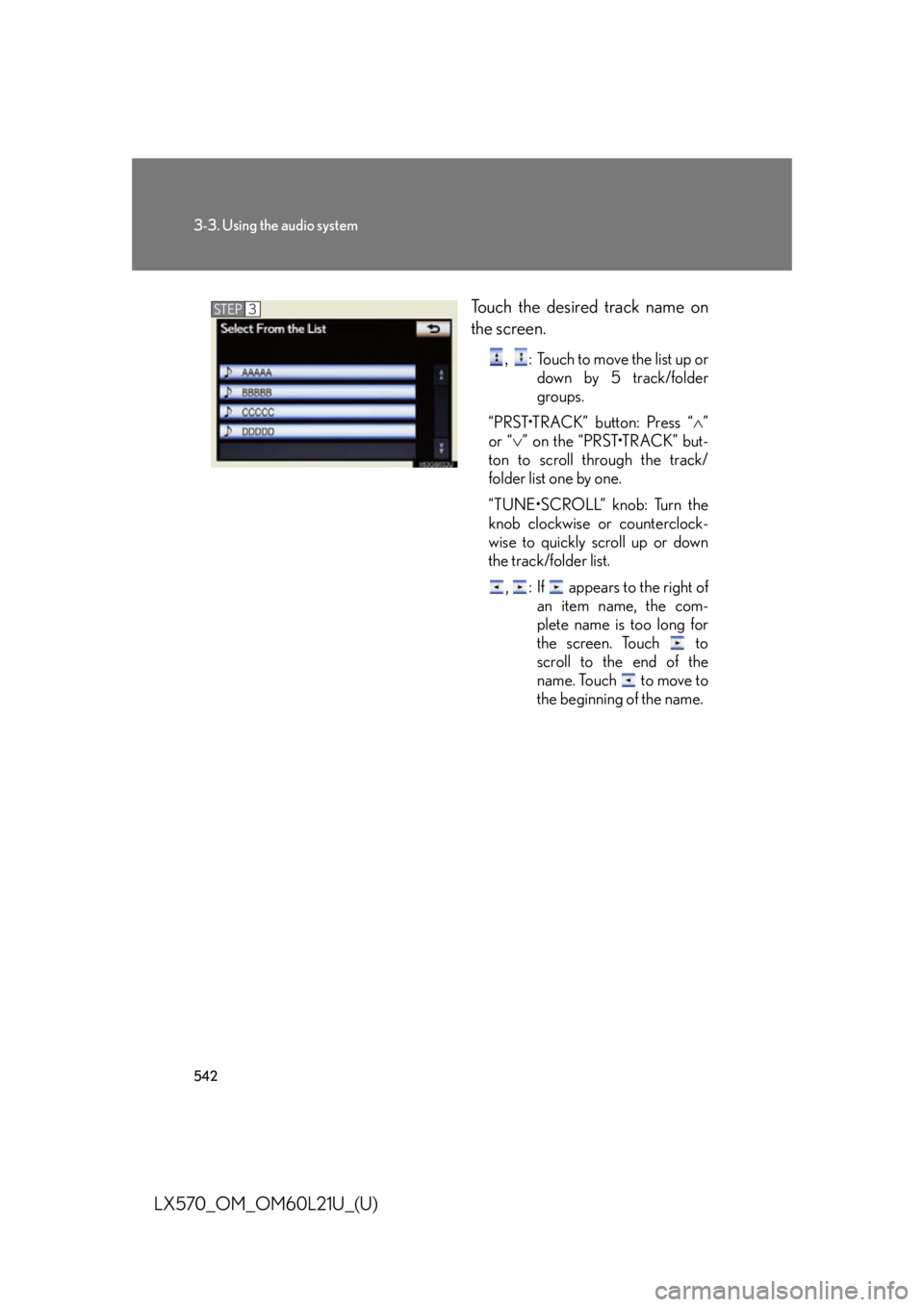
LX570_OM_OM60L21U_(U) Touch the desired track name on
the screen. ,
: Touch to move the list up or
down by 5 track/folder
groups.
“PRST•TRACK” button: Press “ ”
or “ ” on the “PRST•TRACK” but-
ton to scroll through the track/
folder list one by one.
“TUNE•SCROLL” knob: Turn the
knob clockwise or counterclock-
wise to quickly scroll up or down
the track/folder list.
, : If appears to the right of
an item name, the com-
plete name is too long for
the screen. Touch to
scroll to the end of the
name. Touch to move to
the beginning of the name.STEP 3
Page 543 of 956

5433-3. Using the audio system
3
Interior features
LX570_OM_OM60L21U_(U) Selecting, fast forwarding or rewinding a track
■ On the audio top screen
Turn the “TUNE•SCROLL” knob or press “ ” or “ ” on the
“PRST•TRACK” button to select the desired track number.
■ On the track list screen
Touch the track name on the
screen to display the track list
screen.
Touch the desired track number. ,
: Touch to move the list up or down by 5 track groups.
“PRST•TRACK” button: Press “
” or “
” on the “PRST•TRACK” button
to scroll through the track list one by one.
“TUNE•SCROLL” knob: Turn the knob clockwise or counterclockwise
to quickly scroll up or down the track list.
, : If appears to the right of an item name, the complete name is
too long for the screen. Touch to scroll to the end of the
name. Touch to move to the beginning of the name.
■ Fast forwarding and rewinding a track
Press and hold “ ” or “ ” on the “PRST•TRACK”
button to fast forward
or rewind. STEP 1
STEP 2
Page 544 of 956
5443-3. Using the audio system
LX570_OM_OM60L21U_(U) Random playback
■ Playing the tracks on the album in random order
Touch “RAND” on the screen. Each time “RAND” is touched, the mode changes as follows:
album random all track random off
■ Playing tracks from all the albums in random order
Touch “RAND” repeatedly until “A LB.RAND” appears on the screen.To cancel, touch “RAND” again.
Repeat play
■ Repeating a track
Touch “RPT” on the screen. Each time “RPT” is touched, the mode changes as follows:
track repeat album repeat off
■ Repeating an album
Touch “RPT” repeatedly until “A LB.RPT” appears on the screen.To cancel, touch “RPT” again.
Page 545 of 956

5453-3. Using the audio system
3
Interior features
LX570_OM_OM60L21U_(U) ■
If you touch
The display returns to the previous screen. ■
Connecting Bluetooth ®
audio player●
Touching “Connect Portable Player” on the “Bluetooth*” screen also connects a
Bluetooth ®
audio player. ( P. 6 7 7 )●
When none of the selectable portable players have been registered, a screen
confirming registration is displayed. The registration method is the same as
phone registration. ( P. 6 7 0 )●
When the currently connected portable pl ayer is selected, a screen confirming
the selected player’s disc onnection is displayed. ( P. 6 7 2 )●
If connection fails once, a changing connection method confirmation screen is
displayed. If connection fails 2 or more times, a message will be displayed.
When this message is displayed, try again.
*: Bluetooth is a registered trademark of Bluetooth SIG, Inc.■
When using the Bluetooth ®
audio system●
In the following conditions, the system may not function.
• The portable player is turned off
• The portable player is not connected
• The portable player battery is low ●
There may be a delay if phone connect ion is carried out during Bluetooth ®
audio play. ●
Depending on the type of portable player that is connected to the system, oper-
ation may differ slightly and cert ain functions may not be available.■
Bluetooth ®
antenna
The antenna is built into the audio unit. If the portable player is behind the seat or in
the glove box or console box, or is touching or covered by metal objects, connec-
tion status may deteriorate. ■
Battery charge/signal status
This display may not correspond exactly with the portable player, and this system
does not have a charging function.
Page 546 of 956

5463-3. Using the audio system
LX570_OM_OM60L21U_(U) ■
About Bluetooth ®
■
Compatible models
Portable players must correspond to the following specifications: ●
Bluetooth ®
specification
Ve r. 1 .1 o r h i g h e r
(Recommended: Ver. 2.1+EDR or higher) ●
Profile
• A2DP (Advanced Audio Distribution Profile) Ver. 1.0 or higher
(Recommended: Ver. 1.2 or higher)
• AVRCP (Audio/Video Remote Control Profile) Ver. 1.0 or higher
(Recommended: Ver. 1.4 or higher)
However, please note that some function s may be limited depending on the type of
portable player. Also, the different screen is displayed depend ing on which portable
player is connecting.
Please go to the website at http://www.lexus.com/MobileLink to find approved
portable players for this system. ■
Certification
P. 6 1 8 Bluetooth is a registered trademark of Blue-
tooth SIG, Inc.
Page 547 of 956

5473-3. Using the audio system
3
Interior features
LX570_OM_OM60L21U_(U) ■
Reconnecting the portable player
If the portable player is disconnected with a poor reception when the “ENGINE
START STOP” switch is in ACCESSORY or IGNITION ON mode, the system
automatically reconnects the portable player.
If you have switched off the portable player yourself, follow the instructions below to
reconnect: ●
Select the portable player again ●
Enter the portable player■
When transferring ownership of your vehicle
Be sure to remove the registered portable player from the system. ( P. 6 7 2 )
CAUTION■
While driving
Do not use the portable player or connect the Bluetooth ®
system.■
Caution regarding interference with electronic devices ●
Your audio unit is fi tted with Bluetooth ®
antennas. People with implantable car-
diac pacemakers, cardiac resynchronization therapy-pacemakers or implantable
cardioverter defibrillators should maintain a reasonable distance between them-
selves and the Bluetooth ®
antennas. The radio waves may affect the operation of
such devices. ●
Before using Bluetooth ®
devices, users of any electrical medical device other
than implantable cardiac pacemakers, cardiac resynchronization therapy-pace-
makers or implantable cardioverter defibrillators should consult the manufac-
turer of the device for information about its operation under the influence of radio
waves. Radio waves could have unexpected effects on the operation of such
medical devices.
NOTICE■
When leaving the vehicle
Do not leave your portable player in the vehicle. The inside of the vehicle may
become hot, causing damage to the portable player.