air condition LEXUS LX570 2014 User Guide
[x] Cancel search | Manufacturer: LEXUS, Model Year: 2014, Model line: LX570, Model: LEXUS LX570 2014Pages: 956, PDF Size: 16.4 MB
Page 138 of 956
1381-7. Safety information
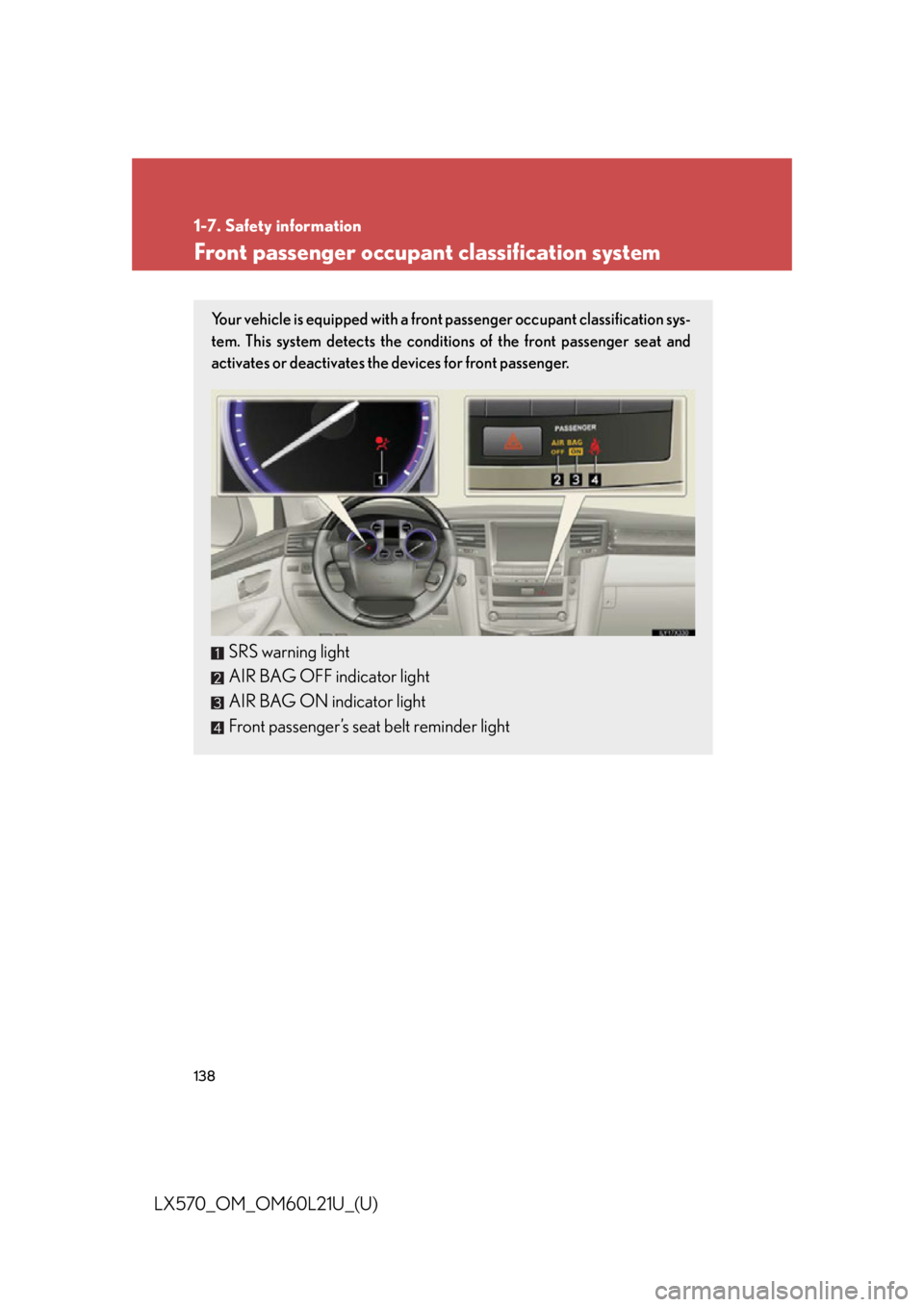
LX570_OM_OM60L21U_(U) Front passenger occupant classification system Your vehicle is equipped with a front passenger occupant classification sys-
tem. This system detects the conditions of the front passenger seat and
activates or deactivates the devices for front passenger.
SRS warning light
AIR BAG OFF indicator light
AIR BAG ON indicator light
Front passenger’s seat belt reminder light
Page 139 of 956

1391-7. Safety information
1
Before driving
LX570_OM_OM60L21U_(U) Condition and operation in the front passenger occupant classification
system
■ Adult
* 1
■ Child
* 3
or child restraint system
* 4Indicator/
warning light AIR BAG ON and AIR BAG OFF
indicator lights “A I R B A G
ON”
SRS warning light Off
Front passenger’s seat belt reminder light
Flashing
* 2
Devices Front passenger airbag and knee airbag
ActivatedSide airbag in the front passenger seat
Curtain shield airbag
on the front passenger side
Front passenger’s seat belt pretensioner
Indicator/
warning light AIR BAG ON and AIR BAG OFF
indicator lights “A I R B A G
OFF”
* 5
SRS warning light Off
Front passenger’s seat belt reminder light
Flashing
* 2
Devices Front passenger airbag and knee airbag Deactivated
Side airbag in the front passenger seat
ActivatedCurtain shield airbag
on the front passenger side
Front passenger’s seat belt pretensioner
Page 257 of 956

2572-4. Using other driving systems
2
When driving
LX570_OM_OM60L21U_(U) ■
Sensor detection information ●
The sensor’s detection areas are limited to the areas around the vehicle’s front
corner and rear bumpers. ●
Certain vehicle conditions and the su rrounding environment may affect the
ability of the sensor to correctly detect obstacles. Particular instances where this
may occur are listed below.
• There is dirt, snow or ice on the sensor. (Wiping the sensors will resolve this
problem.)
• The sensor is frozen. (Thawing the area will resolve this problem.)
In especially cold weather, if a sensor is frozen the screen may show an abnor-
mal display, or obstacles may not be detected.
• The sensor is covered in any way.
• The vehicle is leaning considerably to one side.
• On an extremely bumpy road, on an incline, on gravel, or on grass
• The vicinity of the vehicle is noisy due to vehicle horns, motorcycle engines,
air brakes of large vehicles, or other loud noises producing ultrasonic waves.
• There is another vehicle equipped with parking assist sensor s in the vicinity.
• The sensor is coated with a sheet of spray or heavy rain.
• The vehicle is equipped with a fender pole or wireless antenna.
• Towing eyelets are installed.
• The bumper or sensor receives a strong impact.
• The vehicle is approaching a tall or curved curb.
• In harsh sunlight or intense cold weather
•The area directly under th e bumpers is not detected.
• If obstacles draw too close to the sensor.
• A non-genuine Lexus suspension (low ered suspension etc.) is installed.
• People may not be detected if they are wearing certain types of clothing.
In addition to the examples above, there are instances in which, because of their
shape, signs and other object s may be judged by the sensor to be closer than they
are.
Page 258 of 956

2582-4. Using other driving systems
LX570_OM_OM60L21U_(U) ●
The shape of the obstacle may prevent th e sensor from detecting it. Pay particu-
lar attention to the following obstacles:
• Wires, fences, ropes, etc.
• Cotton, snow and other materi als that absorb sound waves
• Sharply-angled objects
•Low obstacles
• Tall obstacles with upper sections projec ting outwards in the direction of your
vehicle●
The following situations may occur during use.
• Depending on the shape of the obstacle and other factors, the detection dis-
tance may shorten, or dete ction may be impossible.
• Obstacles may not be detected if they are too close to the sensor
• There will be a short delay between obstacle detection and display. Even at
slow speeds, there is a possibility that the obstacle will come within the sen-
sor’s detection areas before the display is shown and the warning beep
sounds.
• Thin posts or objects lower than the sensor may not be detected for collision
when approached, even if they have been detected once.
• It might be difficult to hear beeps due to the volume of audio system or air
flow noise of air conditioning system.■
If a message is displayed on the multi-information display
P. 8 3 2■
Certification (Canada only)
This ISM device complies with Canadian ICES-001.
Page 375 of 956
3752-5. Driving information
2
When driving
LX570_OM_OM60L21U_(U) ■ Before driving the vehicle
Perform the following accord ing to the driving conditions.
● Do not try to forcibly open a w indow or move a wiper that is fro-
zen. Pour warm water over the frozen area to melt the ice. Wipe
away the water immediately to prevent it from freezing.
● To ensure proper operation of the climate control system fan,
remove any snow that has accumu lated on the air inlet vents in
front of the windshield.
● Check for and remove any exce ss ice or snow that may have
accumulated on the exterior lights, vehicle’s roof, chassis, around
the tires or on the brakes.
● Remove any snow or mud from the bottom of your shoes before
getting in the vehicle.
■ When driving the vehicle
Accelerate the vehicle slowly, keep a safe distance between you and
the vehicle ahead, and drive at a reduced speed suitable to road
conditions.
■ When parking the vehicle
Park the vehicle and move the shift lever to “P” without setting the
parking brake. The parking brake may freeze up, preventing it from
being released. If necessary, bl ock the wheels to prevent inadvert-
ent sliding or creeping.
Page 392 of 956

3922-5. Driving information
LX570_OM_OM60L21U_(U) ● Avoid jerky starts or sudden acceleration.
● Avoid jerky steering and sharp turns, and slow down before making a
turn.
● Note that when making a turn, the tr ailer wheels will be closer than the
vehicle wheels to the inside of the turn. Co mpensate by making a
wider than normal turning radius.
● Slow down before making a turn, in crosswinds, on wet or slippery sur-
faces, etc.
Increasing vehicle speed ca n destabilize the trailer.
● Take care when passing other vehi cles. Passing requires considerable
distance. After passing a vehicle, do not forget the length of your
trailer, and be sure you have plenty of room before changing lanes.
● To maintain engine braking efficiency and charging system perfor-
mance when using engine braking, do not put the transmission in “D”.
If in the S mode, the transmission shift range position must be in 5 or
lower.
● Instability happens more frequently when descending steep or long
downhill grades. Before descending, slow down and downshift. Do not
make sudden downshifts while descending steep or long downhill
grades.
● Avoid holding the brake pedal down too long or applying the brakes
too frequently. This could cause th e brakes to overheat and result in
reduced braking efficiency.
● Due to the added load of the trailer, your vehicle’s engine may overheat
on hot days (at temperatures over 85°F [30°C]) when driving up a
long or steep grade. If the eng ine coolant temperature gauge indicates
overheating, immediately turn off th e air conditioning (if in use), pull
your vehicle off the road and stop in a safe spot. ( P. 873)
Page 400 of 956

400
LX570_OM_OM60L21U_(U) 3-1. Using the touch screen
Touch screen ........................... 402
Set up screen ........................... 410
Information screen................. 427
Voice command system ....... 429
3-2. Using the air conditioning
system and defogger
Front air conditioning
system..................................... 440
Rear air conditioning
system..................................... 452
Rear window and outside
rear view mirror
defoggers .............................. 456
Windshield wiper de-icer..... 457 3-3. Using the audio system
Audio system type.................. 458
Using the radio....................... 483
Using the CD/
DVD player .......................... 503
Playing an audio CD and
MP3/WMA discs .............. 505
Playing DVD video .................. 511
CD/DVD player and DVD
video disc information........ 525
Listening to Bluetooth ®
audio........................................ 537
Listening to a USB
memory ................................. 548
Listening to an iPod............... 558
Optimal use of the audio/
video system......................... 568
Using the AUX port .............. 570
Using the steering wheel
audio switches ...................... 572
3-4. Using the rear seat
entertainment system
Rear seat entertainment
system features .................... 575
Using the radio....................... 583
Using the radio (internet
radio broadcast) ................. 585
Playing an audio CD/
CD text .................................. 586
Page 402 of 956

402
LX570_OM_OM60L21U_(U) 3-1. Using the touch screen
Touch screen By touching the screen with your fi nger, you can control the audio system
and air conditioning system, and adjust the screen display etc.
Button Pa g e
“CLIMATE” P. 4 4 0
“A U D I O ” P. 4 5 8
“MAP VOICE”/”DEST” Navigation System Owner’s Manual
“INFO” P. 4 2 7 /
Navigation System Owner’s Manual
P. 6 1 2
“SETUP” P. 4 1 0
Page 423 of 956
4233-1. Using the touch screen
3
Interior features
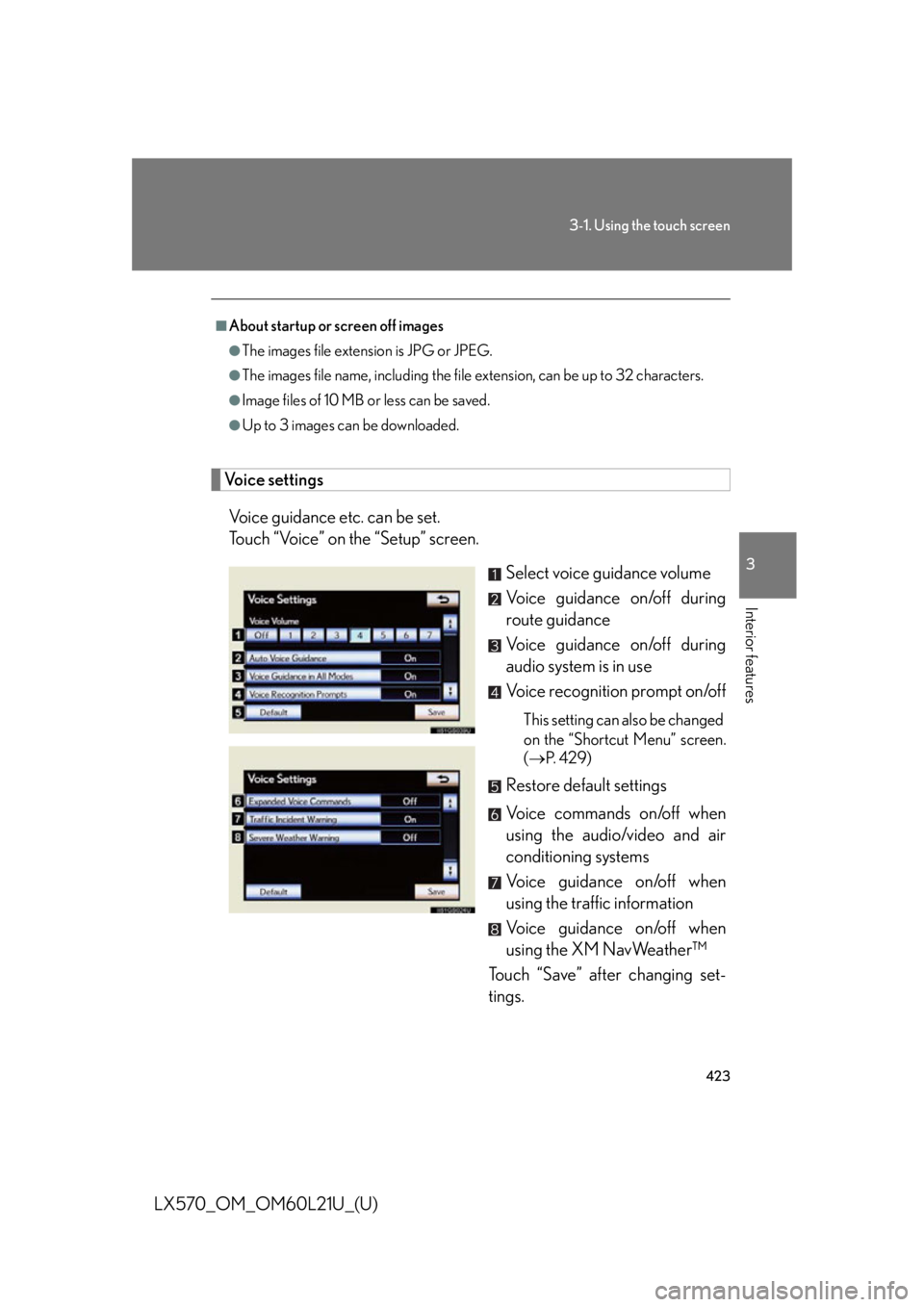
LX570_OM_OM60L21U_(U) Voice settings
Voice guidance etc. can be set.
Touch “Voice” on the “Setup” screen.
Select voice guidance volume
Voice guidance on/off during
route guidance
Voice guidance on/off during
audio system is in use
Voice recognition prompt on/off This setting can also be changed
on the “Shortcut Menu” screen.
( P. 4 2 9 )
Restore default settings
Voice commands on/off when
using the audio/video and air
conditioning systems
Voice guidance on/off when
using the traffic information
Voice guidance on/off when
using the XM NavWeather™
Touch “Save” after changing set-
tings.■
About startup or screen off images ●
The images file extension is JPG or JPEG. ●
The images file name, including the file extension, can be up to 32 characters.●
Image files of 10 MB or less can be saved. ●
Up to 3 images can be downloaded.
Page 429 of 956

4293-1. Using the touch screen
3
Interior features
LX570_OM_OM60L21U_(U) Voice command system
Voice command system operation
■ Voice command system operation
Press or . After the “Shortcut Menu” screen has been displayed, voice guidance
will commence.
Voice guidance for the voice command system can be skipped by
pressing
or .The voice command system enables th e navigation, audio/video, hands-
free and air conditioning systems to be operated using voice commands.
For details of the navigation syst em, refer to the “Navigation System
Owner’s Manual”.
■ Talk switch Press
or .To cancel, press and hold
or .
■ Microphone
STEP 1