instrument panel LEXUS LX570 2014 User Guide
[x] Cancel search | Manufacturer: LEXUS, Model Year: 2014, Model line: LX570, Model: LEXUS LX570 2014Pages: 956, PDF Size: 16.4 MB
Page 191 of 956

1912-2. Instrument cluster
2
When driving
LX570_OM_OM60L21U_(U) Switching the display
Pressing this button switches between odometer and trip meter.
Odometer
Trip meter A
*Trip meter B
*
* : Pushing and holding the button will
reset the trip meter.Odometer and trip meter Odometer: Displays the total distance the vehicle has been driven
Trip meter: Displays the distance the vehicle has been driven since the
meter was last reset. Trip meters A and B can be used to record and dis-
play different distances independently
Odometer/trip meter disp lay change buttonSwitches between odometer and trip meter displays
Instrument panel light control dial The brightness of the instrume nt panel light can be adjusted
Page 192 of 956

1922-2. Instrument cluster
LX570_OM_OM60L21U_(U) Eco Driving Indicator Light customization
Eco Driving Indicator Light can be activated or deactivated.
While the odometer is being dis-
played, press and hold the odome-
ter/trip meter display change
button to display the Eco Driving
Indicator Light customization
screen.
Press the odometer/trip meter displa y change button to set Eco
Driving Indicator Light to on or off.
Press and hold the odometer/tri p meter display ch ange button to
complete the setting.
Instrument panel light control
The brightness of the instrument panel light can be adjusted.
Darker
BrighterSTEP 1
STEP 2
STEP 3
Page 193 of 956
1932-2. Instrument cluster
2
When driving
LX570_OM_OM60L21U_(U) ■
The meters and displa y illuminate when
The “ENGINE START STOP” switch is in IGNITION ON mode. ■
The brightness of the instrument panel lights
When the tail lights are turned on, the me ter’s brightness will be reduced slightly
unless the meter brightness level adjustment is set to the brightest setting.
If the tail lights are turned on when the surroundings are dark, the meter’s bright-
ness will be reduced slightly. However, wh en the surroundings are bright, such as
during the daytime, the meter’s brightness will not be reduced even if the tail lights
are turned on.
NOTICE■
To prevent damage to the engine and its components ●
Do not let the indicator needle of the ta chometer enter the red zone, which indi-
cates the maximum engine speed. ●
The engine may be overheating if the engine coolant temperature gauge is in the
red zone (“H”). In this case, immediatel y stop the vehicle in a safe place, and
check the engine after it has cooled completely. ( P. 8 7 3 )■
Vo l t m e t e r
When the voltmeter indicates 19 V or higher or 9 V or lower while the engine is
running, there may be a battery or chargi ng system malfunction. Have the vehicle
inspected at your Lexus dealer. ■
Engine oil pressure gauge
When the value of the engine oil pressure gauge drops while the engine is running,
stop the vehicle in a safe place immediately and check the amount of engine oil.
( P. 74 9 )
When the oil pressure drops even though the engine oil amount has not decreased,
or if the oil pressure does not increase when engine oil is added, contact your Lexus
dealer, as there may be a problem with the lubrication system.
Page 194 of 956
1942-2. Instrument cluster
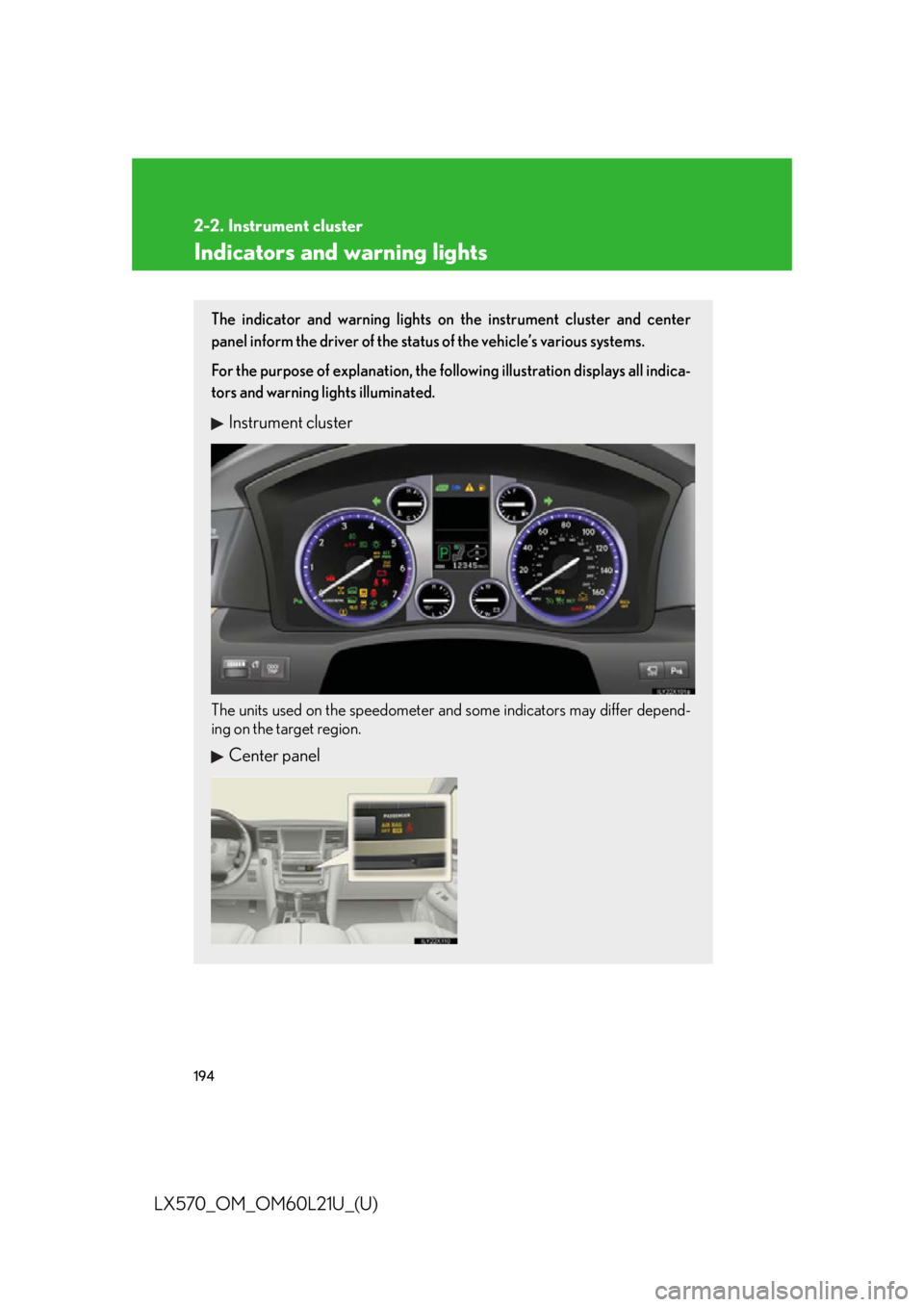
LX570_OM_OM60L21U_(U) Indicators and warning lights The indicator and warning lights on the instrument cluster and center
panel inform the driver of the status of the vehicle’s various systems.
For the purpose of explanation, the following illustration displays all indica-
tors and warning lights illuminated.
Instrument cluster
The units used on the speedometer and some indicators may differ depend-
ing on the target region.
Center panel
Page 206 of 956
206
LX570_OM_OM60L21U_(U) 2-3. Operating the lights and wipers
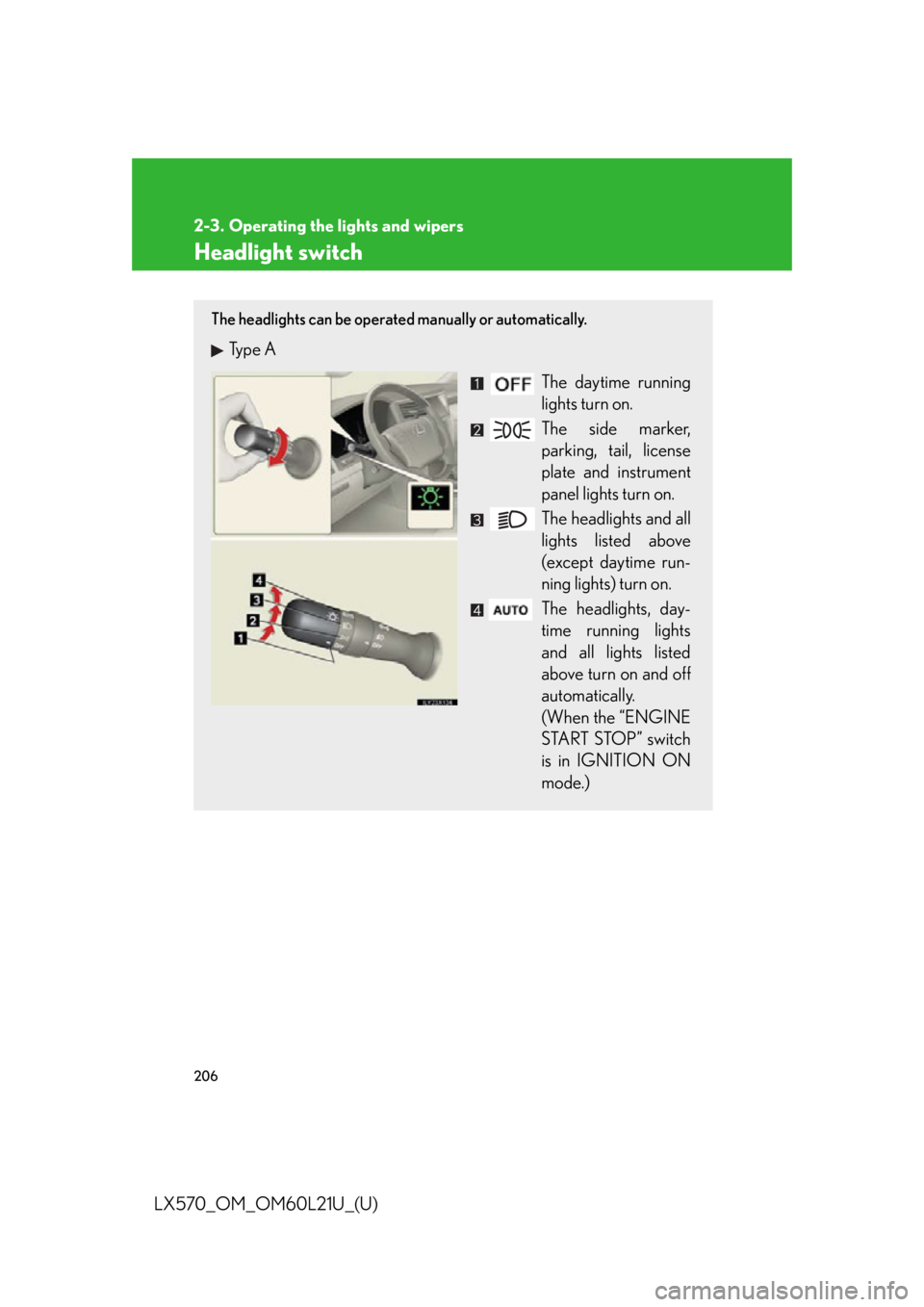
Headlight switch The headlights can be operated manually or automatically.
Type A
The daytime running
lights turn on.
The side marker,
parking, tail, license
plate and instrument
panel lights turn on.
The headlights and all
lights listed above
(except daytime run-
ning lights) turn on.
The headlights, day-
time running lights
and all lights listed
above turn on and off
automatically.
(When the “ENGINE
START STOP” switch
is in IGNITION ON
mode.)
Page 207 of 956
2072-3. Operating the lights and wipers
2
When driving
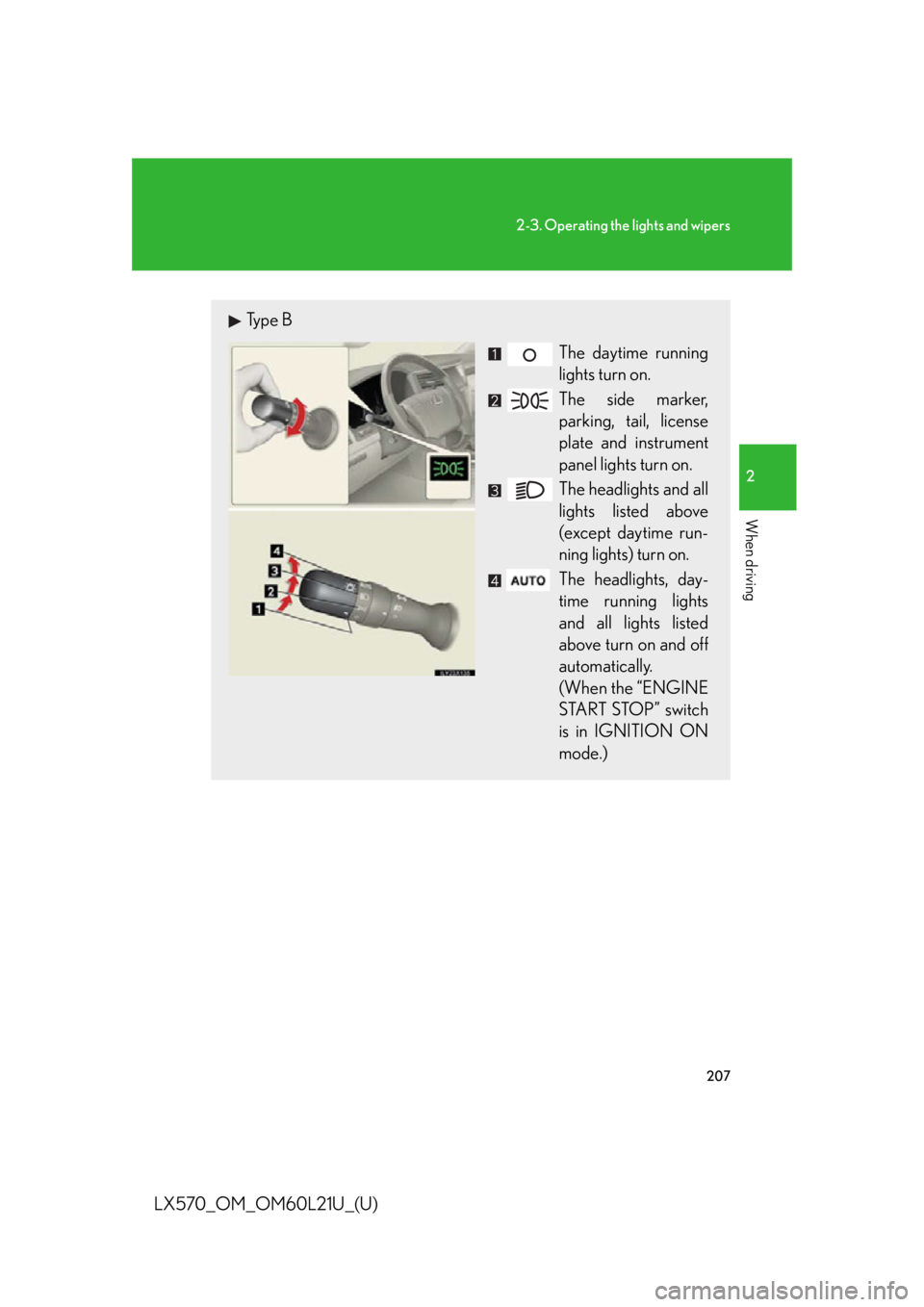
LX570_OM_OM60L21U_(U) Type B
The daytime running
lights turn on.
The side marker,
parking, tail, license
plate and instrument
panel lights turn on.
The headlights and all
lights listed above
(except daytime run-
ning lights) turn on.
The headlights, day-
time running lights
and all lights listed
above turn on and off
automatically.
(When the “ENGINE
START STOP” switch
is in IGNITION ON
mode.)
Page 370 of 956

3702-5. Driving information
LX570_OM_OM60L21U_(U) CAUTION■
Things that must not be carri ed in the luggage compartment
The following things may cause a fire if loaded in the luggage compartment. ●
Receptacles containing gasoline ●
Aerosol cans■
Storage precautions
Observe the following precautions.
Failing to do so may result in death or serious injury. ●
Stow cargo and luggage in the lugga ge compartment whenever possible.●
Do not stack anything in the luggage compartment higher than the seatbacks.
Such items may be thrown about and possib ly injure people in the vehicle during
sudden braking, sudden swerving or in an accident. ●
Do not place cargo or luggage in or on the following locations as the items may
get under the brake or accelerator pedal and prevent the pedals from being
depressed properly, block the driver’s vision, or hit the driver or passengers,
causing an accident.
•Driver’s feet
• Front passenger or rear seats (when stacking items)
•Instrument panel
•Dashboard
• Auxiliary box or tray that has no lid ●
Secure all items in the occupant compartment, as they may shift and injure some-
one during sudden braking, sudd en swerving or an accident.●
When you fold down the rear seats, long items should not be placed directly
behind the front seats. ●
Never allow anyone to ride in the luggage compartment. It is not designed for
passengers. They should ride in their seat s with their seat belt s properly fastened.
Otherwise, they are much more likely to suffer death or serious injury, in the
event of sudden braking, sudd en swerving or an accident.
Page 406 of 956
4063-1. Using the touch screen
LX570_OM_OM60L21U_(U) ■
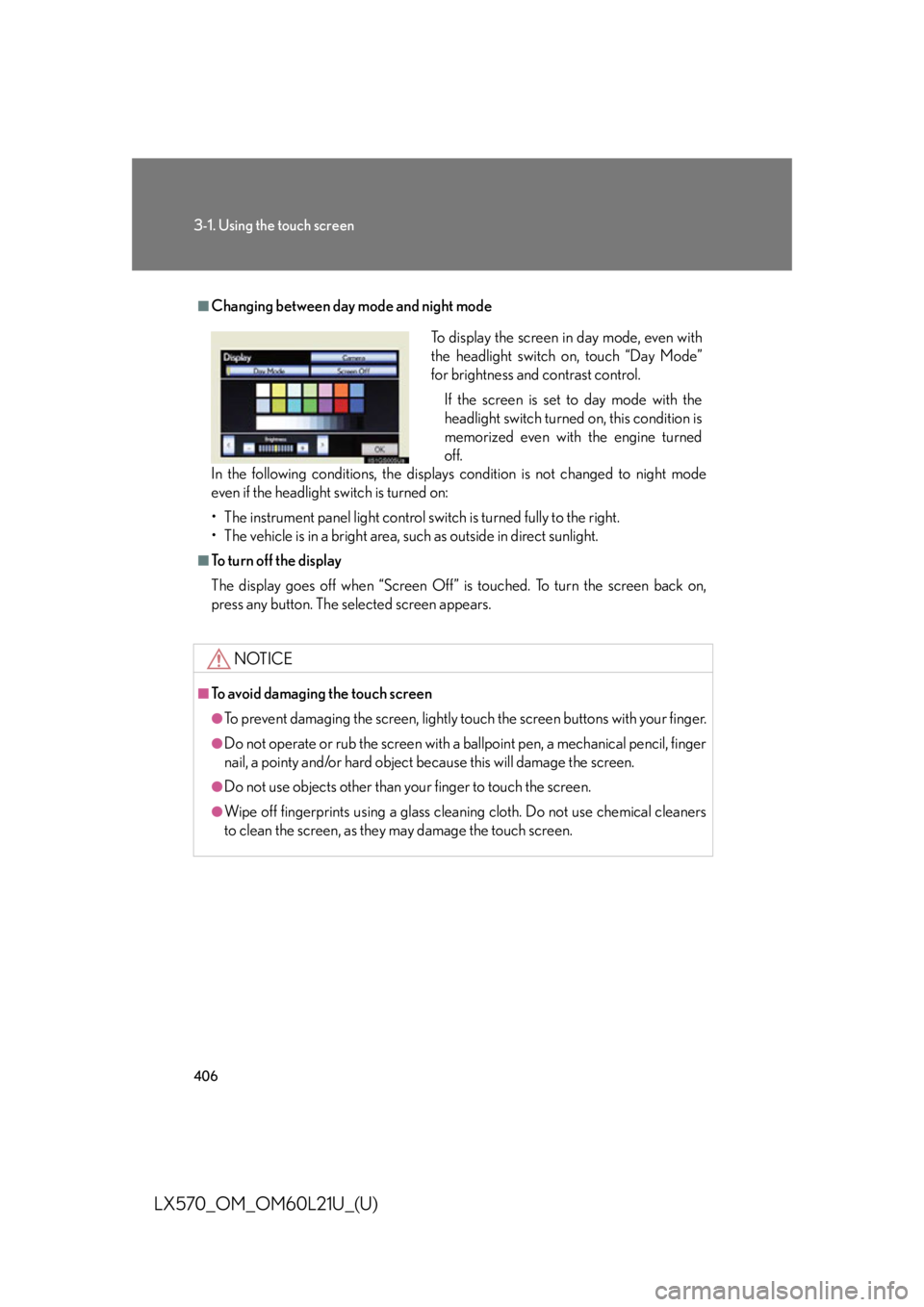
Changing between day mode and night mode
In the following conditions, the displays condition is not changed to night mode
even if the headlight switch is turned on:
• The instrument panel light control switch is turned fully to the right.
• The vehicle is in a bright area, such as outside in direct sunlight. ■
To turn off the display
The display goes off when “Screen Off” is touched. To turn the screen back on,
press any button. The sele cted screen appears.
NOTICE■
To avoid damaging the touch screen ●
To prevent damaging the screen, lightly touch the screen buttons with your finger. ●
Do not operate or rub the screen with a ballpoint pen, a mechanical pencil, finger
nail, a pointy and/or hard object be cause this will damage the screen.●
Do not use objects other than yo ur finger to touch the screen.●
Wipe off fingerprints using a glass cleaning cloth. Do not use chemical cleaners
to clean the screen, as they may damage the touch screen. To display the screen in day mode, even with
the headlight switch on, touch “Day Mode”
for brightness and contrast control.
If the screen is set to day mode with the
headlight switch turned on, this condition is
memorized even with the engine turned
off.
Page 554 of 956

5543-3. Using the audio system
LX570_OM_OM60L21U_(U) ■
If you touch
The display returns to the previous screen. ■
USB memory functions ●
When the USB memory is connected and the audio source is changed to USB
memory mode, the USB memory will start playing the first file in the first folder. If
the same device is removed and reinserted (and the contents have not been
changed), the USB memory will resume playing from the same point it was last
used. ●
Depending on the USB memory that is connected to the system, certain func-
tions may not be available. Disconnecting the device and reconnecting it once
again may resolve some malfunctions.■
When using a USB memory
You may be unable to use the instrument panel power outlet if the USB memory is
connected to the USB port at the same time. ■
Error messages for USB memory
“USB Error”: This indicates a problem in the USB memory or its connection.
“No music files found.”: This indicates that no MP3/WMA files are included in the
USB memory.■
USB memory ●
Compatible devices
USB memory that can be used for MP3 and WMA playback. ●
Compatible device formats
The following device formats can be used:
• USB communication formats: USB2.0 HS (480 Mbps) and FS (12 Mbps)
• File formats: FAT16/32 (Windows)
• Correspondence class: Mass storage class
MP3 and WMA files written in any format other than those listed above may not
play correctly, and their file names an d folder names may not be displayed cor-
rectly.
Items related to standards and limitations are as follows:
• Maximum directory hierarchy: 8 levels
• Maximum number of folders in a device: 3000 (including the root)
• Maximum number of files in a device: 9999
• Maximum number of files per folder: 255
Page 565 of 956
5653-3. Using the audio system
3
Interior features
LX570_OM_OM60L21U_(U) ■
iPod functions ●
When the iPod connected to the system includes iPod video, the system can
only output the sound by touching “Video” on the “iPod” screen. ●
Depending on the iPod, the video so und may not be able to be heard.●
When an iPod is connected and the audio source is changed to iPod mode, the
iPod will resume play from the same point in which it was last used. ●
Depending on the iPod that is connecte d to the system, certain functions may
not be available. If a function is unavailable due to a malfunction (as opposed to
a system specification), disconnecting the device and reconnecting it once
again may resolve the problem.■
When using an iPod
You maybe unable to use the instrument panel power outlet if the iPod is connected
to the USB port at the same time. ■
Battery charge
When an iPod is connected using a genuine iPod cable, the iPod starts charging its
battery. ■
Error messages for iPod
“iPod Error”: This indicates a problem in the iPod or its connection.
“No music files found.”: This indicates th at there is no music data in the iPod.
“Please check the iPod firmware version.”:
This indicates that the software version is not compati-
ble. Perform the iPod firmware updates and try again.
“iPod authorization failed.”: This indicates that it failed to authorize the iPod. Please
check your iPod.