surround LEXUS LX570 2014 User Guide
[x] Cancel search | Manufacturer: LEXUS, Model Year: 2014, Model line: LX570, Model: LEXUS LX570 2014Pages: 956, PDF Size: 16.4 MB
Page 265 of 956
2652-4. Using other driving systems
2
When driving
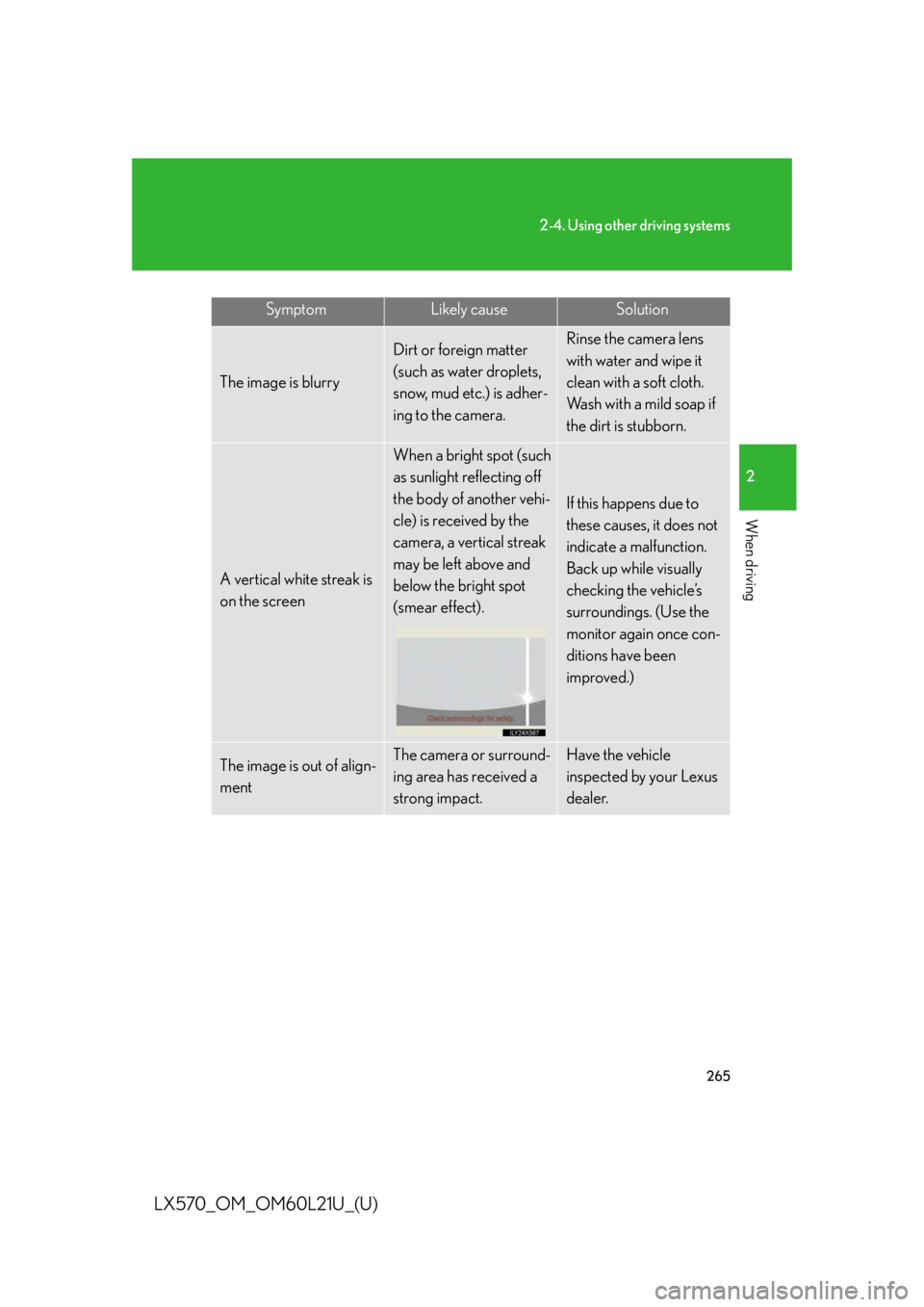
LX570_OM_OM60L21U_(U) The image is blurry Dirt or foreign matter
(such as water droplets,
snow, mud etc.) is adher-
ing to the camera. Rinse the camera lens
with water and wipe it
clean with a soft cloth.
Wash with a mild soap if
the dirt is stubborn.
A vertical white streak is
on the screen When a bright spot (such
as sunlight reflecting off
the body of another vehi-
cle) is received by the
camera, a vertical streak
may be left above and
below the bright spot
(smear effect). If this happens due to
these causes, it does not
indicate a malfunction.
Back up while visually
checking the vehicle’s
surroundings. (Use the
monitor again once con-
ditions have been
improved.)
The image is out of align-
ment The camera or surround-
ing area has received a
strong impact. Have the vehicle
inspected by your Lexus
dealer.Symptom Likely cause Solution
Page 279 of 956

2792-4. Using other driving systems
2
When driving
LX570_OM_OM60L21U_(U) Keeping the steering wheel in that position, check yo ur surroundings
visually and using mirror s, and back up using the distance guide lines
etc. as a reference. ( in “Parking operation”)
When the vehicle is approximately in the desired parking location, par-
allel parking assist is complete. ( in “Parking operation”)
■ Parking operation
The following example describes the procedure for pulling into a park-
ing space on the right. Fo r pulling into a parking space on the left, sub-
stitute left for right and vice versa in all steps.
Stop the vehicle in the positi on as described below, and
straighten the steering wheel.
Roughly half a vehicle’s length
Desired parking space
Approx. 3 ft. (1 m)
Parked vehicle
Yo u r v e h i c l e A position in which you are parallel
with the road (or the side of the
road), and in which there is approx-
imately 3 ft. (1 m) of space between
your vehicle and the parked vehi-
cle
A position in which you are half a
vehicle’s length ahead of the
parked vehicle
Shift the shift lever to the “R” position.
Make sure the monitor displays the part behind the rear tires of
the parked vehicle, and select . If the area is not displayed, move the vehicle to forward. STEP 9
STEP 10
STEP 1
STEP 2
STEP 3
Page 284 of 956
2842-4. Using other driving systems
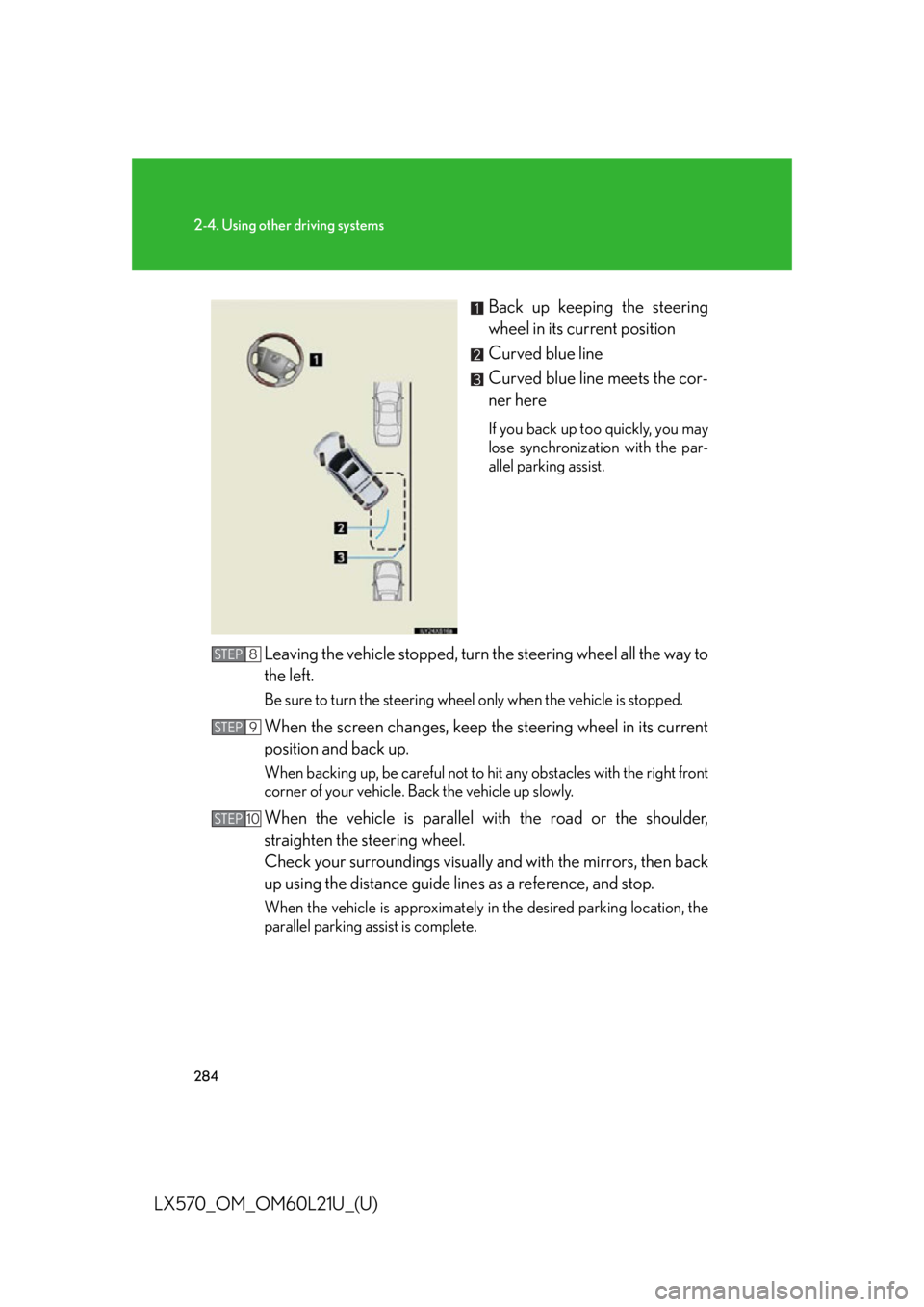
LX570_OM_OM60L21U_(U) Back up keeping the steering
wheel in its current position
Curved blue line
Curved blue line meets the cor-
ner here If you back up too quickly, you may
lose synchronization with the par-
allel parking assist.
Leaving the vehicle stopped, turn the steering wheel all the way to
the left. Be sure to turn the steering wheel only when the vehicle is stopped.
When the screen changes, keep the steering wheel in its current
position and back up. When backing up, be careful not to hi t any obstacles with the right front
corner of your vehicle. Back the vehicle up slowly.
When the vehicle is parallel with the road or the shoulder,
straighten the steering wheel.
Check your surroundings visually and with the mirrors, then back
up using the distance guide lines as a reference, and stop. When the vehicle is approximately in the desired parking location, the
parallel parking assist is complete.STEP 8
STEP 9
STEP 10
Page 292 of 956
2922-4. Using other driving systems
LX570_OM_OM60L21U_(U) ■ When approaching three-dimensional objects
The estimated course lines target a fl at surfaced objects (such as the
road). It is not possible to determine the position of three-dimensional
objects (such as vehicles) using the estimated course lines and dis-
tance guide lines. When approaching a three-dimensional object that
extends outward (such as the flatbed of a truck), be careful of the fol-
lowing.
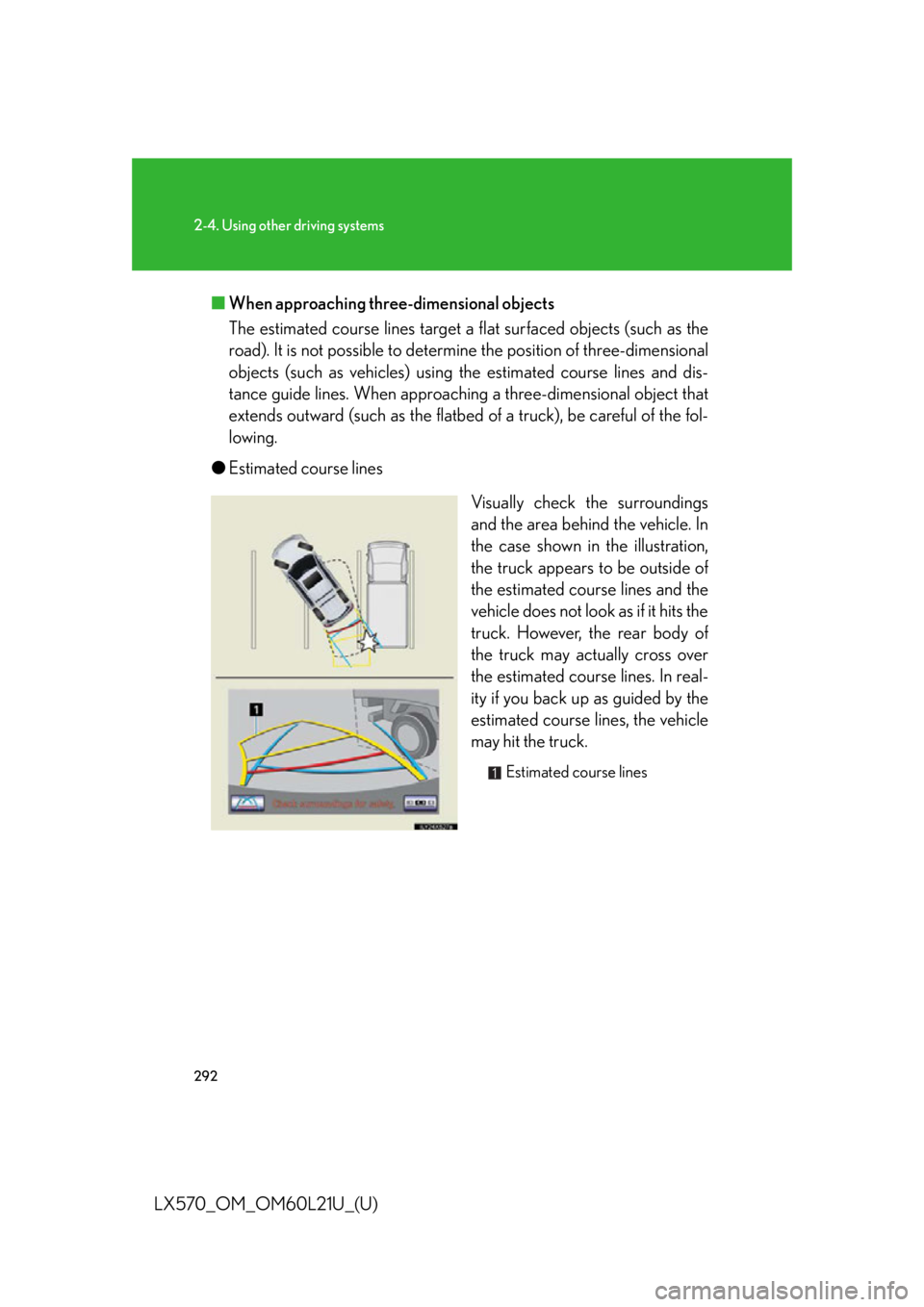
● Estimated course lines
Visually check the surroundings
and the area behind the vehicle. In
the case shown in the illustration,
the truck appears to be outside of
the estimated course lines and the
vehicle does not look as if it hits the
truck. However, the rear body of
the truck may actually cross over
the estimated course lines. In real-
ity if you back up as guided by the
estimated course lines, the vehicle
may hit the truck. Estimated course lines
Page 293 of 956
2932-4. Using other driving systems
2
When driving
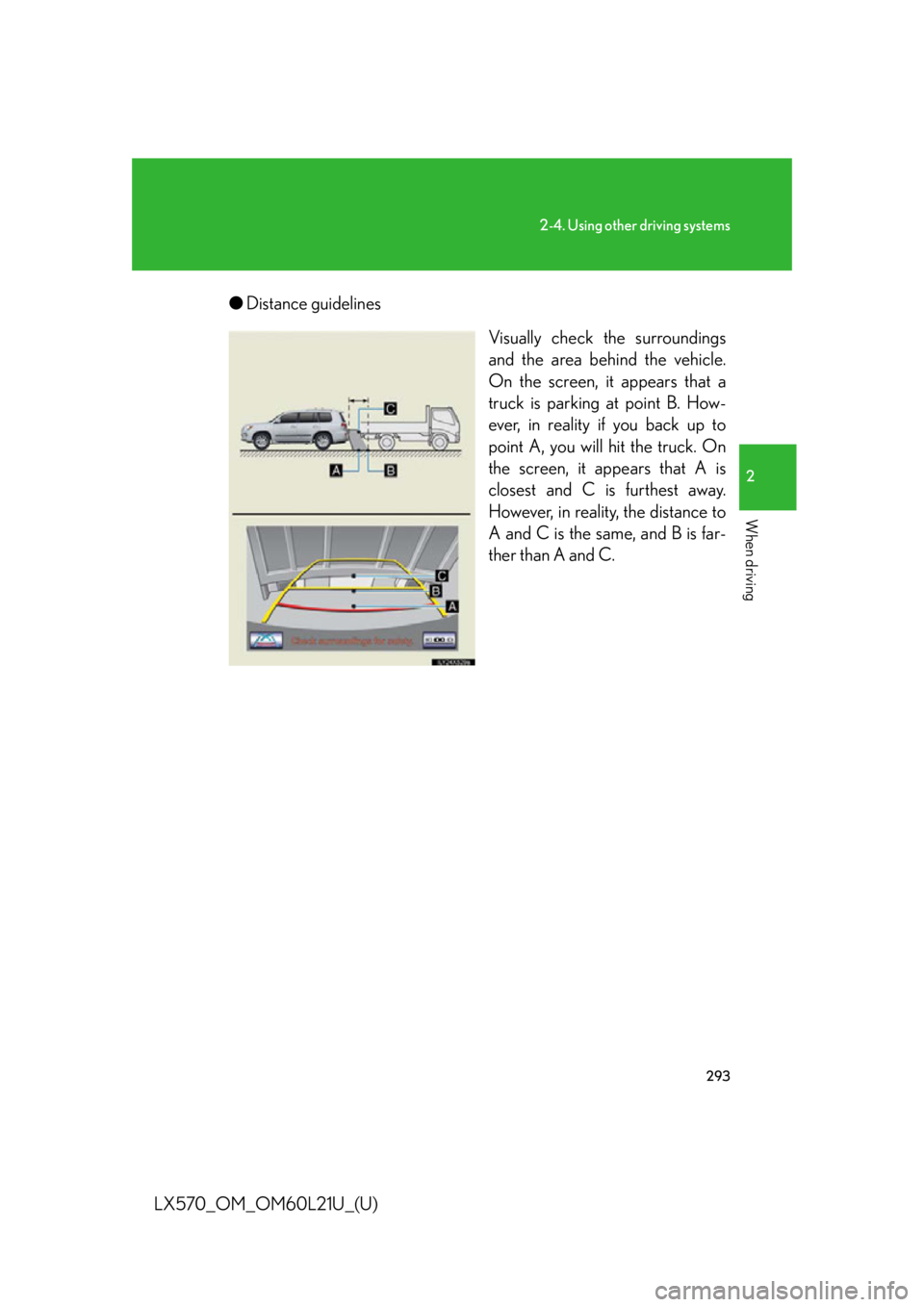
LX570_OM_OM60L21U_(U) ● Distance guidelines
Visually check the surroundings
and the area behind the vehicle.
On the screen, it appears that a
truck is parking at point B. How-
ever, in reality if you back up to
point A, you will hit the truck. On
the screen, it appears that A is
closest and C is furthest away.
However, in reality, the distance to
A and C is the same, and B is far-
ther than A and C.
Page 317 of 956

3172-4. Using other driving systems
2
When driving
LX570_OM_OM60L21U_(U) NOTICE■
When a solid object is close by
■
When using the wide view front & side monitor
Even if an obstacle is no longer visible on the side monitor, do not turn the steering
wheel further in the direction the vehicle is turning until the vehicle has moved com-
pletely past the obstacle. If the steering wh eel is turned to full lock, the vehicle will
turn in the smallest possible turning circle, and may collide with the obstacle. The screen’s guide lines are designed for level
surfaces (road surface etc.) or flat walls etc.
When driving near the obstacle, the obstacle
may be displayed as outside the projected
course line, and it may seem that there is no
danger of a collision, however any sections
protruding from the wall may project over the
course line and the vehicle may actually col-
lide with the obstacle.
In cases such as this were the projected
course line passes clos e to obstacles, always
visually check the surroundings for safety.
Protruding section of wall
Wall displayed on screen
Page 321 of 956

3212-4. Using other driving systems
2
When driving
LX570_OM_OM60L21U_(U) Conditions for changing the vehicle height mode
Some modes may not be selectable depending on the vehicle speed
when the four-wheel drive control swit ch is in the “H4” position. Refer to
the following table.
Easy access mode
You can select this mode for easy
access and easy loading of the
vehicle.
If the “ENGINE START STOP” switch is turned to OFF within 30 seconds after
the vehicle stops while this mode is on, the vehicle height is lowered automati-
cally.
When the vehicle begins to lower a beep will sound twice, and while the vehicle
is lowering the indicator light will flash to alert the driver and surrounding people
that the vehicle is lowering. Low mode Normal mode High mode
Under 7 mph (12 km/h) Ye s Ye s Ye s
7 mph (12 km/h) to
18 mph (30 km/h) No Ye s Ye s
18 mph (30 km/h) or over No Ye s No
Page 360 of 956

3602-4. Using other driving systems
LX570_OM_OM60L21U_(U) CAUTION■
Handling the radar sensor
Observe the following to ensure the pre-co llision system can function effectively.●
Keep the sensor and front grille clean at all times.
Clean the sensor and front grille with a so ft cloth so you do not mark or damage
them. ●
Do not subject the sensor or surrounding area to a strong impact.
If the sensor moves even slightly off po sition, the system may become inaccurate
or malfunction. If the sensor or surround ing area is subject to a strong impact,
always have the area inspected an d adjusted by your Lexus dealer.●
Do not disassemble the sensor. ●
Do not attach accessories or stickers to the sensor, grille cover or surrounding
area. ●
Do not modify or paint the sensor and grille.■
Limitations of the pre-collision system
Do not rely on the pre-collision system. Always drive safely, taking care to observe
your surroundings and checking for any obstacles or other road hazards.
Failure to do so may cause an accident resulting in death or serious injury.
Page 497 of 956
4973-3. Using the audio system
3
Interior features
LX570_OM_OM60L21U_(U) Silencing the sound
Press .
Press the button again to turn the system back on. ■
If you touch
The display returns to the previous screen. ■
When the battery is disconnected
All preset stations are erased. ■
Reception sensitivity ●
Cargo loaded on the roof luggage carrier, especially metal objects, may
adversely affect the reception of XM ®
Satellite Radio.●
Maintaining perfect radio reception at all times is difficult due to the continually
changing position of the an tenna, differences in signal strength and surrounding
objects, such as trains, transmitters, etc. ●
The radio antenna is mounted inside the rear quarter window. To maintain clear
radio reception, do not attach metallic window tinting or other metallic objects
to the antenna wire mounted inside the rear quarter window.
Page 500 of 956
5003-3. Using the audio system
LX570_OM_OM60L21U_(U) ■
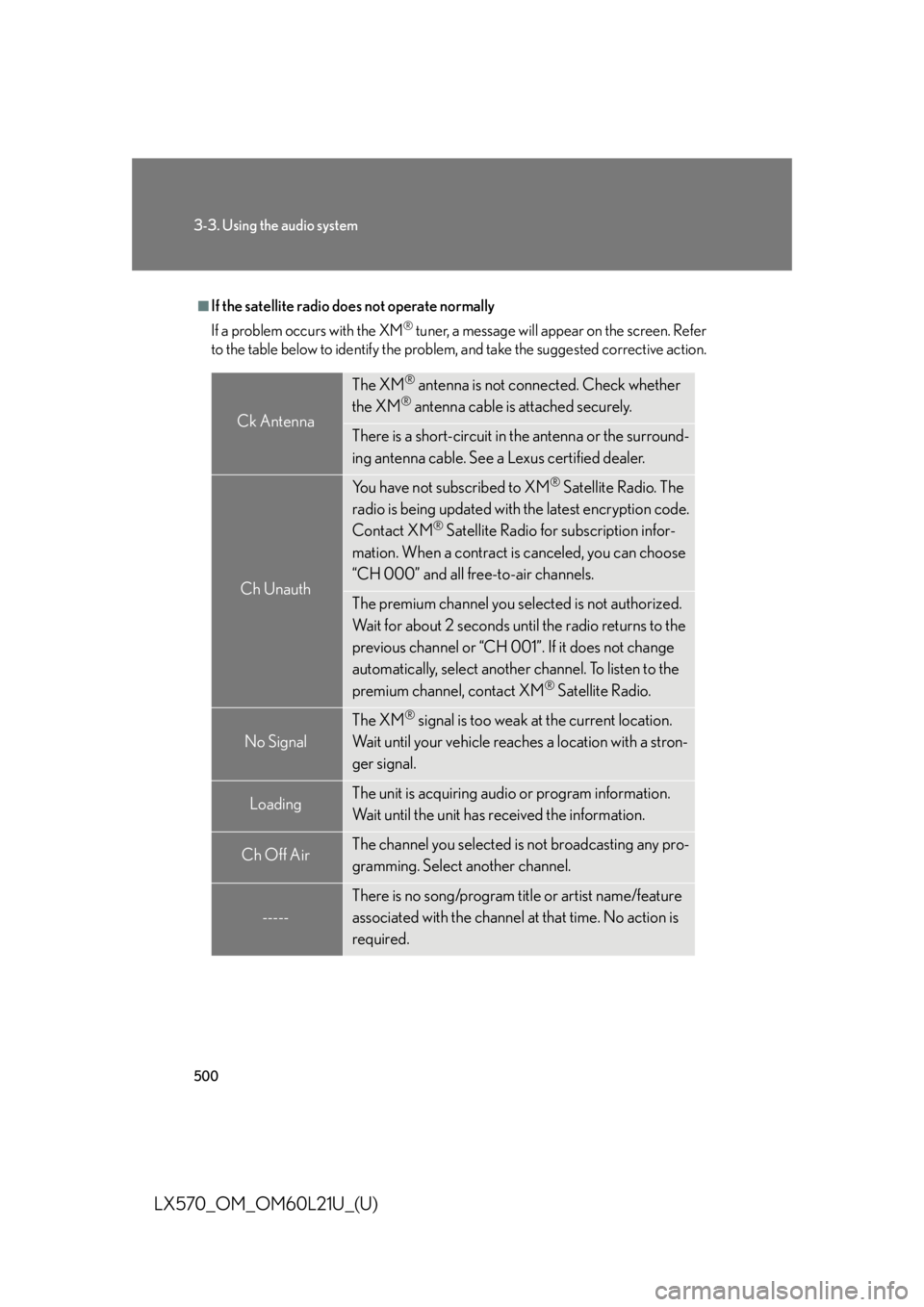
If the satellite radio does not operate normally
If a problem occurs with the XM ®
tuner, a message will appear on the screen. Refer
to the table below to identify the problem, and take the suggested corrective action.
Ck Antenna The XM ®
antenna is not connected. Check whether
the XM ®
antenna cable is attached securely.
There is a short-circuit in the antenna or the surround-
ing antenna cable. See a Lexus certified dealer.
Ch Unauth You have not subscribed to XM ®
Satellite Radio. The
radio is being updated with the latest encryption code.
Contact XM ®
Satellite Radio for subscription infor-
mation. When a contract is canceled, you can choose
“CH 000” and all free-to-air channels.
The premium channel you selected is not authorized.
Wait for about 2 seconds until the radio returns to the
previous channel or “CH 001”. If it does not change
automatically, select another channel. To listen to the
premium channel, contact XM ®
Satellite Radio.
No Signal The XM ®
signal is too weak at the current location.
Wait until your vehicle reaches a location with a stron-
ger signal.
Loading The unit is acquiring audio or program information.
Wait until the unit has received the information.
Ch Off Air The channel you selected is not broadcasting any pro-
gramming. Select another channel.
----- There is no song/program title or artist name/feature
associated with the channel at that time. No action is
required.