window LEXUS LX570 2014 User Guide
[x] Cancel search | Manufacturer: LEXUS, Model Year: 2014, Model line: LX570, Model: LEXUS LX570 2014Pages: 956, PDF Size: 16.4 MB
Page 36 of 956
361-2. Opening, closing and locking the doors
LX570_OM_OM60L21U_(U) Unlocking and locking the doors
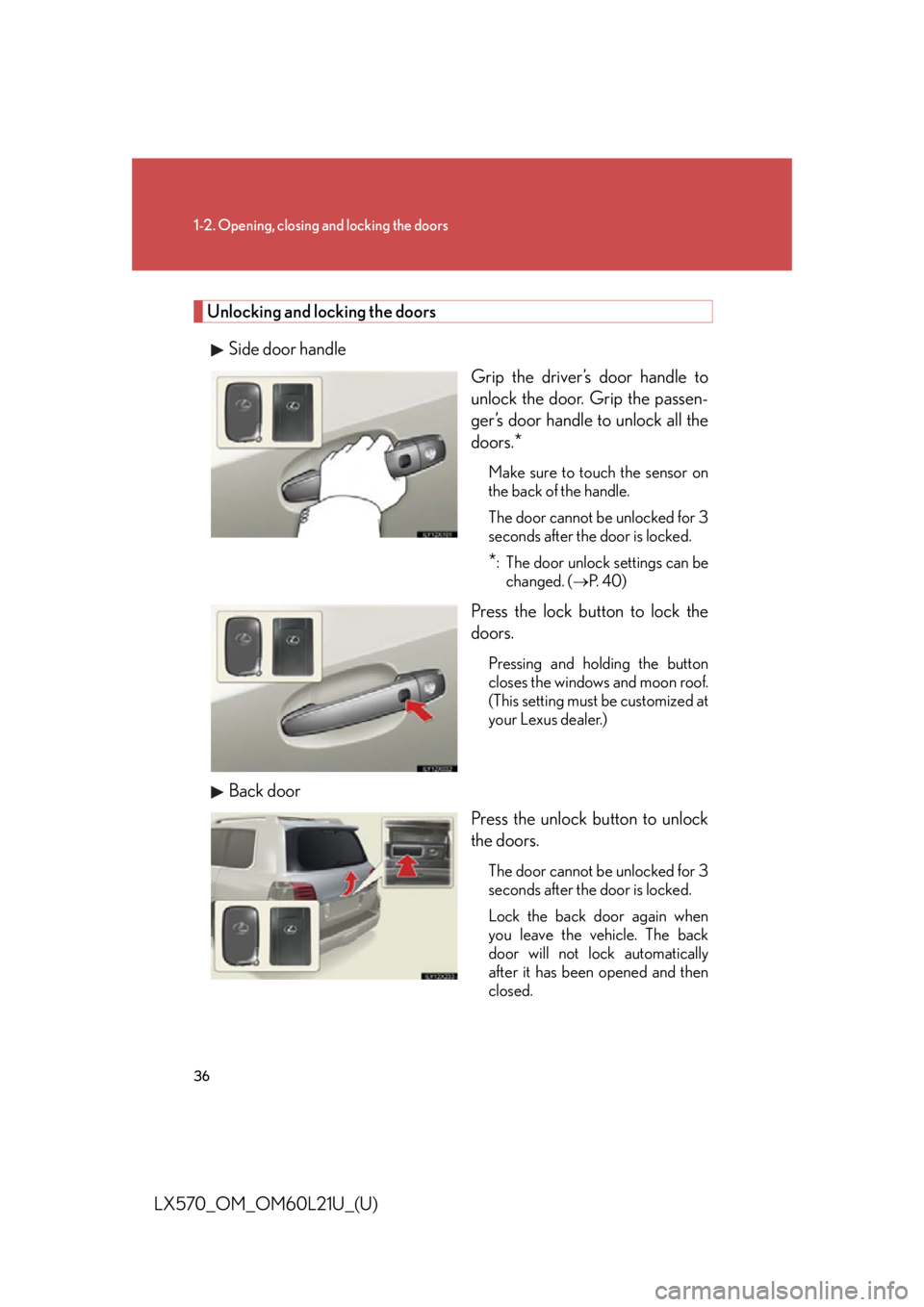
Side door handle
Grip the driver’s door handle to
unlock the door. Grip the passen-
ger’s door handle to unlock all the
doors.
* Make sure to touch the sensor on
the back of the handle.
The door cannot be unlocked for 3
seconds after the door is locked.
* : The door unlock settings can be
changed. (
P. 4 0 )
Press the lock button to lock the
doors. Pressing and holding the button
closes the windows and moon roof.
(This setting must be customized at
your Lexus dealer.)
Back door
Press the unlock button to unlock
the doors. The door cannot be unlocked for 3
seconds after the door is locked.
Lock the back door again when
you leave the vehicle. The back
door will not lock automatically
after it has been opened and then
closed.
Page 38 of 956
381-2. Opening, closing and locking the doors
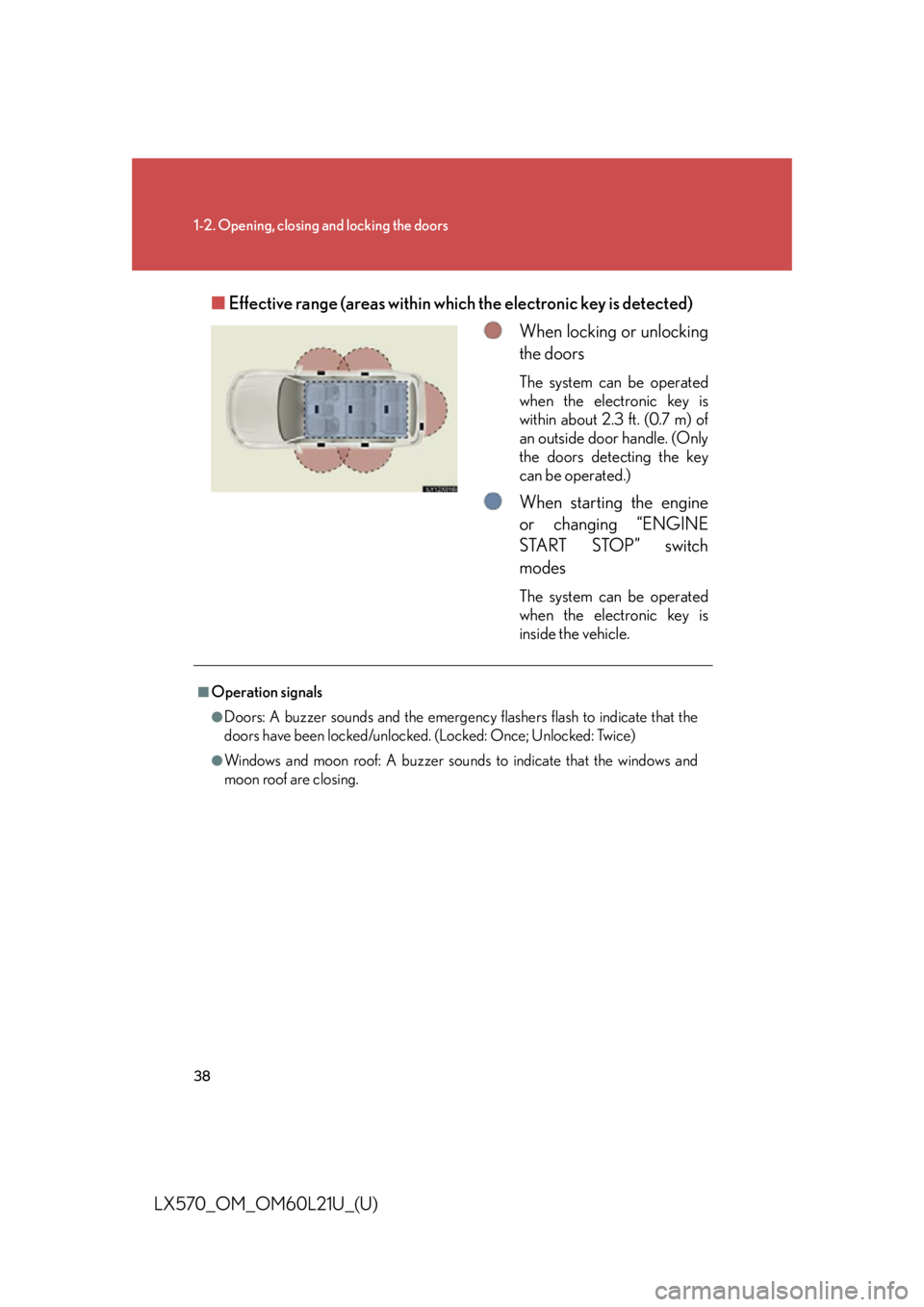
LX570_OM_OM60L21U_(U) ■ Effective range (areas within wh ich the electronic key is detected)
When locking or unlocking
the doors The system can be operated
when the electronic key is
within about 2.3 ft. (0.7 m) of
an outside door handle. (Only
the doors detecting the key
can be operated.)
When starting the engine
or changing “ENGINE
START STOP” switch
modes The system can be operated
when the electronic key is
inside the vehicle.■
Operation signals ●
Doors: A buzzer sounds and the emergency flashers flash to indicate that the
doors have been locked/unlocked. (Locked: Once; Unlocked: Twice)●
Windows and moon roof: A buzzer sounds to indicate that the windows and
moon roof are closing.
Page 39 of 956

391-2. Opening, closing and locking the doors
1
Before driving
LX570_OM_OM60L21U_(U) ■
Conditions affecting operation
The smart access system with push-button start uses weak radio waves. In the fol-
lowing situations, the communication between the electronic key and the vehicle
may be affected, preventing the smart access system with push-button start, wire-
less remote control and engine immobilizer system from operating properly.
(Ways of coping: P. 8 6 7 )●
When the electronic key battery is depleted ●
Near a TV tower, electric power plant, gas station, radio station, large display,
airport or other facility that generates strong radio waves or electrical noise●
When carrying a portable radio, cellular phone, cordless phone or other wire-
less communication devices ●
When the electronic key is in contact wi th, or is covered by the following metal-
lic object
• Card to which aluminum foil is attached
• Cigarette boxes that have aluminum foil inside
• Metallic wallets or bags
•Coins
• Hand warmers made of metal
• Media such as CDs and DVDs ●
When multiple electronic keys are in the vicinity ●
When other wireless keys (that emit radio waves) are being used nearby●
When carrying or using the electronic key together with the following devices
that emit radio waves
• Another vehicle’s electronic key or a wireless key that emits radio waves
• Personal computers or person al digital assistants (PDAs)
• Digital audio players
• Portable game systems ●
If window tint with a metallic content or metallic objects are attached to the rear
window
Page 42 of 956

421-2. Opening, closing and locking the doors
LX570_OM_OM60L21U_(U) ■
To operate the system properly
Make sure to carry the electronic key wh en operating the system. Do not get the
electronic key too close to the vehicle when operating the system from the outside
of the vehicle.
Depending on the position and holding condition of the electronic key, the key may
not be detected corr ectly and the system may not operate properly. (The alarm may
go off accidentally, or the door lock prevention may not function.) ■
Note for the entry function ●
Even when the electronic key is within the effective range (detection areas), the
system may not operate properly in the following cases:
• The electronic key is too close to the window or outside door handle, near the
ground, or in a high place when the doors are locked or unlocked.
• The electronic key is near the ground or in a high place, or too close to the
rear bumper center when the back door is locked or unlocked.
• The electronic key is on the instrument panel, floor or in the glove box when
the engine is started or “ENGINE ST ART STOP” switch modes are changed.●
Do not leave the electronic key on top of the instrument panel or near the door
pockets when exiting the vehicle. Depending on the radio wave reception con-
ditions, it may be detected by the an tenna outside the cabin and the door will
become lockable from the outside, poss ibly trapping the electronic key inside
the vehicle. ●
As long as the electronic key is within the effective range, the doors may be
locked or unlocked by anyone. ●
Even if the electronic key is not inside th e vehicle, it may be possible to start the
engine if the electronic key is near the window. ●
The doors may unlock if a large amount of water splashes on the door handle,
such as in the rain or in a car wash. (The doors will automatically be locked after
approximately 60 seconds if the doors are not opened and closed.)●
Gripping the door handle when wearing a glove may not unlock the door. ●
If the wireless remote control is used to lock the doors when the electronic key
is near the vehicle, there is a possibility that the door may not be unlocked by the
entry function. (Use the wireless re mote control to unlock the doors.)●
A sudden approach to the effective range or door handle operation may pre-
vent the doors from being unlocked. In this case, return the door handle to the
original position and check that the d oors unlock before pulling the door han-
dle.
Page 48 of 956
481-2. Opening, closing and locking the doors
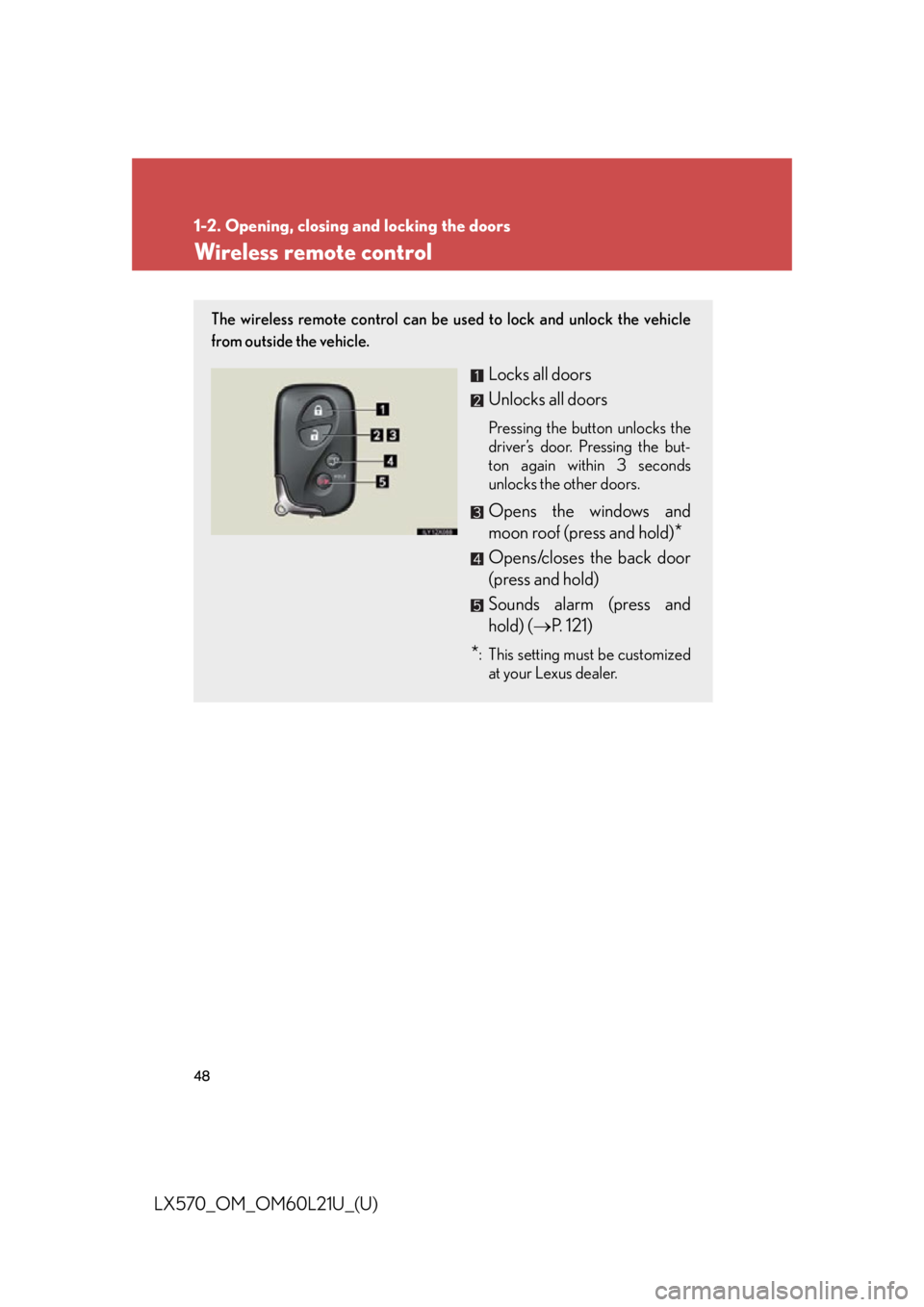
LX570_OM_OM60L21U_(U) Wireless remote control The wireless remote control can be us ed to lock and unlock the vehicle
from outside the vehicle.
Locks all doors
Unlocks all doors Pressing the button unlocks the
driver’s door. Pressing the but-
ton again within 3 seconds
unlocks the other doors.
Opens the windows and
moon roof (press and hold)
*Opens/closes the back door
(press and hold)
Sounds alarm (press and
hold) ( P. 121)
* : This setting must be customized
at your Lexus dealer.
Page 49 of 956
491-2. Opening, closing and locking the doors
1
Before driving
LX570_OM_OM60L21U_(U) ■
Operation signals ●
Doors: A buzzer sounds and the emergency flashers flash to indicate that the
doors have been locked/unlocked. (Locked: Once; Unlocked: Twice)●
Windows and moon roof: A buzzer sounds to indicate that the windows and
moon roof are opening.■
Operating conditions
The wireless remote control will not operate when the “ENGINE START STOP”
switch is in any position other than OFF. ■
Door lock buzzer
If a door is not fully closed, a buzzer soun ds continuously for 5 seconds if an attempt
to lock the door is made. Fully close the do or to stop the buzzer, and lock the vehi-
cle once more. ■
Power back door operation
The power back door can be opened while the vehicle is locked. (one motion) ■
Alarm
Using the wireless remote control to lock the door will set the alarm system. ■
Electronic key battery depletion
P. 4 1■
Security feature
P. 4 3■
If the wireless remote control does not operate properly ●
Locking and unlocking the doors: Use the mechanical key. ( P. 8 6 7 )●
Starting the engine: P. 8 6 8■
When the electronic key battery is fully depleted
P. 7 8 0■
Conditions affecting operation
P. 3 9■
Customization
Settings (e.g. unlocking function) can be changed.
(Customizable features P. 9 0 6 )
Page 105 of 956

1051-3. Adjustable components (s eats, mirrors, steering wheel)
1
Before driving
LX570_OM_OM60L21U_(U) ■
Mirror angle can be adjusted when
The “ENGINE START STOP” switch is in ACCESSORY or IGNITION ON mode. ■
When the mirrors are fogged up
The outside rear view mirrors can be cleared using the mirror defoggers. Turn on
the rear window defogger to turn on the outside rear view mirror defoggers.
( P. 4 5 6 )■
Auto anti-glare function
When the anti-glare inside rear view mirr or is set to auto mode, the outside rear
view mirrors will activate in conjunction with the anti-glare inside rear view mirror to
reduce reflected light. ( P. 1 0 2 )■
Linked mirror function when reversing
When the mirror select switch is in the “L ” or “R” position, the outside rear view mir-
rors will automatically angle downwards wh en the vehicle is reversing in order to
give a better view of the ground. To disa ble this function, move the mirror select
switch to the neutral position (between “L” and “R”). ■
Automatic adjustment of the mirror angle
A desired mirror face angle can be entered to memory and recalled automatically
by the driving position memory. ( P. 8 3 )
Page 107 of 956

1071
Before driving
LX570_OM_OM60L21U_(U) 1-4. Opening and closing th e windows and moon roof
Power windows
Lock switch
Press the switch down to lock pas-
senger window switches. Use this switch to prevent children
from accidentally opening or clos-
ing a passenger window.The power windows can be opened and closed using the following
switches.
Closing
One-touch closing
*Opening
One-touch opening
*
*: To s t o p t h e w i n d o w p a r t w a y ,
operate the switch in the oppo-
site direction.
■
The power windows can be operated when
The “ENGINE START STOP” switch is in IGNITION ON mode. ■
Door lock linked window operation
The following functions can be used if customized at your Lexus dealer. ●
The power windows can be opened and closed using the mechanical key.
( P. 8 6 7 )●
The power windows can be opened using the wireless remote control.
( P. 4 8 )●
The power windows can be closed using the entry function. ( P. 3 6 )
Page 108 of 956

1081-4. Opening and closing the windows and moon roof
LX570_OM_OM60L21U_(U) ■
Operating the power windows after turning the “ENGINE START STOP” switch
OFF
The power windows can be operated for ap proximately 45 seconds even after the
“ENGINE START STOP” switch is turned to ACCESSORY mode or turned OFF.
They cannot, however, be operated once either front door is opened. ■
Jam protection function
If an object becomes caught between th e window and the window frame, window
travel is stopped and the window is opened slightly. ■
When the power window does not close normally
If the jam protection function is oper ating abnormally and a window cannot be
closed, perform the following operations using the power window switch on the rel-
evant door. ●
After stopping the vehicle, the window can be closed by holding the power win-
dow switch in the one-touch closin g position while the “ENGINE START
STOP” switch is turned to IGNITION ON mode. ●
If the window still cannot be closed even by carrying out the operation
explained above, initialize the function by performing the following procedure.
Hold the power window switch in the one-touch closing position. Con-
tinue holding the switch for a further 6 seconds after the window has
closed.
Hold the power window switch in the one-touch opening position. Con-
tinue holding the switch for a further 2 seconds after the window has
opened completely.
Hold the power window switch in the one-touch closing position once
again. Continue holding the switch for a further 2 seconds after the win-
dow has closed.
If you release the switch while the window is moving, start again from the beginning.
If the window continues to close but then re-open slightly even after performing the
above procedure correctly, have the vehicle inspected by your Lexus dealer. STEP 1
STEP 2
STEP 3
Page 109 of 956
1091-4. Opening and closing the windows and moon roof
1
Before driving
LX570_OM_OM60L21U_(U) ■
Customization
Settings (e.g. linked door lock operation) can be changed.
(Customizable features P. 9 0 6 )
CAUTION■
Closing the windows
Observe the following precautions.
Failing to do so may result in death or serious injury. ●
Check to make sure that all passengers do not have any part of their body in a
position where it could be caught when a window is being operated. ●
Do not allow children to operate the power windows.
Closing a power window on someone can cause death or serious injury.■
Jam protection function ●
Never try jamming any part of your body to activate the jam protection function
intentionally. ●
The jam protection function may not work if something gets caught just before
the window fully closes.