light LEXUS LX570 2014 Workshop Manual
[x] Cancel search | Manufacturer: LEXUS, Model Year: 2014, Model line: LX570, Model: LEXUS LX570 2014Pages: 956, PDF Size: 16.4 MB
Page 178 of 956
1782-1. Driving procedures
LX570_OM_OM60L21U_(U) ■
Note for the entry function
P. 4 2
CAUTION■
When starting the engine
Always start the engine while sitting in th e driver’s seat. Do not depress the acceler-
ator while starting the engine under any circumstances.
Doing so may cause an accident resu lting in death or serious injury.■
Stopping the engine in an emergency
If you want to stop the engine in an em ergency while driving the vehicle, press and
hold the “ENGINE START STOP” switch fo r more than 2 seconds, or press it
briefly 3 times or more in succession. ( P. 8 7 8 )
However, do not touch the “ENGINE START STOP” switch while driving except in
an emergency. Turning the engine off while driving will not cause loss of steering or
braking control, but the power assist to thes e systems will be lost. This will make it
more difficult to steer and brake, so you should pull over and stop the vehicle as
soon as it is safe to do so.
NOTICE■
To prevent battery discharge
Do not leave the “ENGINE START STOP” switch in ACCESSORY or IGNITION
ON mode for long periods without the engine running.■
When starting the engine ●
Do not race a cold engine. ●
If the engine becomes difficult to start or stalls frequently, have your vehicle
checked by your Lexus dealer immediately.■
Symptoms indicating a malfunction with the “ENGINE START STOP” switch
If the “ENGINE START STOP” seems to be operating somewhat differently than
usual, such as the switch sticking slightly, there may be a malfunction. Contact your
Lexus dealer immediately.
Page 187 of 956
1872-1. Driving procedures
2
When driving
LX570_OM_OM60L21U_(U) Turn signal lever
■
Turn signals can be operated when
The “ENGINE START STOP” switch is in IGNITION ON mode. ■
If the indicators flash faster than usual
Check that a light bulb in the front or re ar turn signal lights has not burned out.■
If the turn signals stop flashing before a lane change has been performed
Operate the lever again. ■
To discontinue flashing of the tu rn signals during a lane change
Operate the lever in the opposite direction. ■
Customization
The number of times the turn signals flash during a lane change can be changed.
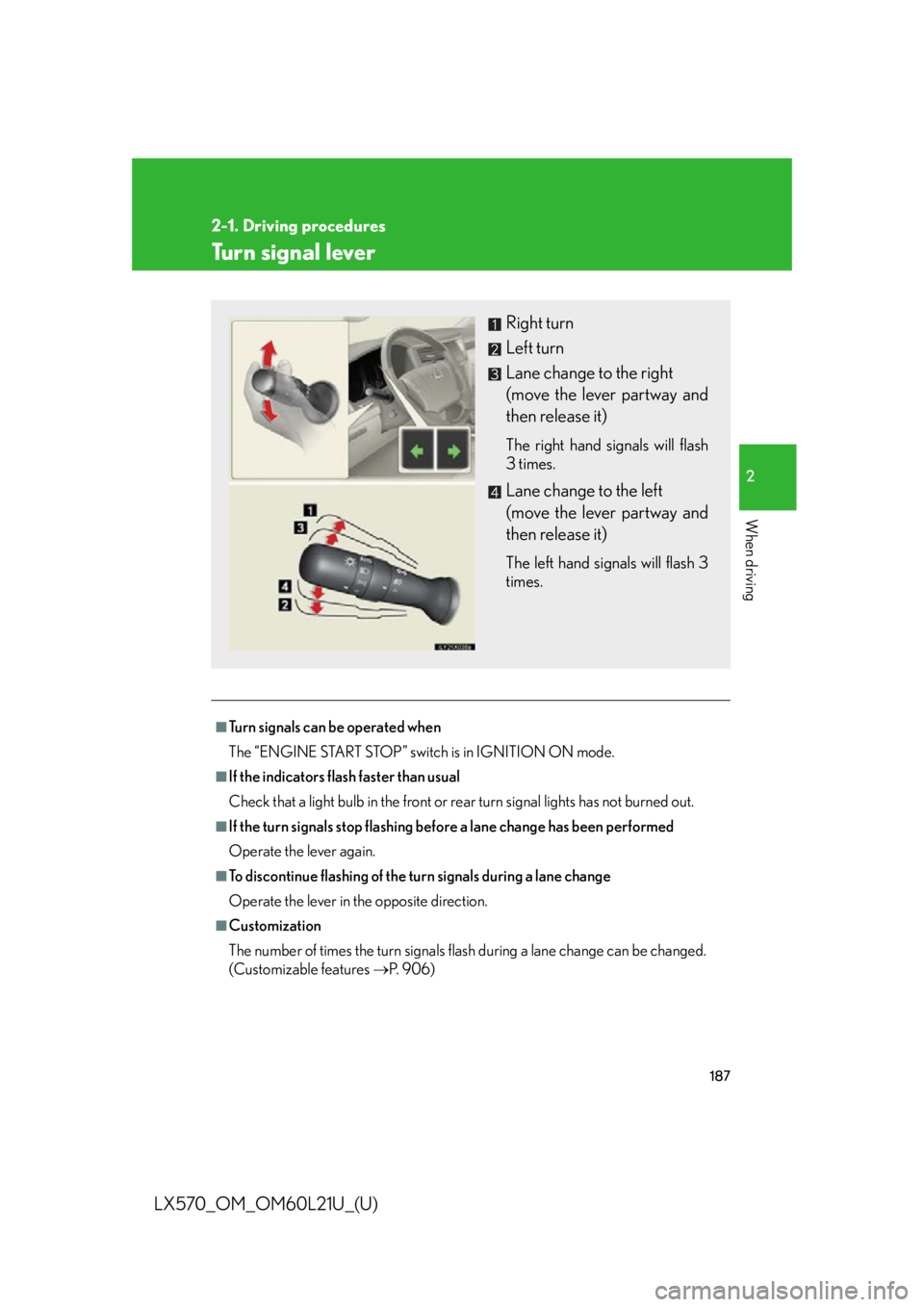
(Customizable features P. 9 0 6 ) Right turn
Left turn
Lane change to the right
(move the lever partway and
then release it) The right hand signals will flash
3 times.
Lane change to the left
(move the lever partway and
then release it) The left hand signals will flash 3
times.
Page 188 of 956
1882-1. Driving procedures
LX570_OM_OM60L21U_(U) Parking brake
■
Usage in winter time
P. 3 74
NOTICE■
Before driving
Fully release the parking brake.
Driving the vehicle with the parking brake set will lead to brake components over-
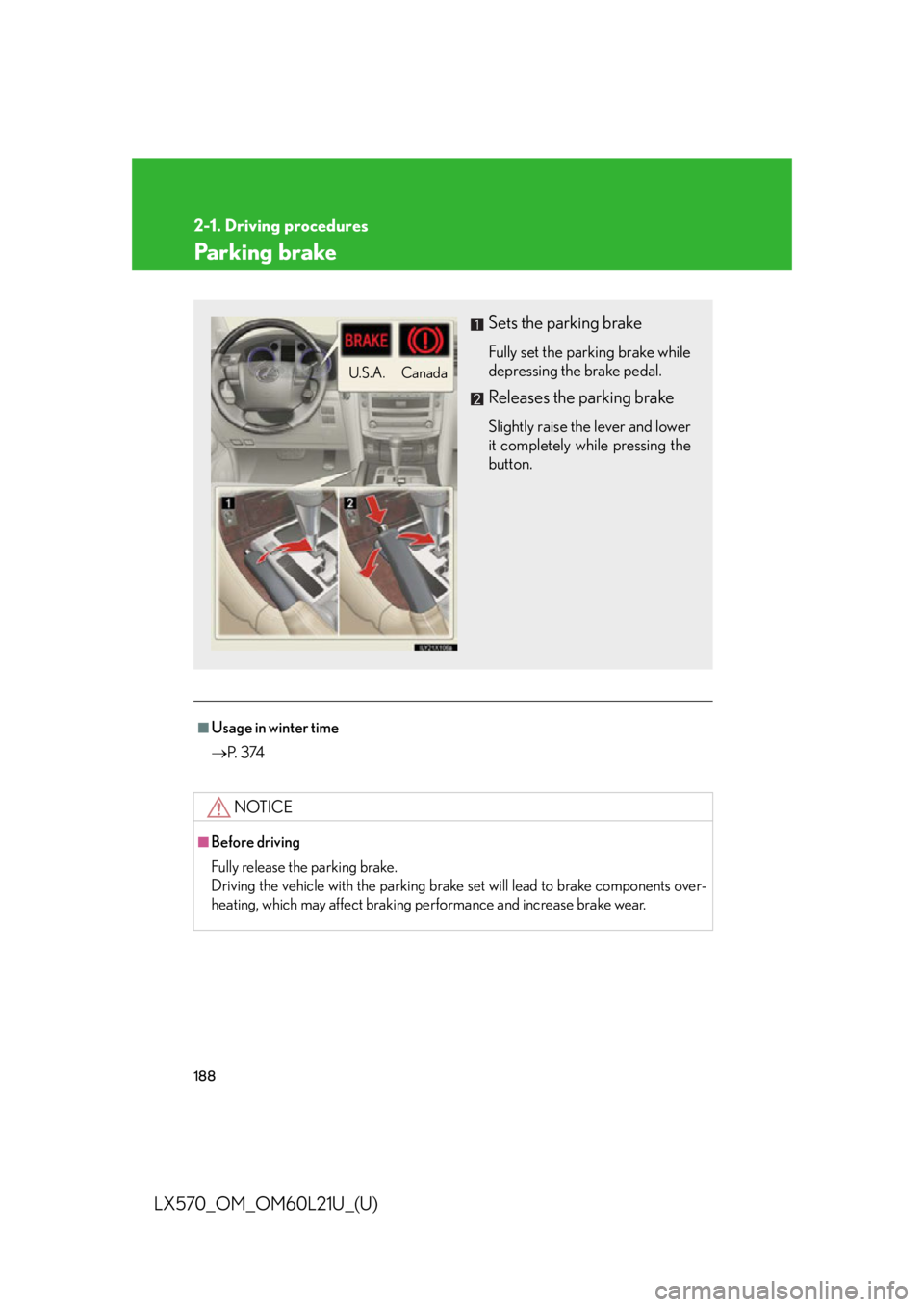
heating, which may affect braking performance and increase brake wear. Sets the parking brake Fully set the parking brake while
depressing the brake pedal.
Releases the parking brake Slightly raise the lever and lower
it completely while pressing the
button.CanadaU.S.A.
Page 191 of 956

1912-2. Instrument cluster
2
When driving
LX570_OM_OM60L21U_(U) Switching the display
Pressing this button switches between odometer and trip meter.
Odometer
Trip meter A
*Trip meter B
*
* : Pushing and holding the button will
reset the trip meter.Odometer and trip meter Odometer: Displays the total distance the vehicle has been driven
Trip meter: Displays the distance the vehicle has been driven since the
meter was last reset. Trip meters A and B can be used to record and dis-
play different distances independently
Odometer/trip meter disp lay change buttonSwitches between odometer and trip meter displays
Instrument panel light control dial The brightness of the instrume nt panel light can be adjusted
Page 192 of 956

1922-2. Instrument cluster
LX570_OM_OM60L21U_(U) Eco Driving Indicator Light customization
Eco Driving Indicator Light can be activated or deactivated.
While the odometer is being dis-
played, press and hold the odome-
ter/trip meter display change
button to display the Eco Driving
Indicator Light customization
screen.
Press the odometer/trip meter displa y change button to set Eco
Driving Indicator Light to on or off.
Press and hold the odometer/tri p meter display ch ange button to
complete the setting.
Instrument panel light control
The brightness of the instrument panel light can be adjusted.
Darker
BrighterSTEP 1
STEP 2
STEP 3
Page 193 of 956
1932-2. Instrument cluster
2
When driving
LX570_OM_OM60L21U_(U) ■
The meters and displa y illuminate when
The “ENGINE START STOP” switch is in IGNITION ON mode. ■
The brightness of the instrument panel lights
When the tail lights are turned on, the me ter’s brightness will be reduced slightly
unless the meter brightness level adjustment is set to the brightest setting.
If the tail lights are turned on when the surroundings are dark, the meter’s bright-
ness will be reduced slightly. However, wh en the surroundings are bright, such as
during the daytime, the meter’s brightness will not be reduced even if the tail lights
are turned on.
NOTICE■
To prevent damage to the engine and its components ●
Do not let the indicator needle of the ta chometer enter the red zone, which indi-
cates the maximum engine speed. ●
The engine may be overheating if the engine coolant temperature gauge is in the
red zone (“H”). In this case, immediatel y stop the vehicle in a safe place, and
check the engine after it has cooled completely. ( P. 8 7 3 )■
Vo l t m e t e r
When the voltmeter indicates 19 V or higher or 9 V or lower while the engine is
running, there may be a battery or chargi ng system malfunction. Have the vehicle
inspected at your Lexus dealer. ■
Engine oil pressure gauge
When the value of the engine oil pressure gauge drops while the engine is running,
stop the vehicle in a safe place immediately and check the amount of engine oil.
( P. 74 9 )
When the oil pressure drops even though the engine oil amount has not decreased,
or if the oil pressure does not increase when engine oil is added, contact your Lexus
dealer, as there may be a problem with the lubrication system.
Page 194 of 956
1942-2. Instrument cluster
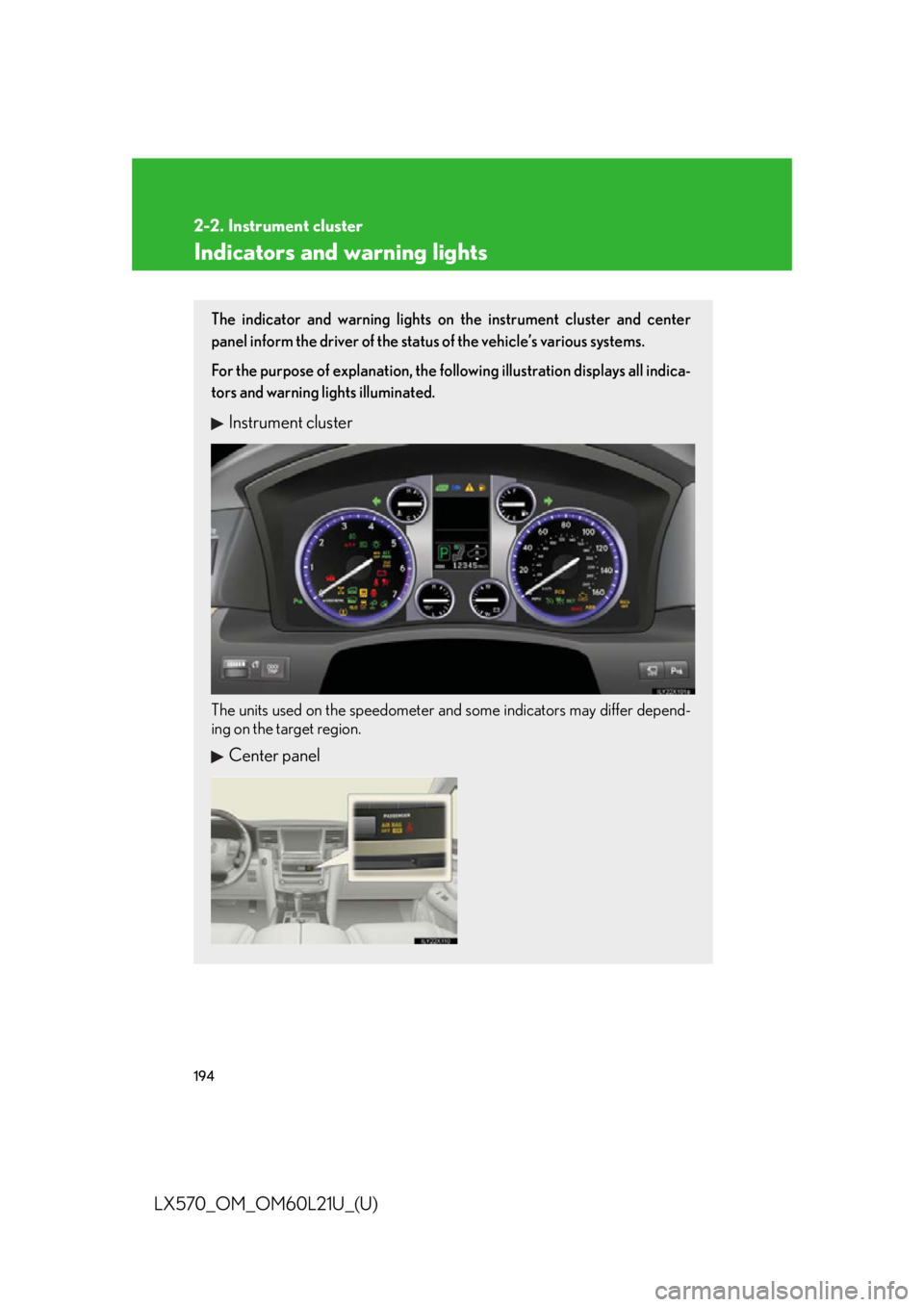
LX570_OM_OM60L21U_(U) Indicators and warning lights The indicator and warning lights on the instrument cluster and center
panel inform the driver of the status of the vehicle’s various systems.
For the purpose of explanation, the following illustration displays all indica-
tors and warning lights illuminated.
Instrument cluster
The units used on the speedometer and some indicators may differ depend-
ing on the target region.
Center panel
Page 195 of 956
1952-2. Instrument cluster
2
When driving
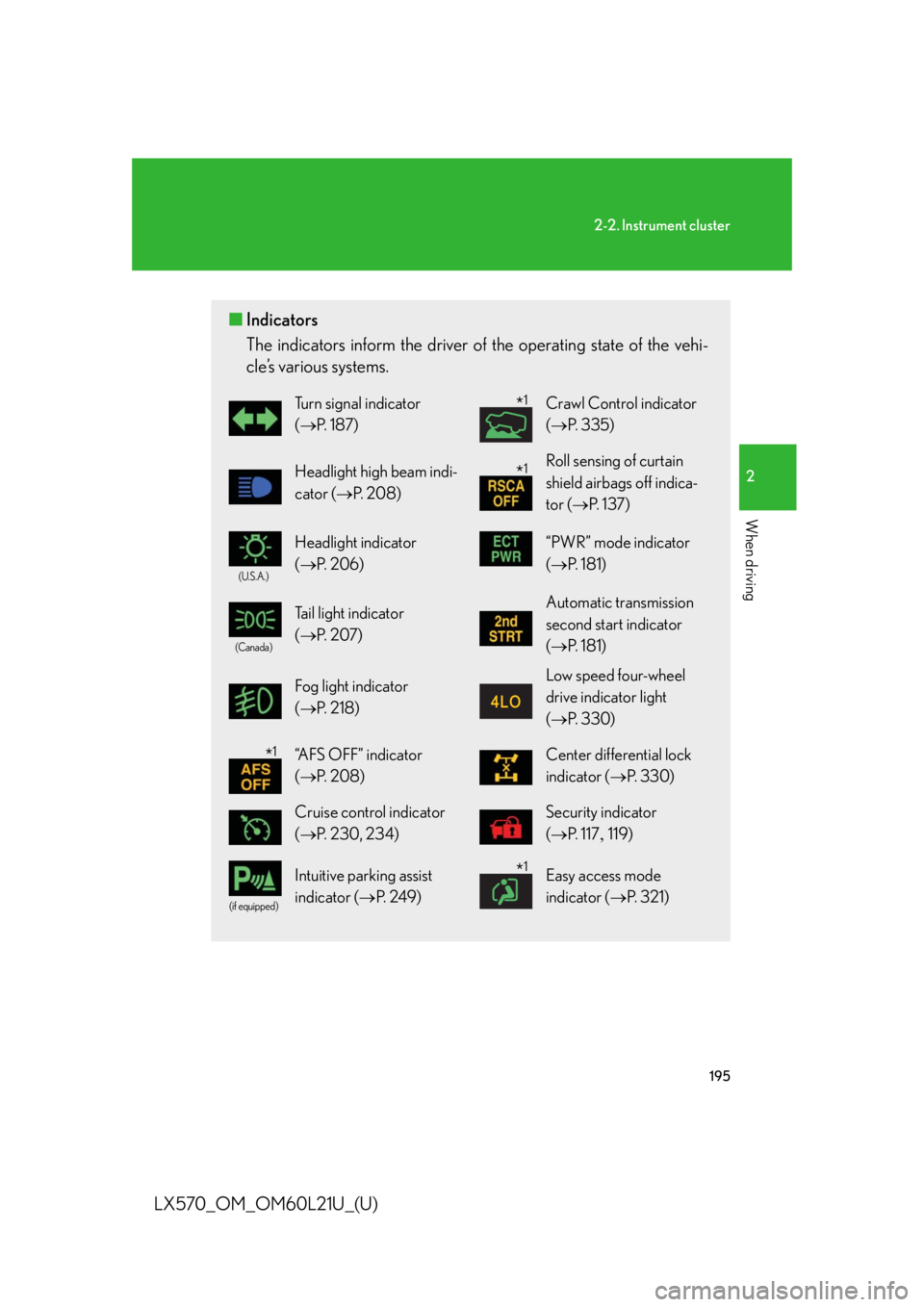
LX570_OM_OM60L21U_(U) ■ Indicators
The indicators inform the driver of th e operating state of the vehi-
cle’s various systems. Turn signal indicator
( P. 1 8 7 ) Crawl Control indicator
( P. 335)
Headlight high beam indi-
cator ( P. 2 0 8 ) Roll sensing of curtain
shield airbags off indica-
tor ( P. 1 3 7 )(U.S.A.)
Headlight indicator
( P. 2 0 6 ) “PWR” mode indicator
( P. 181)(Canada)
Tail light indicator
( P. 2 0 7 ) Automatic transmission
second start indicator
( P. 181)
Fog light indicator
( P. 2 1 8 ) Low speed four-wheel
drive indicator light
( P. 3 3 0 )
“AFS OFF” indicator
( P. 2 0 8 ) Center differential lock
indicator ( P. 3 3 0 )
Cruise control indicator
( P. 230, 234) Security indicator
( P. 117 119)(if equipped)
Intuitive parking assist
indicator ( P. 2 4 9 ) Easy access mode
indicator ( P. 3 2 1 )* 1
* 1
* 1
* 1
Page 196 of 956
1962-2. Instrument cluster
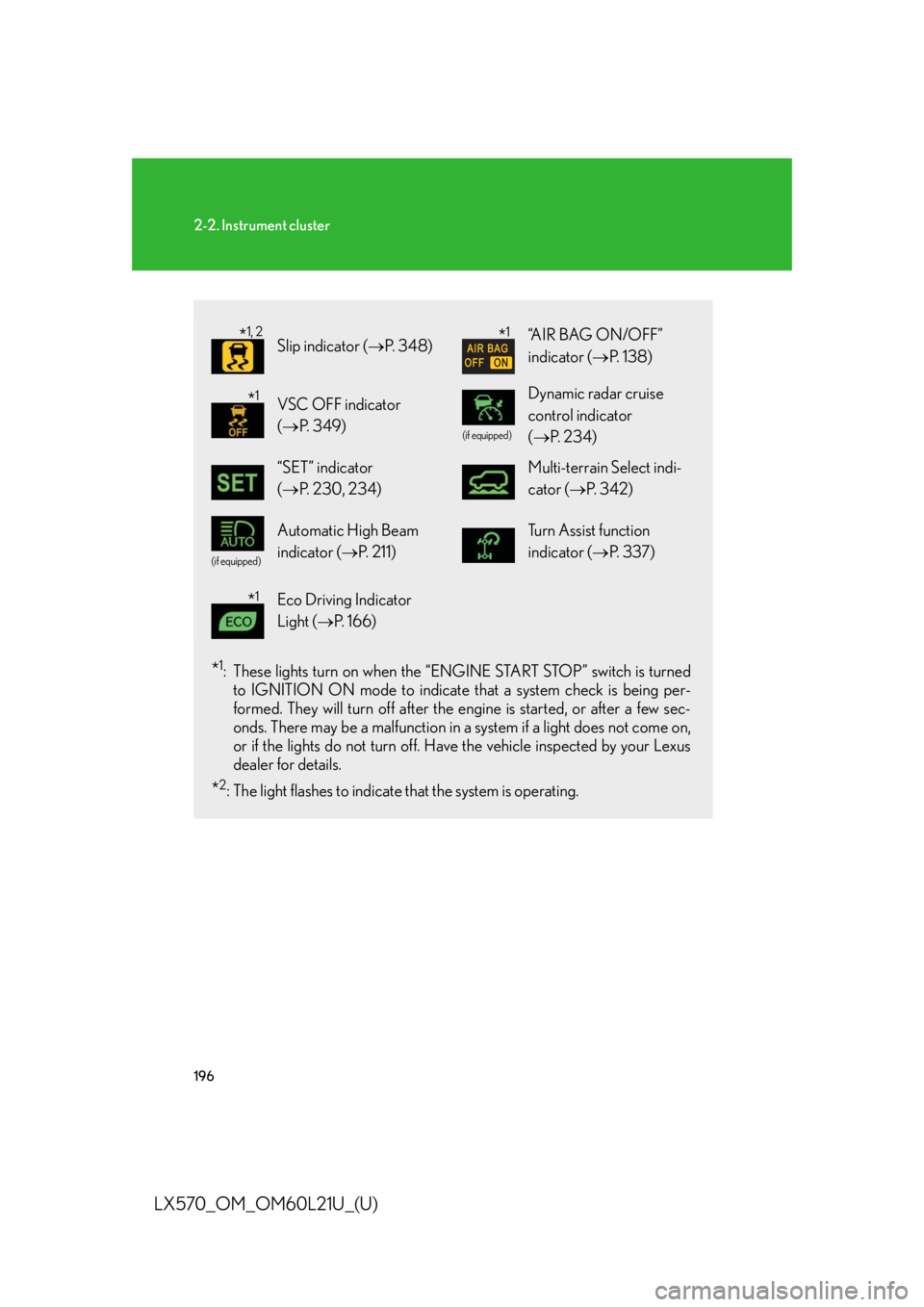
LX570_OM_OM60L21U_(U) * 1
: These lights turn on when the “E NGINE START STOP” switch is turned
to IGNITION ON mode to indicate that a system check is being per-
formed. They will turn off after the en gine is started, or after a few sec-
onds. There may be a malfunction in a system if a light does not come on,
or if the lights do not turn off. Have the vehicle inspected by your Lexus
dealer for details.
* 2
: The light flashes to indicate that the system is operating. Slip indicator ( P. 3 4 8 ) “AIR BAG ON/OFF”
indicator ( P. 1 3 8 )
VSC OFF indicator
( P. 3 4 9 ) (if equipped)
Dynamic radar cruise
control indicator
( P. 2 3 4 )
“SET” indicator
( P. 230, 234) Multi-terrain Select indi-
cator ( P. 3 4 2 )(if equipped)
Automatic High Beam
indicator ( P. 211) Tu r n A s s i s t f u n c t i o n
indicator ( P. 3 3 7 )
Eco Driving Indicator
Light ( P. 1 6 6 )* 1, 2
* 1
* 1
* 1
Page 197 of 956
1972-2. Instrument cluster
2
When driving
LX570_OM_OM60L21U_(U) CAUTION■
If a safety system warning light does not come on
Should a safety system light such as Multi Terrain ABS and the SRS airbag warning
light not come on when you start the engine, this could mean that these systems are
not available to help protect you in an accid ent, which could result in death or seri-
ous injury. Have the vehicle inspected by your Lexus dealer immediately if this
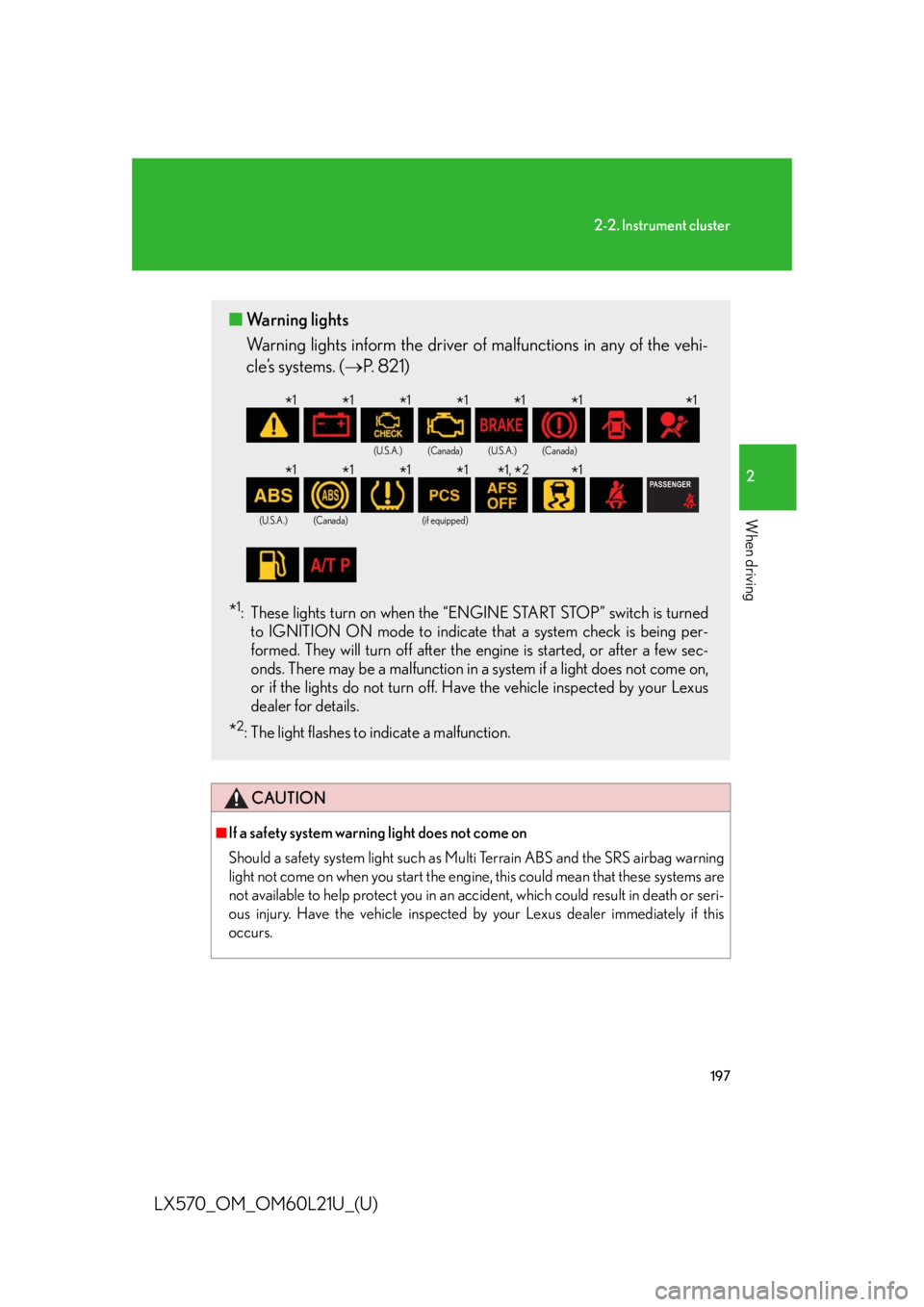
occurs.■ Warning lights
Warning lights inform the driver of malfunctions in any of the vehi-
cle’s systems. ( P. 821)
* 1
: These lights turn on when the “E NGINE START STOP” switch is turned
to IGNITION ON mode to indicate that a system check is being per-
formed. They will turn off after the en gine is started, or after a few sec-
onds. There may be a malfunction in a system if a light does not come on,
or if the lights do not turn off. Have the vehicle inspected by your Lexus
dealer for details.
* 2
: The light flashes to indicate a malfunction. (U.S.A.) (Canada) (U.S.A.) (Canada)
(U.S.A.) (Canada) (if equipped)
* 1
* 1
* 1
* 1
* 1
* 1
* 1
* 1
* 1
* 1
* 1
* 1,
* 2
* 1