mirror LEXUS LX570 2014 Workshop Manual
[x] Cancel search | Manufacturer: LEXUS, Model Year: 2014, Model line: LX570, Model: LEXUS LX570 2014Pages: 956, PDF Size: 16.4 MB
Page 216 of 956

2162-3. Operating the lights and wipers
LX570_OM_OM60L21U_(U) ■
If a warning message of the Automatic High Beam is displayed...
It may indicate a malfunction in the system. Contact your Lexus dealer. ■
Temporary lowering sensor sensitivity
The sensitivity of the sensor can be temporarily lowered.
To lower the sensitivity, push and hold on the inside rear view mirror for 15 to
20 seconds, and release. The indicator light on the inside rear view mirror will flash
to indicate that the sens itivity has been lowered.
When the “ENGINE START STOP” switch is turned off, the sensitivity will be
returned to its normal level. ■
Customization
The Automatic High Beam can be turned off.
(Customizable features P. 9 0 6 )
Page 217 of 956

2172-3. Operating the lights and wipers
2
When driving
LX570_OM_OM60L21U_(U) NOTICE■
Camera sensor
●
Do not touch the camera sensor. ●
Do not subject the inside rear view mirror or the camera sensor to a strong
impact. ●
Do not disassemble the camera sensor. ●
Do not spill liquid onto the inside rear view mirror or the camera sensor. ●
Do not apply window tinting or stickers to the camera sensor or the area of wind-
shield near the camera sensor. ●
Do not place items on the dashboard. There is a possibility that the camera sensor
will mistake items reflected in the windshield for streetlights, the headlights of
other vehicles, etc. ●
Do not install a parking tag or any othe r accessories near or around the inside
rear view mirror and the camera sensor. ●
Do not overload the vehicle. ●
Do not modify the vehicle. ●
Do not replace windshield with a non-genuine windshield.
Contact your Lexus dealer. Observe the following to ensure that the
Automatic High Beam functions correctly.
Page 266 of 956
2662-4. Using other driving systems
LX570_OM_OM60L21U_(U) CAUTION■
When using the rear view monitor system
The rear view monitor system is a supplemental device intended to assist the driver
when backing up. When backing up, be sure to check visually behind and all around
the vehicle before proceeding.
Observe the following precautions to avoid an accident that could result in death or
serious injuries. ●
Never depend on the rear view monitor system entirely when backing up. The
image and the position of the guide lines displayed on the screen may differ from
the actual state.
Use caution, just as you would when backing up any vehicle. ●
When parking, be sure to check that the parking space will accommodate your
vehicle before maneuvering into it. ●
Be sure to back up slowly, depressing the brake pedal to control vehicle speed.●
In low temperatures, the screen may darken or the image may become faint. The
image could distort when the vehicle is moving, or you may become unable to
see the image on the screen. Be sure to check direct visually and with the mirrors
all around the vehicle before proceeding. ●
The camera uses a special lens. The di stances between obje cts and pedestrians
that appear in the image displayed on the screen will differ from the actual dis-
tances. ( P. 2 9 0 )
Page 279 of 956

2792-4. Using other driving systems
2
When driving
LX570_OM_OM60L21U_(U) Keeping the steering wheel in that position, check yo ur surroundings
visually and using mirror s, and back up using the distance guide lines
etc. as a reference. ( in “Parking operation”)
When the vehicle is approximately in the desired parking location, par-
allel parking assist is complete. ( in “Parking operation”)
■ Parking operation
The following example describes the procedure for pulling into a park-
ing space on the right. Fo r pulling into a parking space on the left, sub-
stitute left for right and vice versa in all steps.
Stop the vehicle in the positi on as described below, and
straighten the steering wheel.
Roughly half a vehicle’s length
Desired parking space
Approx. 3 ft. (1 m)
Parked vehicle
Yo u r v e h i c l e A position in which you are parallel
with the road (or the side of the
road), and in which there is approx-
imately 3 ft. (1 m) of space between
your vehicle and the parked vehi-
cle
A position in which you are half a
vehicle’s length ahead of the
parked vehicle
Shift the shift lever to the “R” position.
Make sure the monitor displays the part behind the rear tires of
the parked vehicle, and select . If the area is not displayed, move the vehicle to forward. STEP 9
STEP 10
STEP 1
STEP 2
STEP 3
Page 284 of 956
2842-4. Using other driving systems
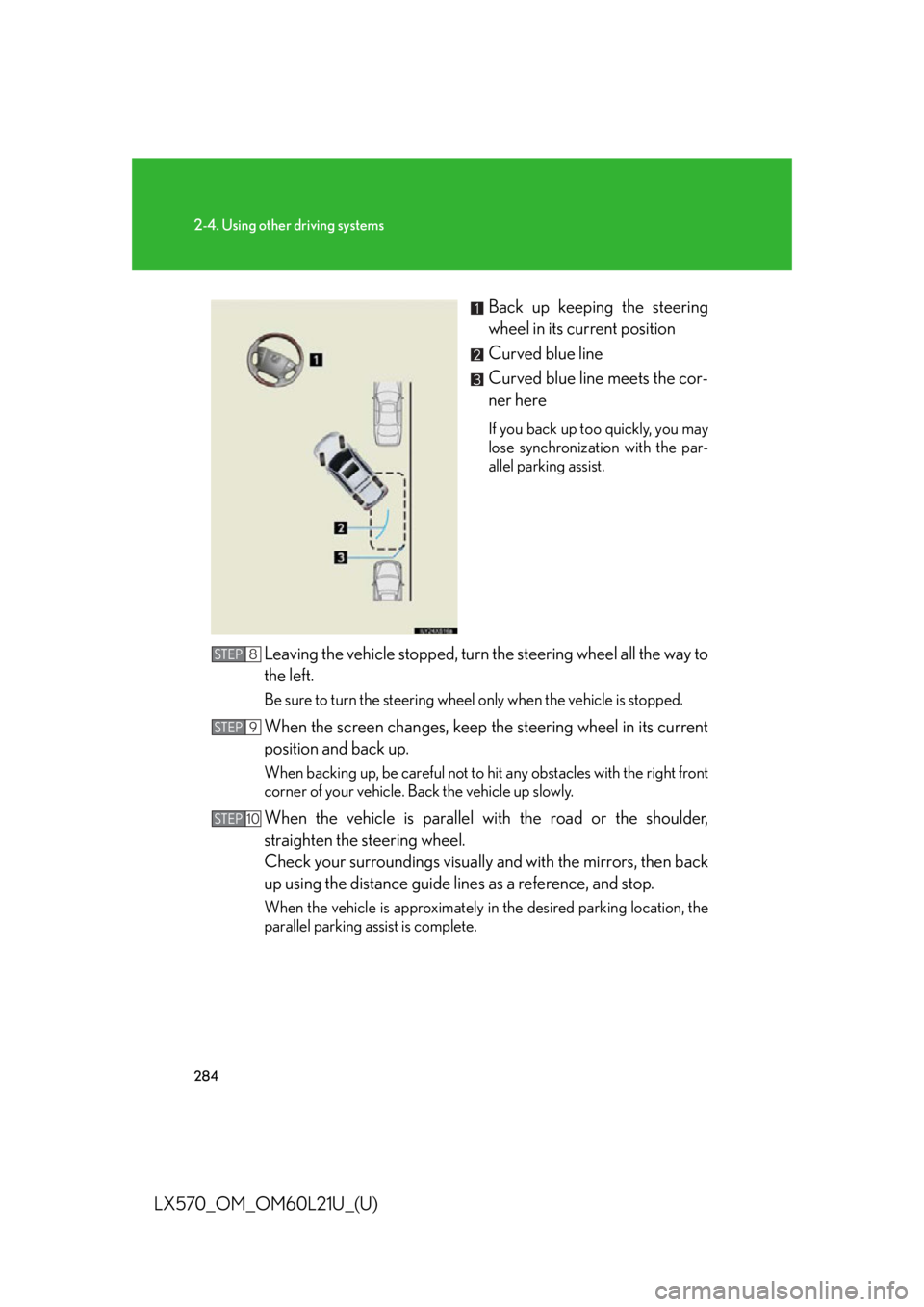
LX570_OM_OM60L21U_(U) Back up keeping the steering
wheel in its current position
Curved blue line
Curved blue line meets the cor-
ner here If you back up too quickly, you may
lose synchronization with the par-
allel parking assist.
Leaving the vehicle stopped, turn the steering wheel all the way to
the left. Be sure to turn the steering wheel only when the vehicle is stopped.
When the screen changes, keep the steering wheel in its current
position and back up. When backing up, be careful not to hi t any obstacles with the right front
corner of your vehicle. Back the vehicle up slowly.
When the vehicle is parallel with the road or the shoulder,
straighten the steering wheel.
Check your surroundings visually and with the mirrors, then back
up using the distance guide lines as a reference, and stop. When the vehicle is approximately in the desired parking location, the
parallel parking assist is complete.STEP 8
STEP 9
STEP 10
Page 285 of 956

2852-4. Using other driving systems
2
When driving
LX570_OM_OM60L21U_(U) ● Parallel parking assist mode information
• There is a possibility that parallel parking guidance may not be given
when backing up at a very slow speed.
• If the back door is opened during parallel parking guidance, parallel
parking assist will be interrupted and canceled. Stop the vehicle,
shift the shift lever out of the “R” position, and restart the operation
from the procedure “1”.
● Canceling parallel parking assist Select .
● Vehicles equipped with intuitive parking assist
If intuitive parking assist detects an object while you attempt to park in
a parking space on the le ft, the black and yellow vertical pole could be
obscured by intuitive park ing assist display. In th is event, turn intuitive
parking assist switch off ( P. 249), and operate the vehicle while
checking the safety of the surroun ding area direct visually and with
mirror. After the operation, turn the switch on.
● If the message “Steering wheel turned too far, please return.” is dis-
played
The steering wheel has been turned too far, and the system cannot
function. Return the steering wheel to its original position.
If the message is displayed before the outline is positioned over the
desired parking space, it is likely that the vehicle is too far away from
the shoulder. Check that there is a gap of approximately 3 ft. (1 m)
between your vehicle and the parked vehicle.
Page 297 of 956

2972-4. Using other driving systems
2
When driving
LX570_OM_OM60L21U_(U) CAUTION■
When using the Lexus parking assist monitor system
The parking assist monitor system is a supp lemental device intended to assist the
driver when backing up. When backing up, be sure to check visually behind and all
around the vehicle before proceeding.
Observe the following precautions to avoid an accident that could result in death or
serious injuries. ●
Never depend on the parking assist monitor entirely when backing up. The image
and the position of the guide lines displayed on the screen may differ from the
actual state.
Use caution, just as you would when backing up any vehicle. ●
Be sure to back up slowly, depressing the brake pedal to control vehicle speed.●
If you seem likely to hit nearby vehicles, obstacles, people or mount the shoulder,
depress the brake pedal to stop the vehicle, then disable the assist system by
touch
on the screen to cancel the system.●
The instructions given are only guidelines.
When and how much to turn the steering wheel will vary according to traffic con-
ditions, road surface conditions, vehicle co ndition, etc. when parking. It is neces-
sary to be fully aware of this before using the parking assist system. ●
When parking, be sure to check that the parking space will accommodate your
vehicle before maneuvering into it. ●
Do not use the Lexus parking assist monitor system in the following cases:
• On icy or slick road surfaces, or in snow
• When using tire chains
• When the back door is not closed completely
• On roads that are not flat or straight, such as curves or slopes. ●
In low temperatures, the screen may darken or the image may become faint. The
image could distort when the vehicle is moving, or you may become unable to
see the image on the screen. Be sure to check direct visually and with the mirrors
all around the vehicle before proceeding.
Page 301 of 956
3012-4. Using other driving systems
2
When driving
LX570_OM_OM60L21U_(U) Wide view front & side monitor
: If equippedThis system can display the wide view front monitor and the side monitor
separately or at the same time.
The wide view front monitor uses a super-wide angle lens to display on
screen the areas to the left and right of the vehicle and the blind spots to the
front of the vehicle. This system he lps the driver check for approaching
cars, bicycles and pedestrians when at intersections with poor visibility.
The side monitor uses a camera insta lled in the passenger’s side outside
rear view mirror to display on screen the area to the front-right of the vehi-
cle, helping the driver check this area.
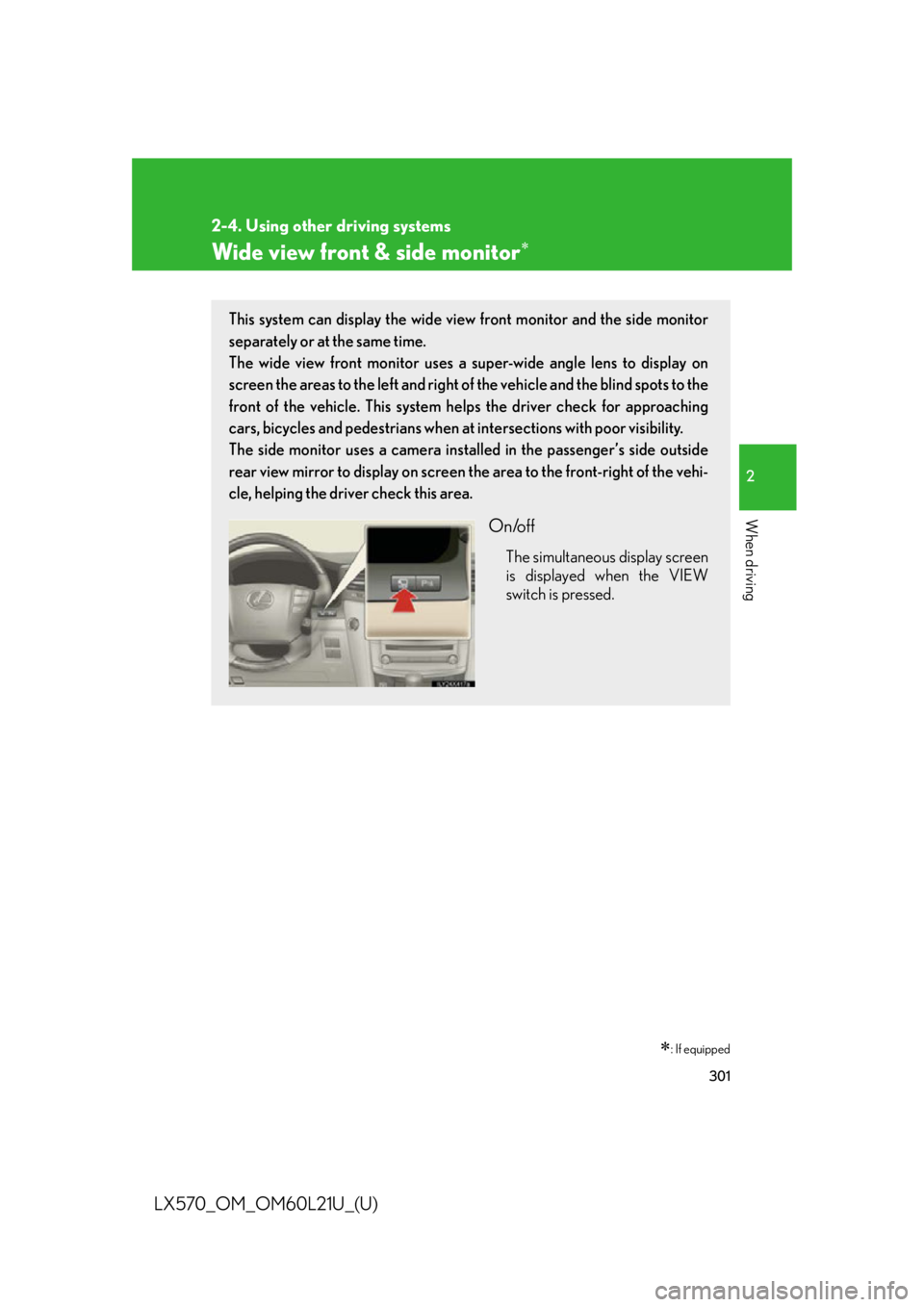
On/off The simultaneous display screen
is displayed when the VIEW
switch is pressed.
Page 312 of 956
3122-4. Using other driving systems
LX570_OM_OM60L21U_(U) ■
The wide view front & side monitor can be operated when ●
The “ENGINE START STOP” switch is in IGNITION ON mode. ●
The vehicle speed is less than approximately 6 mph (10 km/h).■
Automatic system cancelation
In the following situations, the system is canceled automatically. ●
When the vehicle speed exceeds approximately 7 mph (12 km/h).●
When the shift lever is in “R”.■
When the outside rear view mirrors have been folded
The side monitor screen can be displayed even if the outside rear view mirrors have
been folded. In this case, there will be a slight difference between the image dis-
played when the outside rear view mirrors are extended and when the outside rear
view mirrors have been folded.
If the side monitor is displayed while the outside rear view mirrors are folded, you
cannot check the area near the front edge of the vehicle as the base of the outside
rear view mirrors will be in the way. ■
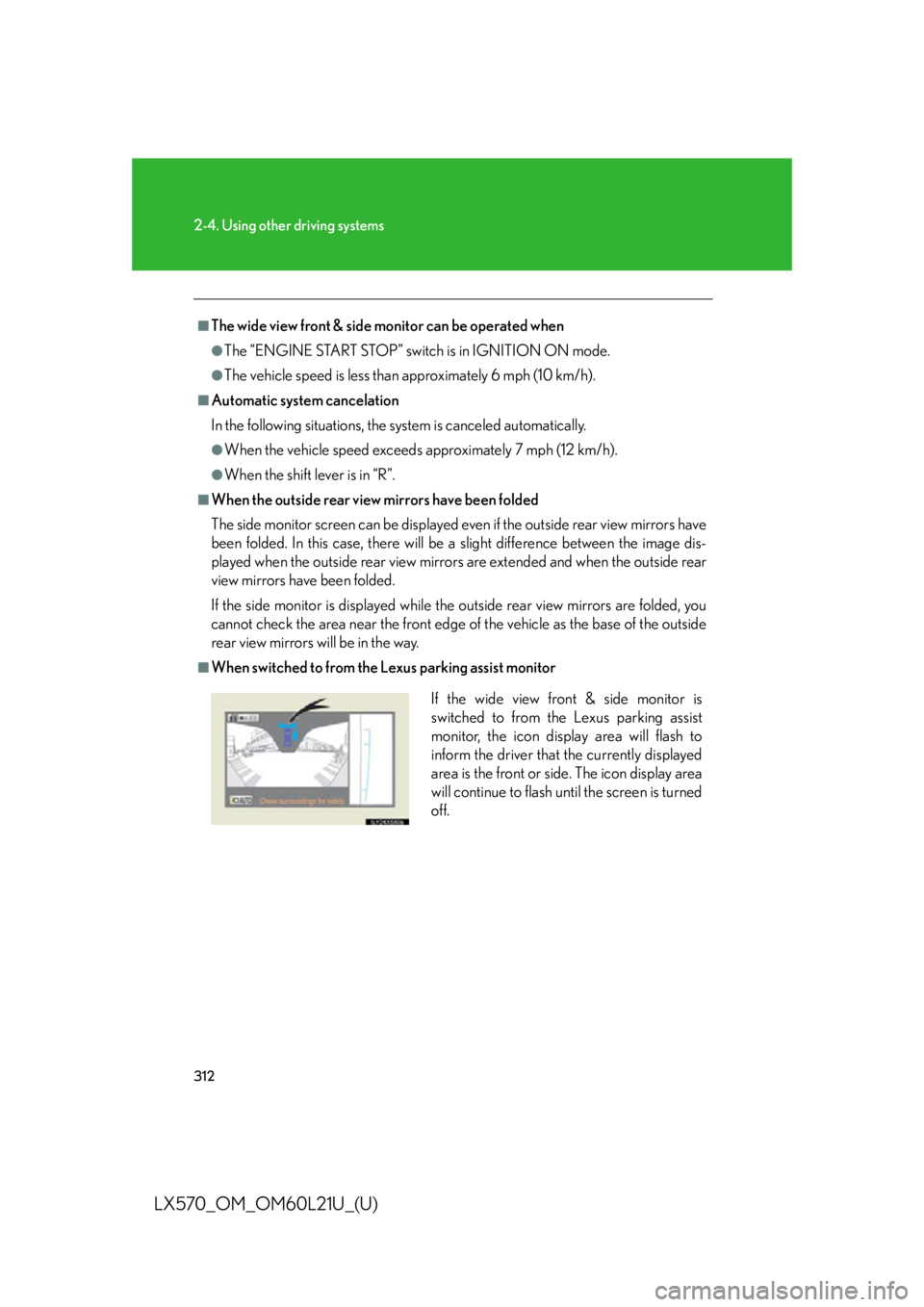
When switched to from the Lexus parking assist monitor
If the wide view front & side monitor is
switched to from the Lexus parking assist
monitor, the icon display area will flash to
inform the driver that the currently displayed
area is the front or side. The icon display area
will continue to flash until the screen is turned
off.
Page 316 of 956

3162-4. Using other driving systems
LX570_OM_OM60L21U_(U) CAUTION■
Conditions which may affect the wide view front & side monitor system ●
If the front of the vehicle or the passenger side outside rear view mirror is hit, the
camera’s position and mounting angle ma y change. Contact your Lexus dealer.●
Rapid temperature changes, such as when hot water is poured on the vehicle in
cold weather, may cause the system to function abnormally. ●
If the camera lens is dirty, it cannot transmit a clear image. Rinse with water and
wipe with a soft cloth. If extremely dirty, wash with a mild cleanser and rinse. ●
The displayed image may be darker and mo ving images may be slightly distorted
when the system is cold. ●
Situations unsuitable for wide view front & side monitor
• On icy or slick road surfaces, or in snow.
• When using tire chains or emergency tires.
• On roads that are not flat or straight, such as curves or slopes. ●
If the tires are changed, the position of the guide lines displayed on the screen
may be incorrect. When changing the tires, consult your Lexus dealer. ●
Depending on the circumstances of the vehicle (number of passengers, amount
of luggage, etc.), the position of the guide lines displayed on the screen may
change. Be sure to check visually behind and all around the vehicle before pro-
ceeding. ●
When washing the vehicle, do not apply intensive bursts of water to the camera
or camera area. Doing so may result in the camera malfunctioning.