steering wheel LEXUS LX570 2014 Manual PDF
[x] Cancel search | Manufacturer: LEXUS, Model Year: 2014, Model line: LX570, Model: LEXUS LX570 2014Pages: 956, PDF Size: 16.4 MB
Page 285 of 956

2852-4. Using other driving systems
2
When driving
LX570_OM_OM60L21U_(U) ● Parallel parking assist mode information
• There is a possibility that parallel parking guidance may not be given
when backing up at a very slow speed.
• If the back door is opened during parallel parking guidance, parallel
parking assist will be interrupted and canceled. Stop the vehicle,
shift the shift lever out of the “R” position, and restart the operation
from the procedure “1”.
● Canceling parallel parking assist Select .
● Vehicles equipped with intuitive parking assist
If intuitive parking assist detects an object while you attempt to park in
a parking space on the le ft, the black and yellow vertical pole could be
obscured by intuitive park ing assist display. In th is event, turn intuitive
parking assist switch off ( P. 249), and operate the vehicle while
checking the safety of the surroun ding area direct visually and with
mirror. After the operation, turn the switch on.
● If the message “Steering wheel turned too far, please return.” is dis-
played
The steering wheel has been turned too far, and the system cannot
function. Return the steering wheel to its original position.
If the message is displayed before the outline is positioned over the
desired parking space, it is likely that the vehicle is too far away from
the shoulder. Check that there is a gap of approximately 3 ft. (1 m)
between your vehicle and the parked vehicle.
Page 295 of 956

2952-4. Using other driving systems
2
When driving
LX570_OM_OM60L21U_(U) The image is blurry Dirt or foreign matter
(such as water droplets,
snow, mud etc.) is
adhering to the camera. Rinse the camera lens with
water and wipe it clean with
a soft cloth.
Wash with a mild soap if the
dirt is stubborn.
A vertical white streak is
on the screen When a bright spot
(such as sunlight
reflecting off the body
of another vehicle) is
received by the camera,
a vertical streak may be
left above and below
the bright spot (smear
effect). If this happens due to these
causes, it does not indicate
a malfunction.
Back up while visually
checking the vehicle’s sur-
roundings. (Use the moni-
tor again once conditions
have been improved.)
The image is out of align-
ment The camera or sur-
rounding area has
received a strong
impact. Have the vehicle inspected
by your Lexus dealer.
The guide lines are very
far out of alignment The camera position is
out of alignment. Have the vehicle inspected
by your Lexus dealer.
The estimated course
lines move even though
the steering wheel is
straight There is a malfunction in
the signals being output
by the steering sensor. Have the vehicle inspected
by your Lexus dealer.Symptom Likely cause Solution
Page 296 of 956

2962-4. Using other driving systems
LX570_OM_OM60L21U_(U) Guide lines are not dis-
played The back door is open. Close the back door.
If this does not resolve the
symptom, have the vehicle
inspected by your Lexus
dealer.
“System is initializing.” is
displayed • The battery has been
reinstalled.
• The steering wheel
has been moved while
the battery was being
reinstalled.
• Battery power is low.
• The steering sensor
has been reinstalled.
• There is a malfunction
in the signals being
output by the steering
sensor. Stop the vehicle, and turn
the steering wheel as far as
it will go to the left and
right.
If this does not resolve the
symptom, have the vehicle
inspected by your Lexus
dealer.
On the system initialization
screen, touch the “?” button
to display the operating
procedure.Symptom Likely cause Solution
Page 297 of 956

2972-4. Using other driving systems
2
When driving
LX570_OM_OM60L21U_(U) CAUTION■
When using the Lexus parking assist monitor system
The parking assist monitor system is a supp lemental device intended to assist the
driver when backing up. When backing up, be sure to check visually behind and all
around the vehicle before proceeding.
Observe the following precautions to avoid an accident that could result in death or
serious injuries. ●
Never depend on the parking assist monitor entirely when backing up. The image
and the position of the guide lines displayed on the screen may differ from the
actual state.
Use caution, just as you would when backing up any vehicle. ●
Be sure to back up slowly, depressing the brake pedal to control vehicle speed.●
If you seem likely to hit nearby vehicles, obstacles, people or mount the shoulder,
depress the brake pedal to stop the vehicle, then disable the assist system by
touch
on the screen to cancel the system.●
The instructions given are only guidelines.
When and how much to turn the steering wheel will vary according to traffic con-
ditions, road surface conditions, vehicle co ndition, etc. when parking. It is neces-
sary to be fully aware of this before using the parking assist system. ●
When parking, be sure to check that the parking space will accommodate your
vehicle before maneuvering into it. ●
Do not use the Lexus parking assist monitor system in the following cases:
• On icy or slick road surfaces, or in snow
• When using tire chains
• When the back door is not closed completely
• On roads that are not flat or straight, such as curves or slopes. ●
In low temperatures, the screen may darken or the image may become faint. The
image could distort when the vehicle is moving, or you may become unable to
see the image on the screen. Be sure to check direct visually and with the mirrors
all around the vehicle before proceeding.
Page 298 of 956
2982-4. Using other driving systems
LX570_OM_OM60L21U_(U) CAUTION ●
If the tire sizes are changed, the positi on of the guide lines displayed on the
screen may change. ●
The camera uses a special lens. The di stances between obje cts and pedestrians
that appear in the image displayed on the screen will differ from the actual dis-
tances. ( P. 2 9 0 )■
When using the perpendicular parking assist screen
Estimated course line display mode: If the steering wheel is straight and the vehicle
width extension guide lines and the estimated course lines are not in alignment,
have the vehicle inspected by your Lexus dealer. ■
When using the parallel parking assist screen ●
Do not use the system if the display is incorrect due to an uneven (curvy/hilly)
road or a non-straight road. ●
Make sure to operate the steering wheel only when the vehicle is stopped. ●
Be sure to check that there are no obstacles inside the blue outline.
If there are any obstacles inside the blue outline, do not use the parallel parking
assist. ●
When positioning the blue outline over the parking space, be sure to position it so
that the extended blue line may not cross the tire of the vehicle parked in front of
the empty space. ●
If the extended line of the blue outline may be crossing the parked vehicle, your
vehicle is too close. Check that there is a gap of approximately 3 ft. (1 m) between
your vehicle and the parked vehicle.
Page 306 of 956
3062-4. Using other driving systems
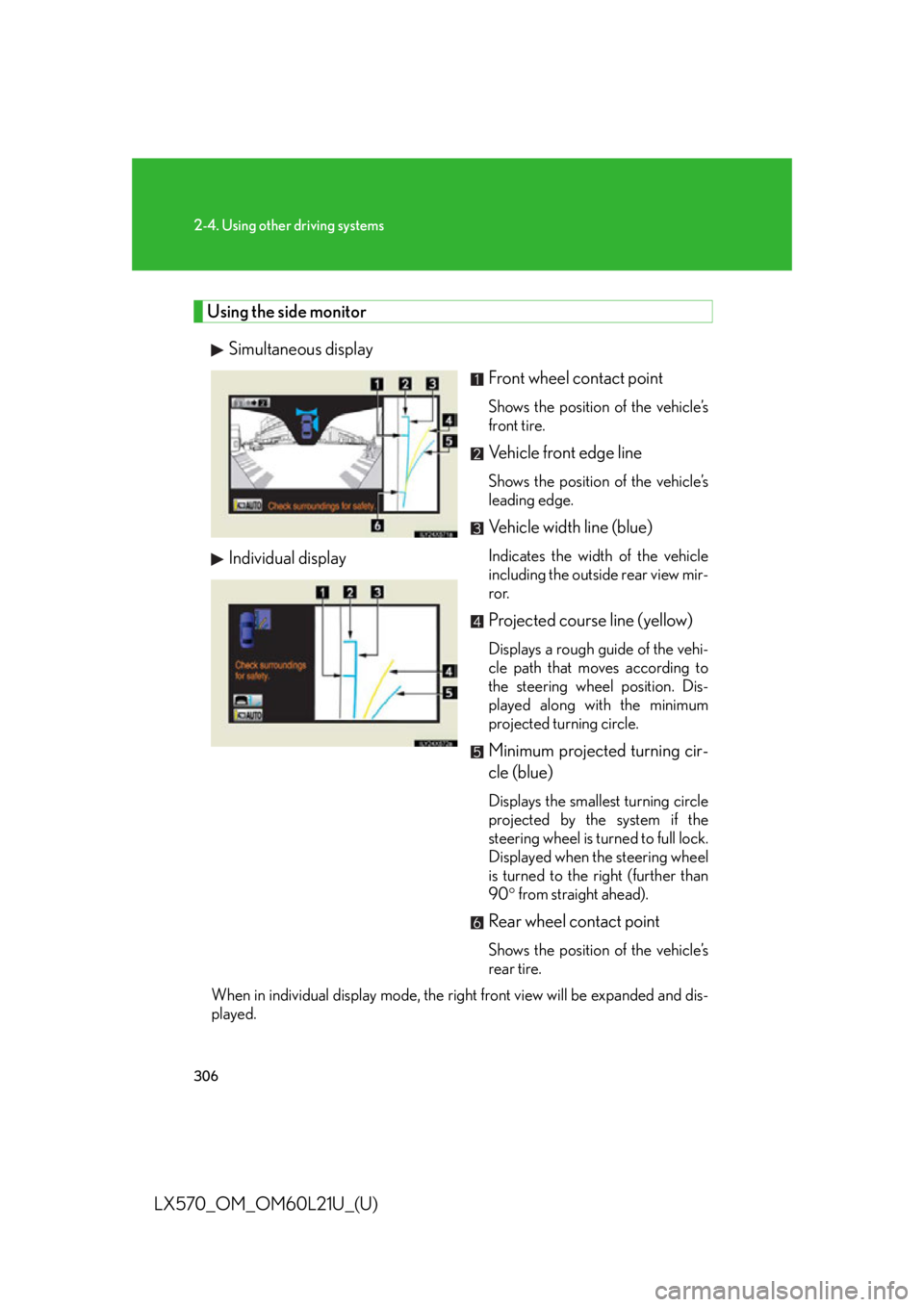
LX570_OM_OM60L21U_(U) Using the side monitor
Simultaneous display
Individual display Front wheel contact point Shows the position of the vehicle’s
front tire.
Vehicle front edge line Shows the position of the vehicle’s
leading edge.
Vehicle width line (blue) Indicates the width of the vehicle
including the outside rear view mir-
ror.
Projected course line (yellow) Displays a rough guide of the vehi-
cle path that moves according to
the steering wheel position. Dis-
played along with the minimum
projected turning circle.
Minimum projected turning cir-
cle (blue) Displays the smallest turning circle
projected by the system if the
steering wheel is turned to full lock.
Displayed when the steering wheel
is turned to the right (further than
90 from straight ahead).
Rear wheel contact point Shows the position of the vehicle’s
rear tire.
When in individual display mode, the ri ght front view will be expanded and dis-
played.
Page 310 of 956
3102-4. Using other driving systems
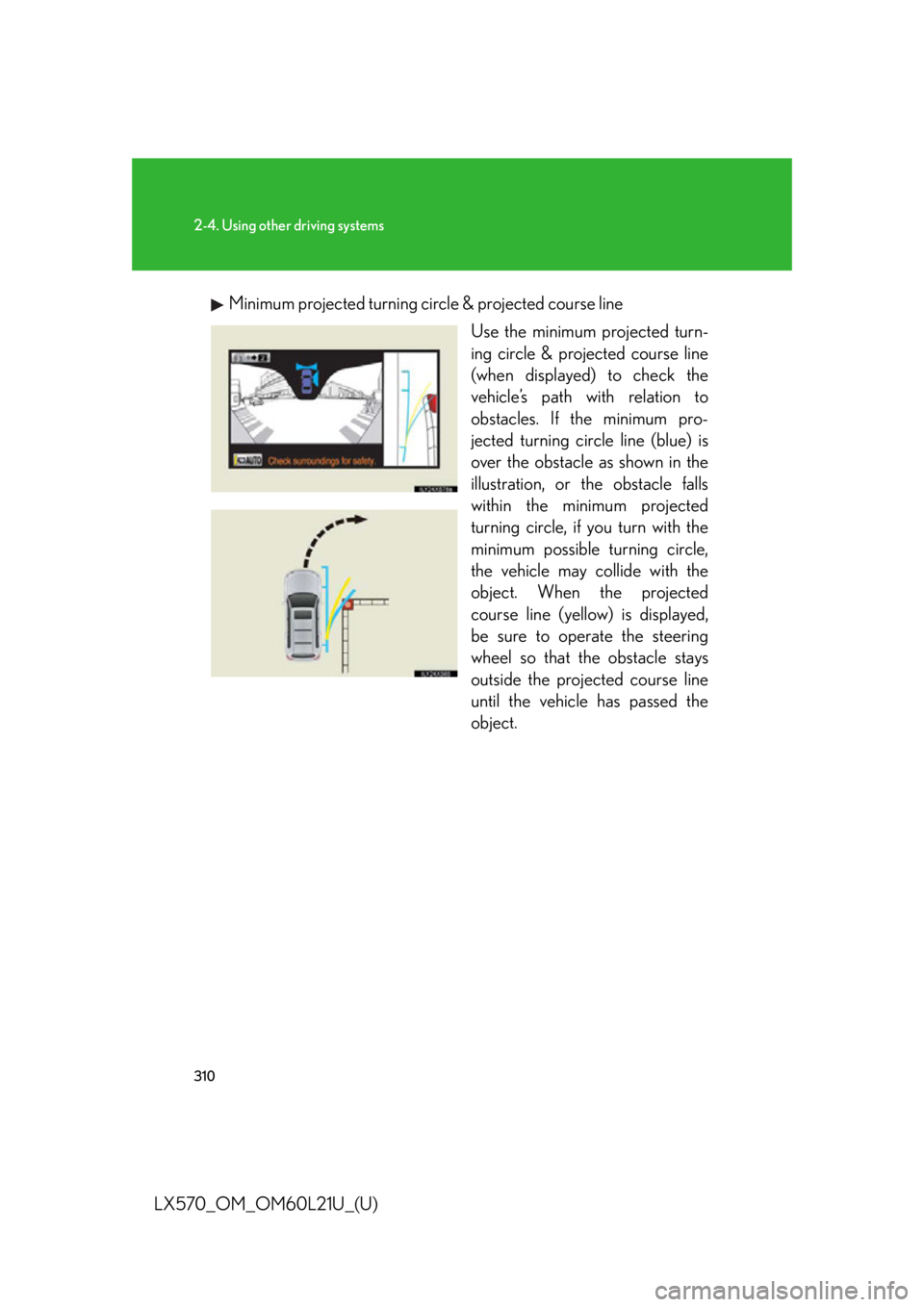
LX570_OM_OM60L21U_(U) Minimum projected turning circ le & projected course line
Use the minimum projected turn-
ing circle & projected course line
(when displayed) to check the
vehicle’s path with relation to
obstacles. If the minimum pro-
jected turning circle line (blue) is
over the obstacle as shown in the
illustration, or the obstacle falls
within the minimum projected
turning circle, if you turn with the
minimum possible turning circle,
the vehicle may collide with the
object. When the projected
course line (yellow) is displayed,
be sure to operate the steering
wheel so that the obstacle stays
outside the projec ted course line
until the vehicle has passed the
object.
Page 311 of 956
3112-4. Using other driving systems
2
When driving
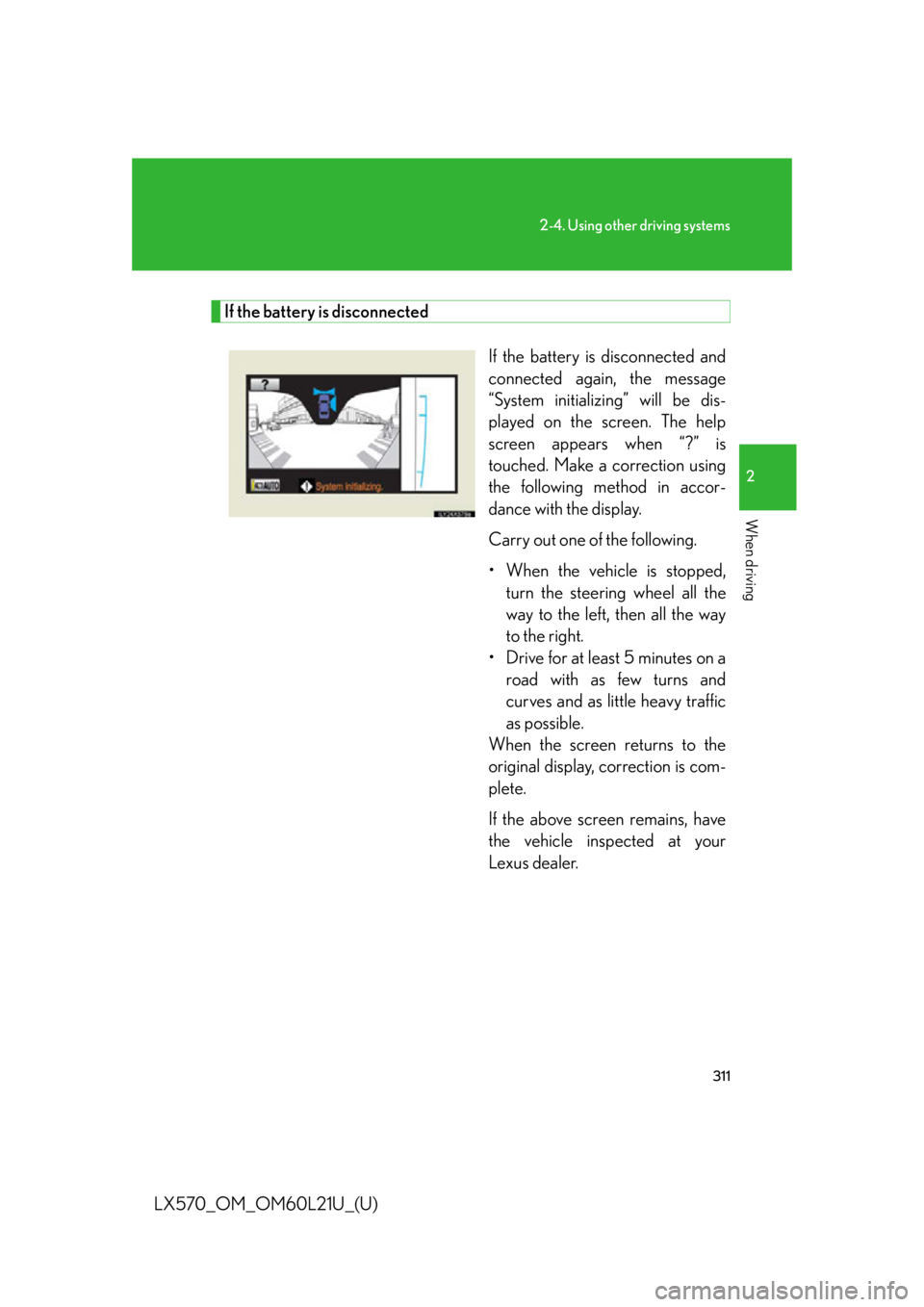
LX570_OM_OM60L21U_(U) If the battery is disconnected
If the battery is disconnected and
connected again, the message
“System initializing” will be dis-
played on the screen. The help
screen appears when “?” is
touched. Make a correction using
the following method in accor-
dance with the display.
Carry out one of the following.
• When the vehicle is stopped,
turn the steering wheel all the
way to the left, then all the way
to the right.
• Drive for at least 5 minutes on a
road with as few turns and
curves and as little heavy traffic
as possible.
When the screen returns to the
original display, correction is com-
plete.
If the above screen remains, have
the vehicle inspected at your
Lexus dealer.
Page 317 of 956

3172-4. Using other driving systems
2
When driving
LX570_OM_OM60L21U_(U) NOTICE■
When a solid object is close by
■
When using the wide view front & side monitor
Even if an obstacle is no longer visible on the side monitor, do not turn the steering
wheel further in the direction the vehicle is turning until the vehicle has moved com-
pletely past the obstacle. If the steering wh eel is turned to full lock, the vehicle will
turn in the smallest possible turning circle, and may collide with the obstacle. The screen’s guide lines are designed for level
surfaces (road surface etc.) or flat walls etc.
When driving near the obstacle, the obstacle
may be displayed as outside the projected
course line, and it may seem that there is no
danger of a collision, however any sections
protruding from the wall may project over the
course line and the vehicle may actually col-
lide with the obstacle.
In cases such as this were the projected
course line passes clos e to obstacles, always
visually check the surroundings for safety.
Protruding section of wall
Wall displayed on screen
Page 325 of 956
3252-4. Using other driving systems
2
When driving
LX570_OM_OM60L21U_(U) ■
In the following cases the 4-Wheel AHC will not operate ●
The brake pedal has been depressed for a few seconds or longer while the vehi-
cle is stopped. ●
Vehicle height control has not been frequently used. ●
The suspension fluid temperature is lower than -22°F (-30°C). ●
There is ice on the suspension. ●
Driving on bumpy roads which may cause the suspension to fully elongate. ●
If the steering wheel is abruptly turned more than 3/4 of a revolution with the
center differential lock system activated.■
Cold weather operation
It may take longer for the vehicle height to change if the suspension fluid tempera-
ture drops below 5°F (-15°C).
The 4-Wheel AHC does not operate when the suspension fluid temperature drops
below -22°F (-30°C). ●
In this case, even if the height select switch is pressed, the vehicle height will not
change. Once the vehicle has been driven for a short time and the suspension
fluid has been warmed to within normal operating limits, the 4-Wheel AHC will
begin operating and the vehicle height wi ll automatically change to the selected
mode. ●
When the suspension fluid is around -22°F (-30°C), the vehicle height may not
be able to be raised, even if the 4-Wheel AHC is operating. In this case, pull the
height select switch to “ ” then push to “ ” after driving for a short time longer
to select the desired vehicle height.■
Parking and stopping tips ●
If you immediately stop the engine after off-road driving, the vehicle height may
gradually lower. When parking, make su re there is nothing under the vehicle
that may come in contact with the underbody. The vehicle will return to the set
height when the engine is started. ●
The vehicle height may change as the temperature changes when the engine is
stopped. The vehicle will return to the set height when the engine is started.