AUX LEXUS LX570 2014 Owners Manual
[x] Cancel search | Manufacturer: LEXUS, Model Year: 2014, Model line: LX570, Model: LEXUS LX570 2014Pages: 956, PDF Size: 16.4 MB
Page 4 of 956

TABLE OF CONTENTS Index
4
LX570_OM_OM60L21U_(U) 3-1. Using the touch screen
Touch screen ................................. 402
Set up screen .................................. 410
Information screen ...................... 427
Voice command system............ 429
3-2. Using the air conditioning
system and defogger
Front air conditioning
system ........................................... 440
Rear air conditioning
system ............................................ 452
Rear window and outside
rear view mirror
defoggers ..................................... 456
Windshield wiper de-icer ......... 457
3-3. Using the audio system
Audio system type ...................... 458
Using the radio ............................. 483
Using the CD/DVD player..... 503
Playing an audio CD and
MP3/WMA discs .................... 505
Playing DVD video......................... 511
CD/DVD player and DVD
video disc information ............. 525 Listening to Bluetooth ®
audio ............................................... 537
Listening to a
USB memory ............................. 548
Listening to an iPod .................... 558
Optimal use of the audio/
video system............................... 568
Using the AUX port ................... 570
Using the steering wheel
audio switches ............................ 572
3-4. Using the rear seat
entertainment system
Rear seat entertainment
system features .......................... 575
Using the radio ............................. 583
Using the radio (internet
radio broadcast) ....................... 585
Playing an audio CD/
CD text ......................................... 586
Playing WMA/MP3 discs ....... 587
Playing a Bluetooth ®
audio .............................................. 589
Playing a USB memory ............. 592
Playing iPod.................................... 594
Playing DVD video...................... 596
DVD player and DVD video
disc information ........................ 605
Using the video mode ................ 6073
Interior features
Page 5 of 956

1
2
3
4
5
6
7
5
LX570_OM_OM60L21U_(U) 3-5. Using the hands-free system
(for cellular phone)
Hands-free system
(for cellular phone) .................... 612
Using a Bluetooth ®
phone ....... 621
Setting the hands-free system
(for cellular phone) ................... 644
Setting the Bluetooth ®
.............. 669
3-6. Using the interior lights
Interior lights list............................ 682
• Interior lights .............................. 683
• Personal lights ........................... 684
• Luggage compartment
light................................................. 685
3-7. Using the storage features
List of storage features.............. 686
• Glove box .................................... 687
• Console box ............................... 688
• Overhead console .................. 689
• Cup holders................................ 690
• Bottle holders ............................. 692
• Card holder ................................. 693
• Auxiliary boxes........................... 693 3-8. Other interior features
Cool box .......................................... 695
Sun visors......................................... 697
Vanity mirrors............................... 698
Ashtrays ........................................... 699
Cigarette lighte r ........................... 700
Power outlets .................................. 701
Heated steering wheel .............. 703
Seat heaters and
ventilators ..................................... 705
Armrest ........................................... 708
Assist grips ...................................... 709
Floor mats......................................... 710
Luggage compartment
features............................................ 712
Garage door opener.................... 714
Safety Connect ............................. 722
4-1. Maintenance and care
Cleaning and protecting the
vehicle exterior .......................... 730
Cleaning and protecting the
vehicle interior............................ 7334
Maintenance and care
Page 13 of 956
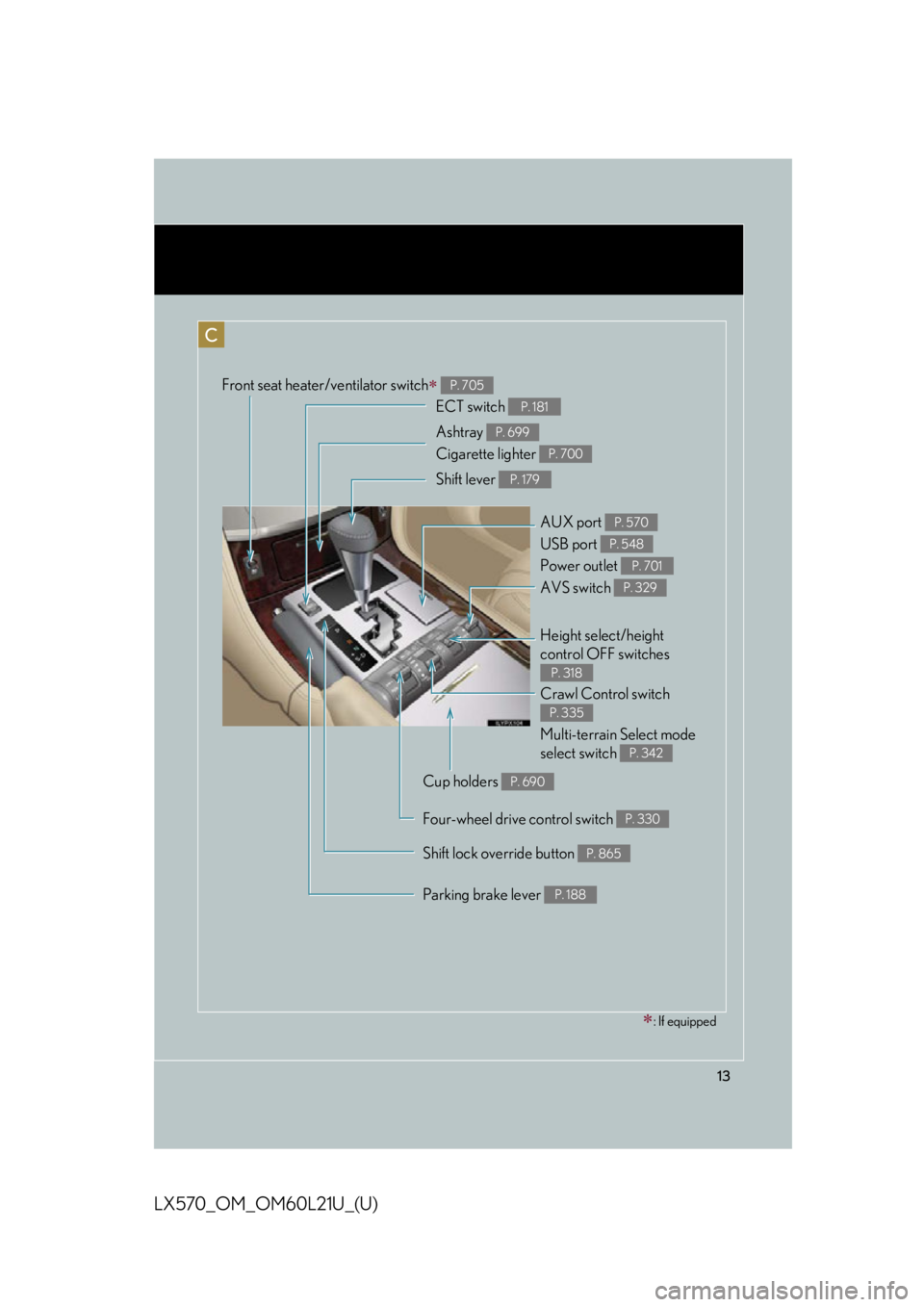
13
LX570_OM_OM60L21U_(U) C Front seat heater/ventilator switch
P. 705
Shift lever P. 179
Shift lock override button P. 865Crawl Control switch
Multi-terrain Select mode
select switch P. 335
P. 342
Height select/height
control OFF switches P. 318ECT switch P. 181
AVS switch P. 329
Ashtray
Cigarette lighter P. 699
P. 700
Parking brake lever P. 188AUX port
USB port
Power outlet P. 570
P. 548
P. 701
Cup holders P. 690
Four-wheel drive control switch P. 330
: If equipped
Page 19 of 956

19
LX570_OM_OM60L21U_(U) D
Headlight cleaner switch
P. 229
Outside rear view mi rror control switches P. 104Odometer/trip meter display
change button P. 191
Instrument panel light control dial P. 192
Tilt and telescopic steering
control switch P. 100
AFS OFF switch P. 208
Auxiliary box P. 693
Power back door switch P. 57
VSC OFF switch P. 349
: If equippedHeated steering wheel switch
P. 703
Page 370 of 956

3702-5. Driving information
LX570_OM_OM60L21U_(U) CAUTION■
Things that must not be carri ed in the luggage compartment
The following things may cause a fire if loaded in the luggage compartment. ●
Receptacles containing gasoline ●
Aerosol cans■
Storage precautions
Observe the following precautions.
Failing to do so may result in death or serious injury. ●
Stow cargo and luggage in the lugga ge compartment whenever possible.●
Do not stack anything in the luggage compartment higher than the seatbacks.
Such items may be thrown about and possib ly injure people in the vehicle during
sudden braking, sudden swerving or in an accident. ●
Do not place cargo or luggage in or on the following locations as the items may
get under the brake or accelerator pedal and prevent the pedals from being
depressed properly, block the driver’s vision, or hit the driver or passengers,
causing an accident.
•Driver’s feet
• Front passenger or rear seats (when stacking items)
•Instrument panel
•Dashboard
• Auxiliary box or tray that has no lid ●
Secure all items in the occupant compartment, as they may shift and injure some-
one during sudden braking, sudd en swerving or an accident.●
When you fold down the rear seats, long items should not be placed directly
behind the front seats. ●
Never allow anyone to ride in the luggage compartment. It is not designed for
passengers. They should ride in their seat s with their seat belt s properly fastened.
Otherwise, they are much more likely to suffer death or serious injury, in the
event of sudden braking, sudd en swerving or an accident.
Page 400 of 956

400
LX570_OM_OM60L21U_(U) 3-1. Using the touch screen
Touch screen ........................... 402
Set up screen ........................... 410
Information screen................. 427
Voice command system ....... 429
3-2. Using the air conditioning
system and defogger
Front air conditioning
system..................................... 440
Rear air conditioning
system..................................... 452
Rear window and outside
rear view mirror
defoggers .............................. 456
Windshield wiper de-icer..... 457 3-3. Using the audio system
Audio system type.................. 458
Using the radio....................... 483
Using the CD/
DVD player .......................... 503
Playing an audio CD and
MP3/WMA discs .............. 505
Playing DVD video .................. 511
CD/DVD player and DVD
video disc information........ 525
Listening to Bluetooth ®
audio........................................ 537
Listening to a USB
memory ................................. 548
Listening to an iPod............... 558
Optimal use of the audio/
video system......................... 568
Using the AUX port .............. 570
Using the steering wheel
audio switches ...................... 572
3-4. Using the rear seat
entertainment system
Rear seat entertainment
system features .................... 575
Using the radio....................... 583
Using the radio (internet
radio broadcast) ................. 585
Playing an audio CD/
CD text .................................. 586
Page 401 of 956

Interior features
3
401
LX570_OM_OM60L21U_(U) Playing WMA/
MP3 discs .............................. 587
Playing a Bluetooth ®
audio....................................... 589
Playing a USB memory ........ 592
Playing iPod ............................. 594
Playing DVD video ................ 596
DVD player and DVD
video disc information ....... 605
Using the video mode ........... 607
3-5. Using the hands-free system
(for cellular phone)
Hands-free system
(for cellular phone) .............. 612
Using a Bluetooth ®
phone ....................................... 621
Setting the hands-free
system (for cellular
phone)..................................... 644
Setting the Bluetooth ®
........ 669
3-6. Using the interior lights
Interior lights list ..................... 682
• Interior lights ........................... 683
• Personal lights ........................ 684
• Luggage compartment
light.............................................. 685 3-7. Using the storage features
List of storage features......... 686
• Glove box ................................. 687
• Console box............................ 688
• Overhead console ................ 689
• Cup holders ............................. 690
• Bottle holders .......................... 692
• Card holder.............................. 693
• Auxiliary boxes ....................... 693
3-8. Other interior features
Cool box ................................... 695
Sun visors .................................. 697
Vanity mirrors ......................... 698
Ashtrays.................................... 699
Cigarette lighter .................... 700
Power outlets ........................... 701
Heated steering wheel ........ 703
Seat heaters and
ventilators ............................. 705
Armrest .................................... 708
Assist grips ............................... 709
Floor mats ................................. 710
Luggage compartment
features ................................... 712
Garage door opener ............. 714
Safety Connect ...................... 722
Page 436 of 956

4363-1. Using the touch screen
LX570_OM_OM60L21U_(U) ■ Select audio mode
When expanded voice commands are turned “On”. ( P. 433)
* : Bluetooth is a registered tr ademark of Bluetooth SIG, Inc.Command
Action Shortcut
Menu
“Radio” Sets the audio mode to radio. O
“A M ” Selects the AM band. O
“FM” Selects the FM band. O
“Satellite radio” Selects the satellite radio mode. O
“Disc” Selects the disc audio mode. O
“Auxiliary” Selects the auxiliary audio mode. O
“Bluetooth
* audio” Selects the Bluetooth ®
audio mode. O
“iPod” Selects the iPod audio mode. O
“USB audio” Selects the USB audio mode. O
“Audio on” Turns the audio system on. O
“Audio off” Turns the audio system off. O
Page 459 of 956

4593-3. Using the audio system
3
Interior features
LX570_OM_OM60L21U_(U) Ti t l e Pa g e
Using the radio P. 4 8 3
Using the CD/DVD player P. 5 0 3
Playing an audio CD and MP3/WMA discs P. 5 0 5
Playing DVD video P. 5 1 1
CD/DVD player and DVD video disc information P. 5 2 5
Listening to Bluetooth ®
audio P. 5 3 7
Listening to a USB memory P. 5 4 8
Listening to an iPod P. 5 5 8
Optimal use of the audio/video system P. 5 6 8
Using the AUX port P. 5 7 0
Using the steering wheel audio switches P. 5 7 2
Page 502 of 956

5023-3. Using the audio system
LX570_OM_OM60L21U_(U) ■
Certifications for XM ®
Satellite Radio
This device complies with RSS-310 of Indu stry Canada. Operation is subject to the
condition that this device does not cause harmful interference.
This device complies with Industry Cana da licence-exempt RSS standard(s). Oper-
ation is subject to the following two conditions: (1) this device may not cause inter-
ference, and (2) this device must accept any interference, including interference
that may cause undesired operation of the device.
Cet appareil est conforme au CNR-310 d’Industrie Canada. Son exploitation est
autorisée sous réserve que l’appareil ne cause pas de brouillage préjudiciable.
Le présent appareil est conforme aux CNR d’Industrie Canada applicables aux
appareils radio exempts de licence. L’exploitation est autorisée aux deux conditions
suivantes : (1) l’appareil ne doit pas produire de brouillage, et (2) l’utilisateur de
l’appareil doit accepter tout brouillage radioélectrique subi, même si le brouillage
est susceptible d’en compro mettre le fonctionnement.