USB LEXUS LX570 2014 Owners Manual
[x] Cancel search | Manufacturer: LEXUS, Model Year: 2014, Model line: LX570, Model: LEXUS LX570 2014Pages: 956, PDF Size: 16.4 MB
Page 4 of 956

TABLE OF CONTENTS Index
4
LX570_OM_OM60L21U_(U) 3-1. Using the touch screen
Touch screen ................................. 402
Set up screen .................................. 410
Information screen ...................... 427
Voice command system............ 429
3-2. Using the air conditioning
system and defogger
Front air conditioning
system ........................................... 440
Rear air conditioning
system ............................................ 452
Rear window and outside
rear view mirror
defoggers ..................................... 456
Windshield wiper de-icer ......... 457
3-3. Using the audio system
Audio system type ...................... 458
Using the radio ............................. 483
Using the CD/DVD player..... 503
Playing an audio CD and
MP3/WMA discs .................... 505
Playing DVD video......................... 511
CD/DVD player and DVD
video disc information ............. 525 Listening to Bluetooth ®
audio ............................................... 537
Listening to a
USB memory ............................. 548
Listening to an iPod .................... 558
Optimal use of the audio/
video system............................... 568
Using the AUX port ................... 570
Using the steering wheel
audio switches ............................ 572
3-4. Using the rear seat
entertainment system
Rear seat entertainment
system features .......................... 575
Using the radio ............................. 583
Using the radio (internet
radio broadcast) ....................... 585
Playing an audio CD/
CD text ......................................... 586
Playing WMA/MP3 discs ....... 587
Playing a Bluetooth ®
audio .............................................. 589
Playing a USB memory ............. 592
Playing iPod.................................... 594
Playing DVD video...................... 596
DVD player and DVD video
disc information ........................ 605
Using the video mode ................ 6073
Interior features
Page 13 of 956
13
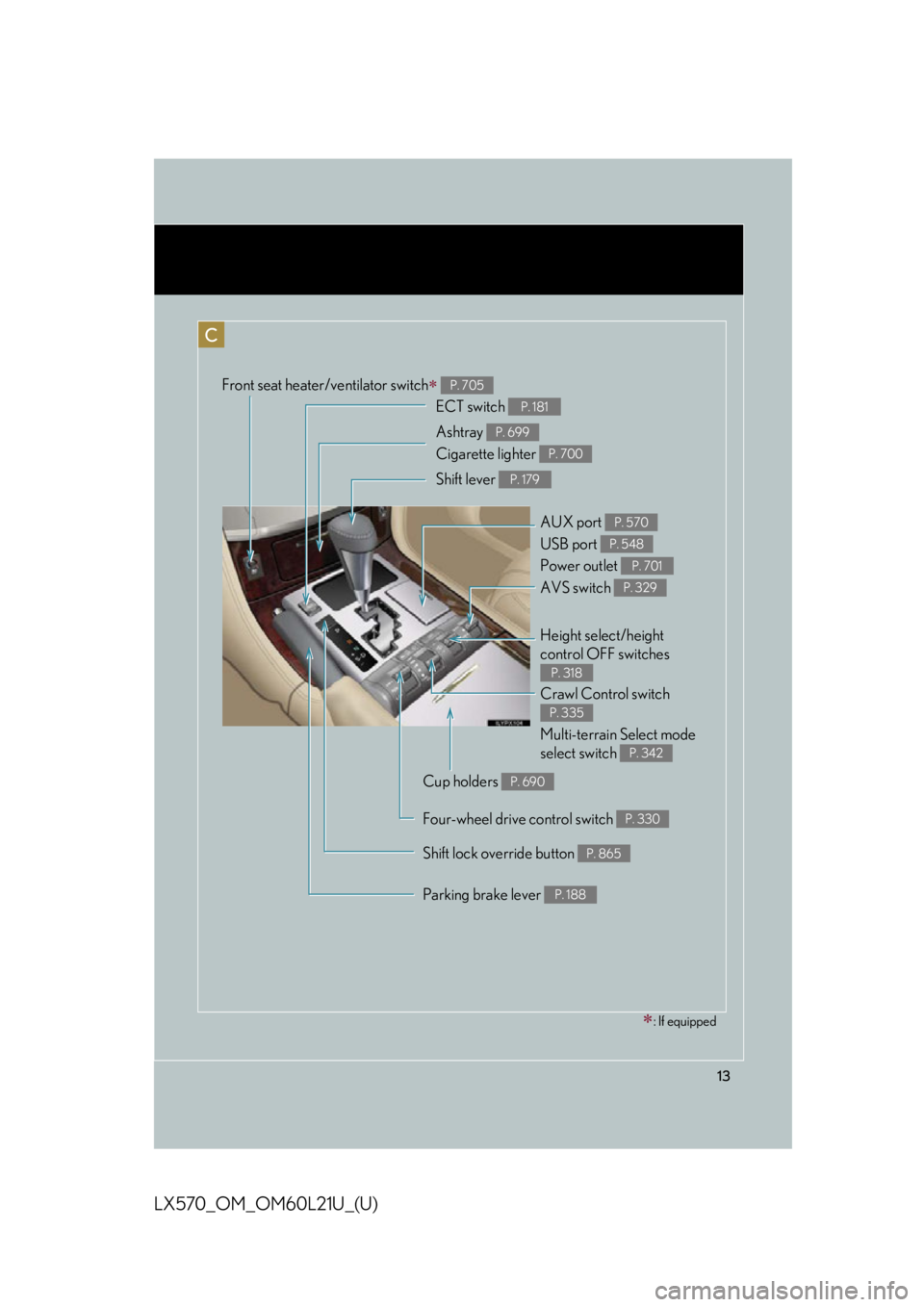
LX570_OM_OM60L21U_(U) C Front seat heater/ventilator switch
P. 705
Shift lever P. 179
Shift lock override button P. 865Crawl Control switch
Multi-terrain Select mode
select switch P. 335
P. 342
Height select/height
control OFF switches P. 318ECT switch P. 181
AVS switch P. 329
Ashtray
Cigarette lighter P. 699
P. 700
Parking brake lever P. 188AUX port
USB port
Power outlet P. 570
P. 548
P. 701
Cup holders P. 690
Four-wheel drive control switch P. 330
: If equipped
Page 400 of 956

400
LX570_OM_OM60L21U_(U) 3-1. Using the touch screen
Touch screen ........................... 402
Set up screen ........................... 410
Information screen................. 427
Voice command system ....... 429
3-2. Using the air conditioning
system and defogger
Front air conditioning
system..................................... 440
Rear air conditioning
system..................................... 452
Rear window and outside
rear view mirror
defoggers .............................. 456
Windshield wiper de-icer..... 457 3-3. Using the audio system
Audio system type.................. 458
Using the radio....................... 483
Using the CD/
DVD player .......................... 503
Playing an audio CD and
MP3/WMA discs .............. 505
Playing DVD video .................. 511
CD/DVD player and DVD
video disc information........ 525
Listening to Bluetooth ®
audio........................................ 537
Listening to a USB
memory ................................. 548
Listening to an iPod............... 558
Optimal use of the audio/
video system......................... 568
Using the AUX port .............. 570
Using the steering wheel
audio switches ...................... 572
3-4. Using the rear seat
entertainment system
Rear seat entertainment
system features .................... 575
Using the radio....................... 583
Using the radio (internet
radio broadcast) ................. 585
Playing an audio CD/
CD text .................................. 586
Page 401 of 956

Interior features
3
401
LX570_OM_OM60L21U_(U) Playing WMA/
MP3 discs .............................. 587
Playing a Bluetooth ®
audio....................................... 589
Playing a USB memory ........ 592
Playing iPod ............................. 594
Playing DVD video ................ 596
DVD player and DVD
video disc information ....... 605
Using the video mode ........... 607
3-5. Using the hands-free system
(for cellular phone)
Hands-free system
(for cellular phone) .............. 612
Using a Bluetooth ®
phone ....................................... 621
Setting the hands-free
system (for cellular
phone)..................................... 644
Setting the Bluetooth ®
........ 669
3-6. Using the interior lights
Interior lights list ..................... 682
• Interior lights ........................... 683
• Personal lights ........................ 684
• Luggage compartment
light.............................................. 685 3-7. Using the storage features
List of storage features......... 686
• Glove box ................................. 687
• Console box............................ 688
• Overhead console ................ 689
• Cup holders ............................. 690
• Bottle holders .......................... 692
• Card holder.............................. 693
• Auxiliary boxes ....................... 693
3-8. Other interior features
Cool box ................................... 695
Sun visors .................................. 697
Vanity mirrors ......................... 698
Ashtrays.................................... 699
Cigarette lighter .................... 700
Power outlets ........................... 701
Heated steering wheel ........ 703
Seat heaters and
ventilators ............................. 705
Armrest .................................... 708
Assist grips ............................... 709
Floor mats ................................. 710
Luggage compartment
features ................................... 712
Garage door opener ............. 714
Safety Connect ...................... 722
Page 417 of 956
4173-1. Using the touch screen
3
Interior features
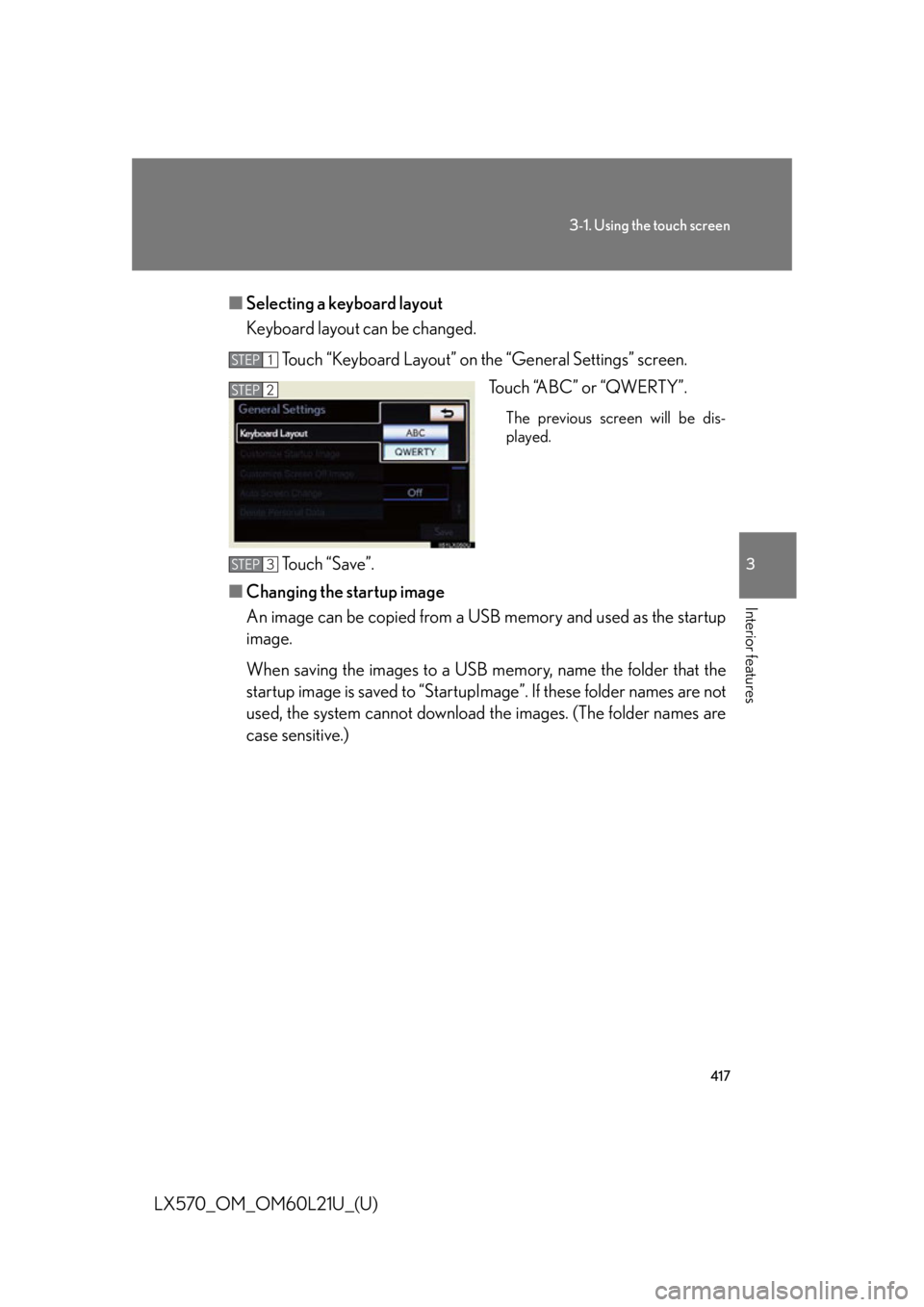
LX570_OM_OM60L21U_(U) ■ Selecting a keyboard layout
Keyboard layout can be changed.
Touch “Keyboard Layout” on the “General Settings” screen.
Touch “ABC” or “QWERTY”. The previous screen will be dis-
played.
Touch “Save”.
■ Changing the startup image
An image can be copied from a USB memory and used as the startup
image.
When saving the images to a USB memory, name the folder that the
startup image is saved to “StartupIma ge”. If these folder names are not
used, the system cannot download th e images. (The folder names are
case sensitive.) STEP 1
STEP 2
STEP 3
Page 418 of 956
4183-1. Using the touch screen
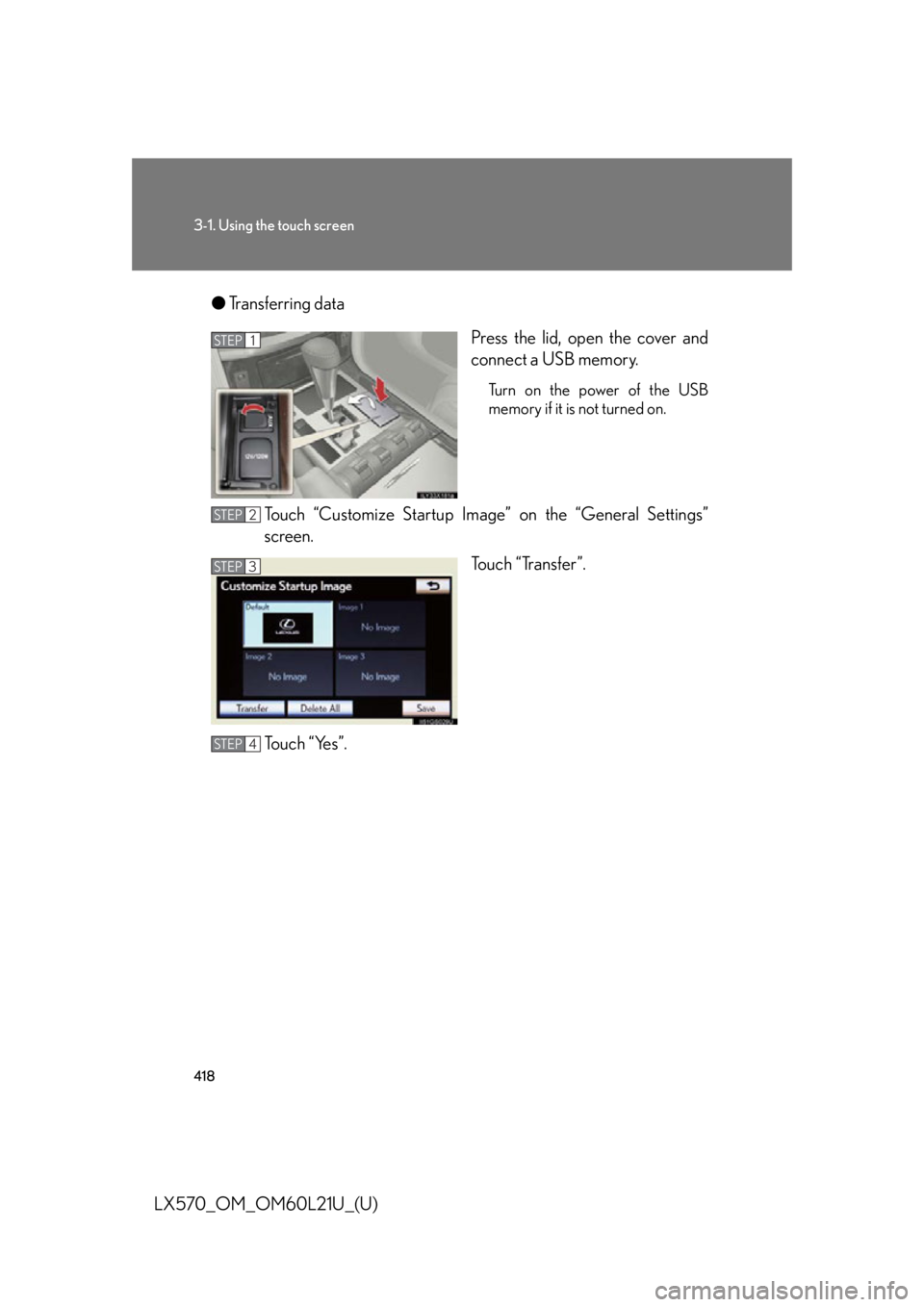
LX570_OM_OM60L21U_(U) ● Transferring data
Press the lid, open the cover and
connect a USB memory. Turn on the power of the USB
memory if it is not turned on.
Touch “Customize Startup Image” on the “General Settings”
screen.
Touch “Transfer”.
To u c h “ Ye s ” . STEP 1
STEP 2
STEP 3
STEP 4
Page 420 of 956
4203-1. Using the touch screen
LX570_OM_OM60L21U_(U) ■ Changing the screen off image
Touch “Screen Off” on the “Display” screen to turn off the screen. An
image can be copied from a USB memory and can be set to display
when “Screen Off” is touched.
When saving the images to a USB memory, name the folder that the
screen off image is saved to “Displ ayOffImage”. If these folder names
are not used, the system cannot do wnload the images. (The folder
names are case sensitive.)
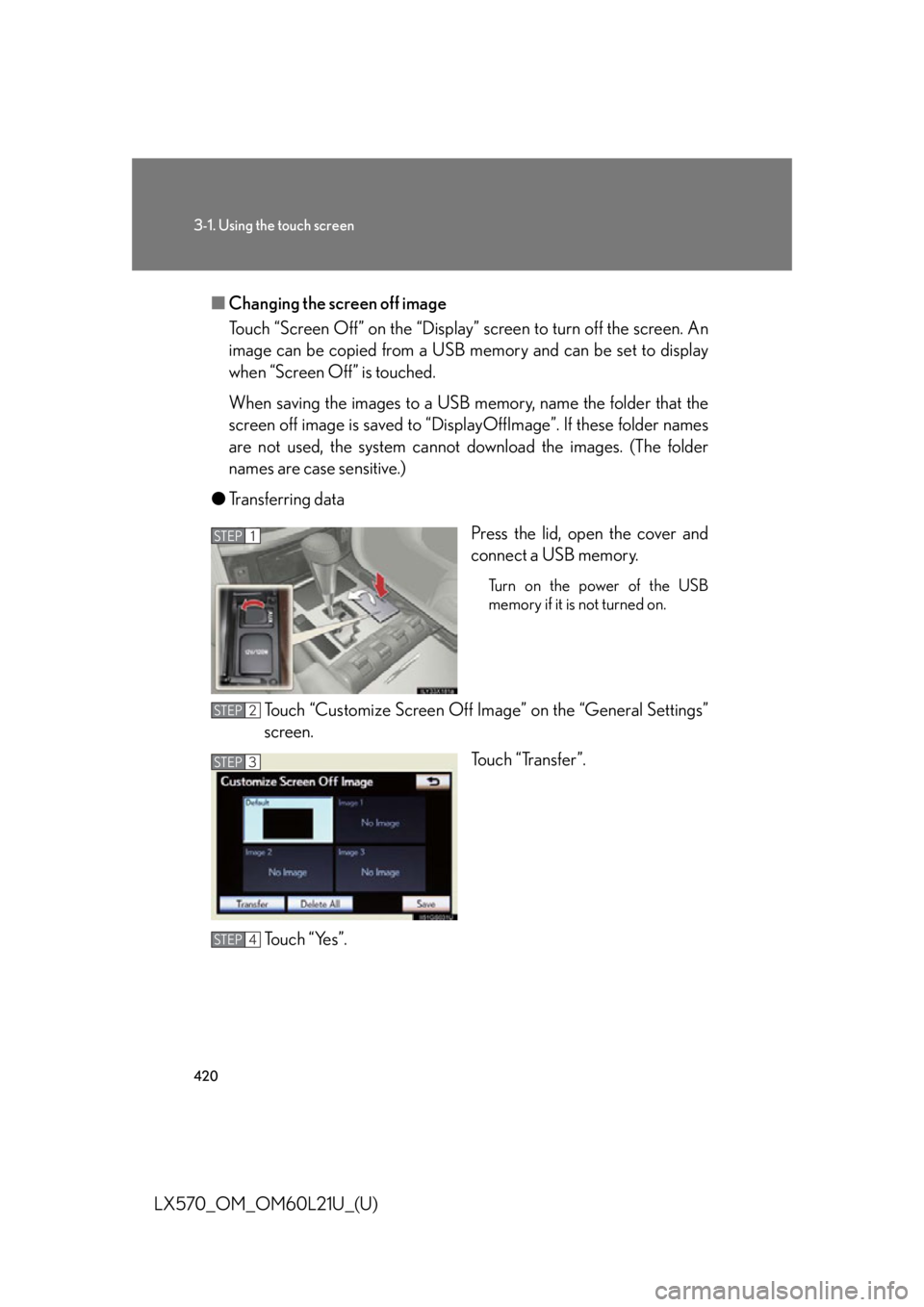
● Transferring data
Press the lid, open the cover and
connect a USB memory. Turn on the power of the USB
memory if it is not turned on.
Touch “Customize Screen Off Ima ge” on the “General Settings”
screen.
Touch “Transfer”.
To u c h “ Ye s ” . STEP 1
STEP 2
STEP 3
STEP 4
Page 436 of 956

4363-1. Using the touch screen
LX570_OM_OM60L21U_(U) ■ Select audio mode
When expanded voice commands are turned “On”. ( P. 433)
* : Bluetooth is a registered tr ademark of Bluetooth SIG, Inc.Command
Action Shortcut
Menu
“Radio” Sets the audio mode to radio. O
“A M ” Selects the AM band. O
“FM” Selects the FM band. O
“Satellite radio” Selects the satellite radio mode. O
“Disc” Selects the disc audio mode. O
“Auxiliary” Selects the auxiliary audio mode. O
“Bluetooth
* audio” Selects the Bluetooth ®
audio mode. O
“iPod” Selects the iPod audio mode. O
“USB audio” Selects the USB audio mode. O
“Audio on” Turns the audio system on. O
“Audio off” Turns the audio system off. O
Page 438 of 956

4383-1. Using the touch screen
LX570_OM_OM60L21U_(U) ■
When using the microphone ●
It is unnecessary to speak directly into the microphone when giving a command. ●
Wait for the confirmation beep before speaking a command. ●
Voice commands may not be recognized if:
• Spoken too quickly.
• Spoken at a low or high volume.
• The roof or windows are open.
• Passengers are talking while voice commands are spoken.
• The air conditioning speed is set high.
• The air conditioning vents are turned towards the microphone. ●
In the following conditions, the system may not recognize the command prop-
erly and using voice commands may not be possible:
• The command is incorrect or unclear. Note that certain words, accents or
speech patterns may be difficul t for the system to recognize.
• There is excessive background noise, such as wind noise.■
When searching for a track ●
A USB memory or iPod must be connected to enable track searching and play-
back. ( P. 5 4 8 , 5 5 8 )●
When a USB memory or iPod is connec ted, recognition data is created so
tracks can be searched using voice commands. ●
Recognition data is updated under the following conditions:
• When the USB memory or iPod data has changed.
• When the voice recognition language is changed. ( P. 4 1 5 )●
While the recognition data is being cr eated or being updated, a track search
cannot be performed using a voice command. ●
While “Play Music” is displayed in the “Shortcut Menu” screen, say “Play music”
to display the music screen from which searching for a track using a voice com-
mand can be performed. ●
When “Play Music” is dimmed in the “Shortcut Menu” screen, it is not possible
to search for a track using a voice command. In this situation, reduce the
amount of music data in the USB memory or iPod and update the recognition
data to enable searching by voice command.
Page 459 of 956

4593-3. Using the audio system
3
Interior features
LX570_OM_OM60L21U_(U) Ti t l e Pa g e
Using the radio P. 4 8 3
Using the CD/DVD player P. 5 0 3
Playing an audio CD and MP3/WMA discs P. 5 0 5
Playing DVD video P. 5 1 1
CD/DVD player and DVD video disc information P. 5 2 5
Listening to Bluetooth ®
audio P. 5 3 7
Listening to a USB memory P. 5 4 8
Listening to an iPod P. 5 5 8
Optimal use of the audio/video system P. 5 6 8
Using the AUX port P. 5 7 0
Using the steering wheel audio switches P. 5 7 2