door lock LEXUS LX570 2014 Owners Manual
[x] Cancel search | Manufacturer: LEXUS, Model Year: 2014, Model line: LX570, Model: LEXUS LX570 2014Pages: 956, PDF Size: 16.4 MB
Page 1 of 956

TABLE OF CONTENTS
1
LX570_OM_OM60L21U_(U) 1
Before driving Adjusting and operating features such as door locks, mirrors,
and steering column
2
When driving Driving, stopping and safe-driving information
3
Interior features Air conditioning and audio systems, as well as other interior
features for a comfortable driving experience
4
Maintenance
and care Cleaning and protecting your vehicle, performing do-it-
yourself maintenance, and maintenance information
5
When trouble
arises What to do if the vehicle needs to be towed, gets a flat tire, or
is involved in an accident
6
Vehicle
specifications Detailed vehicle information
7
For owners Reporting safety defects for U. S. owners, and seat belt and
SRS airbag instructions for Canadian owners
Index Alphabetical listing of inform ation contained in this manual
Page 2 of 956

TABLE OF CONTENTS Index
2
LX570_OM_OM60L21U_(U) 1-1. Key information
Keys ..................................................... 30
1-2. Opening, closing and
locking the doors
Smart access system with
push-button start .......................... 35
Wireless remote control .............. 48
Side doors ........................................... 51
Back door ........................................... 56
1-3. Adjustable components
(seats, mirrors, steering
wheel)
Front seats .......................................... 67
Rear seats ............................................. 71
Driving position memory
system .............................................. 83
Head restraints................................. 87
Seat belts ............................................. 91
Steering wheel................................ 100
Anti-glare inside rear view
mirror .............................................. 102
Outside rear view mirrors ......... 104 1-4. Opening and closing the
windows and moon roof
Power windows.............................. 107
Moon roof ......................................... 110
1-5. Refueling
Opening the fuel tank cap........... 114
1-6. Theft deterrent system
Engine immobilizer system ......... 117
Alarm.................................................... 119
1-7. Safety information
Correct driving posture ............. 122
SRS airbags ..................................... 124
Front passenger occupant
classification system .................. 138
Child restraint sy stems ............... 144
Installing child restraints ............. 1491
Before drivingFor information regarding the navigation system, refer to the “Navigation System
Owner’s Manual”.
Page 12 of 956
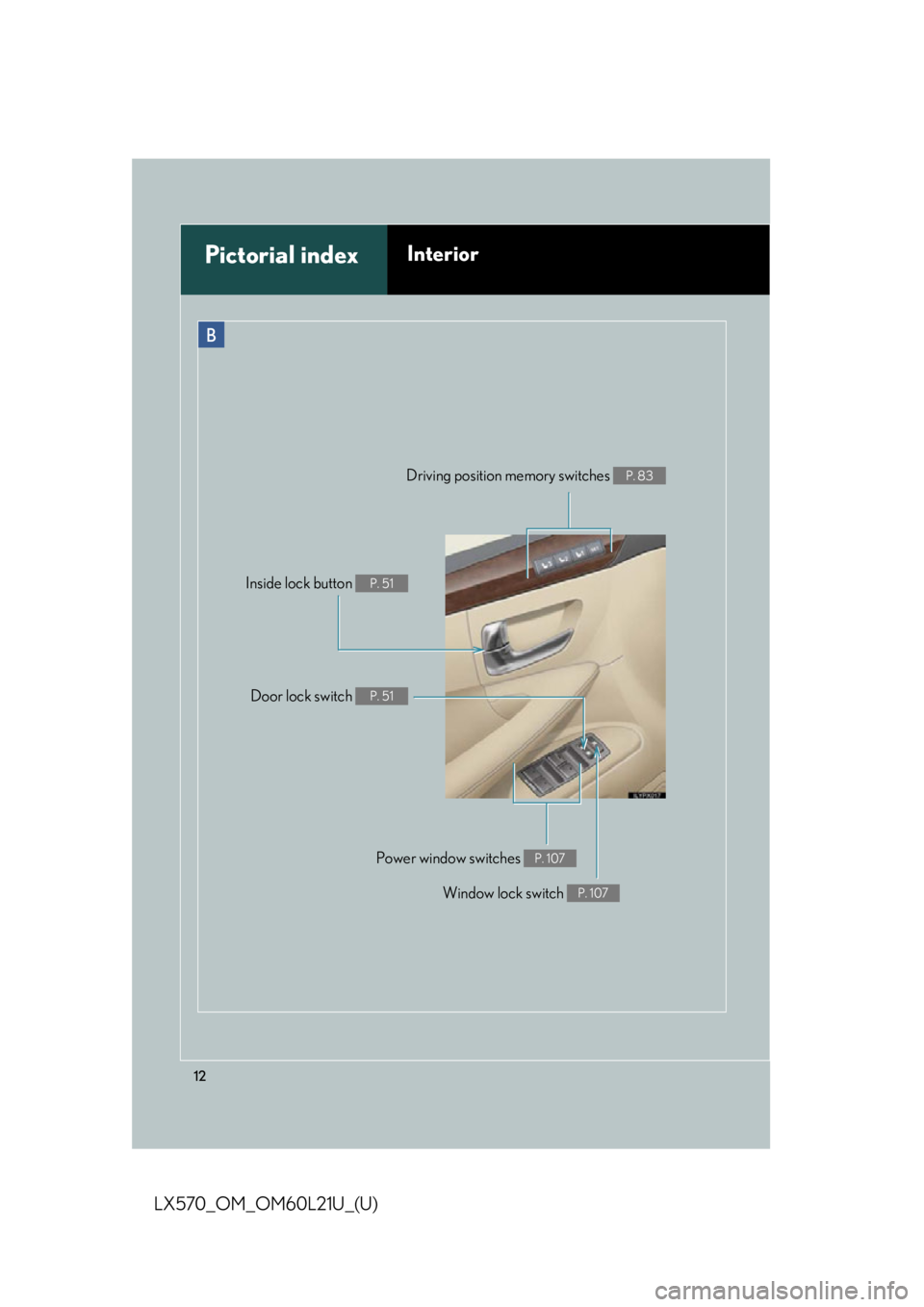
12
LX570_OM_OM60L21U_(U) Window lock switch P. 107
Power window switches P. 107Pictorial index Interior B
Door lock switch P. 51Driving position memory switches P. 83
Inside lock button P. 51
Page 18 of 956

18
LX570_OM_OM60L21U_(U) C
Engine (ignition) switch P. 175
Easy access mode switch P. 321
Center differential lock/unlock
switch P. 330
Power back door main switch P. 57Intuitive parking assist switch
P. 249
Roll sensing of curtain shield
airbags off switch P. 137VIEW switch
P. 301
Pictorial index Instrument panel
Page 29 of 956
Before driving
1
29
LX570_OM_OM60L21U_(U) 1-1. Key information
Keys .............................................. 30
1-2. Opening, closing and
locking the doors
Smart access system with
push-button start .................... 35
Wireless remote control ........ 48
Side doors..................................... 51
Back door .................................... 56
1-3. Adjustable components
(seats, mirrors, steering
wheel)
Front seats ................................... 67
Rear seats ..................................... 71
Driving position memory
system ....................................... 83
Head restraints .......................... 87
Seat belts ...................................... 91
Steering wheel ......................... 100
Anti-glare inside rear view
mirror ....................................... 102
Outside rear view
mirrors ..................................... 104 1-4. Opening and closing the
windows and moon roof
Power windows ........................ 107
Moon roof .................................. 110
1-5. Refueling
Opening the fuel tank
cap ............................................. 114
1-6. Theft deterrent system
Engine immobilizer
system........................................ 117
Alarm........................................... 119
1-7. Safety information
Correct driving posture ....... 122
SRS airbags .............................. 124
Front passenger occupant
classification system............ 138
Child restraint systems ......... 144
Installing child restraints....... 149
Page 35 of 956
351
Before driving
LX570_OM_OM60L21U_(U) 1-2. Opening, closing and locking the doors
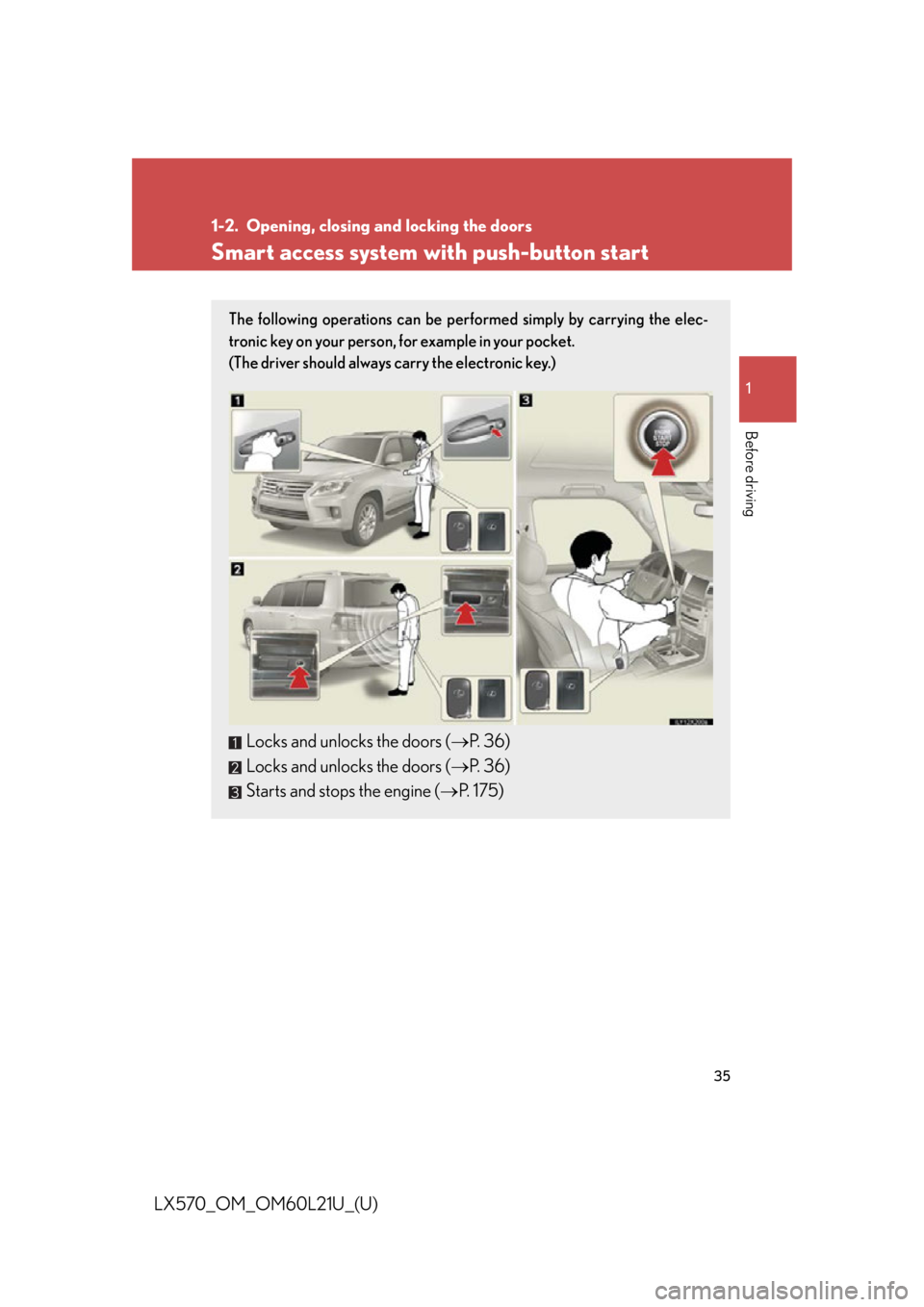
Smart access system with push-button start The following operations can be performed simply by carrying the elec-
tronic key on your person, for example in your pocket.
(The driver should always carry the electronic key.)
Locks and unlocks the doors ( P. 36)
Locks and unlocks the doors ( P. 36)
Starts and stops the engine ( P. 175)
Page 36 of 956
361-2. Opening, closing and locking the doors
LX570_OM_OM60L21U_(U) Unlocking and locking the doors
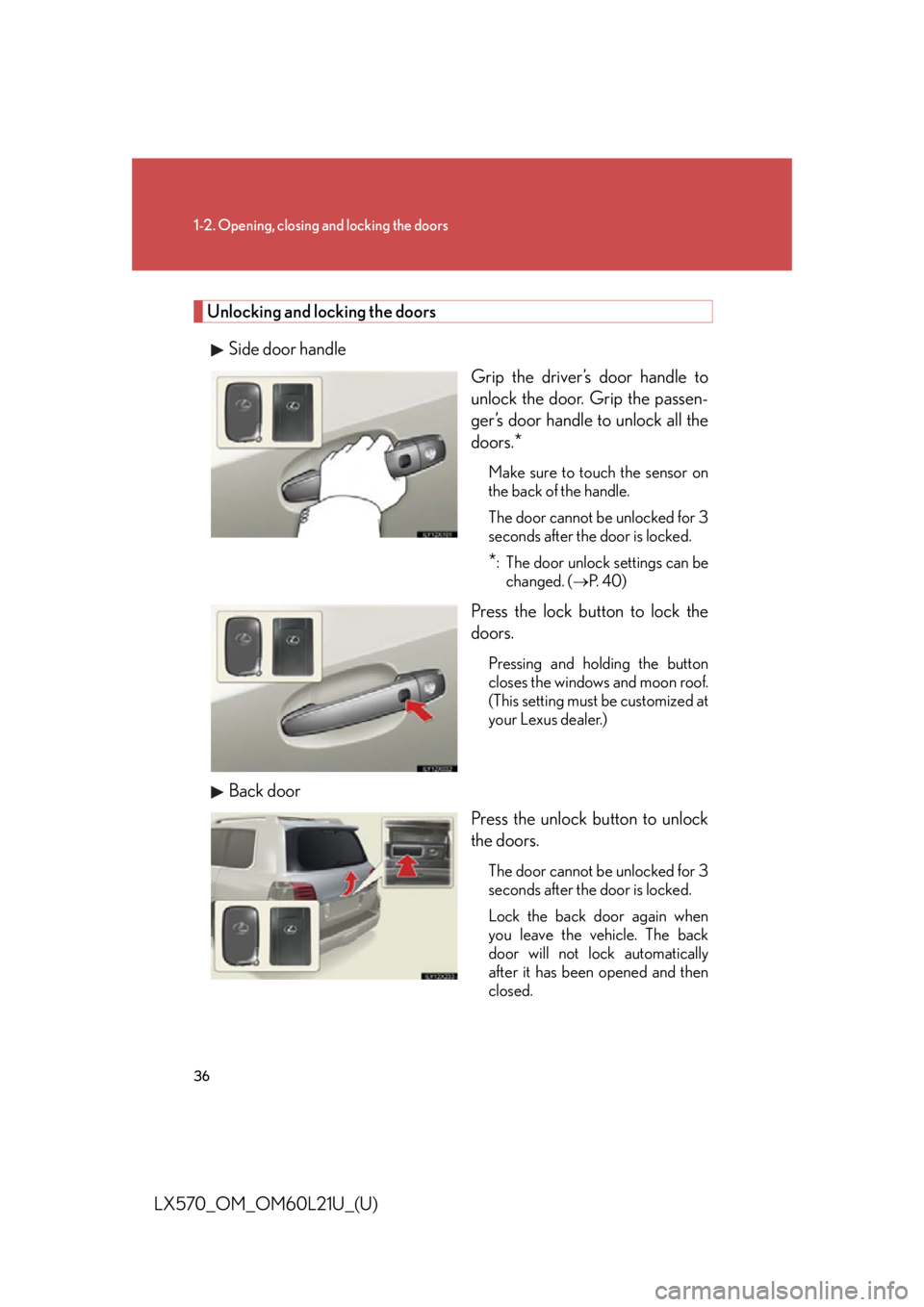
Side door handle
Grip the driver’s door handle to
unlock the door. Grip the passen-
ger’s door handle to unlock all the
doors.
* Make sure to touch the sensor on
the back of the handle.
The door cannot be unlocked for 3
seconds after the door is locked.
* : The door unlock settings can be
changed. (
P. 4 0 )
Press the lock button to lock the
doors. Pressing and holding the button
closes the windows and moon roof.
(This setting must be customized at
your Lexus dealer.)
Back door
Press the unlock button to unlock
the doors. The door cannot be unlocked for 3
seconds after the door is locked.
Lock the back door again when
you leave the vehicle. The back
door will not lock automatically
after it has been opened and then
closed.
Page 37 of 956
371-2. Opening, closing and locking the doors
1
Before driving
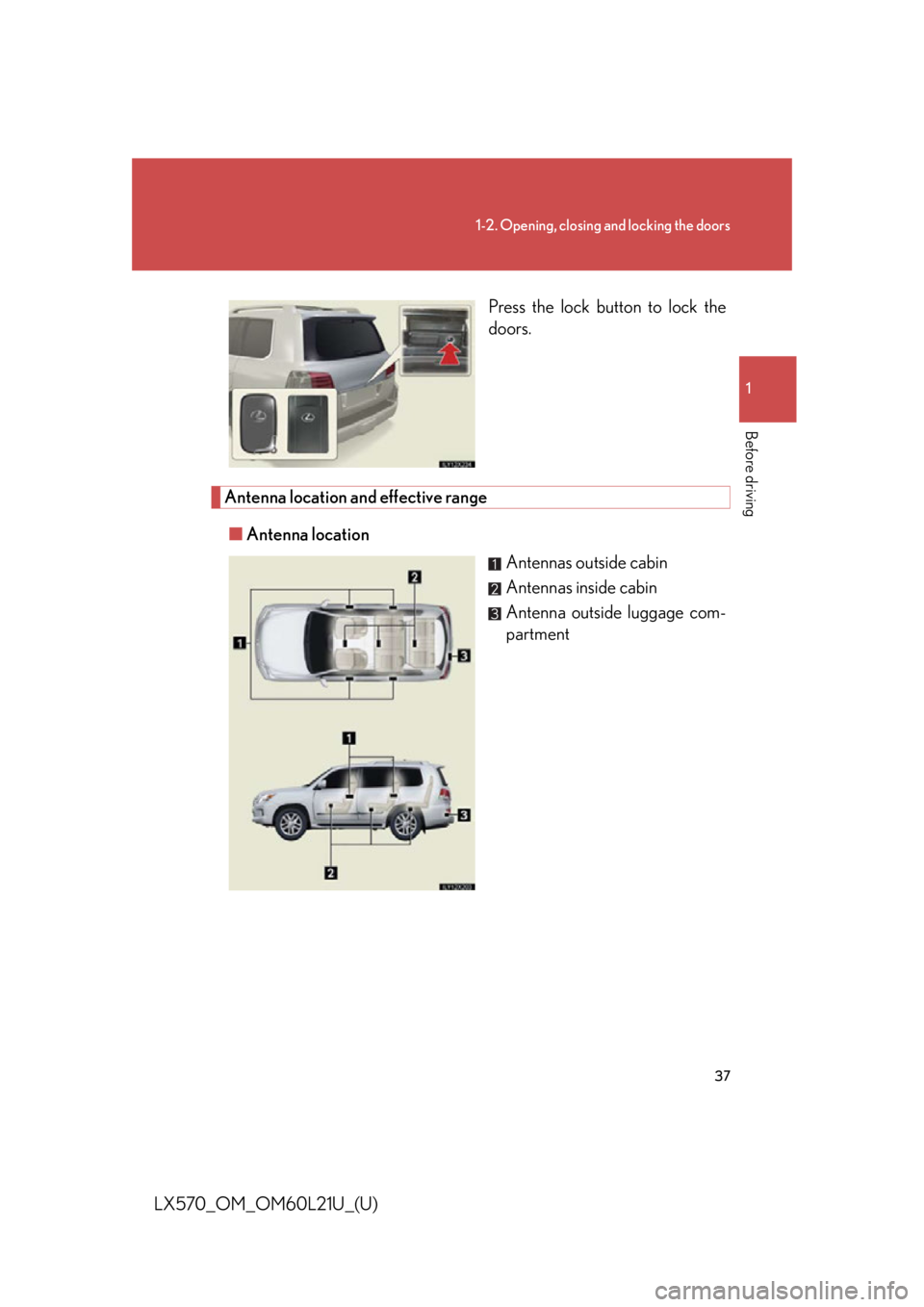
LX570_OM_OM60L21U_(U) Press the lock button to lock the
doors.
Antenna location and effective range
■ Antenna location
Antennas outside cabin
Antennas inside cabin
Antenna outside luggage com-
partment
Page 38 of 956
381-2. Opening, closing and locking the doors
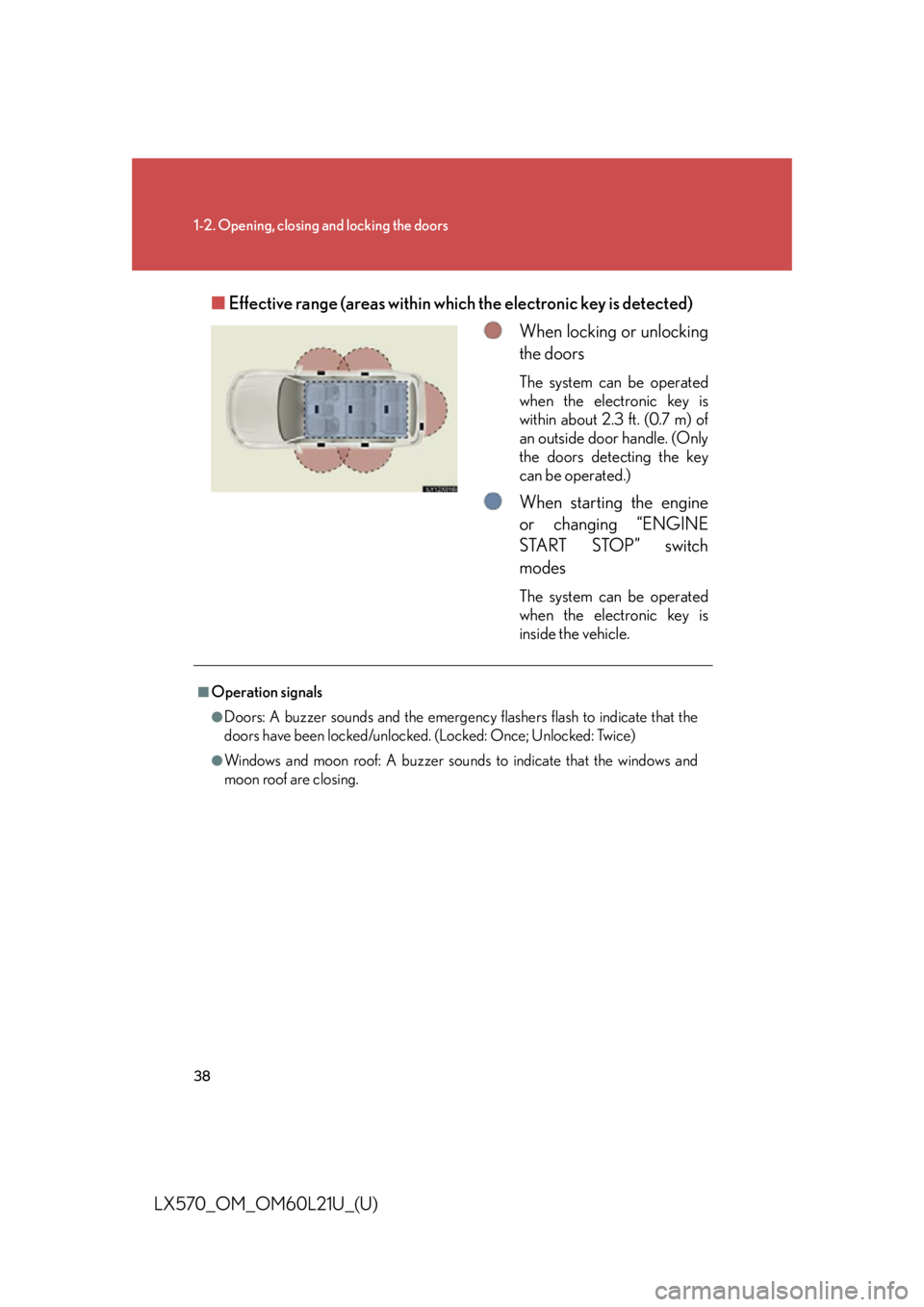
LX570_OM_OM60L21U_(U) ■ Effective range (areas within wh ich the electronic key is detected)
When locking or unlocking
the doors The system can be operated
when the electronic key is
within about 2.3 ft. (0.7 m) of
an outside door handle. (Only
the doors detecting the key
can be operated.)
When starting the engine
or changing “ENGINE
START STOP” switch
modes The system can be operated
when the electronic key is
inside the vehicle.■
Operation signals ●
Doors: A buzzer sounds and the emergency flashers flash to indicate that the
doors have been locked/unlocked. (Locked: Once; Unlocked: Twice)●
Windows and moon roof: A buzzer sounds to indicate that the windows and
moon roof are closing.
Page 39 of 956

391-2. Opening, closing and locking the doors
1
Before driving
LX570_OM_OM60L21U_(U) ■
Conditions affecting operation
The smart access system with push-button start uses weak radio waves. In the fol-
lowing situations, the communication between the electronic key and the vehicle
may be affected, preventing the smart access system with push-button start, wire-
less remote control and engine immobilizer system from operating properly.
(Ways of coping: P. 8 6 7 )●
When the electronic key battery is depleted ●
Near a TV tower, electric power plant, gas station, radio station, large display,
airport or other facility that generates strong radio waves or electrical noise●
When carrying a portable radio, cellular phone, cordless phone or other wire-
less communication devices ●
When the electronic key is in contact wi th, or is covered by the following metal-
lic object
• Card to which aluminum foil is attached
• Cigarette boxes that have aluminum foil inside
• Metallic wallets or bags
•Coins
• Hand warmers made of metal
• Media such as CDs and DVDs ●
When multiple electronic keys are in the vicinity ●
When other wireless keys (that emit radio waves) are being used nearby●
When carrying or using the electronic key together with the following devices
that emit radio waves
• Another vehicle’s electronic key or a wireless key that emits radio waves
• Personal computers or person al digital assistants (PDAs)
• Digital audio players
• Portable game systems ●
If window tint with a metallic content or metallic objects are attached to the rear
window