engine LEXUS LX570 2015 Owners Manual
[x] Cancel search | Manufacturer: LEXUS, Model Year: 2015, Model line: LX570, Model: LEXUS LX570 2015Pages: 960, PDF Size: 11.33 MB
Page 405 of 960

4053-1. Using the touch screen
3
Interior features
LX570_OM_OM60L96U_(U) Initial screen
When the “ENGINE START
STOP” switch is turned to
ACCESSORY or IGNITION ON
mode, the initial screen will be dis-
played for a few seconds as the
system starts up. Images shown on the initial screen
can be changed to suit individual
preferences. ( P. 419)
Page 408 of 960

4083-1. Using the touch screen
LX570_OM_OM60L96U_(U) ■
Changing between day mode and night mode
In the following conditions, the displays condition is not changed to night mode
even if the headlight switch is turned on:
• The instrument panel light control switch is turned fully to the right.
• The vehicle is in a bright area, such as outside in direct sunlight. ■
To turn off the display
The display goes off when “Screen Off” is touched. To turn the screen back on,
press any button. The sele cted screen appears.
NOTICE■
To avoid damaging the touch screen ●
To prevent damaging the screen, lightly touch the screen buttons with your fin-
ger. ●
Do not operate or rub the screen with a ballpoint pen, a mechanical pencil, finger
nail, a pointy and/or hard object because this will damage the screen. ●
Do not use objects other than yo ur finger to touch the screen.●
Wipe off fingerprints using a glass cleaning cloth. Do not use chemical cleaners
to clean the screen, as they may damage the touch screen. To display the screen in day mode, even with
the headlight switch on, touch “Day Mode”
for brightness and contrast control.
If the screen is set to day mode with the
headlight switch turned on, this condition is
memorized even with the engine turned
off.
Page 452 of 960

4523-2. Using the air conditio ning system and defogger
LX570_OM_OM60L96U_(U) ■
Using the automatic mode
Fan speed is adjusted automatically in ac cordance with the temperature setting and
ambient conditions. As a result, the following may occur: ●
Immediately after the “AUTO” button is pressed, the fan may stop for a while
until warm or cool air is ready to flow.●
Cool air may flow to the area around the upper body when the heater is on.■
Using the system in recirculated air mode
The windows will fog up more easily if the recirculated air mode is used for an
extended period. ■
Switching between outside air and recircula ted air modes
Recirculated air mode or outside air mode may be automatically switched in accor-
dance with the temperature sett ing and the inside temperature.■
When the outside temperature exceeds 75°F (24°C) and the air conditioning
system is on ●
In order to reduce the ai r conditioning power consumption, the air conditioning
system may switch to recirculated air mode automatically. This may also reduce
fuel consumption. ●
Recirculated air mode is selected as a default mode when the “ENGINE
START STOP” switch is turn ed to IGNITION ON mode.●
It is possible to switch to outside air mode at any time by pressing .■
Window defogger feature
Recirculated air mode may automatically switch to
(outside air) mode in situ-
ations where the windows need to be defogged.
Page 454 of 960
4543-2. Using the air conditio ning system and defogger
LX570_OM_OM60L96U_(U) CAUTION■
To prevent the windshield from fogging up
Do not use during cool air operation in extremely humid weather. The differ-
ence between the temperature of the outs ide air and that of the windshield can
cause the outer surface of the windshield to fog up, blocking your vision.
NOTICE■
To prevent battery discharge
Do not leave the air conditioning system on longer than necessary when the engine
is stopped.
Page 455 of 960

4553-2. Using the air conditio ning system and defogger
3
Interior features
LX570_OM_OM60L96U_(U) Outside temperature display
Outside temperature is displayed in the screen.
The displayed temperature ranges from -40 F (-40 C) up to 122 F
(50 C).
■
The outside temperature is displayed when
The “ENGINE START STOP” switch is in IGNITION ON mode. ■
When “— —” or “E” is displayed
The system may be malfun ctioning. Take your vehi cle to your Lexus dealer■
Display
In the following situations, the correct ou tside temperature may not be displayed, or
the display may take longer than normal to change. ●
When stopped, or driving at low speeds (less than 12 mph [20 km/h]) ●
When the outside temperature has change d suddenly (at the entrance/exit of a
garage, tunnel, etc.)
Page 459 of 960
4593-2. Using the air conditio ning system and defogger
3
Interior features
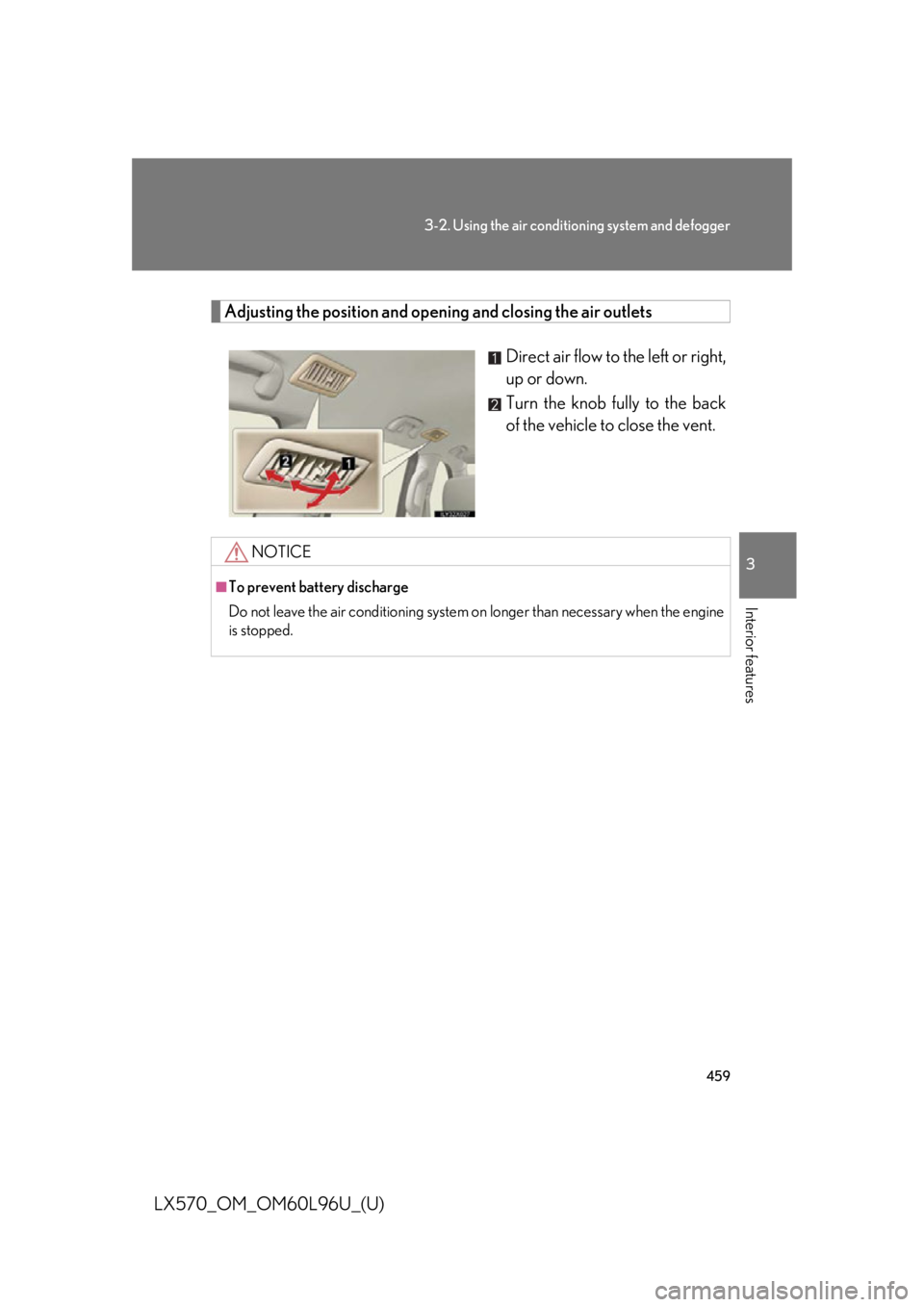
LX570_OM_OM60L96U_(U) Adjusting the position and opening and closing the air outlets
Direct air flow to the left or right,
up or down.
Turn the knob fully to the back
of the vehicle to close the vent.
NOTICE■
To prevent battery discharge
Do not leave the air conditioning system on longer than necessary when the engine
is stopped.
Page 460 of 960

4603-2. Using the air conditio ning system and defogger
LX570_OM_OM60L96U_(U) Rear window and outside rear view mirror defog-
gers ■
The rear window and outside rear view mirror defoggers can be operated when
The “ENGINE START STOP” switch is in IGNITION ON mode.
CAUTION■
When the outside rear view mirror defoggers are on
Do not touch the rear view mirror surfaces, as they can become very hot and burn
you.These features are used to defog the rear window, and to remove rain-
drops, dew and frost from th e outside rear view mirrors.
On/off The operation time changes
according to the ambient tem-
perature and vehicle speed.
Pressing the button again also
turns the defoggers off.
Page 461 of 960

4613-2. Using the air conditio ning system and defogger
3
Interior features
LX570_OM_OM60L96U_(U) Windshield wiper de-icer
■
The windshield wiper de-i cer can be operated when
The “ENGINE START STOP” switch is in IGNITION ON mode.
CAUTION■
When the windshield wiper de-icer is on
Do not touch the glass at the lower part of the windshield or the side of the front pil-
lars as the surfaces can be come very hot and burn you.This feature is used to prevent ice fr om building up on the windshield and
wiper blades.
Press the “CLIMATE” button.
On/off The windshield wiper de-icer
will automatically turn off after
approximately 15 minutes.
Touching the switch again also
turns the de-icer off.STEP 1
STEP 2
Page 465 of 960

4653-3. Using the audio system
3
Interior features
LX570_OM_OM60L96U_(U) CAUTION■
For vehicles sold in U.S.A. and Canada ●
Part 15 of the FCC Rules
FCC Warning:
Changes or modifications not expressly approved by the party responsible for
compliance could void the user’s authority to operate the equipment. ●
Laser products
• USE OF CONTROL OR ADJUSTMENT OR PERFORMANCE OF PRO-
CEDURES OTHER THAN THOSE SPECIFIED HEREIN MAY RESULT IN
HAZARDOUS RADIATION EXPOSURE.
• THE USE OF OPTICAL INSTRUMENTS WITH THIS PRODUCT WILL
INCREASE EYE HAZARD.
NOTICE■
To prevent battery discharge
Do not leave the audio system on longer than necessary when the engine is off. ■
To avoid damaging the audio system
Take care not to spill drinks or other fluids on the audio system.
Page 466 of 960

4663-3. Using the audio system
LX570_OM_OM60L96U_(U) ■
Open source license
This product uses the following open source software. ●
T-Kernel
This Product uses the Source Code of T-Kernel under T-License granted by the T-
Engine Forum (www.t-engine.org ).●
C Library
This product includes software developed by the University of California, Berkeley
and its contributors. This product includes software developed by the University of
California, Lawrence Berkeley Laboratory.
Copyright © 1982, 1985, 1993 The Regents of the University of California. All
rights reserved.
Copyright © 1982, 1986, 1993 The Regents of the University of California. All
rights reserved.
Copyright © 1982, 1986, 1989, 1993 The Re gents of the University of California.
All rights reserved.
© UNIX System Laboratories, Inc. All or some portions of this file are derived from
material licensed to the University of California by American Telephone and Tele-
graph Co. or Unix System Laboratories, Inc. and are reproduced herein with the
permission of UNIX Sy stem Laboratories, Inc.
Copyright © 1982, 1986, 1991, 1993, 1994 The Regents of the University of Cali-
fornia. All rights reserved.
© UNIX System Laboratories, Inc. All or some portions of this file are derived from
material licensed to the University of California by American Telephone and Tele-
graph Co. or Unix System Laboratories, Inc. and are reproduced herein with the
permission of UNIX Sy stem Laboratories, Inc.
Copyright © 1983, 1990, 1993 The Regents of the University of California. All
rights reserved.
© UNIX System Laboratories, Inc. All or some portions of this file are derived from
material licensed to the University of California by American Telephone and Tele-
graph Co. or Unix System Laboratories, Inc. and are reproduced herein with the
permission of UNIX Sy stem Laboratories, Inc.
Copyright © 1983, 1993 The Regents of the University of California. All rights
reserved.