USB LEXUS LX570 2015 User Guide
[x] Cancel search | Manufacturer: LEXUS, Model Year: 2015, Model line: LX570, Model: LEXUS LX570 2015Pages: 960, PDF Size: 11.33 MB
Page 505 of 960
5053-3. Using the audio system
3
Interior features
LX570_OM_OM60L96U_(U) Contact the XM ®
Listener Care Center at 1-877-515-3987 (U.S.A.) or 1-877-
438-9677 (Canada). ■
About internet radio (vehicles with the navigation system) ●
Other applications can be activated while listening to internet radio. ●
An iPhone cannot be connected via Bluetooth ®
and USB connection at the
same time. However, it is possible to recharge an iPhone while using Apps by
connecting via USB. The system uses the connection method that was used last.
Therefore, if connected via USB after Bluetooth ®
connection, it is necessary to
reconnect the iPhone via Bluetooth ®
.●
Services requiring a separa te contract can also be used. For details, refer to
http://www.lexus .com/enform/ or call 1-800-255-3987.●
If internet radio has never been listened to by activating “Apps” from the
“Information” screen, the “Apps” tab will be dimmed. Ch Unavail The channel you selected is no longer available. Wait
for about 2 seconds until the radio returns to the previ-
ous channel or “CH 001”. If it does not change auto-
matically, select another channel.
Page 552 of 960
5523-3. Using the audio system
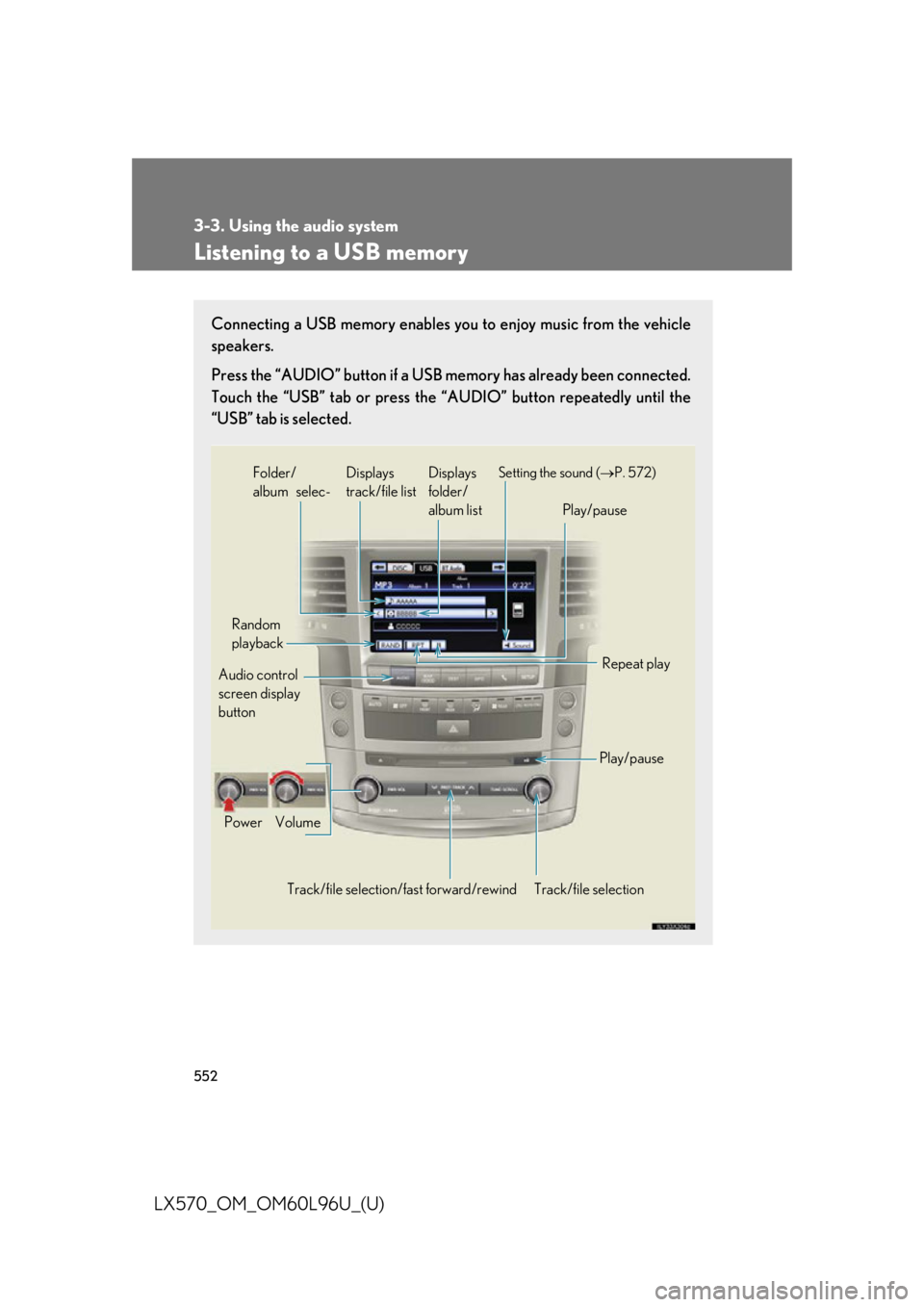
LX570_OM_OM60L96U_(U) Listening to a USB memory Connecting a USB memory enables you to enjoy music from the vehicle
speakers.
Press the “AUDIO” button if a USB memory has already been connected.
Touch the “USB” tab or press the “A UDIO” button repeatedly until the
“USB” tab is selected.
Audio control
screen display
button
Track/file selectionVolumePower Random
playback
Repeat play
Play/pausePlay/pauseSetting the sound ( P. 572)
Track/file selection/ fast forward/rewind Displays
folder/
album listDisplays
track/file listFolder/
album selec-
Page 553 of 960
5533-3. Using the audio system
3
Interior features
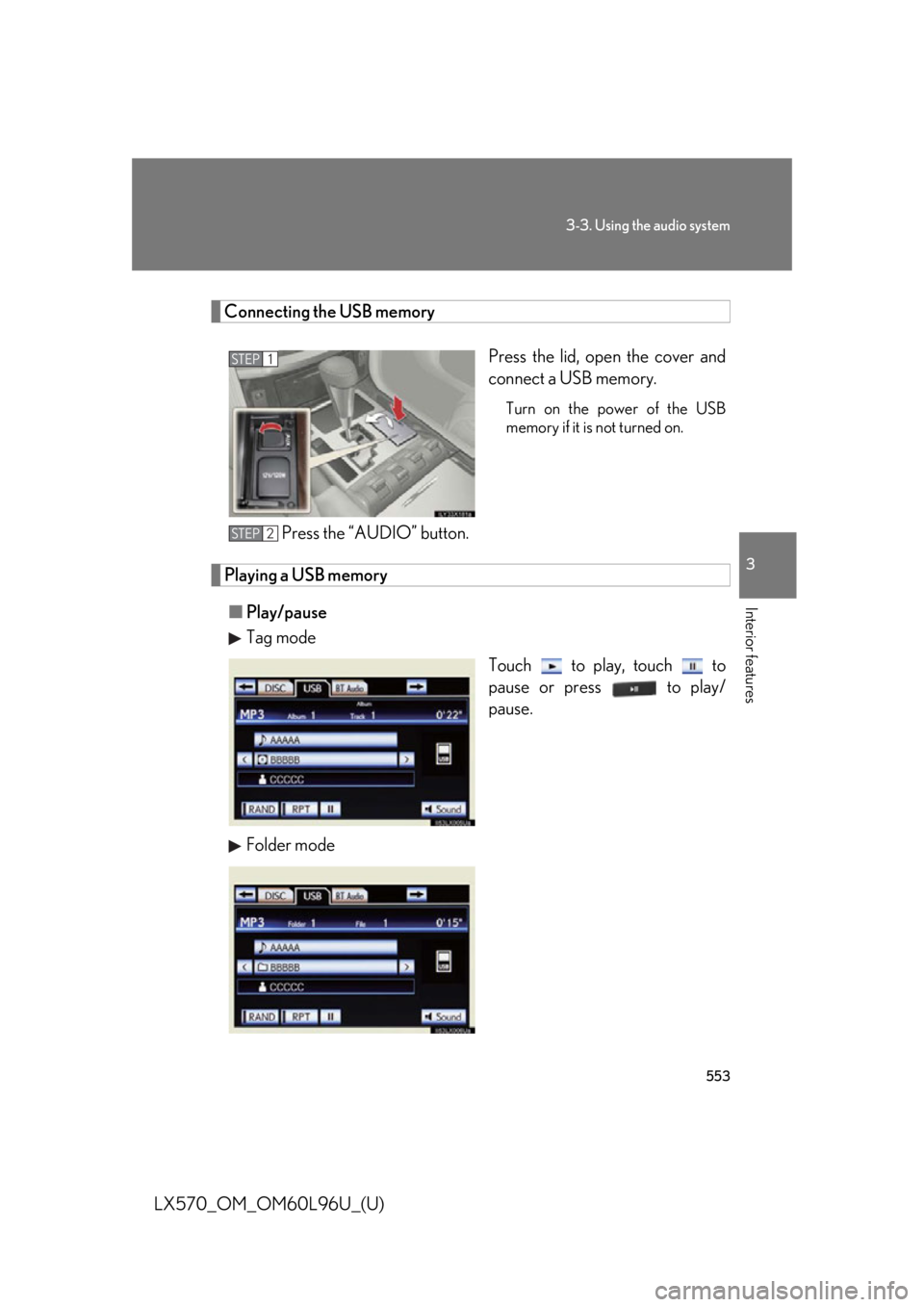
LX570_OM_OM60L96U_(U) Connecting the USB memory
Press the lid, open the cover and
connect a USB memory. Turn on the power of the USB
memory if it is not turned on.
Press the “AUDIO” button.
Playing a USB memory
■ Play/pause
Tag mode
Touch to play, touch to
pause or press to play/
pause.
Folder mode STEP 1
STEP 2
Page 557 of 960
5573-3. Using the audio system
3
Interior features
LX570_OM_OM60L96U_(U) Random playback
■ Playing files/tracks from a particular folder in random order
Touch “RAND” on the screen.
Each time “RAND” is touched, the mode changes as follows:
random (1 folder/album random) folder/album random (all folders/
albums random) off
■ Playing the all folders/albums fr om a USB memory in random order
Touch “RAND” repeatedly until “FLD.RAND”/“ALB.RAND” appears
on the screen. To cancel, touch “RAND” again.
Repeat play
■ Repeating a file/track
Touch “RPT” on the screen.
Each time “RPT” is touched, the mode changes as follows:
● When “RAND” is off
file/track repeat folder/album repeat off
● When “RAND” is on
file/track repeat off
■ Repeating a folder/album
Touch “RPT” repeatedly until “FLD.RPT”/“ALB.RPT” appears on the
screen. To cancel, touch “RPT” again.
Available except when random playback is selected
Page 558 of 960
5583-3. Using the audio system
LX570_OM_OM60L96U_(U) ■
If you touch
The display returns to the previous screen. ■
USB memory functions ●
When the USB memory is connected and the audio source is changed to USB
memory mode, the USB memory will start playing the first file in the first folder.
If the same device is removed and reinserted (and the contents have not been
changed), the USB memory will resume pl aying from the same point it was last
used. ●
Depending on the USB memory that is connected to the system, certain func-
tions may not be available. Disconnecting the device and reconnecting it once
again may resolve some malfunctions.■
When using a USB memory
You may be unable to use the instrument panel power outlet if the USB memory is
connected to the USB port at the same time. ■
Error messages for USB memory
“USB Error”: This indicates a problem in the USB memory or its connection.
“No music files found.”: This indicates that no MP3/WMA files are included in the
USB memory.■
USB memory ●
Compatible devices
USB memory that can be used for MP3 and WMA playback. ●
Compatible device formats
The following device formats can be used:
• USB communication formats: USB2.0 HS (480 Mbps) and FS (12 Mbps)
• File formats: FAT16/32 (Windows)
• Correspondence class: Mass storage class
MP3 and WMA files written in any format other than those listed above may not
play correctly, and their file names an d folder names may not be displayed cor-
rectly.
Items related to standards an d limitations are as follows:
• Maximum directory hierarchy: 8 levels
• Maximum number of folders in a device: 3000 (including the root)
• Maximum number of files in a device: 9999
• Maximum number of files per folder: 255
Page 560 of 960
5603-3. Using the audio system
LX570_OM_OM60L96U_(U) ●
File names
The only files that can be recognized as MP3/WMA and played are those with
the extension .mp3 or .wma. ●
ID3 and WMA tags
ID3 tags can be added to MP3 files, maki ng it possible to record the track title,
artist name, etc.
The system is compatible with ID3 Ver. 1.0, 1.1, and Ver. 2.2, 2.3, 2.4 ID3 tags.
(The number of characters is based on ID3 Ver. 1.0 and 1.1.)
WMA tags can be added to WMA files, making it possible to record the track
title and artist name in the same way as with ID3 tags.●
MP3 and WMA playback
• When a device containing MP3 or WMA files is connected, all files in the
USB memory device are checked. Once the file check is finished, the first
MP3 or WMA file is played. To make the file check finish more quickly, we
recommend that you do not include any files other than MP3 or WMA files
or create any unnecessary folders.
• When the USB device is connected and the audio source is changed to USB
memory mode, the USB device will start playing the first file in the first folder.
If the same device is removed and reinserted (and the contents have not been
changed), the USB device will resume play from the same point in which it
was last used.●
Extensions
If the file extensions .mp3 and .wma are used for files other than MP3 and
WMA files, they will be skipped (not played). ●
Playback
• To play MP3 files with steady sound qu ality, we recommend a fixed bit rate of
at least 128 kbps and a sampling frequency of 44.1 kHz.
• There is a wide variety of freeware and other enco ding software for MP3 and
WMA files on the market, and depending on the status of the encoding and
the file format, poor sound quality or no ise at the start of playback may result.
In some cases, playback may not be possible at all.
• Microsoft, Windows, and Windows Media are registered trademarks of
Microsoft Corporation in the U.S.A. and other countries.
Page 561 of 960
5613-3. Using the audio system
3
Interior features
LX570_OM_OM60L96U_(U) CAUTION■
While driving
Do not connect an USB memory or operate the controls.
NOTICE■
To prevent damage to the USB memory or its terminal ●
Do not leave USB memory in the vehicle. The temperature inside of the vehicle
may become high, resulting in damage to the USB memory.●
Do not push down on or apply unnecessary pressure to the USB memory while it
is connected. ●
Do not insert foreign objects into the port.
Page 569 of 960
5693-3. Using the audio system
3
Interior features
LX570_OM_OM60L96U_(U) ■
iPod functions ●
When the iPod connected to the system includes iPod video, the system can
only output the sound by touching “Video” on the “iPod” screen.●
Depending on the iPod, the video so und may not be able to be heard.●
When an iPod is connected and the audi o source is changed to iPod mode, the
iPod will resume play from the same point in which it was last used. ●
Depending on the iPod that is connected to the system, certain functions may
not be available. If a function is unavailable due to a malfunction (as opposed to
a system specification), disconnecting the device and reconnecting it once
again may resolve the problem.■
When using an iPod
You maybe unable to use the instrument panel power outlet if the iPod is con-
nected to the USB port at the same time. ■
Battery charge
When an iPod is connected using a genuine iPod cable, the iPod starts charging its
battery. ■
Error messages for iPod
“iPod Error”: This indicates a proble m in the iPod or its connection.
“No music files found.”: This indicates that there is no music data in the iPod.
“Please check the iPod firmware version.”:
This indicates that the software version is not compati-
ble. Perform the iPod fir mware updates and try again.
“iPod authorization failed.”: This indicates th at it failed to authorize the iPod. Please
check your iPod.
Page 576 of 960
5763-3. Using the audio system
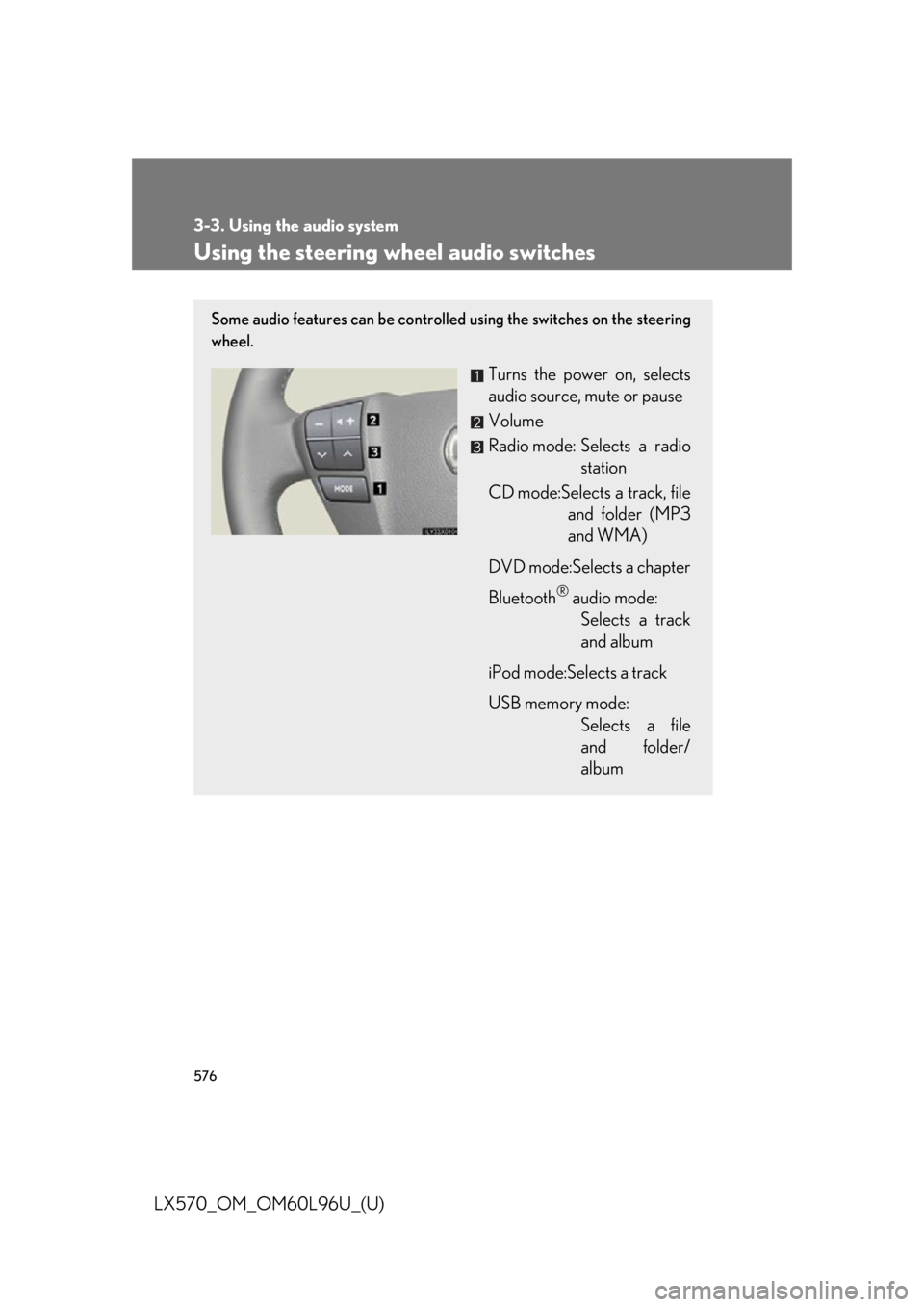
LX570_OM_OM60L96U_(U) Using the steering wheel audio switches Some audio features can be controlled using the switches on the steering
wheel.
Turns the power on, selects
audio source, mute or pause
Volume
Radio mode: Selects a radio
station
CD mode:Selects a track, file
and folder (MP3
and WMA)
DVD mode:Selects a chapter
Bluetooth ®
audio mode:
Selects a track
and album
iPod mode:Selects a track
USB memory mode:
Selects a file
and folder/
album
Page 578 of 960
5783-3. Using the audio system
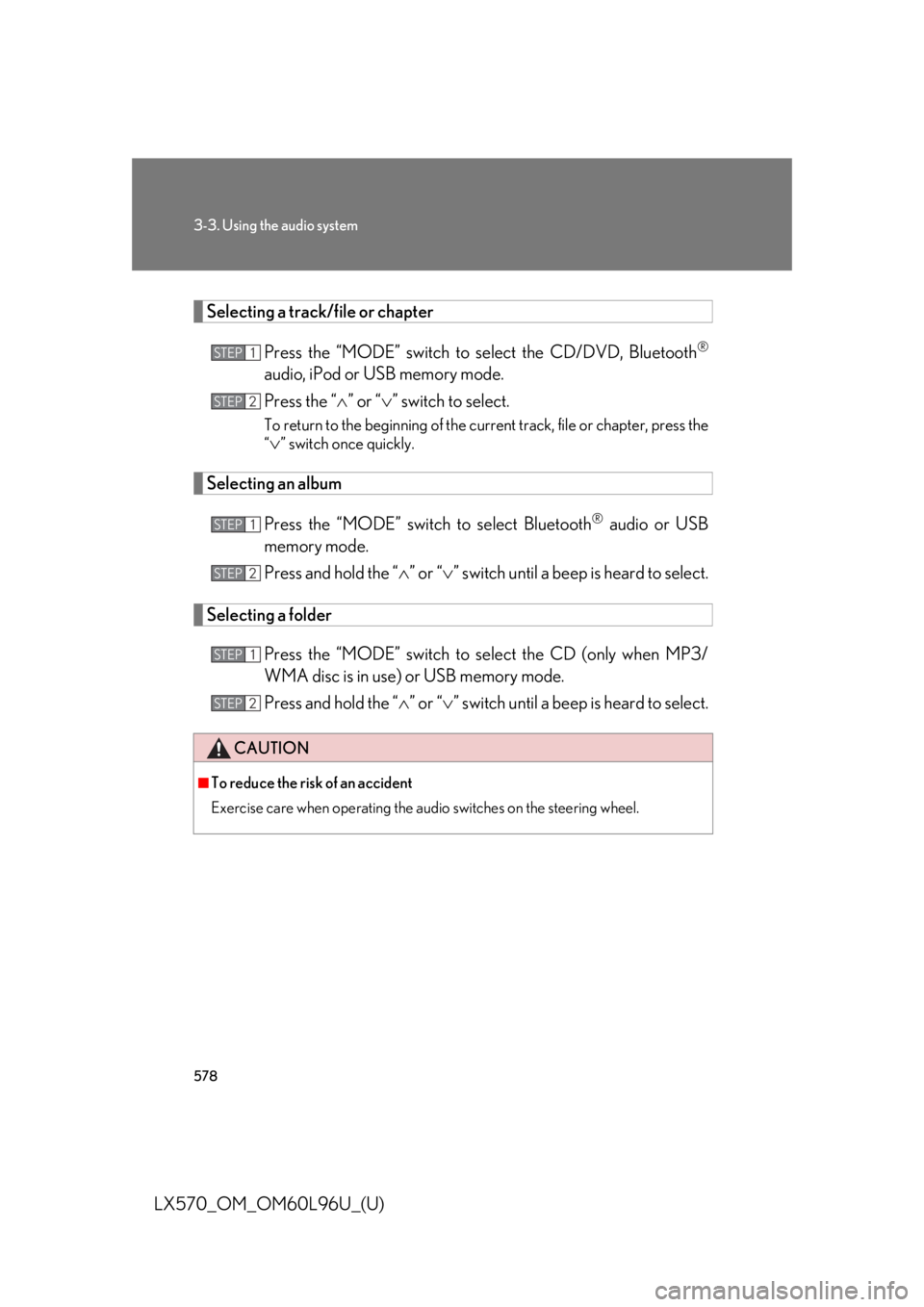
LX570_OM_OM60L96U_(U) Selecting a track/file or chapter
Press the “MODE” switch to se lect the CD/DVD, Bluetooth ®
audio, iPod or USB memory mode.
Press the “ ” or “ ” switch to select.To return to the beginning of the curr ent track, file or chapter, press the
“
” switch once quickly.
Selecting an album
Press the “MODE” switch to select Bluetooth ®
audio or USB
memory mode.
Press and hold the “ ” or “ ” switch until a beep is heard to select.
Selecting a folder
Press the “MODE” switch to se lect the CD (only when MP3/
WMA disc is in use) or USB memory mode.
Press and hold the “ ” or “ ” switch until a beep is heard to select.CAUTION■
To reduce the risk of an accident
Exercise care when operating the audio switches on the steering wheel. STEP 1
STEP 2
STEP 1
STEP 2
STEP 1
STEP 2