headlights LEXUS LX570 2015 User Guide
[x] Cancel search | Manufacturer: LEXUS, Model Year: 2015, Model line: LX570, Model: LEXUS LX570 2015Pages: 960, PDF Size: 11.33 MB
Page 219 of 960

2192-3. Operating the lights and wipers
2
When driving
LX570_OM_OM60L96U_(U) NOTICE■
Camera sensor
●
Do not touch the camera sensor. ●
Do not subject the inside rear view mirror or the camera sensor to a strong
impact. ●
Do not disassemble the camera sensor. ●
Do not spill liquid onto the inside rear view mirror or the camera sensor. ●
Do not apply window tinting or stickers to the camera sensor or the area of wind-
shield near the camera sensor. ●
Do not place items on the dashboard. There is a possibility that the camera sen-
sor will mistake items reflected in the wind shield for streetlights, the headlights of
other vehicles, etc. ●
Do not install a parking tag or any othe r accessories near or around the inside
rear view mirror and the camera sensor. ●
Do not overload the vehicle. ●
Do not modify the vehicle. ●
Do not replace windshield with a non-genuine windshield.
Contact your Lexus dealer. Observe the following to ensure that the
Automatic High Beam functions correctly.
Page 220 of 960
2202-3. Operating the lights and wipers
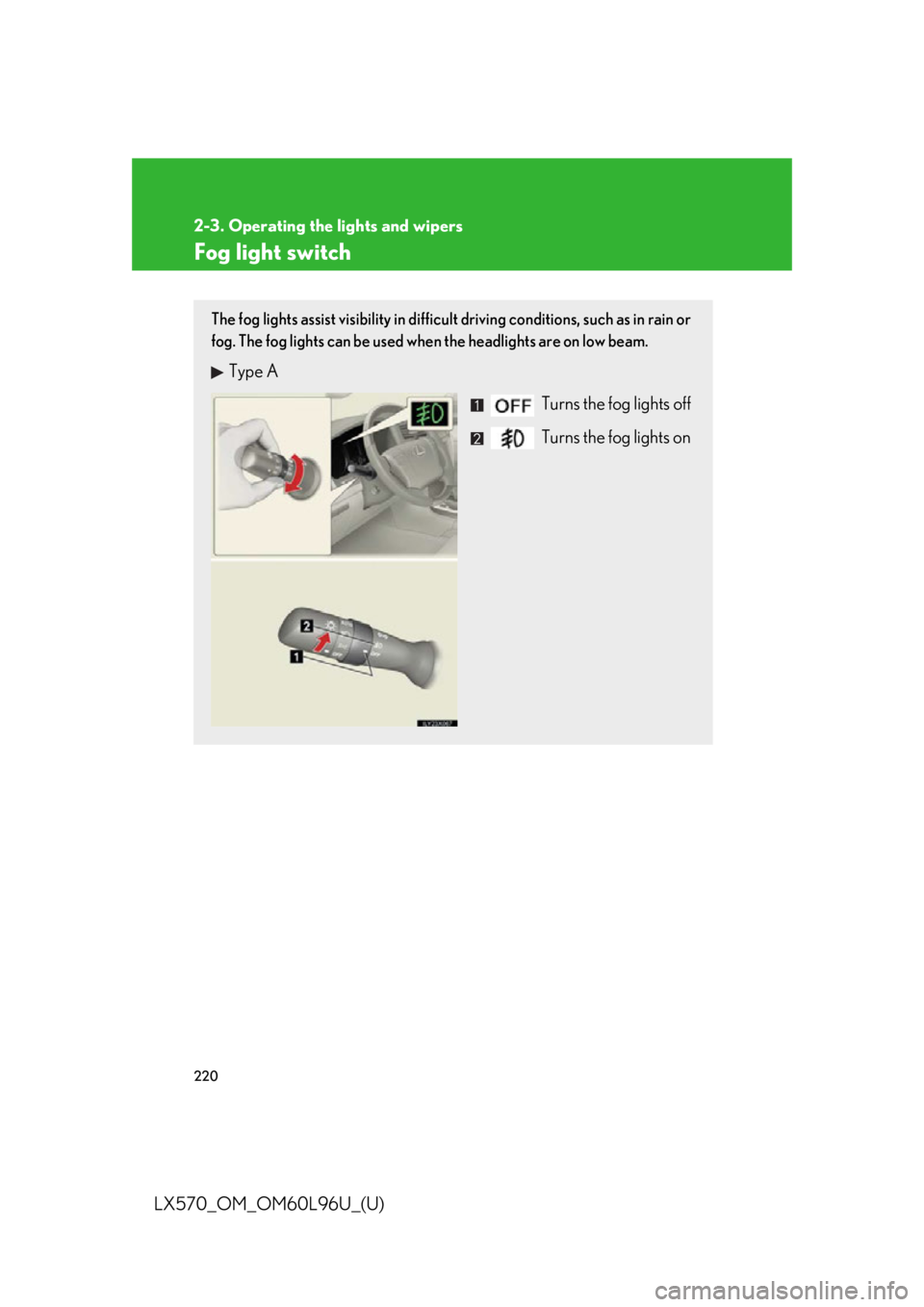
LX570_OM_OM60L96U_(U) Fog light switch The fog lights assist visibility in difficult driving conditions, such as in rain or
fog. The fog lights can be used when the headlights are on low beam.
Type A
Turns the fog lights off
Turns the fog lights on
Page 231 of 960

2312-3. Operating the lights and wipers
2
When driving
LX570_OM_OM60L96U_(U) Headlight cleaner switch
: If equipped■
The headlight cleaner can be operated when
The “ENGINE START STOP” switch is in IGNITION ON mode and the headlight
switch is turned on.
NOTICE■
When the washer fluid tank is empty
Do not use this function when the washer fluid tank is empty. This may cause the
washer fluid pump to overheat.Washer fluid can be sprayed on the headlights.
Press the switch to clean the
headlights.
Page 266 of 960
2662-4. Using other driving systems
LX570_OM_OM60L96U_(U) Things you should know
■ If you notice any symptoms
If you notice any of the following symptoms, refer to the likely cause
and the solution, and re-check.
If the symptom is not resolved by the solution, have the vehicle
inspected by your Lexus dealer. Symptom Likely cause Solution
The image is difficult to
see • The vehicle is in a dark
area
•The temperature
around the lens is either
high or low
• The outside tempera-
ture is low
• There are water drop-
lets on the camera
• It is raining or humid
• Foreign matter (mud
etc.) is adhering to the
camera
• There are scratches on
the camera
• Sunlight or headlights
are shining directly into
the camera
• The vehicle is under flu-
orescent lights, sodium
lights, mercury lights
etc. If this happens due to
these causes, it does not
indicate a malfunction.
Back up while visually
checking the vehicle’s
surroundings. (Use the
monitor again once con-
ditions have been
improved.)
To adjust the image on
the rear view monitor
system screen. ( P.
406)
Page 296 of 960
2962-4. Using other driving systems
LX570_OM_OM60L96U_(U) Things you should know
■ If you notice any symptoms
If you notice any of the following symptoms, refer to the likely cause
and the solution, and re-check.
If the symptom is not resolved by the solution, have the vehicle
inspected by your Lexus dealer. Symptom Likely cause Solution
The image is difficult to
see • The vehicle is in a dark
area
• The temperature
around the lens is
either high or low
• The outside tempera-
ture is low
• There are water drop-
lets on the camera
• It is raining or humid
•Foreign matter (mud
etc.) is adhering to the
camera
• There are scratches
on the camera
• Sunlight or headlights
are shining directly
into the camera
• The vehicle is under
fluorescent lights,
sodium lights, mercury
lights etc. If this happens due to these
causes, it does not indicate
a malfunction.
Back up while visually
checking the vehicle’s sur-
roundings. (Use the moni-
tor again once conditions
have been improved.)
To adjust the image on the
parking assist monitor
screen. ( P. 406)
Page 316 of 960
3162-4. Using other driving systems
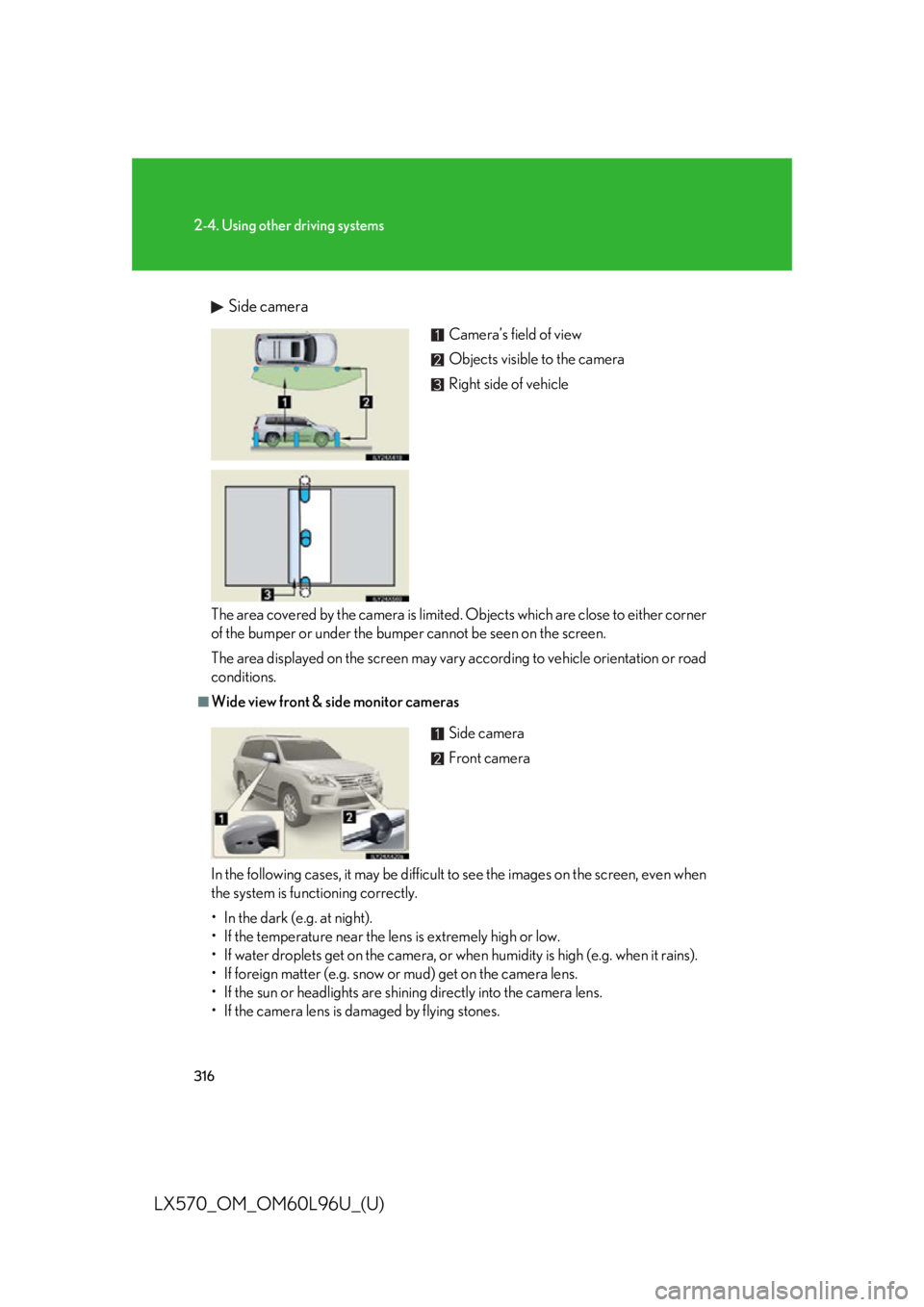
LX570_OM_OM60L96U_(U) Side camera
The area covered by the camera is limited . Objects which are close to either corner
of the bumper or under the bumper cannot be seen on the screen.
The area displayed on the screen may vary according to vehicle orientation or road
conditions. ■
Wide view front & side monitor cameras
In the following cases, it may be difficult to see the images on the screen, even when
the system is functioning correctly.
• In the dark (e.g. at night).
• If the temperature near the lens is extremely high or low.
• If water droplets get on the camera, or when humidity is high (e.g. when it rains).
• If foreign matter (e.g. snow or mud) get on the camera lens.
• If the sun or headlights are shining directly into the camera lens.
• If the camera lens is damaged by flying stones. Camera’s field of view
Objects visible to the camera
Right side of vehicle
Side camera
Front camera
Page 746 of 960
7444-2. Maintenance
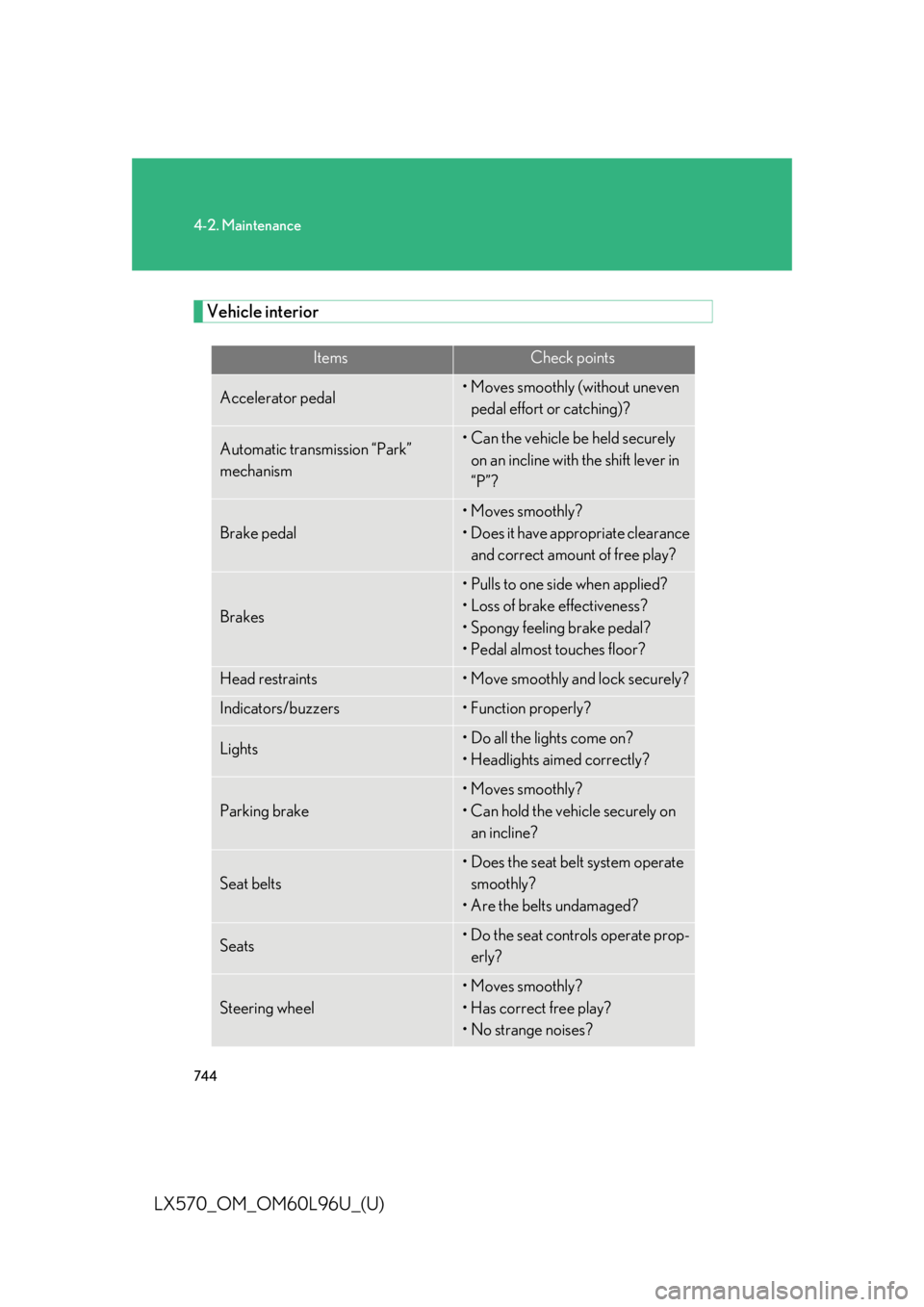
LX570_OM_OM60L96U_(U) Vehicle interior Items Check points
Accelerator pedal • Moves smoothly (without uneven
pedal effort or catching)?
Automatic transmission “Park”
mechanism • Can the vehicle be held securely
on an incline with the shift lever in
“P”?
Brake pedal • Moves smoothly?
• Does it have appropriate clearance
and correct amount of free play?
Brakes • Pulls to one side when applied?
• Loss of brake effectiveness?
• Spongy feeling brake pedal?
• Pedal almost touches floor?
Head restraints • Move smoothly and lock securely?
Indicators/buzzers • Function properly?
Lights • Do all the lights come on?
• Headlights aimed correctly?
Parking brake • Moves smoothly?
• Can hold the vehicle securely on
an incline?
Seat belts • Does the seat belt system operate
smoothly?
• Are the belts undamaged?
Seats • Do the seat controls operate prop-
erly?
Steering wheel • Moves smoothly?
• Has correct free play?
• No strange noises?
Page 808 of 960
8064-3. Do-it-yourself maintenance
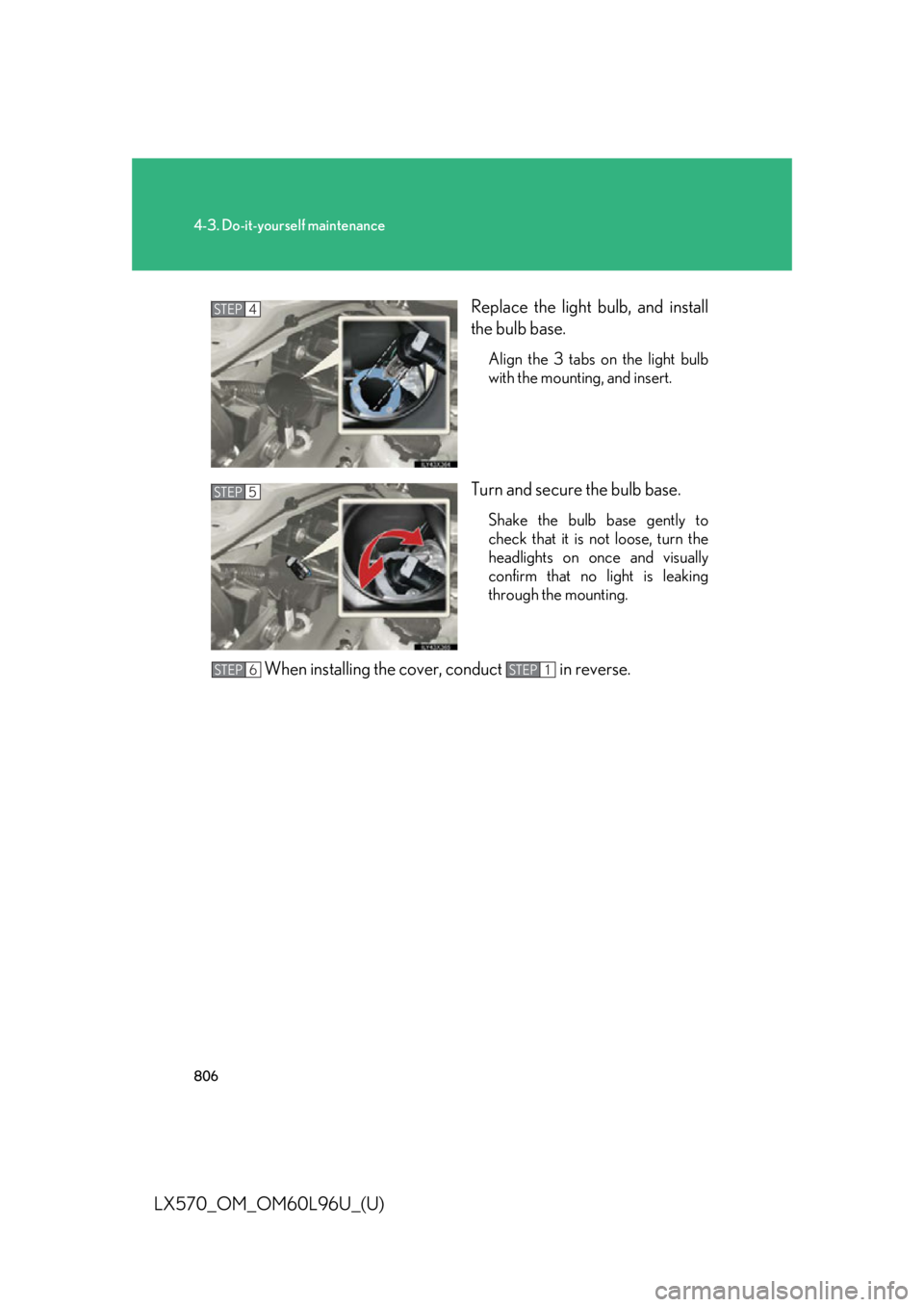
LX570_OM_OM60L96U_(U) Replace the light bulb, and install
the bulb base. Align the 3 tabs on the light bulb
with the mounting, and insert.
Turn and secure the bulb base. Shake the bulb base gently to
check that it is not loose, turn the
headlights on once and visually
confirm that no light is leaking
through the mounting.
When installing the cover, conduct in reverse. STEP 4
STEP 5
STEP 6 STEP 1
Page 813 of 960

8114-3. Do-it-yourself maintenance
4
Maintenance and care
LX570_OM_OM60L96U_(U) ■
Condensation build-up on the inside of the lens
Temporary condensation build- up on the inside of the headlight lens does not indi-
cate a malfunction. Contact your Lexus dealer, for more information in the follow-
ing situations: ●
Large drops of water are built up on the inside of the lens. ●
Water has built up inside the headlight.■
LED lights
The front side marker lights, parking ligh ts, daytime running lights, front fog lights,
side turn signal lights, stop/tail lights, tail lights, rear side marker lights, high
mounted stoplight and license plate lights co nsist of a number of LEDs. If any of the
LEDs burn out, take your vehicle to your Lexus dealer to have the light replaced. ■
Discharge headlights
If voltage to the discharge bulbs is insufficient, the bulbs may not come on, or may
go out temporarily. The discharge bulb s will come on when normal power is
restored.
Page 814 of 960
8124-3. Do-it-yourself maintenance
LX570_OM_OM60L96U_(U) CAUTION■
Replacing light bulbs ●
Turn off the headlights. Do not attempt to replace the bulb immediately after
turning off the headlights.
The bulbs become very hot and may cause burns. ●
Do not touch the glass portion of the li ght bulb with bare hands. When it is
unavoidable to hold the glass portion, use and hold with a clean dry cloth to avoid
getting moisture and oils on the bulb.
Also, if the bulb is scratched or dropped, it may blow out or crack. ●
Fully install light bulbs and any parts used to secure them. Failing to do so may
result in heat damage, fire, or water en tering the headlight unit. This may damage
the headlights or cause condensation to build up on the lens. ●
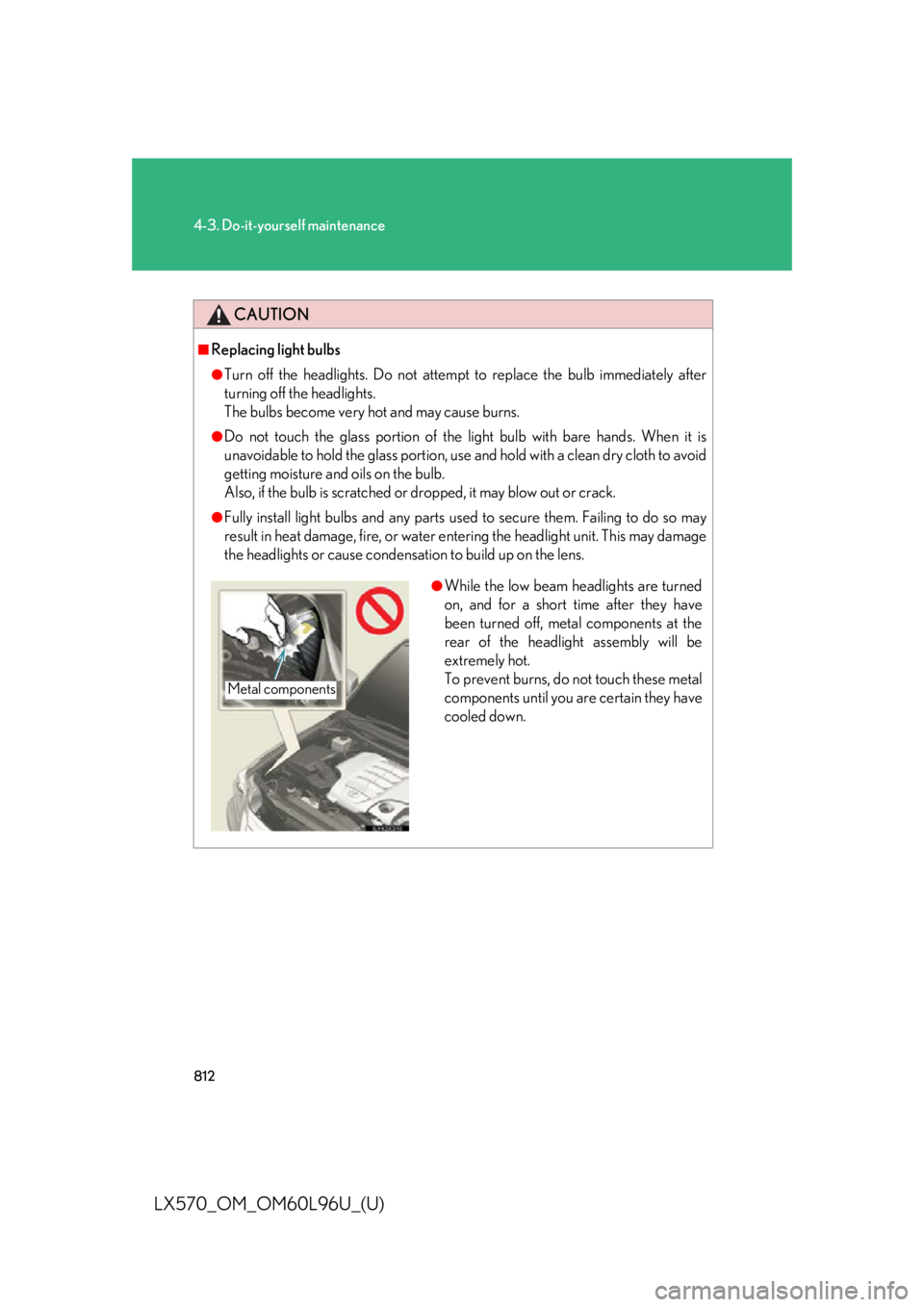
While the low beam headlights are turned
on, and for a short time after they have
been turned off, metal components at the
rear of the headlight assembly will be
extremely hot.
To prevent burns, do not touch these metal
components until you are certain they have
cooled down.Metal components