lock LEXUS LX570 2015 User Guide
[x] Cancel search | Manufacturer: LEXUS, Model Year: 2015, Model line: LX570, Model: LEXUS LX570 2015Pages: 960, PDF Size: 11.33 MB
Page 32 of 960
321-1. Key information
LX570_OM_OM60L96U_(U) ■
Card key ●
The mechanical key that is stored inside the card key should be used only in an
emergency, such as when the key does not operate properly. ●
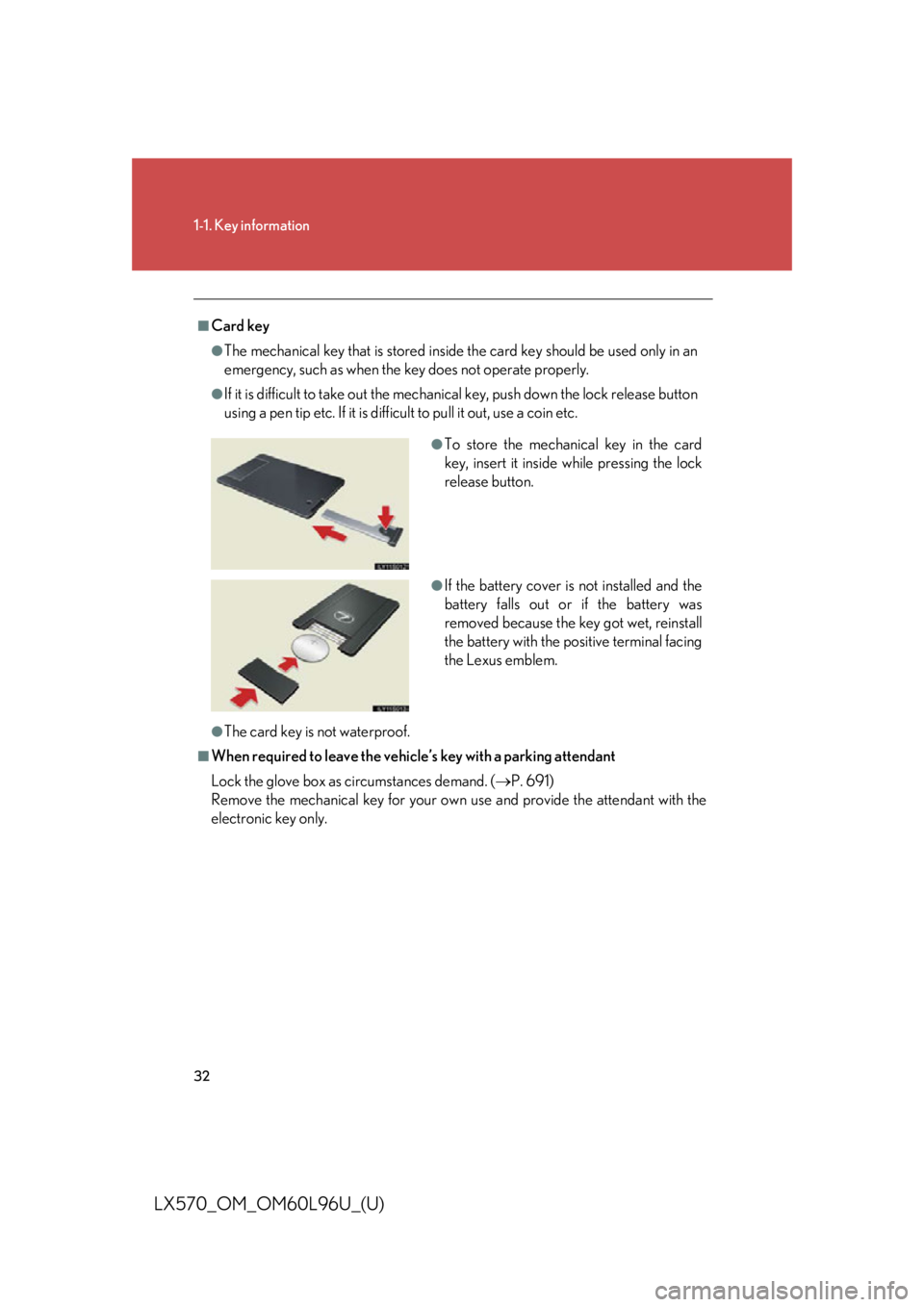
If it is difficult to take out the mechanic al key, push down the lock release button
using a pen tip etc. If it is difficult to pull it out, use a coin etc.
●
The card key is not waterproof.■
When required to leave the vehicle’s key with a parking attendant
Lock the glove box as circumstances demand. ( P. 691)
Remove the mechanical key for your own use and provide the attendant with the
electronic key only. ●
To store the mechanical key in the card
key, insert it inside while pressing the lock
release button.
●
If the battery cover is not installed and the
battery falls out or if the battery was
removed because the key got wet, reinstall
the battery with the positive terminal facing
the Lexus emblem.
Page 35 of 960

351
Before driving
LX570_OM_OM60L96U_(U) 1-2. Opening, closing and locking the doors
Smart access system with push-button start The following operations can be perf ormed simply by carrying the elec-
tronic key on your person, for example in your pocket.
(The driver should always carry the electronic key.)
Locks and unlocks the doors ( P. 36)
Locks and unlocks the doors ( P. 36)
Starts and stops the engine ( P. 177)
Page 36 of 960

361-2. Opening, closing and locking the doors
LX570_OM_OM60L96U_(U) Unlocking and locking the doors
Side door handle
Grip the driver’s door handle to
unlock the door. Grip the passen-
ger’s door handle to unlock all the
doors.
* Make sure to touch the sensor on
the back of the handle.
The door cannot be unlocked for 3
seconds after the door is locked.
* : The door unlock settings can be
changed. (
P. 41)
Press the lock butto n to lock the
doors. Check that the door is securely
locked.
Pressing and holding the button
closes the windows and moon roof.
(This setting must be customized at
your Lexus dealer.)
Page 37 of 960
371-2. Opening, closing and locking the doors
1
Before driving
LX570_OM_OM60L96U_(U) Back door
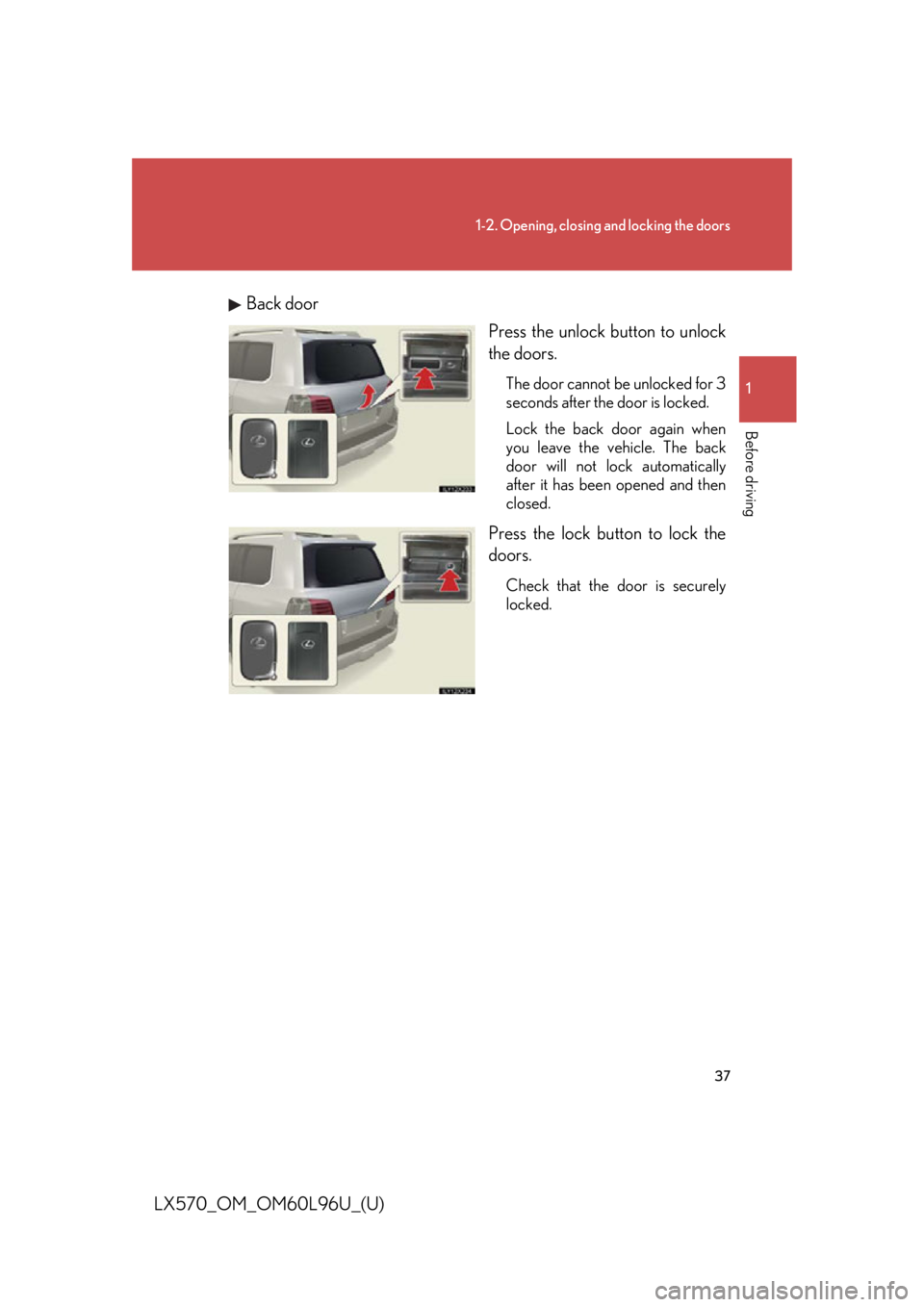
Press the unlock button to unlock
the doors. The door cannot be unlocked for 3
seconds after the door is locked.
Lock the back door again when
you leave the vehicle. The back
door will not lock automatically
after it has been opened and then
closed.
Press the lock butto n to lock the
doors. Check that the door is securely
locked.
Page 38 of 960
381-2. Opening, closing and locking the doors
LX570_OM_OM60L96U_(U) Antenna location and effective range
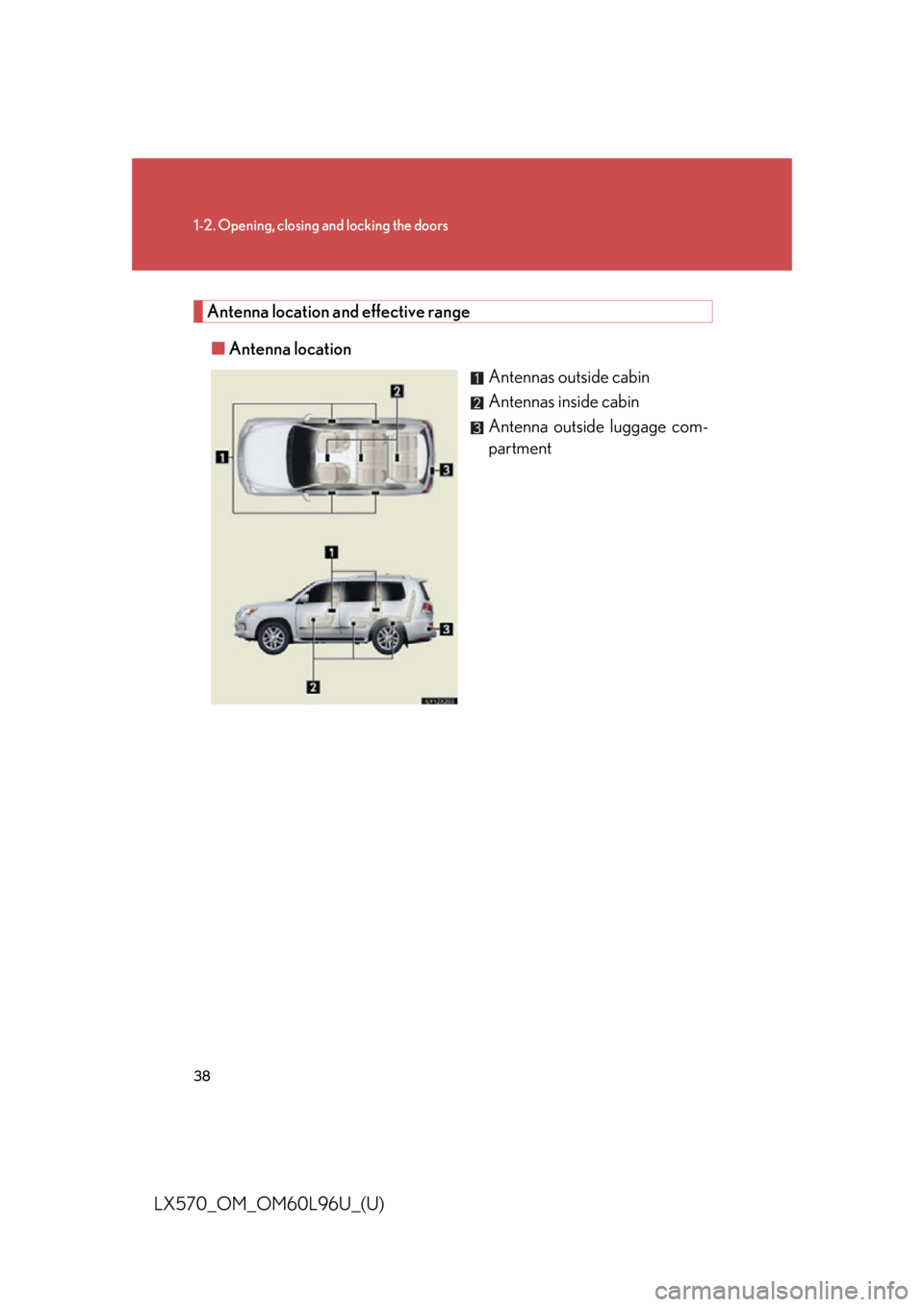
■ Antenna location
Antennas outside cabin
Antennas inside cabin
Antenna outside luggage com-
partment
Page 39 of 960

391-2. Opening, closing and locking the doors
1
Before driving
LX570_OM_OM60L96U_(U) ■ Effective range (areas within wh ich the electronic key is detected)
When locking or unlocking
the doors The system can be operated
when the electronic key is
within about 2.3 ft. (0.7 m) of
an outside door handle. (Only
the doors detecting the key
can be operated.)
When starting the engine
or changing “ENGINE
START STOP” switch
modes The system can be operated
when the electronic key is
inside the vehicle.■
Operation signals ●
Doors: A buzzer sounds and the emergenc y flashers flash to indicate that the
doors have been locked/unlocked. (Locked: Once; Unlocked: Twice) ●
Windows and moon roof: A buzzer sounds to indicate that the windows and
moon roof are closing.
Page 40 of 960

401-2. Opening, closing and locking the doors
LX570_OM_OM60L96U_(U) ■
Conditions affecting operation
The smart access system with push-button start uses weak radio waves. In the fol-
lowing situations, the commu nication between the electr onic key and the vehicle
may be affected, preventing the smart acce ss system with push -button start, wire-
less remote control and en gine immobilizer system from operating properly.
(Ways of coping: P. 872)●
When the electronic key battery is depleted ●
Near a TV tower, electric power plant, gas station, radio st ation, large display,
airport or other facility that generates strong radio waves or electrical noise●
When carrying a portable ra dio, cellular phone, cordless phone or other wire-
less communication devices ●
When the electronic key is in contact with, or is covered by the following metal-
lic object
• Card to which aluminum foil is attached
• Cigarette boxes that have aluminum foil inside
• Metallic wallets or bags
•Coins
• Hand warmers made of metal
• Media such as CDs and DVDs ●
When multiple electronic keys are in the vicinity ●
When other wireless keys (that emit radio waves) are being used nearby ●
When carrying or using the electronic key together with the following devices
that emit radio waves
• Another vehicle’s electronic key or a wireless key that emits radio waves
• Personal computers or personal digital assistants (PDAs)
• Digital audio players
• Portable game systems ●
If window tint with a metallic content or metallic objects are attached to the rear
window
Page 41 of 960

411-2. Opening, closing and locking the doors
1
Before driving
LX570_OM_OM60L96U_(U) ■
Switching the door unlock function
It is possible to set which doors the entr y function unlocks using the wireless remote
control.
Turn the “ENGINE START STOP” switch OFF.
When the indicator on the key surface is turned off, press and hold
for approximately 5 seconds wh ile pressing on the key.
The setting changes each time an operation is performed, as shown below. (When
changing the setting continuously, release the buttons, wait for at least 5 seconds,
and repeat .)
To prevent unintended triggering of the alarm, unlock the doors using the wireless
remote control and open and close a door once after the settings have been
changed. (If a door is not opened with in 60 seconds after is pressed, the
doors will be locked again and the alarm will automatically be set.)
In case that the alarm is triggere d, immediately stop the alarm. ( P. 121)STEP 1
STEP 2
STEP 2
Multi-information
display Unlocking function Beep
Hold the driver’s door handle
to unlock only the driver’s
door. Exterior: Beeps three
times
Interior: Rings once
Hold either door handle to
unlock all doors. Exterior: Beeps twice
Interior: Rings once
Page 42 of 960

421-2. Opening, closing and locking the doors
LX570_OM_OM60L96U_(U) ■
Battery-saving function
In the following circumstances, the entry func tion is disabled in order to prevent the
vehicle and electronic key batteries from discharging. ●
When the entry function has not been used for 2 weeks or more ●
When the electronic key has been left within approxim ately 3 ft. (1 m) of the
vehicle for 10 minutes or more
The system will resume operation when... ●
The vehicle is locked using th e door handle lock switch.●
The vehicle is locked/unlocked using the wireless remote control function
( P. 49) or the mechanical key. ( P. 872)■
Electronic key battery depletion ●
The standard battery life is 1 to 2 years.
(The card key battery life is about a year and a half.) ●
If the battery becomes low, an alarm will sound in the cabin when the engine
stops. ( P. 44)●
The battery becomes depleted even if the electronic key is not used because
the key always receives radio waves. If the smart access system with push-but-
ton start or the wireless remote control fu nction does not operate, or the detec-
tion area becomes smaller, the battery may be depleted. Replace the battery
when necessary. ( P. 784)●
To avoid serious deterioration, do not le ave the electronic key within 3 ft. (1 m)
of the following electrical appliances that produce a magnetic field:
•TVs
• Personal computers
• Cellular phones, cordless phones and battery chargers
• Recharging cellular phones or cordless phones
• Induction cookers
•Table lamps
Page 43 of 960

431-2. Opening, closing and locking the doors
1
Before driving
LX570_OM_OM60L96U_(U) ■
To operate the system properly
Make sure to carry the electronic key when operating the system. Do not get the
electronic key too close to the vehicle when operating the system from the outside
of the vehicle.
Depending on the position and holding cond ition of the electronic key, the key may
not be detected correctly and the system may not oper ate properly. (The alarm
may go off accidentally, or the door lock prevention may not function.) ■
Note for the entry function ●
Even when the electronic key is within the effective range (detection areas), the
system may not operate properly in the following cases:
• The electronic key is too close to the window or outside door handle, near the
ground, or in a high place when the doors are locked or unlocked.
• The electronic key is near the ground or in a high place, or too close to the
rear bumper center when the back door is locked or unlocked.
• The electronic key is on the instrument panel, floor or in the glove box when
the engine is started or “ENGINE ST ART STOP” switch modes are changed.●
Do not leave the electronic key on top of the instrument panel or near the door
pockets when exiting the vehicle. Depending on the radio wave reception con-
ditions, it may be detected by the antenna outside the cabin and the door will
become lockable from the outside, possibly trapping the electronic key inside
the vehicle. ●
As long as the electronic key is within the effective range, the doors may be
locked or unlocked by anyone. ●
Even if the electronic key is not inside the vehicle, it may be possible to start the
engine if the electronic key is near the window. ●
The doors may unlock if a large amount of water splashes on the door handle,
such as in the rain or in a car wash. (T he doors will automatically be locked after
approximately 60 seconds if the doors are not open ed and closed.)●
Gripping the door handle when wear ing a glove may not unlock the door.●
If the wireless remote control is used to lock the doors when the electronic key
is near the vehicle, there is a possibility that the door may not be unlocked by the
entry function. (Use the wireless remote control to unlock the doors.) ●
A sudden approach to the effective ra nge or door handle operation may pre-
vent the doors from being unlocked. In th is case, return the door handle to the
original position and check that the do ors unlock before pulling the door han-
dle.