CD player LEXUS LX570 2015 Owner's Manual
[x] Cancel search | Manufacturer: LEXUS, Model Year: 2015, Model line: LX570, Model: LEXUS LX570 2015Pages: 960, PDF Size: 11.33 MB
Page 549 of 960
5493-3. Using the audio system
3
Interior features
LX570_OM_OM60L96U_(U) ■
If you touch
The display returns to the previous screen. ■
Connecting Bluetooth ®
audio player●
Touching “Connect Portable Player” on the “Bluetooth*” screen also connects
a Bluetooth ®
audio player. ( P. 681)●
When none of the selectable portable players have been registered, a screen
confirming registration is displayed. The registrati on method is the same as
phone registration. ( P. 674)●
When the currently connected portable pl ayer is selected, a screen confirming
the selected player’s disconnection is displayed. ( P. 676)●
If connection fails once, a changing conn ection method confirmation screen is
displayed. If connection fails 2 or more times, a message will be displayed.
When this message is displayed, try again.
*: Bluetooth is a re gistered trademark of Bluetooth SIG, Inc.■
When using the Bluetooth ®
audio system●
In the following conditions, the system may not function.
• The portable player is turned off
• The portable player is not connected
• The portable player battery is low ●
There may be a delay if phone connection is carried out during Bluetooth ®
audio play. ●
Depending on the type of portable player that is connected to the system, oper-
ation may differ slightly and certain functions may not be available.■
Bluetooth ®
antenna
The antenna is built into the audio unit. If th e portable player is behind the seat or in
the glove box or console box, or is touching or covered by metal objects, connec-
tion status may deteriorate. ■
Battery charge/signal status
This display may not correspond exactly wi th the portable play er, and this system
does not have a charging function.
Page 550 of 960
5503-3. Using the audio system
LX570_OM_OM60L96U_(U) ■
About Bluetooth ®
■
Compatible models
Portable players must correspond to the following specifications: ●
Bluetooth ®
specification
Ver. 1.1 or higher
(Recommended: Ver. 2.1+EDR or higher) ●
Profile
• A2DP (Advanced Audio Distribution Profile) Ver. 1.0 or higher
(Recommended: Ver. 1.2 or higher)
• AVRCP (Audio/Video Remote Control Profile) Ver. 1.0 or higher
(Recommended: Ver. 1.4 or higher)
However, please note that some functions may be li mited depending on the type of
portable player. Also, the different screen is displayed depending on which porta-
ble player is connecting.
Please go to the website at http://www.lexus.com/MobileLink to find approved
portable players for this system. ■
Certification
P. 622 Bluetooth is a register ed trademark of Blue-
tooth SIG, Inc.
Page 551 of 960
5513-3. Using the audio system
3
Interior features
LX570_OM_OM60L96U_(U) ■
Reconnecting the portable player
If the portable player is disconnected with a poor reception when the “ENGINE
START STOP” switch is in ACCESSORY or IGNITION ON mode, the system
automatically reconnects the portable player.
If you have switched off the portable player yourself, follow the instructions below to
reconnect: ●
Select the portable player again ●
Enter the portable player■
When transferring owne rship of your vehicle
Be sure to remove the registered portable player from the system. ( P. 676)
CAUTION■
While driving
Do not use the portable player or connect the Bluetooth ®
system.■
Caution regarding interference with electronic devices ●
Your audio unit is fitted with Bluetooth ®
antennas. People with implantable car-
diac pacemakers, cardiac resynchronization therapy-pacemakers or implant-
able cardioverter defibrillators should maintain a reasonable distance between
themselves and the Bluetooth ®
antennas. The radio waves may affect the opera-
tion of such devices. ●
Before using Bluetooth ®
devices, users of any electrical medical device other
than implantable cardiac pacemakers, cardiac resynchronization therapy-pace-
makers or implantable cardioverter defi brillators should consult the manufac-
turer of the device for information about its operation under the influence of radio
waves. Radio waves could have unexpected effects on the operation of such
medical devices.
NOTICE■
When leaving the vehicle
Do not leave your portable player in the vehicle. The inside of the vehicle may
become hot, causing damage to the portable player.
Page 575 of 960
5753-3. Using the audio system
3
Interior features
LX570_OM_OM60L96U_(U) ■
Operating portable audio device s connected to the audio system
The volume can be adjusted using the vehicle’s audio controls. All other adjust-
ments must be made on the po rtable audio device itself.■
When using a portable audio devi ce connected to the power outlet
Noise may occur during playback. Use the power source of the portable audio
device. ■
When using the AUX port
You may be unable to use th e instrument panel power outlet if a device is con-
nected to the AUX port at the same time.
CAUTION■
While driving
Do not connect portable audio device or operate the controls.
NOTICE■
To prevent damage to portable audio device ●
Do not leave portable audio device in the vehicle. The temperature inside the
vehicle may become high, result ing in damage to the player. ●
Do not push down on or apply unnecessary pressure to the portable audio
device while it is connected as this may damage the portable audio device or its
terminal. ●
Do not insert foreign objects into the port as this may damage the portable audio
device or its terminal.
Page 586 of 960
5863-4. Using the rear seat entertainment system
LX570_OM_OM60L96U_(U) NOTICE■
Cleaning the display
Wipe the display with a dry soft cloth.
If the screen is wiped with a rough cloth, the surface of the screen may be
scratched. ■
To prevent damage to the controller ●
Keep the remote control away from dire ct sunlight, high temperature and high
humidity. ●
Do not drop or knock the cont roller against hard objects.●
Do not sit on or place heavy objects on the controller.■
DVD player
Never try to disassemble or oil any part of the DVD player. Do not insert anything
other than a disc into the slot. ■
For normal operation after replacing the battery
Observe the following precau tions to prevent accidents.●
Always work with dry hands.
Moisture may cause the battery to rust. ●
Do not touch or move any other components inside the controller. ●
Do not bend either of the battery terminals.
Page 594 of 960
5943-4. Using the rear seat entertainment system
LX570_OM_OM60L96U_(U) Fast forwarding or rewinding a track
Press or , or press and hold or .
Playing and pausing a track
Press . ■
When a different audio source is selected at the front seats
BT-A mode cannot be selected at the rear seats. ■
Connecting Bluetooth ®
audio player
P. 549■
When using the Bluetooth ®
audio system
P. 549■
Bluetooth ®
antenna
P. 549■
Battery charge/signal status
P. 549■
About Bluetooth ®
P. 550■
Compatible models
P. 550■
Certification
P. 622■
Reconnecting the portable player
P. 551■
When transferring owne rship of your vehicle
P. 551
Page 608 of 960

6083-4. Using the rear seat entertainment system
LX570_OM_OM60L96U_(U) Setup operation from the front seat
This screen appears when a front passenger selects the setup menu.
Rear passengers can cancel this
setup operation by selecting
“Play”. The player will resume nor-
mal play.
Likewise, a fron t passenger can
cancel a rear passenger’s selec-
tion of the setup menu.■
Error messages
If “Region code error” is displayed, chec k if the region code printed on the DVD
matches the player’s region code.
If a different message is displayed: P. 529
Page 609 of 960
6093-4. Using the rear seat entertainment system
3
Interior features
LX570_OM_OM60L96U_(U) DVD player and DVD video disc information■ Error messages
P. 529
■ DVD video discs
P. 530 ■
Symbols shown on DVD video discs
P. 530■
Discs that can be used
P. 531■
DVD video disc information
P. 532■
Sound
P. 533■
MP3 and WMA files
P. 533
Page 610 of 960
6103-4. Using the rear seat entertainment system
LX570_OM_OM60L96U_(U) CAUTION■
DVD video precaution
P. 538
NOTICE■
Discs and adapters that cannot be used
P. 539■
Player precautions
P. 540
Page 675 of 960
6753-5. Using the hands-free system (for cellular phone)
3
Interior features
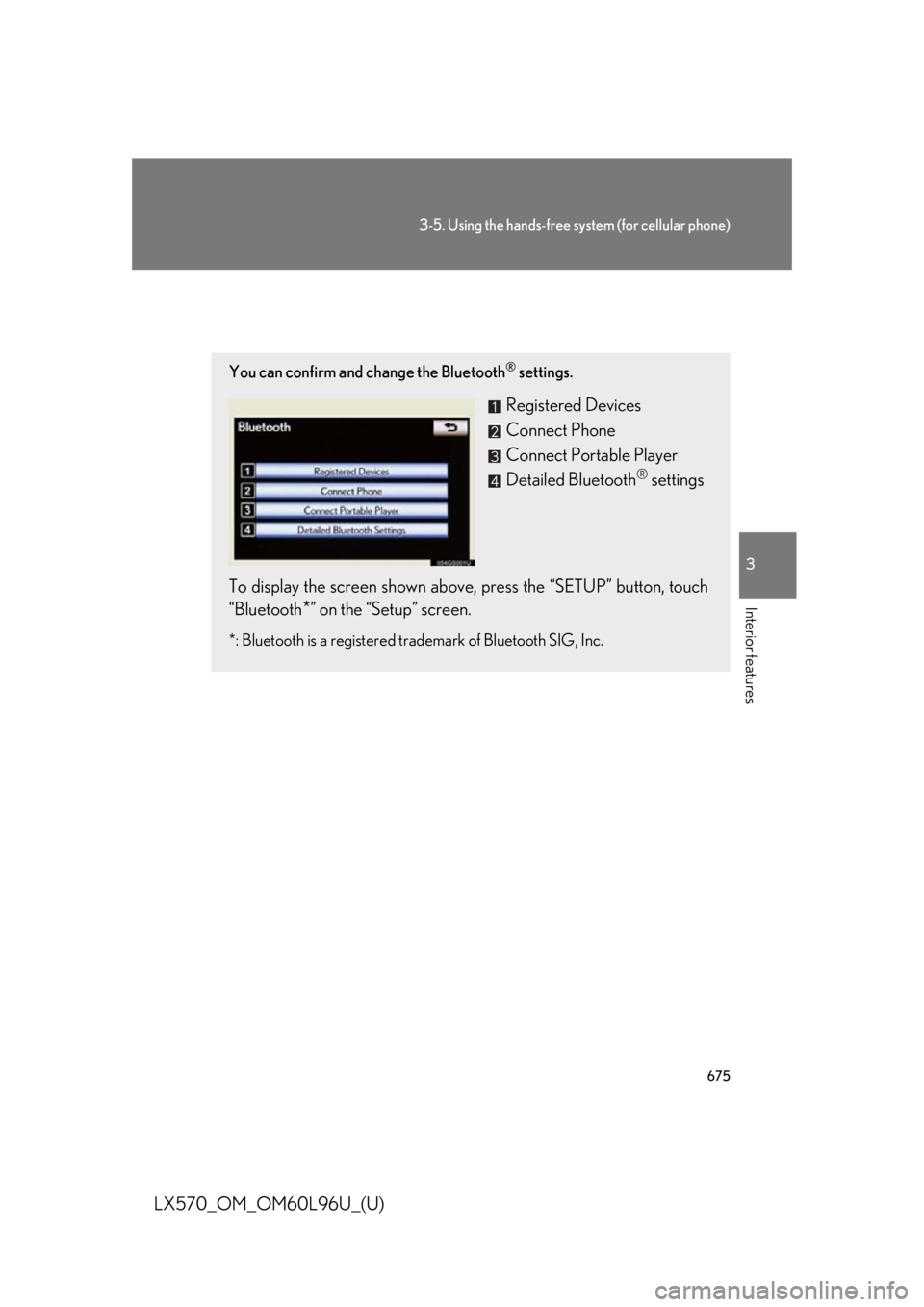
LX570_OM_OM60L96U_(U) Setting the Bluetooth ®
You can confirm and change the Bluetooth ®
settings.
Registered Devices
Connect Phone
Connect Portable Player
Detailed Bluetooth ®
settings
To display the screen shown above, press the “SETUP” button, touch
“Bluetooth
* ” on the “Setup” screen.*: Bluetooth is a registered tr ademark of Bluetooth SIG, Inc.