change time LEXUS LX570 2015 Owner's Manual
[x] Cancel search | Manufacturer: LEXUS, Model Year: 2015, Model line: LX570, Model: LEXUS LX570 2015Pages: 960, PDF Size: 11.33 MB
Page 504 of 960
5043-3. Using the audio system
LX570_OM_OM60L96U_(U) ■
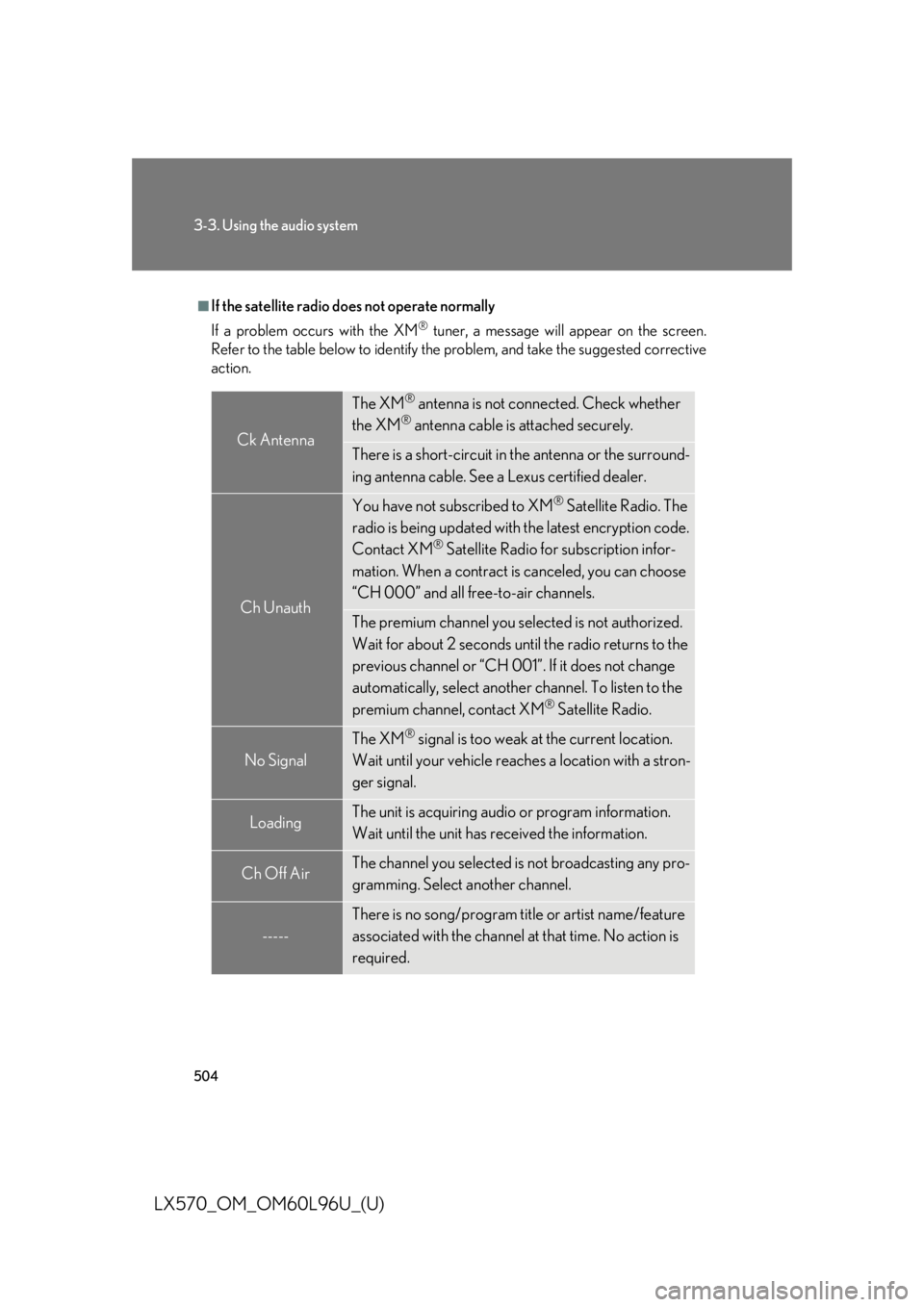
If the satellite radio does not operate normally
If a problem occurs with the XM ®
tuner, a message will appear on the screen.
Refer to the table below to identify the problem, and ta ke the suggested corrective
action.
Ck Antenna The XM ®
antenna is not connected. Check whether
the XM ®
antenna cable is attached securely.
There is a short-circuit in the antenna or the surround-
ing antenna cable. See a Lexus certified dealer.
Ch Unauth You have not subscribed to XM ®
Satellite Radio. The
radio is being updated with the latest encryption code.
Contact XM ®
Satellite Radio for subscription infor-
mation. When a contract is canceled, you can choose
“CH 000” and all free-to-air channels.
The premium channel you sele cted is not authorized.
Wait for about 2 seconds until the radio returns to the
previous channel or “CH 001”. If it does not change
automatically, select another channel. To listen to the
premium channel, contact XM ®
Satellite Radio.
No Signal The XM ®
signal is too weak at the current location.
Wait until your vehicle reach es a location with a stron-
ger signal.
Loading The unit is acquiring audi o or program information.
Wait until the unit has received the information.
Ch Off Air The channel you selected is not broadcasting any pro-
gramming. Select another channel.
----- There is no song/program title or artist name/feature
associated with the channel at that time. No action is
required.
Page 505 of 960
5053-3. Using the audio system
3
Interior features
LX570_OM_OM60L96U_(U) Contact the XM ®
Listener Care Center at 1-877-515-3987 (U.S.A.) or 1-877-
438-9677 (Canada). ■
About internet radio (vehicles with the navigation system) ●
Other applications can be activated while listening to internet radio. ●
An iPhone cannot be connected via Bluetooth ®
and USB connection at the
same time. However, it is possible to recharge an iPhone while using Apps by
connecting via USB. The system uses the connection method that was used last.
Therefore, if connected via USB after Bluetooth ®
connection, it is necessary to
reconnect the iPhone via Bluetooth ®
.●
Services requiring a separa te contract can also be used. For details, refer to
http://www.lexus .com/enform/ or call 1-800-255-3987.●
If internet radio has never been listened to by activating “Apps” from the
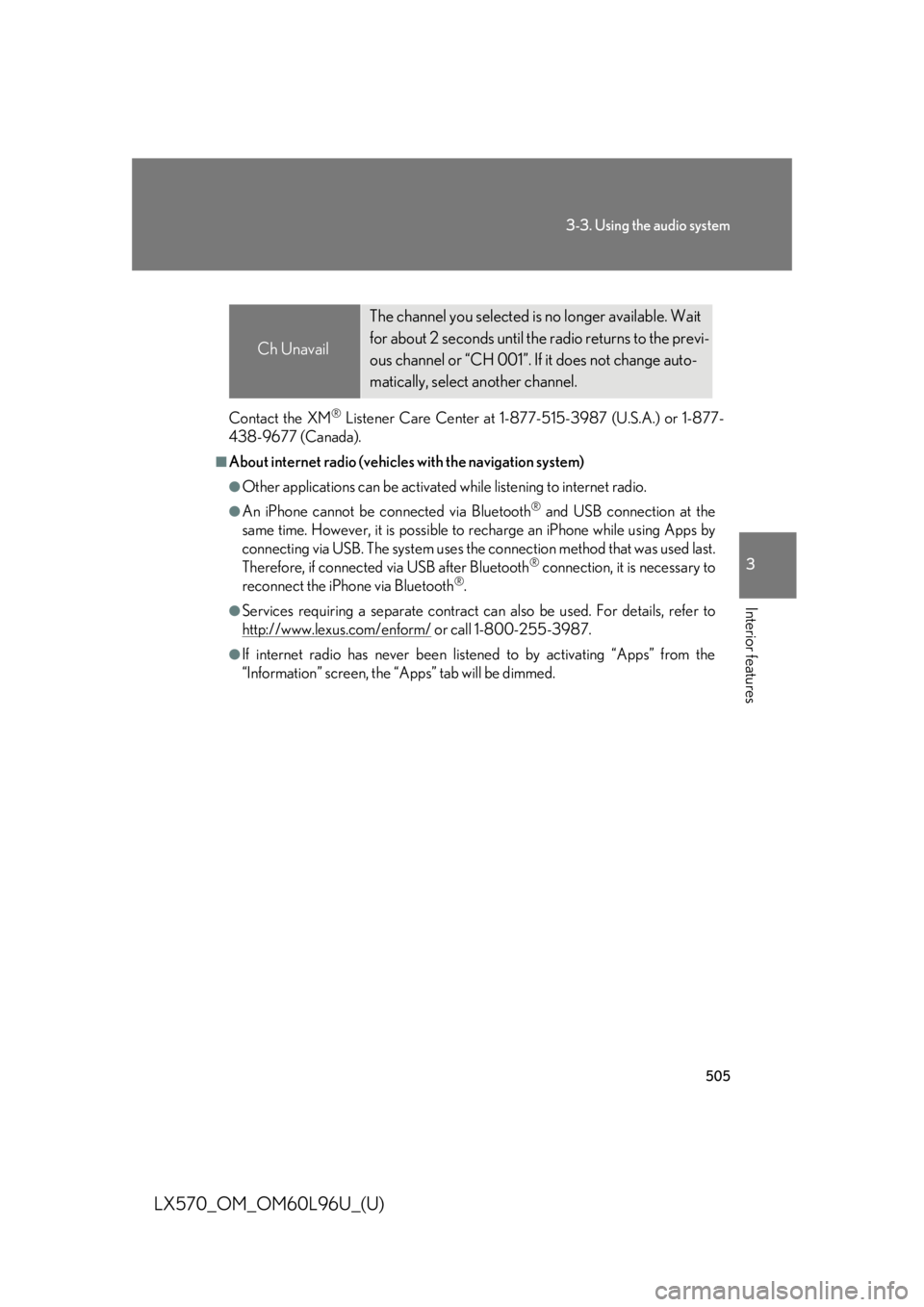
“Information” screen, the “Apps” tab will be dimmed. Ch Unavail The channel you selected is no longer available. Wait
for about 2 seconds until the radio returns to the previ-
ous channel or “CH 001”. If it does not change auto-
matically, select another channel.
Page 513 of 960
5133-3. Using the audio system
3
Interior features
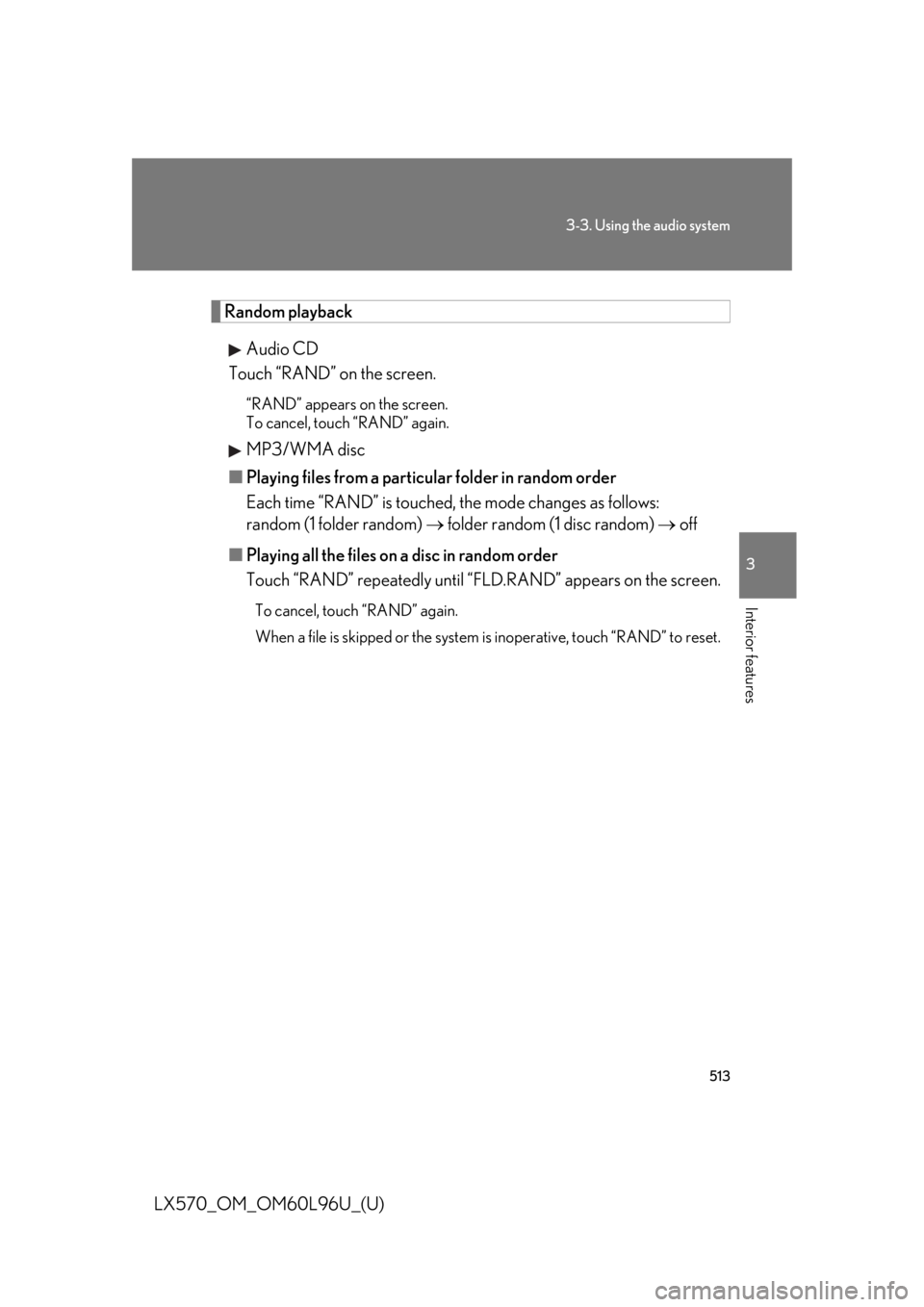
LX570_OM_OM60L96U_(U) Random playback
Audio CD
Touch “RAND” on the screen. “RAND” appears on the screen.
To cancel, touch “RAND” again.
MP3/WMA disc
■ Playing files from a particular folder in random order
Each time “RAND” is touched, the mode changes as follows:
random (1 folder random) folder random (1 disc random) off
■ Playing all the files on a disc in random order
Touch “RAND” repeatedly until “F LD.RAND” appears on the screen.To cancel, touch “RAND” again.
When a file is skipped or the system is inoperative, touch “RAND” to reset.
Page 514 of 960
5143-3. Using the audio system
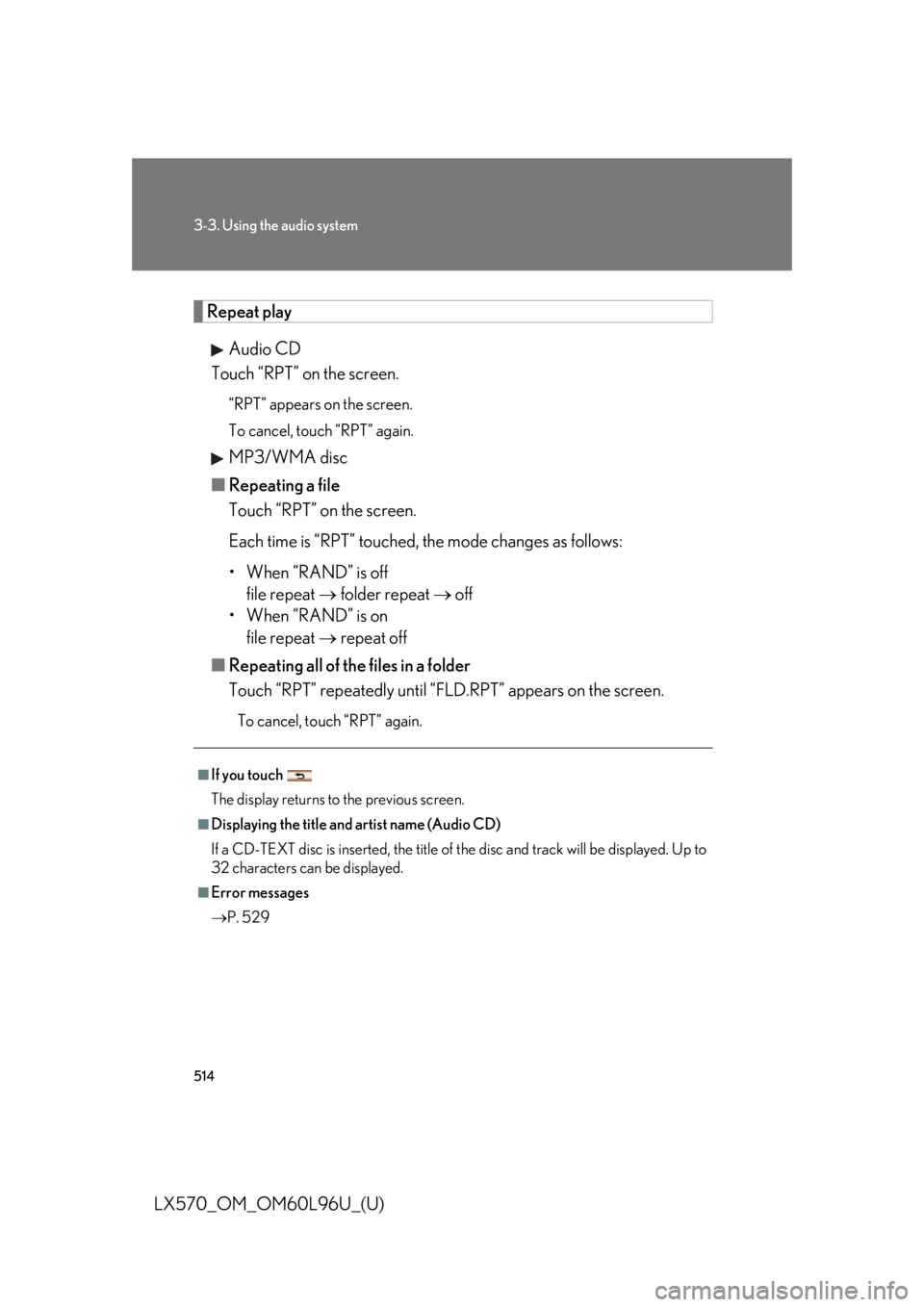
LX570_OM_OM60L96U_(U) Repeat play
Audio CD
Touch “RPT” on the screen. “RPT” appears on the screen.
To cancel, touch “RPT” again.
MP3/WMA disc
■ Repeating a file
Touch “RPT” on the screen.
Each time is “RPT” touched, th e mode changes as follows:
• When “RAND” is off
file repeat folder repeat off
• When “RAND” is on
file repeat repeat off
■ Repeating all of the files in a folder
Touch “RPT” repeatedly until “F LD.RPT” appears on the screen.To cancel, touch “RPT” again.■
If you touch
The display returns to the previous screen. ■
Displaying the title and artist name (Audio CD)
If a CD-TEXT disc is inserted, the title of the disc and track will be displayed. Up to
32 characters can be displayed. ■
Error messages
P. 529
Page 520 of 960

5203-3. Using the audio system
LX570_OM_OM60L96U_(U) Changing the subtitle language
Touch “Subtitle” on the “DVD Options” screen.
Each time you touch “Change”,
the next available language is
selected. The languages available are
restricted to those available on the
DVD disc.
“Hide”: Hides the subtitles
: Returns to the previous
screen
Changing the audio language
Touch “Audio” on the “DVD Options” screen.
Each time you touch “Change”,
the next available language is
selected. The languages available are
restricted to those available on the
DVD disc.
: Returns to the previous
screenSTEP 1
STEP 2
STEP 1
STEP 2
Page 521 of 960
5213-3. Using the audio system
3
Interior features
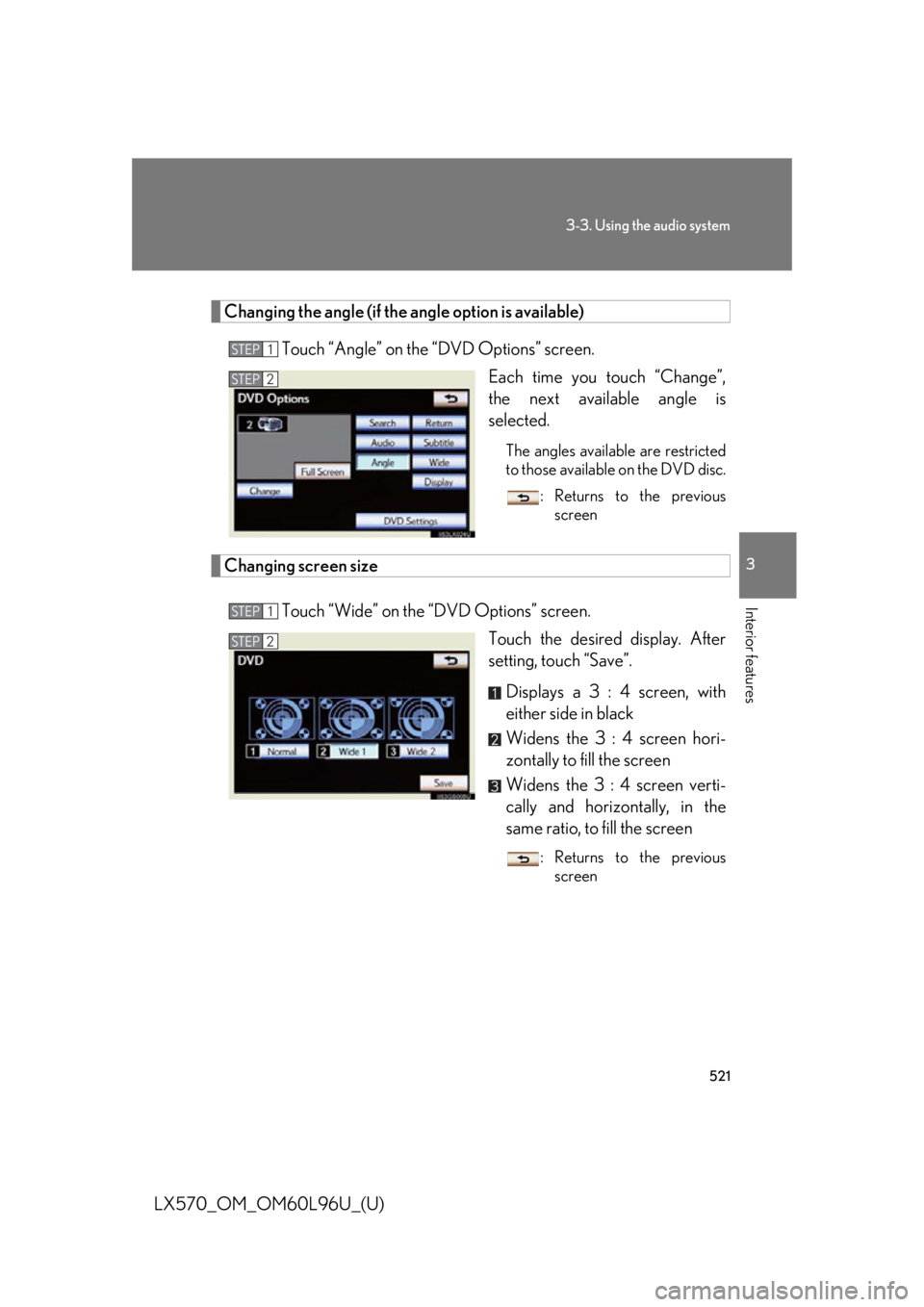
LX570_OM_OM60L96U_(U) Changing the angle (if the angle option is available)
Touch “Angle” on the “DVD Options” screen.
Each time you touch “Change”,
the next available angle is
selected. The angles available are restricted
to those available on the DVD disc.
: Returns to the previous
screen
Changing screen size
Touch “Wide” on the “DVD Options” screen.
Touch the desired display. After
setting, touch “Save”.
Displays a 3 : 4 screen, with
either side in black
Widens the 3 : 4 screen hori-
zontally to fill the screen
Widens the 3 : 4 screen verti-
cally and horizontally, in the
same ratio, to fill the screen : Returns to the previous
screenSTEP 1
STEP 2
STEP 1
STEP 2
Page 538 of 960
5383-3. Using the audio system
LX570_OM_OM60L96U_(U) The Gracenote Software and each item of Gracenote Data are licensed to you “AS
IS.” Gracenote makes no representations or warranties, express or implied,
regarding the accuracy of any Gracenot e Data from in the Gracenote Servers.
Gracenote reserves the right to delete data from the Gracenote Servers or to
change data categories for any cause th at Gracenote deems sufficient. No war-
ranty is made that the Gracenote Software or Gracenote Servers are error-free or
that functioning of Gracenote Software or Gracenote Servers will be uninter-
rupted. Gracenote is not obligated to prov ide you with new enha nced or additional
data types or categories that Gracenote may provide in the future and is free to dis-
continue its services at any time.
GRACENOTE DISCLAIMS ALL WARRANTIES EXPRESS OR IMPLIED,
INCLUDING, BUT NOT LIMITED TO, IMPLIED WARRANTIES OF MER-
CHANTABILITY, FITNESS FOR A PART ICULAR PURPOSE, TITLE, AND
NON-INFRINGEMENT. GRACENOTE DOES NOT WARRANT THE
RESULTS THAT WILL BE OBTAINED BY YOUR USE OF THE GRACENOTE
SOFTWARE OR ANY GRACENOTE SERVER. IN NO CASE WILL
GRACENOTE BE LIABLE FOR ANY CONSEQUENTIAL OR INCIDENTAL
DAMAGES OR FOR ANY LOST PROFITS OR LOST REVENUES.
copyright © 2000 to present Gracenote
CAUTION■
DVD video precaution
Conversational speech on so me DVDs is recorded at a low volume to emphasize
the impact of sound effects. If you adjust the volume assuming that the conversa-
tions represent the maximum volume level that the DVD will play, you may be star-
tled by louder sound effects or startled when you change to a different audio
source.
Loud sounds may have a significant impact on the human body or pose a driving
hazard. Keep this in mind when you adjust the volume.
Page 548 of 960
5483-3. Using the audio system
LX570_OM_OM60L96U_(U) Random playback
■ Playing the tracks on th e album in random order
Touch “RAND” on the screen. Each time “RAND” is touched, the mode changes as follows:
album random all track random off
■ Playing tracks from all the albums in random order
Touch “RAND” repeatedly until “A LB.RAND” appears on the screen.To cancel, touch “RAND” again.
Repeat play
■ Repeating a track
Touch “RPT” on the screen. Each time “RPT” is touched, the mode changes as follows:
track repeat album repeat off
■ Repeating an album
Touch “RPT” repeatedly until “A LB.RPT” appears on the screen.To cancel, touch “RPT” again.
Page 557 of 960
5573-3. Using the audio system
3
Interior features
LX570_OM_OM60L96U_(U) Random playback
■ Playing files/tracks from a particular folder in random order
Touch “RAND” on the screen.
Each time “RAND” is touched, the mode changes as follows:
random (1 folder/album random) folder/album random (all folders/
albums random) off
■ Playing the all folders/albums fr om a USB memory in random order
Touch “RAND” repeatedly until “FLD.RAND”/“ALB.RAND” appears
on the screen. To cancel, touch “RAND” again.
Repeat play
■ Repeating a file/track
Touch “RPT” on the screen.
Each time “RPT” is touched, the mode changes as follows:
● When “RAND” is off
file/track repeat folder/album repeat off
● When “RAND” is on
file/track repeat off
■ Repeating a folder/album
Touch “RPT” repeatedly until “FLD.RPT”/“ALB.RPT” appears on the
screen. To cancel, touch “RPT” again.
Available except when random playback is selected
Page 558 of 960
5583-3. Using the audio system
LX570_OM_OM60L96U_(U) ■
If you touch
The display returns to the previous screen. ■
USB memory functions ●
When the USB memory is connected and the audio source is changed to USB
memory mode, the USB memory will start playing the first file in the first folder.
If the same device is removed and reinserted (and the contents have not been
changed), the USB memory will resume pl aying from the same point it was last
used. ●
Depending on the USB memory that is connected to the system, certain func-
tions may not be available. Disconnecting the device and reconnecting it once
again may resolve some malfunctions.■
When using a USB memory
You may be unable to use the instrument panel power outlet if the USB memory is
connected to the USB port at the same time. ■
Error messages for USB memory
“USB Error”: This indicates a problem in the USB memory or its connection.
“No music files found.”: This indicates that no MP3/WMA files are included in the
USB memory.■
USB memory ●
Compatible devices
USB memory that can be used for MP3 and WMA playback. ●
Compatible device formats
The following device formats can be used:
• USB communication formats: USB2.0 HS (480 Mbps) and FS (12 Mbps)
• File formats: FAT16/32 (Windows)
• Correspondence class: Mass storage class
MP3 and WMA files written in any format other than those listed above may not
play correctly, and their file names an d folder names may not be displayed cor-
rectly.
Items related to standards an d limitations are as follows:
• Maximum directory hierarchy: 8 levels
• Maximum number of folders in a device: 3000 (including the root)
• Maximum number of files in a device: 9999
• Maximum number of files per folder: 255