intuitive parking LEXUS LX570 2015 Owners Manual
[x] Cancel search | Manufacturer: LEXUS, Model Year: 2015, Model line: LX570, Model: LEXUS LX570 2015Pages: 960, PDF Size: 11.33 MB
Page 3 of 960

1
2
3
4
5
6
7
3
LX570_OM_OM60L96U_(U) 2-1. Driving procedures
Driving the vehicle ........................ 166
Engine (ignition) switch ............... 177
Automatic transmission............... 181
Turn signal lever ............................ 189
Parking brake ................................. 190
Horn...................................................... 191
2-2. Instrument cluster
Gauges and meters ..................... 192
Indicators and warning
lights................................................. 196
Multi-information display......... 200
2-3. Operating the lights and wipers
Headlight switch .......................... 208
Automatic High Beam ................ 213
Fog light switch ............................. 220
Windshield wipers
and washer................................... 222
Rear window wiper
and washer................................... 228
Headlight cleaner switch ........... 231 2-4. Using other driving systems
Cruise control ............................... 232
Dynamic radar cruise
control............................................ 236
Intuitive parking assist ................. 251
Rear view monitor system ........ 262
Lexus parking assist
monitor .......................................... 270
Wide view front &
side monitor................................ 303
4-Wheel AHC
(Active Height Control
Suspension) ................................. 320
AVS (Adaptive Variable
Suspension system)................... 331
Four-wheel drive system........... 332
Crawl Control (with Turn
Assist function)........................... 337
Multi-terrain Select ..................... 344
Driving assist systems................. 349
Pre-Collision System.................. 357
2-5. Driving information
Off-road precauti ons ................. 363
Cargo and luggage .................... 368
Vehicle load limits ........................ 375
Winter driving tips ....................... 376
Trailer towing .................................. 381
Dinghy towing ................................ 4012
When driving
Page 18 of 960

18
LX570_OM_OM60L96U_(U) C
Engine (ignition) switch P. 177
Easy access mode switch P. 323
Center differential lock/unlock
switch P. 332
Power back door main switch P. 57Intuitive parking assist switch
P. 251
Roll sensing of curtain shield
airbags off switch P. 139VIEW switch
P. 303
Pictorial index Instrument panel
Page 165 of 960
When driving
2
165
LX570_OM_OM60L96U_(U) 2-1. Driving procedures
Driving the vehicle.................. 166
Engine (ignition) switch ......... 177
Automatic transmission ......... 181
Turn signal lever ...................... 189
Parking brake .......................... 190
Horn ............................................. 191
2-2. Instrument cluster
Gauges and meters ................ 192
Indicators and warning
lights ......................................... 196
Multi-information
display .................................... 200
2-3. Operating the lights
and wipers
Headlight switch.................... 208
Automatic High Beam ........... 213
Fog light switch ...................... 220
Windshield wipers
and washer ............................ 222
Rear window wiper
and washer ........................... 228
Headlight cleaner
switch ....................................... 231 2-4. Using other driving
systems
Cruise control ........................ 232
Dynamic radar cruise
control .................................... 236
Intuitive parking assist........... 251
Rear view monitor system... 262
Lexus parking assist
monitor................................... 270
Wide view front &
side monitor .......................... 303
4-Wheel AHC (Active
Height Control
Suspension) .......................... 320
AVS (Adaptive Variable
Suspension system) ............. 331
Four-wheel drive system ..... 332
Crawl Control (with Turn
Assist function) .................... 337
Multi-terrain Select .............. 344
Driving assist systems........... 349
Pre-Collision System............ 357
2-5. Driving information
Off-road precautions ........... 363
Cargo and luggage ............... 368
Vehicle load limits ................. 375
Winter driving tips ................. 376
Trailer towing........................... 381
Dinghy towing.......................... 401
Page 197 of 960

1972-2. Instrument cluster
2
When driving
LX570_OM_OM60L96U_(U) ■ Indicators
The indicators inform the driver of the operating state of the vehi-
cle’s various systems. Turn signal indicator
( P. 189) Crawl Control indicator
( P. 337)
Headlight high beam indi-
cator ( P. 210) Roll sensing of curtain
shield airbags off indica-
tor ( P. 139)(U.S.A.)
Headlight indicator
( P. 208) “PWR” mode indicator
( P. 183)(Canada)
Tail light indicator
( P. 209) Automatic transmission
second start indicator
( P. 183)
Fog light indicator
( P. 220) Low speed four-wheel
drive indicator light
( P. 332)
“AFS OFF” indicator
( P. 210) Center differential lock
indicator ( P. 332)
Cruise control indicator
( P. 232, 236) Security indicator
( P. 119 121)(if equipped)
Intuitive parking assist
indicator ( P. 251) Easy access mode
indicator ( P. 323)* 1
* 1
* 1
* 1
Page 200 of 960

2002-2. Instrument cluster
LX570_OM_OM60L96U_(U) Multi-information display The multi-information display presents the driver with a variety of driving-
related data including the current outside air temperature.
● Trip information ( P. 202)Displays driving range, fuel consumpt ion and other cruising related infor-
mation.
● Outside temperature display ( P. 202)
● Speedometer ( P. 203)
● Turn-by-turn navigation ( P. 206)
● Front tire angle ( P. 204)
● Tire inflation pressure ( P. 205)
● Intuitive parking assist display (if equipped) ( P. 251)Automatically displayed when using Intuitive parking assist.
● 4-Wheel AHC display ( P. 320)
Page 251 of 960

2512-4. Using other driving systems
2
When driving
LX570_OM_OM60L96U_(U) Intuitive parking assist
: If equippedThe distance from your vehicle to ne arby obstacles when parallel parking
or maneuvering into a garage is measured by the sensors and communi-
cated via the multi-information displa y, touch screen and a buzzer. Always
check the surrounding area when using this system.
■ Types of sensors
Front corner sensors
Rear corner sensors
Rear center sensors
■ Intuitive parking assist switch
Turns the Intuitive parking assist
on/off. When on, the indicator light
comes on and the buzzer
sounds to inform the driver that
the system is operational.
To turn the system off, press the
switch again.
Page 257 of 960
2572-4. Using other driving systems
2
When driving
LX570_OM_OM60L96U_(U) Setting up intuitive parking assist
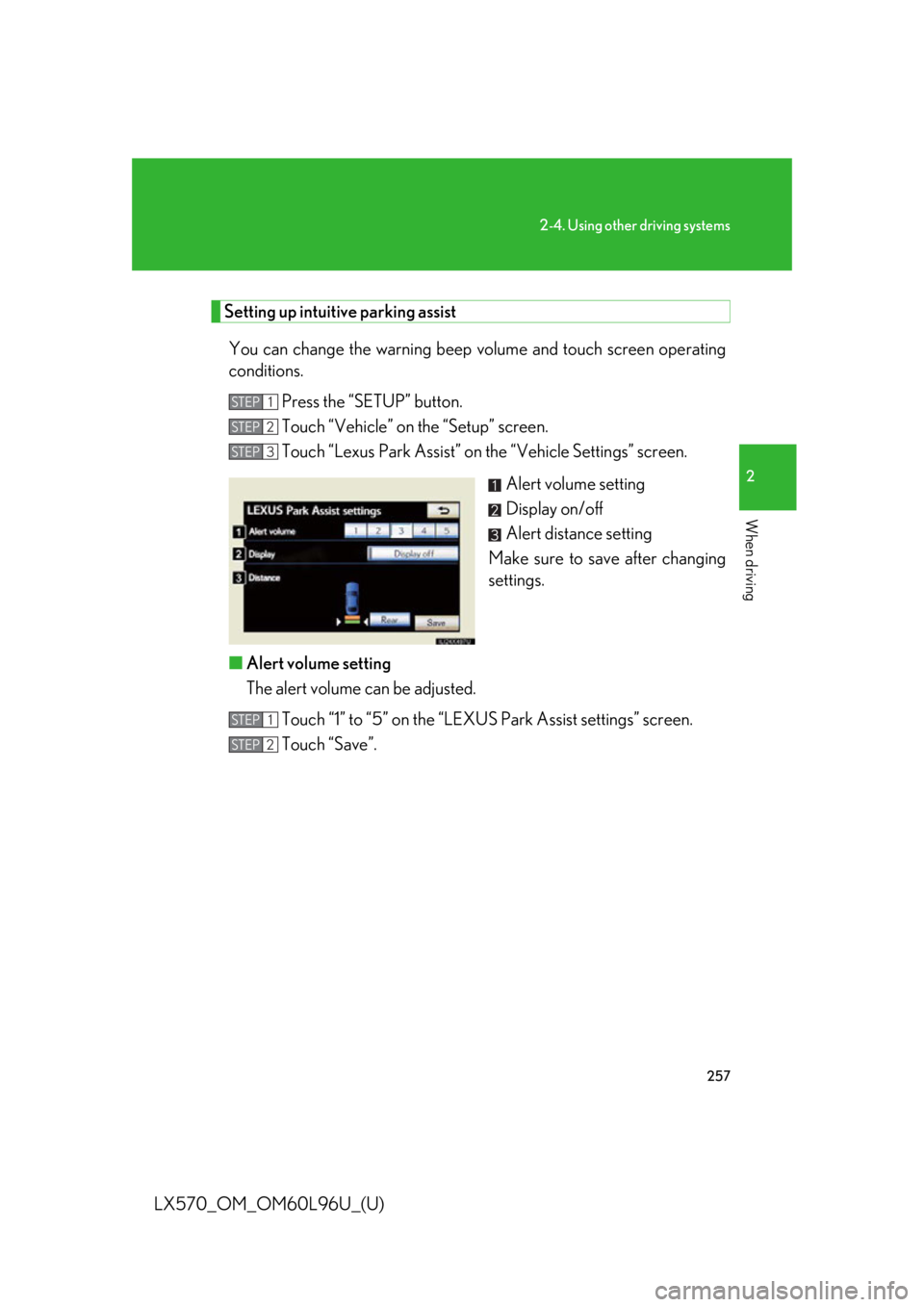
You can change the warning beep volume and touch screen operating
conditions.
Press the “SETUP” button.
Touch “Vehicle” on the “Setup” screen.
Touch “Lexus Park Assist” on the “Vehicle Settings” screen.
Alert volume setting
Display on/off
Alert distance setting
Make sure to save after changing
settings.
■ Alert volume setting
The alert volume can be adjusted.
Touch “1” to “5” on the “LEXUS Park Assist settings” screen.
Touch “Save”. STEP 1
STEP 2
STEP 3
STEP 1
STEP 2
Page 258 of 960

2582-4. Using other driving systems
LX570_OM_OM60L96U_(U) ■ Display on/off setting
On or off can be selected for intuitive parking assist display.
Touch “Display Off”. When the “Display Off” indicator is turned on, the display of intuitive
parking assist will be off. Touch “Displ ay Off” again to turn the display of
intuitive parking assist on.
Touch “Save”.
■ Alert distance setting
Front or rear center sensors display and tone indication can be set.
Touch “Rear”. Long distance or short distance can be selected.
Touch “Save”.■
The intuitive parking assi st can be operated when●
Front corner sensors:
• The “ENGINE START STOP” switch is in IGNITION ON mode.
• The shift lever is in a position other than “P”.
• The vehicle speed is less than approximately 6 mph (10 km/h).●
Rear corner and rear center sensors:
• The “ENGINE START STOP” switch is in IGNITION ON mode.
• The shift lever is in “R”.■
Intuitive parking assist display
When an obstacle is detected while the rear view monitor system, Lexus parking
assist monitor or wide view front & side mo nitor is in use, the warning indicator will
appear in the top right of the screen even if the display setting has been set to off.STEP 1
STEP 2
STEP 1
STEP 2
Page 261 of 960

2612-4. Using other driving systems
2
When driving
LX570_OM_OM60L96U_(U) CAUTION■
When using the intuitive parking assist
Observe the following precautions.
Failing to do so may result in the vehicle being unable to be driven safely and possi-
bly cause an accident. ●
Do not use the sensor at speeds in excess of 6 mph (10 km/h). ●
The sensors’ detection areas and reaction times are limited. When moving for-
ward or reversing, check the areas surro unding the vehicle (especially the sides
of the vehicle) for safety, and drive slowly, using the brake to control the vehicle’s
speed. ●
Do not install accessories within the sensors’ detection areas.
NOTICE■
When using intuitive parking assist
In the following situations, the system ma y not function correctly due to a sensor
malfunction etc. Have the vehicle checked by your Lexus dealer. ●
A beep does not sound when you turn the main switch on. ●
The intuitive parking assist operation disp lay flashes, and a beep sounds when no
obstacles are detected. ●
If the area around a sensor collides with something, or is subjected to strong
impact. ●
If the bumper collides with something. ●
If the display shows continuously without a beep. ●
If a display error occurs, first check the sensor.
If the error occurs even if there is no ice, snow or mud on the sensor, it is likely
that the sensor is malfunctioning.■
Notes when washing the vehicle
Do not apply intensive bursts of wa ter or steam to the sensor area.
Doing so may result in the sensor malfunctioning.
Page 263 of 960
2632-4. Using other driving systems
2
When driving
LX570_OM_OM60L96U_(U) Using the rear view monitor system
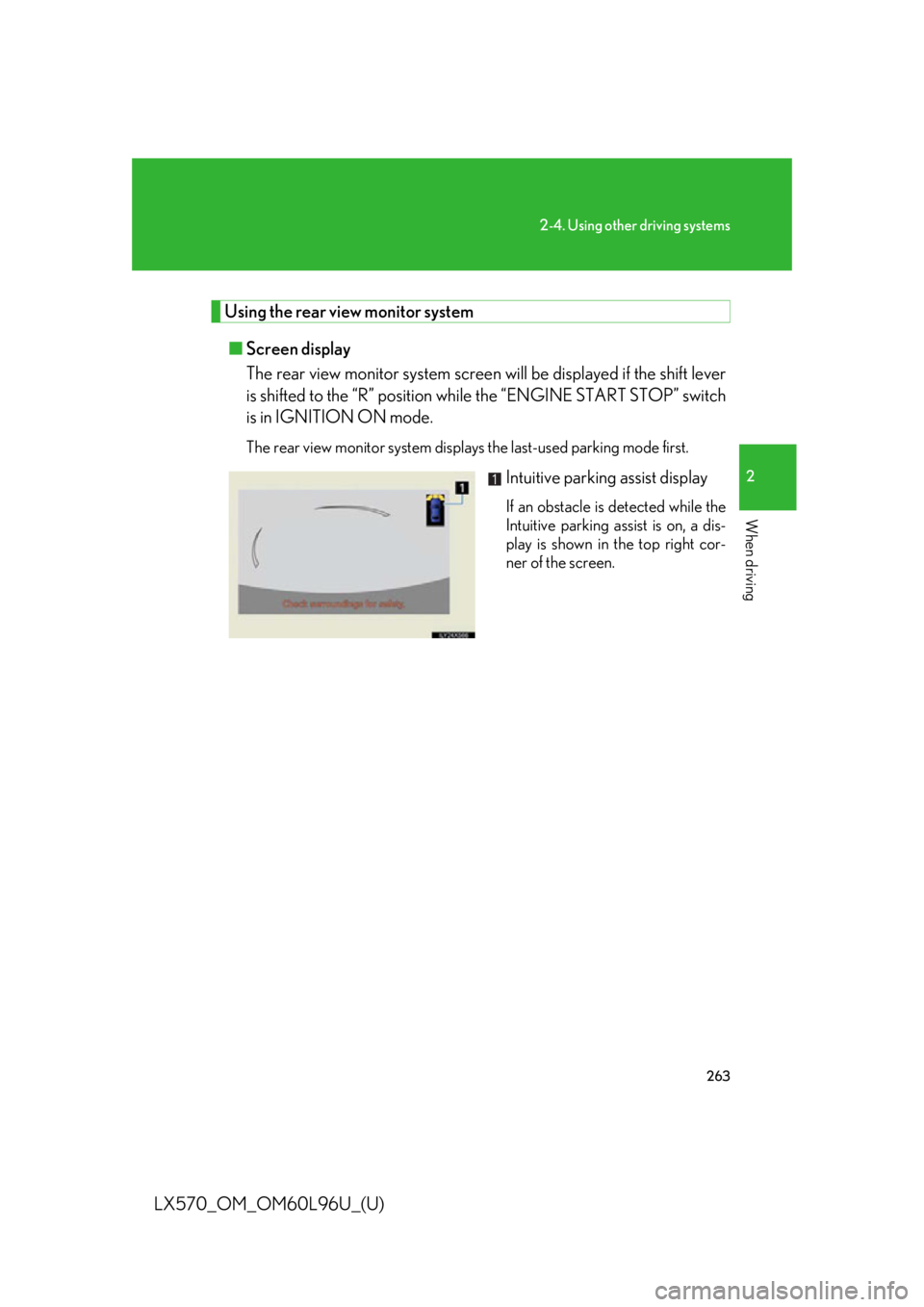
■ Screen display
The rear view monitor system screen will be displayed if the shift lever
is shifted to the “R” position while the “ENGINE ST ART STOP” switch
is in IGNITION ON mode. The rear view monitor system displa ys the last-used parking mode first.
Intuitive parking assist display If an obstacle is detected while the
Intuitive parking assist is on, a dis-
play is shown in the top right cor-
ner of the screen.