suspension LEXUS LX570 2016 User Guide
[x] Cancel search | Manufacturer: LEXUS, Model Year: 2016, Model line: LX570, Model: LEXUS LX570 2016Pages: 632, PDF Size: 10.34 MB
Page 287 of 632
LX570_OM_OM60N01U_(U) 2874-5. Using the driving support systems
4
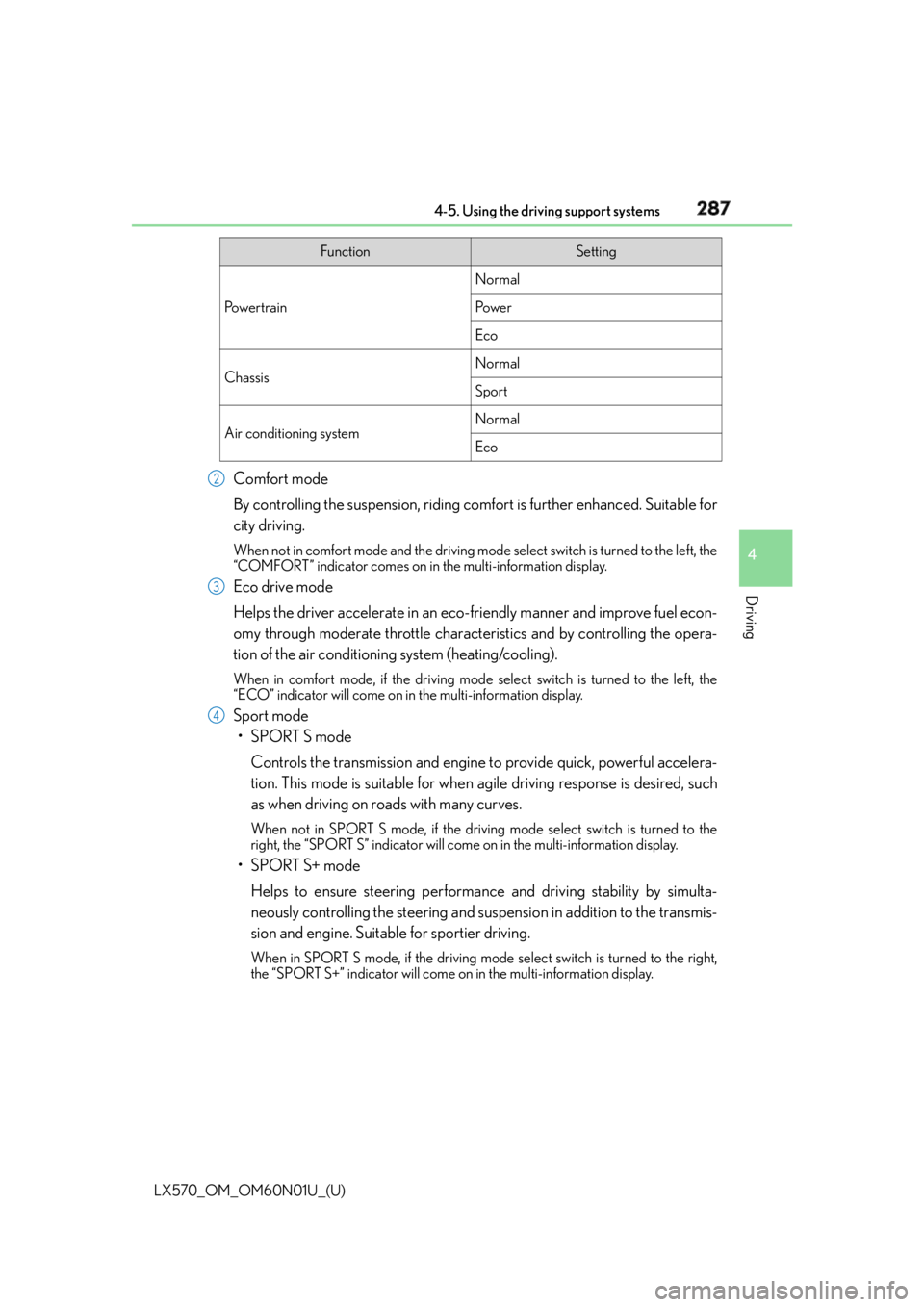
Driving Comfort mode
By controlling the suspension, riding comfort is further enhanced. Suitable for
city driving. When not in comfort mode and the driving mode select switch is turned to the left, the
“COMFORT” indicator comes on in the multi-information display.
Eco drive mode
Helps the driver accelerate in an eco- friendly manner and improve fuel econ-
omy through moderate throttle characteristics and by controlling the opera-
tion of the air conditioning system (heating/cooling). When in comfort mode, if the driving mode select switch is turned to the left, the
“ECO” indicator will come on in the multi-information display.
Sport mode
•SPORT S mode
Controls the transmission and engine to provide quick, powerful accelera-
tion. This mode is suitable for when agile driving response is desired, such
as when driving on roads with many curves. When not in SPORT S mode, if the driving mode select switch is turned to the
right, the “SPORT S” indicator will come on in the multi-information display.
•SPORT S+ mode
Helps to ensure steering performanc e and driving stability by simulta-
neously controlling the steering and suspen sion in addition to the transmis-
sion and engine. Suitable for sportier driving. When in SPORT S mode, if the driving mode select switch is turned to the right,
the “SPORT S+” indicator will come on in the multi-information display. Function Setting
Po w e r t r a i n Normal
Po w e r
Eco
Chassis Normal
Sport
Air conditioning system Normal
Eco2
3
4
Page 294 of 632

294
LX570_OM_OM60N01U_(U) 4-5. Using the driving support systems■
The intuitive parking assist can be operated when ●
Front corner sensors:
• The engine switch is in IGNITION ON mode.
• The shift lever is in a position other than P.
• The vehicle speed is less than approximately 6 mph (10 km/h).
(At any speed when the shift lever is in R) ●
Front center sensors:
• The engine switch is in IGNITION ON mode.
• The shift lever is in a position other than P or R.
• The vehicle speed is less than about 6 mph (10 km/h). ●
Rear corner and rear center sensors:
• The engine switch is in IGNITION ON mode.
• The shift lever is in R. ■
Intuitive parking assist display
When an obstacle is detected while the re ar view monitor system, Lexus parking assist
monitor or Multi-terrain Monitor is in use, the warning indicator will appear in the upper
corner of the screen even if the display setting has been set to off. ■
Sensor detectio n information●
The sensor’s detection areas are limited to the areas around the vehicle’s bumper. ●
Certain vehicle conditions and the surround ing environment may affect the ability of a
sensor to correctly detect an obstacle. Particular instances where this may occur are
listed below.
• There is dirt, snow or ice on the sensor . (Wiping the sensors will resolve this prob-
lem.)
• The sensor is frozen. (Thawing th e area will resolve this problem.)
In especially cold weather, if a sensor is frozen the screen may show an abnormal
display, or obstacles may not be detected.
• The sensor is covered in any way.
• The vehicle is leaning co nsiderably to one side.
• On an extremely bumpy road, on an incline, on gravel, or on grass.
• The vicinity of the vehicle is noisy due to vehicle horns, motorcycle engines, air
brakes of large vehicles, or other loud noises producing ultrasonic waves.
• There is another vehicle equipped with parking assist sensors in the vicinity.
• The sensor is coated with a sheet of spray or heavy rain.
• The vehicle is equipped with a fender pole or wireless antenna.
• The bumper or sensor receives a strong impact.
• The vehicle is approaching a tall or curved curb.
• In harsh sunlight or intense cold weather.
• The area directly under the bumpers is not detected.
• If obstacles draw too close to the sensor.
• A non-genuine Lexus suspension (low ered suspension etc.) is installed.
• People may not be detected if they are wearing certain types of clothing.
In addition to the examples above, there are instances in which, because of their shape,
signs and other objects may be judged by a sensor to be closer than they are.
Page 297 of 632
297
LX570_OM_OM60N01U_(U) 4-5. Using the driving support systems
4
Driving
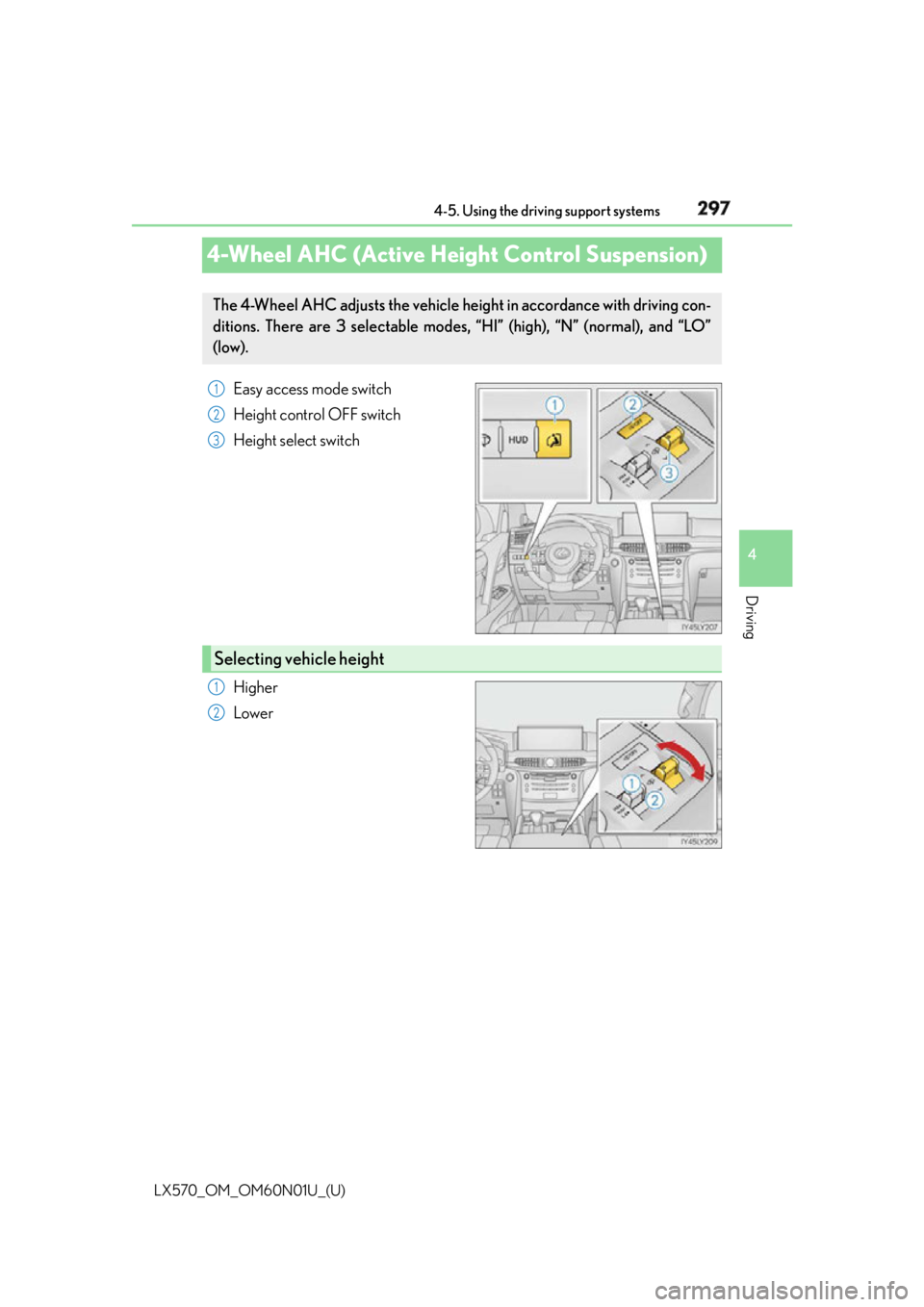
4-Wheel AHC (Active Height Control Suspension) Easy access mode switch
Height control OFF switch
Height select switch
Higher
LowerThe 4-Wheel AHC adjusts the vehicle heig ht in accordance with driving con-
ditions. There are 3 selectable modes, “HI” (high), “N” (normal), and “LO”
(low). 1
2
3
Selecting vehicle height 1
2
Page 302 of 632

302
LX570_OM_OM60N01U_(U) 4-5. Using the driving support systems■
In the following cases the 4-Wheel AHC will not operate ●
The brake pedal has been depressed for a few seconds or longer while the vehicle is
stopped. ●
Vehicle height control has not been frequently used. ●
The suspension fluid temperature is lower than -22°F (-30°C). ●
There is ice on the suspension. ●
Driving on bumpy roads which may cause the suspension to fully elongate.●
If the steering wheel is abruptly turned more than 3/4 of a revolution with the center
differential lock system activated. ■
Cold weather operation
It may take longer for the vehicle height to change if the suspension fluid temperature
drops below 5°F (-15°C).
The 4-Wheel AHC does not operate when the suspension fluid temperature drops
below -22°F (-30°C). ●
In this case, even if the height select switch is pressed, th e vehicle height will not change.
Once the vehicle has been driven for a sh ort time and the suspension fluid has been
warmed to within normal operating limits, the 4-Wheel AHC will begin operating and
the vehicle height will automatically change to the selected mode. ●
When the suspension fluid is around -22°F (-30°C), the vehicle height may not be able
to be raised, even if the 4-Wheel AHC is oper ating. In this case, pull the height select
switch to “ ” then push to “ ” after driving for a short time longer to select the desired
vehicle height. ■
Parking and stopping tips ●
If you immediately stop the engine after off-road driving, the vehicle height may gradu-
ally lower. When parking, make sure ther e is nothing under the vehicle that may come
in contact with the underbody. The vehicle will return to the set height when the engine
is started. ●
The vehicle height may change as the temperature changes when the engine is
stopped. The vehicle will return to the set height when the engine is started.■
Propeller shaft noise
If the vehicle height is adjusted on a slope, or with the shift lever in a position other than P
or N while the vehicle is stopped, you may hear a sound caused by the expansion and
contraction of the propeller shaft. Th is does not indicate a malfunction.■
4-Wheel AHC failure warning
If a malfunction occurs in the 4-Wheel AHC , normal mode is automatically selected.
However, the system may not switch to norm al mode depending on the location of the
malfunction.
The warning message is displayed on the mu lti-information display, and the 4-Wheel
AHC cannot be activated until the malfunction is corrected.
Stop the engine and start it again. If the warning message turns off, the system is operat-
ing correctly. If the warning message continue s to be displayed, have the vehicle checked
at your Lexus dealer as soon as possible.
Page 349 of 632

LX570_OM_OM60N01U_(U) 3494-5. Using the driving support systems
4
Driving Observe the following precautions. Failure to do so may result in an unexpected
accident. Also, when driving, make sure to directly confirm the safety of your sur-
roundings and the area to the rear of the vehicle.
When using the Multi-terrain Monitor WA R N I N G ■
Conditions under which the Multi-terrain Monitor should not be used
Do not use the Multi-terrain Monitor in th e following situations. The system may not
operate properly, resulting in an unexpected accident.●
When driving on an icy, snow-covered or otherwise slippery road surface●
When using tire chains or a spare tire ●
When either front door or the ba ck door is not completely closed●
When driving on an uneven road, such as a hill ●
When tires or suspension parts othe r than those specified are equipped
When the tires are replaced, the position indicated by the guide lines displayed on the
screen may differ. ■
Guide lines
The tire position indicator lines and vehicle position indicator lines may differ from
actual vehicle positions depending on the number of passengers, cargo weight, road
grade, road surface conditions, brightness of the surrounding environment, etc. Always
drive the vehicle while confirming the safety of your surroundings.
Page 379 of 632
379
LX570_OM_OM60N01U_(U) 4-5. Using the driving support systems
4
Driving
Driving assist systems ◆ Multi Terrain ABS (Anti-lock Brake System) Helps to prevent wheel lock when the brakes are applied suddenly, or if the brakes are
applied while driving on a slippery road su rface, or in off-road conditions (such as
rough roads, sand and mud)
◆ Brake assist Generates an increased leve l of braking force after the brake pedal is depressed
when the system detects a panic stop situation
◆ VSC (Vehicle Stability Control) Helps the driver to control skidding when swerving suddenly or turning on slippery
road surfaces
◆ Active TRAC (Traction Control) Helps to maintain drive power and prevent the 4 wheels from spinning when starting
the vehicle or accelerating on slippery roads, or in off-road conditions
◆ Hill-start assist control Helps to reduce the backward movement of the vehicle when starting on an incline or
slippery slope
◆ AVS (Adaptive Variable Suspension system) By independently controlling the damping force of the shock absorbers for each of
the 4 wheels according to the road and dr iving conditions, this system helps riding
comfort with superior stee ring stability, and helps good vehicle posture. When
SPORT S+ mode is selected by the drivin g mode select switches, the damping force
is suitable for sporty driving. ( P. 2 8 6 )
◆ VGRS (Variable Gear Ratio Steering) Helps to adjust the wheel turning angle in accordance with the vehicle speed and
steering wheel movement.
◆ Trailer Sway Control Helps the driver to control trailer sway by selectively applying brake pressure for indi-
vidual wheels and reducing engine to rque when trailer sway is detected.
Trailer Sway Control is part of the VSC system and will not operate if VSC turned off
or experiences a malfunction.To help enhance driving safety and performance, the following systems oper-
ate automatically in response to various driving situations. Be aware, however,
that these systems are supplementary and should not be relied upon too
heavily when operating the vehicle.
Page 383 of 632

LX570_OM_OM60N01U_(U) 3834-5. Using the driving support systems
4
Driving WA R N I N G ■
Replacing tires
Make sure that all tires are of the same size, brand, tread pattern and total load capac-
ity. In addition, make sure that the tires are inflated to the specified tire pressure level.
The Multi Terrain ABS, Active TRAC, VSC an d Trailer Sway Control will not function
correctly if different tires are fitted on the vehicle.
Contact your Lexus dealer for further information when replacing tires or wheels. ■
Handling of tires and suspension
Using tires with any kind of problem or modi fying the suspension will affect the driving
assist systems, and may caus e the system to malfunction.■
Trailer Sway Control precaution
The Trailer Sway Control system is not able to reduce trailer sway in all situations.
Depending on many factors such as the condit ions of the vehicle, trailer, road surface,
and driving environment, the Trailer Sway Co ntrol system may not be effective. Refer to
your trailer owner’s manual for information on how to tow your trailer properly. ■
If trailer sway occurs
Observe the following precautions.
Failing to do so may caus e death or serious injury.●
Firmly grip the steering wh eel. Steer straight ahead.
Do not try to control trailer swaying by turning the steering wheel. ●
Begin releasing the accelerator pedal i mmediately but very gradually to reduce
speed.
Do not increase speed. Do not apply vehicle brakes.
If you make no extreme correction with the steering or brakes, your vehicle and trailer
should stabilize. ( P. 2 0 1 )
Page 390 of 632

390
LX570_OM_OM60N01U_(U) 4-6. Driving tips
WA R N I N G ■
Off-road driving precautions
Always observe the following precautions to minimize the risk of death, serious injury
or damage to your vehicle: ●
Drive carefully when off the road. Do not ta ke unnecessary risks by driving in danger-
ous places. ●
Do not grip the steering wheel spokes when driving off-road. A bad bump could jerk
the wheel and injure your hands. Keep both hands and especially your thumbs on the
outside of the rim. ●
Always check your brakes for effectivenes s immediately after driving in sand, mud,
water or snow. ●
After driving through tall grass, mud, rock, sand, rivers, etc., check that there is no
grass, bush, paper, rags, stone, sand, etc. adhering or trapped on the underbody.
Clear off any such matter from the underbody. If the vehicle is used with these materi-
als trapped or adhering to the underb ody, a breakdown or fire could occur.●
When driving off-road or in rugged terrai n, do not drive at excessive speeds, jump,
make sharp turns, strike objects, etc. This may cause loss of control or vehicle rollover
causing death or serious injury. You are also risking expensive damage to your vehi-
cle’s suspension and chassis.
Page 460 of 632

460
LX570_OM_OM60N01U_(U) 6-1. Maintenance and care
NOTICE ■
To prevent paint deterioration and corrosio n on the body and components (aluminum
wheels etc.) ●
Wash the vehicle immediately in the following cases:
• After driving near the sea coast
• After driving on salted roads
• If coal tar or tree sap is present on the paint surface
• If you see dead insects, insect droppings or bird droppings on the paint
• After driving in an area contaminated wi th soot, oily smoke, mine dust, iron pow-
der or chemical substances
• If the vehicle becomes heavily soiled in dust or mud
• If liquids such as benzene and gaso line are spilled on the paint surface●
If the paint is chipped or scratche d, have it repaired immediately.●
To prevent the wheels from corroding, remo ve any dirt and store in a place with low
humidity when storing wheels. ■
Cleaning the exterior lights ●
Wash carefully. Do not use organic substances or scrub with a hard brush.
This may damage the su rfaces of the lights.●
Do not apply wax on the surfaces of the lights.
Wax may cause damage to the lenses. ■
When using an automatic car wash
Set the wiper switch to the off position.
If the wiper switch is in “AUTO”, the wipers may operate and the wiper blades may be
damaged. ■
When using a high pressure car wash
Do not bring the nozzle tip close to boots (rubber or resin manufactured cover), con-
nectors or the following parts. The parts may be damaged if they come into contact
with high-pressure water.
• Traction related parts
•Steering parts
• Suspension parts
•Brake parts
Page 521 of 632
5217-2. Steps to take in an emergency
LX570_OM_OM60N01U_(U) 7
When trouble arises NOTICE ■
To prevent damage to the vehicle when towing using a wheel-lift type truck●
Do not tow the vehicle from the rear when the engine switch is off. The steering lock
mechanism is not strong enough to hold the front wheels straight.●
When raising the vehicle, ensure adequate ground clearance for towing at the oppo-
site end of the raised vehicle. Without adequate clearance, the vehicle could be dam-
aged while being towed. ■
To prevent damage to the vehicle when towing with a sling-type truck
Do not tow with a sling-type truck, either from the front or rear. ■
To prevent damage to the vehicle during emergency towing
Do not secure cables or chains to the suspension components. ■
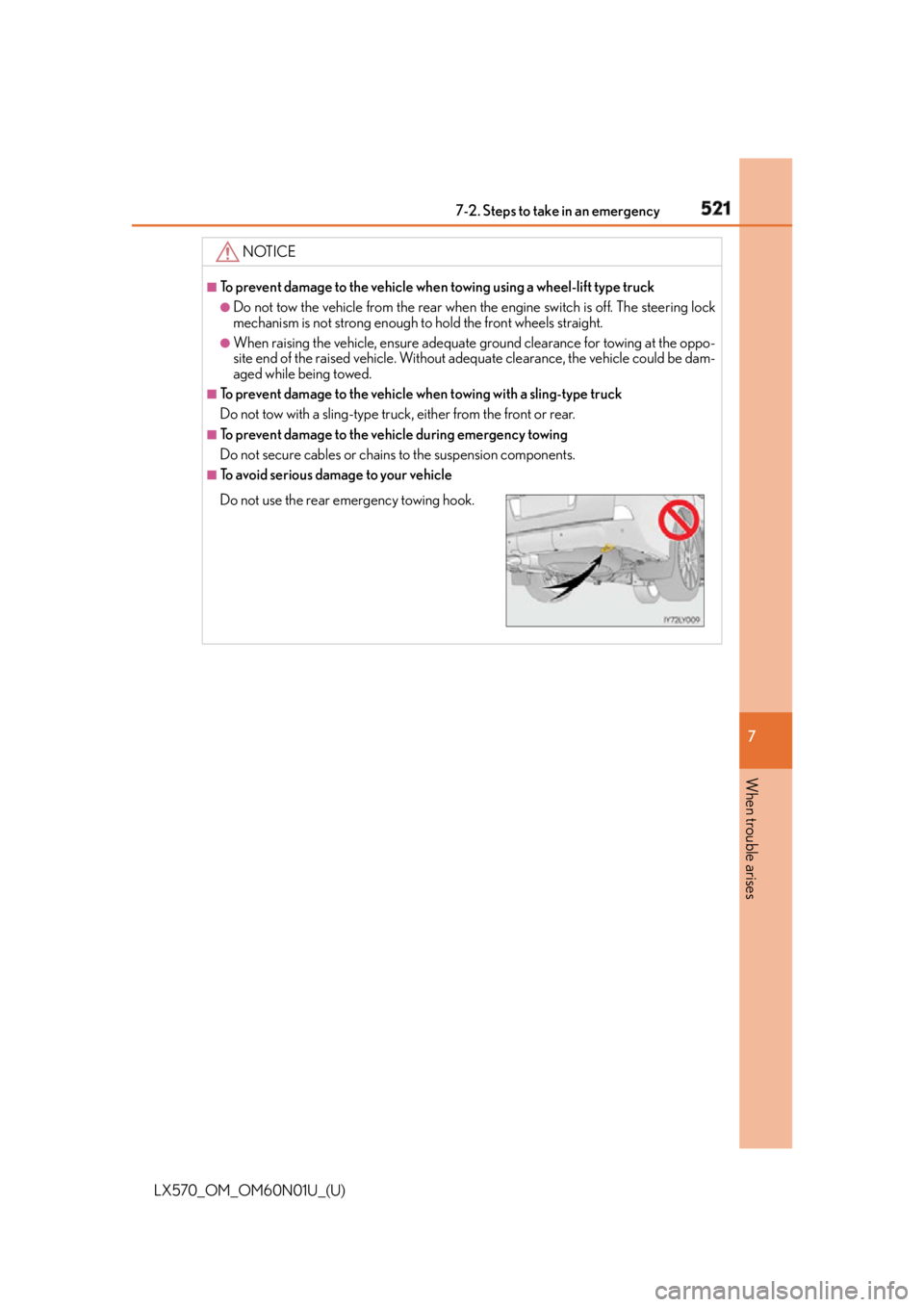
To avoid serious damage to your vehicle
Do not use the rear emergency towing hook.