ignition LEXUS LX570 2016 Owner's Manual
[x] Cancel search | Manufacturer: LEXUS, Model Year: 2016, Model line: LX570, Model: LEXUS LX570 2016Pages: 632, PDF Size: 10.34 MB
Page 166 of 632

166
LX570_OM_OM60N01U_(U) 3-5. Opening, closing the windows and moon roof■
When the window cannot be opened or closed
When the jam protection function or catch protection function operates unusually and
the door window cannot be open ed or closed, perform the fo llowing operations with the
power window switch of that door. ●
Stop the vehicle. With the engine switch in IGNITION ON mode, within 4 seconds of
the jam protection function or catch protecti on function activating, continuously oper-
ate the power window switch in the one-to uch closing direction or one-touch opening
direction so that the door wind ow can be opened and closed.●
If the door window cannot be opened and closed even when performing the above
operations, perform the following proc edure for function initialization.
Turn the engine switch to IGNITION ON mode.
Pull and hold the power window switch in the one-touch closing direction and com-
pletely close the door window.
Release the power window switch for a mo ment and then resume pulling and hold-
ing the switch in the one-touch closing direction for approximately 4 seconds.
Press and hold the power window switch in the one-touch opening direction. After
the door window is complete ly opened, continue holding the switch for an additional
1 second or more.
Pull and hold the power window switch in the one-touch closing direction again.
After the door window is completely clos ed, continue holding the switch for a fur-
ther 1 second or more.
If you release the switch while the window is moving, start again from the beginning.
If the window reverses and cannot be fully cl osed or opened, have the vehicle inspected
by your Lexus dealer. ■
When the battery is disconnected
The window lock switch is disabled. If nece ssary, press the window lock switch after
reconnecting the battery. ■
Door lock linked window operation ●
The power windows can be opened an d closed using the mechanical key.
* ( P. 5 5 0 )●
The power windows can be opened us ing the wireless remote control.
* ( P. 1 1 5 )
* : These settings must be cust omized at your Lexus dealer.■
Power windows open warning buzzer
The buzzer sounds and a message is shown on the multi-information display in the instru-
ment cluster when the engine switch is turned off and the driver’s door is opened with the
power windows open. ■
Customization
Settings (e.g. linked door lock operation) can be changed.
(Customizable features: P. 585) 1
2
3
4
5
Page 169 of 632

LX570_OM_OM60N01U_(U) 1693-5. Opening, closing the windows and moon roof
3
Operation of each component ■
The moon roof can be operated when
The engine switch is in IGNITION ON mode. ■
Operating the moon roof after turning the engine off
The moon roof can be operated for approximately 45 seconds after the engine switch is
turned to ACCESSORY mode or turned off. It cannot, however, be operated once either
front door is opened. ■
Jam protection function
If an object is detected between the moon roof and the frame while the moon roof is clos-
ing or tilting down, travel is stoppe d and the moon roof opens slightly.■
Sunshade
The sunshade can be opened and closed manually. However, the sunshade will open
automatically when the moon roof is opened. ■
Door lock linked moon roof operation ●
The moon roof can be opened and closed using the mechanical key
* . ( P. 5 5 0 )●
The moon roof can be opened using the wireless remote control
* . ( P. 1 1 5 )
* : These settings must be cust omized at your Lexus dealer.■
If the moon roof cannot be closed automatically
Keep the switch depressed. ■
When the moon roof does not close normally
Perform the following procedure: ●
If the moon roof closes but then re-opens slightly
Stop the vehicle.
Press and hold the “CLOSE” switch.
* 1
The moon roof will close, re-open an d pause for approximately 10 seconds.
* 2
Then
it will close again, tilt up and pause for appr oximately 1 second. Finally, it will tilt down,
open and close.
Check to make sure that the moon roof is completely closed and then release the
switch. 1
2
3
Page 173 of 632

173
LX570_OM_OM60N01U_(U) 4 Driving4-1. Before driving
Driving the vehicle ....................... 174
Cargo and luggage .................... 182
Vehicle load limits ....................... 186
Trailer towing ................................. 187
Dinghy towing..............................204
4-2. Driving procedures
Engine (ignition) switch .......... 205
Automatic transmission ............ 210
Turn signal lever ........................... 216
Parking brake ................................ 217
4-3. Operating the lights
and wipers
Headlight switch .........................220
Automatic High Beam ............. 224
Fog light switch............................ 229
Windshield wipers and
washer........................................... 231
Rear window wiper and
washer..........................................235
Headlight cleaner switch ....... 238 4-4. Refueling
Opening the fuel tank cap ..... 239
4-5. Using the driving support
systems
Lexus Safety System+ .............. 242
PCS (Pre-Collision
system) ........................................250
LDA (Lane Departure
Alert) ............................................ 263
Dynamic radar cruise
control with full-speed
range .............................................. 271
Cruise control ............................. 283
Driving mode select
switch ........................................... 286
Intuitive parking assist .............. 289
4-Wheel AHC (Active
Height Control
Suspension) ................................297
Four-wheel drive system .........305
Crawl Control (with Turn
Assist function).........................309
Multi-terrain Select .................... 314
Multi-terrain Monitor ................ 318
BSM (Blind Spot Monitor) ..... 365
• BSM function ......................... 369
• RCTA function ...................... 373
Driving assist systems............... 379
4-6. Driving tips
Winter driving tips .....................384
Off-road precautions ............... 387
Page 205 of 632
205
LX570_OM_OM60N01U_(U) 4-2. Driving procedures
4
Driving
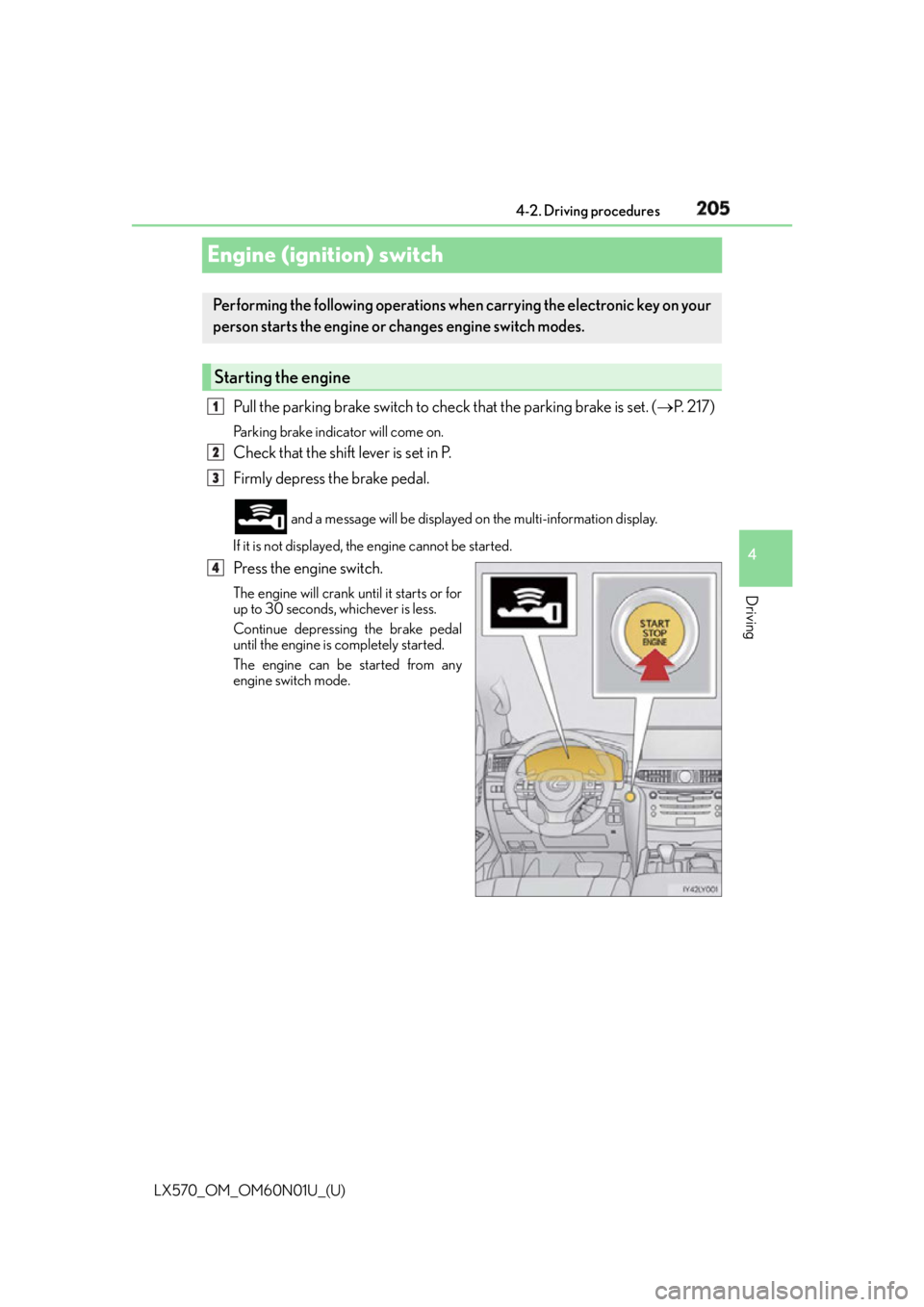
Engine (ignition) switch Pull the parking brake switch to check that the parking brake is set. ( P. 2 1 7 )Parking brake indicator will come on.
Check that the shift lever is set in P.
Firmly depress the brake pedal. and a message will be displayed on the multi-information display.
If it is not displayed, the engine cannot be started.
Press the engine switch. The engine will crank until it starts or for
up to 30 seconds, whichever is less.
Continue depressing the brake pedal
until the engine is completely started.
The engine can be started from any
engine switch mode.Performing the following op erations when carrying the electronic key on your
person starts the engine or changes engine switch modes.
Starting the engine 1
2
3
4
Page 206 of 632
206
LX570_OM_OM60N01U_(U) 4-2. Driving procedures
Stop the vehicle.
Shift the shift lever to P.
Set the parking brake. ( P. 2 1 8 )If the parking brake is in automatic mode, the parking brake is set automatically when
shifting the shift lever to P. ( P. 2 1 7 )
Press the engine switch.
Release the brake pedal and check that th e display on the instrument cluster is
off.
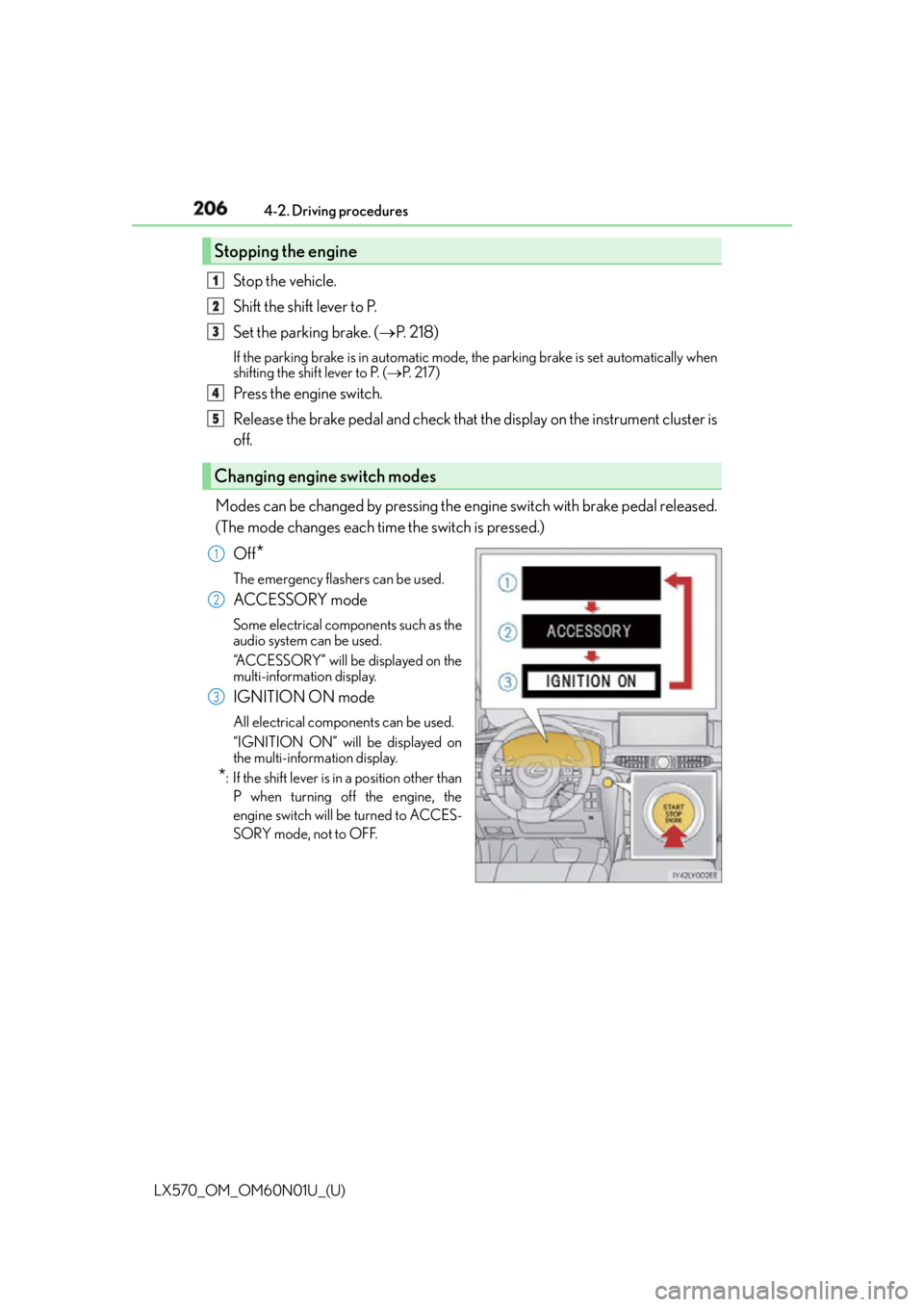
Modes can be changed by pressing the engine switch with brake pedal released.
(The mode changes each time the switch is pressed.)
Off
* The emergency flashers can be used.
ACCESSORY mode Some electrical components such as the
audio system can be used.
“ACCESSORY” will be displayed on the
multi-information display.
IGNITION ON mode All electrical components can be used.
“IGNITION ON” will be displayed on
the multi-information display.
* : If the shift lever is in a position other than
P when turning off the engine, the
engine switch will be turned to ACCES-
SORY mode, not to OFF.Stopping the engine
Changing engine switch modes 1
2
3
4
5
1
2
3
Page 207 of 632

LX570_OM_OM60N01U_(U) 2074-2. Driving procedures
4
Driving If the engine is stopped with the shift le ver in a position other than P, the engine
switch will not be turned off but inst ead be turned to ACCESSORY mode. Per-
form the following procedure to turn the switch off:
Check that the parking brake is set.
Shift the shift lever to P.
Check that “Turn Off Vehicle” is displayed on the multi-information display
and then press the engine switch once.
Check that “Turn Off Vehicle” on the multi-information display is off. ■
Auto power off function
If the vehicle is left in ACCESSORY mode for more than 20 minutes or IGNITION ON
mode (the engine is not running) for more than an hour with the shift lever in P, the engine
switch will automatically turn off. However, this function cannot en tirely prevent battery
discharge. Do not leave the vehicle with the engine switch in ACCESSORY or IGNI-
TION ON mode for long periods of ti me when the engine is not running.■
Operation of the engine switch ●
When operating the engine switch, one short, firm press is enough. If the switch is
pressed improperly, the engine may not start or the engine switch mode may not
change. It is not necessary to press and hold the switch. ●
If attempting to restart the engine immediat ely after turning the engine switch off, the
engine may not start in some cases. After turning the engine off, please wait a few sec-
onds before restarting the engine. ■
Electronic key battery depletion
P. 112 ■
Conditions affe cting operation
P. 1 3 4 ■
Note for the entry function
P. 1 3 5 ■
If the engine does not start ●
The engine immobilizer system may not have been deactivated. ( P. 76 )
Contact your Lexus dealer. ●
Check that the shift lever is securely set in P. The engine may not start if the shift lever is
displaced out of P.
A message will be displayed on the multi-information display. ■
Steering lock
After turning the engine switch off and opening and closing the doors, the steering wheel
will be locked due to the stee ring lock function. Operating the engine switch again auto-
matically cancels the steering lock.When stopping the engine with the shift lever in a position other than P1
2
3
4
Page 209 of 632

LX570_OM_OM60N01U_(U) 2094-2. Driving procedures
4
Driving NOTICE ■
To prevent battery discharge ●
Do not leave the engine switch in AC CESSORY or IGNITION ON mode for long
periods of time without the engine running. ●
If “ACCESSORY” or “IGNITION ON” is disp layed on the multi-information display,
the engine switch is not off. When exiting the vehicle, always check that the engine
switch is off. ●
Do not stop the engine when the shift lever is in a position other than P. If the engine is
stopped in another shift lever position, the engine switch will not be turned off but
instead be turned to ACCESSORY mode. If the vehicle is left in ACCESSORY
mode, battery discharge may occur. ■
When starting the engine ●
Do not race a cold engine. ●
If the engine becomes difficult to start or stalls frequently, have your vehicle checked
by your Lexus dealer immediately. ■
Symptoms indicating a malfun ction with the engine switch
If the engine switch seems to be operating somewhat differently than usual, such as the
switch sticking slightly, there may be a malf unction. Contact your Lexus dealer immedi-
ately.
Page 210 of 632
210
LX570_OM_OM60N01U_(U) 4-2. Driving procedures
Automatic transmission
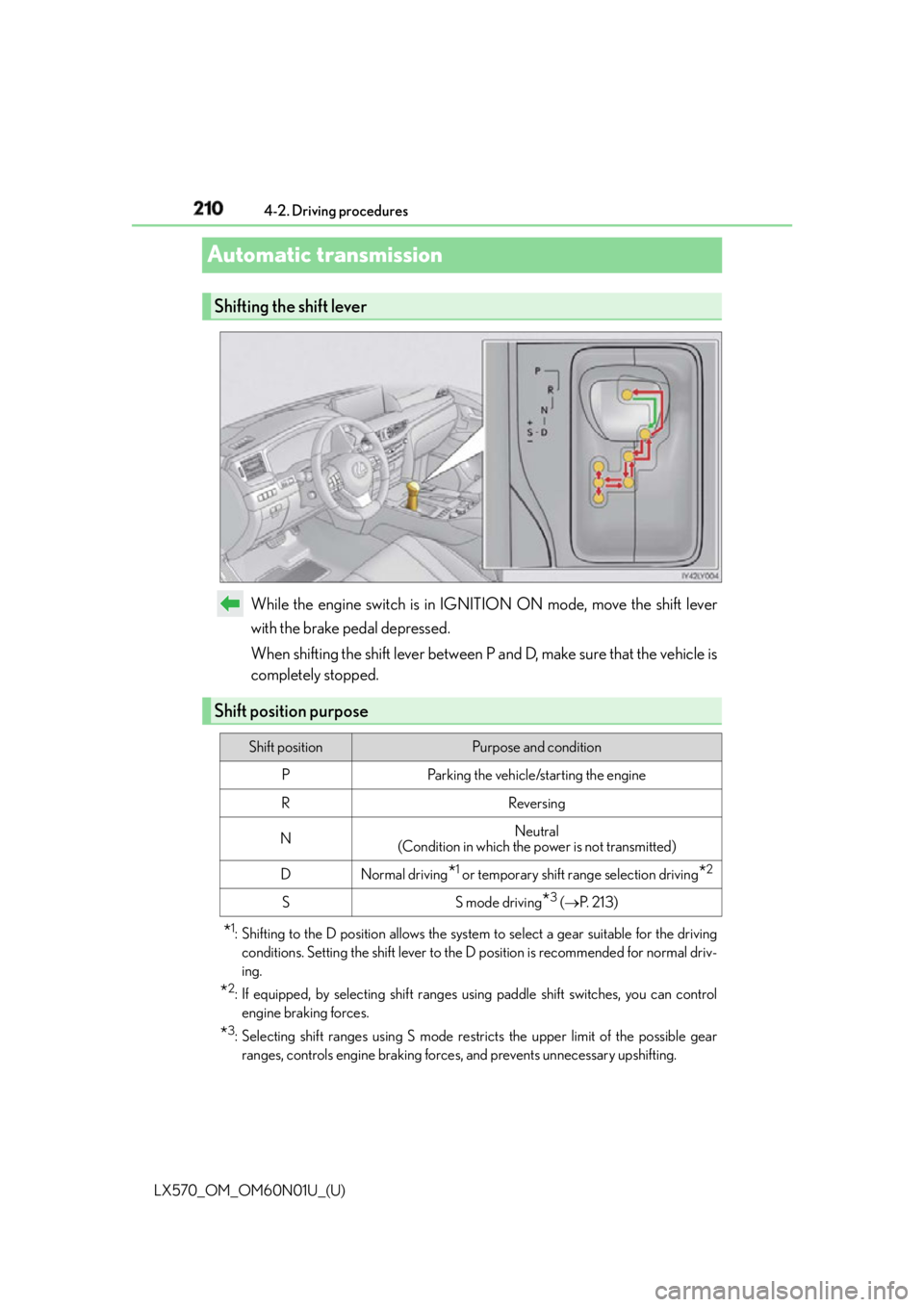
While the engine switch is in IGNITION ON mode, move the shift lever
with the brake pedal depressed.
When shifting the shift lever between P and D, make sure that the vehicle is
completely stopped.
* 1
: Shifting to the D position allows the system to select a gear su itable for the driving
conditions. Setting the shift lever to the D position is recommended for normal driv-
ing.
* 2
: If equipped, by selecting shift ranges us ing paddle shift switches, you can control
engine braking forces.
* 3
: Selecting shift ranges using S mode rest ricts the upper limit of the possible gear
ranges, controls engine braking forces , and prevents unnecessary upshifting.Shifting the shift lever
Shift position purpose Shift position Purpose and condition
P Parking the vehicle/starting the engine
R Reversing
N Neutral
(Condition in which the power is not transmitted)
D Normal driving
* 1
or temporary shift range selection driving
* 2
S S mode driving
* 3
( P. 2 1 3 )
Page 216 of 632
216
LX570_OM_OM60N01U_(U) 4-2. Driving procedures
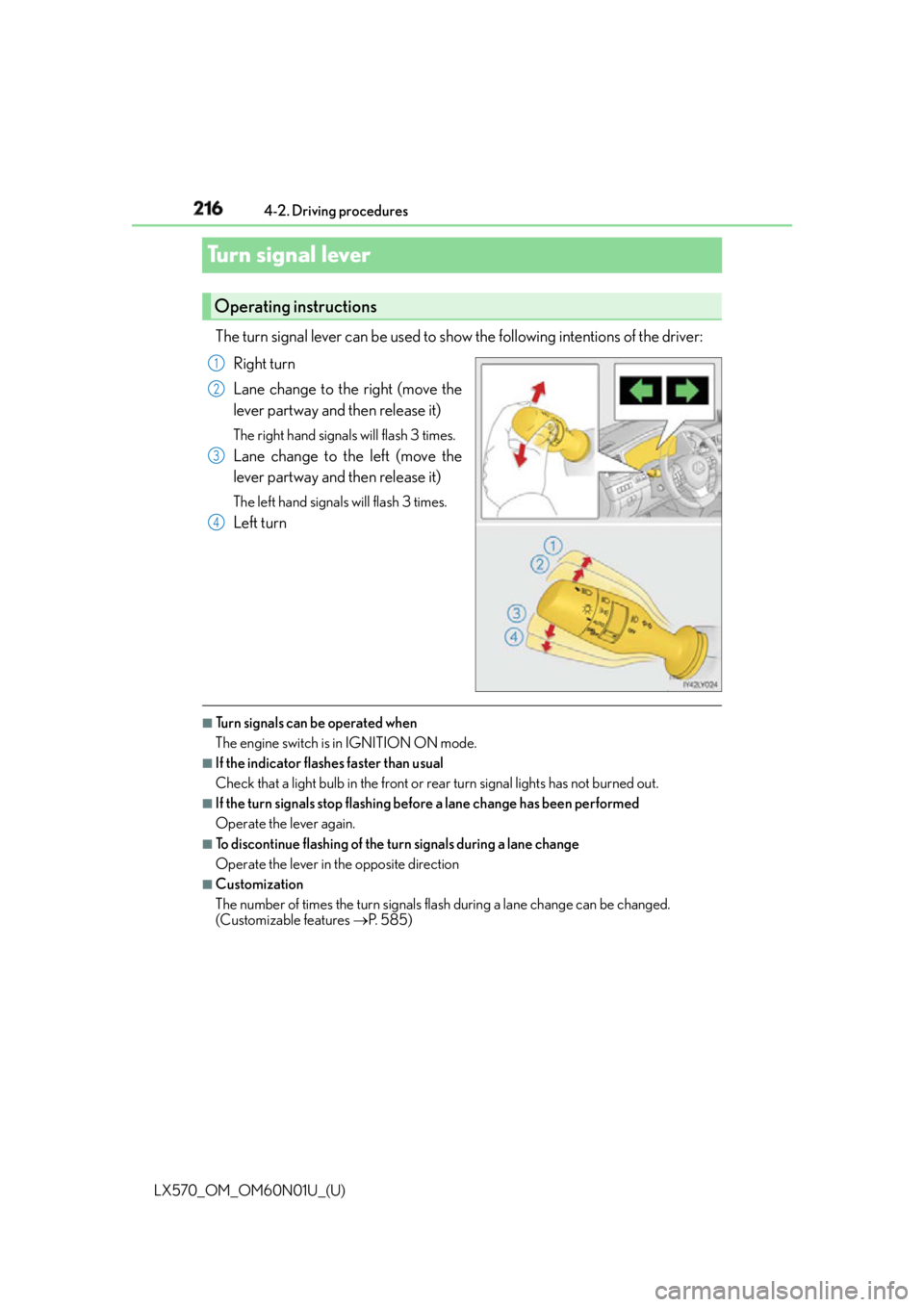
Turn signal lever The turn signal lever can be used to show the following intentions of the driver:
Right turn
Lane change to the right (move the
lever partway and then release it) The right hand signals will flash 3 times.
Lane change to the left (move the
lever partway and then release it) The left hand signals will flash 3 times.
Left turn
■
Turn signals can be operated when
The engine switch is in IGNITION ON mode. ■
If the indicator flashes faster than usual
Check that a light bulb in the front or rear turn signal lights has not burned out. ■
If the turn signals stop flashing befo re a lane change has been performed
Operate the lever again. ■
To discontinue flashing of the turn signals during a lane change
Operate the lever in the opposite direction ■
Customization
The number of times the turn signals flash during a lane change can be changed.
(Customizable features P. 585)Operating instructions 1
2
3
4
Page 218 of 632
218
LX570_OM_OM60N01U_(U) 4-2. Driving procedures
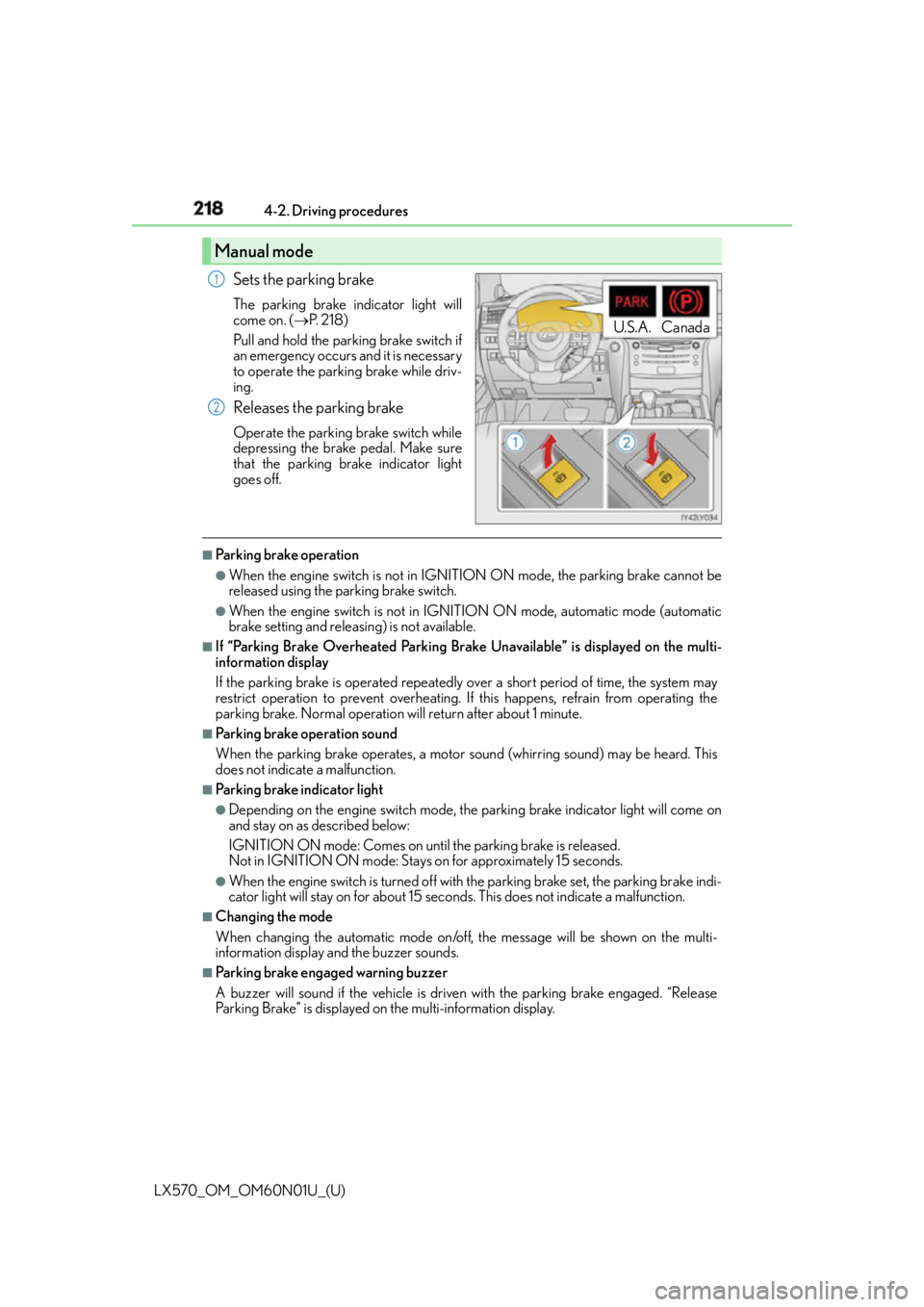
Sets the parking brake The parking brake indicator light will
come on. ( P. 2 1 8 )
Pull and hold the parking brake switch if
an emergency occurs and it is necessary
to operate the parking brake while driv-
ing.
Releases the parking brake Operate the parking brake switch while
depressing the brake pedal. Make sure
that the parking brake indicator light
goes off. ■
Parking brake operation ●
When the engine switch is not in IGNITION ON mode, the parking brake cannot be
released using the pa rking brake switch.●
When the engine switch is not in IGNI TION ON mode, automatic mode (automatic
brake setting and releas ing) is not available.■
If “Parking Brake Overheated Parking Brake Unavailable” is displayed on the multi-
information display
If the parking brake is operated repeatedly over a short period of time, the system may
restrict operation to prevent overheating. If this happens, refrain from operating the
parking brake. Normal operation will return after about 1 minute. ■
Parking brake operation sound
When the parking brake operates, a motor sound (whirring sound) may be heard. This
does not indicate a malfunction. ■
Parking brake indicator light ●
Depending on the engine switch mode, the parking brake indicator light will come on
and stay on as described below:
IGNITION ON mode: Comes on until the parking brake is released.
Not in IGNITION ON mode: Stays on for approximately 15 seconds. ●
When the engine switch is turned off with the parking brake set, the parking brake indi-
cator light will stay on for about 15 seco nds. This does not indicate a malfunction.■
Changing the mode
When changing the automatic mode on/off , the message will be shown on the multi-
information display and the buzzer sounds. ■
Parking brake engaged warning buzzer
A buzzer will sound if the vehicle is driven with the parking brake engaged. “Release
Parking Brake” is displayed on the multi-information display.Manual mode U.S.A. Canada1
2