display LEXUS LX570 2016 Owners Manual
[x] Cancel search | Manufacturer: LEXUS, Model Year: 2016, Model line: LX570, Model: LEXUS LX570 2016Pages: 632, PDF Size: 8.94 MB
Page 492 of 632
492
LX570_OM_OM60N01U_(U)6-3. Do-it-yourself maintenance
■When the initialization of the tire pressure warning system has failed
Initialization can be
completed in a few minutes. However, in the following cases, the set-
tings have not been recorded and the system will not operate properly. If repeated
attempts to record tire inflation pressure settings are unsuccessful, have the vehicle
inspected by your Lexus dealer.
●When operating the tire pressure warning reset switch, the tire pressure warning light
does not blink 3 times and the setting mess age does not appear on the multi-informa-
tion display.
●After carrying out the initialization procedure, the tire pressure warning light blinks for 1
minute then stays on after driving for about 20 minutes.
If the inflation of each tire is not displaye d after driving for approximately 1 hour, perform
the following procedure.
●Park the vehicle in a safe place for approxim ately 20 minutes. Then drive straight (with
occasional left and right turns) at approximately 25 mph (40 km/h) or more for
approximately 10 to 20 minutes.
However, in the following situations, the tire inflation pressure will not be recorder and
the system will not operate properly. Perform initialization.
●When operating the tire pressure warning reset switch, the tire pressure warning light
does not blink 3 times.
●After performing initialization, the tire pres sure warning light blinks for 1 minute then
stays on after driving for about 20 minutes.
If the inflation pressure of each tire is st ill not displayed, have the vehicle inspected by
your Lexus dealer.
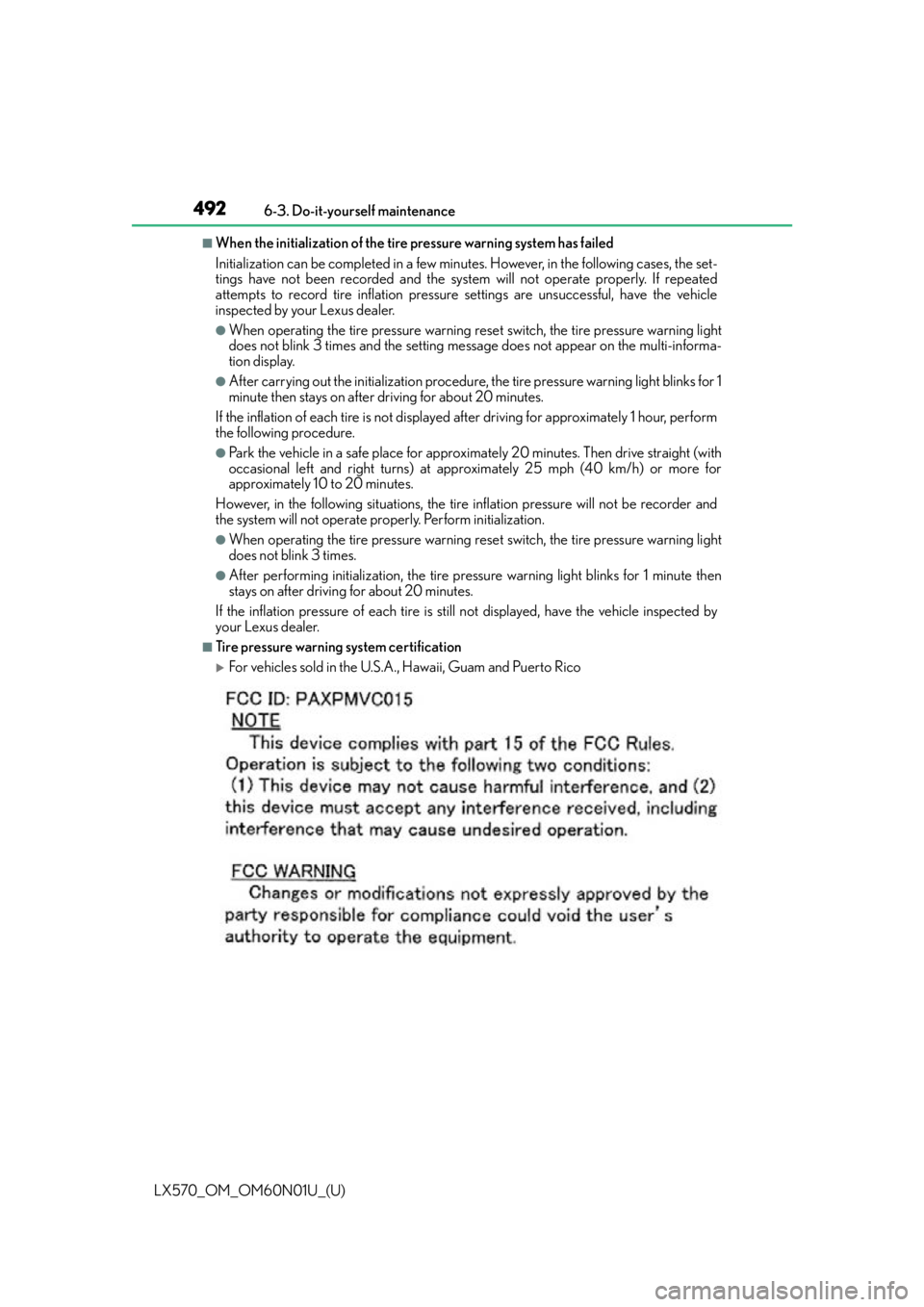
■Tire pressure warning system certification
For vehicles sold in the U.S.A., Hawaii, Guam and Puerto Rico
Page 495 of 632
495
LX570_OM_OM60N01U_(U)6-3. Do-it-yourself maintenance
6
Maintenance and care
Tire inflation pressure
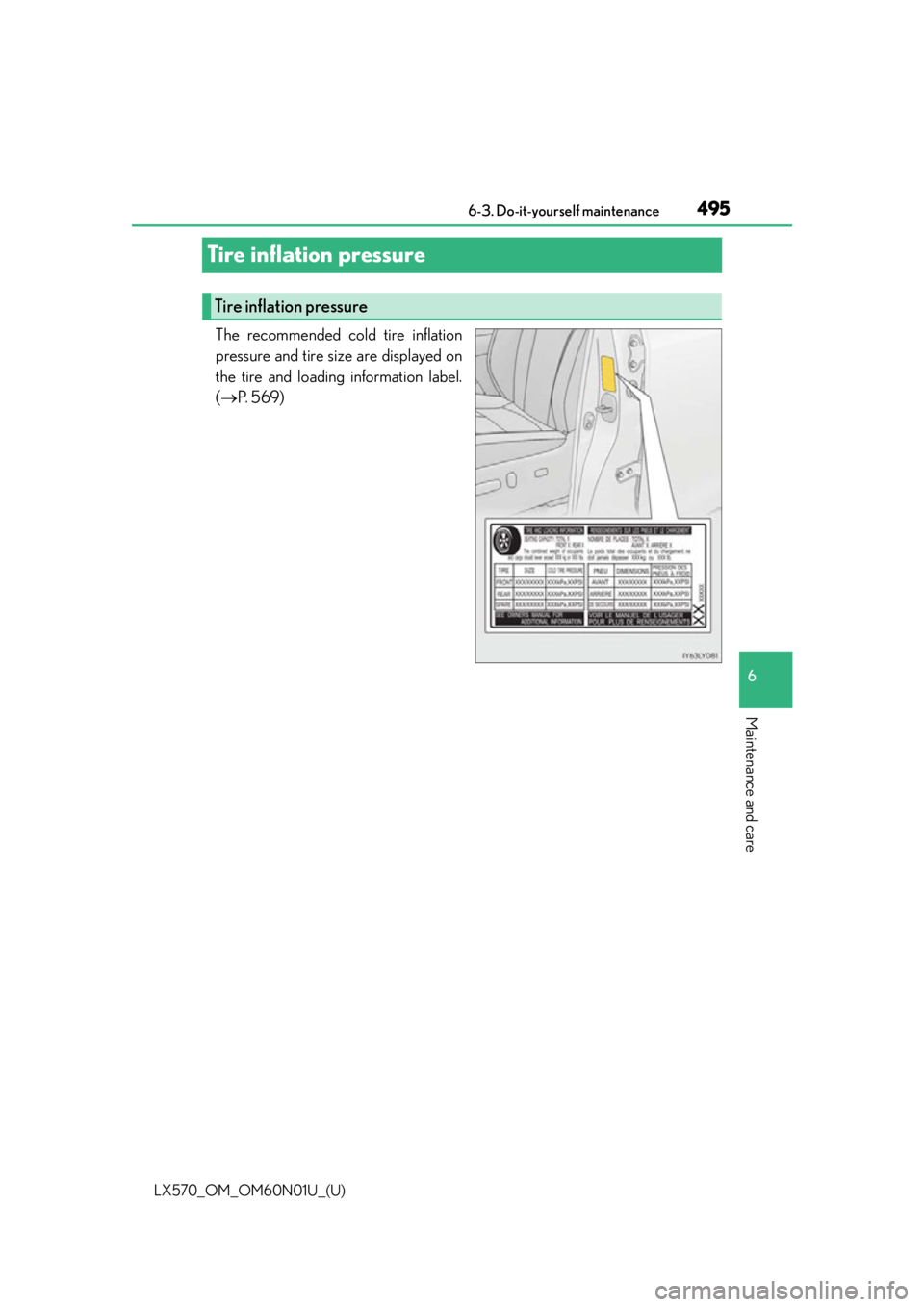
The recommended cold tire inflation
pressure and tire size are displayed on
the tire and loading information label.
(
P. 5 6 9 )
Tire inflation pressure
Page 513 of 632

513
LX570_OM_OM60N01U_(U)
7When trouble arises
7-1. Essential informationEmergency flashers ................... 514
If your vehicle has to be stopped in an emergency ..... 515
7-2. Steps to take in an emergency If your vehicle needs to be towed ................................. 516
If you think something is wrong ........................................... 522
Fuel pump shut off system ...... 523
If a warning light turns on or a warning buzzer
sounds.......................................... 524
If a warning message is displayed..................................... 532
If you have a flat tire................... 536
If the engine will not start ........ 547
If the shift lever cannot be shifted from P............................ 549
If the electronic key does not operate properly .............550
If the vehicle battery is discharged ................................. 553
If your vehicle overheats ......... 556
If the vehicle becomes stuck ............................................. 559
Page 532 of 632
532
LX570_OM_OM60N01U_(U)7-2. Steps to take in an emergency
If a warning message is displayed
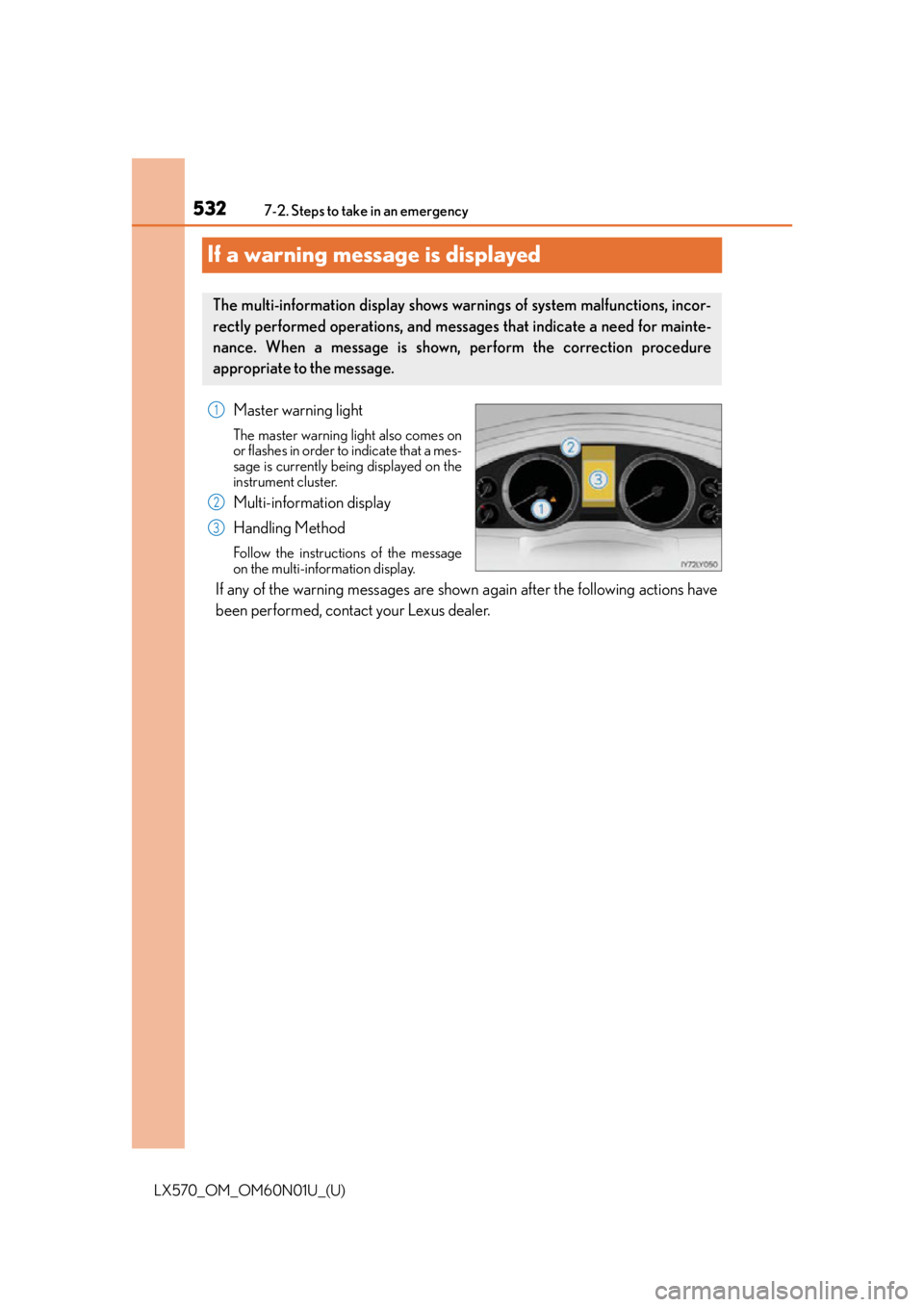
Master warning light
The master warning light also comes on
or flashes in order to indicate that a mes-
sage is currently being displayed on the
instrument cluster.
Multi-information display
Handling Method
Follow the instructio
ns of the message
on the multi-information display.
If any of the warning messages are show n again after the following actions have
been performed, contact your Lexus dealer.
The multi-information display shows warnings of system malfunctions, incor-
rectly performed operations, and messages that indicate a need for mainte-
nance. When a message is shown, perform the correction procedure
appropriate to the message.
1
2
3
Page 533 of 632
5337-2. Steps to take in an emergency
LX570_OM_OM60N01U_(U)
7
When trouble arises
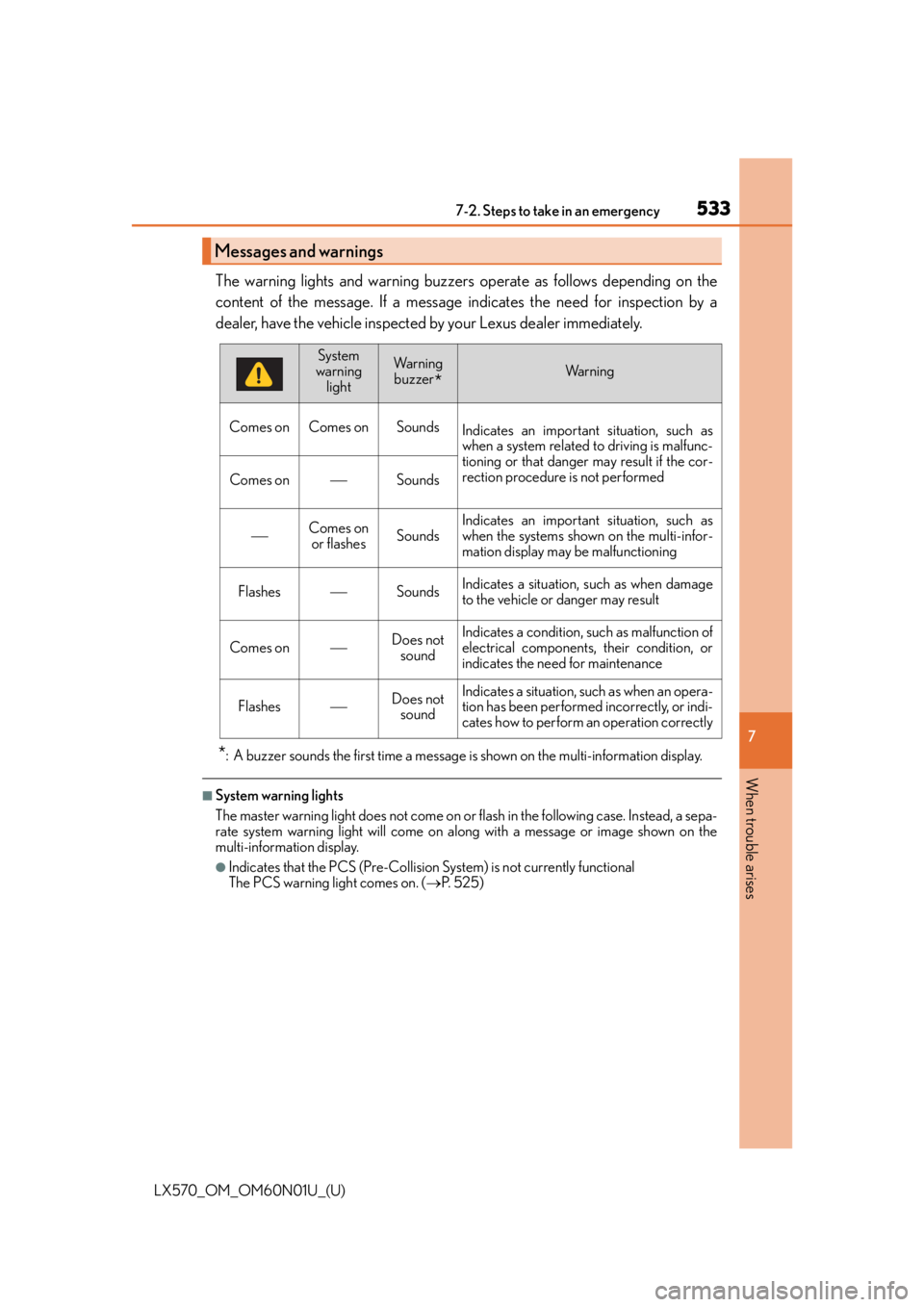
The warning lights and warning buzzers operate as follows depending on the
content of the message. If a message in dicates the need for inspection by a
dealer, have the vehicle inspected by your Lexus dealer immediately.
*: A buzzer sounds the first time a message is shown on the multi-information display.
■System warning lights
The master warning light does not come on or flash in the following case. Instead, a sepa-
rate system warning light will come on along with a message or image shown on the
multi-information display.
●Indicates that the PCS (Pre-Collision System) is not currently functional
The PCS warning light comes on. ( P. 5 2 5 )
Messages and warnings
System
warning lightWa r n i n g buzzer
*Wa r n i n g
Comes on Comes on Sounds Indicates an important situation, such as
when a system related to driving is malfunc-
tioning or that danger may result if the cor-
rection procedure is not performed
Comes onSounds
Comes on
or flashesSoundsIndicates an important situation, such as
when the systems shown on the multi-infor-
mation display may be malfunctioning
FlashesSoundsIndicates a situation, such as when damage
to the vehicle or danger may result
Comes onDoes not soundIndicates a condition, such as malfunction of
electrical components, their condition, or
indicates the need for maintenance
FlashesDoes not soundIndicates a situation, such as when an opera-
tion has been performed incorrectly, or indi-
cates how to perform an operation correctly
Page 534 of 632

5347-2. Steps to take in an emergency
LX570_OM_OM60N01U_(U)
■If “See Owner’s Manual” is shown
●If “Smart Access System Malfunction” is shown, this may be a malfunction.
Immediately have the vehicle inspected by your Lexus dealer.
●If “Transmission Fluid Temp High” is shown, it indicates that the automatic transmission
fluid temperature is too high.
Immediately stop the vehicle in a safe place, shift the shift lever to P and wait until the
warning message and light go off. If the warning message and light go off, you may
start the vehicle again. If the warning message and light do not go off, contact your
Lexus dealer.
■If “Shift to P Before Exiting Vehicle” is shown
Message is displayed when the driver’s door is opened without turning the engine switch
to off with the shift lever in any position other than P.
Shift the shift lever to P.
■If “Power Turned Off to Save Battery” is shown
Power was turned off due to the automatic power off function.
Next time when starting the engine, increase the engine speed slightly and maintain that
level for approximately 5 minutes to recharge the battery.
■When a message that indicates the need for the shift lever operation is shown
To prevent the shift lever from being operated incorrectly or the vehicle from moving
unexpectedly, a message that requires shifting the shift lever may be shown on the multi-
information display. In that case, follow the instruction of the message and shift the shift
lever.
■When “Headlight System Malfunction Visit Your Dealer” is displayed on the multi-
information display
The following systems may be malfunctioning. Have the vehicle inspected by your Lexus
dealer.
●The LED headlight system
●The automatic headlight leveling system
●AHB (Automatic High Beam) (if equipped)
■If “Forward Camera System Unavailable” or “Forward Camera System Unavailable
Clean Windshield” is displayed. (if equipped)
The following systems may be suspended un til the problem shown in the message is
resolved.
●Dynamic radar cruise control with full-speed range
●PCS (Pre-Collision System)
●LDA (Lane Departure Alert)
●AHB (Automatic High Beam)
■If “Engine Oil Level Low” is shown
Indicates that engine oil level is low.
Check the level of engine oil, and add if necessary.
This message may appear if the vehicle is stopped on a slope.
Move the vehicle to a level surface and check to see if the message disappears.
Page 535 of 632
5357-2. Steps to take in an emergency
LX570_OM_OM60N01U_(U)
7
When trouble arises
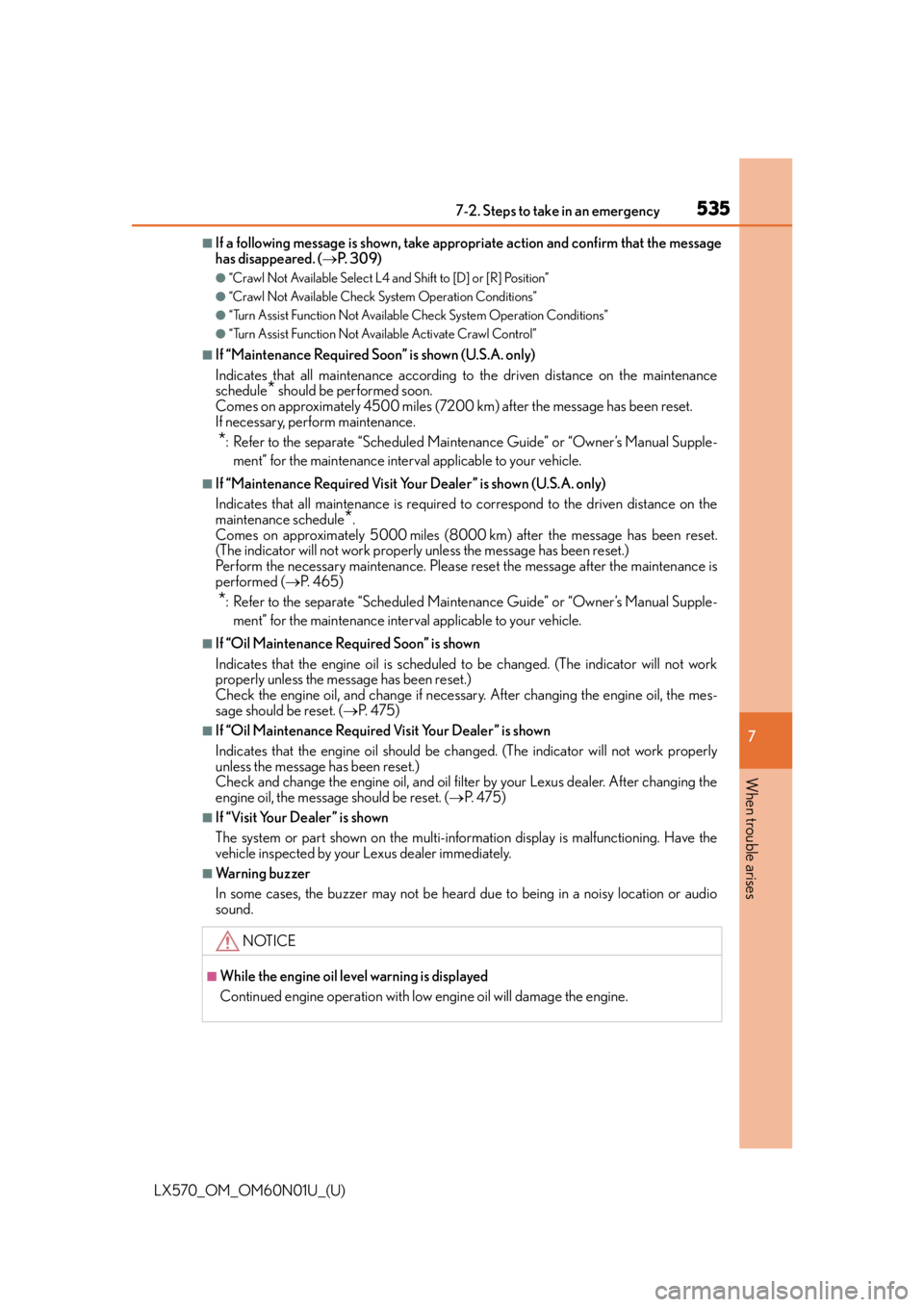
■If a following message is shown, take appr opriate action and confirm that the message
has disappeared. ( P. 3 0 9 )
●“Crawl Not Available Select L4 an d Shift to [D] or [R] Position”
●“Crawl Not Available Check System Operation Conditions”
●“Turn Assist Function Not Available Check System Operation Conditions”
●“Turn Assist Function Not Available Activate Crawl Control”
■If “Maintenance Required Soon” is shown (U.S.A. only)
Indicates that all maintenance according to the driven distance on the maintenance
schedule
* should be performed soon.
Comes on approximately 4500 miles (7200 k m) after the message has been reset.
If necessary, perform maintenance.
*: Refer to the separate “Scheduled Maintenance Guide” or “Owner’s Manual Supple-
ment” for the maintenance interval applicable to your vehicle.
■If “Maintenance Required Visit Your Dealer” is shown (U.S.A. only)
Indicates that all maintenance is required to correspond to the driven distance on the
maintenance schedule
*.
Comes on approximately 5000 miles (8000 k m) after the message has been reset.
(The indicator will not work properly unless the message has been reset.)
Perform the necessary maintenance. Please reset the message after the maintenance is
performed ( P. 4 6 5 )
*: Refer to the separate “Scheduled Maintenance Guide” or “Owner’s Manual Supple-
ment” for the maintenance interval applicable to your vehicle.
■If “Oil Maintenance Required Soon” is shown
Indicates that the engine oil is scheduled to be changed. (The indicator will not work
properly unless the message has been reset.)
Check the engine oil, and change if necessar y. After changing the engine oil, the mes-
sage should be reset. ( P. 4 7 5 )
■If “Oil Maintenance Required Visit Your Dealer” is shown
Indicates that the engine oil should be chan ged. (The indicator will not work properly
unless the message has been reset.)
Check and change the engine oil, and oil filter by your Lexus dealer. After changing the
engine oil, the message should be reset. ( P. 4 7 5 )
■If “Visit Your Dealer” is shown
The system or part shown on the multi-info rmation display is malfunctioning. Have the
vehicle inspected by your Lexus dealer immediately.
■Warning buzzer
In some cases, the buzzer may not be heard due to being in a noisy location or audio
sound.
NOTICE
■While the engine oil level warning is displayed
Continued engine operation with low engine oil will damage the engine.
Page 551 of 632
5517-2. Steps to take in an emergency
LX570_OM_OM60N01U_(U)
7
When trouble arises
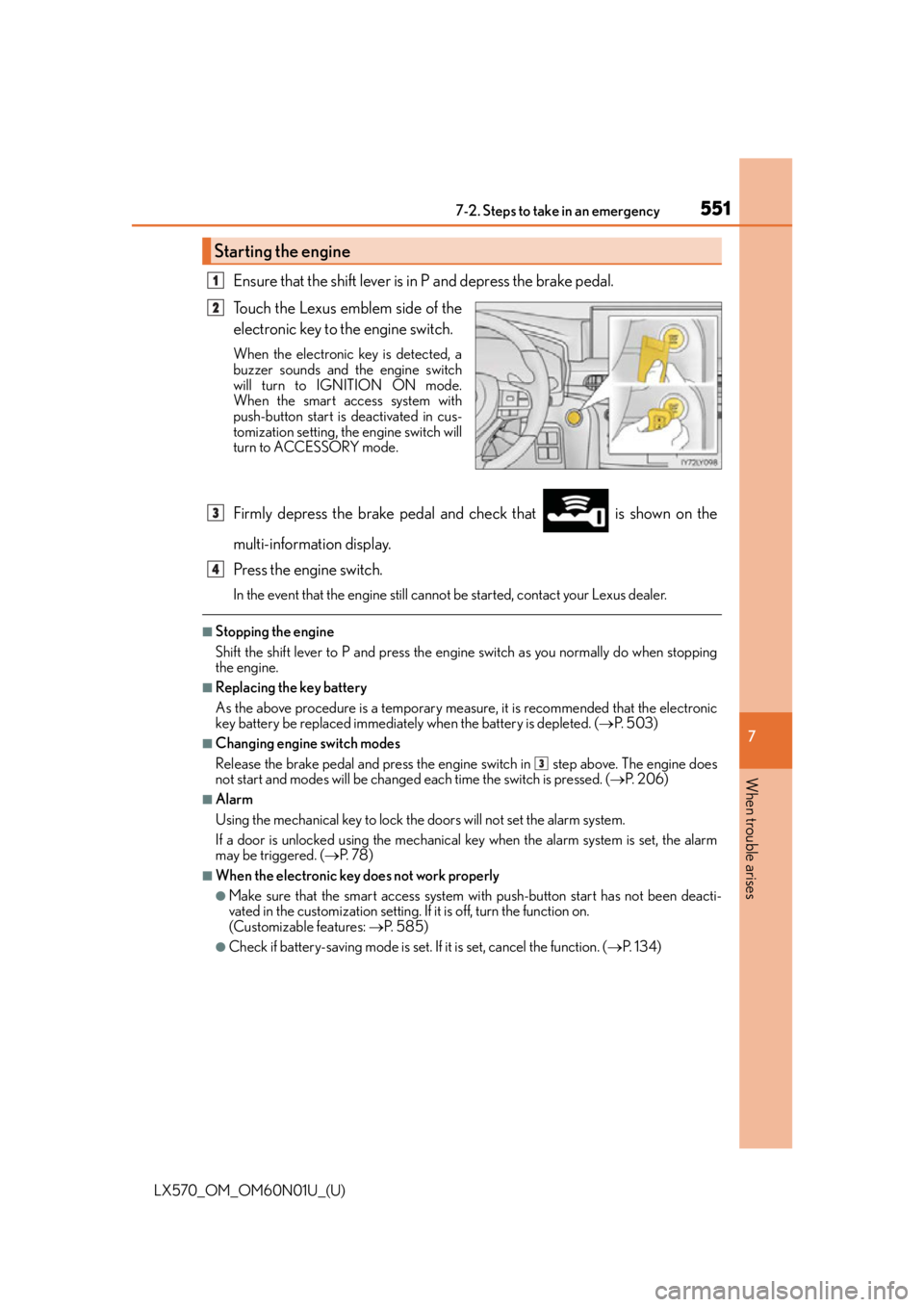
Ensure that the shift lever is in P and depress the brake pedal.
Touch the Lexus emblem side of the
electronic key to the engine switch.
When the electronic key is detected, a
buzzer sounds and the engine switch
will turn to IGNITION ON mode.
When the smart access system with
push-button start is deactivated in cus-
tomization setting, the engine switch will
turn to ACCESSORY mode.
Firmly depress the brake pedal and check that is shown on the
multi-information display.
Press the engine switch.
In the event that the engine still cannot be started, contact your Lexus dealer.
■Stopping the engine
Shift the shift lever to P and press the engine switch as you normally do when stopping
the engine.
■Replacing the key battery
As the above procedure is a temporary measure, it is recommended that the electronic
key battery be replaced immediately when the battery is depleted. ( P. 5 0 3 )
■Changing engine switch modes
Release the brake pedal and press the engine switch in step above. The engine does
not start and modes will be changed each time the switch is pressed. ( P. 2 0 6 )
■Alarm
Using the mechanical key to lock the doors will not set the alarm system.
If a door is unlocked using the mechanical key when the alarm system is set, the alarm
may be triggered. ( P. 7 8 )
■When the electronic key does not work properly
●Make sure that the smart access system wi th push-button start has not been deacti-
vated in the custom ization setting. If it is off, turn the function on.
(Customizable features: P. 585)
●Check if battery-saving mo de is set. If it is set, cancel the function. ( P. 1 3 4 )
Starting the engine
1
2
3
4
3
Page 585 of 632
585
LX570_OM_OM60N01U_(U)8-2. Customization
8
Vehicle specifications
Customizable features
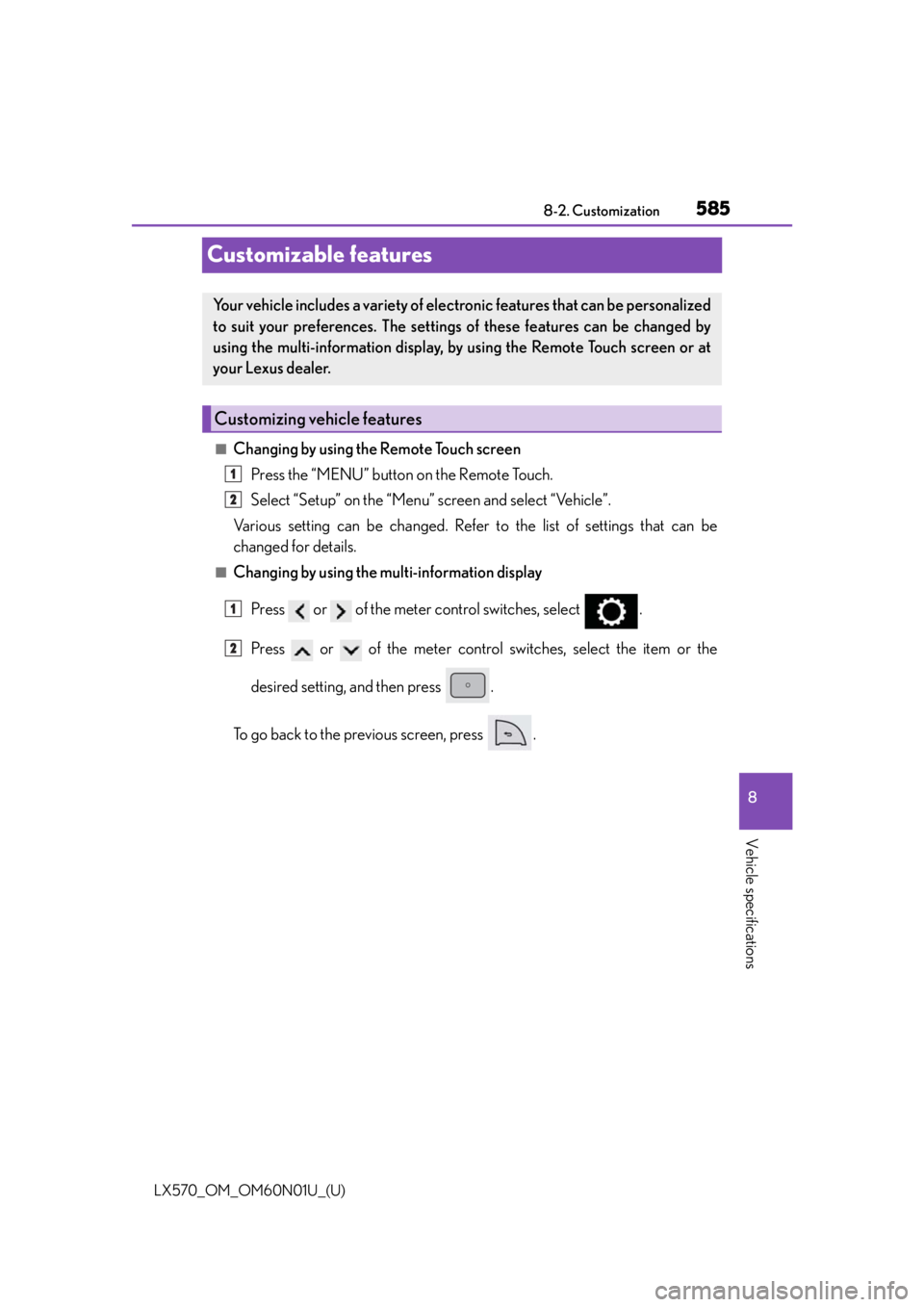
■Changing by using the Remote Touch screen
Press the “MENU” button on the Remote Touch.
Select “Setup” on the “Menu” screen and select “Vehicle”.
Various setting can be changed. Refer to the list of settings that can be
changed for details.
■Changing by using the multi-information display
Press or of the meter control switches, select .
Press or of the meter control switches, select the item or the
desired setting, and then press .
To go back to the previous screen, press .
Your vehicle includes a variety of electronic features that can be personalized
to suit your preferences. The settings of these features can be changed by
using the multi-information display, by using the Remote Touch screen or at
your Lexus dealer.
Customizing vehicle features
1
2
1
2
Page 586 of 632
586
LX570_OM_OM60N01U_(U)8-2. Customization
Some function settings are changed simultaneously with other functions being
customized. Contact your Lexus dealer for further details.
Settings that can be changed using the Remote Touch screen
Settings that can be changed us ing the multi-information display
Settings that can be changed by your Lexus dealer
Definition of symbols: O = Available, – =Not available
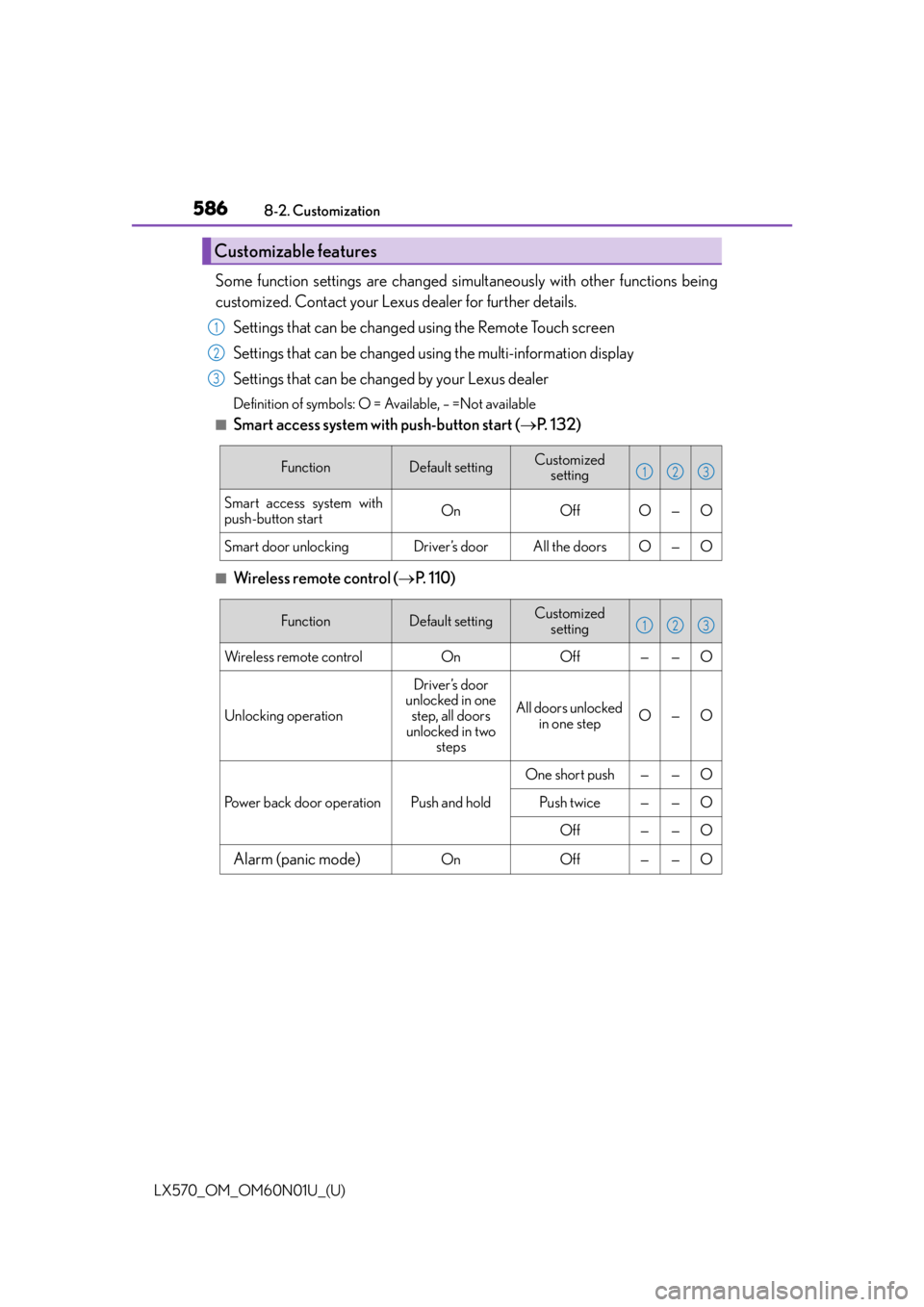
■Smart access system with push-button start ( P. 1 3 2 )
■Wireless remote control ( P. 1 1 0 )
Customizable features
1
2
3
FunctionDefault settingCustomized
setting
Smart access system with
push-button startOnOffO—O
Smart door unlockingDriver’s doorAll the doorsO—O
123
FunctionDefault settingCustomized setting
Wireless remote controlOnOff——O
Unlocking operation
Driver’s door
unlocked in one
step, all doors
unlocked in two steps
All doors unlocked in one stepO—O
Power back door operationPush and hold
One short push——O
Push twice——O
Off——O
Alarm (panic mode)OnOff——O
123