Rear screen LEXUS LX570 2016 User Guide
[x] Cancel search | Manufacturer: LEXUS, Model Year: 2016, Model line: LX570, Model: LEXUS LX570 2016Pages: 632, PDF Size: 8.94 MB
Page 326 of 632
326
LX570_OM_OM60N01U_(U)4-5. Using the driving support systems
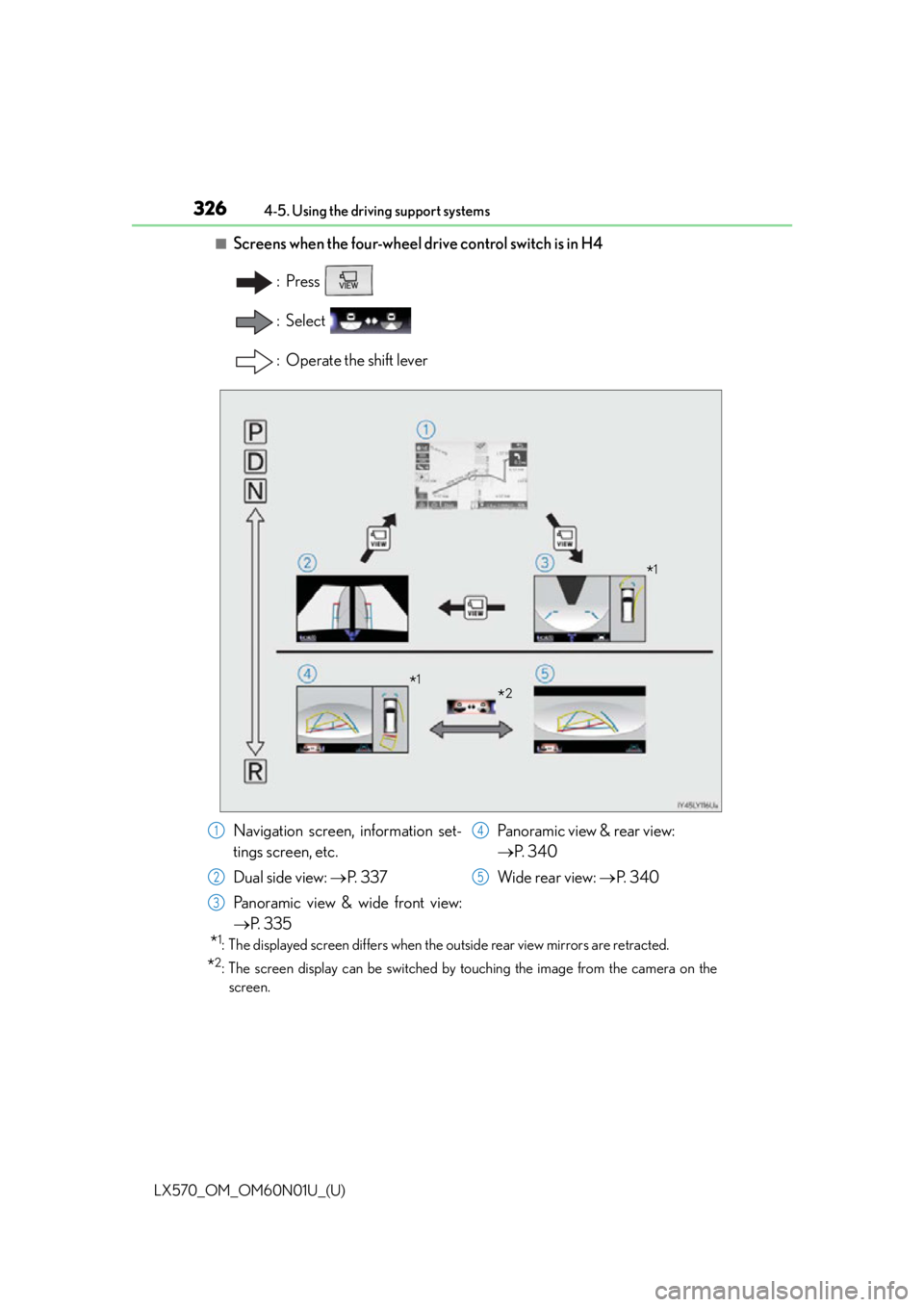
■Screens when the four-wheel drive control switch is in H4
:Press
: Select
: Operate the shift lever
*1: The displayed screen differs when the outside rear view mirrors are retracted.
*2: The screen display can be switched by touching the image from the camera on the
screen.
*1
*2*1
Navigation screen, information set-
tings screen, etc.
Dual side view: P. 3 3 7
Panoramic view & wide front view:
P. 3 3 5 Panoramic view & rear view:
P. 3 4 0
Wide rear view: P. 3 4 01
2
3
4
5
Page 328 of 632
328
LX570_OM_OM60N01U_(U)4-5. Using the driving support systems
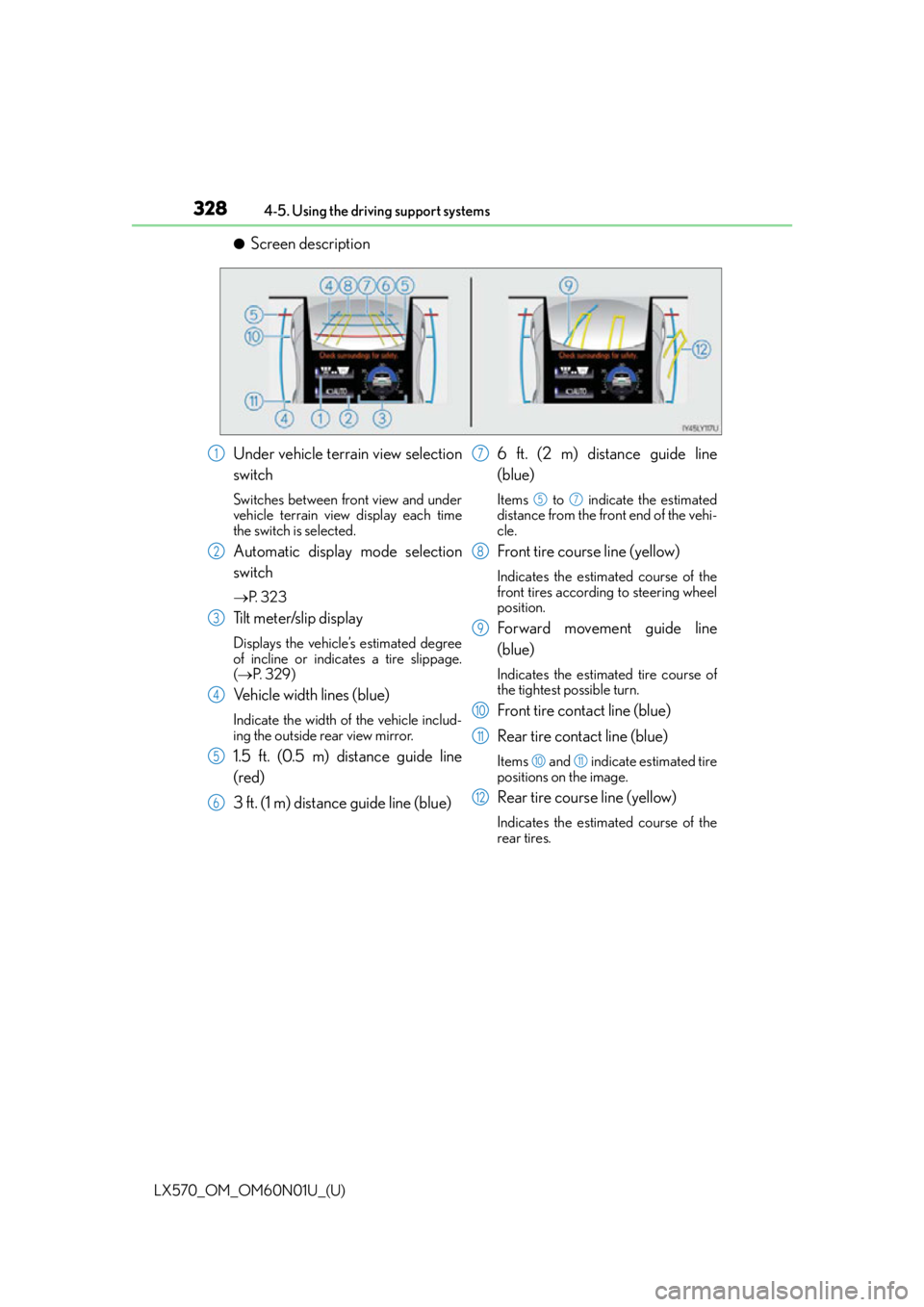
●Screen description
Under vehicle terrain view selection
switch
Switches between front view and under
vehicle terrain view display each time
the switch is selected.
Automatic display mode selection
switch
P. 3 2 3
Tilt meter/slip display
Displays the vehicle’s estimated degree
of incline or indicates a tire slippage.
( P. 3 2 9 )
Vehicle width lines (blue)
Indicate the width of the vehicle includ-
ing the outside rear view mirror.
1.5 ft. (0.5 m) distance guide line
(red)
3 ft. (1 m) distance guide line (blue) 6 ft. (2 m) distance guide line
(blue)
Items to indicate the estimated
distance from the front end of the vehi-
cle.
Front tire course line (yellow)
Indicates the estimated course of the
front tires according to steering wheel
position.
Forward movement guide line
(blue)
Indicates the estimated tire course of
the tightest possible turn.
Front tire contact line (blue)
Rear tire contact line (blue)
Items and indicate estimated tire
positions on the image.
Rear tire course line (yellow)
Indicates the estimated course of the
rear tires.
1
2
3
4
5
6
7
57
8
9
10
11
1011
12
Page 330 of 632
330
LX570_OM_OM60N01U_(U)4-5. Using the driving support systems
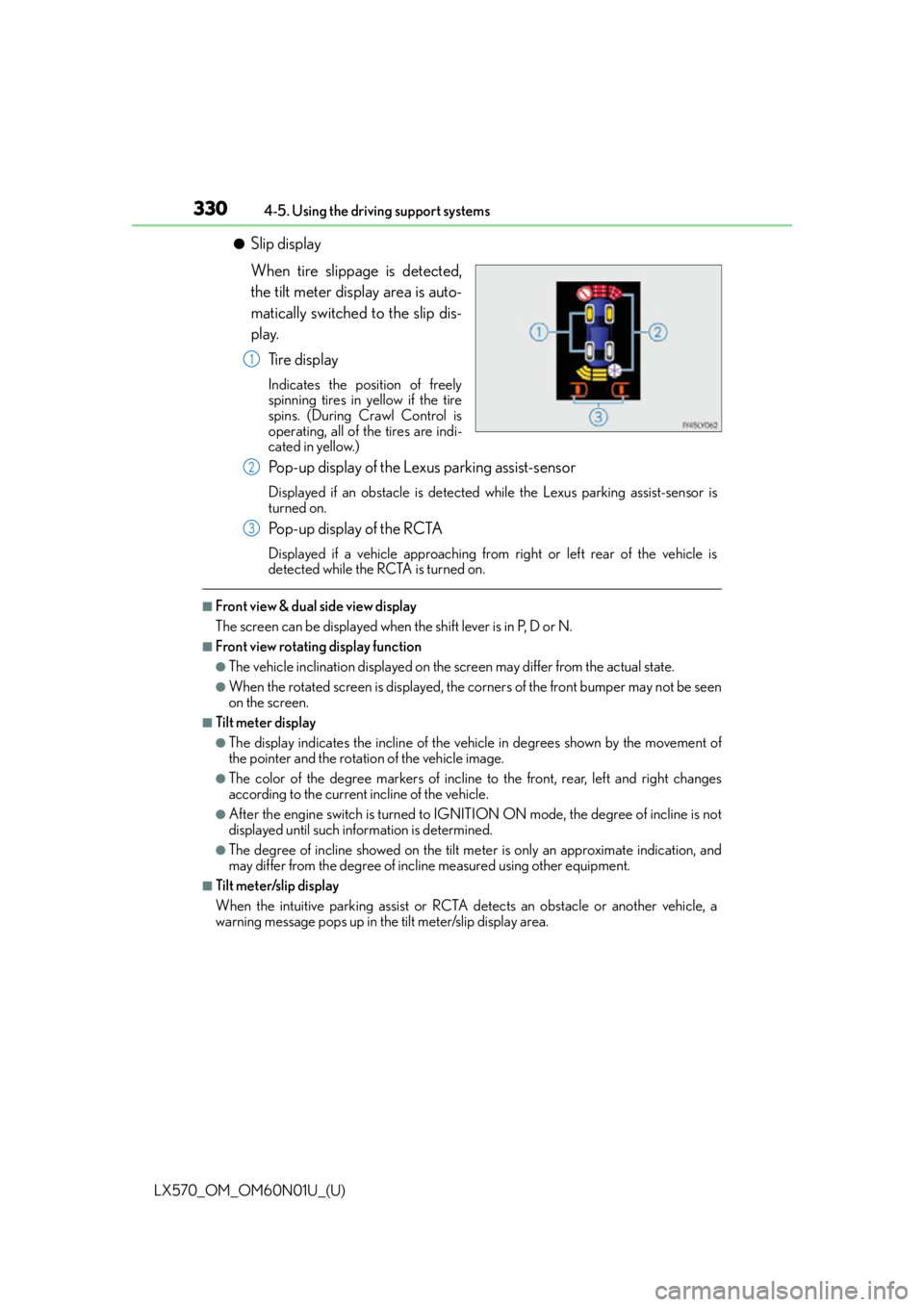
●Slip display
When tire slippage is detected,
the tilt meter display area is auto-
matically switched to the slip dis-
play.
Tire display
Indicates the position of freely
spinning tires in yellow if the tire
spins. (During Crawl Control is
operating, all of the tires are indi-
cated in yellow.)
Pop-up display of the Lexus parking assist-sensor
Displayed if an obstacle is detected while the Lexus parking assist-sensor is
turned on.
Pop-up display of the RCTA
Displayed if a vehicle approaching from right or left rear of the vehicle is
detected while the RC TA is turned on.
■Front view & dual side view display
The screen can be displayed when the shift lever is in P, D or N.
■Front view rotating display function
●The vehicle inclination displayed on the screen may differ from the actual state.
●When the rotated screen is displayed, the corners of the front bumper may not be seen
on the screen.
■Tilt meter display
●The display indicates the incline of the vehicle in degrees shown by the movement of
the pointer and the rotation of the vehicle image.
●The color of the degree markers of incline to the front, rear, left and right changes
according to the current incline of the vehicle.
●After the engine switch is turned to IGNI TION ON mode, the degree of incline is not
displayed until such information is determined.
●The degree of incline showed on the tilt me ter is only an approximate indication, and
may differ from the degree of incl ine measured using other equipment.
■Tilt meter/slip display
When the intuitive parking assist or RCTA detects an obstacle or another vehicle, a
warning message pops up in the tilt meter/slip display area.
1
2
3
Page 333 of 632
LX570_OM_OM60N01U_(U)
3334-5. Using the driving support systems
4
Driving
■Rear view & dual side view/wide rear view
Guide lines are displayed in a composite view on an image of the area to the
rear of the vehicle to use as a reference when deciding a course of movement
and assist the driver to check the safety of the area to the rear of the vehicle or
to park the vehicle.
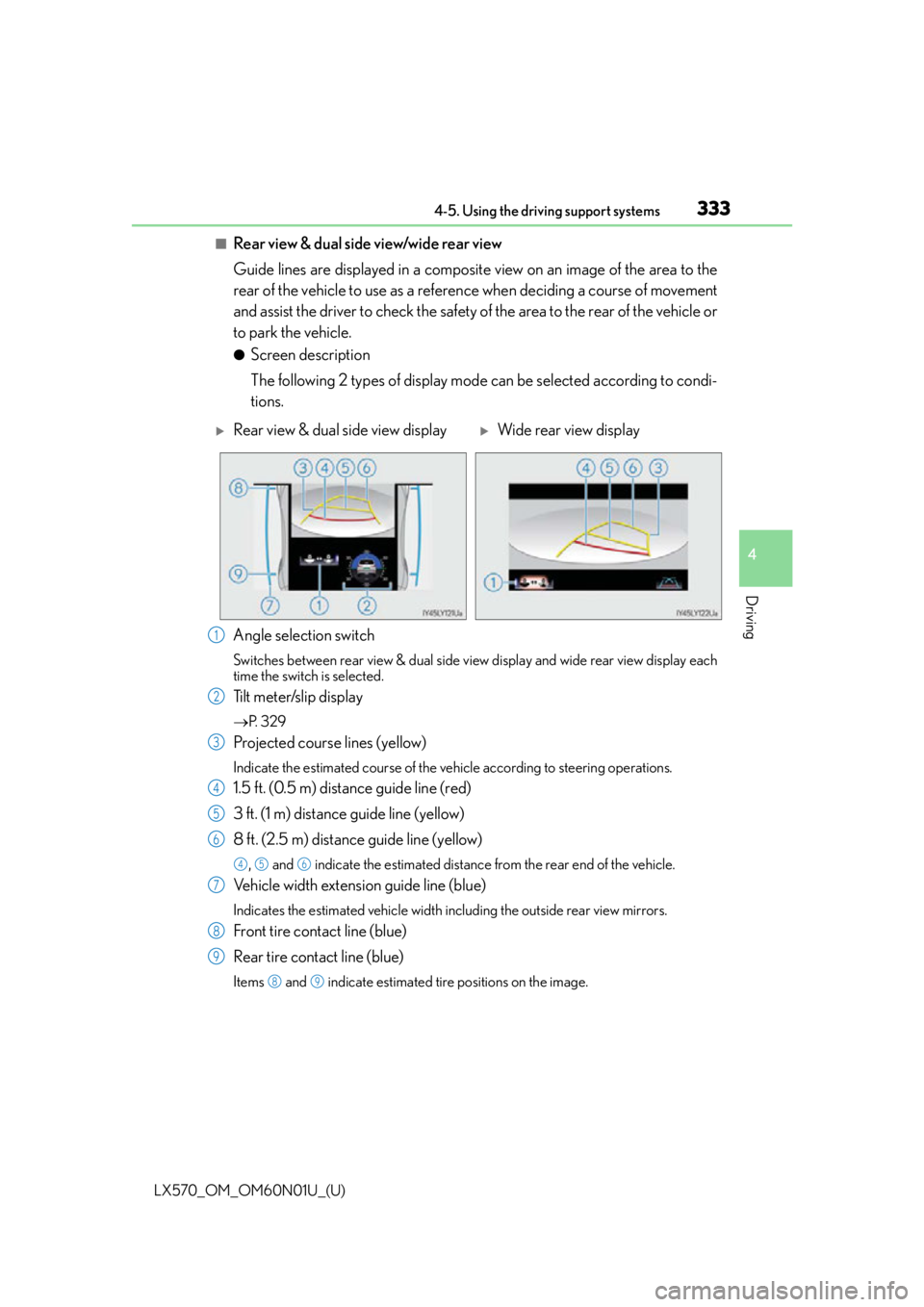
●Screen description
The following 2 types of display mode can be selected according to condi-
tions.
Angle selection switch
Switches between rear view & dual side vi ew display and wide rear view display each
time the switch is selected.
Tilt meter/slip display
P. 3 2 9
Projected course lines (yellow)
Indicate the estimated course of the vehicle according to steering operations.
1.5 ft. (0.5 m) distance guide line (red)
3 ft. (1 m) distance guide line (yellow)
8 ft. (2.5 m) distance guide line (yellow)
, and indicate the estimated distance from the rear end of the vehicle.
Vehicle width extension guide line (blue)
Indicates the estimated vehicle width including the outside rear view mirrors.
Front tire contact line (blue)
Rear tire contact line (blue)
Items and indicate estimated tire positions on the image.
Rear view & dual side view displayWide rear view display
1
2
3
4
5
6
456
7
8
9
89
Page 334 of 632

334
LX570_OM_OM60N01U_(U)4-5. Using the driving support systems
■Rear view & dual side view/wide rear view
The screen can be displayed when the shift lever is in R.
■Guide lines
If the back door is not closed
, guide lines will not be displaye d. If the guide lines do not
display even when the back door is closed , have the vehicle inspected at your Lexus
dealer.
WA R N I N G
■Guide lines
The tire position indicator lines and vehicle position indicator lines may differ from
actual vehicle positions depending on the number of passengers, cargo weight, road
grade, road surface conditions, brightness of the surrounding environment, etc. Always
drive the vehicle while confirming the safety of your surroundings.
Page 337 of 632
LX570_OM_OM60N01U_(U)
3374-5. Using the driving support systems
4
Driving
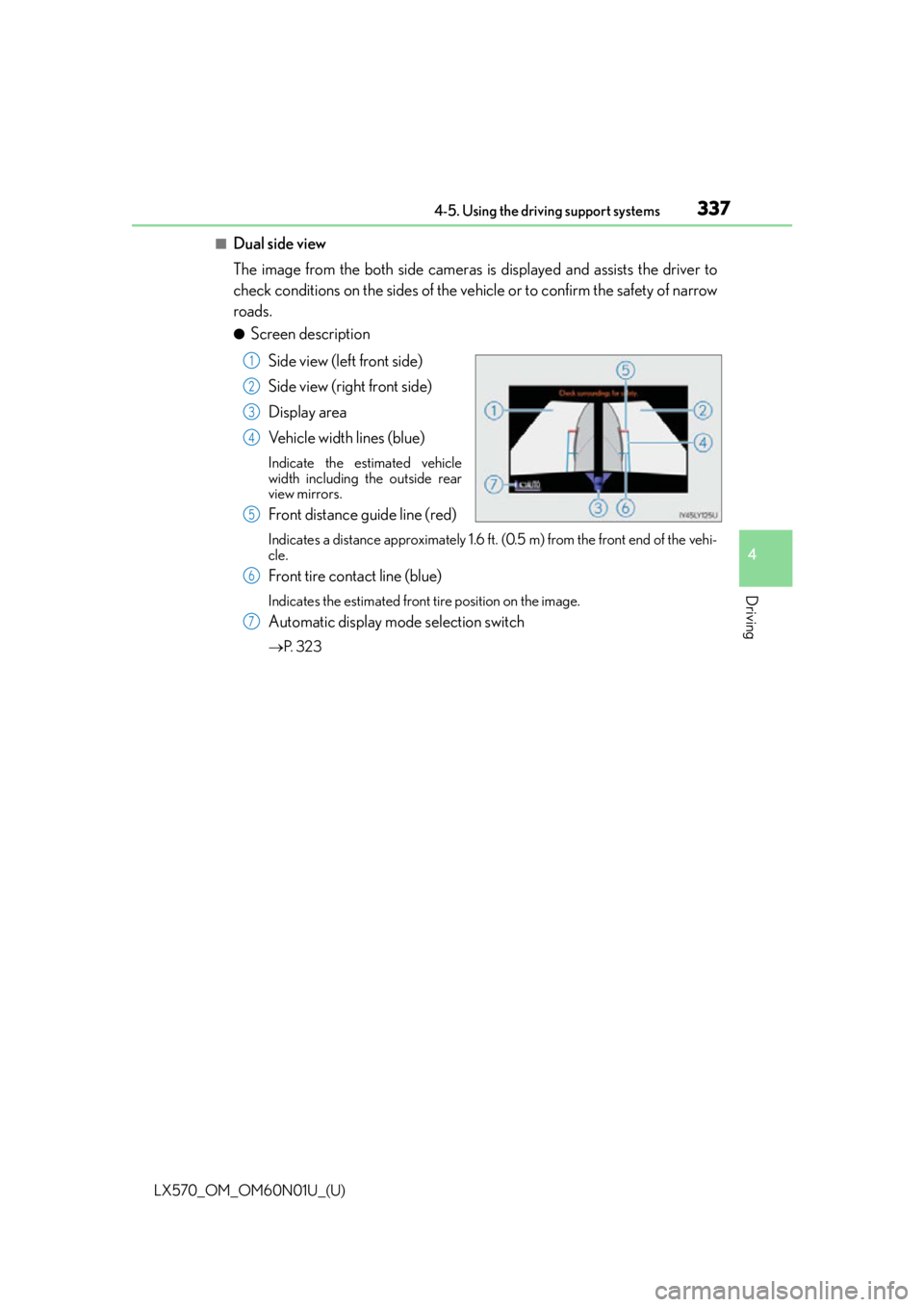
■Dual side view
The image from the both side cameras is displayed and assists the driver to
check conditions on the sides of the vehicle or to confirm the safety of narrow
roads.
●Screen description
Side view (left front side)
Side view (right front side)
Display area
Vehicle width lines (blue)
Indicate the estimated vehicle
width including the outside rear
view mirrors.
Front distance guide line (red)
Indicates a distance approximately 1.6 ft. (0.5 m) from the front end of the vehi-
cle.
Front tire contact line (blue)
Indicates the estimated front tire position on the image.
Automatic display mode selection switch
P. 3 2 3
1
2
3
4
5
6
7
Page 339 of 632

LX570_OM_OM60N01U_(U)
3394-5. Using the driving support systems
4
Driving
■Dual side view
●The screen can be displayed when the shift lever is in P, D or N.
●When the outside rear view mirrors are retracted, the displayed area changes (the area
on the screen that is not masked in black). (P. 3 4 6 )
WA R N I N G
■Guide lines
The tire position indicator lines and vehicle position indicator lines may differ from
actual vehicle positions depending on the number of passengers, cargo weight, road
grade, road surface conditions, brightness of the surrounding environment, etc. Always
drive the vehicle while confirming the safety of your surroundings.
Page 340 of 632

340
LX570_OM_OM60N01U_(U)4-5. Using the driving support systems
■Panoramic view & rear view/wide rear view
• Panoramic view & rear view:
The image looking down at the vehicle from above and the image from the
rear camera are displayed simultaneously and assist the driver to check the
safety of the area when parking.
• Wide rear view:
The image from the rear camera is displayed in a range of approximately
180 and assists the driver to check the safety of the area when backing up.
●Screen description
Guide line selection switch
P. 3 3 6
Angle mode selection switch
Switches between the panoramic view & rear view and wide rear view display each
time the switch is selected.
Panoramic view & rear view
Rear view
Switches the screen to wide rear vi ew display when you touch the display.
Wide rear view
Switches the screen to the panoramic & rear view display when the display is touched.
Panoramic view & rear viewWide rear view
1
2
3
4
5
Page 341 of 632

LX570_OM_OM60N01U_(U)
3414-5. Using the driving support systems
4
Driving
●Switching modes
The display mode switches and the icon display changes each time the
guide line display selection switch is selected.• Projected course line display mode: Projected course lines that change according to steering wheel opera-
tions are displayed.
• Parking assist guide line display mode: Inverted steering wheel operations (p arking assist guide line) are dis-
played. Use this mode if you are used to how the vehicle handles (if you
can park without needing the course line display).
• Distance guide line display mode: Only distance guide lines are displa yed. Use this mode when guide lines
are not needed.
●Guide lines
The panoramic view & rear view screen is explained here as an example.
Selected modeProjected course
line display modeParking assist guide line display modeDistance guide line display mode
Icon display
Projected course line display modeParking assist guide line display
mode
Page 345 of 632

LX570_OM_OM60N01U_(U)
3454-5. Using the driving support systems
4
Driving
■Panoramic view & rear view/wide rear view
The screen can be displayed when the shift lever is in R.
■Guide lines
If the back door is not closed, guide lines will not be displaye d. If the guide lines do not
display even when the back door is closed , have the vehicle inspected at your Lexus
dealer.
WA R N I N G
■Guide lines
The tire position indicator lines and vehicle position indicator lines may differ from
actual vehicle positions depending on the number of passengers, cargo weight, road
grade, road surface conditions, brightness of the surrounding environment, etc. Always
drive the vehicle while confirming the safety of your surroundings.
■When using panoramic view & rear view or wide rear view
●If the vehicle width extension guide lines and projected course lines are not aligned
with the steering wheel in the center position , drive straight on a road without as little
traffic and as few bends or curves as poss ible for approximately 5 minutes or more. If
the symptom is not resolved, have the vehicle inspected by your Lexus dealer.
●Rear vehicle width extension guide lines ar e displayed wider than the actual vehicle
width. When backing up, always confirm the safety of your surroundings and the area
to the rear of the vehicle.