alarm LEXUS LX570 2016 User Guide
[x] Cancel search | Manufacturer: LEXUS, Model Year: 2016, Model line: LX570, Model: LEXUS LX570 2016Pages: 632, PDF Size: 8.94 MB
Page 133 of 632

LX570_OM_OM60N01U_(U)
1333-2. Opening, closing and locking the doors
3
Operation of each component
■Effective range (areas within whic h the electronic key is detected)
When starting the engine or changing engine switch modes
The system can be operated when the electronic key is inside the vehicle.
■Alarms and warning indicators
A combination of exterior and interior alarms as well as warning messages shown on the
multi-information display are used to prevent theft of the vehicle and accidents resulting
from erroneous operation. Take appropriate measures in response to any warning mes-
sage on the multi-information display.
The following table describes circumstance s and correction procedures when only
alarms are sounded. When locking or unlocking the doors
The system can be operated when the elec-
tronic key is within about 2.3 ft. (0.7 m) of
either of the outside front door handle.
(Only the doors detecting the key can be
operated.)
AlarmSituationCorrection procedure
Exterior alarm
sounds once for 5
secondsAn attempt was made to lock the
vehicle while a door is openClose all of the doors and
lock the doors again
Interior alarm pings
continuously
The engine switch was turned to
ACCESSORY mode while the
driver’s door was open (or the
driver’s door was opened while
the engine switch was in ACCES-
SORY mode)
Tu r n t h e e n g i n e s w i t c h o f f
and close the driver’s door
The engine switch was turned off
while the driver’s door was openClose the driver’s door
Page 136 of 632

136
LX570_OM_OM60N01U_(U)3-2. Opening, closing and locking the doors
●If the electronic key is insi
de the vehicle and a door handle becomes wet during a car
wash, a message may be shown on the mult i-information display and a buzzer will
sound outside the vehicle. To turn off the alarm, lock all the doors.
●The lock sensor may not work properly if it comes into contact with ice, snow, mud, etc.
Clean the lock sensor and attempt to operate it again, or use the lock sensor on the
lower part of the door handle.
●If there is another electronic key in the detection area, it may take slightly longer to
unlock the doors after the d oor handle is gripped or back door unlock switch is
pressed.
●A sudden approach to the effective range or door handle may prevent the doors from
being unlocked. In this case, return the door handle to the original position and check
that the doors unlock before pulling the door handle again.
■When the vehicle is not driven for extended periods
●To prevent theft of the vehicle, do not leave the electronic key within 6 ft. (2 m) of the
vehicle.
●The smart access system with push-button start can be deactivated in advance.
( P. 5 8 5 )
■To operate the system properly
Make sure to carry the electronic key when operating the system. Do not get the elec-
tronic key too close to the vehicle when op erating the system from the outside of the
vehicle.
Depending on the position and holding condition of the electronic key, the key may not
be detected correctly and the system may not operate properly. (The alarm may go off
accidentally, or the door lock prev ention function may not operate.)
■If the smart access system with push-button start does not operate properly
●Locking and unlocking the doors: Use the mechanical key. (P. 5 5 0 )
●Starting the engine: P. 551
■Customization
Settings (e. g. smart access system with push-button start) can be changed.
(Customizable features: P. 585)
Page 149 of 632

LX570_OM_OM60N01U_(U)
1493-3. Adjusting the seats
3
Operation of each component
■Alarms and indicators
The following table describes circumstances and correction procedures when only
alarms are sound.
*: A warning will be shown on the multi-inform ation display in the instrument cluster.
Indicator light and buzzer Situation Correction procedure
Buzzer sounds for 10 sec-
onds Indicator light on
*
Shift lever is not in the P
position with the engine
switch in IGNITION ON
mode.
Stop the switch operation
during the automatic third
seat is in motion. Move the shift lever in the
P position with the engine
switch in IGNITION ON
mode.
Return the third seat from a
halfway position to tum-
bling position or the origi-
nal position with the third
seat return switch or third
seat tumbling switch.
Indicator light flashes*The seat movement is
stopped in a half way when
the back door is opened.
Buzzer sounds for 10 sec-
onds Indicator light
flashes
*
Automatic tumbling or
return operation is
stopped because of a sys-
tem problem.
Have the system checked
by your Lexus dealer.
The seat is not moved to
the table mode from the
original position after 10
seconds the tumbling
switch is pressed. Check something is
caught between the seat
cushion and seatback. If
nothing is caught, have the
system checked by your
Lexus dealer.
Buzzer sounds for 10 sec-
onds Indicator light blinks
slowly
*
Automatic closing opera-
tion is stopped because of
a system problem. Have the system checked
by your Lexus dealer.
Indicator light flashes
Any of the tumbling or
return switch is pushed
when shift lever is not in the
P position with the engine
switch in IGNITION ON
mode.
Move the shift lever in the
P position with the engine
switch in IGNITION ON
mode.
Indicator light flashes 3
times
Table mode switch is
pushed when shift lever is
not in the P position with
the engine switch in IGNI-
TION ON mode.
Page 459 of 632
LX570_OM_OM60N01U_(U)
4596-1. Maintenance and care
6
Maintenance and care
■Notes for a smart access system with push-button start
●If the door handle becomes wet while the electronic key is within the effective range,
the door may lock and unlock repeatedly. Place the key in a position 6 ft. (2 m) or more
separate from the vehicle while the vehicle is being washed. (Take care to ensure that
the key is not stolen.)
●If the electronic key is insi de the vehicle and a door handle becomes wet during a car
wash, a message may be shown on the mult i-information display and a buzzer will
sound outside the vehicle. To turn off the alarm, lock all the doors.
WA R N I N G
■When washing the vehicle
Do not apply water to the inside of the en gine compartment. Doing so may cause the
electrical components etc. to catch fire.
■When cleaning the windshield
●When the upper part of the windshield where the raindrop sensor is located is
touched by hand
●When a wet rag or similar is held close to the raindrop sensor
●If something bumps against the windshield
●If you directly touch the raindrop sensor body or if something bumps into the raindrop
sensor
■Precautions regarding the exhaust pipe
Exhaust gasses cause the exhaust pipe to become quite hot.
When washing the vehicle, be careful not to touch the pipe until it has cooled suffi-
ciently, as touching a hot exhaust pipe can cause burns.
■Precautions regarding the Blin d Spot Monitor (if equipped)
If the paint of the rear bumper is chipped or scratched, the system may malfunction.
If this occurs, consult your Lexus dealer.
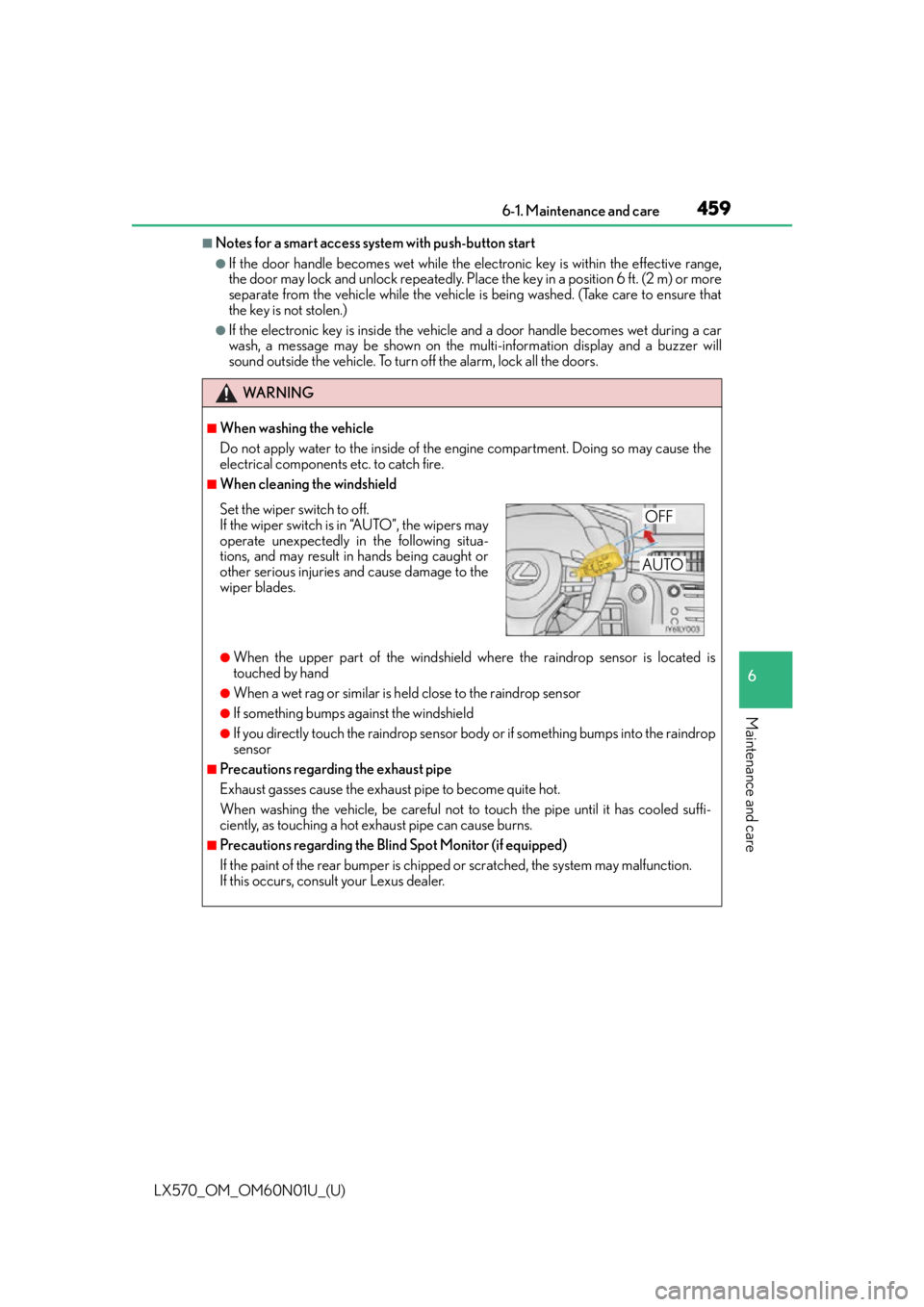
Set the wiper switch to off.
If the wiper switch is in “A U T O ” , t h e w i p e r s m a y
operate unexpectedly in the following situa-
tions, and may result in hands being caught or
other serious injuries and cause damage to the
wiper blades.OFF
AUTO
Page 551 of 632
5517-2. Steps to take in an emergency
LX570_OM_OM60N01U_(U)
7
When trouble arises
Ensure that the shift lever is in P and depress the brake pedal.
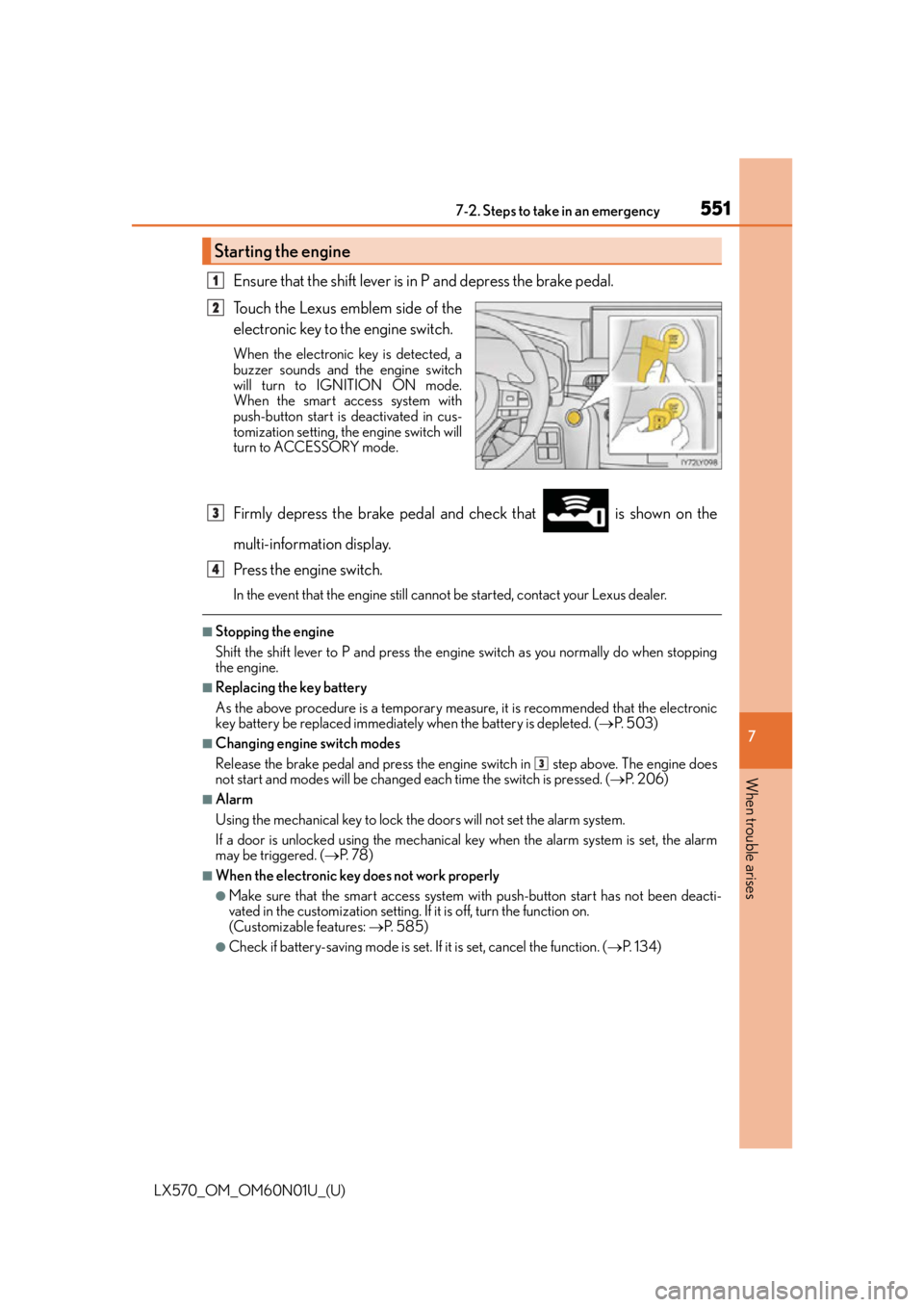
Touch the Lexus emblem side of the
electronic key to the engine switch.
When the electronic key is detected, a
buzzer sounds and the engine switch
will turn to IGNITION ON mode.
When the smart access system with
push-button start is deactivated in cus-
tomization setting, the engine switch will
turn to ACCESSORY mode.
Firmly depress the brake pedal and check that is shown on the
multi-information display.
Press the engine switch.
In the event that the engine still cannot be started, contact your Lexus dealer.
■Stopping the engine
Shift the shift lever to P and press the engine switch as you normally do when stopping
the engine.
■Replacing the key battery
As the above procedure is a temporary measure, it is recommended that the electronic
key battery be replaced immediately when the battery is depleted. ( P. 5 0 3 )
■Changing engine switch modes
Release the brake pedal and press the engine switch in step above. The engine does
not start and modes will be changed each time the switch is pressed. ( P. 2 0 6 )
■Alarm
Using the mechanical key to lock the doors will not set the alarm system.
If a door is unlocked using the mechanical key when the alarm system is set, the alarm
may be triggered. ( P. 7 8 )
■When the electronic key does not work properly
●Make sure that the smart access system wi th push-button start has not been deacti-
vated in the custom ization setting. If it is off, turn the function on.
(Customizable features: P. 585)
●Check if battery-saving mo de is set. If it is set, cancel the function. ( P. 1 3 4 )
Starting the engine
1
2
3
4
3
Page 553 of 632
553
LX570_OM_OM60N01U_(U)
7
When trouble arises
7-2. Steps to take in an emergency
If the vehicle battery is discharged
If you have a set of jumper (or booster) cables and a second vehicle with a 12-volt
battery, you can jump start your Lexus following the steps below.
Confirm that the electronic key is
being carried.
When connecting the jumper (or
booster) cables, depending on the
situation, the alarm may activate and
doors locked. ( P. 8 0 )
Open the hood. Remove the engine compartment cover. ( P. 4 74 )
Connect the jumper cables.
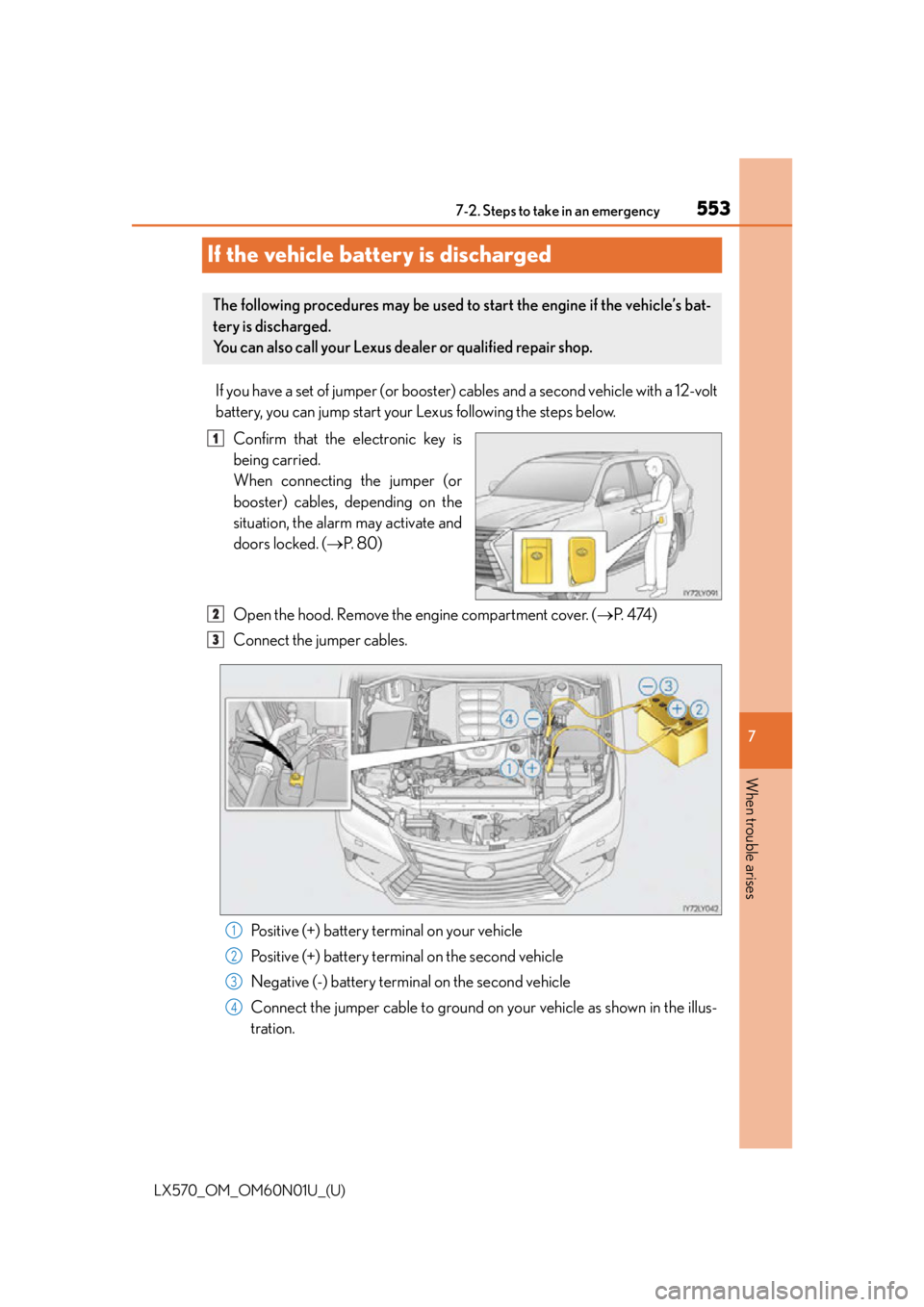
Positive (+) battery terminal on your vehicle
Positive (+) battery terminal on the second vehicle
Negative (-) battery terminal on the second vehicle
Connect the jumper cable to ground on your vehicle as shown in the illus-
tration.
The following procedures may be used to start the engine if the vehicle’s bat-
tery is discharged.
You can also call your Lexus dealer or qualified repair shop.
1
2
3
1
2
3
4
Page 586 of 632
586
LX570_OM_OM60N01U_(U)8-2. Customization
Some function settings are changed simultaneously with other functions being
customized. Contact your Lexus dealer for further details.
Settings that can be changed using the Remote Touch screen
Settings that can be changed us ing the multi-information display
Settings that can be changed by your Lexus dealer
Definition of symbols: O = Available, – =Not available
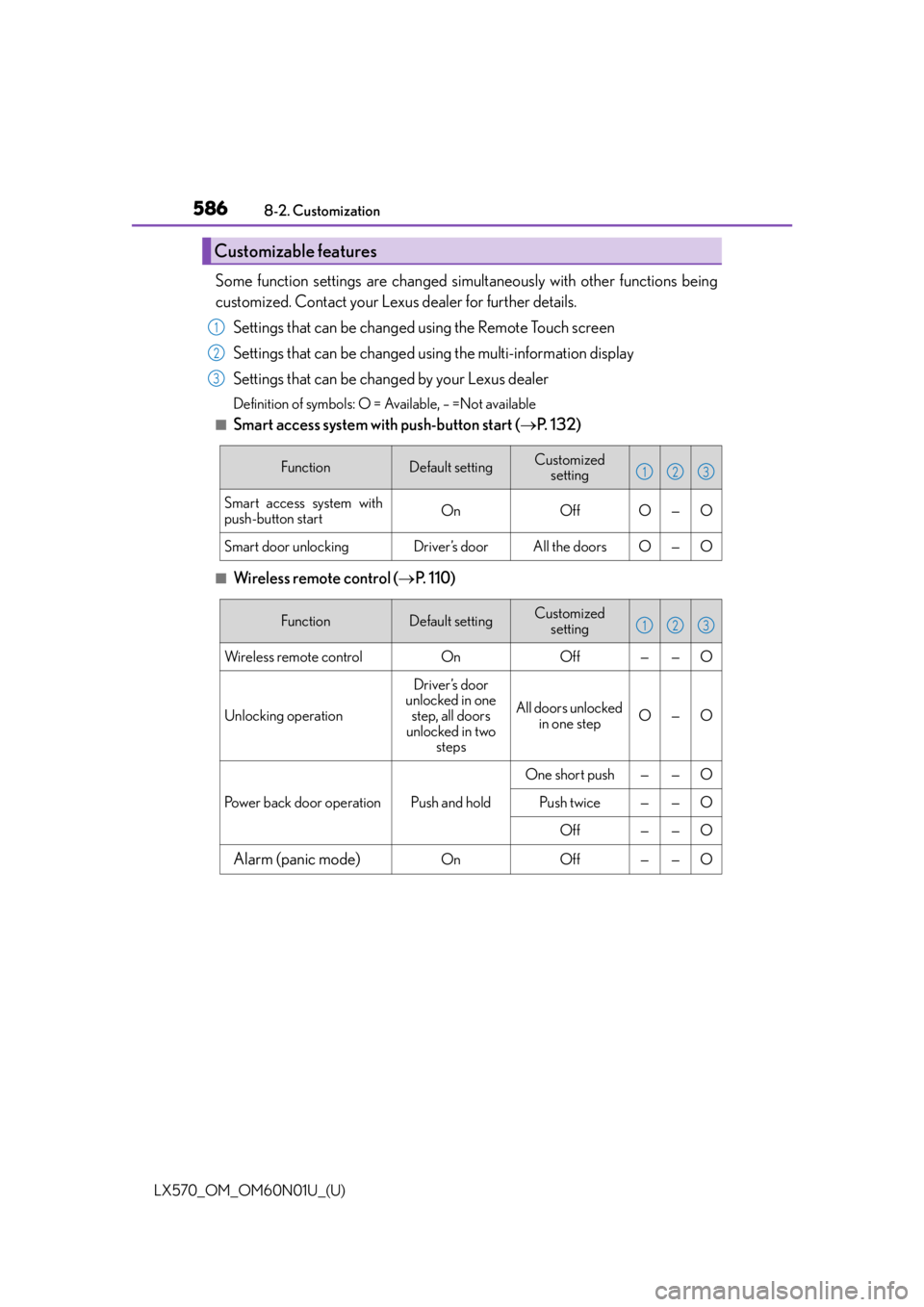
■Smart access system with push-button start ( P. 1 3 2 )
■Wireless remote control ( P. 1 1 0 )
Customizable features
1
2
3
FunctionDefault settingCustomized
setting
Smart access system with
push-button startOnOffO—O
Smart door unlockingDriver’s doorAll the doorsO—O
123
FunctionDefault settingCustomized setting
Wireless remote controlOnOff——O
Unlocking operation
Driver’s door
unlocked in one
step, all doors
unlocked in two steps
All doors unlocked in one stepO—O
Power back door operationPush and hold
One short push——O
Push twice——O
Off——O
Alarm (panic mode)OnOff——O
123
Page 614 of 632
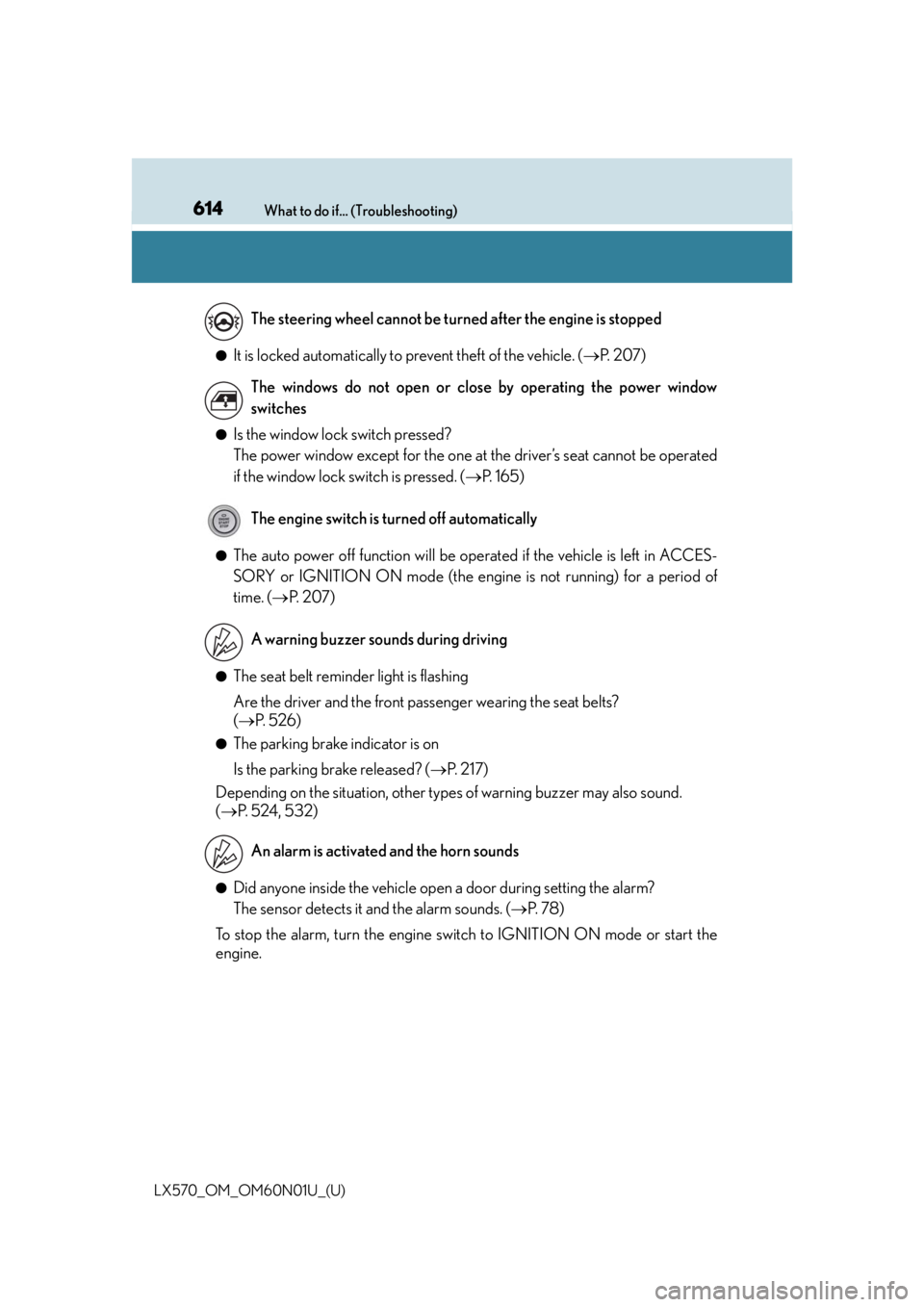
614What to do if... (Troubleshooting)
LX570_OM_OM60N01U_(U)
●It is locked automatically to prevent theft of the vehicle. ( P. 2 0 7 )
●Is the window lock switch pressed?
The power window except for the one at the driver’s seat cannot be operated
if the window lock switch is pressed. ( P. 1 6 5 )
●The auto power off function will be oper ated if the vehicle is left in ACCES-
SORY or IGNITION ON mode (the engine is not running) for a period of
time. ( P. 2 0 7 )
●The seat belt reminder light is flashing
Are the driver and the front passenger wearing the seat belts?
( P. 5 2 6 )
●The parking brake indicator is on
Is the parking brake released? ( P. 2 1 7 )
Depending on the situation, other type s of warning buzzer may also sound.
( P. 5 2 4 , 5 3 2 )
●Did anyone inside the vehicle open a door during setting the alarm?
The sensor detects it and the alarm sounds. ( P. 7 8 )
To stop the alarm, turn the engine switch to IGNITION ON mode or start the
engine. The steering wheel cannot be turned after the engine is stopped
The windows do not open or close by operating the power window
switches
The engine switch is turned off automatically
A warning buzzer sounds during driving
An alarm is activated and the horn sounds
Page 616 of 632

616Alphabetical index
LX570_OM_OM60N01U_(U)
Alphabetical index
A/C ....................................................401, 412Air conditioning filter......................... 501
Changing the rear seat settings ................................................ 406
Front automatic air conditioning system ....................... 401
Micro dust and pollen filter ...........407
Rear air conditioning system..........412
ABS (Anti-lock Brake System)....... 379 Function ..................................................379
Warning light .......................................524
Active head restraint............................ 140
Active Height Control Suspension........................................... 297
Active TRAC.......................................... 379
Air cleaner................................................. 471
Air conditioning filter ........................... 501
Air conditioning system .............401, 412 Air conditioning filter......................... 501
Changing the rear seat settings ................................................ 406
Front automatic air conditioning system ....................... 401
Micro dust and pollen filter ...........407
Rear air conditioning system..........412 Airbags ........................................................ 38
Airbag operating conditions .......... 46
Airbag precautions for your child............................................................ 41
Airbag warning light ........................ 524
Correct driving posture .................... 28
Curtain shield airbag operating conditions ....................... 46
Curtain shield airbag precautions .......................................... 44
Front passenger occupant classification system........................... 51
General airbag precautions ............. 41
Locations of airbags............................ 38
Modification and disposal of airbags............................................... 45
“RSCA OFF” switch ........................... 50
Side airbag operating conditions ............................................. 46
Side airbag precautions .................... 44
Side and curtain shield airbags operating conditions ...... 46
Side and curtain shield airbags precautions ......................... 44
SRS airbag instructions for Canadian owners ..........................603
SRS airbags ............................................. 38
Alarm ............................................................78 Alarm .......................................................... 78
Warning buzzer................................. 524
Anchor brackets.......................................63
Antenna Smart access system with push-button start .............................. 132
A
Page 629 of 632

629Alphabetical index
LX570_OM_OM60N01U_(U)
Rear window wiper and washer switch...................................235
Rear window and outside rear view mirror defoggers
switch....................................................407
Seat heater switches...........................417
Seat ventilator switches ....................417
“SOS” button......................................... 451
Talk switch
*
Telephone switches*
Tilt and telescopic steering control switch .................................... 158
Tire pressure warning reset switch................................................... 488
Vehicle-to-vehicle distance button ................................................... 277
VSC OFF switch .............................. 380
Window lock switch.......................... 165
Windshield wipers and washer switch.....................................231
Wireless charger power supply switch ....................................436
Tachometer ............................................... 88
Tail lights................................................... 220 Light switch ...........................................220
Replacing light bulbs ......................... 510
Talk switch
*
Telephone switch*
Theft deterrent system Alarm........................................................... 78
Immobilizer system .............................. 76 Tire inflation pressure......................... 569
Maintenance data..............................569
Warning light ....................................... 526
Tire information .....................................574 Glossary................................................ 580
Size ........................................................... 576
Tire identification number ............. 575
Uniform Tire Quality Grading.... 578
Tire pressure warning system ..........487 Function .................................................. 487
Initializing ............................................... 487
Installing tire pressure warning valves and transmitters................ 487
Registering ID codes ...................... 488
Tire pressure warning reset switch .................................................. 488
Warning light ....................................... 526
Tires ........................................................... 486 Chains .....................................................385
Checking ...............................................486
If you have a flat tire ..........................536
Inflation pressure................................ 495
Replacing ............................................... 536
Rotating tires ........................................486
Size ...........................................................569
Snow tires .............................................. 384
Spare tire................................... 536, 569
Tire pressure warning system ..... 487
Warning light ....................................... 526
Tools .......................................................... 536
Total load capacity............................... 562
T
*: Refer to the “NAVIGATION SYSTEM OWNER’S MANUAL”.