door lock LEXUS LX570 2016 User Guide
[x] Cancel search | Manufacturer: LEXUS, Model Year: 2016, Model line: LX570, Model: LEXUS LX570 2016Pages: 632, PDF Size: 8.94 MB
Page 83 of 632

LX570_OM_OM60N01U_(U)
832. Instrument cluster
2
Instrument cluster
Warning lights inform the driver of malfunctions in any of the vehicle’s systems.
Warning lights
*1
(U.S.A.)
Brake system warning light
( P. 5 2 4 )*1Automatic headlight
leveling system warning
light ( P. 5 2 5 )
*1
(Canada)
Brake system warning light
( P. 5 2 4 )*2Low speed four-wheel
drive indicator light
( P. 5 2 6 )
*1Charging system warning
light ( P. 5 2 4 )*2Center differential lock
indicator light ( P. 5 2 6 )
*1
(U.S.A.)
Malfunction indicator lamp
( P. 5 2 4 ) Open door warning light
(
P. 5 2 6 )
*1
(Canada)
Malfunction indicator lamp
( P. 5 2 4 ) Low fuel level warning light
(
P. 5 2 6 )
*1SRS warning light
( P. 5 2 4 ) Driver’s seat belt reminder
light (
P. 5 2 6 )
*1
(U.S.A.)
ABS warning light
( P. 5 2 4 )*3Front passenger’s seat belt
reminder light ( P. 5 2 6 )
*1
(Canada)
ABS warning light
( P. 5 2 4 )*1Master warning light
( P. 5 2 6 )
*1, 2
(if equipped)
PCS warning light
( P. 5 2 5 )*1Tire pressure warning light
( P. 5 2 6 )
*1Slip indicator light
( P. 5 2 5 )*2
(U.S.A.)
Parking brake indicator
( P. 5 2 6 )
Page 109 of 632

109
LX570_OM_OM60N01U_(U)
3
Operation of
each component
3-1. Key information
Keys ....................................................110
3-2. Opening, closing and locking the doors
Side doors ........................................ 115
Back door........................................122
Smart access system with push-button start...................... 132
3-3. Adjusting the seats Front seats ...................................... 140
Rear seats ........................................142
Driving position memory ........... 151
Head restraints ............................ 155
3-4. Adjusting the steering wheel and mirrors
Steering wheel ............................. 158
Inside rear view mirror.............. 160
Outside rear view mirrors ........162
3-5. Opening, closing the windows and moon roof
Power windows ............................ 165
Moon roof ...................................... 168
Page 110 of 632

110
LX570_OM_OM60N01U_(U)3-1. Key information
Keys
The following keys are provided with the vehicle.
Electronic keys
• Operating the smart access systemwith push-button start ( P. 1 3 2 )
• Operating the wireless remote con-
trol function
Mechanical keys
Key number plate
Card key (electronic key)
Operating the smart access system with
push-button start ( P. 1 3 2 )
Locks the doors ( P. 1 1 5 )
Unlocks the doors ( P. 115)
Opens the windows and moon roof
*
( P. 1 1 5 )
Opens/closes the power back door
( P. 1 2 2 )
Sounds the alarm ( P. 111)
*: This setting must be customized at your Lexus dealer.
The keys
1
2
3
4
Wireless remote control
1
2
3
4
5
Page 115 of 632
115
LX570_OM_OM60N01U_(U)3-2. Opening, closing
and locking the doors
3
Operation of each component
Side doors
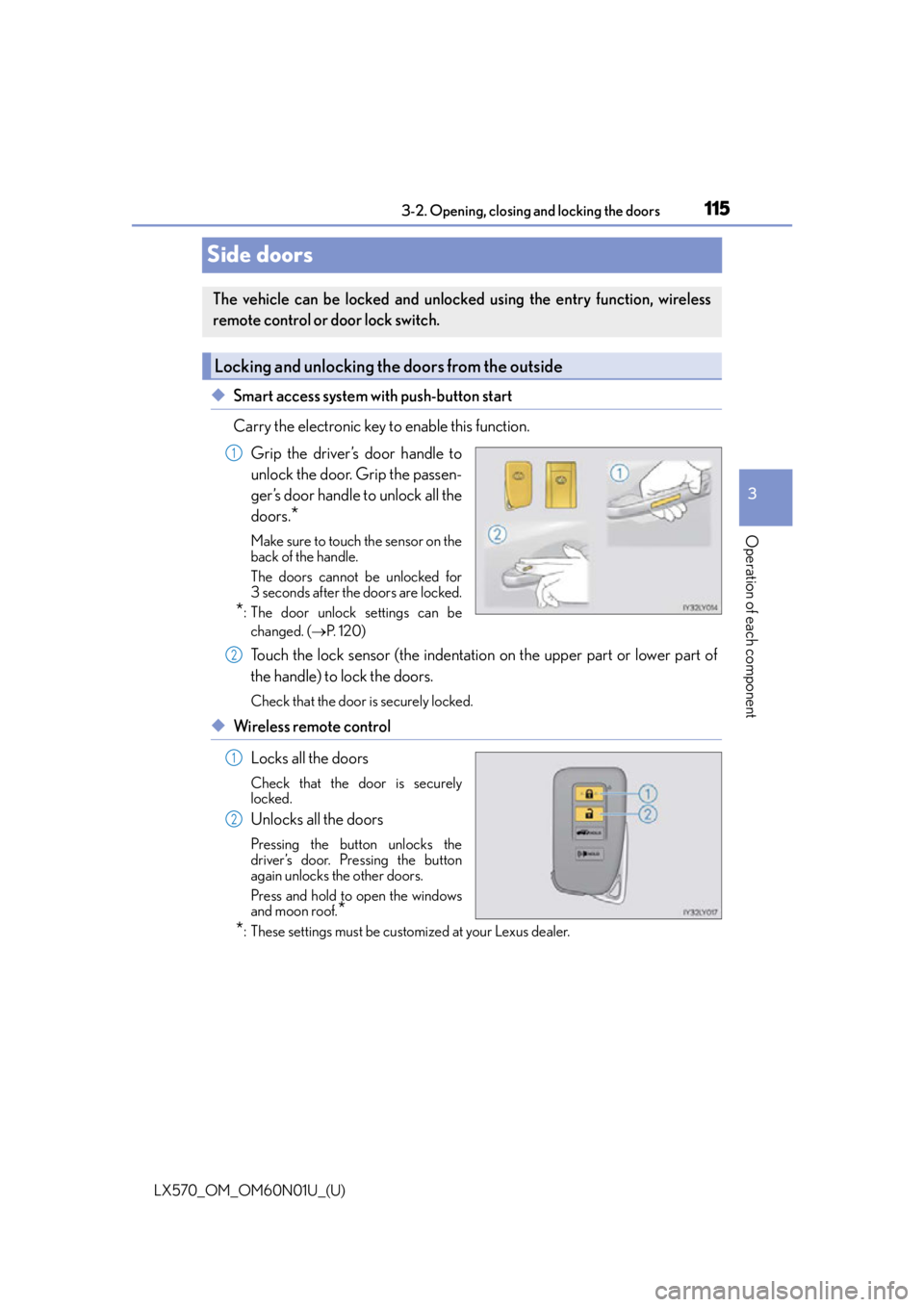
◆Smart access system with push-button start
Carry the electronic key to enable this function.
Grip the driver’s door handle to
unlock the door. Grip the passen-
ger’s door handle to unlock all the
doors.
*
Make sure to touch the sensor on the
back of the handle.
The doors cannot be unlocked for
3 seconds after the doors are locked.
*: The door unlock settings can bechanged. ( P. 1 2 0 )
Touch the lock sensor (the indentatio n on the upper part or lower part of
the handle) to lock the doors.
Check that the door is securely locked.
◆Wireless remote control
Locks all the doors
Check that the door is securely
locked.
Unlocks all the doors
Pressing the button unlocks the
driver’s door. Pressing the button
again unlocks the other doors.
Press and hold to open the windows
and moon roof.
*
*
: These settings must be cust omized at your Lexus dealer.
The vehicle can be locked and unlock ed using the entry function, wireless
remote control or door lock switch.
Locking and unlocking the doors from the outside
1
2
1
2
Page 116 of 632

116
LX570_OM_OM60N01U_(U)3-2. Opening, closing and locking the doors
■Operation signals
Doors: A buzzer sounds and the emergency flas
hers flash to indicate that the doors have
been locked/unlocked. (Locked: once; Unlocked: twice)
Windows and moon roof: A buzzer sounds to indicate that the windows and moon roof
are operating.
■Security feature
If a door is not opened within approximately 60 seconds after the vehicle is unlocked, the
security feature automatically locks the vehicle again.
■When the door cannot be locked by the lock sensor on the upper part of the door han-
dle
■Door lock buzzer
If an attempt to lock the doors is made when a door is not fully closed, a buzzer sounds
continuously. Fully close the door to stop the buzzer, and lock the vehicle once more.
■Setting the alarm
Using the wireless remote control to lock the door will set the alarm system. ( P. 7 8 )
■If the smart access system with push-butto n start or the wireless remote control does
not operate properly
●Use the mechanical key to lock and unlock the doors. ( P. 5 5 0 )
●Replace the battery with a new one if it is depleted. ( P. 5 0 3 )
If the door will not lock even when the topside
sensor area is touched, try touching both the
topside and underside sensor areas at the same
time.
Page 117 of 632
LX570_OM_OM60N01U_(U)
1173-2. Opening, closing and locking the doors
3
Operation of each component
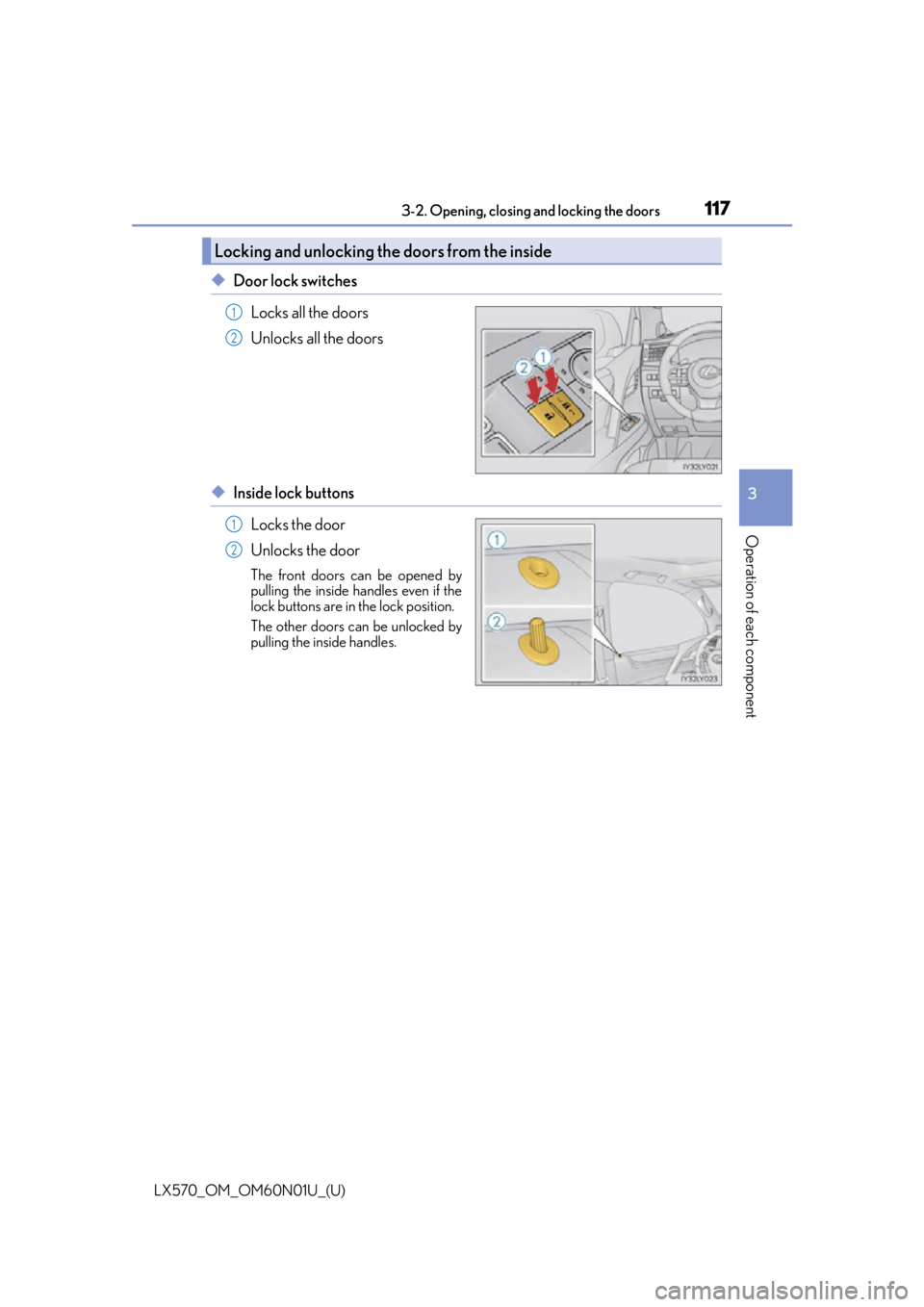
◆Door lock switches
Locks all the doors
Unlocks all the doors
◆Inside lock buttonsLocks the door
Unlocks the door
The front doors can be opened by
pulling the inside handles even if the
lock buttons are in the lock position.
The other doors can be unlocked by
pulling the inside handles.
Locking and unlocking the doors from the inside
1
2
1
2
Page 118 of 632
118
LX570_OM_OM60N01U_(U)3-2. Opening, closing and locking the doors
Move the inside lock button to the lock position.
Close the door.
The door cannot be locked if the engi ne switch is in ACCESSORY or IGNI-
TION ON mode, or the electronic key is left inside the vehicle.
Depending on the position of the electronic key, the key may not be detected cor-
rectly and the door may be locked.
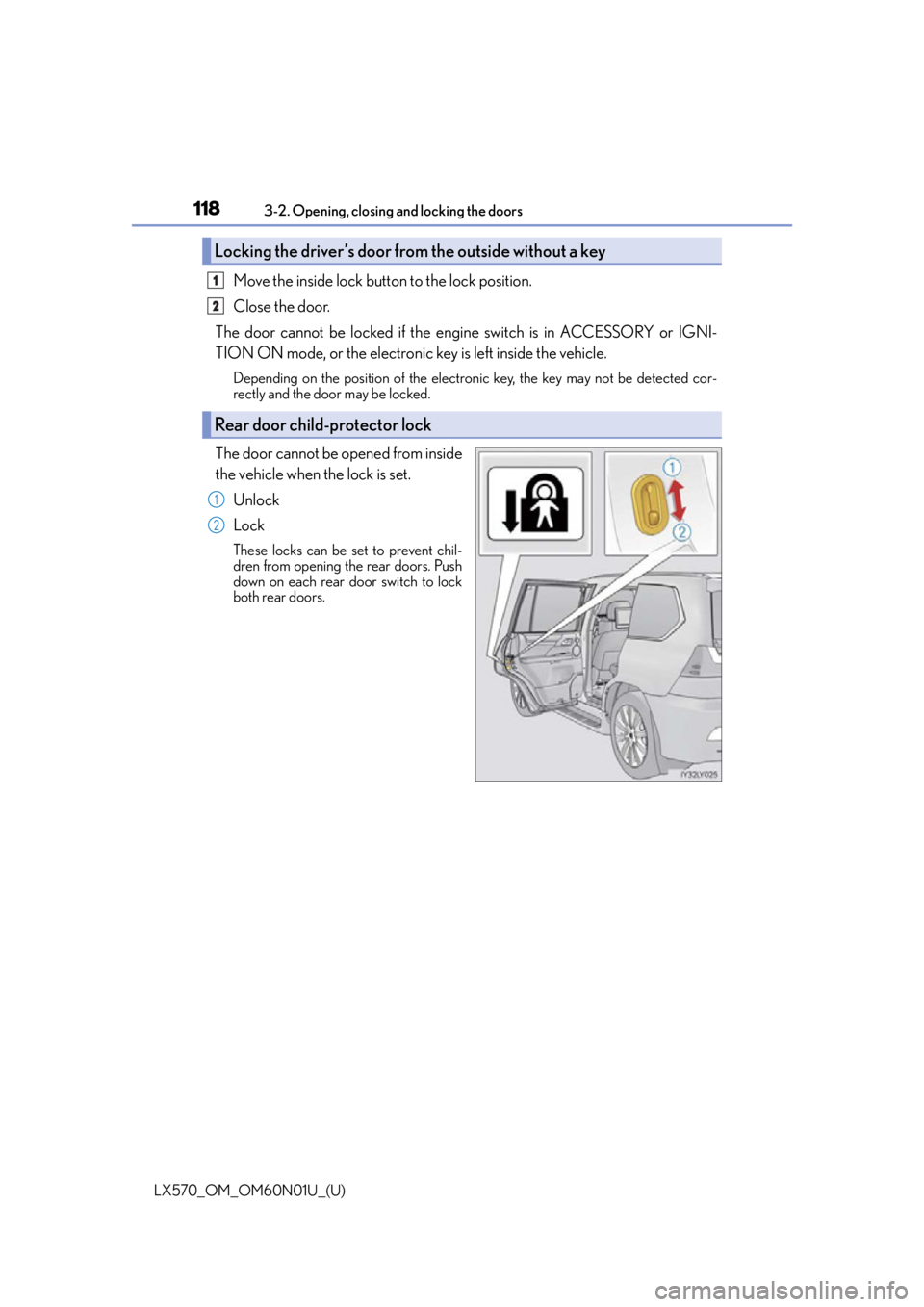
The door cannot be opened from inside
the vehicle when the lock is set.
Unlock
Lock
These locks can be set to prevent chil-
dren from opening the rear doors. Push
down on each rear door switch to lock
both rear doors.
Locking the driver’s door from the outside without a key
Rear door child-protector lock
1
2
1
2
Page 119 of 632
LX570_OM_OM60N01U_(U)
1193-2. Opening, closing and locking the doors
3
Operation of each component
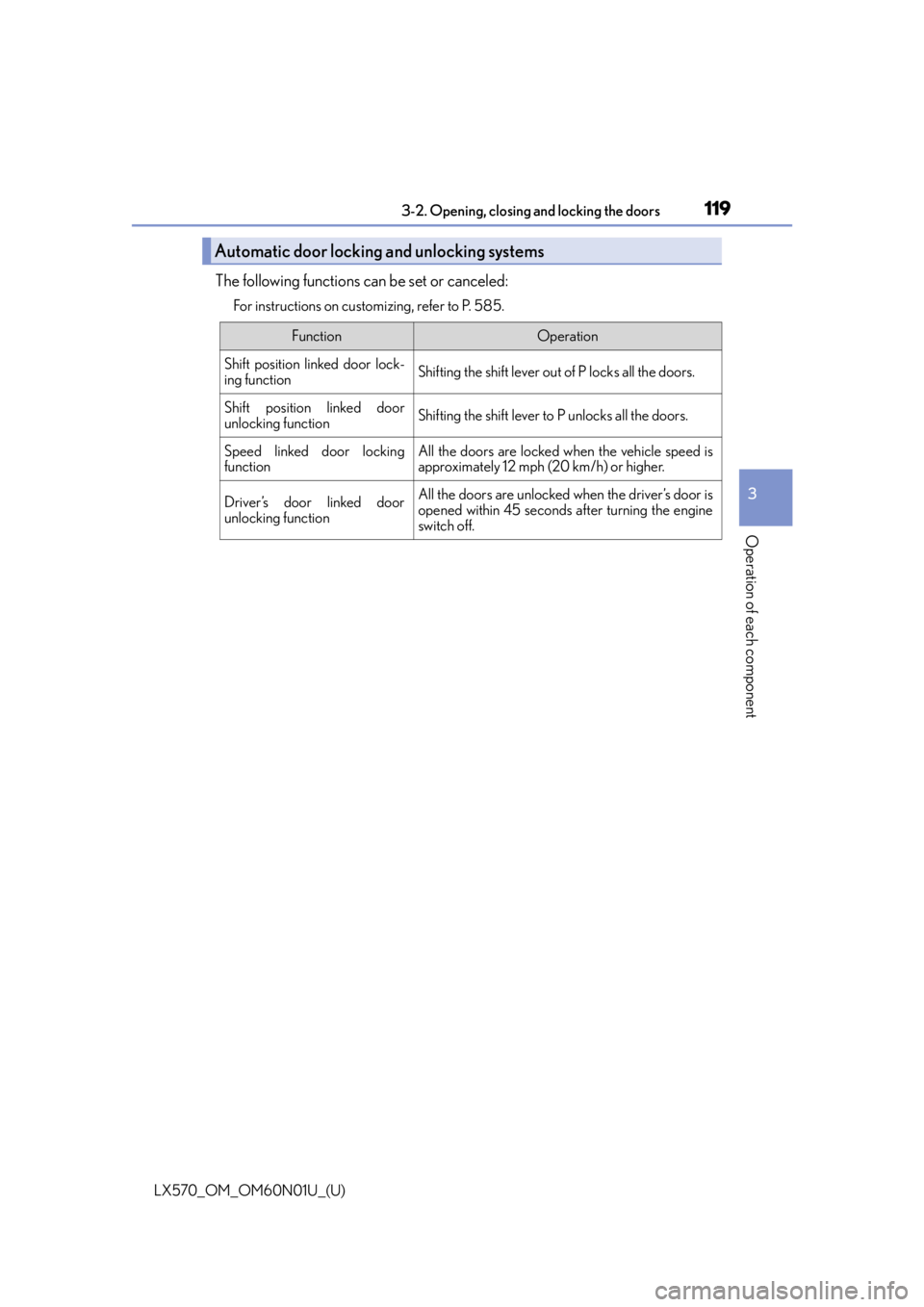
The following functions can be set or canceled:
For instructions on customizing, refer to P. 585.
Automatic door locking and unlocking systems
FunctionOperation
Shift position linked door lock-
ing functionShifting the shift lever out of P locks all the doors.
Shift position linked door
unlocking functionShifting the shift lever to P unlocks all the doors.
Speed linked door locking
functionAll the doors are locked when the vehicle speed is
approximately 12 mph (20 km/h) or higher.
Driver’s door linked door
unlocking functionAll the doors are unlocked when the driver’s door is
opened within 45 seconds after turning the engine
switch off.
Page 120 of 632

120
LX570_OM_OM60N01U_(U)3-2. Opening, closing and locking the doors
■Changing the door unlock function setting
It is possible to set which doors the entry fu
nction unlocks using the wireless remote con-
trol.
Turn the engine switch off.
When the indicator light on the key surface is not on, press and hold for
approximately 5 seconds while pressing and holding .
The setting changes each time an operatio n is performed, as shown below. (When
changing the setting continuously, release the buttons, wait for at least 5 seconds, and
repeat step .)
To prevent unintended triggering of the alarm, unlock the doors using the wireless
remote control and open and close a door once after the settings have been changed. (If
a door is not opened within 60 seconds af ter is pressed, the doors will be locked
again and the alarm will automatically be set.)
In a case that the alarm is triggered, immediately stop the alarm. ( P. 7 8 )
1
2
2
Multi-information
displayUnlocking functionBeep
Holding the driver’s door handle
unlocks only the driver’s door.
Exterior: Beeps 3 times
Interior: Pings once
Holding a passenger’s door han-
dle unlocks all the doors.
Holding a door handle unlocks
all the doors.Exterior: Beeps twice
Interior: Pings once
Page 121 of 632
LX570_OM_OM60N01U_(U)
1213-2. Opening, closing and locking the doors
3
Operation of each component
■Impact detection door lock release system
In the event that the vehicle is subject to a strong impact, all the doors are unlocked.
Depending on the force of the impact or the type of accident, however, the system may
not operate.
■Using the mechanical key
The doors can also be locked and unlocked with the mechanical key. ( P. 5 5 0 )
■Conditions affecting the operation of the sm art access system with push-button start
or wireless remote control
P. 1 3 4
■Customization
Settings (e.g. unlocking function using a key) can be changed.
(Customizable features: P. 585)
WA R N I N G
■To prevent an accident
Observe the following precautions while driving the vehicle.
Failure to do so may result in a door open ing and an occupant being thrown out of the
vehicle, resulting in death or serious injury.
●Ensure that all doors are properly closed and locked.
●Do not pull the inside handle of the doors while driving.
Be especially careful for the front doors, as the doors may be opened even if the
inside lock buttons ar e in locked position.
●Set the rear door child-protector locks when children are seated in the rear seats.