headlights LEXUS LX570 2016 User Guide
[x] Cancel search | Manufacturer: LEXUS, Model Year: 2016, Model line: LX570, Model: LEXUS LX570 2016Pages: 632, PDF Size: 8.94 MB
Page 227 of 632

LX570_OM_OM60N01U_(U)
2274-3. Operating the lights and wipers
4
Driving
■Camera sensor detection information
●The high beam may not be automatically turned off in the following situations:
• When oncoming vehicles sudd enly appear from a curve
• When the vehicle is cut in front of by another vehicle
• When vehicles ahead are hidden from sight due to repeated curves, road dividers or roadside trees
• When vehicles ahead appear from the faraway lane on wide road
• When vehicles ahead have no lights
●The high beam may be turned off if a vehicl e ahead that is using fog lights without using
the headlights is detected.
●House lights, street lights, traffic signals, and illuminated billboards or signs may cause
the high beam to switch to the low be ams, or the low beams to remain on.
●The following factors may affect the amount of time taken to turn the high beam on or
off:
• The brightness of headlights, fog lights, and tail lights of vehicles ahead
• The movement and direction of vehicles ahead
• When a vehicle ahead only has operational lights on one side
• When a vehicle ahead is a two-wheeled vehicle
• The condition of the road (gradient, curve, condition of the road surface etc.)
• The number of passengers and amount of luggage
●The high beam may be turned on or off when the driver does not expect it.
●Bicycles or similar objects may not be detected.
●In the situations shown below, the system may not be able to accurately detect sur-
rounding brightness levels. This may caus e the low beams to remain on or the high
beams to cause problems for pedestrians, vehicles ahead or other parties. In these
cases, manually switch between the high and low beams.
• In bad weather (rain, snow, fog, sandstorms etc.)
• The windshield is obscured by fog, mist, ice, dirt etc.
• The windshield is cracked or damaged.
• The camera sensor is deformed or dirty.
• The camera sensor temperature is extremely high.
• Surrounding brightness levels are equal to those of headlights, tail lights or fog lights.
• Vehicles ahead have headlights that are either switched off, dirty, are changing color, or have are not aimed properly.
• When driving through an area of intermit tently changing brightness and darkness.
• When frequently and repeatedly driving ascending/descending roads, or roads with rough, bumpy or uneven surfaces (such as stone-paved roads, gravel tracks etc.).
• When frequently and repeat edly taking curves or driving on a winding road.
• There is a highly reflective object ahead of the vehicle, such as a sign or a mirror.
• The back of a vehicle ahead is highly reflective, such as a container on a truck.
• The vehicle’s headlights are damaged or dirty.
• The vehicle is listing or tilting, due to a flat tire, a trailer being towed etc.
• The high beam and low beam are repeated ly being switched between in an abnor-
mal manner.
• The driver believes that the high beam may be causing problems or distress to other
drivers or pedestrians nearby.
Page 228 of 632

228
LX570_OM_OM60N01U_(U)4-3. Operating the lights and wipers
■Temporary lowering sensor sensitivity
The sensitivity of the sensor
can be temporarily lowered.
Vehicles without PCS (Pre-Collision System):
To lower the sensitivity, push and hold on th e inside rear view mirror for 15 to 20 sec-
onds, and release. The indicator light on the in side rear view mirror will flash to indicate
that the sensitivity has been lowered.
When the engine switch is turned off, the sens itivity will be returned to its normal level.
Vehicles with PCS (Pre-Collision System):
Turn the engine switch off while the following conditions are met.
• The headlight switch is in .
• The headlight switch lever is in low beam position. Turn the engine switch to IGNITION ON mode.
Within 30 seconds af ter , repeat pushing the headlig ht switch lever to the high
beam position then pulling it to the low be am position quickly 10 times, then leave
the lever in high beam position.
Automatic High Beam (headlights) may turn on even the vehicle is stopped.
1
2
32
Page 230 of 632
230
LX570_OM_OM60N01U_(U)4-3. Operating the lights and wipers
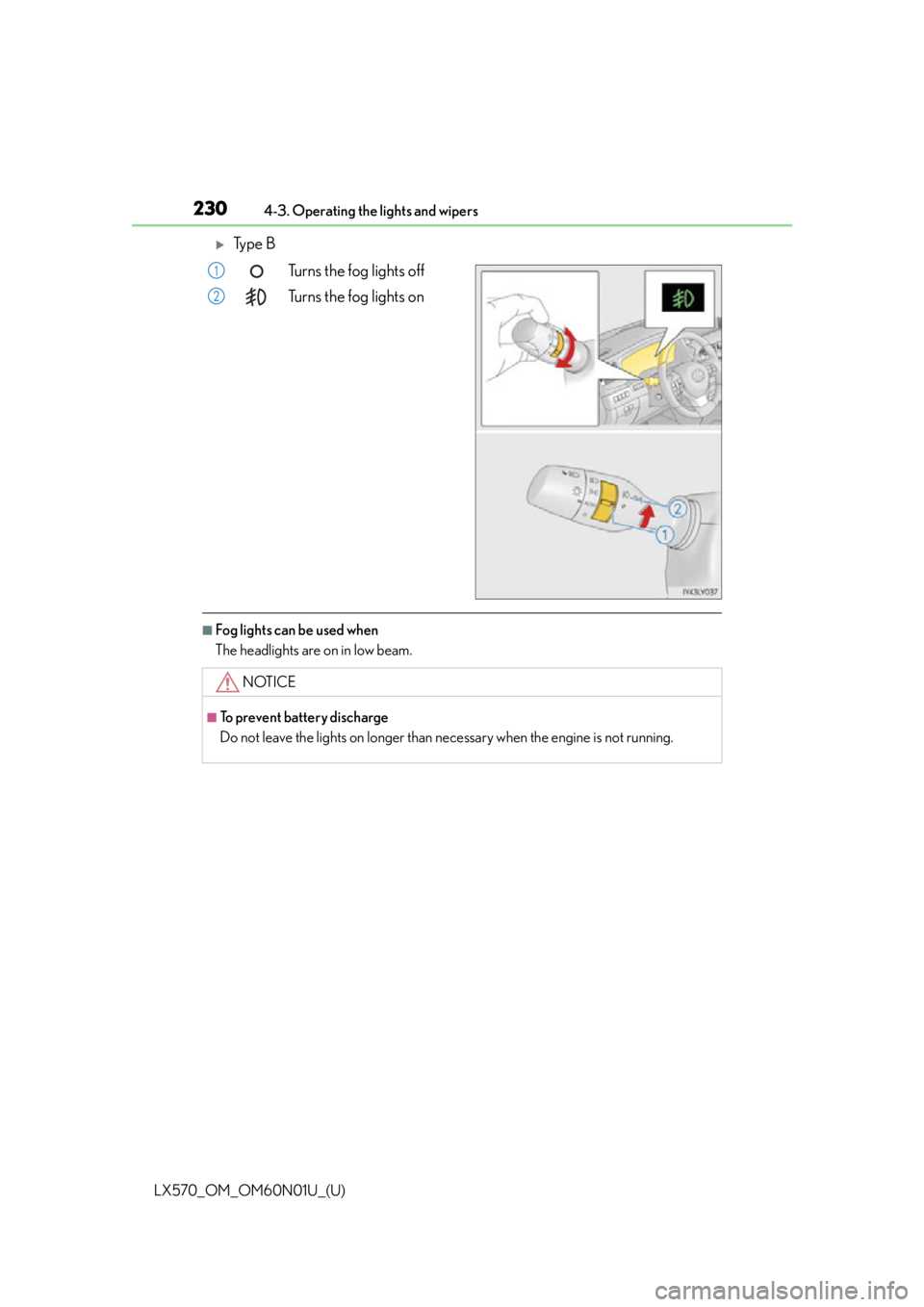
Ty p e B
Turns the fog lights off
Turns the fog lights on
■Fog lights can be used when
The headlights are on in low beam.
1
2
NOTICE
■To prevent battery discharge
Do not leave the lights on longer than ne cessary when the engine is not running.
Page 238 of 632
238
LX570_OM_OM60N01U_(U)4-3. Operating the lights and wipers
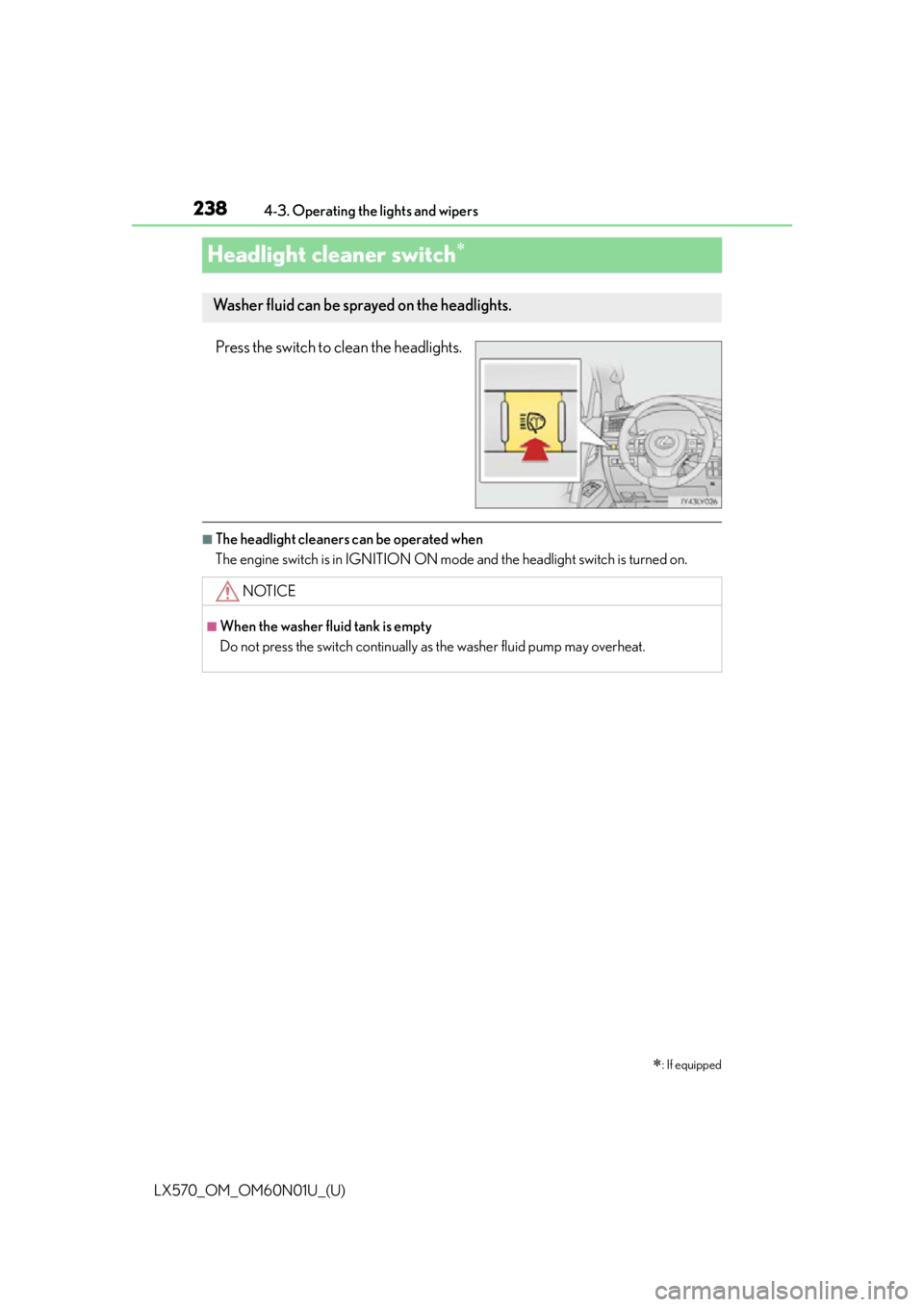
Headlight cleaner switch
Press the switch to clean the headlights.
■The headlight cleaners can be operated when
The engine switch is in IGNITION ON mode
and the headlight switch is turned on.
: If equipped
Washer fluid can be sprayed on the headlights.
NOTICE
■When the washer fluid tank is empty
Do not press the switch continually as the washer fluid pump may overheat.
Page 247 of 632

LX570_OM_OM60N01U_(U)
2474-5. Using the driving support systems
4
Driving
WA R N I N G
●Do not change the installation position or direction of the camera sensor or remove it.
●Do not disassemble the camera sensor.
●Do not install an electronic device or device that emits strong electric waves near the
camera sensor.
●Do not modify any components of the vehicle around the camera sensor (inside rear
view mirror, sun visors, etc.) or ceiling.
●Do not attach any accessories that may obst ruct the camera sensor to the hood, front
grille or front bumper. Contact your Lexus dealer for details.
●If a surfboard or other long object is to be mounted on the roof, make sure that it will
not obstruct the camera sensor.
●Do not modify the headlights or other lights.
Page 260 of 632
260
LX570_OM_OM60N01U_(U)4-5. Using the driving support systems
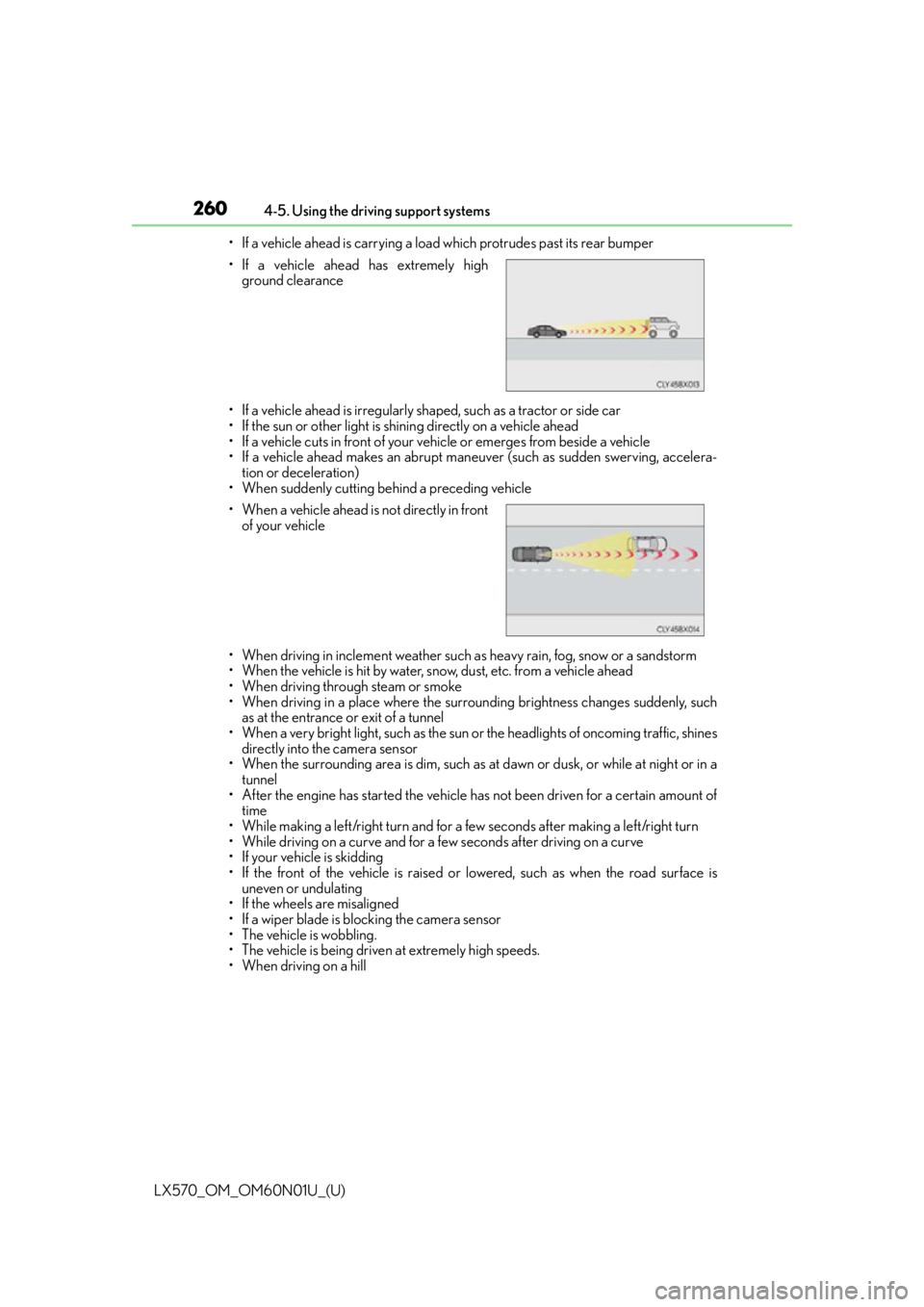
• If a vehicle ahead is carrying a load which protrudes past its rear bumper
• If a vehicle ahead is irregularly shaped, such as a tractor or side car
• If the sun or other light is shin ing directly on a vehicle ahead
• If a vehicle cuts in front of your vehicle or emerges from beside a vehicle
• If a vehicle ahead makes an abrupt maneuver (such as sudden swerving, accelera- tion or deceleration)
• When suddenly cutting behind a preceding vehicle
• When driving in inclement weather such as heavy rain, fog, snow or a sandstorm
• When the vehicle is hit by water, snow, dust, etc. from a vehicle ahead
• When driving through steam or smoke
• When driving in a place where the surrounding brightness changes suddenly, such as at the entrance or exit of a tunnel
• When a very bright light, such as the sun or the headlights of oncoming traffic, shines
directly into the camera sensor
• When the surrounding area is dim, such as at dawn or dusk, or while at night or in a
tunnel
• After the engine has started the vehicle has not been driven for a certain amount of time
• While making a left/right turn and for a few seconds after making a left/right turn
• While driving on a curve and for a few seconds after driving on a curve
• If your vehicle is skidding
• If the front of the vehicle is raised or lowered, such as when the road surface is
uneven or undulating
• If the wheels are misaligned
• If a wiper blade is blocking the camera sensor
• The vehicle is wobbling.
• The vehicle is being driven at extremely high speeds.
• When driving on a hill • If a vehicle ahead has extremely high
ground clearance
• When a vehicle ahead is not directly in front
of your vehicle
Page 265 of 632
LX570_OM_OM60N01U_(U)
2654-5. Using the driving support systems
4
Driving
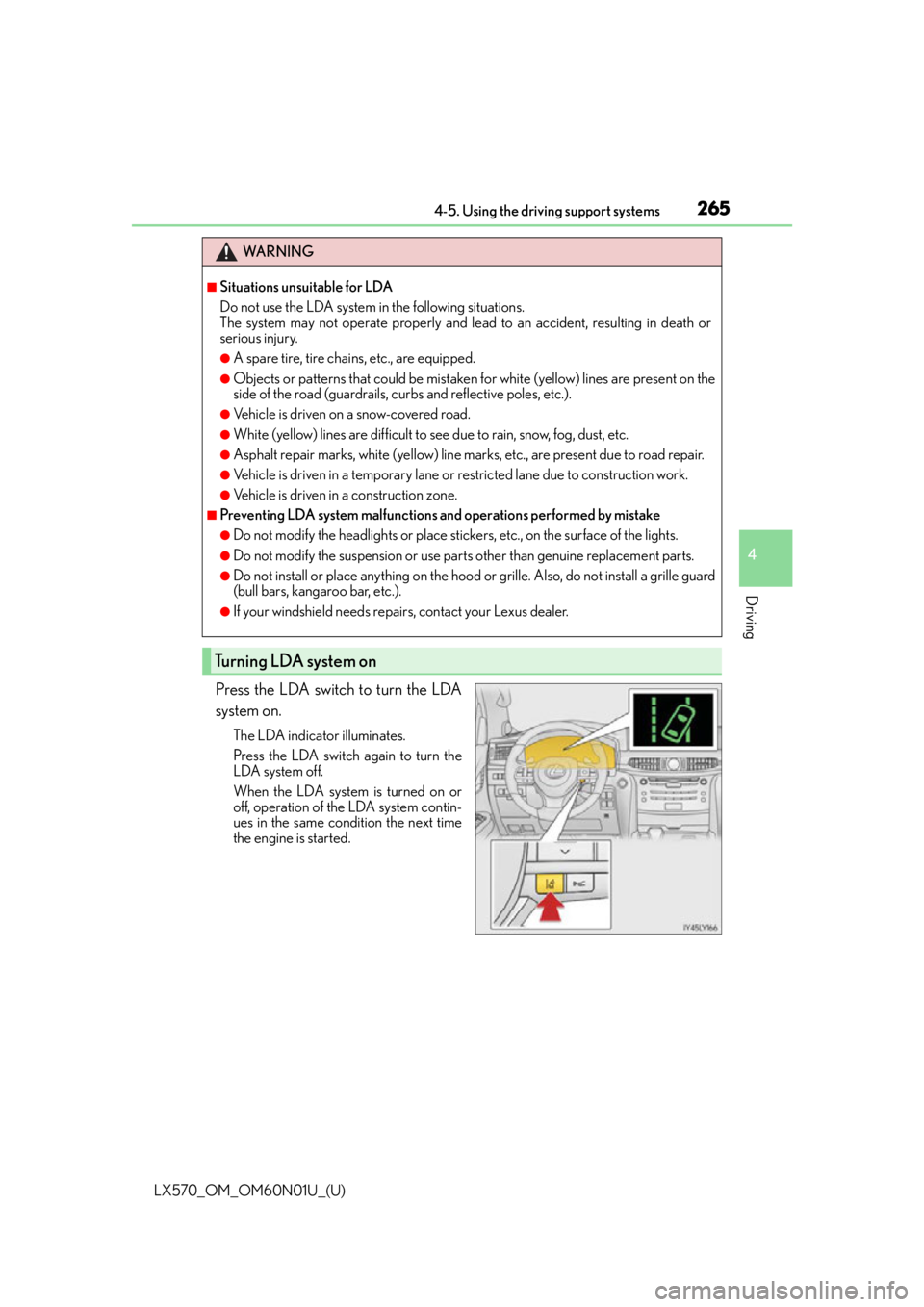
Press the LDA switch to turn the LDA
system on.
The LDA indicator illuminates.
Press the LDA switch again to turn the
LDA system off.
When the LDA system is turned on or
off, operation of the LDA system contin-
ues in the same condition the next time
the engine is started.
WA R N I N G
■Situations unsuitable for LDA
Do not use the LDA system in the following situations.
The system may not operate properly and lead to an accident, resulting in death or
serious injury.
●A spare tire, tire chains, etc., are equipped.
●Objects or patterns that could be mistaken for white (yellow) lines are present on the
side of the road (guardrails, cu rbs and reflective poles, etc.).
●Vehicle is driven on a snow-covered road.
●White (yellow) lines are difficult to see due to rain, snow, fog, dust, etc.
●Asphalt repair marks, white (yellow) line marks, etc., are present due to road repair.
●Vehicle is driven in a temporary lane or restricted lane due to construction work.
●Vehicle is driven in a construction zone.
■Preventing LDA system malfunctions and operations performed by mistake
●Do not modify the headlights or place stickers, etc., on the surface of the lights.
●Do not modify the suspension or use pa rts other than genuine replacement parts.
●Do not install or place anything on the hood or grille. Also, do not install a grille guard
(bull bars, kangaroo bar, etc.).
●If your windshield needs repairs, contact your Lexus dealer.
Turning LDA system on
Page 268 of 632

268
LX570_OM_OM60N01U_(U)4-5. Using the driving support systems
■Conditions in which functions may not operate properly
In the following situations, the camera sensor
may not detect white (yellow) lines and var-
ious functions may not operate normally.
●There are shadows on the road that run paralle l with, or cover, the white (yellow) lines.
●The vehicle is driven in an area without white (yellow) lines, such as in front of a tollgate
or checkpoint, or at an intersection, etc.
●The white (yellow) lines are cracked, “Botts’ dots”, “Raised pavement marker” or stones
are present.
●The white (yellow) lines cannot be seen or are difficult to see due to sand, etc.
●The vehicle is driven on a road surface that is wet due to rain, puddles, etc.
●The traffic lines are yellow (which may be more difficult to recognize than lines that are
white).
●The white (yellow) lines cross over a curb, etc.
●The vehicle is driven on a brig ht surface, such as concrete.
●The vehicle is driven on a surface that is bright due to reflected light, etc.
●The vehicle is driven in an area where the brightness changes suddenly, such as at the
entrances and exits of tunnels, etc.
●Light from the headlights of an oncoming vehicle, the sun, etc., enters the camera.
●The vehicle is driven where the road diverges, merges, etc.
●The vehicle is driven on a slope.
●The vehicle is driven on a road which tilts left or right, or a winding road.
●The vehicle is driven on an unpaved or rough road.
●The vehicle is driven around a sharp curve.
●The traffic lane is excessively narrow or wide.
●The vehicle is extremely tilted due to carry ing heavy luggage or having improper tire
pressure.
●The distance to the preceding vehicle is extremely short.
●The vehicle is moving up and down a large am ount due to road conditions during driv-
ing (poor roads or road seams).
●The headlight lenses are dirty an d emit a faint amount of light at night, or the beam axis
has deviated.
●The vehicle is struck by a crosswind.
●The vehicle has just changed lane s or crossed an intersection.
Page 363 of 632
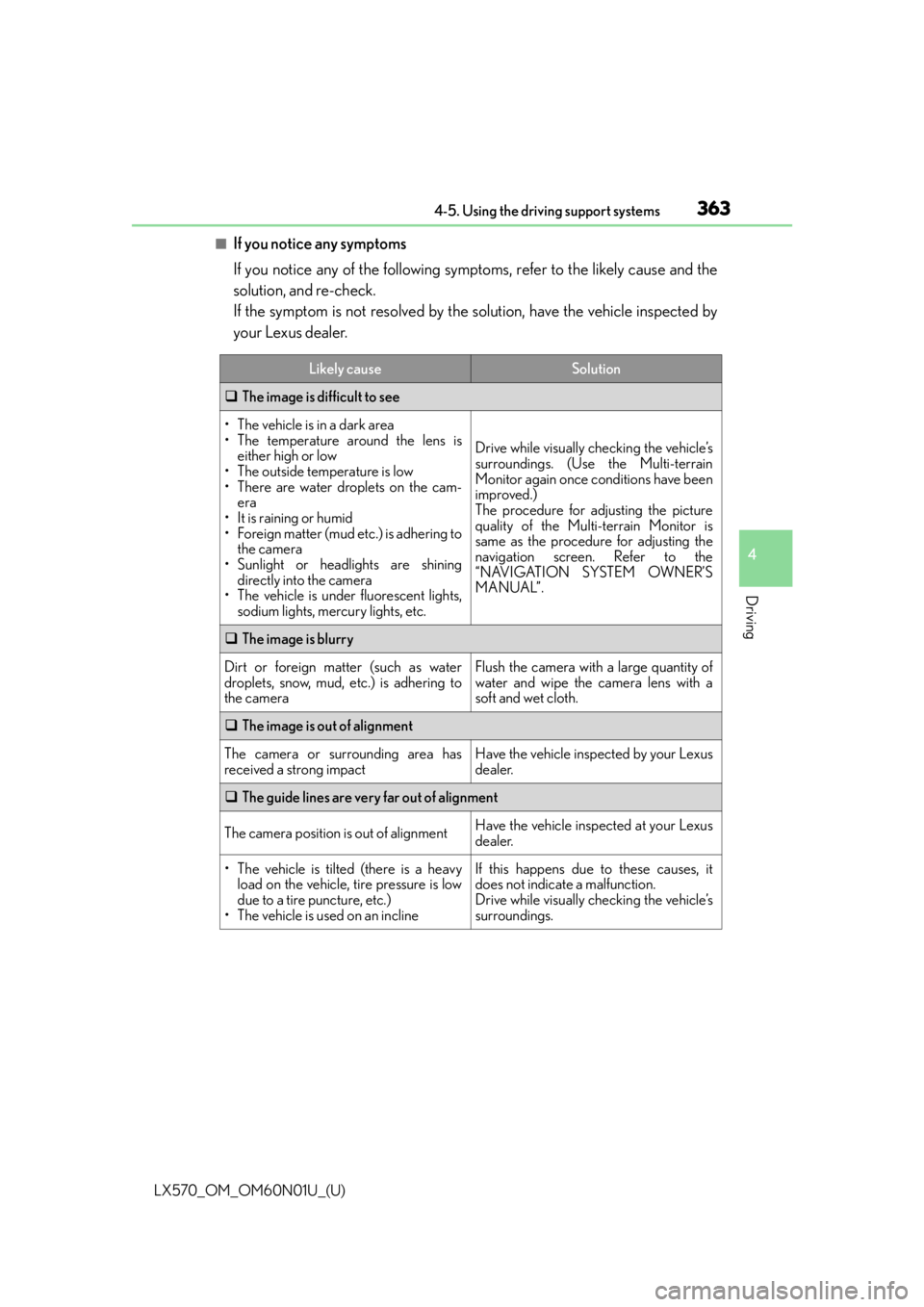
LX570_OM_OM60N01U_(U)
3634-5. Using the driving support systems
4
Driving
■If you notice any symptoms
If you notice any of the following symptoms, refer to the likely cause and the
solution, and re-check.
If the symptom is not resolved by the solution, have the vehicle inspected by
your Lexus dealer.
Likely causeSolution
The image is difficult to see
• The vehicle is in a dark area
• The temperature around the lens is
either high or low
• The outside temperature is low
• There are water droplets on the cam- era
• It is raining or humid
• Foreign matter (mud etc.) is adhering to the camera
• Sunlight or headlights are shining directly into the camera
• The vehicle is under fluorescent lights,
sodium lights, mercury lights, etc.
Drive while visually checking the vehicle’s
surroundings. (Use the Multi-terrain
Monitor again once conditions have been
improved.)
The procedure for adjusting the picture
quality of the Multi-terrain Monitor is
same as the procedure for adjusting the
navigation screen. Refer to the
“NAVIGATION SYSTEM OWNER’S
MANUAL”.
The image is blurry
Dirt or foreign matter (such as water
droplets, snow, mud, etc.) is adhering to
the cameraFlush the camera with a large quantity of
water and wipe the camera lens with a
soft and wet cloth.
The image is out of alignment
The camera or surrounding area has
received a strong impactHave the vehicle inspected by your Lexus
dealer.
The guide lines are very far out of alignment
The camera position is out of alignmentHave the vehicle inspected at your Lexus
dealer.
• The vehicle is tilted (there is a heavy
load on the vehicle, tire pressure is low
due to a tire puncture, etc.)
• The vehicle is used on an inclineIf this happens due to these causes, it
does not indicate a malfunction.
Drive while visually checking the vehicle’s
surroundings.
Page 510 of 632

510
LX570_OM_OM60N01U_(U)6-3. Do-it-yourself maintenance
■Replacing the following bulbs
If any of the lights listed below has burnt out, have it replaced by your Lexus
dealer.
●Headlights
●Parking lights/daytime running lights
●Front side marker lights
●Fog lights
●Front turn signal lights
●Side turn signal lights
●Outer foot lights
●Rear turn signal lights
●High mounted stoplight
●Stop/tail lights
●License plate lights
●Stop lights
●Rear side marker lights
●Running board light
■LED lights
The lights other than the back-up lights consist of a number of LEDs. If any of the LEDs
burn out, take your vehicle to your Le
xus dealer to have the light replaced.
■Condensation build-up on the inside of the lens
Temporary condensation build-up on the inside of the headlight lens does not indicate a
malfunction. Contact your Lexus dealer for mo re information in the following situations:
●Large drops of water are built up on the inside of the lens.
●Wa t e r h a s b u i l t u p i nside the headlight.
■When replacing light bulbs
P. 5 0 7