change time LEXUS LX570 2016 Owner's Manual
[x] Cancel search | Manufacturer: LEXUS, Model Year: 2016, Model line: LX570, Model: LEXUS LX570 2016Pages: 632, PDF Size: 8.94 MB
Page 323 of 632
LX570_OM_OM60N01U_(U)
3234-5. Using the driving support systems
4
Driving
■Switch operations
On some screens, the display mode or display settings can be changed using
the switches.
●Automatic display mode switch
When automatic display mode is tu rned on, the Multi-terrain Monitor
screen is displayed in the following conditions, even if the VIEW switch has
not been operated. • The shift lever is shifted to D or N
• While driving, the vehicle speed drops to approximately 10 km/h (6 mph) or less (except when the shift lever is in R)
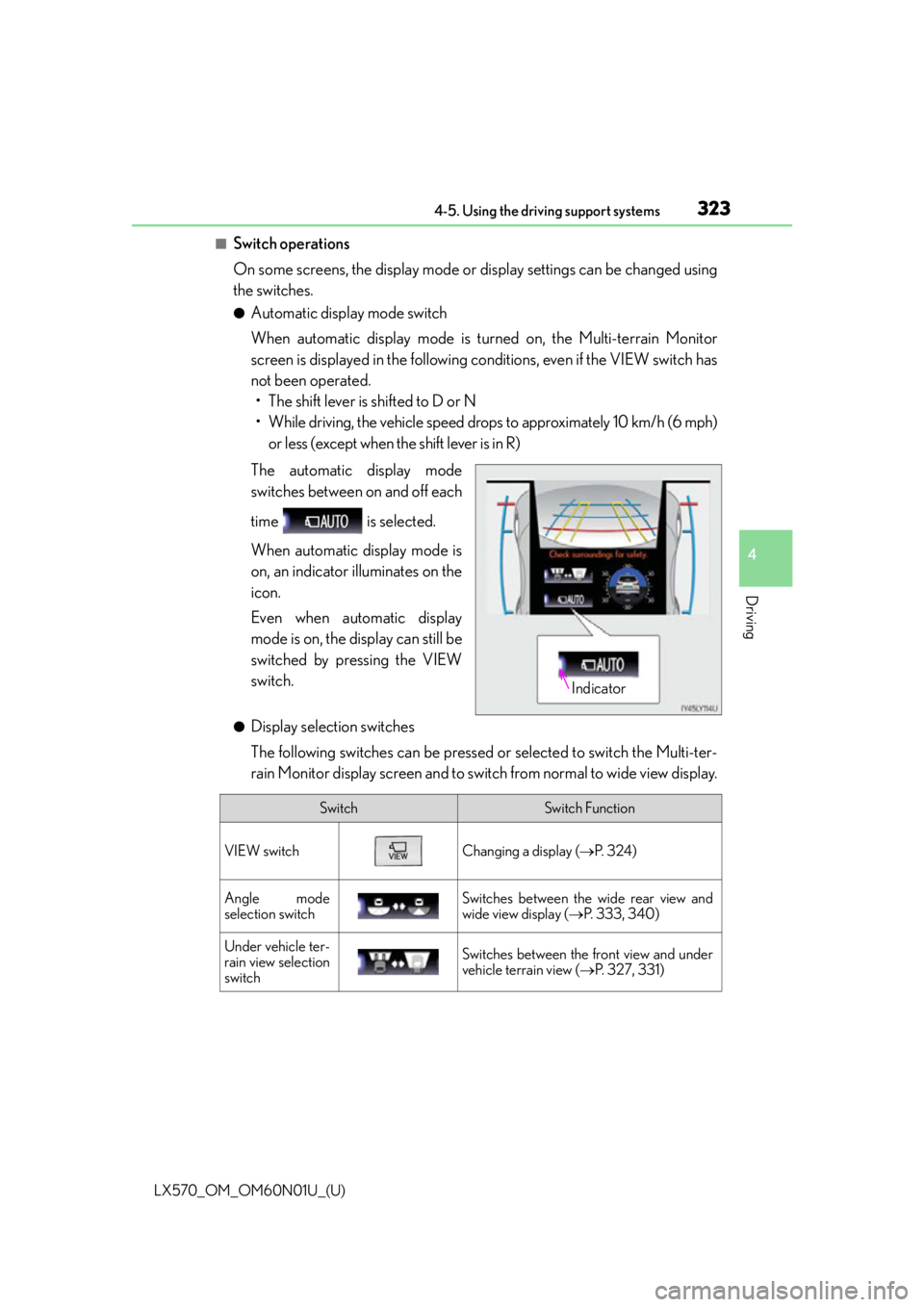
The automatic display mode
switches between on and off each
time is selected.
When automatic display mode is
on, an indicator illuminates on the
icon.
Even when automatic display
mode is on, the display can still be
switched by pressing the VIEW
switch.
●Display selection switches
The following switches can be pressed or selected to switch the Multi-ter-
rain Monitor display screen and to switch from normal to wide view display.
Indicator
SwitchSwitch Function
VIEW switchChanging a display ( P. 3 2 4 )
Angle mode
selection switchSwitches between the wide rear view and
wide view display ( P. 3 3 3 , 3 4 0 )
Under vehicle ter-
rain view selection
switchSwitches between the front view and under
vehicle terrain view ( P. 3 2 7 , 3 3 1 )
Page 327 of 632

LX570_OM_OM60N01U_(U)
3274-5. Using the driving support systems
4
Driving
■Multi-terrain Monitor screen display
The amount of time that the Multi-terrain Monitor screen is displayed changes as follows
according to the vehicle speed at th e time the VIEW switch was pressed.
The Multi-terrain Monitor screen is displayed if the vehicle speed is approximately 7 mph
(12 km/h) or less when the camera switch is pressed.
If the vehicle speed exceeds approximately 7 mph (12 km/h), the Multi-terrain Monitor
display is canceled.
The various screens of the Multi-terrain Monitor display information to support
several different driving situations, such as when checking for obstacles when
moving forward or in reverse, or when judging road surface conditions during
off-road driving.
■Front view & dual side view
Front view & dual side view can be used to check the area around the front of
the vehicle. • In addition to an image of the front of the vehicle, guide lines are displayed in a composite view to provide refere nce for when deciding a direction to
move forward in.
• If the VIEW switch is pressed while the screen is displayed, the screen switches from normal to magnified display. (Pressing the switch again
returns the screen to the normal display)
• If the steering wheel is turned 270 or more, guide lines and other features
to support turning are automatically displayed.
Screen display and functions
Page 336 of 632

336
LX570_OM_OM60N01U_(U)4-5. Using the driving support systems
●Switching to automatic display mode
P. 3 2 3
●Switching guide line display modes
The mode switches and the switch display changes each time the guide line
display selection switch is selected.
■Panoramic view & wide front view
The screen can be displayed when
the shift lever is in P, D or N.
Selected modeDistance guide line display
modeProjected course line display mode
Switch display
WA R N I N G
■Guide lines
The tire position indicator lines and vehicle position indicator lines may differ from
actual vehicle positions depending on the number of passengers, cargo weight, road
grade, road surface conditions, brightness of the surrounding environment, etc. Always
drive the vehicle while confirming the safety of your surroundings.
Page 341 of 632

LX570_OM_OM60N01U_(U)
3414-5. Using the driving support systems
4
Driving
●Switching modes
The display mode switches and the icon display changes each time the
guide line display selection switch is selected.• Projected course line display mode: Projected course lines that change according to steering wheel opera-
tions are displayed.
• Parking assist guide line display mode: Inverted steering wheel operations (p arking assist guide line) are dis-
played. Use this mode if you are used to how the vehicle handles (if you
can park without needing the course line display).
• Distance guide line display mode: Only distance guide lines are displa yed. Use this mode when guide lines
are not needed.
●Guide lines
The panoramic view & rear view screen is explained here as an example.
Selected modeProjected course
line display modeParking assist guide line display modeDistance guide line display mode
Icon display
Projected course line display modeParking assist guide line display
mode
Page 381 of 632

LX570_OM_OM60N01U_(U)
3814-5. Using the driving support systems
4
Driving
■Automatic Active TRAC reactivation
If only the Active TRAC system is turned off, the Active TRAC system will turn on when
vehicle speed increases.
■Automatic Active TRAC, VSC and Trailer Sway Control reactivation
If the Active TRAC, VSC and Trailer Sway Control are turned off, the systems will not
turn on even when vehicle speed increases.
■If the brake system overheats
The brake system may overheat. In this case, a buzzer will sound, and the TRAC OFF
indicator will flash, and Active TRAC and hill- start assist control will be temporarily inop-
erable. In this event, stop the vehicle immediately in a safe place, and allow the brake sys-
tem to cool down sufficiently until the TR AC OFF indicator goes off. (There is no
problem with continuing normal driving.)
■Sounds and vibrations caused by the Mult i Terrain ABS, brake assist, Active TRAC,
VSC, Trailer Sway Control, hill-start assist control and VGRS
●A sound may be heard from the engine compartment when the engine is started or just
after the vehicle begins to move. This sound does not indicate that a malfunction has
occurred in any of these systems.
●Any of the following condit ions may occur when the above systems are operating.
None of these indicates that a malfunction has occurred.
• Vibrations may be felt through the vehicle body and steering.
• A motor sound may be heard after the vehicle comes to a stop.
• The brake pedal may pulsate slightly af ter the Multi Terrain ABS is activated.
• The brake pedal may move down slightly after the Multi Terrain ABS is activated.
■Hill-start assist cont rol is operational when
●The shift lever is in D or S.
●The brake pedal is not depressed.
■VGRS is disabled in the following situations
●During stopping or the steering wheel has been moved for a long time while driving at
lower speeds.
●After the engine is restarted at less than -22°F (-30°C).
●If you disconnect the battery with the steeri ng wheel turned, the center position of the
steering wheel could be slightly and tempor ary changed. To initialize the VGRS, drive
for a short while.
Page 402 of 632
4025-3. Using the air conditioning system and defogger
LX570_OM_OM60N01U_(U)
■Change the airflow mode
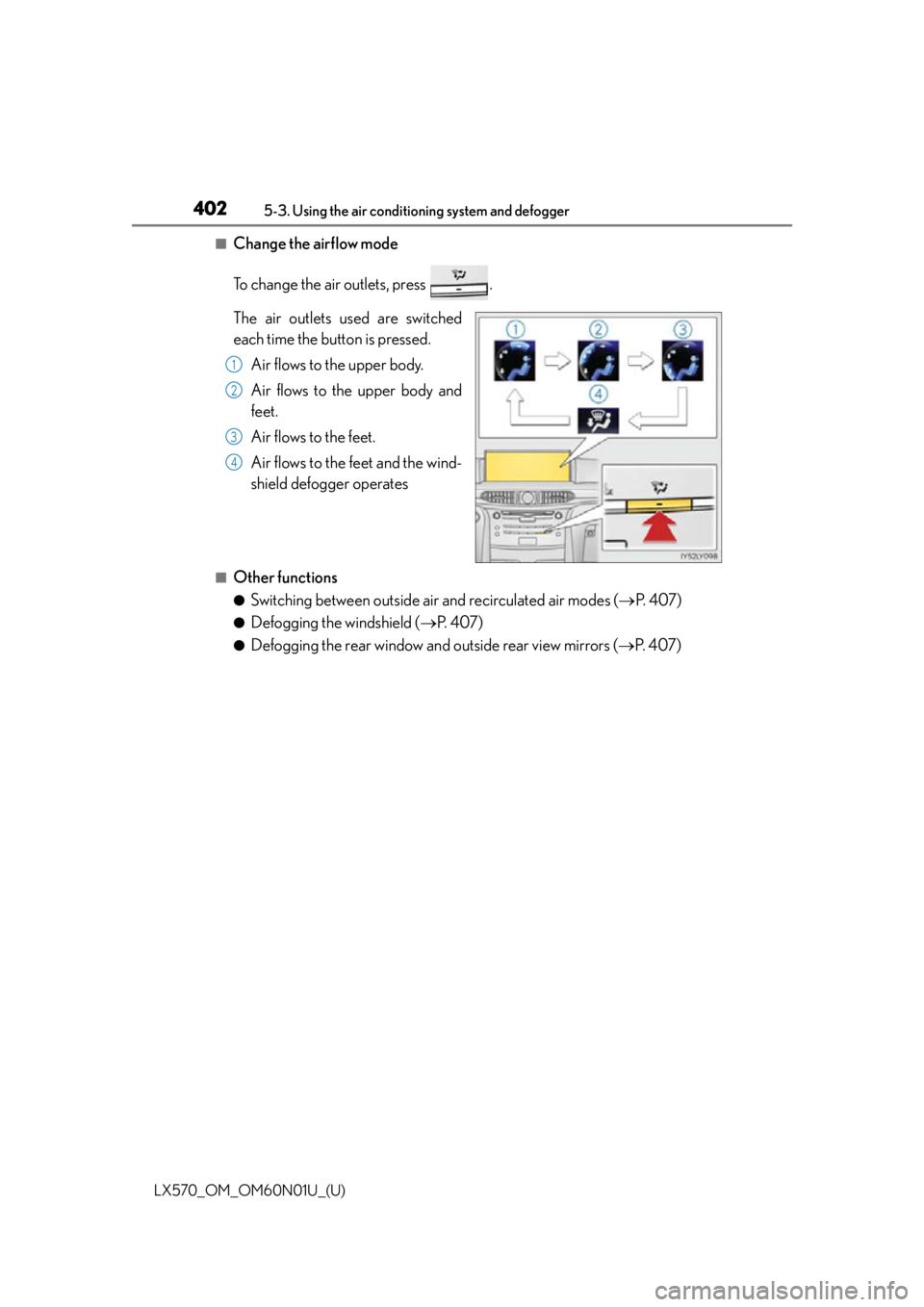
To change the air outlets, press .
The air outlets used are switched
each time the button is pressed. Air flows to the upper body.
Air flows to the upper body and
feet.
Air flows to the feet.
Air flows to the feet and the wind-
shield defogger operates
■Other functions
●Switching between outside air and recirculated air modes (P. 4 0 7 )
●Defogging the windshield ( P. 4 0 7 )
●Defogging the rear window and outside rear view mirrors ( P. 4 0 7 )
1
2
3
4
Page 410 of 632
4105-3. Using the air conditioning system and defogger
LX570_OM_OM60N01U_(U)
■When the outside temperature is low
The dehumidification function may not operate even when is selected.
■Micro dust and pollen filter
●In order to prevent the windows from fogging up when the outside air is cold, the fol-
lowing may occur.
• Outside air mode does not switch to recirculated air mode.
• The air conditioning system operates automatically.
• The operation cancels after 1 minute.
●In rainy weather, the windows may fog up. Press .
■The rear window defogger, outside rear view mirror defogger and windshield wiper de-
icer can be operated when
The engine switch is in IGNITION ON mode.
■When the windshield wiper de-icer is on
The windshield wiper de-icer will automatically turn off after approximately 15 minutes.
■Ventilation and air conditioning odors
●To let fresh air in, set the air conditioning system to the outside air mode.
●During use, various odors from inside and outside the vehicle may enter into and accu-
mulate in the air conditioning system. This may then cause odor to be emitted from the
vents.
●To reduce potential odors from occurring:
• It is recommended that the air conditioning system be set to outside air mode prior to turning the vehicle off.
• The start timing of the blower may be dela yed for a short period of time immediately
after the air conditioning system is started in automatic mode.
■Air conditioning filter
P. 5 0 1
■Customization
Settings (e.g. Exhaust gas sensor sensitivity) can be changed.
(Customizable features: P. 585)
WA R N I N G
■To prevent the windshield from fogging up
●Do not use during cool air operation in extremely humid weather. The differ-
ence between the temperature of the outside air and that of the windshield can cause
the outer surface of the windshield to fog up, blocking your vision.
■To prevent burns
●Do not touch the rear view mirror surfaces when the outside rear view mirror defog-
gers are on.
●Do not touch the glass at lower part of the wi ndshield or to the side of the front pillars
when the windshield wiper de-icer is on.
Page 421 of 632

LX570_OM_OM60N01U_(U)
4215-4. Using the interior lights
5
Interior features
■Illuminated entry system
The lights automatically turn on/off according to engine switch mode, the presence of the
electronic key, whether the doors are locked/unlocked, and whether the doors are
open/closed.
■To prevent battery discharge
If the interior lights remain on when the engine switch is turned off, the lights will go off
automatically after 20 minutes:
■Customization
Settings (e.g. adjust the time elapsed before the interior light s automatically turn off) can
be changed. (Customizable features: P. 5 8 5 )
Personal lights
Front Rear
Turns the lights on/off (touch the lights) Turns the lights on/off
NOTICE
To prevent battery discharge, do not leave the lights on longer than necessary when the
engine is not running.
Page 439 of 632
LX570_OM_OM60N01U_(U)
4395-6. Using the other interior features
5
Interior features
■When covers and accessories are attached to portable devices
Do not charge in situations where cover and accessories not able to handle Qi are
attached to the portable devi ce. Depending on the type of cover and accessory, it may
not be possible to charge. When charging is not performed even with the portable
device placed on the charge area, remove the cover and accessories.
■While charging, noise enters the AM radio
Turn off the wireless charger and confirm th at the noise has decreased. If the noise
decreases, continuously pushing the power supply switch of the wireless charger for 2
seconds, the frequency of the charger can be changed and the noise can be reduced.
Also, on that occasion, the operation indicator light will flash orange 2 times.
■Important points of the wireless charger
●If the electronic key cannot be detected within the vehicle interior, charging cannot be
done. When the door is opened and closed , charging may be temporarily suspended.
●When charging, the wireless charging device and portable device will get warmer,
however this is not a malfunction.
When a portable device gets warm while charging, charging may stop due to the pro-
tection function on the portable device side . In this case, when the temperature of the
portable device drops significantly, charge again.
■Operation sounds
When the power supply is turned on, while se arching for the portable device a sound will
be produced, however this is not a malfunction.
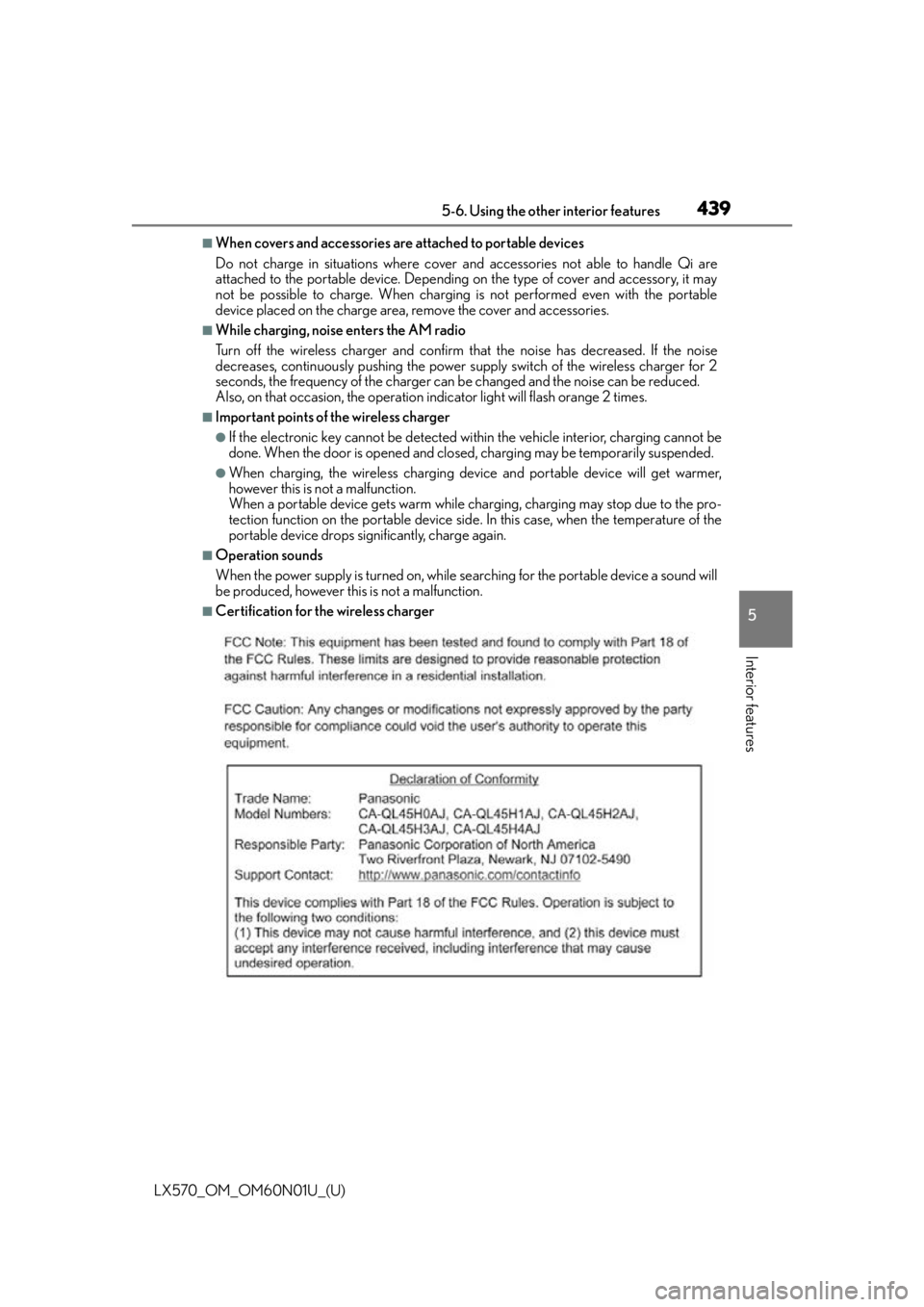
■Certification for the wireless charger
Page 551 of 632
5517-2. Steps to take in an emergency
LX570_OM_OM60N01U_(U)
7
When trouble arises
Ensure that the shift lever is in P and depress the brake pedal.
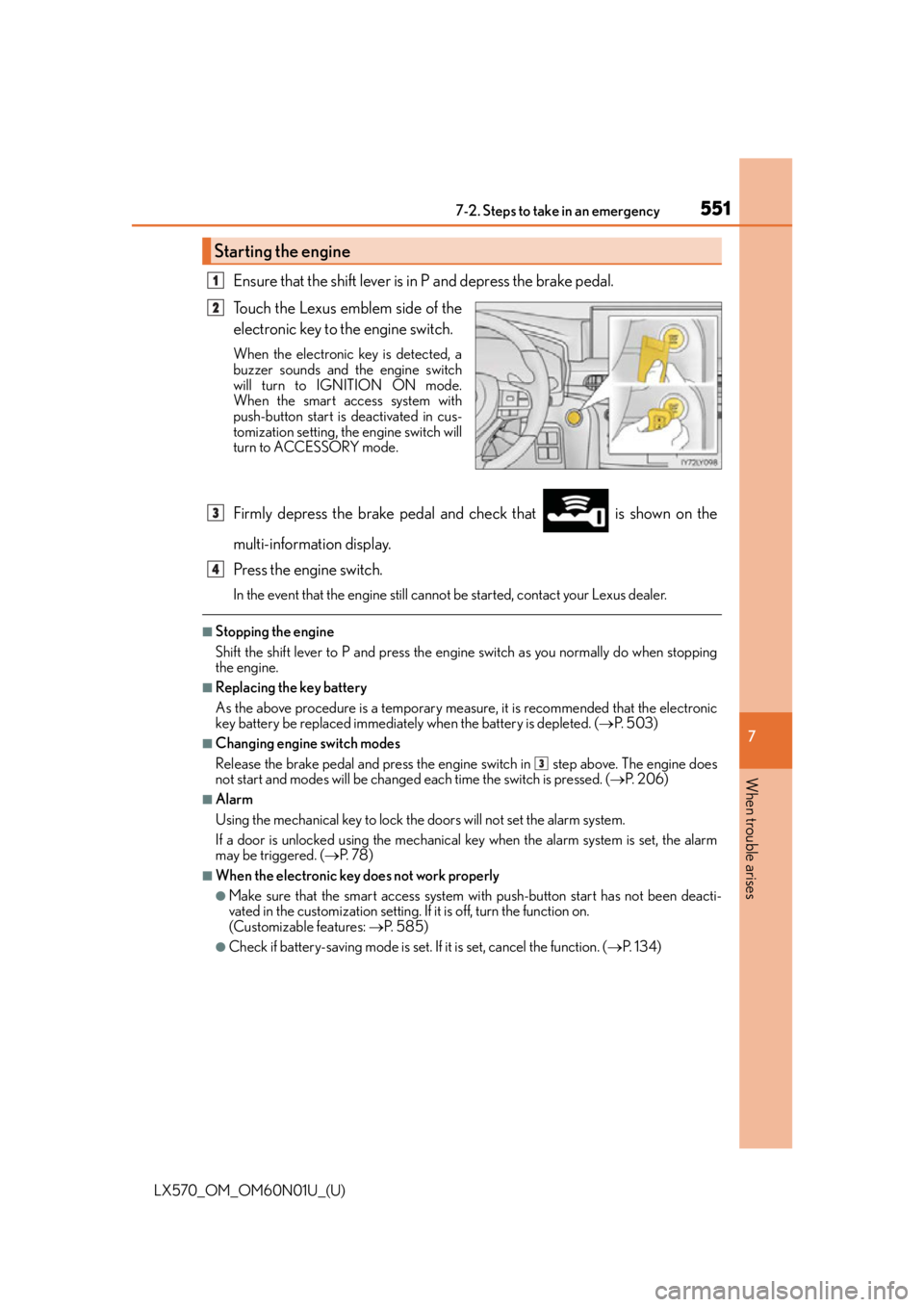
Touch the Lexus emblem side of the
electronic key to the engine switch.
When the electronic key is detected, a
buzzer sounds and the engine switch
will turn to IGNITION ON mode.
When the smart access system with
push-button start is deactivated in cus-
tomization setting, the engine switch will
turn to ACCESSORY mode.
Firmly depress the brake pedal and check that is shown on the
multi-information display.
Press the engine switch.
In the event that the engine still cannot be started, contact your Lexus dealer.
■Stopping the engine
Shift the shift lever to P and press the engine switch as you normally do when stopping
the engine.
■Replacing the key battery
As the above procedure is a temporary measure, it is recommended that the electronic
key battery be replaced immediately when the battery is depleted. ( P. 5 0 3 )
■Changing engine switch modes
Release the brake pedal and press the engine switch in step above. The engine does
not start and modes will be changed each time the switch is pressed. ( P. 2 0 6 )
■Alarm
Using the mechanical key to lock the doors will not set the alarm system.
If a door is unlocked using the mechanical key when the alarm system is set, the alarm
may be triggered. ( P. 7 8 )
■When the electronic key does not work properly
●Make sure that the smart access system wi th push-button start has not been deacti-
vated in the custom ization setting. If it is off, turn the function on.
(Customizable features: P. 585)
●Check if battery-saving mo de is set. If it is set, cancel the function. ( P. 1 3 4 )
Starting the engine
1
2
3
4
3