height LEXUS LX570 2016 Owner's Manual
[x] Cancel search | Manufacturer: LEXUS, Model Year: 2016, Model line: LX570, Model: LEXUS LX570 2016Pages: 632, PDF Size: 8.94 MB
Page 303 of 632

LX570_OM_OM60N01U_(U)
3034-5. Using the driving support systems
4
Driving
WA R N I N G
■When switching the vehicle height mode
Before lowering the vehicle height, check that there are no people under or around the
vehicle, and check for obstacles.
If you do not do this, body parts may be caught in the vehicle, possibly leading to an
accident.
■Using the high mode
The high mode should only be used when driving on rough roads, for example when
driving off-road. Because the vehicle’s center of gravity will become higher when in the
mode, the vehicle may become unstable when turning abruptly, resulting in an acci-
dent.
■When jacking up the vehicle or installing tire chains
Turn off the height control and stop the engine, otherwise the vehicle height may
change due to the automatic leveling function and you may catch part of your body in
the vehicle, resultin g in an accident.
■When crossing rivers
Select the high mode and turn off the heig ht control. Drive at 30 km/h (18 mph) or
lower. Otherwise the vehicle height may change due to the automatic leveling function,
resulting in an accident.
■If your vehicle must be towed
Put the vehicle height in the normal mode and turn off the height control, otherwise the
vehicle height may change due to the automatic leveling function and you may catch
part of your body in the vehicle, resulting in an accident.
■If your vehicle becomes stuck in a ditch
Turn off the height control, otherwise the vehicle height may change due to the auto-
matic leveling function, re sulting in an accident.
■When loading cargo on the roof luggage carrier
Do not switch to high mode. Sudden steering could cause the vehicle to lose stability
due to the vehicle’s higher center of gr avity, possibly leading to an accident.
Page 304 of 632

304
LX570_OM_OM60N01U_(U)4-5. Using the driving support systems
NOTICE
■When parking in areas with limited overhead height
After leaving the vehicle or unloading the luggage, the vehicle height may be slightly
higher than normal. Take care wh
en overhead height is limited.
■To avoid damage to the vehicle
●Normal mode will be switched to automatically even if the vehicle is started off in low
mode. Take care when over head height is limited.
●Do not select the low mode when driving on bumpy roads, as the underbody of the
vehicle may contact the road surface.
●When traveling on bumpy roads or through water, or when towing, turn off easy
access mode.
■Avoid rapid changes to the vehicle height
As the pump may overheat. Leave at a few seconds between selections when changing
the vehicle height mode.
Page 354 of 632

354
LX570_OM_OM60N01U_(U)4-5. Using the driving support systems
■Panoramic view display range
●In the panoramic view, the system processes
and displays images acquired form the 4
cameras under the assumption that the vehicle is on a flat road surface. Therefore, the
display may appear as follows.
• Three-dimensional objects may appear to have fallen over, and be long and thin or bigger than they actually are
• Three-dimensional objects at a point higher than the surface of the road may appear further away than they actually are, or may not appear
• Tall objects may appear to emerge from the image processing seams
●Inconsistencies in the bright ness of images from each camera may occur depending on
lighting conditions.
●The displayed image may not be aligned when the tilt or height of the vehicle changed
due to the number of passengers, cargo we ight or remaining quantity of gasoline.
●The displayed image may not be aligned when the vehicle is in other than “N” (normal)
height mode. ( P. 2 9 7 )
●Images and guide lines may not be properly displayed when the doors are not com-
pletely closed.
●The relative distances between the vehicle ic on and road surface or an obstacle dis-
played in the panoramic view may differ from the actual state.
●If an illuminated license plate is used, it may appear on the screen.
●The black area around the vehicle icon is an area that is not appear in the camera.
Check these areas directly.
■Wide front view display range
●Certain areas at the front of the vehicle have a different sense of distance, and are
masked in black so that they do not appear on the screen.
●There are limits to the range displayed on the screen. Objects at either corner of the
bumper or directly below the bumper are not displayed.
●The perceived distance in images displayed on the screen differs from the actual dis-
tance.
■Images displayed on the screen
Cameras of the Multi-terrain Monitor system use special lenses. The distance of the
image that appears on the screen differs from the actual distance.
●The circled areas shown in the illustration may
be difficult to see, as these are points where
images are combined.
Page 372 of 632

372
LX570_OM_OM60N01U_(U)4-5. Using the driving support systems
■Conditions under which the BSM function may not function correctly
●The BSM function may not detect vehicles correctly in the following situations:
• When the sensor is misaligned due to a strong impact to the sensor or its surround-
ing area
• When mud, snow, ice, a sticker, etc. is covering the sensor or surrounding area on the rear bumper
• When driving on a road surface that is wet with standing water during bad weather, such as heavy rain, snow, or fog
• When multiple vehicles are approaching wi th only a small gap between each vehicle
• When the distance between your vehicle and a following vehicle is short
• When there is a significant difference in speed between your vehicle and the vehicle that enters the detection area
• When the difference in speed between your vehicle and another vehicle is changing
• When a vehicle enters a detection area traveling at about the same speed as your vehicle
• As your vehicle starts from a stop, a vehicle remains in the detection area
• When driving up and down consecutive steep in clines, such as hills, dips in the road,
etc.
• When driving on roads with sharp bends, consecutive curves, or uneven surfaces
• When vehicle lanes are wide, or when drivin g on the edge of a lane, and the vehicle
in an adjacent lane is far away from your vehicle
• When a bicycle carrier or other accessory is installed to the rear of the vehicle
• When there is a significant difference in height between your vehicle and the vehicle
that enters the detection area
• Immediately after the BSM function is turned on
●Instances of the BSM function unnecessarily detecting a vehicle and/or object may
increase in the following situations:
• When the sensor is misaligned due to a strong impact to the sensor or its surround- ing area
• When the distance between your vehicle and a guardrail, wall, etc. that enters the detection area is short
• When driving up and down consecutive steep in clines, such as hills, dips in the road,
etc.
• When vehicle lanes are narrow, or when driving on the edge of a lane, and a vehicle traveling in a lane other than the ad jacent lanes enters the detection area
• When driving on roads with sharp bends, consecutive curves, or uneven surfaces
• When the tires are slipping or spinning
• When the distance between your vehicle and a following vehicle is short
• When a bicycle carrier or other accessory is installed to the rear of the vehicle
Page 386 of 632

386
LX570_OM_OM60N01U_(U)4-6. Driving tips
WA R N I N G
■Driving with snow tires
Observe the following precautions to reduce the risk of accidents.
Failure to do so may result in a loss of ve
hicle control and cause death or serious injury.
●Use tires of the specified size.
●Maintain the recommended level of air pressure.
●Do not drive in excess of 75 mph (120 km/h), regardless of the type of snow tires
being used.
●Use snow tires on all, not just some wheels.
■Driving with tire chains (vehicles with 20-inch tires)
Observe the following precautions to reduce the risk of accidents.
Failing to do so may result in the vehicle being unable to be driven safely, and may
cause death or serious injury.
●Do not drive in excess of the speed limit specified for the tire chains being used, or 30
mph (50 km/h), whichever is lower.
●Avoid driving on bumpy road surfaces or over potholes.
●Avoid sudden acceleration, ab rupt steering, sudden braking and shifting operations
that cause sudden engine braking.
●Slow down sufficiently before entering a cu rve to ensure that vehicle control is main-
tained.
●Do not use LDA (Lane Departure Alert) system. (if equipped)
■When installing tire chains (vehicles with 20-inch tires)
Turn off the vehicle height control.
The vehicle height may change due to the automatic leveling function and you may
catch part of your body in the ve hicle, resulting in an accident. (P. 300)
NOTICE
■Repairing or replacing snow tires
Request repairs or replacement of snow tires from Lexus dealers or legitimate tire
retailers.
This is because the removal and attachment of snow tires affects the operation of the
tire pressure warning valves and transmitters.
■Fitting tire chains (vehicles with 20-inch tires)
The tire pressure warning valves and transmitters may not function correctly when tire
chains are fitted.
Page 387 of 632
387
LX570_OM_OM60N01U_(U)4-6. Driving tips
4
Driving
Off-road precautions
●Specific design characteristics give it
a higher center of gravity than ordinary
passenger cars. This vehicle design feat ure causes this type of vehicle to be
more likely to rollover. And, utility vehicles have a significantly higher rollover
rate than other types of vehicles.
●An advantage of the higher ground clearance is a better view of the road
allowing you to anticipate problems.
●It is not designed for cornering at the same speeds as ordinary passenger cars
any more than low-slung sports cars are designed to perform satisfactorily
under off-road conditions. Therefore, sharp turns at excessive speeds may
cause the vehicle to rollover.
This vehicle belongs to the utility vehicl e class, which has higher ground clear-
ance and narrower tread in relation to the height of its center of gravity to
make it capable of performing in a wi de variety of off-road applications.
Off-road vehicle features
Page 519 of 632
5197-2. Steps to take in an emergency
LX570_OM_OM60N01U_(U)
7
When trouble arises
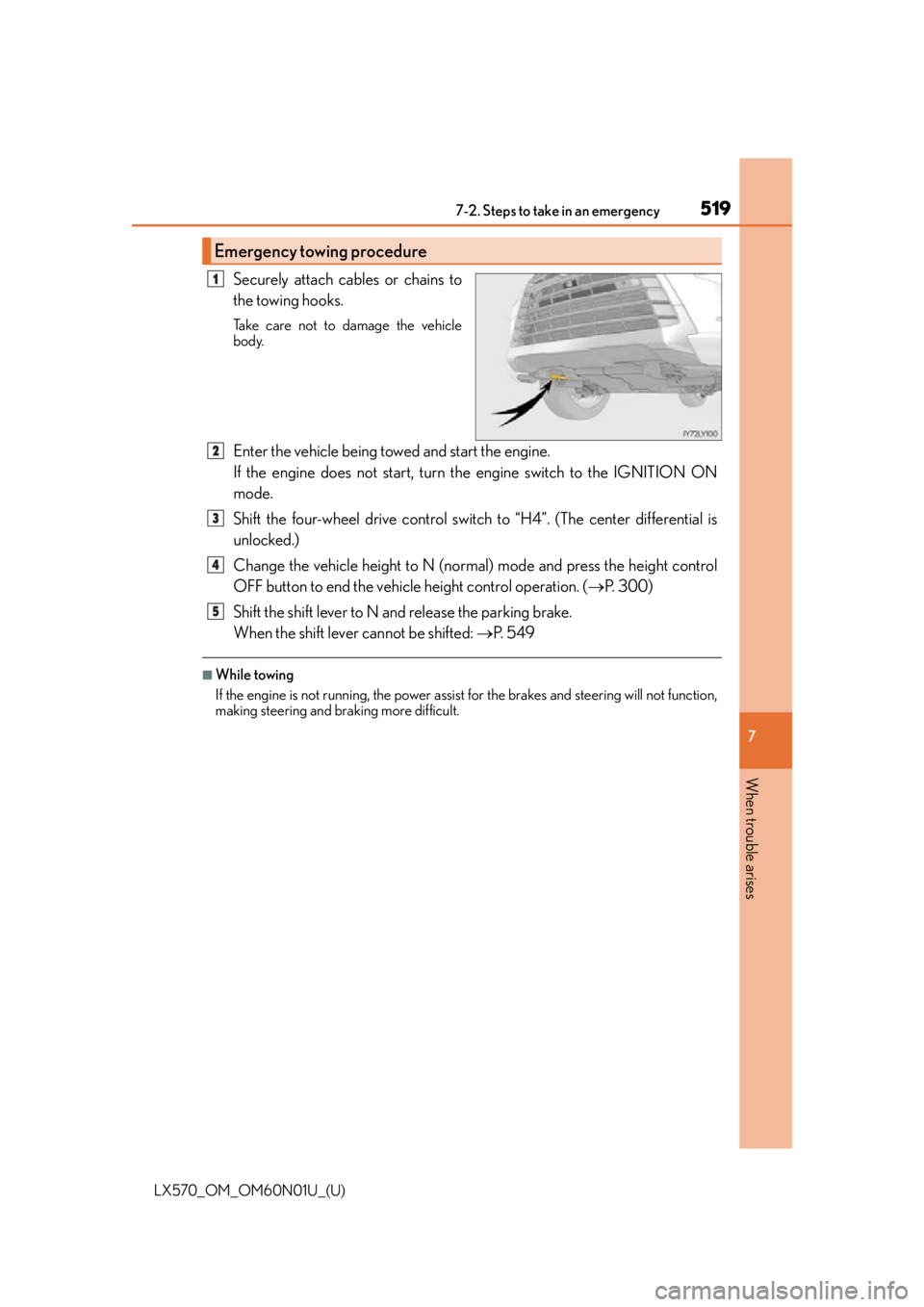
Securely attach cables or chains to
the towing hooks.
Take care not to damage the vehicle
body.
Enter the vehicle being towed and start the engine.
If the engine does not start, turn the engine switch to the IGNITION ON
mode.
Shift the four-wheel drive control switch to “H4”. (The center differential is
unlocked.)
Change the vehicle height to N (normal) mode and press the height control
OFF button to end the vehicle height control operation. ( P. 3 0 0 )
Shift the shift lever to N and release the parking brake.
When the shift lever cannot be shifted: P. 5 4 9
■While towing
If the engine is not running, the power assist for the brakes and steering will not function,
making steering and br aking more difficult.
Emergency towing procedure
1
2
3
4
5
Page 537 of 632
5377-2. Steps to take in an emergency
LX570_OM_OM60N01U_(U)
7
When trouble arises
WA R N I N G
■Using the tire jack
Improper use of the tire jack may lead to death or serious injuries due to the vehicle
suddenly falling off the jack.
●Do not use the tire jack for any purpose ot her than replacing tires or installing and
removing tire chains.
●Only use the tire jack that comes with this vehicle for replacing a flat tire.
Do not use it on other vehicles, and do not use other tire jacks for replacing tires on
this vehicle.
●Always check that the tire jack is securely set to the jack point.
●Be sure to turn off the 4-Wheel AHC and stop the engine.
●Do not put any part of your body under the vehicle supported by a jack.
●Do not start or run the engine while your vehicle is supported by the jack.
●Do not raise the vehicle while someone is in it.
●When raising the vehicle, do not pu t an object on or under the jack.
●Do not raise the vehicle to a height greater than that required to replace the tire.
●Use a jack stand if it is necessary to get under the vehicle.
Take particular care when lowering the ve hicle to ensure that no one working on or
near the vehicle will be injured.
■Using the jack handle
Tighten all the jack handle bolts securely using a Phillips-head screwdriver, to prevent
the extension parts from coming apart unexpectedly.
Page 543 of 632
5437-2. Steps to take in an emergency
LX570_OM_OM60N01U_(U)
7
When trouble arises
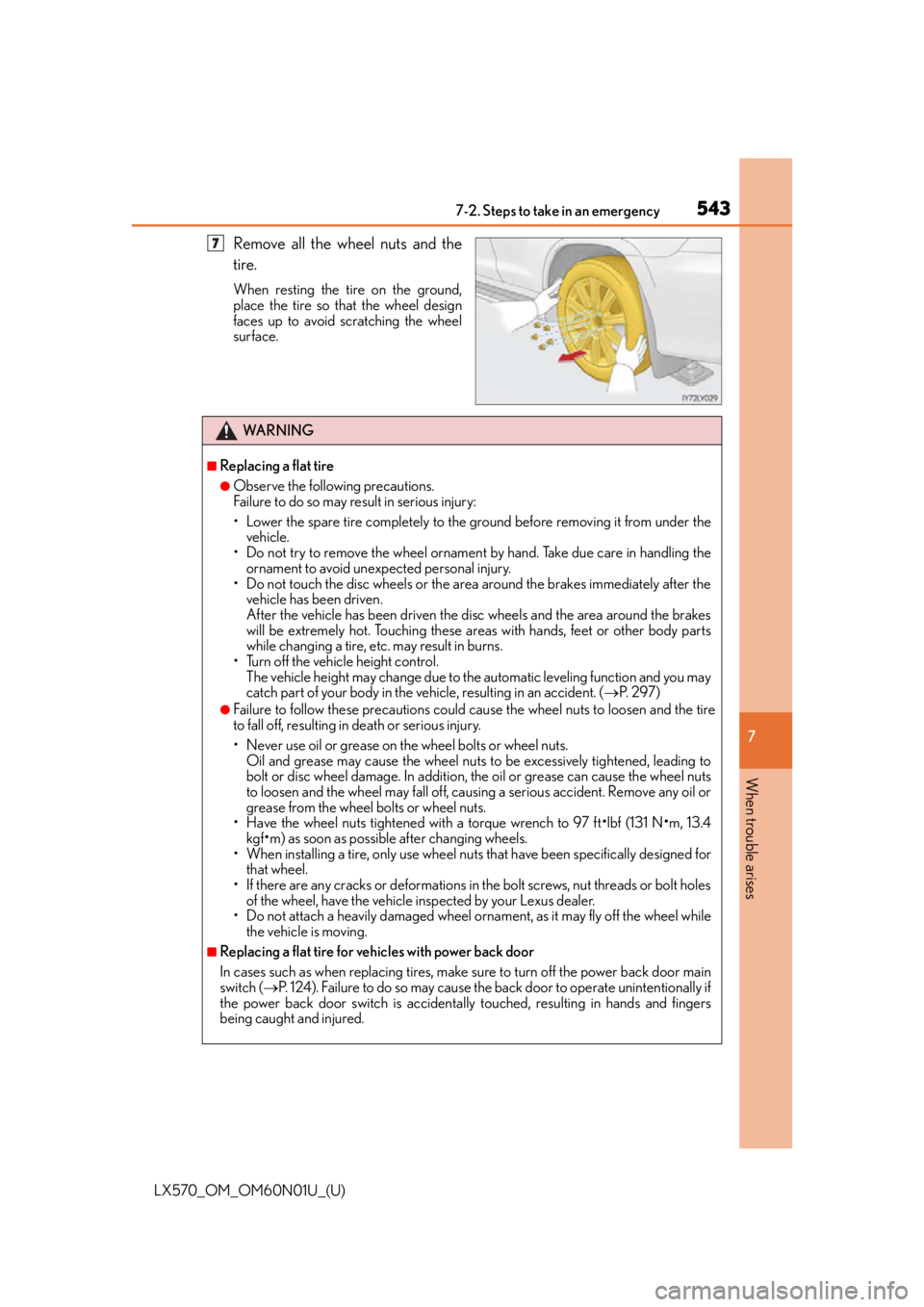
Remove all the wheel nuts and the
tire.
When resting the tire on the ground,
place the tire so that the wheel design
faces up to avoid scratching the wheel
surface.
7
WA R N I N G
■Replacing a flat tire
●Observe the following precautions.
Failure to do so may result in serious injury:
• Lower the spare tire completely to the ground before removing it from under the vehicle.
• Do not try to remove the wheel ornament by hand. Take due care in handling the
ornament to avoid unexpected personal injury.
• Do not touch the disc wheels or the area around the brakes immediately after the vehicle has been driven.
After the vehicle has been driven the disc wheels and the area around the brakes
will be extremely hot. Touching these areas with hands, feet or other body parts
while changing a tire, etc. may result in burns.
• Turn off the vehicle height control. The vehicle height may change due to the automatic leveling function and you may
catch part of your body in the vehicle, resulting in an accident. ( P. 2 9 7 )
●Failure to follow these precautions could cause the wheel nuts to loosen and the tire
to fall off, resulting in death or serious injury.
• Never use oil or grease on the wheel bolts or wheel nuts.
Oil and grease may cause the wheel nuts to be excessively tightened, leading to
bolt or disc wheel damage. In addition, the oil or grease can cause the wheel nuts
to loosen and the wheel may fall off, caus ing a serious accident. Remove any oil or
grease from the wheel bolts or wheel nuts.
• Have the wheel nuts tightened with a torque wrench to 97 ft
•lbf (131 N•m, 13.4
kgf
•m) as soon as possible after changing wheels.
• When installing a tire, only use wheel nuts that have been specifically designed for
that wheel.
• If there are any cracks or deformations in the bolt screws, nut threads or bolt holes of the wheel, have the vehicle inspected by your Lexus dealer.
• Do not attach a heavily damaged wheel ornament, as it may fly off the wheel while
the vehicle is moving.
■Replacing a flat tire for vehicles with power back door
In cases such as when replacing tires, make sure to turn off the power back door main
switch ( P. 124). Failure to do so may cause the back door to operat e unintentionally if
the power back door switch is accidentally touched, resulting in hands and fingers
being caught and injured.
Page 562 of 632

562
LX570_OM_OM60N01U_(U)8-1. Specifications
Maintenance data (fuel, oil level, etc.)
*1: Unladen vehicles
*2: Vehicles without roof rail
*3: Vehicles with roof rail
*4: Vehicles with 20-inch tires
*5: Vehicles with 21-inch tires
Dimensions and weights
Overall length200.0 in. (5080 mm)
Overall width78.0 in. (1980 mm)
Overall height*174.4 in. (1890 mm)*2
76 . 0 i n . ( 1 9 3 0 m m )*3
Wheelbase112.2 in. (2850 mm)
Tr e a d
Front64.8 in. (1645 mm)*4
65.0 in. (1650 mm)*5
Rear64.6 in. (1640 mm)*4
65.0 in. (1650 mm)*5
Vehicle capacity weight
(Occupants + luggage)1285 lb. (580 kg)
TWR
(trailer weight + cargo weight)7000 lb. (3175 kg)