mirror LEXUS LX570 2016 Owner's Manual
[x] Cancel search | Manufacturer: LEXUS, Model Year: 2016, Model line: LX570, Model: LEXUS LX570 2016Pages: 632, PDF Size: 8.94 MB
Page 224 of 632

224
LX570_OM_OM60N01U_(U)4-3. Operating the lights and wipers
Automatic High Beam
The Automatic High Beam uses an in-v
ehicle camera sensor to assess the
brightness of streetlights, the lights of vehicles ahead etc., and automatically
turns the high beam on or off as necessary.
WA R N I N G
■Limitations of the Automatic High Beam
Do not rely on the Automatic High Beam. Always drive safely, taking care to observe
your surroundings and turning the high beam on or off manually if necessary.
■To prevent incorrect operation of the Automatic High Beam system
Do not overload the vehicle.
NOTICE
■Notes when using the Automatic High Beam system
Vehicles without PCS (Pre-Collision System):
Observe the following to ensure that the Automatic High Beam functions correctly.
●Do not place items on the dashboard. There is a possibility that the camera sensor will
mistake items reflected in the windshield for streetlights, the headlights of other vehi-
cles, etc.
●Do not install a parking tag or any other acc essories near or around the inside rear
view mirror and the camera sensor.
●Do not modify the vehicle.
●Do not replace windshield with non-genuine windshield.
Contact your Lexus dealer.
●Do not replace headlights wi th non-genuine headlights.
Contact your Lexus dealer.
Vehicles with PCS (Pre-Collision System): P. 2 4 6
●Do not touch the camera sensor.
●Do not subject the inside rear view mirror or
the camera sensor to a strong impact.
●Do not disassemble the camera sensor.
●Do not spill liquid onto the inside rear view
mirror or the camera sensor.
●Do not apply window tinting or stickers to the
camera sensor or the area of windshield near
the camera sensor.
Page 227 of 632

LX570_OM_OM60N01U_(U)
2274-3. Operating the lights and wipers
4
Driving
■Camera sensor detection information
●The high beam may not be automatically turned off in the following situations:
• When oncoming vehicles sudd enly appear from a curve
• When the vehicle is cut in front of by another vehicle
• When vehicles ahead are hidden from sight due to repeated curves, road dividers or roadside trees
• When vehicles ahead appear from the faraway lane on wide road
• When vehicles ahead have no lights
●The high beam may be turned off if a vehicl e ahead that is using fog lights without using
the headlights is detected.
●House lights, street lights, traffic signals, and illuminated billboards or signs may cause
the high beam to switch to the low be ams, or the low beams to remain on.
●The following factors may affect the amount of time taken to turn the high beam on or
off:
• The brightness of headlights, fog lights, and tail lights of vehicles ahead
• The movement and direction of vehicles ahead
• When a vehicle ahead only has operational lights on one side
• When a vehicle ahead is a two-wheeled vehicle
• The condition of the road (gradient, curve, condition of the road surface etc.)
• The number of passengers and amount of luggage
●The high beam may be turned on or off when the driver does not expect it.
●Bicycles or similar objects may not be detected.
●In the situations shown below, the system may not be able to accurately detect sur-
rounding brightness levels. This may caus e the low beams to remain on or the high
beams to cause problems for pedestrians, vehicles ahead or other parties. In these
cases, manually switch between the high and low beams.
• In bad weather (rain, snow, fog, sandstorms etc.)
• The windshield is obscured by fog, mist, ice, dirt etc.
• The windshield is cracked or damaged.
• The camera sensor is deformed or dirty.
• The camera sensor temperature is extremely high.
• Surrounding brightness levels are equal to those of headlights, tail lights or fog lights.
• Vehicles ahead have headlights that are either switched off, dirty, are changing color, or have are not aimed properly.
• When driving through an area of intermit tently changing brightness and darkness.
• When frequently and repeatedly driving ascending/descending roads, or roads with rough, bumpy or uneven surfaces (such as stone-paved roads, gravel tracks etc.).
• When frequently and repeat edly taking curves or driving on a winding road.
• There is a highly reflective object ahead of the vehicle, such as a sign or a mirror.
• The back of a vehicle ahead is highly reflective, such as a container on a truck.
• The vehicle’s headlights are damaged or dirty.
• The vehicle is listing or tilting, due to a flat tire, a trailer being towed etc.
• The high beam and low beam are repeated ly being switched between in an abnor-
mal manner.
• The driver believes that the high beam may be causing problems or distress to other
drivers or pedestrians nearby.
Page 228 of 632

228
LX570_OM_OM60N01U_(U)4-3. Operating the lights and wipers
■Temporary lowering sensor sensitivity
The sensitivity of the sensor
can be temporarily lowered.
Vehicles without PCS (Pre-Collision System):
To lower the sensitivity, push and hold on th e inside rear view mirror for 15 to 20 sec-
onds, and release. The indicator light on the in side rear view mirror will flash to indicate
that the sensitivity has been lowered.
When the engine switch is turned off, the sens itivity will be returned to its normal level.
Vehicles with PCS (Pre-Collision System):
Turn the engine switch off while the following conditions are met.
• The headlight switch is in .
• The headlight switch lever is in low beam position. Turn the engine switch to IGNITION ON mode.
Within 30 seconds af ter , repeat pushing the headlig ht switch lever to the high
beam position then pulling it to the low be am position quickly 10 times, then leave
the lever in high beam position.
Automatic High Beam (headlights) may turn on even the vehicle is stopped.
1
2
32
Page 247 of 632

LX570_OM_OM60N01U_(U)
2474-5. Using the driving support systems
4
Driving
WA R N I N G
●Do not change the installation position or direction of the camera sensor or remove it.
●Do not disassemble the camera sensor.
●Do not install an electronic device or device that emits strong electric waves near the
camera sensor.
●Do not modify any components of the vehicle around the camera sensor (inside rear
view mirror, sun visors, etc.) or ceiling.
●Do not attach any accessories that may obst ruct the camera sensor to the hood, front
grille or front bumper. Contact your Lexus dealer for details.
●If a surfboard or other long object is to be mounted on the roof, make sure that it will
not obstruct the camera sensor.
●Do not modify the headlights or other lights.
Page 261 of 632

LX570_OM_OM60N01U_(U)
2614-5. Using the driving support systems
4
Driving
●In some situations such as the following, sufficient braking force may not be obtained,
preventing the system from performing properly:
• If the braking functions cannot operate to their full extent, such as when the brake parts are extremely cold, extremely hot, or wet
• If the vehicle is not properly maintained (brakes or tires are excessively worn, improper tire inflation pressure, etc.)
• When the vehicle is being driven on a gravel road or other slippery surface
●Some pedestrians such as the following may not be detected by the radar sensor and
camera sensor, preventing the system from operating properly
*5:
• Pedestrians shorter than approximately 3.2 ft. (100 cm) or taller than approximately 6.5 ft. (2 m)
• Pedestrians wearing oversized clothing (a rain coat, long skirt, etc.), making their sil- houette obscure
• Pedestrians who are carrying large baggage, holding an umbrella, etc., hiding part
of their body
• Pedestrians who are bending forward or squatting
• Pedestrians who are pushing a stroller, wheelchair, bicycle or other vehicle
• Groups of pedestrians which are close together
• Pedestrians who are wearing white and look extremely bright
• Pedestrians in the dark, such as at night or while in a tunnel
• Pedestrians whose clothing appears to be nearly the same color or brightness as
their surroundings
• Pedestrians near walls, fences, guardrails, or large objects
• Pedestrians who are on a metal object (man hole cover, steel plate, etc.) on the road
• Pedestrians who are walking fast
• Pedestrians who are changing speed abruptly
• Pedestrians running out from behind a vehicle or a large object
• Pedestrians who are extremely close to the side of the vehicle (outside rear view mirror, etc.)
*5: Depending on the region in which the ve hicle was sold, the pedestrian detection
function may not be available.
Page 318 of 632
318
LX570_OM_OM60N01U_(U)4-5. Using the driving support systems
Multi-terrain Monitor
The following screens can be select
ed according to driving conditions.
• Screens that can be selected vary depe nding on conditions such as shift posi-
tion and vehicle speed. ( P. 3 2 4 )
• Depending on the displayed screen, th e display can be switched from normal
to wide view display.
The Multi-terrain Monitor helps the driv er to check the vehicle surroundings.
It assists in determining the conditions around the driver in a variety of situa-
tions, such as when judging conditions during off-road driving or checking for
obstacles when parking.
WA R N I N G
■When using the Multi- terrain Monitor system
Observe the following precautions to avoid an accident that could result in death or
serious injuries.
●Never rely solely on the Multi-terrain Moni tor. As with unequipped vehicles, drive
carefully while directly confirming the safety of your surroundings and the area to the
rear of the vehicle. Take particular care to avoid parked cars and other obstacles.
●Due to the characteristics of the camera lens, the actual position and distance of peo-
ple and other obstacles will differ from those shown on the Multi-terrain Monitor
screen. Directly confirm the safety of your surroundings before driving.
●Do not drive while only looking at the scre en. When driving, make sure to directly
confirm the safety of your surroundings, su ch as by visually checking the area and
using the vehicle’s mirrors.
●In low temperatures, the screen may darken or the images may become faint.
Images of moving objects in particular may distort or disappear from the screen.
Therefore, make sure to drive carefully while directly visually confirming the safety of
your surroundings.
Multi-terrain Monitor screens
Page 321 of 632
LX570_OM_OM60N01U_(U)
3214-5. Using the driving support systems
4
Driving
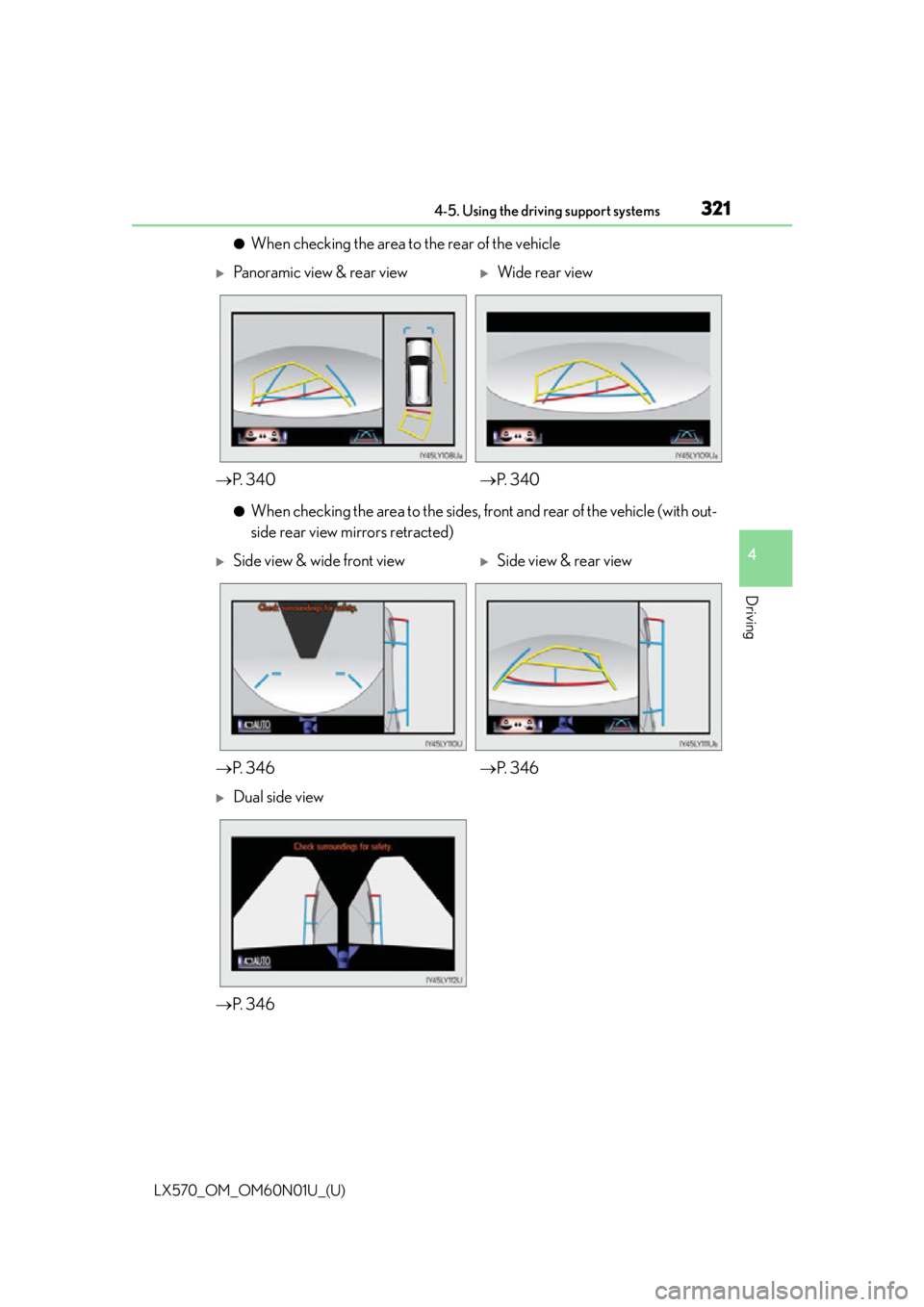
●When checking the area to the rear of the vehicle
●When checking the area to the sides, front and rear of the vehicle (with out-
side rear view mirrors retracted)
Panoramic view & rear viewWide rear view
P. 3 4 0 P. 3 4 0
Side view & wide front viewSide view & rear view
P. 3 4 6 P. 3 4 6
Dual side view
P. 3 4 6
Page 326 of 632
326
LX570_OM_OM60N01U_(U)4-5. Using the driving support systems
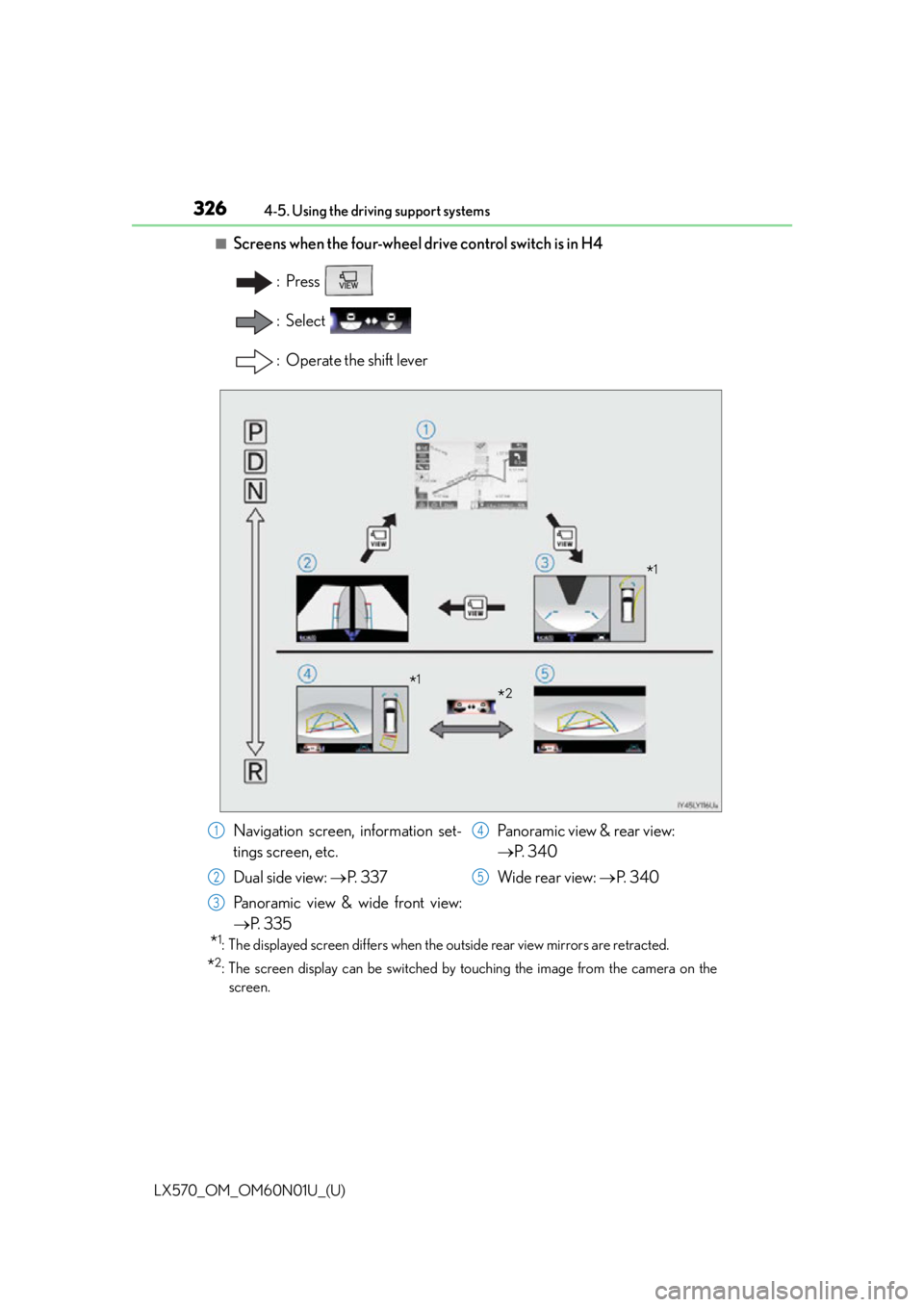
■Screens when the four-wheel drive control switch is in H4
:Press
: Select
: Operate the shift lever
*1: The displayed screen differs when the outside rear view mirrors are retracted.
*2: The screen display can be switched by touching the image from the camera on the
screen.
*1
*2*1
Navigation screen, information set-
tings screen, etc.
Dual side view: P. 3 3 7
Panoramic view & wide front view:
P. 3 3 5 Panoramic view & rear view:
P. 3 4 0
Wide rear view: P. 3 4 01
2
3
4
5
Page 328 of 632
328
LX570_OM_OM60N01U_(U)4-5. Using the driving support systems
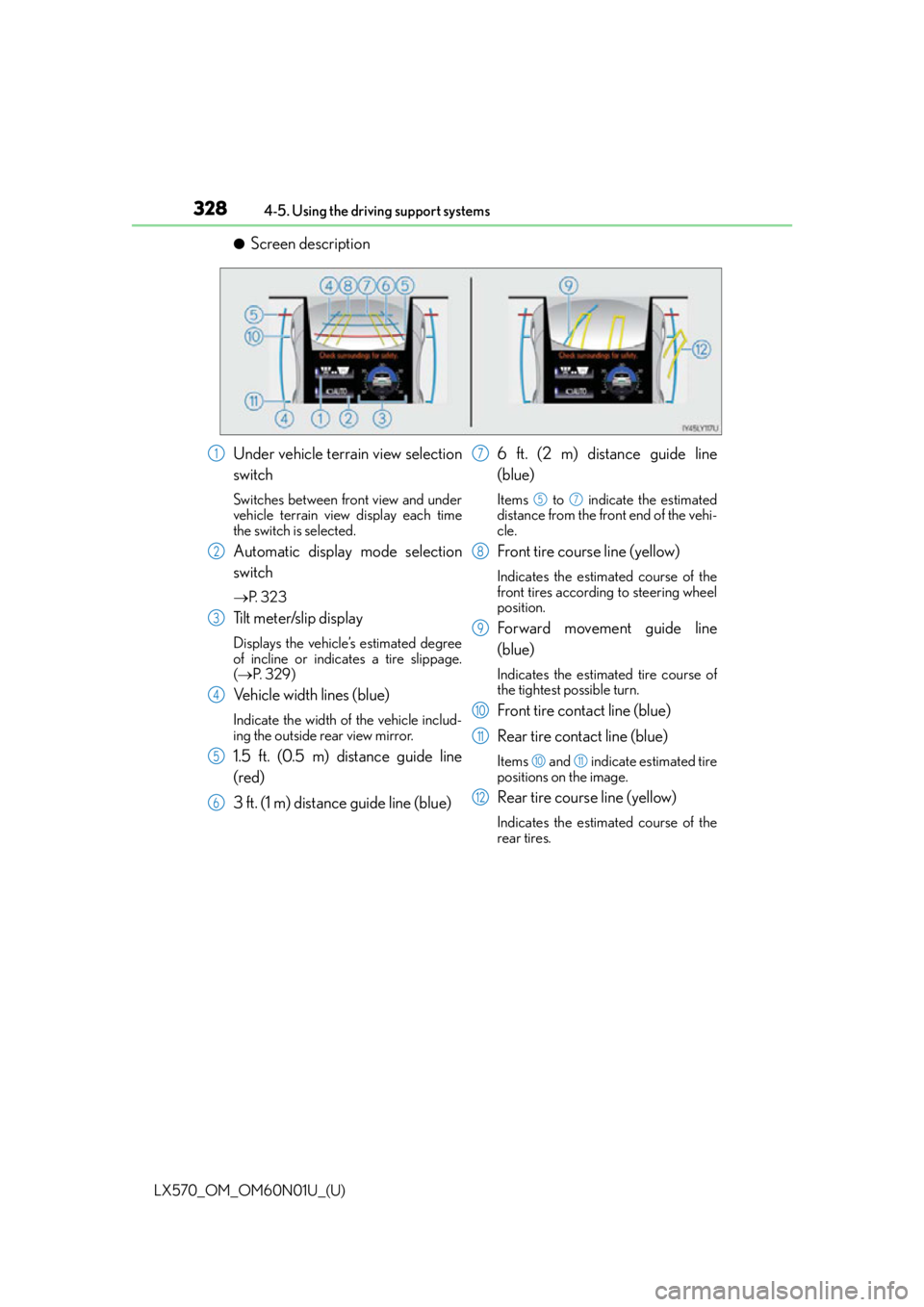
●Screen description
Under vehicle terrain view selection
switch
Switches between front view and under
vehicle terrain view display each time
the switch is selected.
Automatic display mode selection
switch
P. 3 2 3
Tilt meter/slip display
Displays the vehicle’s estimated degree
of incline or indicates a tire slippage.
( P. 3 2 9 )
Vehicle width lines (blue)
Indicate the width of the vehicle includ-
ing the outside rear view mirror.
1.5 ft. (0.5 m) distance guide line
(red)
3 ft. (1 m) distance guide line (blue) 6 ft. (2 m) distance guide line
(blue)
Items to indicate the estimated
distance from the front end of the vehi-
cle.
Front tire course line (yellow)
Indicates the estimated course of the
front tires according to steering wheel
position.
Forward movement guide line
(blue)
Indicates the estimated tire course of
the tightest possible turn.
Front tire contact line (blue)
Rear tire contact line (blue)
Items and indicate estimated tire
positions on the image.
Rear tire course line (yellow)
Indicates the estimated course of the
rear tires.
1
2
3
4
5
6
7
57
8
9
10
11
1011
12
Page 333 of 632
LX570_OM_OM60N01U_(U)
3334-5. Using the driving support systems
4
Driving
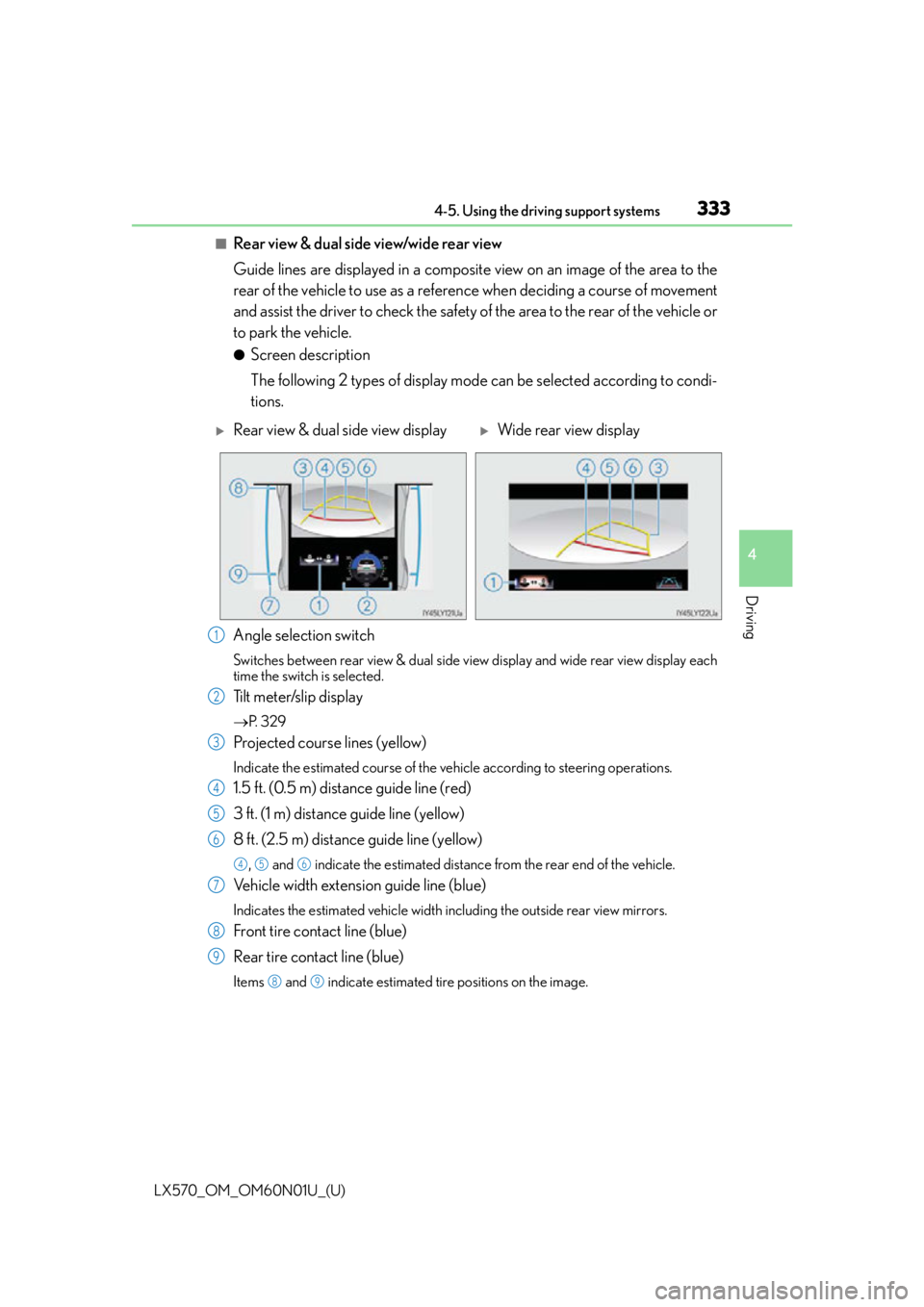
■Rear view & dual side view/wide rear view
Guide lines are displayed in a composite view on an image of the area to the
rear of the vehicle to use as a reference when deciding a course of movement
and assist the driver to check the safety of the area to the rear of the vehicle or
to park the vehicle.
●Screen description
The following 2 types of display mode can be selected according to condi-
tions.
Angle selection switch
Switches between rear view & dual side vi ew display and wide rear view display each
time the switch is selected.
Tilt meter/slip display
P. 3 2 9
Projected course lines (yellow)
Indicate the estimated course of the vehicle according to steering operations.
1.5 ft. (0.5 m) distance guide line (red)
3 ft. (1 m) distance guide line (yellow)
8 ft. (2.5 m) distance guide line (yellow)
, and indicate the estimated distance from the rear end of the vehicle.
Vehicle width extension guide line (blue)
Indicates the estimated vehicle width including the outside rear view mirrors.
Front tire contact line (blue)
Rear tire contact line (blue)
Items and indicate estimated tire positions on the image.
Rear view & dual side view displayWide rear view display
1
2
3
4
5
6
456
7
8
9
89