remote control LEXUS LX570 2016 Owner's Manual
[x] Cancel search | Manufacturer: LEXUS, Model Year: 2016, Model line: LX570, Model: LEXUS LX570 2016Pages: 632, PDF Size: 8.94 MB
Page 171 of 632

LX570_OM_OM60N01U_(U)
1713-5. Opening, closing the windows and moon roof
3
Operation of each component
WA R N I N G
Observe the following precautions.
Failing to do so may cause death or serious injury.
■Opening the moon roof
●Do not allow any passengers to put their hands or heads outside the vehicle while it is
moving.
●Do not sit on top of the moon roof.
■Closing the moon roof
●The driver is responsible for moon roof opening and closing operations.
In order to prevent accidental operation, espe cially by a child, do not let a child oper-
ate the moon roof. It is possible for children and other passengers to have body parts
caught in the moon roof.
●Check to make sure that all passengers do not have any part of their bodies in a posi-
tion where it could be caught when the moon roof is being operated.
●When using the wireless remote control or mechanical key and operating the moon
roof, operate the moon roof after checking to make sure that there is no possibility of
any passenger having any of their body parts caught in the moon roof. Also, do not let
a child operate moon roof by the wireless remote control or mechanical key. It is pos-
sible for children and other passengers to get caught in the moon roof.
●When exiting the vehicle, turn the engine sw itch off, carry the key and exit the vehicle
along with the child. There may be accidental operation, due to mischief, etc., that
may possibly lead to an accident.
■Jam protection function
●Never use any part of your body to intentio nally activate the jam protection function.
●The jam protection function may not work if something gets caught just before the
moon roof fully closes.
Page 223 of 632

LX570_OM_OM60N01U_(U)
2234-3. Operating the lights and wipers
4
Driving
■Automatic headlight leveling system
The level of the headlights is automatically adjusted according to the number of passen-
gers and the loading condition of the vehicle to ensure that the headlights do not inter-
fere with other road users.
■We l c o m e l i g h t i n g
If the headlight switch is turned to and the surrounding area is dark, unlocking the
doors using the smart access system with pu sh-button start or wireless remote control
will turn the parking lights and tail lights on automatically.
■If the automatic headlight leveling system warning light flashes
It may indicate a malfunction in the system. Contact your Lexus dealer.
■Light reminder buzzer
A buzzer sounds when the engine switch is turned off or turned to ACCESSORY mode
and the driver’ door is opened while the tail lights remain on.
■Customization
Settings (e.g. light sensor sensitivity) can be changed.
(Customizable features:P. 585)
NOTICE
■To prevent battery discharge
Do not leave the lights on longer than ne cessary when the engine is not running.
Page 396 of 632
3965-1. Remote Touch screen
LX570_OM_OM60N01U_(U)
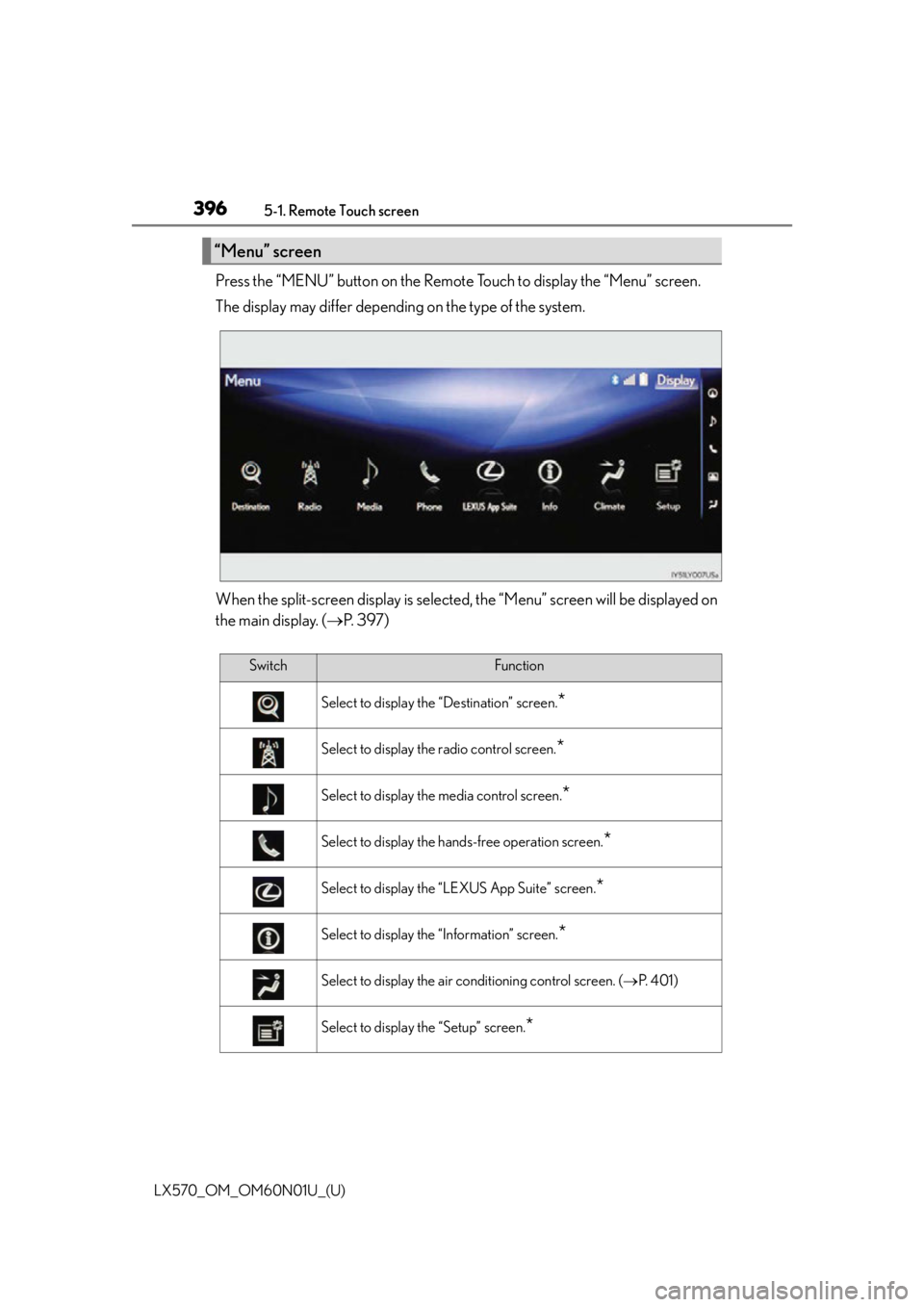
Press the “MENU” button on the Remote Touch to display the “Menu” screen.
The display may differ depending on the type of the system.
When the split-screen display is selected , the “Menu” screen will be displayed on
the main display. ( P. 3 9 7 )
“Menu” screen
SwitchFunction
Select to display the “Destination” screen.*
Select to display the radio control screen.*
Select to display the media control screen.*
Select to display the hands-free operation screen.*
Select to display the “LEXUS App Suite” screen.*
Select to display the “Information” screen.*
Select to display the air conditioning control screen. ( P. 4 0 1 )
Select to display the “Setup” screen.*
Page 401 of 632
401
LX570_OM_OM60N01U_(U)5-3. Using the air conditio
ning system and defogger
5
Interior features
Front automatic air conditioning system
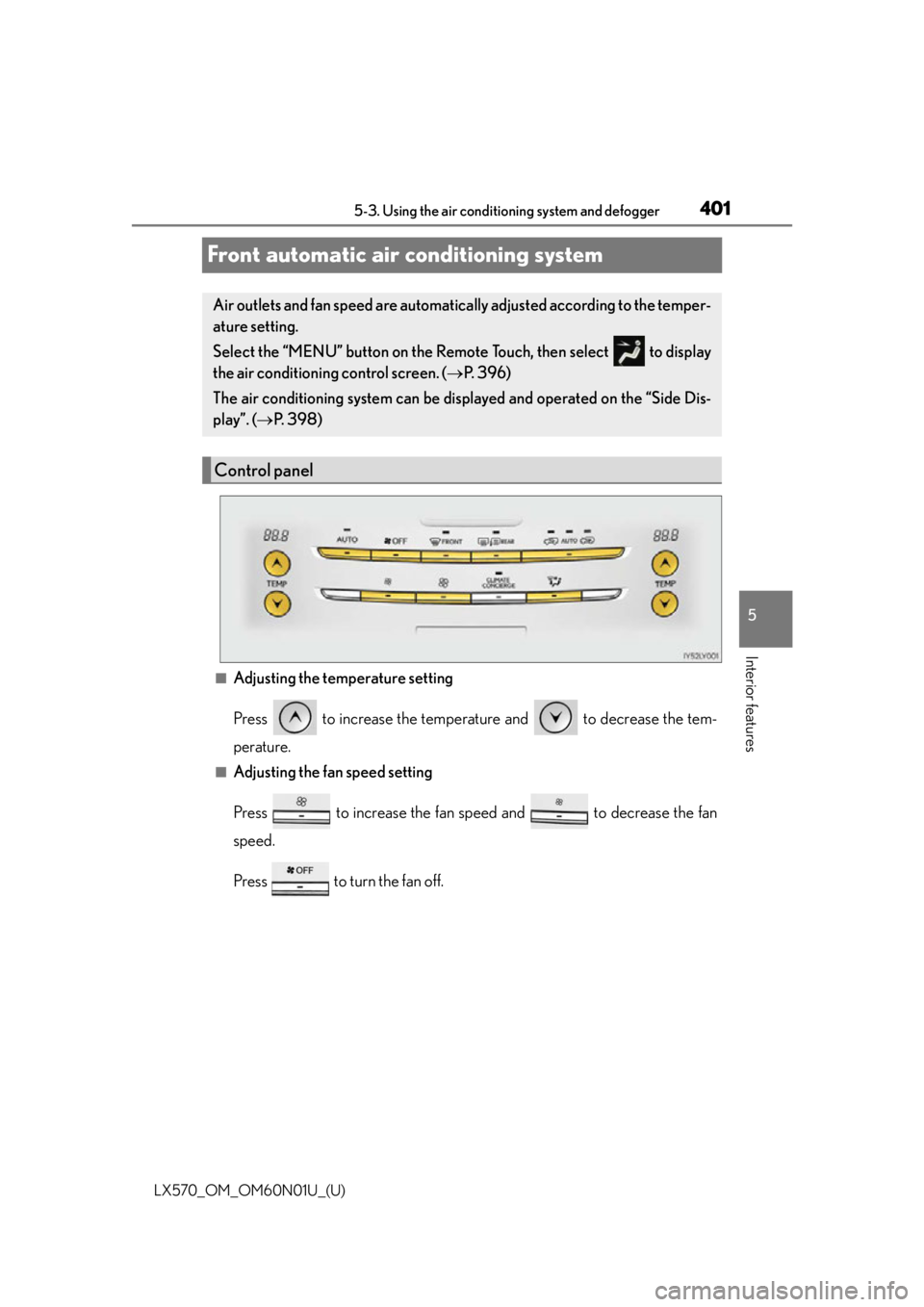
■Adjusting the temperature setting
Press to increase the temperature and to decrease the tem-
perature.
■Adjusting the fan speed setting
Press to increase the fan speed and to decrease the fan
speed.
Press to turn the fan off.
Air outlets and fan speed are automatica lly adjusted according to the temper-
ature setting.
Select the “MENU” button on the Remote Touch, then select to display
the air conditioning control screen. ( P. 3 9 6 )
The air conditioning system can be disp layed and operated on the “Side Dis-
play”. ( P. 3 9 8 )
Control panel
Page 446 of 632
446
LX570_OM_OM60N01U_(U)5-6. Using the other interior features
Garage door opener
The garage door opener (HomeLink® Universal Transceiver) is manufactured under
license from HomeLink®.
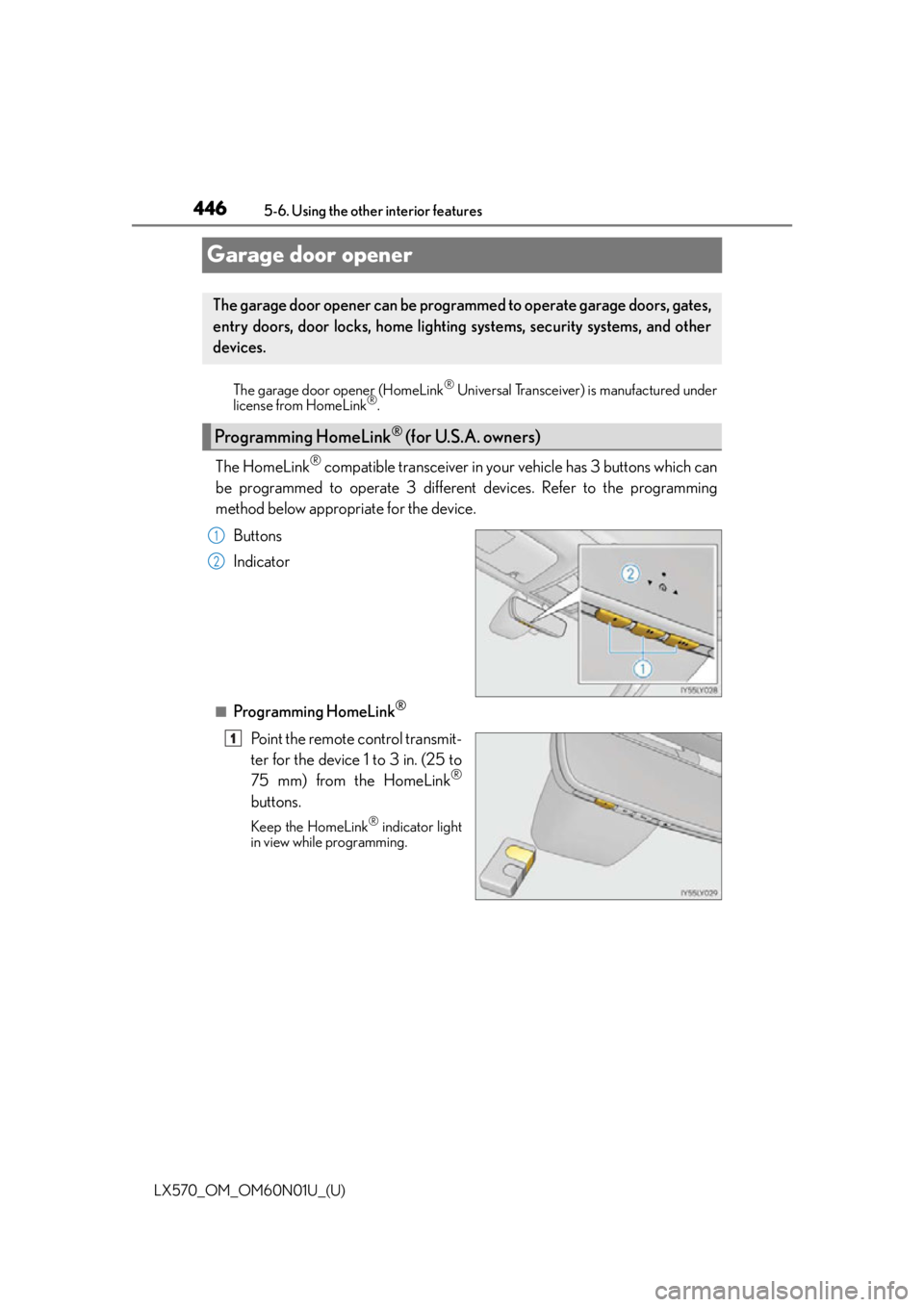
The HomeLink® compatible transceiver in your vehicle has 3 buttons which can
be programmed to operate 3 different devices. Refer to the programming
method below appropriate for the device.
Buttons
Indicator
■Programming HomeLink®
Point the remote control transmit-
ter for the device 1 to 3 in. (25 to
75 mm) from the HomeLink
®
buttons.
Keep the HomeLink® indicator light
in view while programming.
The garage door opener can be programmed to operate garage doors, gates,
entry doors, door locks, home lighting systems, security systems, and other
devices.
Programming HomeLink® (for U.S.A. owners)
1
2
1
Page 447 of 632
LX570_OM_OM60N01U_(U)
4475-6. Using the other interior features
5
Interior features
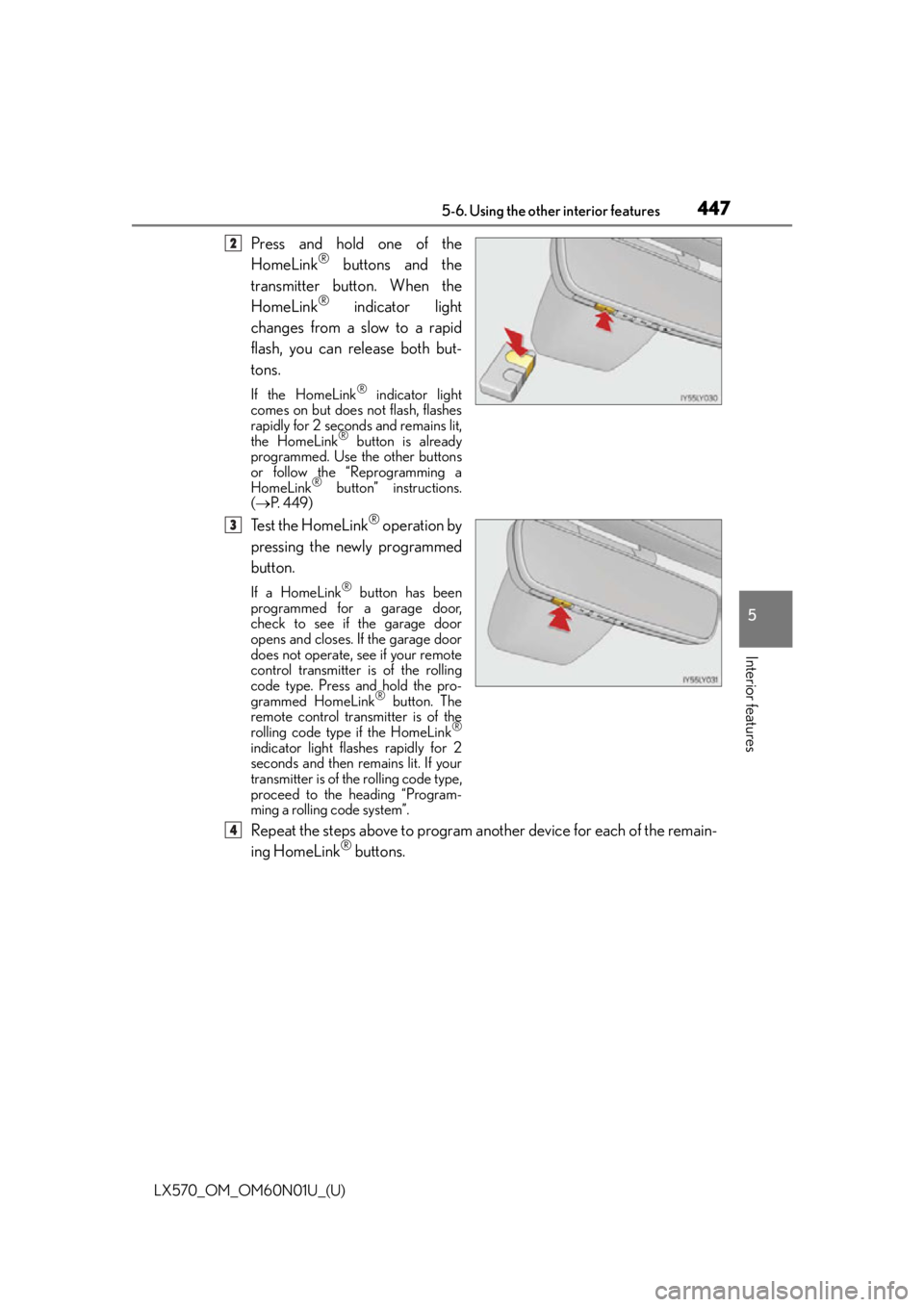
Press and hold one of the
HomeLink® buttons and the
transmitter button. When the
HomeLink
® indicator light
changes from a slow to a rapid
flash, you can release both but-
tons.
If the HomeLink® indicator light
comes on but does not flash, flashes
rapidly for 2 seconds and remains lit,
the HomeLink
® button is already
programmed. Use the other buttons
or follow the “Reprogramming a
HomeLink
® button” instructions.
( P. 4 4 9 )
Te s t t h e H o m e L i n k® operation by
pressing the newly programmed
button.
If a HomeLink® button has been
programmed for a garage door,
check to see if the garage door
opens and closes. If the garage door
does not operate, see if your remote
control transmitter is of the rolling
code type. Press and hold the pro-
grammed HomeLink
® button. The
remote control transmitter is of the
rolling code type if the HomeLink
®
indicator light flashes rapidly for 2
seconds and then remains lit. If your
transmitter is of the rolling code type,
proceed to the heading “Program-
ming a rolling code system”.
Repeat the steps above to program another device for each of the remain-
ing HomeLink® buttons.
2
3
4
Page 448 of 632

448
LX570_OM_OM60N01U_(U)5-6. Using the other interior features
■Programming a rolling code system
If your device is rolling code equipp
ed, follow the steps under the heading
“Programming HomeLink
®” before proceeding with the steps listed below.
Locate the learn button on the ceiling mounted garage door opener motor.
The exact location and color of the bu tton may vary by brand of garage
door opener motor.
Refer to the operation manual supplied wi th the garage door opener motor for the
location of the learn button.
Press the learn button.
Following this step, you have 30 seconds in which to initiate step 3 below.
Press and hold the vehicle’s programmed HomeLink® button for 2 sec-
onds and release it. Repeat this step once again. The garage door may
open.
If the garage door opens, the programming process is complete. If the door does
not open, press and release the button a third time. This third press and release will
complete the programming process by opening the garage door.
The ceiling mounted garage door opener motor should now recognize the
HomeLink
® signal and operate the garage door.
Repeat the steps above to program an other rolling code system for any of
the remaining HomeLink® buttons.
■Programming an entry gate (for U.S.A. owners)/Programming all devices in
the Canadian market
Place your transmitter 1 to 3 in. (25 to 75 mm) away from the surface of the
HomeLink
®.
Keep the HomeLink® indicator light in view while programming.
Press and hold the selected HomeLink® button.
Repeatedly press and release (cycle) th e device’s remote control button for
two seconds each until step 4 is completed.
When the indicator light on the HomeLink
® compatible transceiver starts
to flash rapidly, release the buttons.
Test the operation of the HomeLink
® by pressing the newly programmed
button. Check to see if the gate/device operates correctly.
Repeat the steps above to program another device for each of the remain-
ing HomeLink
® buttons.
1
2
3
4
1
2
3
4
5
6
Page 450 of 632
450
LX570_OM_OM60N01U_(U)5-6. Using the other interior features
■Before programming
●Install a new battery in the remote control transmitter.
●The battery side of the remote control transmitter must be pointed away from the
HomeLink® button.
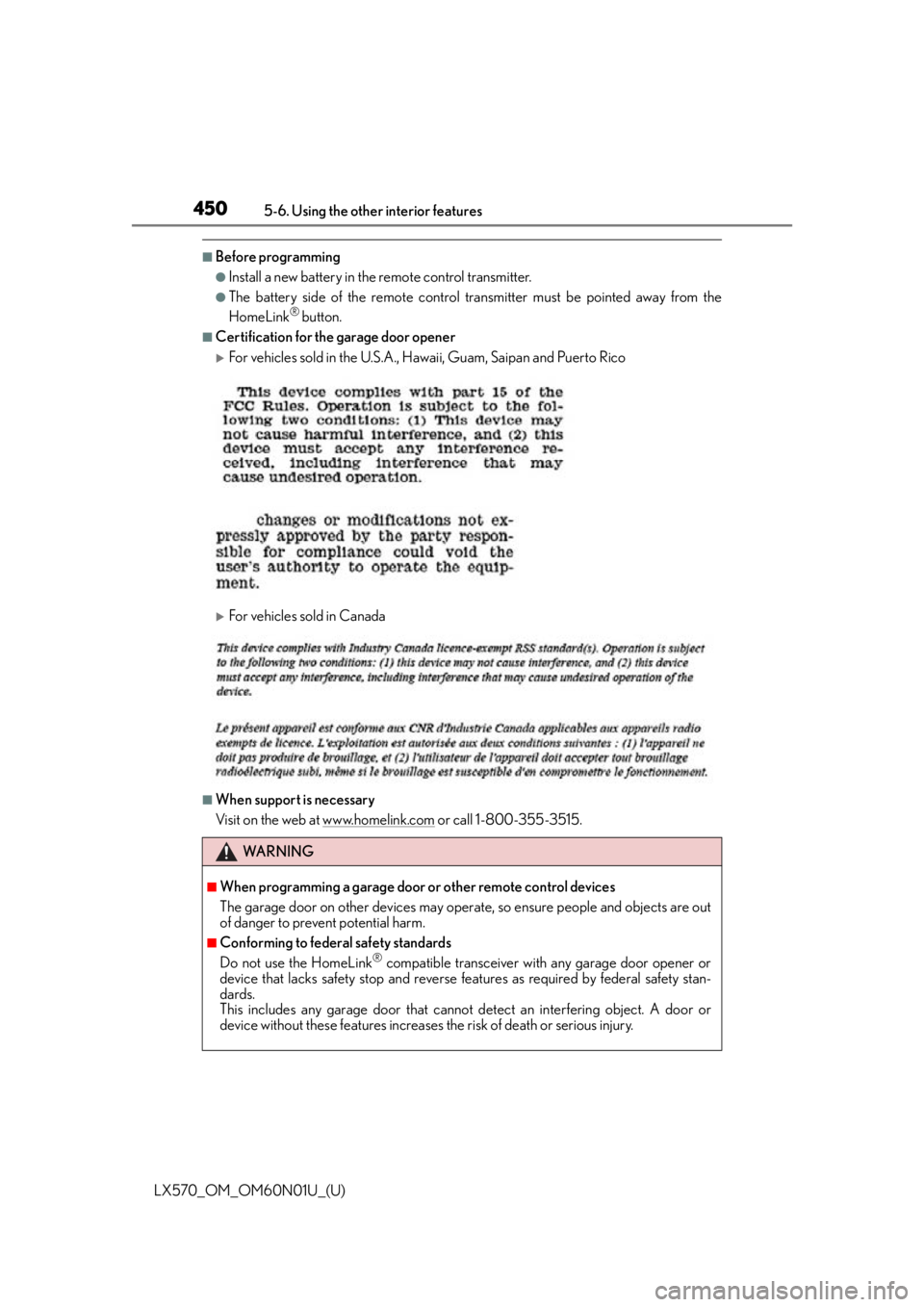
■Certification for the garage door opener
For vehicles sold in the U.S.A., Ha
waii, Guam, Saipan and Puerto Rico
For vehicles sold in Canada
■When support is necessary
Visit on the web at www.homelink.com
or call 1-800-355-3515.
WA R N I N G
■When programming a garage door or other remote control devices
The garage door on other devices may operate, so ensure people and objects are out
of danger to prevent potential harm.
■Conforming to federal safety standards
Do not use the HomeLink® compatible transceiver with any garage door opener or
device that lacks safety stop and reverse fe atures as required by federal safety stan-
dards.
This includes any garage door that canno t detect an interfering object. A door or
device without these features increases the risk of death or serious injury.
Page 483 of 632
LX570_OM_OM60N01U_(U)
4836-3. Do-it-yourself maintenance
6
Maintenance and care
■Before recharging
When recharging, the battery produces hydrogen gas which is flammable and explosive.
Therefore, observe the following before recharging:
●If recharging with the battery installed on the vehicle, be sure to disconnect the ground
cable.
●Make sure the engine switch on the charger is off when connecting and disconnecting
the charger cables to the battery.
■After recharging/reconnecting the battery
The engine may not start. Follow the procedure below to initialize the system.
Shift the shift lever to P.
Open and close any of the doors.
Restart the engine.
●Unlocking the doors using the smart access system with push-button start may not be
possible immediately after reconnecting the battery. If this happens, use the wireless
remote control or the mechanical key to lock/unlock the doors.
●Start the engine with the engine switch in ACCESSORY mode. The engine may not
start with the engine switch turned off. However, the engine will operate normally from
the second attempt.
●The engine switch mode is recorded by the vehicle. If the battery is reconnected, the
vehicle will return the engine switch mode to the status it was in before the battery was
disconnected. Make sure to turn off the en gine before disconnect the battery. Take
extra care when connecting the battery if the engine switch mode prior to discharge is
unknown.
If the engine will not start even after mult iple attempts, contact your Lexus dealer.
WA R N I N G
■Chemicals in the battery
Batteries contain poisonous and corrosive sulfuric acid and may produce hydrogen
gas which is flammable and explosive. To reduce the risk of death or serious injury, take
the following precautions while working on or near battery:
●Do not cause sparks by touching the battery terminals with tools.
●Do not smoke or light a match near the battery.
●Avoid contact with eyes, skin and clothes.
●Never inhale or swallow electrolyte.
●Wear protective safety glasses when working near the battery.
●Keep children away from the battery.
■Where to safely charge the battery
Always charge the battery in an open area. Do not charge the battery in a garage or
closed room where there is not sufficient ventilation.
1
2
3
Page 504 of 632
504
LX570_OM_OM60N01U_(U)6-3. Do-it-yourself maintenance
■Use a CR2032 lithium battery
●Batteries can be purchased at your Lexus
dealer, local electrical appliance shops or
camera stores.
●Replace only with the same or equivalent type recommended by the manufacturer.
●Dispose of used batteries according to the local laws.
■When the card key battery needs to be replaced
The battery for the card key is available only at Lexus dealers. Your Lexus dealer can
replace the battery for you.
■If the electronic key battery is depleted
The following symptoms may occur:
●The smart access system with push-button start and wireless remote control will not
function properly.
●The operational range will be reduced.
WA R N I N G
■Removed battery and other parts
These parts are small and if swallowed by a child, they can cause choking. Keep away
from children. Failure to do so could result in death or serious injury.
NOTICE
■For normal operation afte r replacing the battery
Observe the following precautions to prevent accidents:
●Always work with dry hands.
Moisture may cause the battery to rust.
●Do not touch or move any other component inside the remote control.
●Do not bend either of the battery terminals.