steering wheel LEXUS LX570 2016 Owner's Manual
[x] Cancel search | Manufacturer: LEXUS, Model Year: 2016, Model line: LX570, Model: LEXUS LX570 2016Pages: 632, PDF Size: 8.94 MB
Page 162 of 632
1623-4. Adjusting the steering wheel and mirrors
LX570_OM_OM60N01U_(U)
Outside rear view mirrors
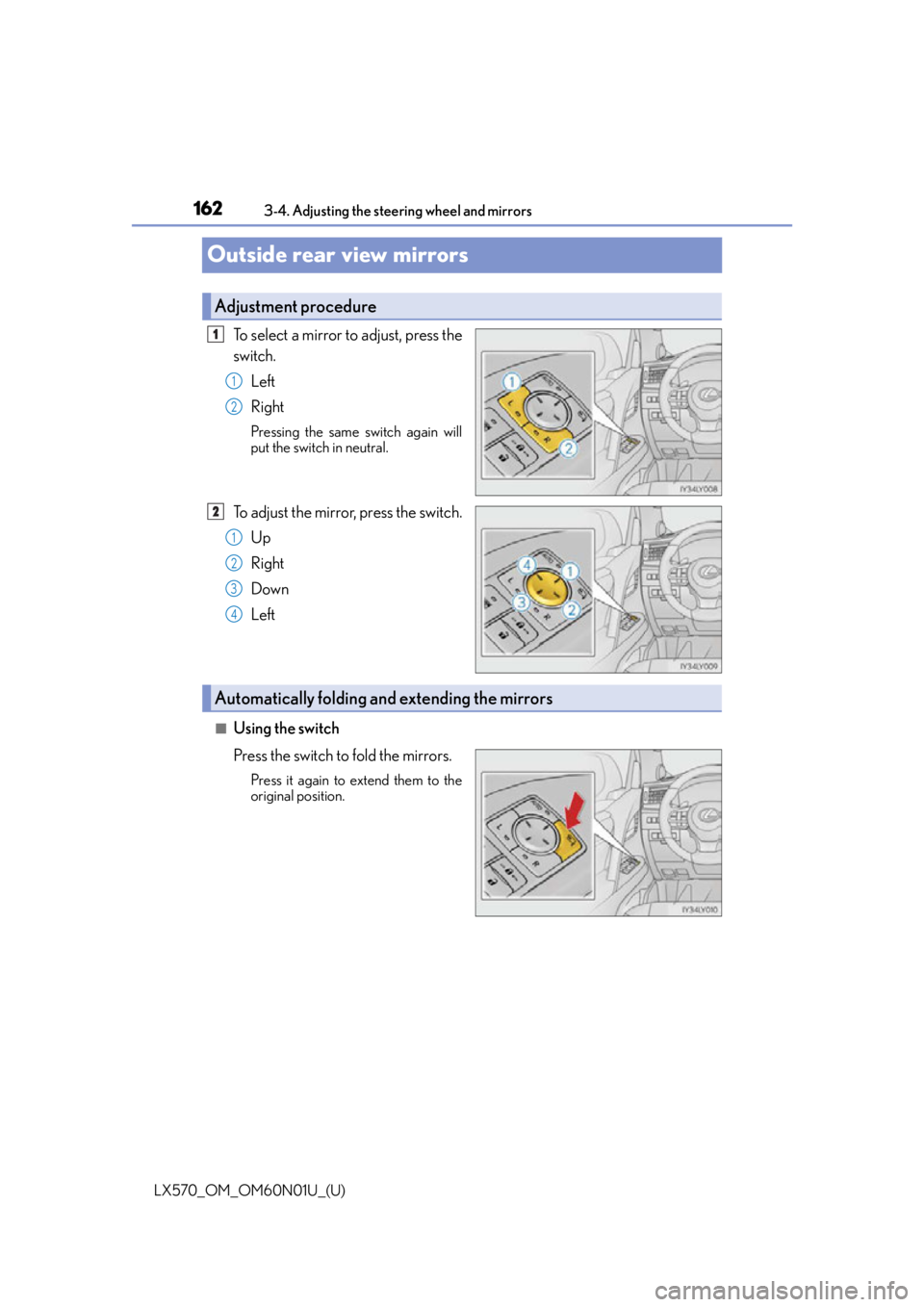
To select a mirror to adjust, press the
switch. Left
Right
Pressing the same switch again will
put the switch in neutral.
To adjust the mirror, press the switch.
Up
Right
Down
Left
■Using the switch
Press the switch to fold the mirrors.
Press it again to extend them to the
original position.
Adjustment procedure
1
1
2
2
1
2
3
4
Automatically folding and extending the mirrors
Page 163 of 632
1633-4. Adjusting the steering wheel and mirrors
3
Operation of each component
LX570_OM_OM60N01U_(U)
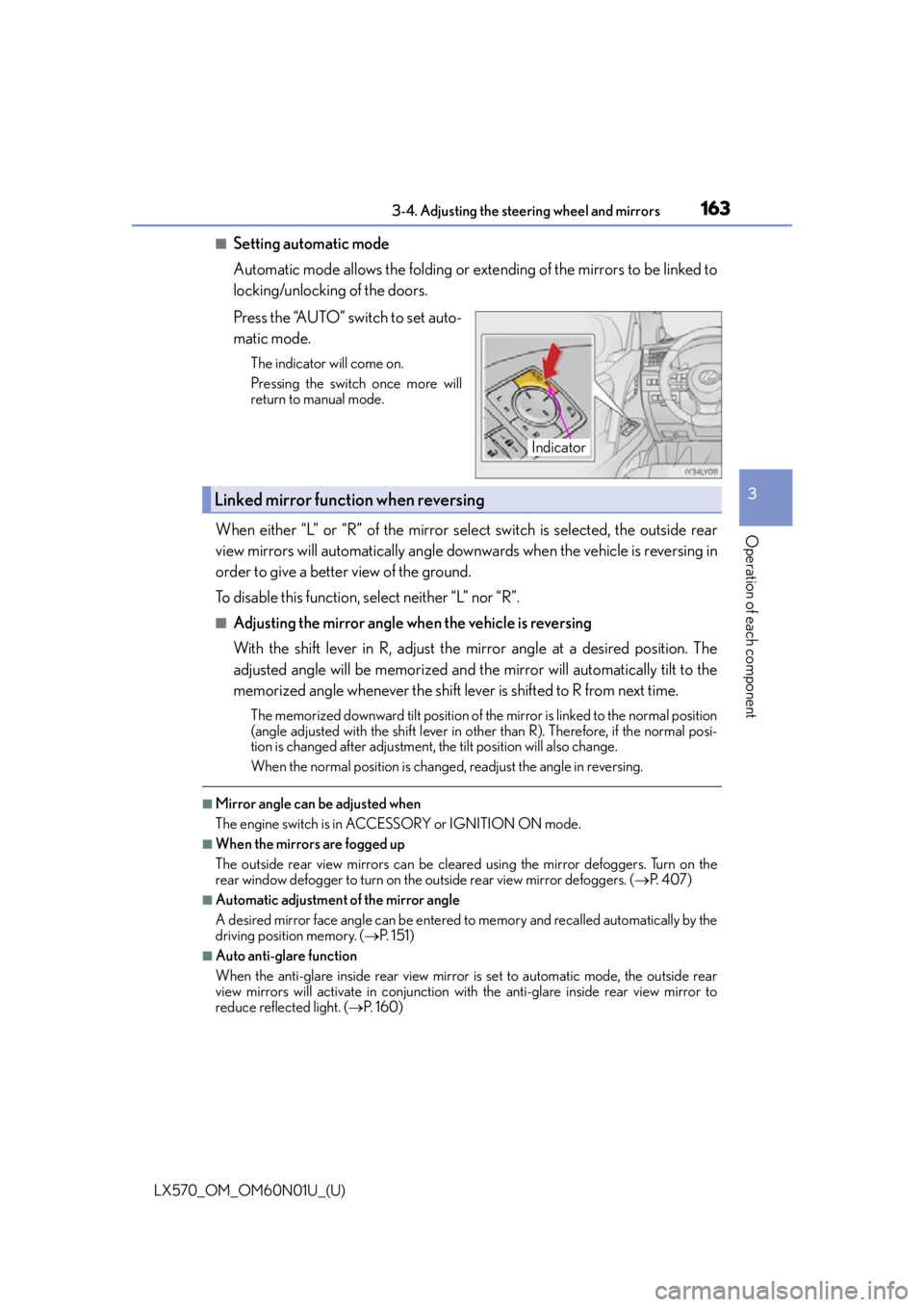
■Setting automatic mode
Automatic mode allows the folding or extending of the mirrors to be linked to
locking/unlocking of the doors.
Press the “AUTO” switch to set auto-
matic mode.
The indicator will come on.
Pressing the switch once more will
return to manual mode.
When either “L” or “R” of the mirror select switch is selected, the outside rear
view mirrors will automatically angle downwards when the vehicle is reversing in
order to give a better view of the ground.
To disable this function, select neither “L” nor “R”.
■Adjusting the mirror angle when the vehicle is reversing
With the shift lever in R, adjust the mirror angle at a desired position. The
adjusted angle will be memorized and the mirror will automatically tilt to the
memorized angle whenever the shift lever is shifted to R from next time.
The memorized downward tilt position of the mirror is linked to the normal position
(angle adjusted with the shif t lever in other than R). Therefore, if the normal posi-
tion is changed after adjustment, th e tilt position will also change.
When the normal position is chang ed, readjust the angle in reversing.
■Mirror angle can be adjusted when
The engine switch is in ACCESSORY or IGNITION ON mode.
■When the mirrors are fogged up
The outside rear view mirrors can be cleare d using the mirror defoggers. Turn on the
rear window defogger to turn on the outside rear view mirror defoggers. ( P. 4 0 7 )
■Automatic adjustment of the mirror angle
A desired mirror face angle can be entered to memory and recalled automatically by the
driving position memory. ( P. 1 5 1 )
■Auto anti-glare function
When the anti-glare inside rear view mirror is set to automatic mode, the outside rear
view mirrors will activate in conjunction with the anti-glare inside rear view mirror to
reduce reflected light. ( P. 1 6 0 )
Indicator
Linked mirror function when reversing
Page 164 of 632

1643-4. Adjusting the steering wheel and mirrors
LX570_OM_OM60N01U_(U)
■Using automatic mode in cold weather
When automatic mode is used in cold weather, the door mirror could freeze up and
automatic stowing and return may not be possib le. In this event, remove any ice and snow
from the door mirror, then either operate th e mirror using manual mode or move the mir-
ror by hand.
WA R N I N G
■Important points while driving
Observe the following precautions while driving.
Failing to do so may result in loss of contro l of the vehicle and cause an accident, result-
ing in death or serious injury.
●Do not adjust the mirrors while driving.
●Do not drive with the mirrors folded.
●Both the driver and passenger side mirror s must be extended and properly adjusted
before driving.
■When a mirror is moving
To avoid personal injury and mirror malfunct ion, be careful not to get your hand caught
by the moving mirror.
■When the mirror defoggers are operating
Do not touch the rear view mirror surfaces, as they can become very hot and burn you.
NOTICE
■If ice should jam the mirror
Do not operate the control or scrape the mi rror face. Use a spray de-icer to free the
mirror.
Page 181 of 632

LX570_OM_OM60N01U_(U)
1814-1. Before driving
4
Driving
NOTICE
■When driving the vehicle
●Do not depress the accelerator and brake pedals at the same time during driving, as
this may restrain the engine output.
●Do not use the accelerator pedal or depress the accelerator and brake pedals at the
same time to hold the vehicle on a hill.
■When parking the vehicle
Always shift the shift lever to P. Failure to do so may cause the vehicle to move or the
vehicle may accelerate suddenly if the accelerator pedal is ac cidentally depressed.
■Avoiding damage to vehicle parts
●Do not turn the steering wheel fully in either direction and hold it there for an
extended period of time.
Doing so may damage the power steering pump.
●When driving over bumps in the road, drive as slowly as possible to avoid damaging
the wheels, underside of the vehicle, etc.
■If you get a flat tire while driving
A flat or damaged tire may cause the follo wing situations. Hold the steering wheel
firmly and gradually depress the brak e pedal to slow down the vehicle.
●It may be difficult to control your vehicle.
●The vehicle will make abnormal sounds or vibrations.
●The vehicle will lean abnormally.
Information on what to do in case of a flat tire. (P. 5 3 6 )
■When encountering flooded roads
Do not drive on a road that has flooded after heavy rain etc. Doing so may cause the
following serious damage to the vehicle:
●Engine stalling
●Short in electrical components
●Engine damage caused by water immersion
In the event that you drive on a flooded road and the vehicle is flooded, be sure to have
your Lexus dealer check the following:
●Brake function
●Changes in quantity and quality of oil and fluid used for the engine, transmission,
transfer, differentials, etc.
●Lubricant condition for the propeller shaft, bearings and suspension joints (where
possible), and the function of all joints, bearings, etc.
Page 197 of 632

LX570_OM_OM60N01U_(U)
1974-1. Before driving
4
Driving
Your vehicle will handle differently when towing a trailer. Help to avoid an acci-
dent, death or serious injury, keep the following in mind when towing:
●Speed limits for towing a trailer vary by state or province. Do not exceed the
posted towing speed limit.
●Lexus recommends that the vehicle-trailer speed limit is 65 mph (104 km/h)
on a flat, straight, dry road. Do not exceed this limit, the posted towing speed
limit or the speed limit for your trailer as set forth in your trailer owner’s man-
ual, whichever is lowest. Instability of the towing vehicle-trailer combination
(trailer sway) increases as speed increases. Exceeding speed limits may cause
loss of control.
●Before starting out, check the trailer lights, tires and the vehicle-trailer con-
nections. Recheck after driving a short distance.
●Practice turning, stopping and reversing with the trailer attached in an area
away from traffic until you become accustomed to the feel of the vehicle-
trailer combination.
●Reversing with a trailer attached is di fficult and requires practice. Grip the
bottom of the steering wheel and move your hand to the left to move the
trailer to the left. Move your hand to the right to move the trailer to the right.
(This is generally opposite to reversing without a trailer attached.) Avoid sharp
or prolonged turning. Have someone gu ide you when reversing to reduce the
risk of an accident.
●As stopping distance is increased when towing a trailer, vehicle-to-vehicle dis-
tance should be increased. For each 10 mph (16 km/h) of speed, allow at least
one vehicle and trailer length.
●Avoid sudden braking as you may skid, re sulting in the trailer jackknifing and
loss of vehicle control. This is especially true on wet or slippery surfaces.
Trailer towing tips
Page 198 of 632

198
LX570_OM_OM60N01U_(U)4-1. Before driving
●Avoid jerky starts or sudden acceleration.
●Avoid jerky steering and sharp turns, and slow down before making a turn.
●Note that when making a turn, the traile
r wheels will be closer than the vehicle
wheels to the inside of the turn. Comp ensate by making a wider than normal
turning radius.
●Slow down before making a turn, in crosswinds, on wet or slippery surfaces,
etc.
Increasing vehicle speed can destabilize the trailer.
●Take care when passing other vehicles. Passing requires considerable dis-
tance. After passing a vehicle, do not forget the length of your trailer, and be
sure you have plenty of room before changing lanes.
●To maintain engine braking efficiency and charging system performance
when using engine braking, do not put the transmission in D.
If in the S mode, the transmission shift range position must be in 6 or lower.
( P. 2 1 0 )
●Instability happens more frequently when descending steep or long downhill
grades. Before descending, slow down and downshift. Do not make sudden
downshifts while descending steep or long downhill grades.
●Avoid holding the brake pedal down too long or applying the brakes too fre-
quently. This could cause the brakes to overheat and result in reduced braking
efficiency.
●Due to the added load of the trailer, yo ur vehicle’s engine may overheat on hot
days (at temperatures over 85°F [30°C]) when driving up a long or steep
grade. If the engine coolant temperat ure gauge indicates overheating, imme-
diately turn off the air cond itioning (if in use), pull your vehicle off the road and
stop in a safe spot. ( P. 5 5 6 )
Page 201 of 632

LX570_OM_OM60N01U_(U)
2014-1. Before driving
4
Driving
■Driving mode select switch
The suspension can be switched for improvement in driveability. (P. 2 8 6 )
■Break-in schedule
If your vehicle is new or equipped with any new power train components (such as an
engine, transmission, differential or wheel bearing), Lexus recommends that you do not
tow a trailer until the vehicle has been driven for over 500 miles (800 km).
After the vehicle has been driven for over 500 miles (800 km), you can start towing.
However, for the next 500 miles (800 km), drive the vehicle at a speed of less than
50 mph (80 km/h) when towing a trailer, and avoid full throttle acceleration.
■Maintenance
●If you tow a trailer, your vehicle will require more frequent maintenance due to the addi-
tional load. (See “Owner’s Guide”, “Warranty and Services Guide”, “Owner’s Manual
Supplement” or “Warranty Booklet”.)
●Retighten the fixing bolts of the towing ba ll and bracket after approximately 600 miles
(1000 km) of trailer towing.
■If trailer sway occurs
One or more factors (crosswinds, passing vehicles, rough roads, etc.) can adversely
affect handling of your vehicle and trailer, causing instability.
●If trailer swaying occurs:
• Firmly grip the steering wheel. Steer straight ahead.
Do not try to control trailer sway ing by turning the steering wheel.
• Begin releasing the accelerator pedal i mmediately but very gradually to reduce
speed.
Do not increase speed. Do not apply vehicle brakes.
If you make no extreme correction with the steering or brakes, your vehicle and trailer
should stabilize.
●After the trailer sw aying has stopped:
• Stop in a safe place. Get all occupants out of the vehicle.
• Check the tires of the vehicle and the trailer.
• Check the load in the trailer. Make sure the load has not shifted.
Make sure the tongue weight is appropriate, if possible.
• Check the load in the vehicle.
Make sure the vehicle is not overloaded after occupants get in.
If you cannot find any problems, the speed at which trailer swaying occurred is beyond
the limit of your particular vehicle-trailer combination.
Drive at a lower speed to prevent instability. Remember that swaying of the towing vehi-
cle-trailer increases as speed increases.
Page 207 of 632

LX570_OM_OM60N01U_(U)
2074-2. Driving procedures
4
Driving
If the engine is stopped with the shift lever in a position other than P, the engine
switch will not be turned off but inst ead be turned to ACCESSORY mode. Per-
form the following procedure to turn the switch off:
Check that the parking brake is set.
Shift the shift lever to P.
Check that “Turn Off Vehicle” is displayed on the multi-information display
and then press the engine switch once.
Check that “Turn Off Vehicle” on the multi-information display is off.
■Auto power off function
If the vehicle is left in ACCESSORY mode for more than 20 minutes or IGNITION ON
mode (the engine is not running) for more than an hour with the shift lever in P, the engine
switch will automatically turn off. However, this function cannot entirely prevent battery
discharge. Do not leave the vehicle with the engine switch in ACCESSORY or IGNI-
TION ON mode for long periods of ti me when the engine is not running.
■Operation of the engine switch
●When operating the engine switch, one short, firm press is enough. If the switch is
pressed improperly, the engine may not start or the engine switch mode may not
change. It is not necessary to press and hold the switch.
●If attempting to restart the engine immediat ely after turning the engine switch off, the
engine may not start in some cases. After turning the engine off, please wait a few sec-
onds before restarting the engine.
■Electronic key battery depletion
P. 112
■Conditions affe cting operation
P. 1 3 4
■Note for the entry function
P. 1 3 5
■If the engine does not start
●The engine immobilizer system may not have been deactivated. ( P. 76 )
Contact your Lexus dealer.
●Check that the shift lever is securely set in P. The engine may not start if the shift lever is
displaced out of P.
A message will be displayed on the multi-information display.
■Steering lock
After turning the engine switch off and opening and closing the doors, the steering wheel
will be locked due to the stee ring lock function. Operating the engine switch again auto-
matically cancels the steering lock.
When stopping the engine with the shift lever in a position other than P
1
2
3
4
Page 208 of 632
208
LX570_OM_OM60N01U_(U)4-2. Driving procedures
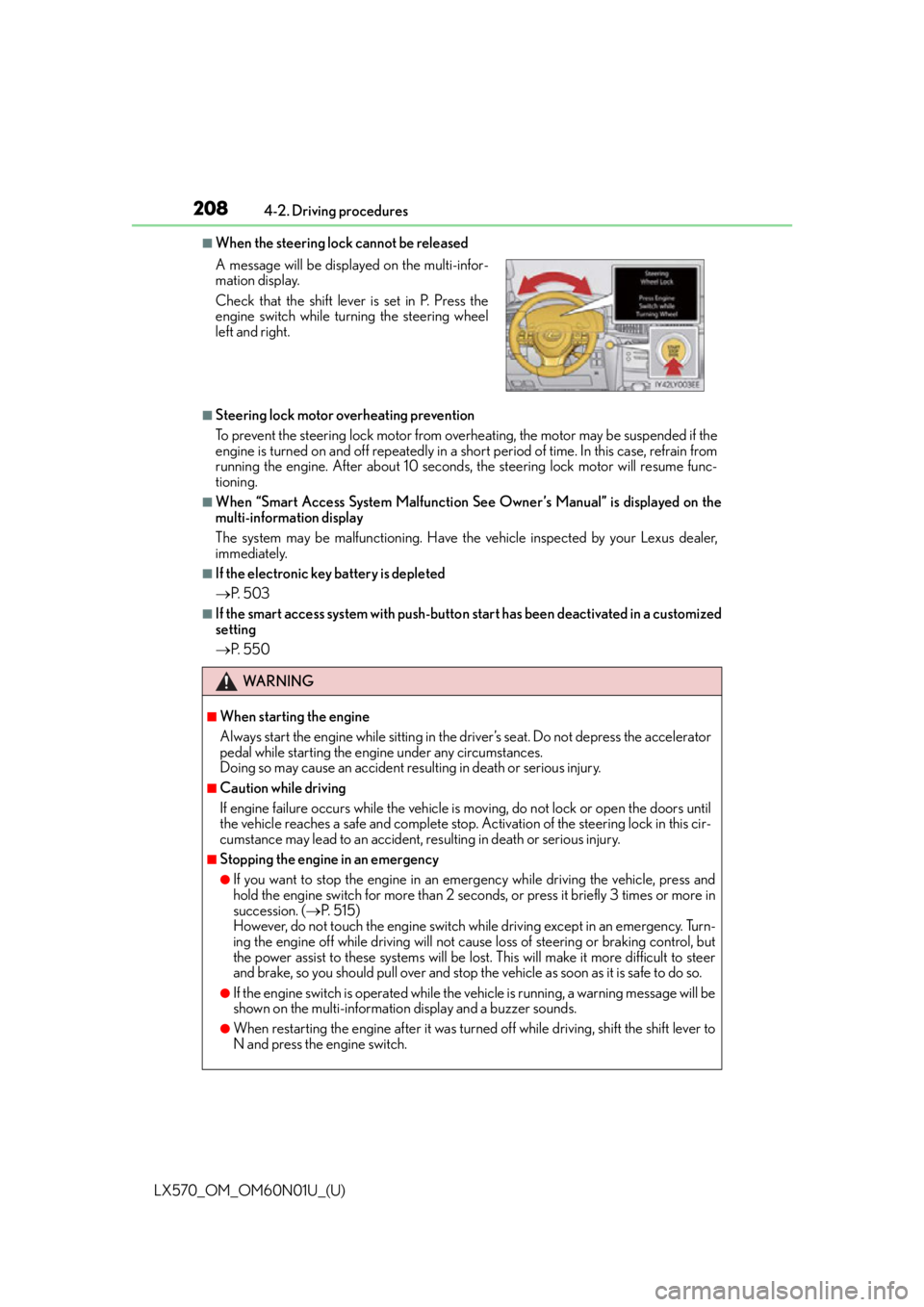
■When the steering lock cannot be released
■Steering lock motor overheating prevention
To prevent the steering lock motor from overheating, the motor may be suspended if the
engine is turned on and off repeatedly in a sh
ort period of time. In this case, refrain from
running the engine. After about 10 seconds, the steering lock motor will resume func-
tioning.
■When “Smart Access System Malfunction See Owner’s Manual” is displayed on the
multi-information display
The system may be malfunctioning. Have the vehicle inspected by your Lexus dealer,
immediately.
■If the electronic key battery is depleted
P. 5 0 3
■If the smart access system with push-butto n start has been deactivated in a customized
setting
P. 5 5 0
A message will be displayed on the multi-infor-
mation display.
Check that the shift lever is set in P. Press the
engine switch while turning the steering wheel
left and right.
WA R N I N G
■When starting the engine
Always start the engine while
sitting in the driver’s seat. Do not depress the accelerator
pedal while starting the engine under any circumstances.
Doing so may cause an accident resu lting in death or serious injury.
■Caution while driving
If engine failure occurs while the vehicle is moving, do not lock or open the doors until
the vehicle reaches a safe and complete stop. Activation of the steering lock in this cir-
cumstance may lead to an accident, re sulting in death or serious injury.
■Stopping the engine in an emergency
●If you want to stop the engine in an emergency while driving the vehicle, press and
hold the engine switch for more than 2 seco nds, or press it briefly 3 times or more in
succession. ( P. 5 1 5 )
However, do not touch the engine switch while driving except in an emergency. Turn-
ing the engine off while driving will not cause loss of steering or braking control, but
the power assist to these systems will be lost . This will make it more difficult to steer
and brake, so you should pull over and stop th e vehicle as soon as it is safe to do so.
●If the engine switch is operated while the vehicle is running, a warning message will be
shown on the multi-information display and a buzzer sounds.
●When restarting the engine after it was turn ed off while driving, shift the shift lever to
N and press the engine switch.
Page 252 of 632

252
LX570_OM_OM60N01U_(U)4-5. Using the driving support systems
WA R N I N G
■Limitations of the pre-collision system
●The driver is solely responsible for safe
driving. Always drive safely, taking care to
observe your surroundings.
Do not use the pre-collision system instea d of normal braking operations under any
circumstances. This system will not preven t collisions or lessen collision damage or
injury in every situation. Do not overly rely on this system. Failure to do so may lead to
an accident, resulting in death or serious injury.
●Although this system is design ed to help avoid and reduce the impact of a collision, its
effectiveness may change according to various conditions, therefore the system may
not always be able to achieve the same level of performance.
Read the following conditions carefully. Do not overly rely on this system and always
drive carefully.
• Conditions under which the system may operat e even if there is no possibility of a
collision: P. 2 5 7
• Conditions under which the system may not operate properly: P. 2 5 9
●Do not attempt to test the operation of the pre-collision system yourself, as the system
may not operate properly, poss ibly leading to an accident.
■Pre-collision braking*3
●The pre-collision braking function may not operate if certain operations are per-
formed by the driver. If the accelerator peda l is being depressed strongly or the steer-
ing wheel is being turned, the system may de termine that the driver is taking evasive
action and possibly prevent the pre-colli sion braking function from operating.
●In some situations, while the pre-collision braking function is operating, operation of
the function may be canceled if the accele rator pedal is depressed strongly or the
steering wheel is turned and the system determines that the driver is taking evasive
action.
●A large amount of braking force is applied while the pre-collision braking function is
operating. Additionally, as the vehicle may creep if it has been stopped by the pre-
collision braking function, the driver should depress the brake pedal as necessary.
●If the brake pedal is being depressed, the system may determine that the driver is tak-
ing evasive action and possibly delay the op eration timing of the pre-collision braking
function.
*3: Depending on the region in which the ve hicle was sold, the pre-collision braking
function may not be available.