ignition LEXUS LX570 2016 Service Manual
[x] Cancel search | Manufacturer: LEXUS, Model Year: 2016, Model line: LX570, Model: LEXUS LX570 2016Pages: 632, PDF Size: 8.94 MB
Page 301 of 632

LX570_OM_OM60N01U_(U)
3014-5. Using the driving support systems
4
Driving
■Extra high mode
If the vehicle becomes stuck or the Crawl Control system requests the vehicle height be
raised, extra high mode may be automatically selected when the vehicle height is in high
mode with the four-wheel drive control switch in the L4 position.
The vehicle height is raised to 0.8 in. (20 mm) higher than the high mode height, or
slightly higher.
●Extra high mode will change back to high mode when:
• The vehicle speed exceeds 6 mph (10 km/h)
• The four-wheel drive control switch is shifted to H4.
●If you pull the height select switch to “ ” when in extra high mode, normal mode is
selected.
●Extra high mode cannot be manually selected.
■Tu r n i n g o f f t h e h e i g h t c o n t r o l
●The system will remain off until the height co ntrol “OFF” switch is pushed again, even if
the engine switch is turned off.
●Even if the system is turned off, the system will intervene automatically if the vehicle
speed exceeds the following.
• 18 mph (30 km/h) with high or low mode
• 50 mph (80 km/h) with normal mode
■Automatic leveling function
The vehicle is adjusted to a fixed height for each mode, regardless of the number of
occupants and the luggage load.
●However the vehicle cannot be raised if the vehicle load exceeds the following limits:
• Up to 4 occupants
* plus approximately 661 lb. (300 kg) in the normal mode
• Up to 4 occupants
* plus approximately 441 lb. (200 kg) in the high mode
*: average weight 150 lb. (68 kg) per person
●If the vehicle height cannot be raised when in the normal mode, and “LO” appears on
the display, the vehicle is loaded too heavily. Take extra care when driving in this condi-
tion.
If the vehicle height cannot be raised even after unloading the vehicle, pull the height
select switch to “ ” then push to “ ”. If the vehicle height st ill cannot be raised, turn the
ignition off then on again, then try once more.
■When the vehicle is stopped during driving
The activation of the automatic leveling func tion may cause the vehicle height to change.
This is not a malfunction.
■If the vehicle height does not change
If the vehicle is loaded too heavily, or the undercarriage has come into contact with the
road surface, the vehicle height cannot be raised/lowered.
Page 306 of 632
306
LX570_OM_OM60N01U_(U)4-5. Using the driving support systems
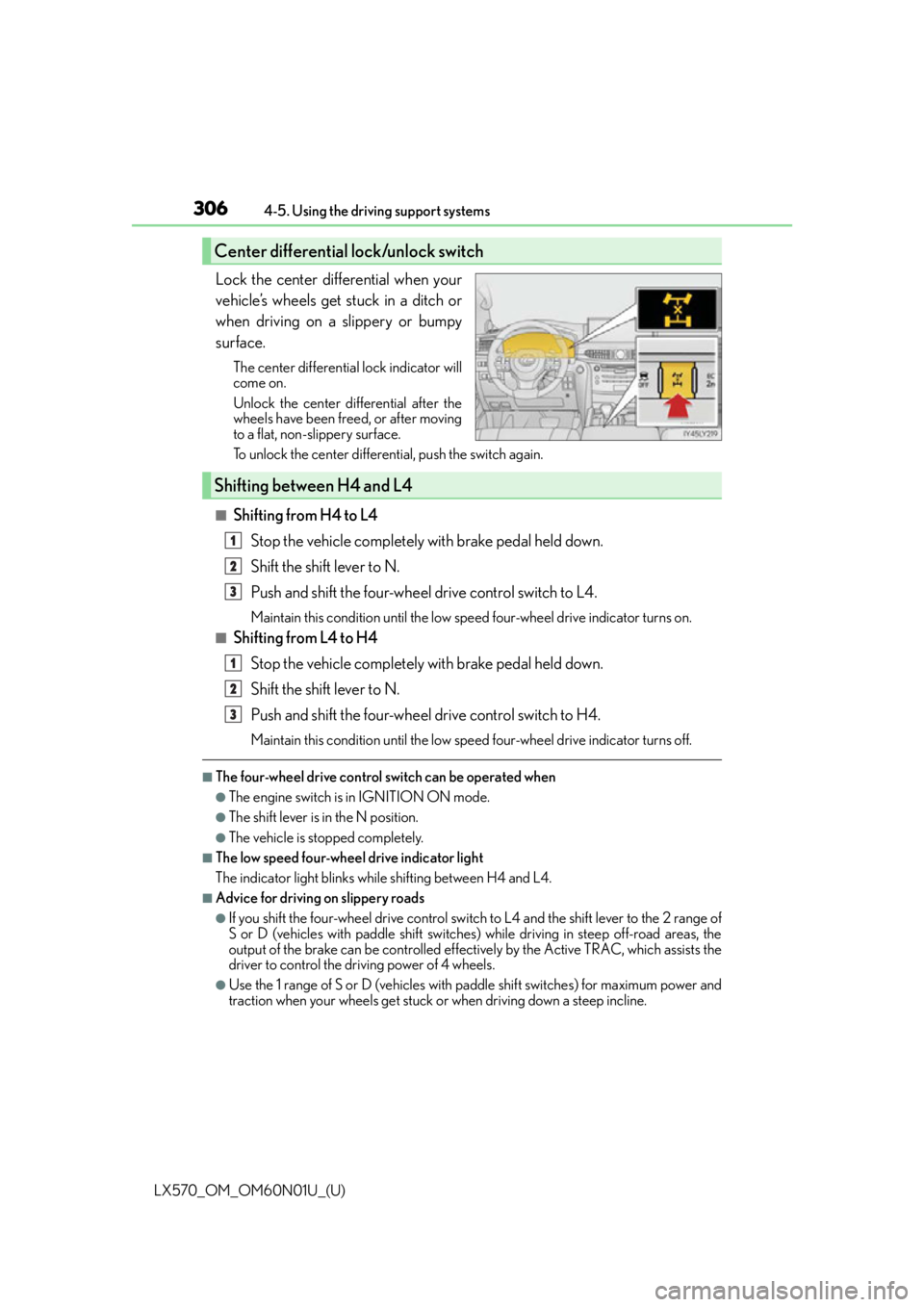
Lock the center differential when your
vehicle’s wheels get stuck in a ditch or
when driving on a slippery or bumpy
surface.
The center differential lock indicator will
come on.
Unlock the center differential after the
wheels have been freed, or after moving
to a flat, non-slippery surface.
To unlock the center differential, push the switch again.
■Shifting from H4 to L4
Stop the vehicle completely with brake pedal held down.
Shift the shift lever to N.
Push and shift the four-wheel drive control switch to L4.
Maintain this condition until the low sp eed four-wheel drive indicator turns on.
■Shifting from L4 to H4
Stop the vehicle completely with brake pedal held down.
Shift the shift lever to N.
Push and shift the four-wheel drive control switch to H4.
Maintain this condition until the low sp eed four-wheel drive indicator turns off.
■The four-wheel drive control switch can be operated when
●The engine switch is in IGNITION ON mode.
●The shift lever is in the N position.
●The vehicle is stopped completely.
■The low speed four-wheel drive indicator light
The indicator light blinks while shifting between H4 and L4.
■Advice for driving on slippery roads
●If you shift the four-wheel drive control switch to L4 and the shift lever to the 2 range of
S or D (vehicles with paddle shift switches) while driving in steep off-road areas, the
output of the brake can be controlled effectively by the Active TRAC, which assists the
driver to control the driving power of 4 wheels.
●Use the 1 range of S or D (vehicles with pa ddle shift switches) for maximum power and
traction when your wheels get stuck or when driving down a steep incline.
Center differential lock/unlock switch
Shifting between H4 and L4
1
2
3
1
2
3
Page 307 of 632

LX570_OM_OM60N01U_(U)
3074-5. Using the driving support systems
4
Driving
■The center differential lock indicator light
The indicator light blinks while locking/unlocking the center differential.
■The center differential lock/unlock switch can be operated when
●The engine switch is in IGNITION ON mode.
●The vehicle speed is less than 62 mph (100 km/h).
■Locking/unlocking the center differential
●When the four-wheel drive control switch is in L4 with the center differential locked,
VSC is automatically turned off. (The center differential lock and VSC OFF indicator
lights come on.)
●If the operation is not completed, the center di fferential lock indicator blinks. If the indi-
cator light does not turn off when unlocking the center differential, drive straight ahead
while accelerating or decelerating, or drive in reverse.
●If the center differential lock/unlock is not completed within 5 seconds while the cruise
control system is on, cancel the cruise control system.
■If the low speed four-wheel drive indicator light or the center differential lock indicator
light blinks
●If the low speed four-wheel drive indicator lig ht continues to blink when using the four-
wheel drive control switch, stop the vehicle completely, move the shift lever to N and
operate the switch again.
●If the shift lever is moved before the low sp eed four-wheel drive indicator turns on/off,
the transfer mode may not be shifted comp letely. The transfer mode disengages both
the front and rear driveshafts from the powertrain and allows the vehicle to move
regardless of the shift position. (At this time , the indicator blinks and the buzzer sounds.)
Therefore, the vehicle is free to roll even if the automatic transmission is in P. You or
someone else could be seriously injured. You must complete the shifting of the transfer
mode.
To complete the shifting, stop the vehicle completely, return the shift lever to N, and
confirm that the shift was completed (the indicator turns on/off).
●If the engine coolant temperature is too low, the four-wheel drive control system may
not be able to shift. When the engine is warmer operate the switch again.
If the low speed four-wheel drive indicator light or the center differential lock indicator
light continues to blink even after attempti ng the above, there may be a malfunction in
the engine, the brake system or the four-wheel drive system. In this case, you may not be
able to shift between H4 and L4, and the center differential lock may not be operable.
Have the vehicle inspected by your Lexus dealer immediately.
Page 322 of 632
322
LX570_OM_OM60N01U_(U)4-5. Using the driving support systems
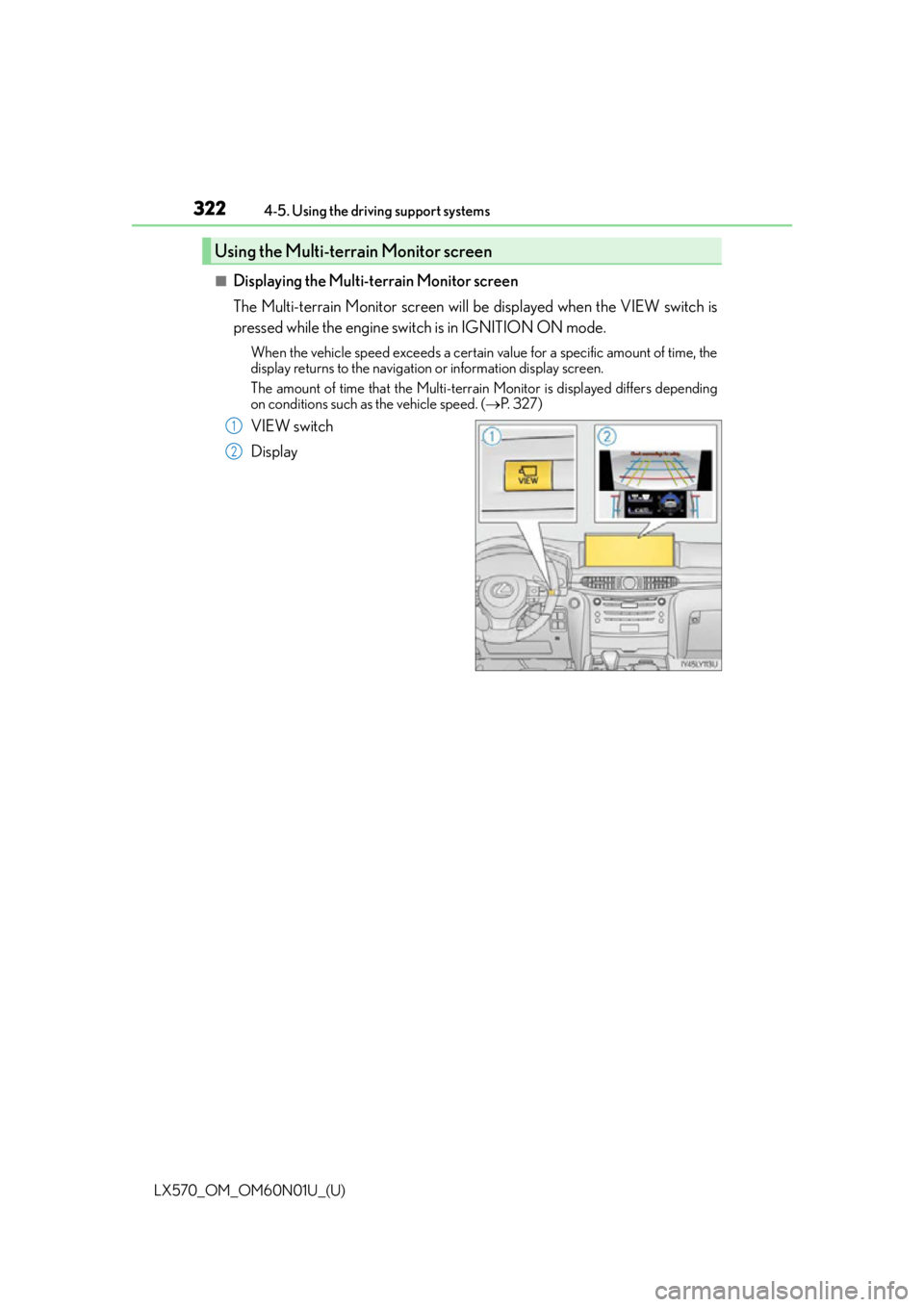
■Displaying the Multi-terrain Monitor screen
The Multi-terrain Monitor screen will be displayed when the VIEW switch is
pressed while the engine switch is in IGNITION ON mode.
When the vehicle speed exceeds a certain va
lue for a specific amount of time, the
display returns to the navigation or information display screen.
The amount of time that the Multi-terrain Monitor is displayed differs depending
on conditions such as the vehicle speed. ( P. 3 2 7 )
VIEW switch
Display
Using the Multi-terrain Monitor screen
1
2
Page 409 of 632

LX570_OM_OM60N01U_(U)
4095-3. Using the air conditioning system and defogger
5
Interior features
■Using automatic mode
Fan speed is adjusted automatically accordin g to the temperature setting and the ambi-
ent conditions.
Therefore, the fan may stop for a while until warm or cool air is ready to flow immediately
after the is pressed or on the control screen is selected.
■Operation of the air conditioning system in Eco drive mode
●In the Eco drive mode, the air conditioning sy stem is controlled as follows to prioritize
fuel efficiency
• Engine speed and compressor operation controlled to restrict heating/cooling
capacity
• Fan speed restricted when automatic mode is selected
●To improve air conditioning performa nce, perform the following operations
• Adjust the fan speed
• Turn off Eco mode
■Using the voice command system
Air conditioning system can be operated usin g voice commands. For details, refer to the
“NAVIGATION SYSTEM OWNER’S MANUAL”.
■Fogging up of the windows
●The windows will easily fog up when the humidity in the vehicle is high. Selecting
will dehumidify the air from the outlet s and defog the windshield effectively.
●If you turn off, the windows may fog up more easily.
●The windows may fog up if the recirculated air mode is used.
■Outside/recirculated air mode
●When driving on dusty roads such as tunnels or in heavy traffic, set the outside/recircu-
lated air mode button to the recirculated ai r mode. This is effective in preventing out-
side air from entering the vehicle interior. During cooling operation, setting the
recirculated air mode will also cool the vehicle interior effectively.
●Outside/recirculated air mode may automa tically switch depending on the tempera-
ture setting or the inside temperature.
■When the outside temperature exceeds 75 F (24 C) and the air conditioning system
is on
●In order to reduce the air conditioning po wer consumption, the air conditioning system
may switch to recirculated air mode automatically.
This may also reduce fuel consumption.
●Recirculated air mode is selected as a defaul t mode when the engine switch is turned to
IGNITION ON mode.
●It is possible to switch to outside air mode at any time by pressing .
■Automatic mode for air intake control
In automatic mode, the system detects exhaust gas and other pollutants and automati-
cally switches between outside air and recirculated air modes.
When the dehumidification function is off, and the fan is operating, turning automatic
mode on will activate the dehumidification function.
Page 410 of 632

4105-3. Using the air conditioning system and defogger
LX570_OM_OM60N01U_(U)
■When the outside temperature is low
The dehumidification function may not operate even when is selected.
■Micro dust and pollen filter
●In order to prevent the windows from fogging up when the outside air is cold, the fol-
lowing may occur.
• Outside air mode does not switch to recirculated air mode.
• The air conditioning system operates automatically.
• The operation cancels after 1 minute.
●In rainy weather, the windows may fog up. Press .
■The rear window defogger, outside rear view mirror defogger and windshield wiper de-
icer can be operated when
The engine switch is in IGNITION ON mode.
■When the windshield wiper de-icer is on
The windshield wiper de-icer will automatically turn off after approximately 15 minutes.
■Ventilation and air conditioning odors
●To let fresh air in, set the air conditioning system to the outside air mode.
●During use, various odors from inside and outside the vehicle may enter into and accu-
mulate in the air conditioning system. This may then cause odor to be emitted from the
vents.
●To reduce potential odors from occurring:
• It is recommended that the air conditioning system be set to outside air mode prior to turning the vehicle off.
• The start timing of the blower may be dela yed for a short period of time immediately
after the air conditioning system is started in automatic mode.
■Air conditioning filter
P. 5 0 1
■Customization
Settings (e.g. Exhaust gas sensor sensitivity) can be changed.
(Customizable features: P. 585)
WA R N I N G
■To prevent the windshield from fogging up
●Do not use during cool air operation in extremely humid weather. The differ-
ence between the temperature of the outside air and that of the windshield can cause
the outer surface of the windshield to fog up, blocking your vision.
■To prevent burns
●Do not touch the rear view mirror surfaces when the outside rear view mirror defog-
gers are on.
●Do not touch the glass at lower part of the wi ndshield or to the side of the front pillars
when the windshield wiper de-icer is on.
Page 416 of 632
4165-3. Using the air conditioning system and defogger
LX570_OM_OM60N01U_(U)
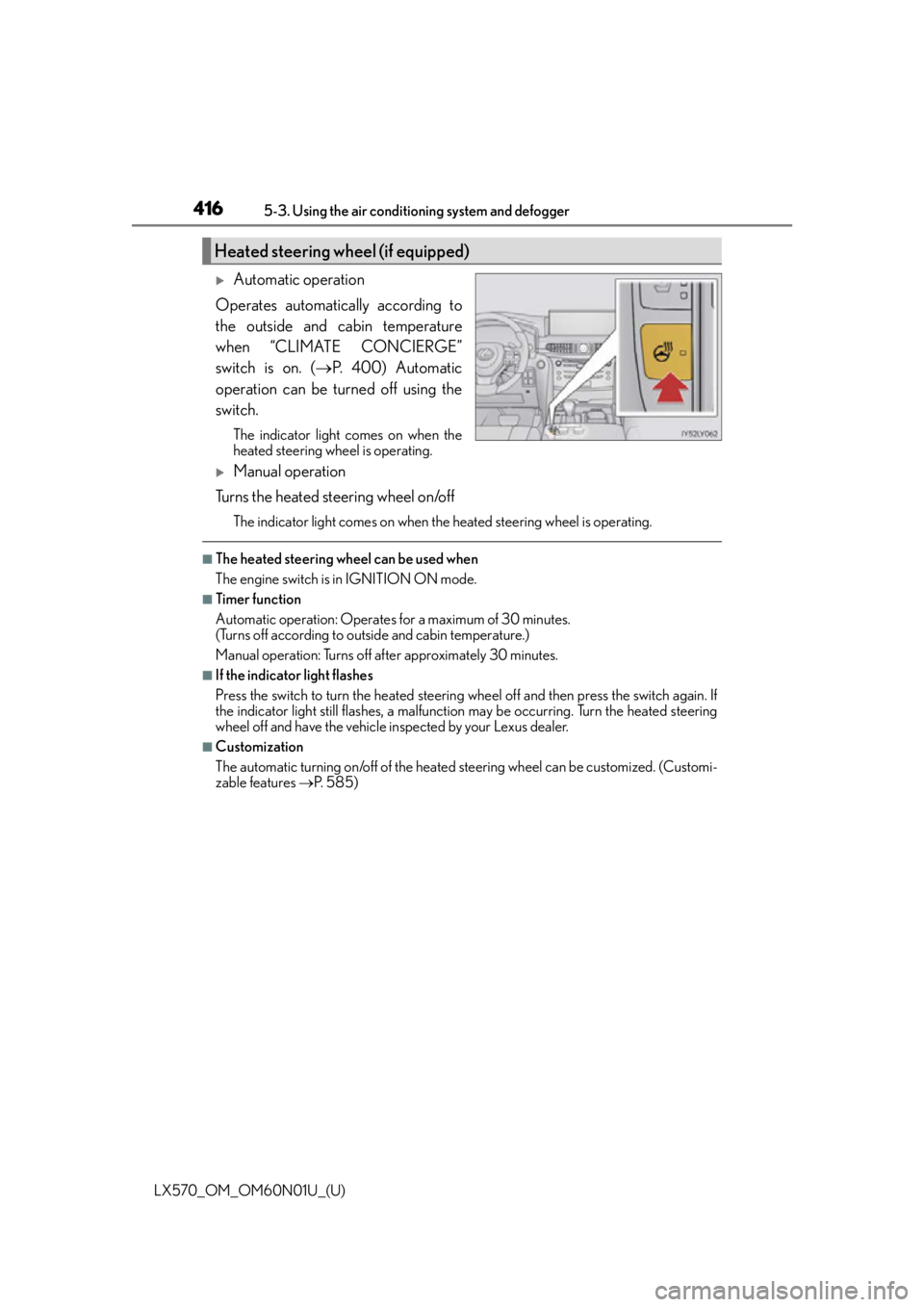
Automatic operation
Operates automatically according to
the outside and cabin temperature
when “CLIMATE CONCIERGE”
switch is on. ( P. 400) Automatic
operation can be turned off using the
switch.
The indicator light comes on when the
heated steering wheel is operating.
Manual operation
Turns the heated steering wheel on/off
The indicator light comes on when the heated steering wheel is operating.
■The heated steering wheel can be used when
The engine switch is in IGNITION ON mode.
■Timer function
Automatic operation: Operates for a maximum of 30 minutes.
(Turns off according to outside and cabin temperature.)
Manual operation: Turns off after approximately 30 minutes.
■If the indicator light flashes
Press the switch to turn the heated steering wheel off and then press the switch again. If
the indicator light still flashes, a malfunctio n may be occurring. Turn the heated steering
wheel off and have the vehicle inspected by your Lexus dealer.
■Customization
The automatic turning on/off of the heated steering wheel can be customized. (Customi-
zable features P. 585)
Heated steering wheel (if equipped)
Page 418 of 632
4185-3. Using the air conditioning system and defogger
LX570_OM_OM60N01U_(U)
■Modes and indicators
The mode can be changed by pressing the switch.
*: When automatic mode is selected, the level automatically changes depending on the air conditioning settings.
■The seat heaters/seat ventilators can be used when
The engine switch is in IGNITION ON mode.
■Replacing the air filters
Filters are installed in the se at ventilators. For replacement of the filters, contact your
Lexus dealer.
■Customization
The automatic mode settings for the seat heaters and ventilators can be changed.
(Customizable features: P. 585)
Mode“AUTO” indicator lightLevel indicator lights
OffOffOff
Automatic*On3 to 1, or off
HiOff3
MidOff2
LoOff1
Page 435 of 632
LX570_OM_OM60N01U_(U)
4355-6. Using the other interior features
5
Interior features
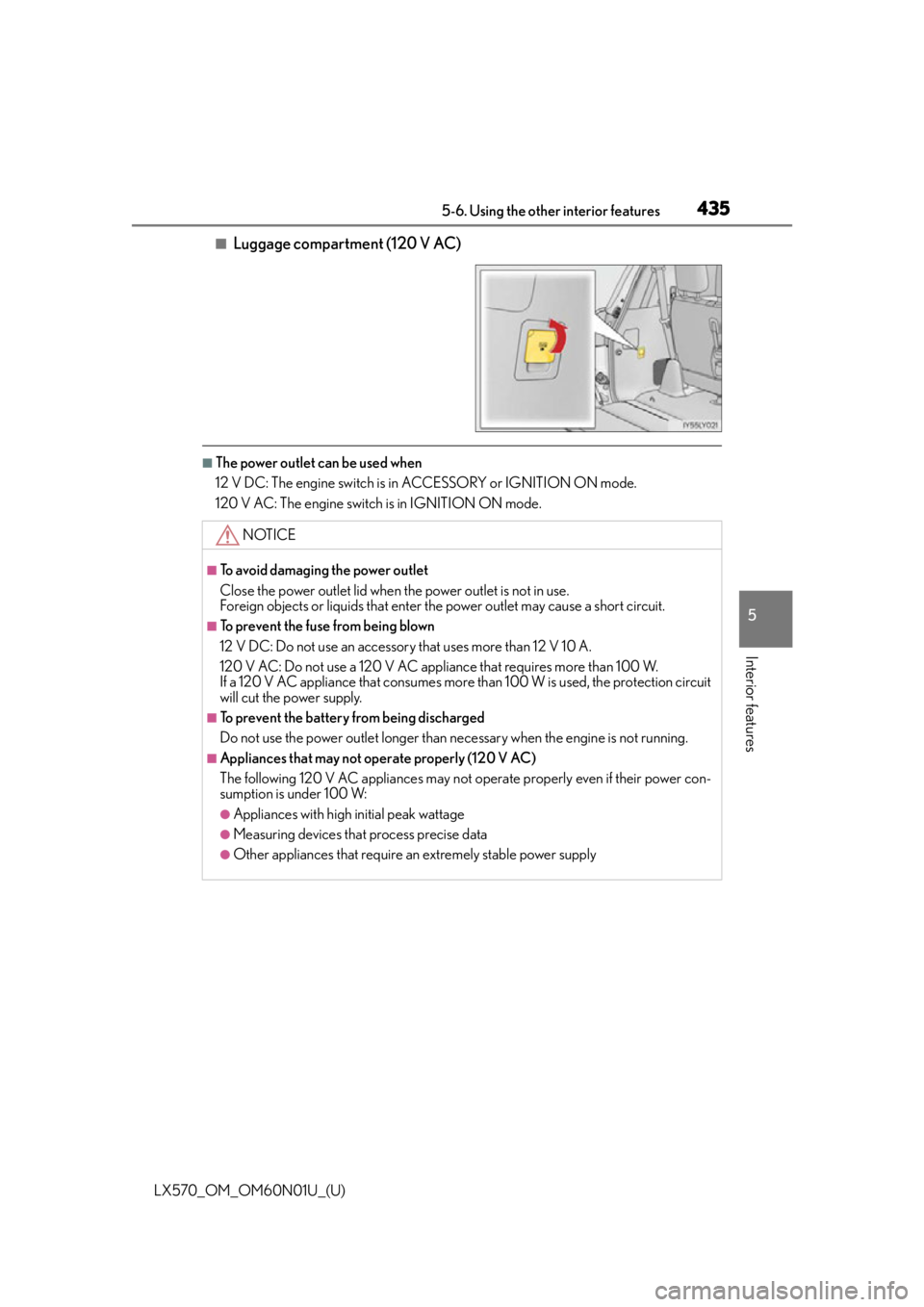
■Luggage compartment (120 V AC)
■The power outlet can be used when
12 V DC: The engine switch is in ACCESSORY or IGNITION ON mode.
120 V AC: The engine switch is in IGNITION ON mode.
NOTICE
■To avoid damaging the power outlet
Close the power outlet lid when the power outlet is not in use.
Foreign objects or liquids that enter th e power outlet may cause a short circuit.
■To prevent the fuse from being blown
12 V DC: Do not use an accessory that uses more than 12 V 10 A.
120 V AC: Do not use a 120 V AC appliance that requires more than 100 W.
If a 120 V AC appliance that consumes more than 100 W is used, the protection circuit
will cut the power supply.
■To prevent the battery from being discharged
Do not use the power outlet longer than necessary when the engine is not running.
■Appliances that may not operate properly (120 V AC)
The following 120 V AC appliances may not operate properly even if their power con-
sumption is under 100 W:
●Appliances with high initial peak wattage
●Measuring devices that process precise data
●Other appliances that require an extremely stable power supply
Page 438 of 632
438
LX570_OM_OM60N01U_(U)5-6. Using the other interior features
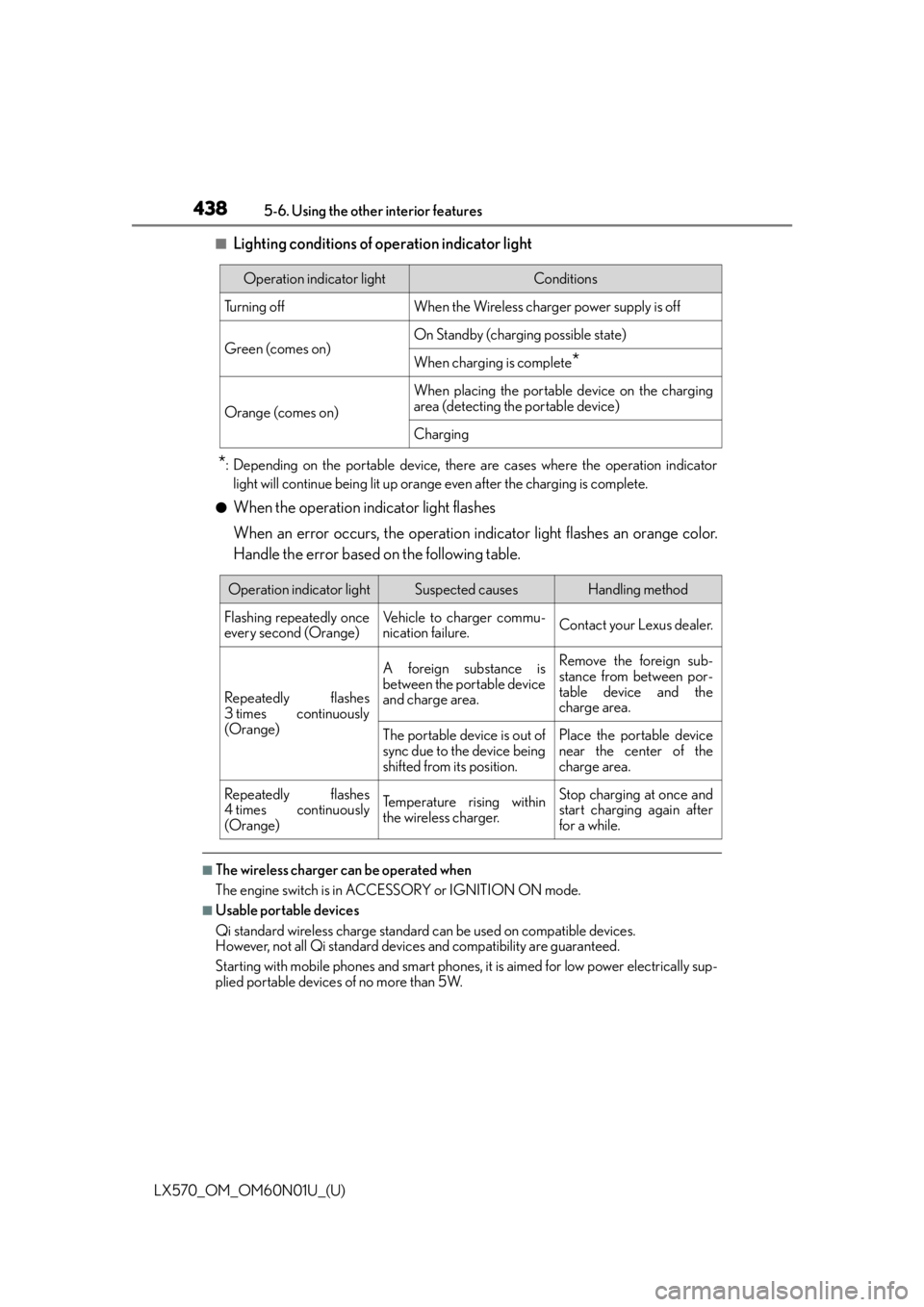
■Lighting conditions of operation indicator light
*: Depending on the portable device, there are cases where the operation indicator
light will continue being lit up orange even after the charging is complete.
●When the operation indicator light flashes
When an error occurs, the operation in dicator light flashes an orange color.
Handle the error based on the following table.
■The wireless charger can be operated when
The engine switch is in ACCESSORY or IGNITION ON mode.
■Usable portable devices
Qi standard wireless charge standard can be used on compatible devices.
However, not all Qi standard devi ces and compatibility are guaranteed.
Starting with mobile phones and smart phones , it is aimed for low power electrically sup-
plied portable devices of no more than 5W.
Operation indicator lightConditions
Tu r n i n g o f fWhen the Wireless charger power supply is off
Green (comes on)On Standby (charging possible state)
When charging is complete*
Orange (comes on)
When placing the portable device on the charging
area (detecting the portable device)
Charging
Operation indicator lightSuspected causesHandling method
Flashing repeatedly once
every second (Orange)Vehicle to charger commu-
nication failure.Contact your Lexus dealer.
Repeatedly flashes
3 times continuously
(Orange)
A foreign substance is
between the portable device
and charge area.Remove the foreign sub-
stance from between por-
table device and the
charge area.
The portable device is out of
sync due to the device being
shifted from its position.Place the portable device
near the center of the
charge area.
Repeatedly flashes
4 times continuously
(Orange)Te m p e r a t u r e r i s i n g w i t h i n
the wireless charger.Stop charging at once and
start charging again after
for a while.