door lock LEXUS LX570 2016 Repair Manual
[x] Cancel search | Manufacturer: LEXUS, Model Year: 2016, Model line: LX570, Model: LEXUS LX570 2016Pages: 632, PDF Size: 8.94 MB
Page 483 of 632
LX570_OM_OM60N01U_(U)
4836-3. Do-it-yourself maintenance
6
Maintenance and care
■Before recharging
When recharging, the battery produces hydrogen gas which is flammable and explosive.
Therefore, observe the following before recharging:
●If recharging with the battery installed on the vehicle, be sure to disconnect the ground
cable.
●Make sure the engine switch on the charger is off when connecting and disconnecting
the charger cables to the battery.
■After recharging/reconnecting the battery
The engine may not start. Follow the procedure below to initialize the system.
Shift the shift lever to P.
Open and close any of the doors.
Restart the engine.
●Unlocking the doors using the smart access system with push-button start may not be
possible immediately after reconnecting the battery. If this happens, use the wireless
remote control or the mechanical key to lock/unlock the doors.
●Start the engine with the engine switch in ACCESSORY mode. The engine may not
start with the engine switch turned off. However, the engine will operate normally from
the second attempt.
●The engine switch mode is recorded by the vehicle. If the battery is reconnected, the
vehicle will return the engine switch mode to the status it was in before the battery was
disconnected. Make sure to turn off the en gine before disconnect the battery. Take
extra care when connecting the battery if the engine switch mode prior to discharge is
unknown.
If the engine will not start even after mult iple attempts, contact your Lexus dealer.
WA R N I N G
■Chemicals in the battery
Batteries contain poisonous and corrosive sulfuric acid and may produce hydrogen
gas which is flammable and explosive. To reduce the risk of death or serious injury, take
the following precautions while working on or near battery:
●Do not cause sparks by touching the battery terminals with tools.
●Do not smoke or light a match near the battery.
●Avoid contact with eyes, skin and clothes.
●Never inhale or swallow electrolyte.
●Wear protective safety glasses when working near the battery.
●Keep children away from the battery.
■Where to safely charge the battery
Always charge the battery in an open area. Do not charge the battery in a garage or
closed room where there is not sufficient ventilation.
1
2
3
Page 509 of 632
LX570_OM_OM60N01U_(U)
5096-3. Do-it-yourself maintenance
6
Maintenance and care
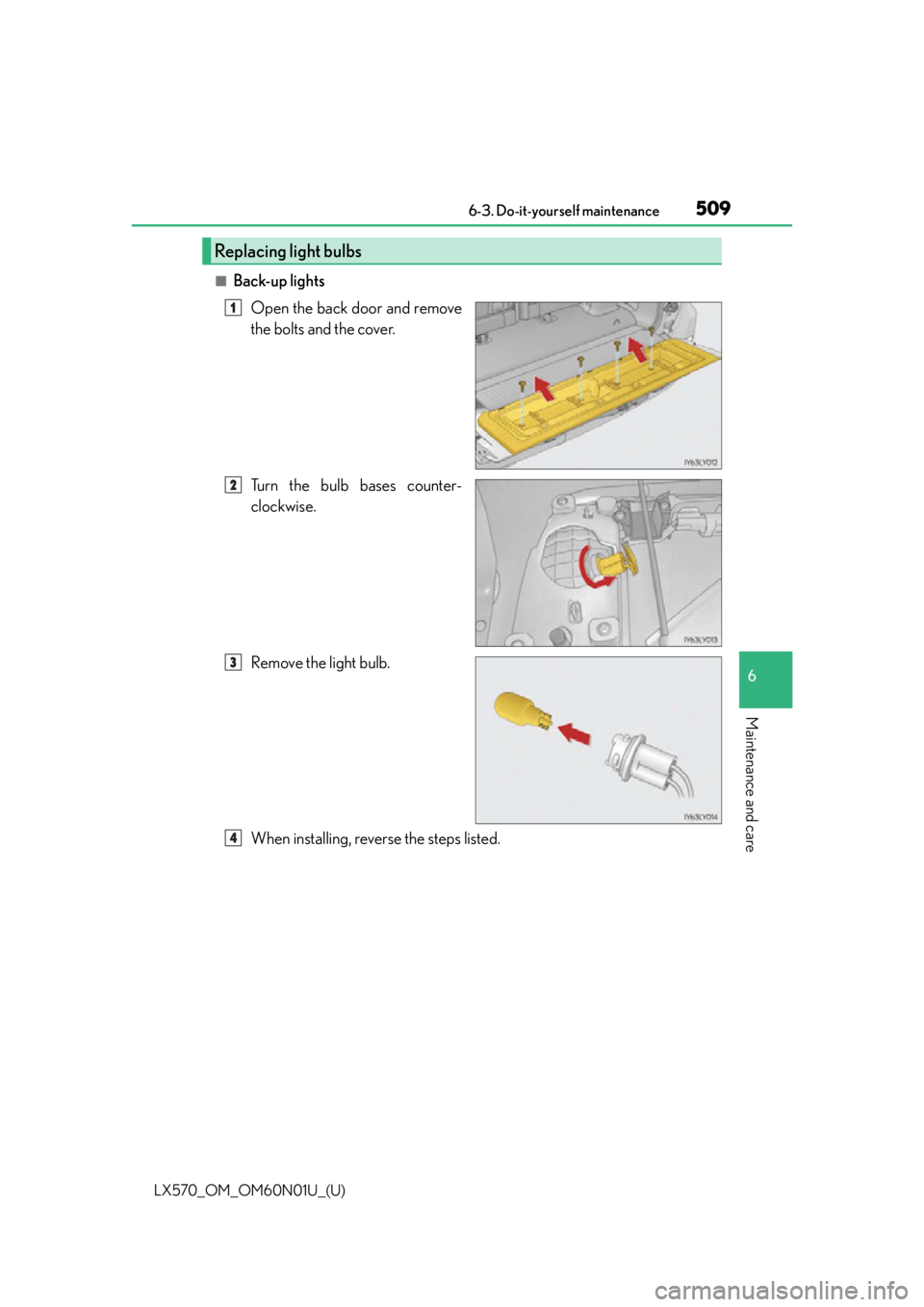
■Back-up lightsOpen the back door and remove
the bolts and the cover.
Turn the bulb bases counter-
clockwise.
Remove the light bulb.
When installing, reverse the steps listed.
Replacing light bulbs
1
2
3
4
Page 526 of 632
5267-2. Steps to take in an emergency
LX570_OM_OM60N01U_(U)
(Flashes)
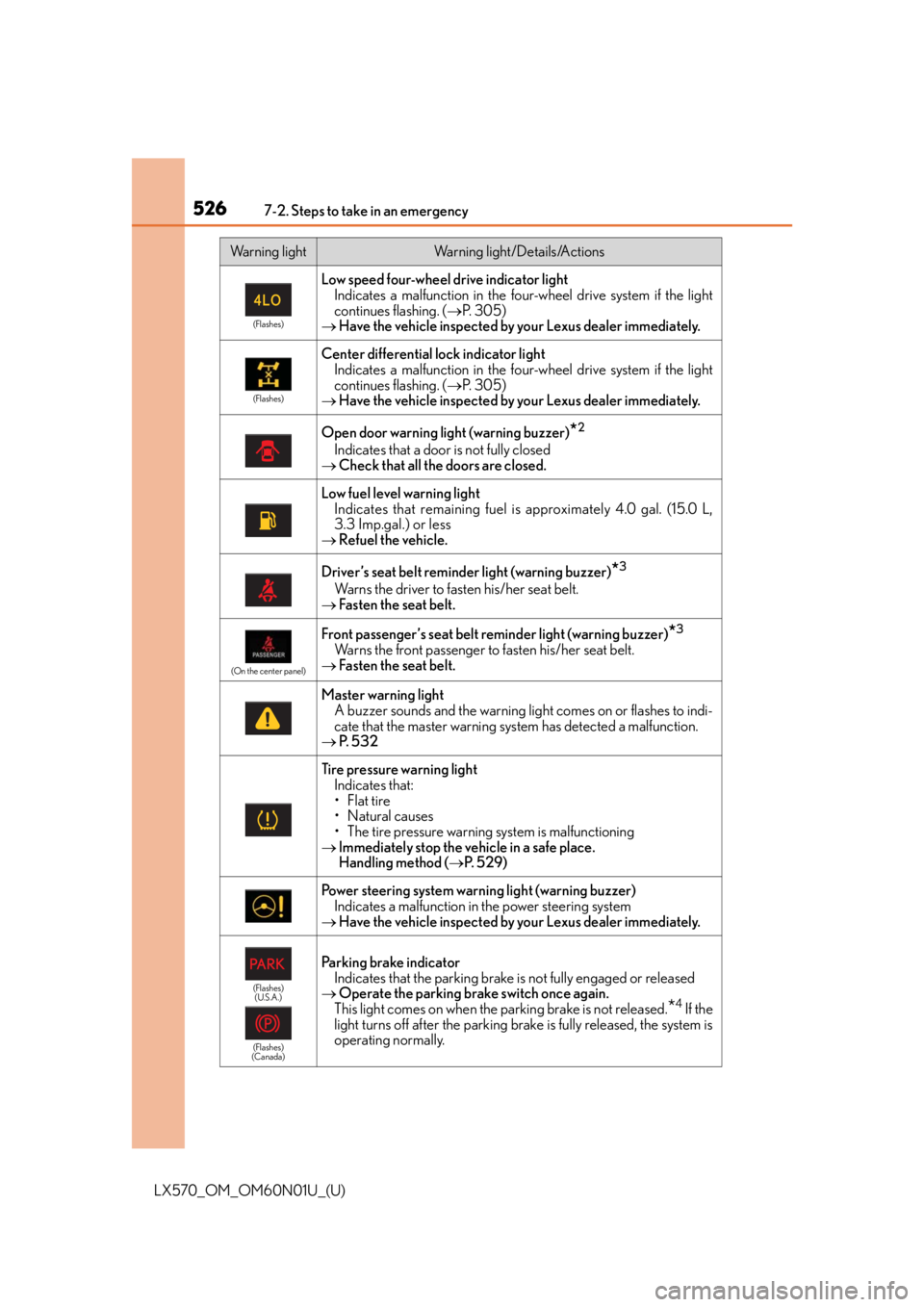
Low speed four-wheel drive indicator lightIndicates a malfunction in the four -wheel drive system if the light
continues flashing. ( P. 3 0 5 )
Have the vehicle inspected by your Lexus dealer immediately.
(Flashes)
Center differential lock indicator light
Indicates a malfunction in the four -wheel drive system if the light
continues flashing. ( P. 3 0 5 )
Have the vehicle inspected by your Lexus dealer immediately.
Open door warning light (warning buzzer)*2
Indicates that a door is not fully closed
Check that all the doors are closed.
Low fuel level warning light
Indicates that remaining fuel is approximately 4.0 gal. (15.0 L,
3.3 Imp.gal.) or less
Refuel the vehicle.
Driver’s seat belt reminder light (warning buzzer)*3
Warns the driver to fast en his/her seat belt.
Fasten the seat belt.
(On the center panel)
Front passenger’s seat belt reminder light (warning buzzer)*3
Warns the front passenger to fasten his/her seat belt.
Fasten the seat belt.
Master warning light
A buzzer sounds and the warning light comes on or flashes to indi-
cate that the master warning sy stem has detected a malfunction.
P. 5 3 2
Tire pressure warning light
Indicates that:
•Flat tire
• Natural causes
• The tire pressure warning system is malfunctioning
Immediately stop the vehicle in a safe place.
Handling method ( P. 5 2 9 )
Power steering system warning light (warning buzzer)
Indicates a malfunction in the power steering system
Have the vehicle inspected by your Lexus dealer immediately.
(Flashes)
(U.S.A.)
(Flashes)
(Canada)
Parking brake indicator Indicates that the parking brake is not fully engaged or released
Operate the parking brake switch once again.
This light comes on when the parking brake is not released.
*4 If the
light turns off after the parking brake is fully released, the system is
operating normally.
Warning lightWarning light/Details/Actions
Page 528 of 632

5287-2. Steps to take in an emergency
LX570_OM_OM60N01U_(U)
■SRS warning light
This warning light system monitors the airbag sensor assembly, front impact sensors, side
impact sensors (rear), side imp act sensors (front door), safing sensor (rear), driver’s seat
belt buckle switch, driver’s seat position sens or, front passenger’s seat belt buckle switch,
airbags, interconnecting wiring and power sources, front passenger occupant classifica-
tion system, “AIR BAG ON” and “AIR BAG OFF” indicator lights, seat belt pretensioners
and force limiters, “RSCA OFF” indicator light. ( P. 3 8 )
■Front passenger detection sensor, seat belt reminder and warning buzzer
●If luggage is placed on the front passenger seat, the front passenger detection sensor
may cause the warning light to flash and the warning buzzer to sound even if a passen-
ger is not sittin g in the seat.
●If a cushion is placed on th e seat, the sensor may not detect a passenger, and the warn-
ing light may not operate properly.
■If the malfunction indicator lamp comes on while driving
First check the following:
●Is the fuel tank empty?
If it is, fill the fuel tank immediately.
●Is the fuel tank cap loose?
If it is, tighten it securely.
The light will go off after several driving trips.
If the light does not go off even after severa l trips, contact your Lexus dealer as soon as
possible.
■If the low speed four-wheel drive indicator light or the center differential lock indicator
light blinks
Take the specified steps. ( P. 3 0 7 )
If the brake system warning light or the malf unction indicator light also comes on, or the
low speed four-wheel drive indicator light or the center differential lock indicator light
continues to blink after takin g the specified steps, there may be a malfunction in the
engine, the brake system or the four-wheel drive system. In this case, you may not be able
to transfer between “H4” and “L4” modes, and the center differential lock may not be
able to be locked or unlocked. Have the vehicle inspected by your Lexus dealer, immedi-
ately.
Page 550 of 632
550
LX570_OM_OM60N01U_(U)7-2. Steps to take in an emergency
If the electronic key do
es not operate properly
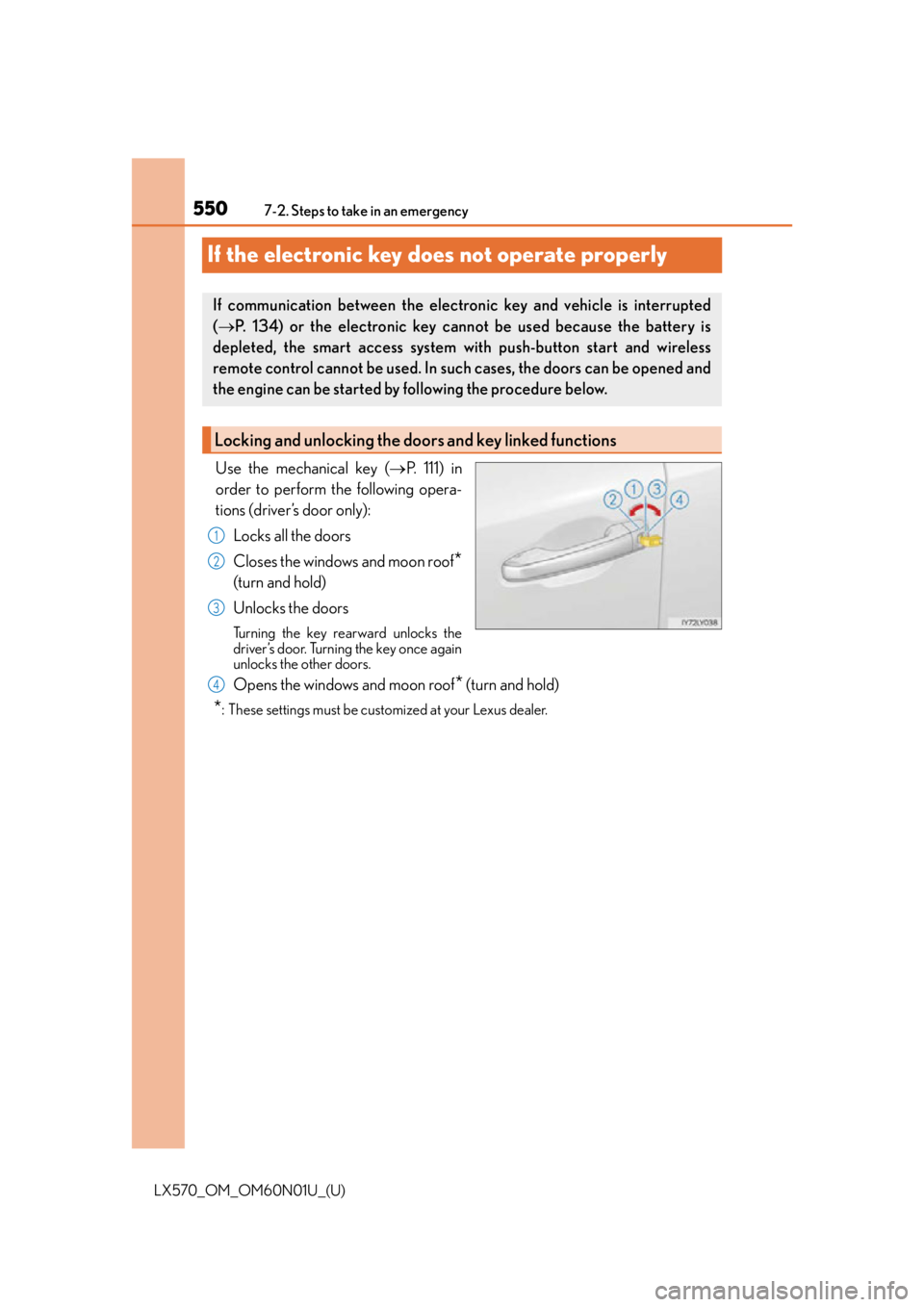
Use the mechanical key ( P. 111) in
order to perform the following opera-
tions (driver’s door only):
Locks all the doors
Closes the windows and moon roof
*
(turn and hold)
Unlocks the doors
Turning the key rearward unlocks the
driver’s door. Turning the key once again
unlocks the other doors.
Opens the windows and moon roof* (turn and hold)
*: These settings must be cust omized at your Lexus dealer.
If communication between the electronic key and vehicle is interrupted
( P. 134) or the electronic key ca nnot be used because the battery is
depleted, the smart access system with push-button start and wireless
remote control cannot be used. In such cases, the doors can be opened and
the engine can be started by following the procedure below.
Locking and unlocking the doors and key linked functions
1
2
3
4
Page 551 of 632
5517-2. Steps to take in an emergency
LX570_OM_OM60N01U_(U)
7
When trouble arises
Ensure that the shift lever is in P and depress the brake pedal.
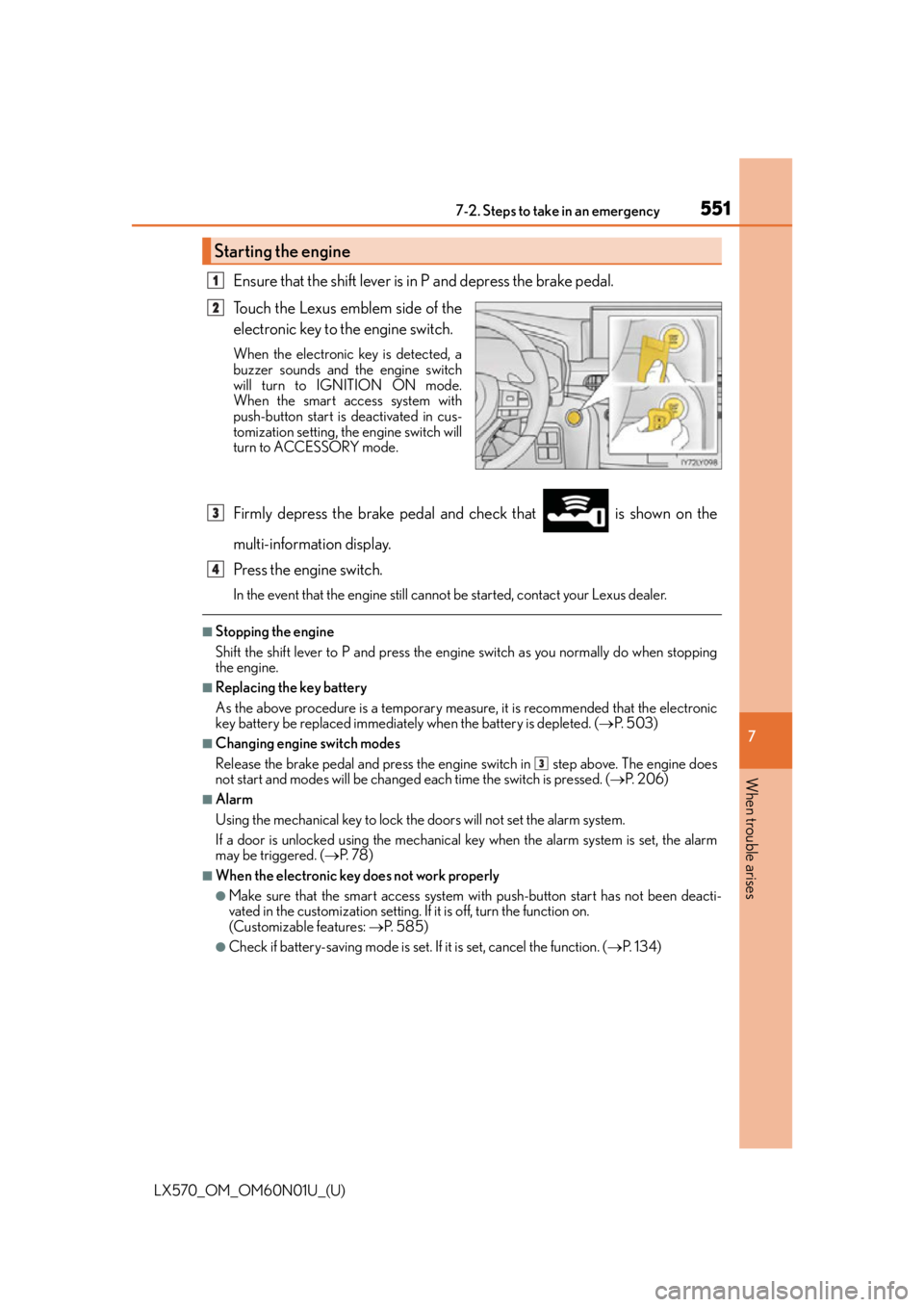
Touch the Lexus emblem side of the
electronic key to the engine switch.
When the electronic key is detected, a
buzzer sounds and the engine switch
will turn to IGNITION ON mode.
When the smart access system with
push-button start is deactivated in cus-
tomization setting, the engine switch will
turn to ACCESSORY mode.
Firmly depress the brake pedal and check that is shown on the
multi-information display.
Press the engine switch.
In the event that the engine still cannot be started, contact your Lexus dealer.
■Stopping the engine
Shift the shift lever to P and press the engine switch as you normally do when stopping
the engine.
■Replacing the key battery
As the above procedure is a temporary measure, it is recommended that the electronic
key battery be replaced immediately when the battery is depleted. ( P. 5 0 3 )
■Changing engine switch modes
Release the brake pedal and press the engine switch in step above. The engine does
not start and modes will be changed each time the switch is pressed. ( P. 2 0 6 )
■Alarm
Using the mechanical key to lock the doors will not set the alarm system.
If a door is unlocked using the mechanical key when the alarm system is set, the alarm
may be triggered. ( P. 7 8 )
■When the electronic key does not work properly
●Make sure that the smart access system wi th push-button start has not been deacti-
vated in the custom ization setting. If it is off, turn the function on.
(Customizable features: P. 585)
●Check if battery-saving mo de is set. If it is set, cancel the function. ( P. 1 3 4 )
Starting the engine
1
2
3
4
3
Page 553 of 632
553
LX570_OM_OM60N01U_(U)
7
When trouble arises
7-2. Steps to take in an emergency
If the vehicle battery is discharged
If you have a set of jumper (or booster) cables and a second vehicle with a 12-volt
battery, you can jump start your Lexus following the steps below.
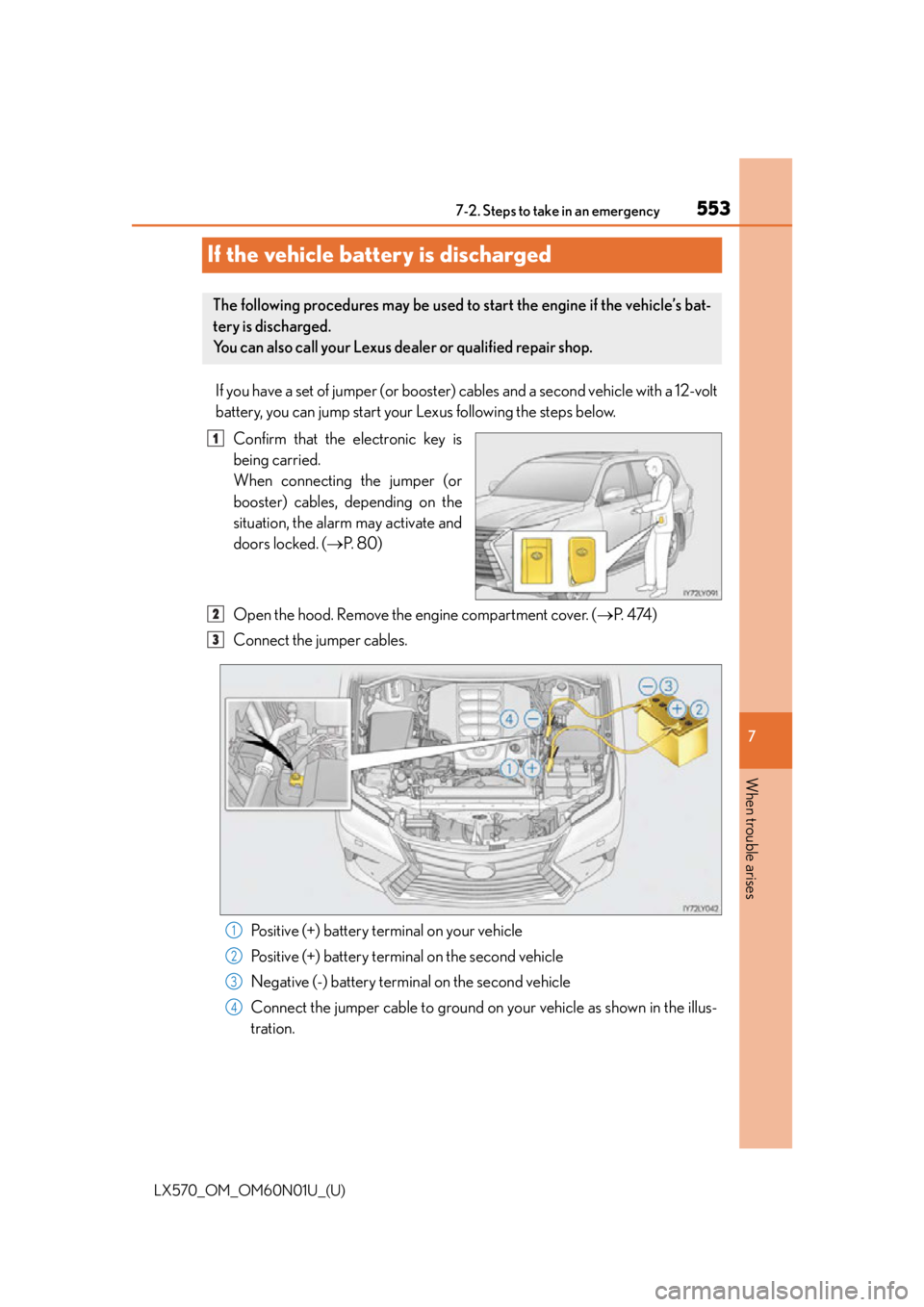
Confirm that the electronic key is
being carried.
When connecting the jumper (or
booster) cables, depending on the
situation, the alarm may activate and
doors locked. ( P. 8 0 )
Open the hood. Remove the engine compartment cover. ( P. 4 74 )
Connect the jumper cables.
Positive (+) battery terminal on your vehicle
Positive (+) battery terminal on the second vehicle
Negative (-) battery terminal on the second vehicle
Connect the jumper cable to ground on your vehicle as shown in the illus-
tration.
The following procedures may be used to start the engine if the vehicle’s bat-
tery is discharged.
You can also call your Lexus dealer or qualified repair shop.
1
2
3
1
2
3
4
Page 586 of 632
586
LX570_OM_OM60N01U_(U)8-2. Customization
Some function settings are changed simultaneously with other functions being
customized. Contact your Lexus dealer for further details.
Settings that can be changed using the Remote Touch screen
Settings that can be changed us ing the multi-information display
Settings that can be changed by your Lexus dealer
Definition of symbols: O = Available, – =Not available
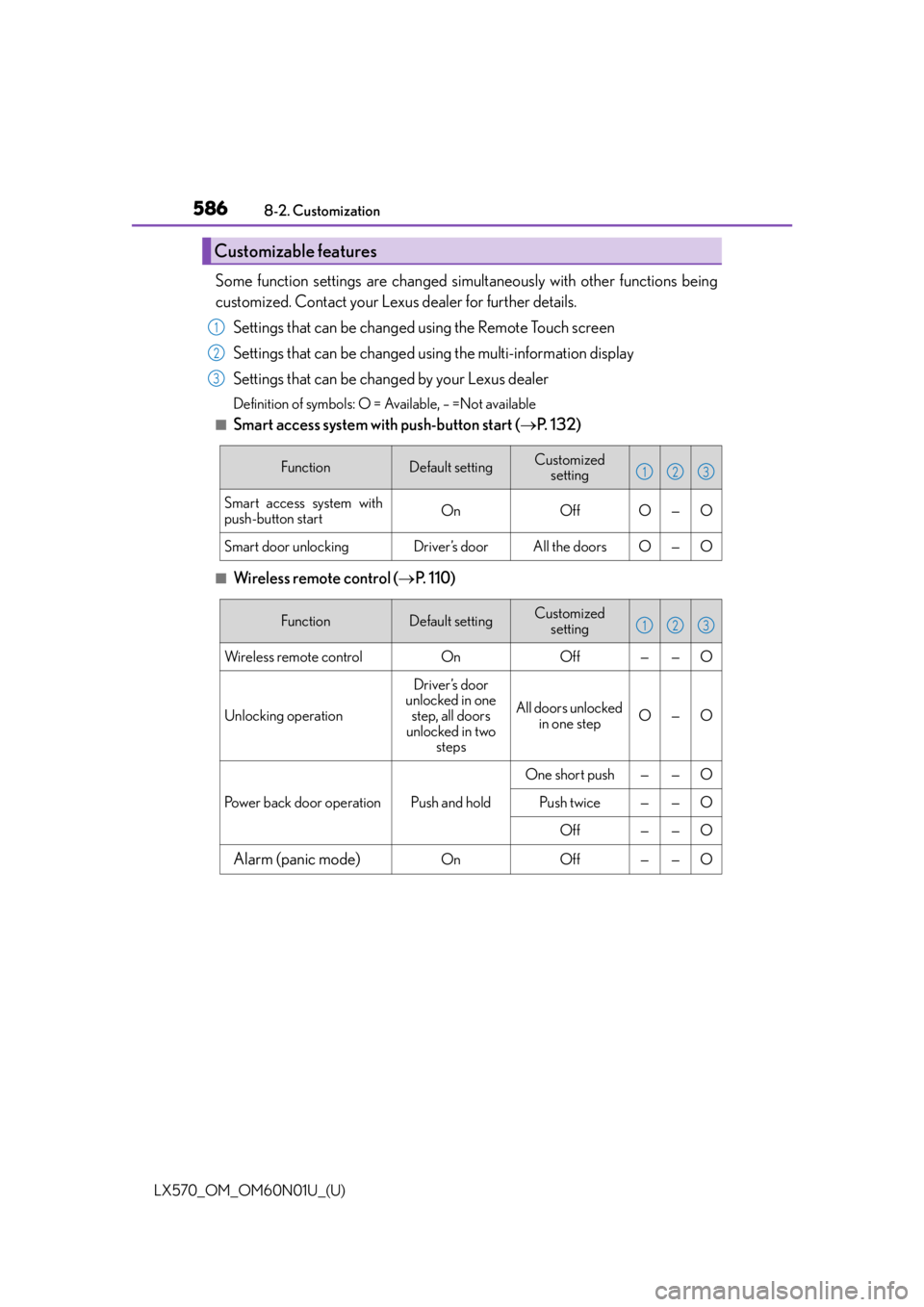
■Smart access system with push-button start ( P. 1 3 2 )
■Wireless remote control ( P. 1 1 0 )
Customizable features
1
2
3
FunctionDefault settingCustomized
setting
Smart access system with
push-button startOnOffO—O
Smart door unlockingDriver’s doorAll the doorsO—O
123
FunctionDefault settingCustomized setting
Wireless remote controlOnOff——O
Unlocking operation
Driver’s door
unlocked in one
step, all doors
unlocked in two steps
All doors unlocked in one stepO—O
Power back door operationPush and hold
One short push——O
Push twice——O
Off——O
Alarm (panic mode)OnOff——O
123
Page 587 of 632
LX570_OM_OM60N01U_(U)
5878-2. Customization
8
Vehicle specifications
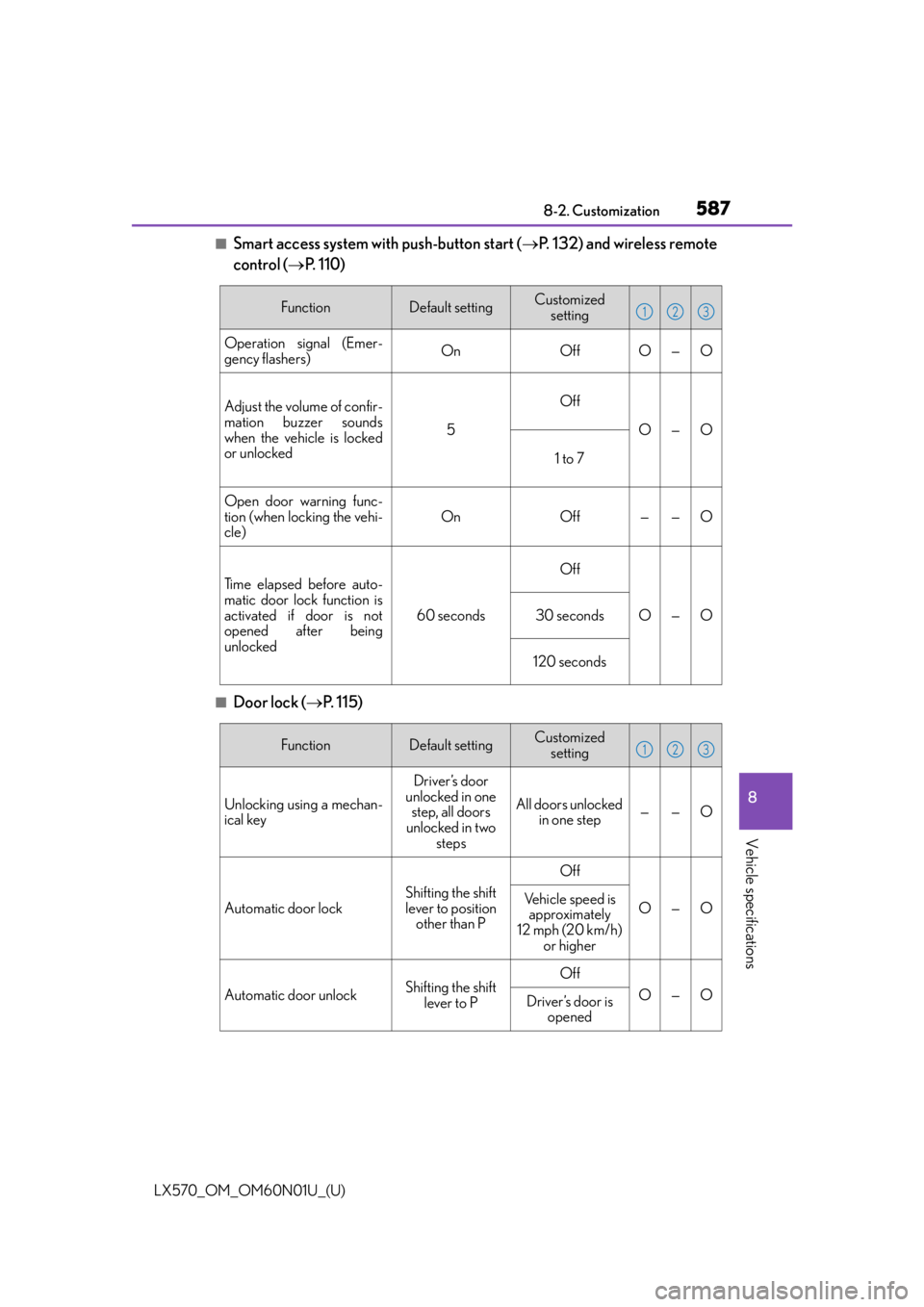
■Smart access system with push-button start (P. 132) and wireless remote
control ( P. 110)
■Door lock ( P. 115)
FunctionDefault settingCustomized
setting
Operation signal (Emer-
gency flashers)OnOffO—O
Adjust the volume of confir-
mation buzzer sounds
when the vehicle is locked
or unlocked
5
Off
O—O
1 to 7
Open door warning func-
tion (when locking the vehi-
cle)
OnOff——O
Ti m e e l a p s e d b e f o r e a u t o -
matic door lock function is
activated if door is not
opened after being
unlocked
60 seconds
Off
O—O30 seconds
120 seconds
123
FunctionDefault settingCustomized setting
Unlocking using a mechan-
ical key
Driver’s door
unlocked in one step, all doors
unlocked in two steps
All doors unlocked in one step——O
Automatic door lock
Shifting the shift
lever to position other than P
Off
O—OVehicle speed is approximately
12 mph (20 km/h) or higher
Automatic door unlockShifting the shift lever to POff
O—ODriver’s door is opened
123
Page 588 of 632
588
LX570_OM_OM60N01U_(U)8-2. Customization
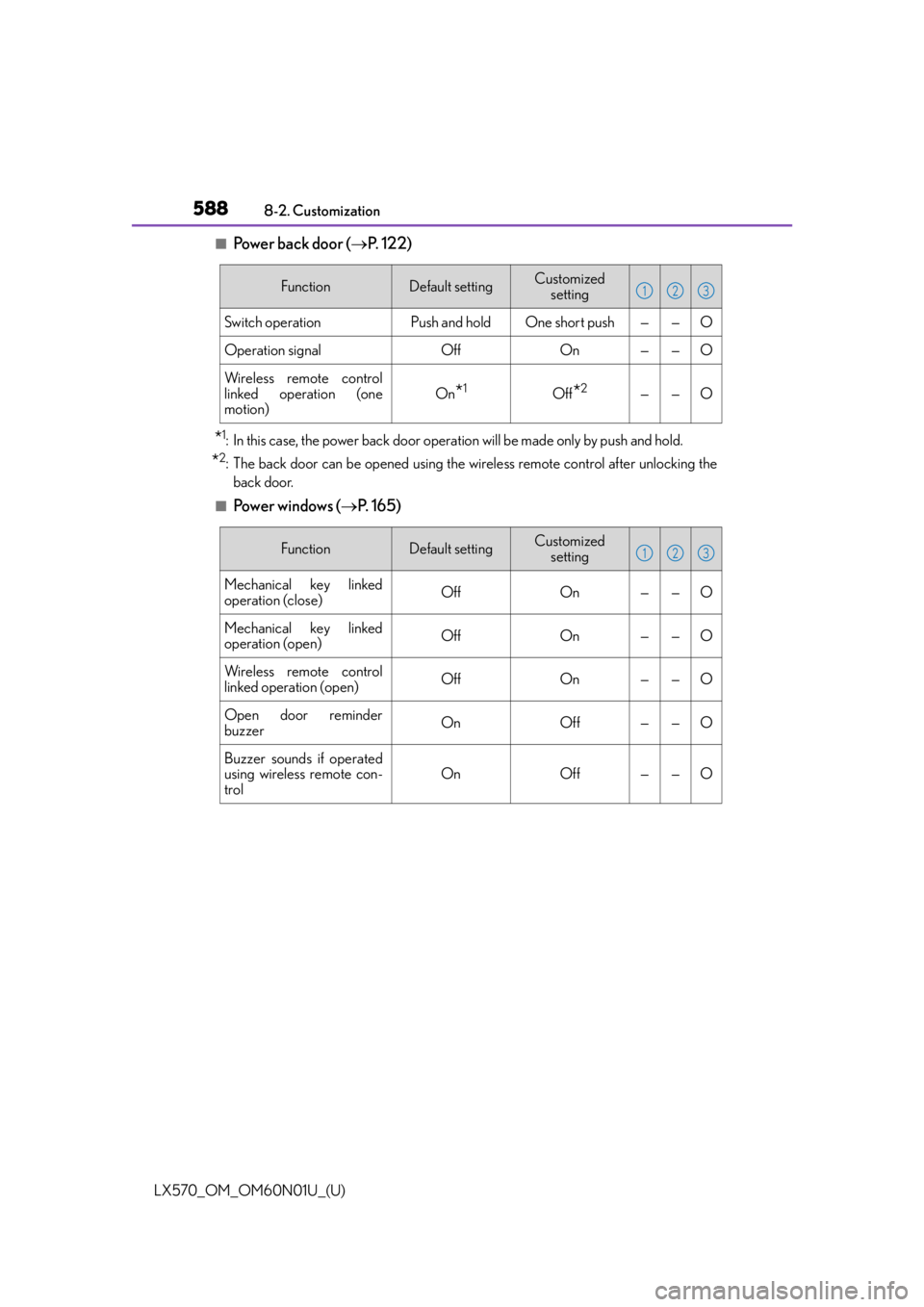
■Power back door (
P. 1 2 2 )
*1: In this case, the power back door operat ion will be made only by push and hold.
*2: The back door can be opened using the wi reless remote control after unlocking the
back door.
■Powe r w i n d ow s ( P. 1 6 5 )
FunctionDefault settingCustomized
setting
Switch operationPush and holdOne short push——O
Operation signalOffOn——O
Wireless remote control
linked operation (one
motion)
On*1Off*2——O
123
FunctionDefault settingCustomized setting
Mechanical key linked
operation (close)OffOn——O
Mechanical key linked
operation (open)OffOn——O
Wireless remote control
linked operation (open)OffOn——O
Open door reminder
buzzerOnOff——O
Buzzer sounds if operated
using wireless remote con-
trol
OnOff——O
123