lock LEXUS LX570 2018 Owners Manual
[x] Cancel search | Manufacturer: LEXUS, Model Year: 2018, Model line: LX570, Model: LEXUS LX570 2018Pages: 628, PDF Size: 12.38 MB
Page 304 of 628
304
LX570_OM_OM60Q78U_(U) 4-5. Using the driving support systems
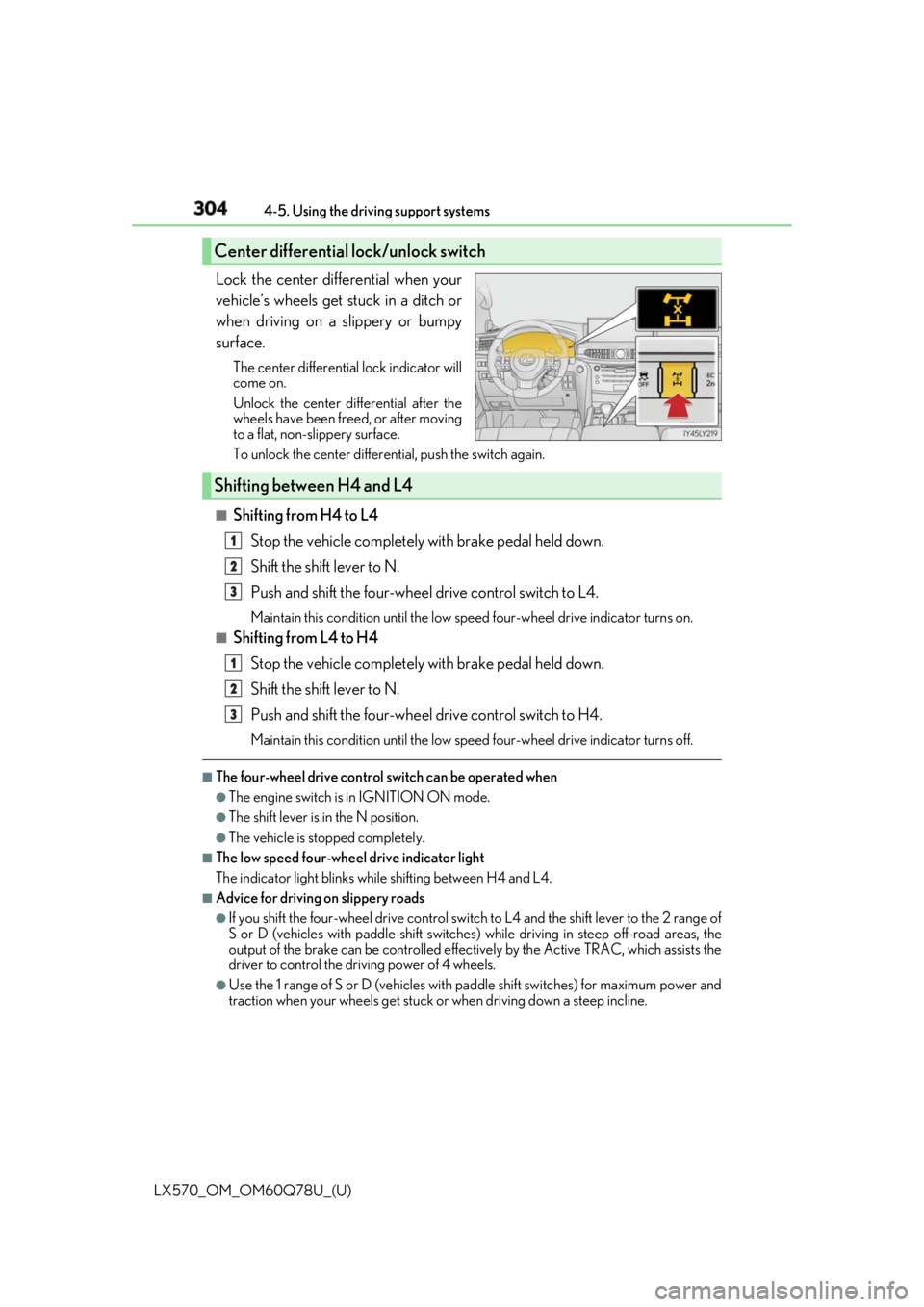
Lock the center differential when your
vehicle’s wheels get stuck in a ditch or
when driving on a slippery or bumpy
surface. The center differential lock indicator will
come on.
Unlock the center differential after the
wheels have been fr eed, or after moving
to a flat, non-slippery surface.
To unlock the center differential, push the switch again.
■
Shifting from H4 to L4
Stop the vehicle completely with brake pedal held down.
Shift the shift lever to N.
Push and shift the four-wheel drive control switch to L4. Maintain this condition until the low sp eed four-wheel drive indicator turns on.■
Shifting from L4 to H4
Stop the vehicle completely with brake pedal held down.
Shift the shift lever to N.
Push and shift the four-wheel drive control switch to H4. Maintain this condition until the low sp eed four-wheel drive indicator turns off.■
The four-wheel drive control switch can be operated when ●
The engine switch is in IGNITION ON mode. ●
The shift lever is in the N position. ●
The vehicle is stopped completely. ■
The low speed four-wheel drive indicator light
The indicator light blinks while shifting between H4 and L4.■
Advice for driving on slippery roads ●
If you shift the four-wheel drive control switch to L4 and the shift lever to the 2 range of
S or D (vehicles with paddle shift switches) while driving in steep off-road areas, the
output of the brake can be co ntrolled effectively by the Ac tive TRAC, which assists the
driver to control the driving power of 4 wheels. ●
Use the 1 range of S or D (vehicles with pa ddle shift switches) for maximum power and
traction when your wheels get stuck or when driving down a steep incline.Center differential lock/unlock switch
Shifting between H4 and L4 1
2
3
1
2
3
Page 305 of 628

LX570_OM_OM60Q78U_(U) 3054-5. Using the driving support systems
4
Driving ■
The center differential lock indicator light
The indicator light blinks while locking/unlocking the center differential.■
The center differential lock/unlock switch can be operated when ●
The engine switch is in IGNITION ON mode. ●
The vehicle speed is less than 62 mph (100 km/h). ■
Locking/unlocking the center differential●
When the four-wheel drive control switch is in L4 with the center differential locked,
VSC is automatically turned off. (The center differential lock and VSC OFF indicator
lights come on.) ●
If the operation is not completed, the center di fferential lock indicato r blinks. If the indi-
cator light does not turn off when unlocking the center diff erential, drive straight ahead
while accelerating or decelera ting, or drive in reverse.●
If the center differential lock/unlock is no t completed within 5 se conds while the cruise
control system is on, cancel the cruise control system.■
If the low speed four-wheel driv e indicator light or the center differential lock indicator
light blinks ●
If the low speed four-wheel drive indicator lig ht continues to blink when using the four-
wheel drive control switch, st op the vehicle completely, move the shift lever to N and
operate the switch again. ●
If the shift lever is moved before the low speed four-wheel drive indicator turns on/off,
the transfer mode may not be shifted completely. The transfer mode disengages both
the front and rear driveshafts from the po wertrain and allows the vehicle to move
regardless of the shift position. (At this time , the indicator blinks and the buzzer sounds.)
Therefore, the vehicle is free to roll even if the automatic transmission is in P. You or
someone else could be seriously injured. You must complete the shifting of the transfer
mode.
To complete the shifting, stop the vehicle co mpletely, return the shift lever to N, and
confirm that the shift was completed (the indicator turns on/off). ●
If the engine coolant temperature is too low, the four-wheel drive control system may
not be able to shift. When the engine is warmer operate the switch again.
If the low speed four-wheel drive indicator light or the center differential lock indicator
light continues to blink even after attempting the above, there may be a malfunction in
the engine, the brake system or the four-wheel drive system. In this case, you may not be
able to shift between H4 and L4, and the cent er differential lock may not be operable.
Have the vehicle inspected by your Lexus dealer immediately.
Page 306 of 628

306
LX570_OM_OM60Q78U_(U) 4-5. Using the driving support systems
WARNING ■
While driving
Never move the four-wheel drive control switch if the wheels have lost traction. Doing
so may cause an accident result ing in death or serious injury.■
When the vehicle is parked
If the shift lever is moved be fore the low speed four-wheel drive indicator turns on/off,
the transfer mode may not be shifted completely. The transfer mode disengages both
the front and rear driveshafts from the po wertrain and allows the vehicle to move
regardless of the shift position. (At this time, the indicator blinks and the buzzer
sounds.)
Therefore, the vehicle is free to roll even if the automatic transmission is in P. You or
someone else could be seriously injured. You must complete the shifting of the transfer
mode.
NOTICE ■
To prevent damage to the center differential●
For normal driving on dry and hard surface roads, unlock the center differential.●
Unlock the center differential after the wheels are out of the ditch or off the slippery
or bumpy surface. ●
Do not push the center differential lock/u nlock switch when the vehicle is turning or
when its wheels are spinning freely off the ground.
Page 309 of 628

LX570_OM_OM60Q78U_(U) 3094-5. Using the driving support systems
4
Driving
Crawl Control
Press the ON/OFF switch while Crawl Cont rol is operating. If the switch is
turned off, the slip indicator and the Turn Assist indicator will go off (if the Turn
Assist function is in use), the Crawl Co ntrol indicator will flash until the system
has turned off completely, and a messag e stating that Crawl Control has been
turned off will be displayed on the multi- information display fo r several seconds.
When turning off Crawl Control while driv ing, stop the vehicle before the Crawl
Control indicator turns off, or drive extremely carefully.
Turn Assist function
Press the Turn Assist switch while the Turn Assist function is operating. When the
switch is pressed, the Turn Assist indicat or will go off, and a message stating that
the Turn Assist function ha s been turned off will be di splayed on the multi-infor-
mation display for several seconds. ■
The Crawl Control and Turn Assist function can be operated when
Crawl Control ●
The engine is running. ●
The shift lever is in any gear other than P or N.●
The four-wheel drive control switch is in L4. ●
The driver’s door is closed.
Turn Assist function ●
Crawl Control is operating. ●
The center differential is not locked. ●
The accelerator and brake are not being operated. ●
The shift lever is in any ge ar other than P, R or N.●
The steering wheel is turned very far.When the system is turned off
Page 310 of 628

310
LX570_OM_OM60Q78U_(U) 4-5. Using the driving support systems■
Automatic system cancelation
Crawl Control
In the following situations, the buzzer will sound intermittently an d Crawl Control will be
canceled automatically. In this event, the Crawl Control indicator will flash and then go
off, the Turn Assist indicator will go off (if th e Turn Assist function is in use), and a message
stating that Crawl Cont rol has been turned off will be di splayed on the multi-information
display for several seconds. ●
When the shift lever is moved to P or N. ●
When the four-wheel drive control switch is in H4. ●
When the driver’s door is opened.
Turn Assist function
When the center differential is locked, the buzzer will sound inte rmittently and the Turn
Assist function will be canceled automatically. In this event, the Turn Assist indicator will
go off, and a message stating that the Turn Assi st function has been turned off will be dis-
played on the multi-informatio n display for several seconds.■
Function limitations
Crawl Control ●
In the following situations, brake control can be used to drive downhill at a constant
speed. However, engine control is not available when drivin g uphill at a co nstant speed.
•When switched to second start mode.●
In the following situation, engine control an d brake control will stop temporarily. In this
event, the Crawl Control indicator will flash.
• When the vehicle speed exceeds approximately 15 mph (25 km/h).
Turn Assist function
In the following situations, the Turn Assist func tion will stop temporarily. In this event, the
Turn Assist indicator will flash. ●
When the vehicle speed exceeds approximately 6 mph (10 km/h). ●
When the shift lever is moved to R. ■
When the Crawl Control system is operated continuously●
If Crawl Control is used continuously for a long time, the buzzer will sound, a malfunc-
tion notification will be displayed on the multi-information display, the Crawl Control
indicator will go off, and Crawl Control will be temporarily inoperable as a result of the
brake system overheating. In this event, stop the vehicle immediately in a safe place,
and allow the brake system to cool down sufficiently until the TRAC OFF indicator
goes off. (In the meantime, normal driving is possible.) ●
If Crawl Control is used continuously for a long time, the buzzer will sound, the system
will be temporarily canceled, and a malfunct ion notification will be displayed on the
multi-information display as a result of th e automatic transmission system overheating.
Stop the vehicle in a safe place until the display goes off. ■
When depressing the accelerator pedal while the Crawl Control is operating
Multi-terrain Select operates in AUTO mode. ( → P. 313)
Page 314 of 628
314
LX570_OM_OM60Q78U_(U) 4-5. Using the driving support systems
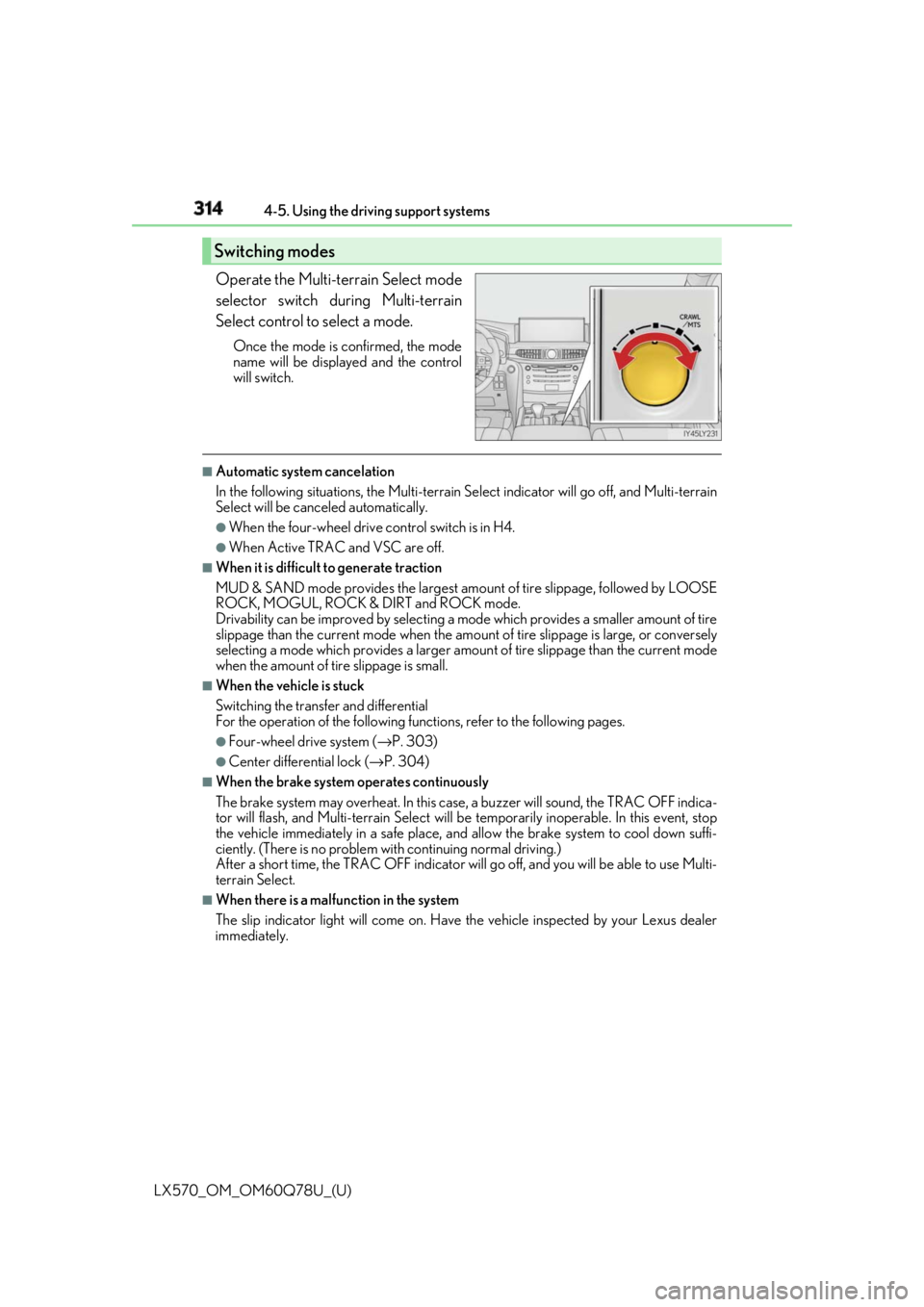
Operate the Multi-terrain Select mode
selector switch du ring Multi-terrain
Select control to select a mode. Once the mode is confirmed, the mode
name will be displayed and the control
will switch. ■
Automatic system cancelation
In the following situations, the Multi-terrain Select indicator will go off, and Multi-terrain
Select will be canceled automatically. ●
When the four-wheel drive control switch is in H4. ●
When Active TRAC and VSC are off. ■
When it is difficult to generate traction
MUD & SAND mode provides the largest amou nt of tire slippage, followed by LOOSE
ROCK, MOGUL, ROCK & DIRT and ROCK mode.
Drivability can be improved by selecting a mo de which provides a smaller amount of tire
slippage than the current mode when the amount of tire slippage is large, or conversely
selecting a mode which provides a larger amou nt of tire slippage than the current mode
when the amount of tire slippage is small. ■
When the vehicle is stuck
Switching the transfer and differential
For the operation of the following func tions, refer to th e following pages.●
Four-wheel drive system ( → P. 303)●
Center differential lock ( → P. 304)■
When the brake system operates continuously
The brake system may overheat. In this case , a buzzer will sound, the TRAC OFF indica-
tor will flash, and Multi-terrain Select will be temporarily inoperable. In this event, stop
the vehicle immediately in a safe place, and allow the brake system to cool down suffi-
ciently. (There is no problem wi th continuing normal driving.)
After a short time, the TRAC OFF indicator will go off, and you will be able to use Multi-
terrain Select. ■
When there is a malfunction in the system
The slip indicator light will come on. Have the vehicle in spected by your Lexus dealer
immediately.Switching modes
Page 377 of 628

377
LX570_OM_OM60Q78U_(U) 4-5. Using the driving support systems
4
Driving
Driving assist systems ◆ Multi Terrain ABS (Anti-lock Brake System) Helps to prevent wheel lock when the brakes are applied suddenly, or if the brakes are
applied while driving on a slippery road su rface, or in off-road conditions (such as
rough roads, sand and mud)
◆ Brake assist Generates an increase d level of braking force after the brake pedal is depressed
when the system detects a panic stop situation
◆ VSC (Vehicle Stability Control) Helps the driver to control skidding when swerving suddenly or turning on slippery
road surfaces
◆ Active TRAC (Traction Control) Helps to maintain drive power and prevent the 4 wheels from spinning when starting
the vehicle or accelerating on slippe ry roads, or in off-road conditions
◆ Hill-start assist control Helps to reduce the backward movement of the vehicle when starting on an incline or
slippery slope
◆ AVS (Adaptive Variable Suspension system) By independently controlling the damping force of the shock absorbers for each of
the 4 wheels according to th e road and driving conditions, this system helps riding
comfort with superior steering stabilit y, and helps good vehicle posture. When
SPORT S+ mode is selected by the drivin g mode select switch, the damping force is
suitable for sporty driving. ( → P. 284)
◆ VGRS (Variable Gear Ratio Steering) Helps to adjust the wheel turning angle in accordance with the vehicle speed and
steering wheel movement.
◆ Trailer Sway Control Helps the driver to control trailer sway by selectively applying brake pressure for indi-
vidual wheels and reducing engine to rque when trailer sway is detected.
Trailer Sway Control is part of the VSC system and will not operate if VSC turned off
or experiences a malfunction.To help enhance driving safety and perf ormance, the following systems oper-
ate automatically in response to variou s driving situations. Be aware, however,
that these systems are supplementary and should not be relied upon too heav-
ily when operating the vehicle.
Page 383 of 628
LX570_OM_OM60Q78U_(U) 3834-6. Driving tips
4
Driving Accelerate the vehicle slowly, keep a sa fe distance between you and the vehicle
ahead, and drive at a reduced spee d suitable to road conditions.●
Park the vehicle and move the shift lever to P without setting the parking
brake. The parking brake may freeze up, preventing it from being released. If
the vehicle is parked without setting the parking brake, make sure to block the
wheels.
Failure to do so may be dangerous because it may cause the vehicle to move
unexpectedly, possibly leading to an accident. ●
If the vehicle is parked without setting the parking brake, confirm that the shift
lever cannot be moved out of P
* .When the parking brake is in automatic mo de, release the parkin g brake after shifting
the shift lever to P. ( → P. 218)
* : The shift lever will be locked if it is attempted to be shif ted from P to any other position
without depressing the brake pedal. If the sh ift lever can be shifte d from P, there may
be a problem with the shift lock system. Have the vehicle inspected by your Lexus
dealer immediately.
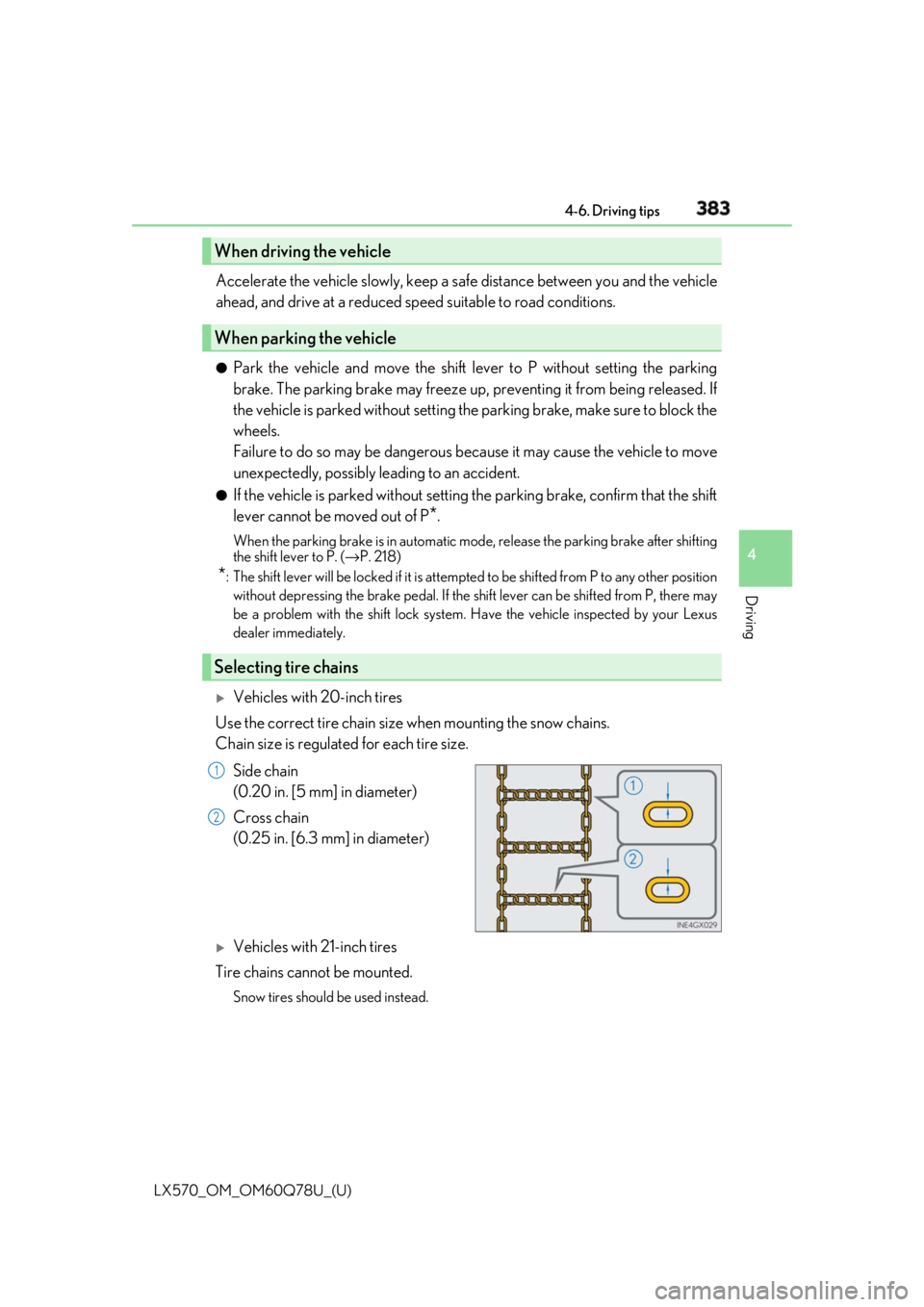
Vehicles with 20-inch tires
Use the correct tire chain size when mounting the snow chains.
Chain size is regulated for each tire size.
Side chain
(0.20 in. [5 mm] in diameter)
Cross chain
(0.25 in. [6.3 mm] in diameter)
Vehicles with 21-inch tires
Tire chains cannot be mounted. Snow tires should be used instead.When driving the vehicle
When parking the vehicle
Selecting tire chains 1
2
Page 390 of 628

390
LX570_OM_OM60Q78U_(U) 4-6. Driving tips
NOTICE ■
To prevent the water damage
Take all necessary safety measures to ensure that water damage to the engine or other
components does not occur. ●
Water entering the engine air intake will cause severe engine damage. ●
Water entering the automatic transmission will cause deterioration in shift quality,
locking up of your transmission accompan ied by vibration, and ultimately damage.●
Water can wash the grease from wheel be arings, causing rusting and premature fail-
ure, and may also enter the differentials, tr ansmission and transfer case, reducing the
gear oil’s lubricating qualities. ■
When you drive through water
If driving through water, such as when cro ssing shallow streams, first check the depth of
the water and the bottom of the riverbed for firmness. Drive slowly and avoid deep
water. ■
Inspection after off-road driving ●
Sand and mud that has accumulated in brake drums and around brake discs may
affect braking efficiency and may damage brake system components. ●
Always perform a maintenance inspection afte r each day of off-road driving that has
taken you through rough terrain, sand, mud, or water. For scheduled maintenance
information, refer to the “Warranty and Se rvices Guide”, “Owner’s Manual Supple-
ment” or “Scheduled Maintenance”.
Page 391 of 628

391
LX570_OM_OM60Q78U_(U) 5Interior features5-1. Remote Touch screen
Remote Touch/12.3-inch
display ..........................................392
5-2. Lexus Climate Concierge
Lexus Climate Concierge ..... 398
5-3. Using the air conditioning
system and defogger
Front automatic air
conditioning system ...............399
Rear air conditioning
system ........................................... 410
Heated steering wheel/seat
heaters/seat ve ntilators......... 413
5-4. Using the interior lights
Interior lights list........................... 417
• Interior lights ........................... 418
• Personal lights ........................ 419 5-5. Using the storage features
List of storage features ............ 420
• Glove box .................................421
• Console box.............................421
• Overhead console .............. 422
• Cup holders ........................... 423
• Bottle holders ........................ 424
• Card holder............................ 424
• Auxiliary boxes ..................... 425
Luggage compartment
features ....................................... 427
5-6. Using the other interior
features
Other interior features ............430
• Cool box..................................430
• Sun visors ................................. 431
• Vanity mirrors ........................ 431
• Clock ........................................ 432
• Power outlets......................... 433
• Wireless charger ................. 435
• Armrest .................................... 442
• Rear door sunshades ......... 443
• Coat hooks ............................. 443
• Assist grips.............................. 444
Garage door opener ............... 445
LEXUS Enform Safety
Connect ...................................... 452