height LEXUS LX570 2018 User Guide
[x] Cancel search | Manufacturer: LEXUS, Model Year: 2018, Model line: LX570, Model: LEXUS LX570 2018Pages: 628, PDF Size: 12.38 MB
Page 192 of 628
192
LX570_OM_OM60Q78U_(U) 4-1. Before driving
●
A recommended tongue weight varies in accordance with the types of trailers
or towing as described below. ●
To ensure the recommended values show n below, the trailer must be loaded
by referring to the following instructions.
• Tongue Weight
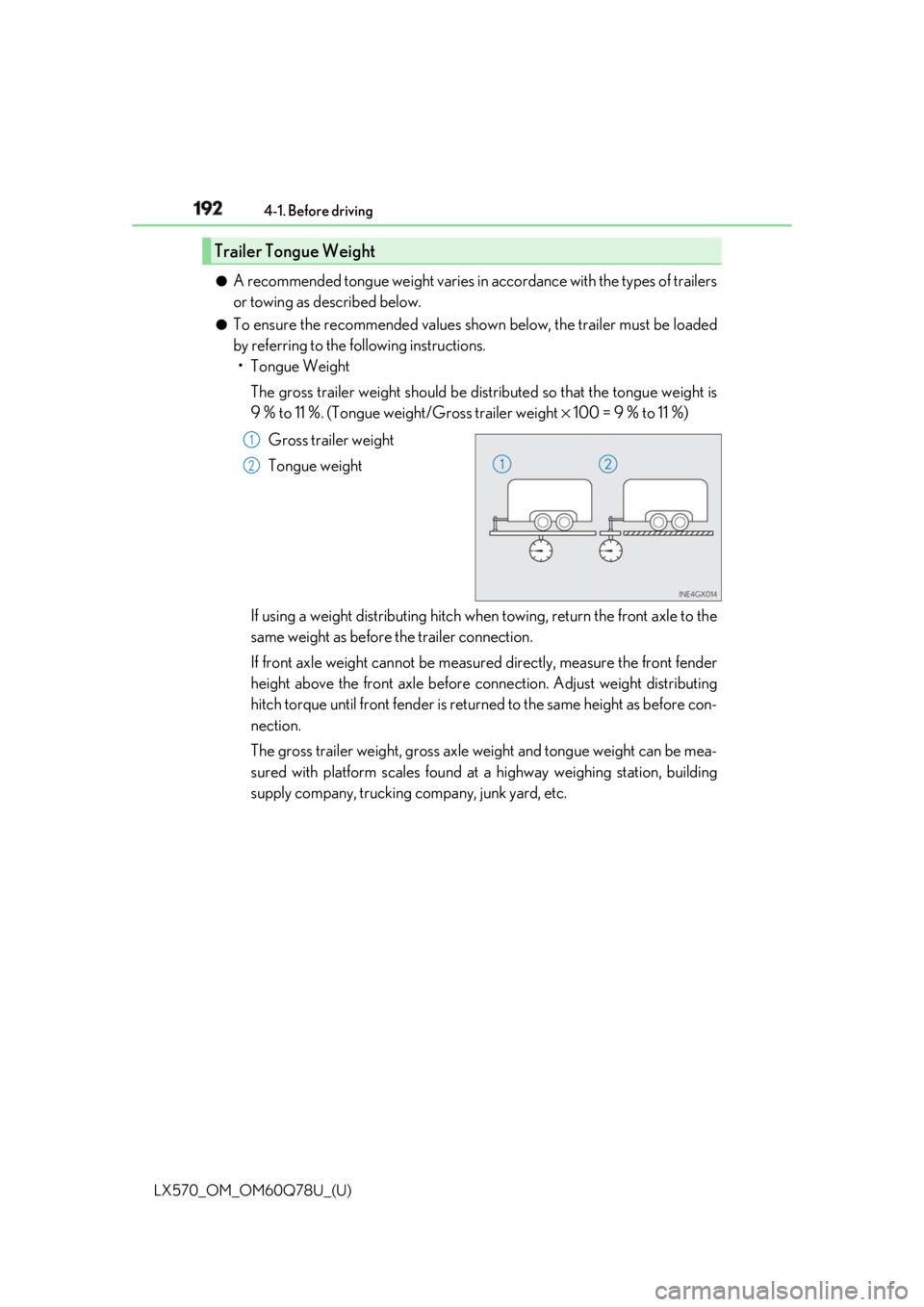
The gross trailer weight should be dist ributed so that the tongue weight is
9 % to 11 %. (Tongue weig ht/Gross trailer weight × 100 = 9 % to 11 %)
Gross trailer weight
Tongue weight
If using a weight distributing hitch when towing, return the front axle to the
same weight as before the trailer connection.
If front axle weight cannot be meas ured directly, measure the front fender
height above the front axle before co nnection. Adjust weight distributing
hitch torque until front fender is return ed to the same height as before con-
nection.
The gross trailer weight, gross axle weight and tongue weight can be mea-
sured with platform scales found at a highway weighing station, building
supply company, trucking company, junk yard, etc.Trailer Tongue Weight 1
2
Page 196 of 628

196
LX570_OM_OM60Q78U_(U) 4-1. Before driving
Stop your vehicle and a trailer in line and perform the following:●
Connecting a trailer
Put the 4-Wheel AHC in the “LO” (low) mode.
Turn off the engine switch or the 4-Wheel AHC.
Connect a trailer.
Turn on the engine switch or the 4-Wheel AHC.
Select the N (normal) mode with the height select switch. When a vehicle loaded with four occupants tows a trailer of about 4000 lb.
(1800 kg) with more than about 400 lb. (180 kg) tongue load, the normal mode
may not be selected. However, there is no problem to continue normal driving.
Drive with sufficient care because of large load.●
Disconnecting a trailer
Put the 4-Wheel AHC in the “LO” (low) mode. (Make sure the vehicle
height is in the “LO” mode by pulling the switch to “ ∨ ” on the height select
switch.)
Turn off the engine switch or the 4-Wheel AHC.
Set the supporting leg of a trailer on the ground and raise the hitch by 4 in.
(100 mm).
Turn on the engine switch or the 4-Wheel AHC.
Wait for about 20 seconds until the re ar vehicle height is lowered by the
automatic leveling function.
Make sure the hitch is disconnected. If not, raise the hitch higher and
repeat steps 2 through 5.
Move the vehicle forward in the “LO” mode where the hitch does not touch
anything in the N (normal) mode.
Put the 4-Wheel AHC in the N mode.Connecting and disconnecting a trailer 1
2
3
4
5
1
2
3
4
5
6
7
8
Page 200 of 628
200
LX570_OM_OM60Q78U_(U) 4-1. Before driving■
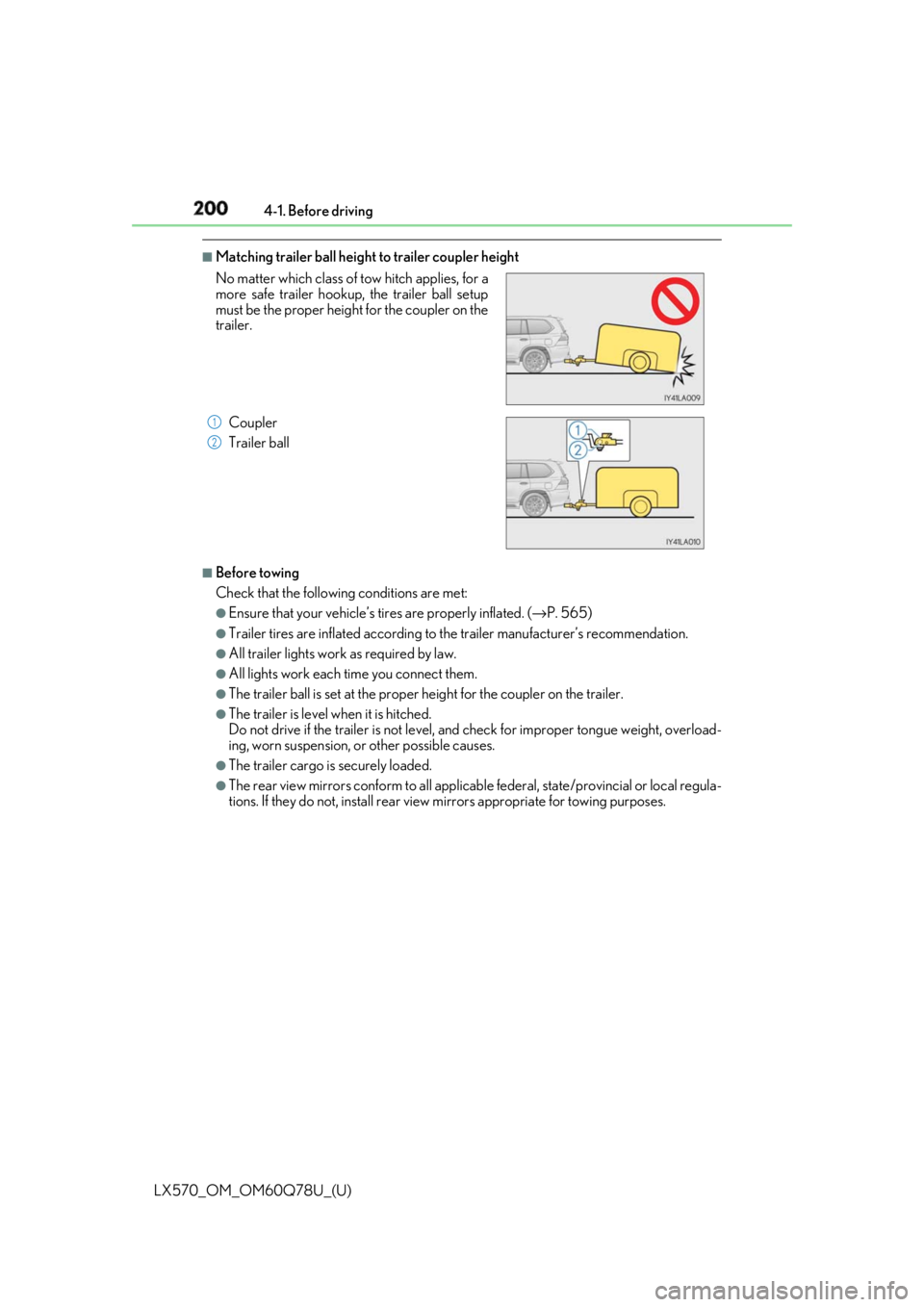
Matching trailer ball height to trailer coupler height
■
Before towing
Check that the followin g conditions are met:●
Ensure that your vehicle’s tires are properly inflated. ( → P. 565)●
Trailer tires are inflated a ccording to the trailer manufacturer’s recommendation.●
All trailer lights work as required by law. ●
All lights work each time you connect them.●
The trailer ball is set at the proper height for the coupler on the trailer. ●
The trailer is level when it is hitched.
Do not drive if the trailer is not level, and check for improper to ngue weight, overload-
ing, worn suspension, or other possible causes. ●
The trailer cargo is securely loaded. ●
The rear view mirrors conform to all applicable federal, state/provincial or local regula-
tions. If they do not, install rear view mirrors appropriate for towing purposes.No matter which class of tow hitch applies, for a
more safe trailer hookup, the trailer ball setup
must be the proper height for the coupler on the
trailer.
Coupler
Trailer ball 1
2
Page 202 of 628

202
LX570_OM_OM60Q78U_(U) 4-1. Before driving
WARNING ■
Trailer towing precautions ●
To tow a trailer safely, use extreme care an d drive the vehicle in accordance with the
trailer’s characteristics and operating condit ions. Failure to do so could cause an acci-
dent resulting in death or serious injury. Vehicle stability and braking performance are
affected by trailer st ability, brake setting and performanc e, and the hitch. Your vehicle
will handle differently when towing a trailer. ●
Set the vehicle height to the “LO” mode and turn off the 4-Wheel AHC when you
connect a trailer, otherwise the vehicle height may change due to the automatic level-
ing function, and you may catch part of your body in the vehicle, resulting in an acci-
dent. ( → P. 295)■
To avoid accident or injury ●
Do not exceed the TWR, unbraked TWR, GCWR, GVWR or GAWR. ●
If the gross trailer weight is over 2000 lb. (907 kg), a sway control device with suffi-
cient capacity is required. ●
If the gross trailer weight is over 5000 lb. (2268 kg), a weight distributing hitch with
sufficient capacity is required. ●
Adjust the tongue weight within the approp riate range. Place heavier loads as close
to the trailer axle as possible. ●
Do not exceed 65 mph (104 km/h), the posted towing speed limit or the speed limit
for your trailer as set forth in your trai ler owner’s manual, whichever is lowest. Slow
down sufficiently before making a turn, in crosswinds, on wet or slippery surface, etc.
to help avoid an accident. If you experien ce a vehicle-trailer in stability from reducing
a certain speed, slow down and make sure you keep your vehicle speed under the
speed of which you expe rience the instability.●
Do not make jerky, abrupt or sharp turns. ●
Do not apply the brakes suddenly as you ma y skid, resulting in jackknifing and loss of
vehicle control. This is especially true on wet or slippery surfaces.●
Do not exceed the trailer hitch assembly weight, gross vehicle weight, gross axle
weight and trailer tongue weight capacities. ●
Do not use cruise control (if equipped) or dynamic radar cruise control with full-
speed range (if equipped) when trailer towing. ●
Slow down and downshift before descending steep or long downhill grades. Do not
make sudden downshifts while descending steep or long downhill grades. ●
Vehicle-trailer instability is more likely on steep long down hills. Before descending
steep or long downhill grades, slow down and downshift. Do not make sudden down-
shifts when descending steep or long do wnhill grades. Avoid ho lding the brake pedal
down too long or applying the brakes too frequently. This could cause the brakes to
overheat and result in reduced braking efficiency.
Page 295 of 628
295
LX570_OM_OM60Q78U_(U) 4-5. Using the driving support systems
4
Driving
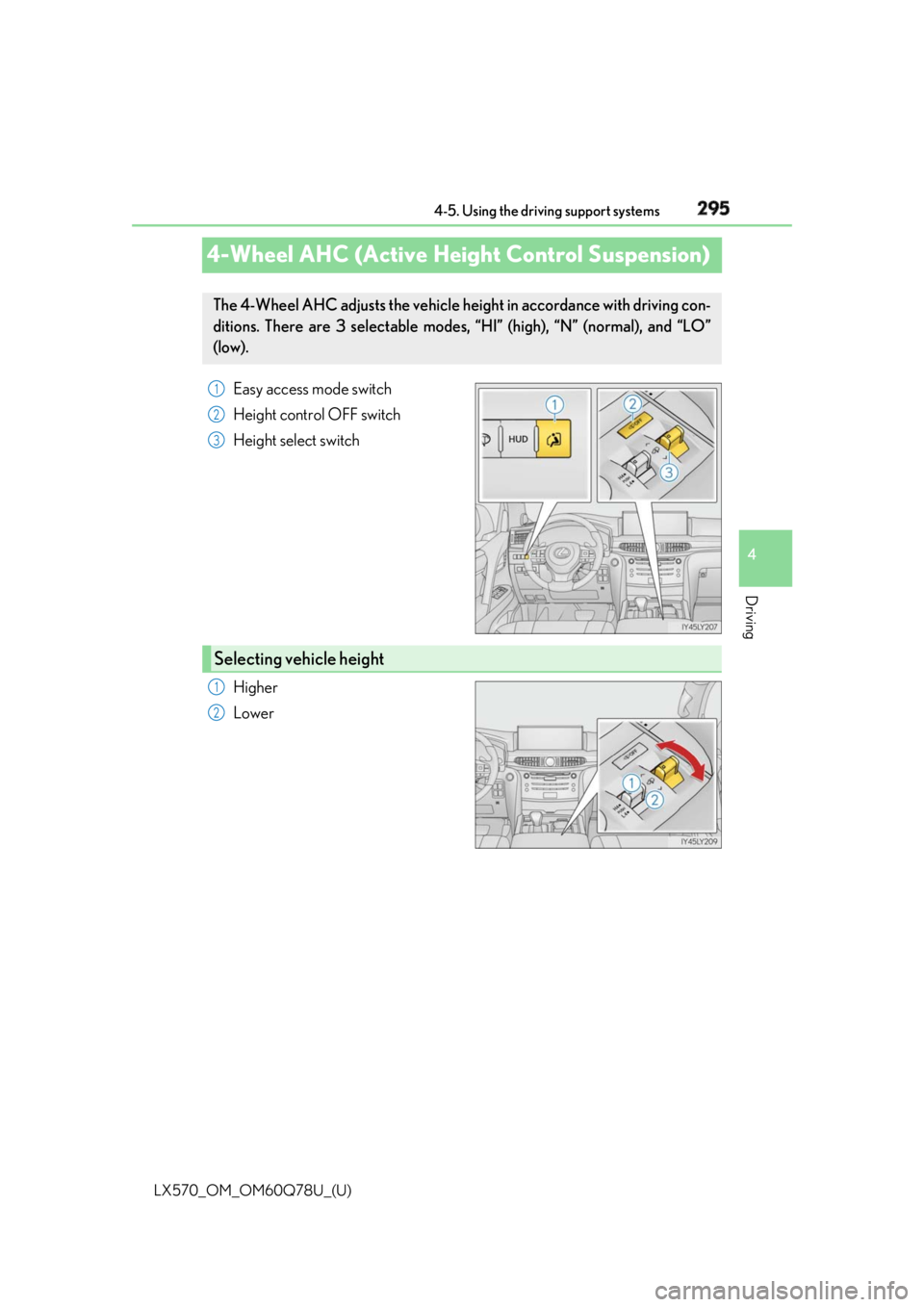
4-Wheel AHC (Active Heigh t Control Suspension)Easy access mode switch
Height control OFF switch
Height select switch
Higher
LowerThe 4-Wheel AHC adjusts the vehicle height in accordance with driving con-
ditions. There are 3 selectable modes, “HI” (high), “N” (normal), and “LO”
(low). 1
2
3
Selecting vehicle height 1
2
Page 296 of 628
296
LX570_OM_OM60Q78U_(U) 4-5. Using the driving support systems
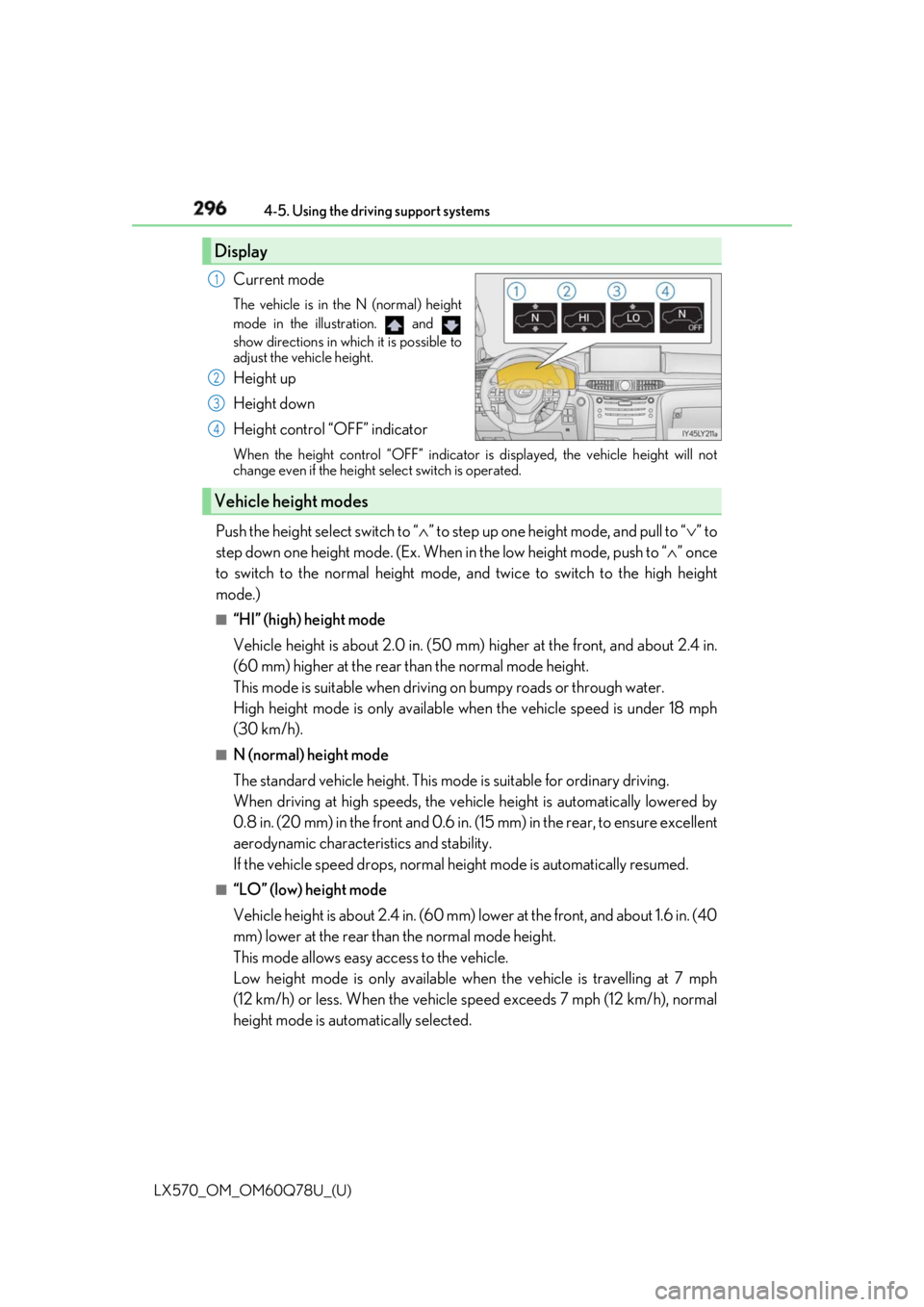
Current mode The vehicle is in the N (normal) height
mode in the illustration. and
show directions in which it is possible to
adjust the vehicle height.
Height up
Height down
Height control “OFF” indicator When the height control “OFF” indicator is displayed, the vehicle height will not
change even if the height select switch is operated.
Push the height select switch to “ ∧ ” to step up one height mode, and pull to “ ∨ ” to
step down one height mode. (Ex. When in the low height mode, push to “ ∧ ” once
to switch to the normal height mode, and twice to switch to the high height
mode.) ■
“HI” (high) height mode
Vehicle height is about 2.0 in. (50 mm) higher at the front, and about 2.4 in.
(60 mm) higher at the rear than the normal mode height.
This mode is suitable when drivin g on bumpy roads or through water.
High height mode is only available when the vehicle speed is under 18 mph
(30 km/h). ■
N (normal) height mode
The standard vehicle height. This mode is suitable for ordinary driving.
When driving at high speeds, the vehi cle height is automatically lowered by
0.8 in. (20 mm) in the front and 0.6 in. (15 mm) in the rear, to ensure excellent
aerodynamic character istics and stability.
If the vehicle speed drops, normal he ight mode is automatically resumed.■
“LO” (low) height mode
Vehicle height is about 2.4 in. (60 mm) lower at the front, and about 1.6 in. (40
mm) lower at the rear than the normal mode height.
This mode allows easy access to the vehicle.
Low height mode is only available wh en the vehicle is travelling at 7 mph
(12 km/h) or less. When the vehicle speed exceeds 7 mph (12 km/h), normal
height mode is automatically selected.Display 1
2
3
4
Vehicle height modes
Page 297 of 628
LX570_OM_OM60Q78U_(U) 2974-5. Using the driving support systems
4
Driving Some modes may not be selectable depending on the vehicle speed when the
four-wheel drive control switch is in the H4 position. Refer to the following table.
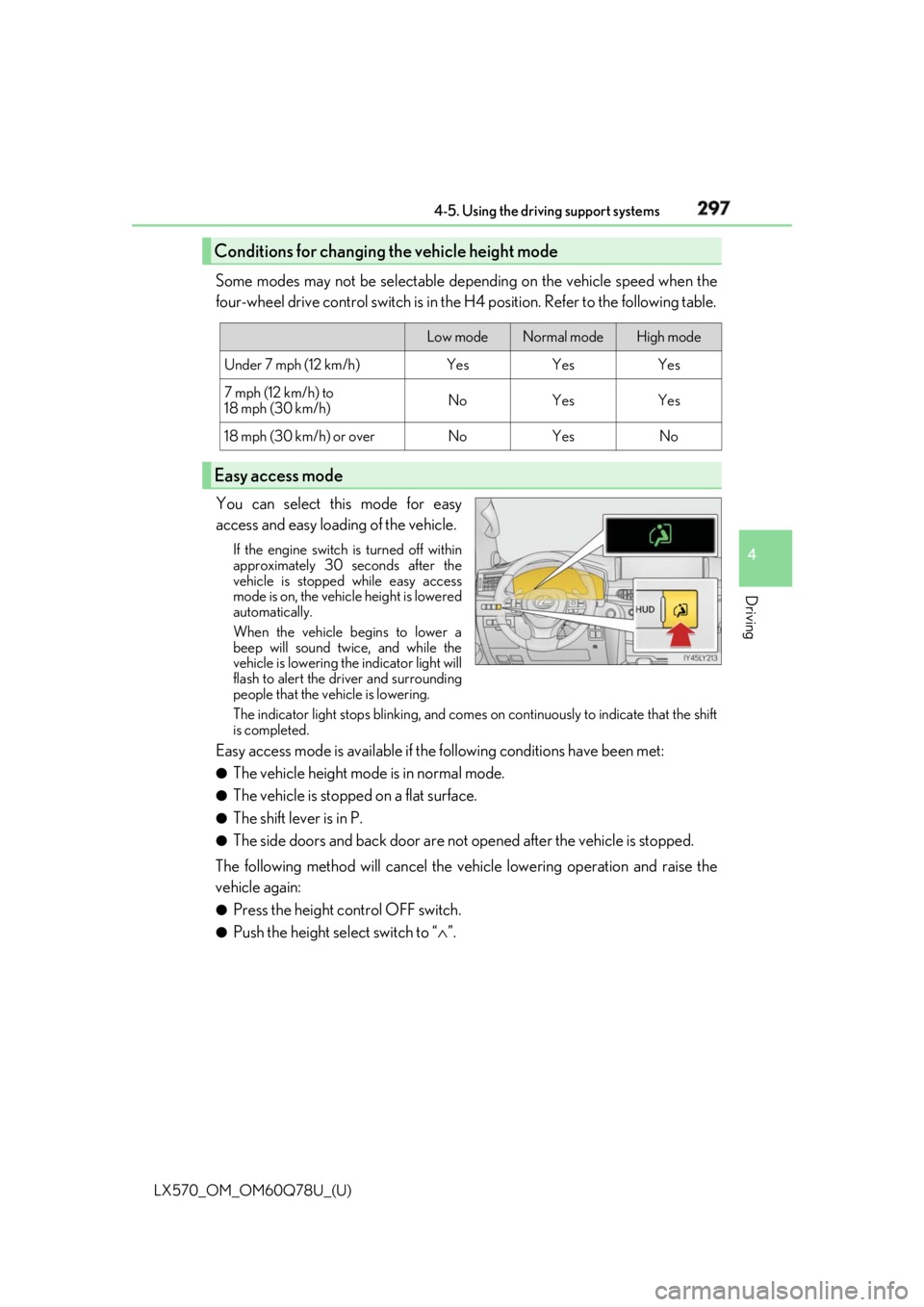
You can select this mode for easy
access and easy loading of the vehicle. If the engine switch is turned off within
approximately 30 seconds after the
vehicle is stopped while easy access
mode is on, the vehicle height is lowered
automatically.
When the vehicle begins to lower a
beep will sound twice, and while the
vehicle is lowering the indicator light will
flash to alert the driver and surrounding
people that the vehicle is lowering.
The indicator light stops blinking, and comes on continuously to indicate that the shift
is completed.
Easy access mode is available if the following conditions have been met:●
The vehicle height mode is in normal mode. ●
The vehicle is stopped on a flat surface. ●
The shift lever is in P. ●
The side doors and back door are not opened after the vehicle is stopped.
The following method will cancel the vehi cle lowering operation and raise the
vehicle again: ●
Press the height control OFF switch. ●
Push the height select switch to “ ∧ ”.Conditions for changing the vehicle height mode Low mode Normal mode High mode
Under 7 mph (12 km/h) Yes Yes Yes
7 mph (12 km/h) to
18 mph (30 km/h) No Yes Yes
18 mph (30 km/h) or over No Yes No
Easy access mode
Page 298 of 628
298
LX570_OM_OM60Q78U_(U) 4-5. Using the driving support systems
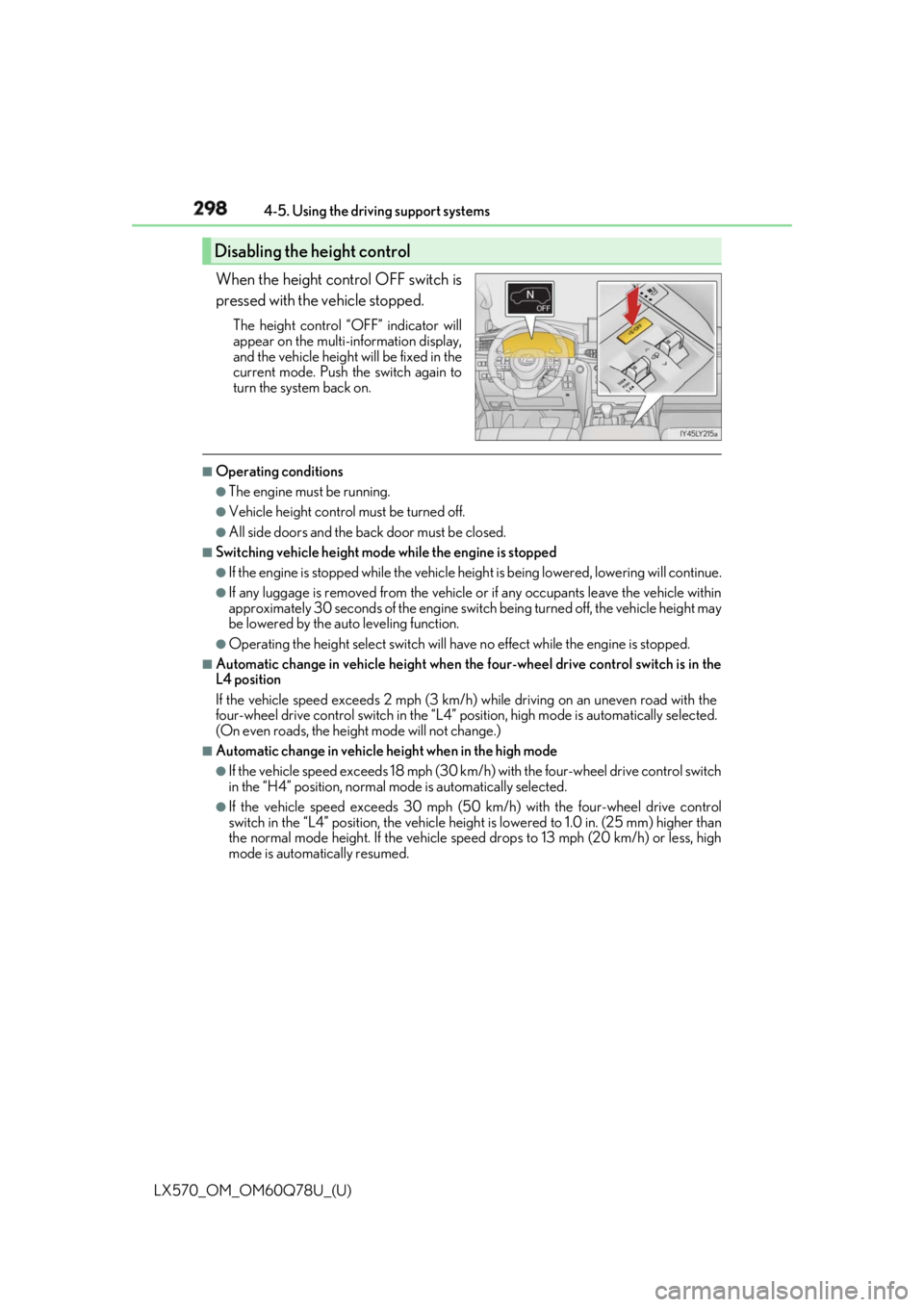
When the height control OFF switch is
pressed with the vehicle stopped. The height control “OFF” indicator will
appear on the multi- information display,
and the vehicle height will be fixed in the
current mode. Push the switch again to
turn the system back on. ■
Operating conditions ●
The engine must be running. ●
Vehicle height control must be turned off. ●
All side doors and the back door must be closed. ■
Switching vehicle height mode while the engine is stopped●
If the engine is stopped while the vehicle height is being lowe red, lowering will continue.●
If any luggage is removed from the vehicle or if any occupants leave the vehicle within
approximately 30 seconds of the engine switch being turned off, the vehicle height may
be lowered by the auto leveling function. ●
Operating the height select switch will have no effect while the engine is stopped.■
Automatic change in vehicle height when the four-wheel drive contro l switch is in the
L4 position
If the vehicle speed exceeds 2 mph (3 km/h) while driving on an uneven road with the
four-wheel drive control switch in the “L4” position, high mo de is automatically selected.
(On even roads, the height mode will not change.) ■
Automatic change in vehicle height when in the high mode ●
If the vehicle speed exceeds 18 mph (30 km/h) with the four-wheel drive control switch
in the “H4” position, normal mode is automatically selected. ●
If the vehicle speed exceeds 30 mph (50 km/h) with the four-wheel drive control
switch in the “L4” position, the vehicle heig ht is lowered to 1.0 in. (25 mm) higher than
the normal mode height. If the vehicle speed drops to 13 mph (20 km/h) or less, high
mode is automatically resumed.Disabling the height control
Page 299 of 628

LX570_OM_OM60Q78U_(U) 2994-5. Using the driving support systems
4
Driving ■
Extra high mode
If the vehicle becomes stuck or the Crawl Co ntrol system requests the vehicle height be
raised, extra high mode may be automatically selected when the vehicle height is in high
mode with the four-wheel drive control switch in the L4 position.
The vehicle height is raised to 0.8 in. (2 0 mm) higher than the high mode height, or
slightly higher. ●
Extra high mode will change back to high mode when:
• The vehicle speed exceeds 6 mph (10 km/h)
• The four-wheel drive contro l switch is shifted to H4.●
If you pull the height select switch to “ ∨ ” when in extra high mode, normal mode is
selected. ●
Extra high mode cannot be manually selected. ■
Turning off the height control ●
The system will remain off until the height co ntrol “OFF” switch is pushed again, even if
the engine switch is turned off. ●
Even if the system is turned off, the system will interven e automatically if the vehicle
speed exceeds the following.
• 18 mph (30 km/h) with high or low mode
• 50 mph (80 km/h) with normal mode ■
Automatic leveling function
The vehicle is adjusted to a fixed height for each mode, regardless of the number of
occupants and the luggage load. ●
However the vehicle cannot be raised if the vehicle load exceeds the following limits:
• Up to 4 occupants
* plus approximately 661 lb. (300 kg) in the normal mode
• Up to 4 occupants
* plus approximately 441 lb. (200 kg) in the high mode
* : average weight 150 lb. (68 kg) per person ●
If the vehicle height cannot be raised when in the normal mode, and “LO” appears on
the display, the vehicle is loaded too heavily. Take extra care when driving in this condi-
tion.
If the vehicle height cannot be raised even after unloading the vehicle, pull the height
select switch to “ ∨ ” then push to “ ∧ ”. If the vehicle height stil l cannot be raised, turn the
ignition off then on again, then try once more. ■
When the vehicle is stopped during driving
The activation of the automatic leveling func tion may cause the vehicle height to change.
This is not a malfunction. ■
If the vehicle height does not change
If the vehicle is loaded too heavily, or the undercarriage has come into contact with the
road surface, the vehicle heig ht cannot be raised/lowered.
Page 300 of 628

300
LX570_OM_OM60Q78U_(U) 4-5. Using the driving support systems■
In the following cases the 4-Wheel AHC will not operate●
The brake pedal has been depressed for a few seconds or longer while the vehicle is
stopped. ●
Vehicle height control has not been frequently used. ●
The suspension fluid temperature is lower than -22°F (-30°C). ●
There is ice on the suspension. ●
Driving on bumpy roads which may caus e the suspension to fully elongate.●
If the steering wheel is abrupt ly turned more than 3/4 of a revolution with the center dif-
ferential lock system activated. ■
Cold weather operation
It may take longer for the vehicle height to change if the suspension fluid temperature
drops below 5°F (-15°C).
The 4-Wheel AHC does not operate when the suspension fluid temperature drops
below -22°F (-30°C). ●
In this case, even if the height select switch is pressed, the vehicle height will not change.
Once the vehicle has been driven for a sh ort time and the suspension fluid has been
warmed to within normal operating limits , the 4-Wheel AHC will begin operating and
the vehicle height will automatically change to the selected mode.●
When the suspension fluid is around -22°F (-30°C), the vehicle height may not be able
to be raised, even if the 4-Wheel AHC is operating. In this case, pull the height select
switch to “ ∨ ” then push to “ ∧ ” after driving for a short time longer to select the desired
vehicle height. ■
Parking and stopping tips ●
If you immediately stop the en gine after off-road driving, the vehicle height may gradu-
ally lower. When parking, ma ke sure there is nothing un der the vehicle that may come
in contact with the underbody. The vehicle will return to th e set height when the engine
is started. ●
The vehicle height may change as the temperature changes when the engine is
stopped. The vehicle will return to the set height when the engine is started. ■
Propeller shaft noise
If the vehicle height is adjusted on a slope, or with the shift lever in a position other than P
or N while the vehicle is stopped, you may hear a sound caused by the expansion and
contraction of the propeller shaft. This does not indicate a malfunction. ■
4-Wheel AHC failure warning
If a malfunction occurs in the 4-Wheel AHC , normal mode is automatically selected.
However, the system may not switch to norm al mode depending on the location of the
malfunction.
The warning message is displa yed on the multi-informatio n display, and the 4-Wheel
AHC cannot be activated until the malfunction is corrected.
Stop the engine and start it again. If the wa rning message turns off, the system is operat-
ing correctly. If the warning me ssage continues to be displayed, have the vehicle checked
at your Lexus dealer as soon as possible.