steering wheel LEXUS LX570 2018 Owner's Guide
[x] Cancel search | Manufacturer: LEXUS, Model Year: 2018, Model line: LX570, Model: LEXUS LX570 2018Pages: 628, PDF Size: 12.38 MB
Page 251 of 628

LX570_OM_OM60Q78U_(U) 2514-5. Using the driving support systems
4
Driving WARNING ■
Limitations of the pre-collision system●
The driver is solely responsible for safe driving. Always drive safely, taking care to
observe your surroundings.
Do not use the pre-collision sy stem instead of normal braking operations under any
circumstances. This system will not preven t collisions or lessen collision damage or
injury in every situation. Do not overly rely on this system. Failure to do so may lead to
an accident, resulting in death or serious injury. ●
Although this system is designed to help avoid a collision or help reduce the impact of
the collision, its effectivenes s may change according to various conditions, therefore
the system may not always be able to achieve the same level of performance.
Read the following conditions carefully. Do not overly rely on this system and always
drive carefully.
• Conditions under which the system may oper ate even if there is no possibility of a
collision: → P. 255
• Conditions under which the system may not operate properly: → P. 257●
Do not attempt to test the operation of the pre-collision system yourself, as the system
may not operate properly, possib ly leading to an accident.■
Pre-collision braking ●
When the pre-collision braking function is operating, a large amount of braking force
will be applied. ●
If the vehicle is stopped by the operation of the pre-collision braking function, the pre-
collision braking function operation will be canceled after approximately 2 seconds.
Depress the brake pedal as necessary. ●
The pre-collision braking fu nction may not operate if certain operations are per-
formed by the driver. If the accelerator pedal is being depressed strongly or the steer-
ing wheel is being turned, the system may de termine that the driver is taking evasive
action and possibly prevent the pre-coll ision braking function from operating.●
In some situations, wh ile the pre-collision braking function is operating, operation of
the function may be canceled if the accele rator pedal is depressed strongly or the
steering wheel is turned and the system de termines that the driv er is taking evasive
action. ●
If the brake pedal is being depressed, the sy stem may determine that the driver is tak-
ing evasive action and possibly delay the op eration timing of the pre-collision braking
function.
Page 255 of 628
LX570_OM_OM60Q78U_(U) 2554-5. Using the driving support systems
4
Driving ■
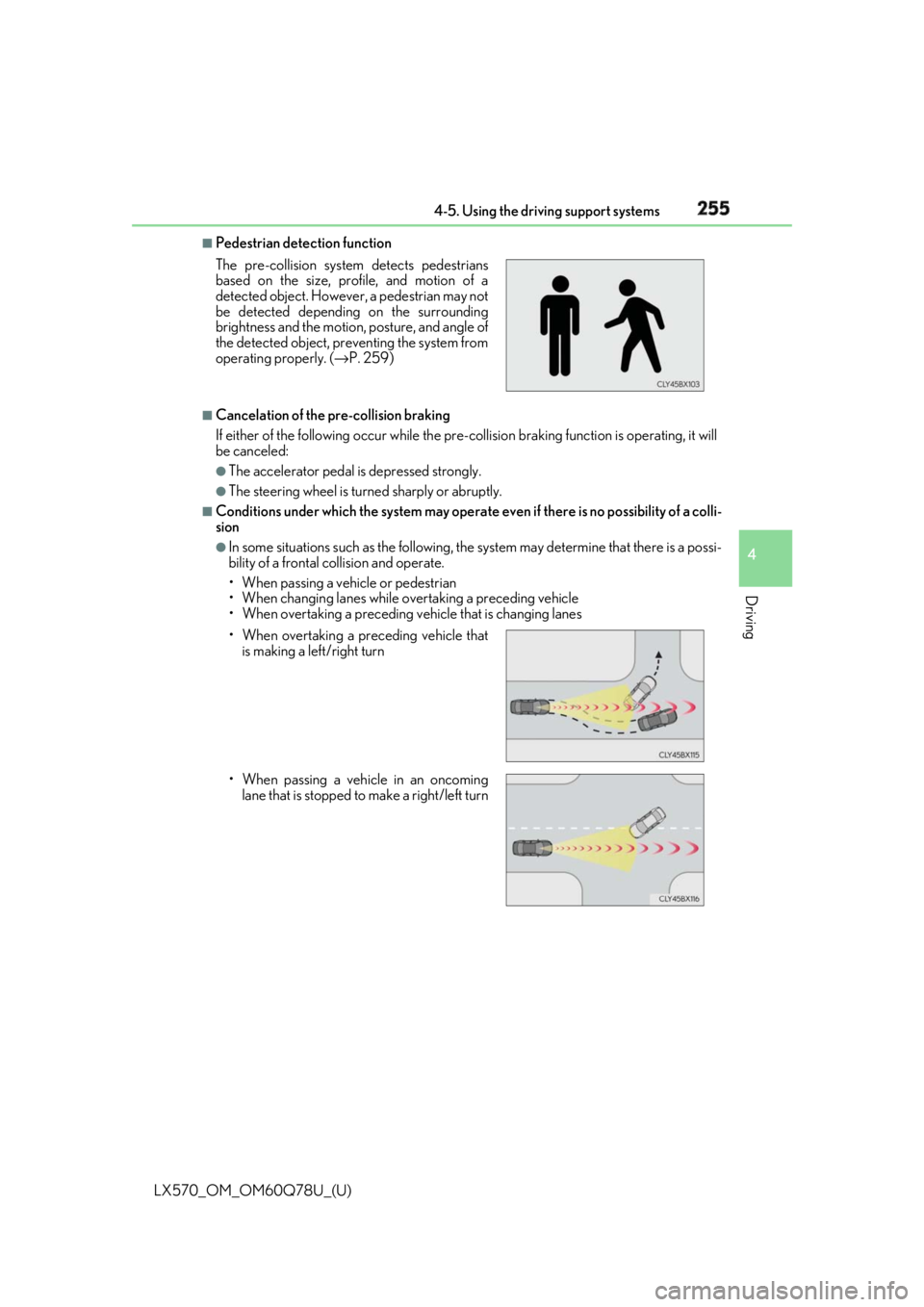
Pedestrian detection function
■
Cancelation of the pre-collision braking
If either of the following occur while the pre-co llision braking function is operating, it will
be canceled: ●
The accelerator pedal is depressed strongly. ●
The steering wheel is turned sharply or abruptly. ■
Conditions under which the system may operate even if th ere is no possibility of a colli-
sion ●
In some situations such as the following, th e system may determine that there is a possi-
bility of a frontal collision and operate.
• When passing a vehicle or pedestrian
• When changing lanes while overtaking a preceding vehicle
• When overtaking a preceding vehicle that is changing lanesThe pre-collision system detects pedestrians
based on the size, prof ile, and motion of a
detected object. However, a pedestrian may not
be detected depending on the surrounding
brightness and the motion, posture, and angle of
the detected object, preventing the system from
operating properly. ( → P. 259)
• When overtaking a preceding vehicle that
is making a left/right turn
• When passing a vehicle in an oncoming
lane that is stopped to make a right/left turn
Page 261 of 628

261
LX570_OM_OM60Q78U_(U) 4-5. Using the driving support systems
4
Driving
LDA (Lane Departure Alert) ∗When driving on roads with white (yellow) lines, this function alerts the driver
when the vehicle might depart from its lane.
The LDA system recognizes visible
white (yellow) lines with the camera
sensor on the upper portion of the front
windshield.
◆ Lane departure alert function
When the system determines that
the vehicle might depart from its
lane, a warning is displayed on the
multi-information display, and either
the warning buzzer sounds or the
steering wheel vibrates to alert the
driver. When the warning buzzer sounds or
the steering wheel vibrates, check
the surrounding road situation and
carefully operate the steering wheel
to move the vehicle back to the cen-
ter of the lane.
∗ : If equippedSummary of functions
Functions included in LDA system
Page 262 of 628

262
LX570_OM_OM60Q78U_(U) 4-5. Using the driving support systems
◆ Vehicle sway warning
When the vehicle is swaying or
appears as if it may depart from its
lane multiple times, the warning
buzzer sounds and a message is dis-
played on the multi-information dis-
play to alert the driver.
WARNING ■
Before using LDA system
Do not rely solely upon the LDA system. The LDA system does not automatically drive
the vehicle or reduce the amount of attention that must be paid to the area in front of
the vehicle. The driver must always assume full responsibility for driving safely by pay-
ing careful attention to the surrounding cond itions and operating the steering wheel to
correct the path of the vehicle. Also, the driver must take adequate breaks when
fatigued, such as from driving for a long period of time.
Failure to perform appropriate driving operat ions and pay careful attention may lead to
an accident, resulting in death or serious injury. ■
To avoid operating LDA system by mistake
When not using the LDA system, use the LDA switch to turn the system off.
Page 265 of 628

LX570_OM_OM60Q78U_(U) 2654-5. Using the driving support systems
4
Driving ■
Operation conditions of each function ●
Lane departure alert function
This function operates when all of the following conditions are met.
• LDA is turned on.
• Vehicle speed is approximatel y 32 mph (50 km/h) or more.
• System recognizes white (yellow) lines.
• Width of traffic lane is approx imately 9.8 ft. (3 m) or more.
• Turn signal lever is not operated.
• Vehicle is driven on a stra ight road or around a gentle curve with a radius of more
than approximately 492 ft. (150 m).
• No system malfunctions are detected. ( → P. 267)●
Vehicle sway warning
This function operates when all of the following conditions are met.
• Setting for “Sway Warning” in (Setting s display) of the multi-information dis-
play is set to “On”. ( → P. 580)
• Vehicle speed is approximatel y 32 mph (50 km/h) or more.
• Width of traffic lane is approx imately 9.8 ft. (3 m) or more.
• No system malfunctions are detected. ( → P. 267)■
Temporary cancelation of functions
When operation conditions are no longer met, a function may be temporarily canceled.
However, when the operation co nditions are met again, operat ion of the function is auto-
matically restored. ( → P. 265)■
Lane departure alert function
The warning buzzer may be difficult to hear due to external noise, audio playback, etc.
Also, it may be difficult to f eel steering wheel vibrations due to the road conditions, etc.■
White (yellow) lines are only on one side of road
The LDA system will not operate for the side on which white (yellow) lines could not be
recognized.
Page 280 of 628

280
LX570_OM_OM60Q78U_(U) 4-5. Using the driving support systems
■
Conditions under which the ve hicle-to-vehicle distance co ntrol mode may not function
correctly
In the case of the following conditions, o perate the brake pedal (or accelerator pedal,
depending on the situ ation) as necessary.
As the sensor may not be able to correctly detect vehicles ahead, the system may not
operate properly.
●
When the vehicle ahead of you decelerates suddenly ●
When your vehicle is pointing upwards
(caused by a heavy load in the luggage com-
partment, etc.) ●
Preceding vehicle has an extremely high
ground clearance
●
When the road curves or when the lanes are
narrow
●
When steering wheel operation or your posi-
tion in the lane is unstable
Page 300 of 628

300
LX570_OM_OM60Q78U_(U) 4-5. Using the driving support systems■
In the following cases the 4-Wheel AHC will not operate●
The brake pedal has been depressed for a few seconds or longer while the vehicle is
stopped. ●
Vehicle height control has not been frequently used. ●
The suspension fluid temperature is lower than -22°F (-30°C). ●
There is ice on the suspension. ●
Driving on bumpy roads which may caus e the suspension to fully elongate.●
If the steering wheel is abrupt ly turned more than 3/4 of a revolution with the center dif-
ferential lock system activated. ■
Cold weather operation
It may take longer for the vehicle height to change if the suspension fluid temperature
drops below 5°F (-15°C).
The 4-Wheel AHC does not operate when the suspension fluid temperature drops
below -22°F (-30°C). ●
In this case, even if the height select switch is pressed, the vehicle height will not change.
Once the vehicle has been driven for a sh ort time and the suspension fluid has been
warmed to within normal operating limits , the 4-Wheel AHC will begin operating and
the vehicle height will automatically change to the selected mode.●
When the suspension fluid is around -22°F (-30°C), the vehicle height may not be able
to be raised, even if the 4-Wheel AHC is operating. In this case, pull the height select
switch to “ ∨ ” then push to “ ∧ ” after driving for a short time longer to select the desired
vehicle height. ■
Parking and stopping tips ●
If you immediately stop the en gine after off-road driving, the vehicle height may gradu-
ally lower. When parking, ma ke sure there is nothing un der the vehicle that may come
in contact with the underbody. The vehicle will return to th e set height when the engine
is started. ●
The vehicle height may change as the temperature changes when the engine is
stopped. The vehicle will return to the set height when the engine is started. ■
Propeller shaft noise
If the vehicle height is adjusted on a slope, or with the shift lever in a position other than P
or N while the vehicle is stopped, you may hear a sound caused by the expansion and
contraction of the propeller shaft. This does not indicate a malfunction. ■
4-Wheel AHC failure warning
If a malfunction occurs in the 4-Wheel AHC , normal mode is automatically selected.
However, the system may not switch to norm al mode depending on the location of the
malfunction.
The warning message is displa yed on the multi-informatio n display, and the 4-Wheel
AHC cannot be activated until the malfunction is corrected.
Stop the engine and start it again. If the wa rning message turns off, the system is operat-
ing correctly. If the warning me ssage continues to be displayed, have the vehicle checked
at your Lexus dealer as soon as possible.
Page 308 of 628
308
LX570_OM_OM60Q78U_(U) 4-5. Using the driving support systems
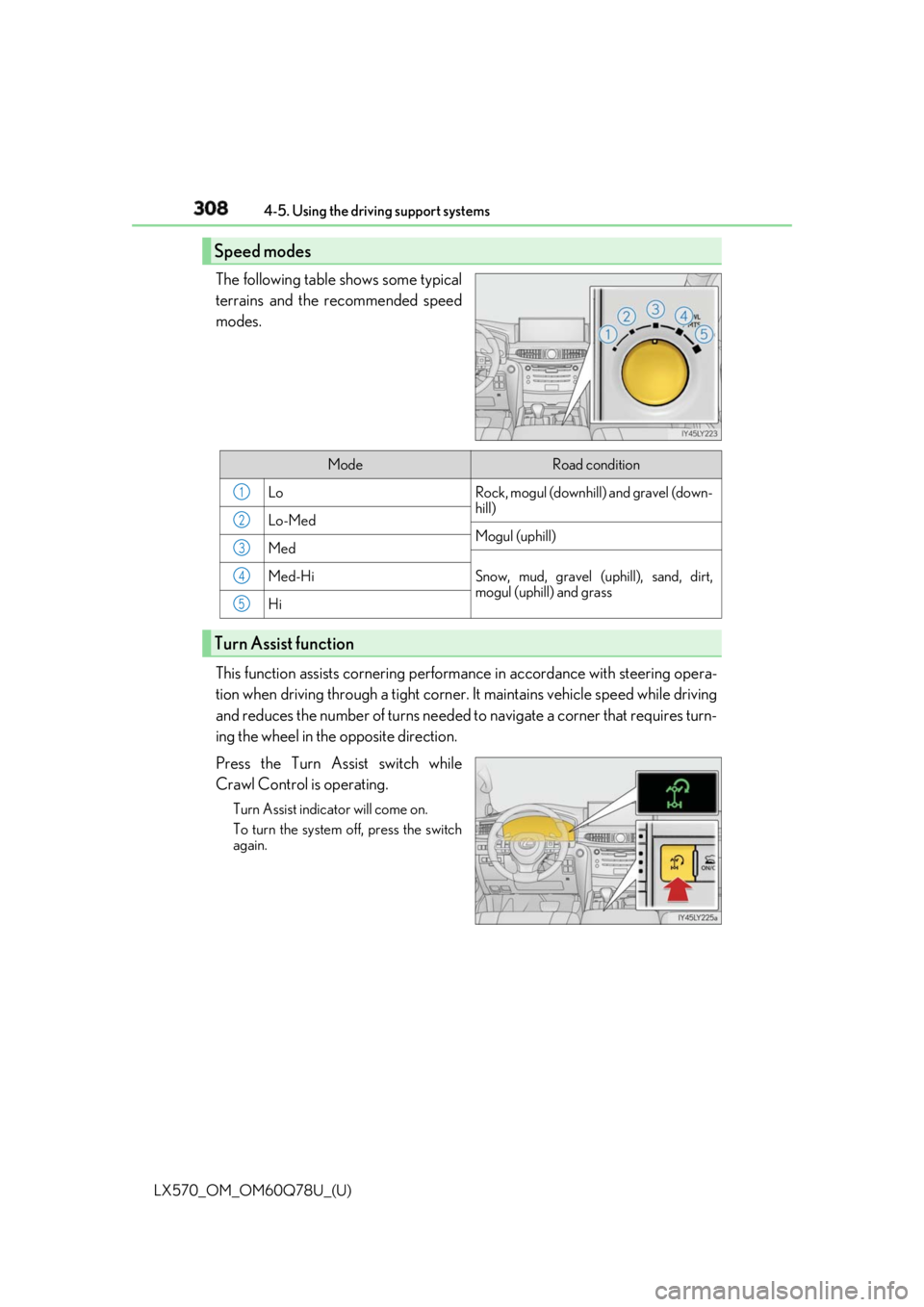
The following table shows some typical
terrains and the recommended speed
modes.
This function assists cornering perfor mance in accordance with steering opera-
tion when driving through a tight corner. It maintains vehicle speed while driving
and reduces the number of turns needed to navigate a corner that requires turn-
ing the wheel in the opposite direction.
Press the Turn Assist switch while
Crawl Control is operating. Turn Assist indicator will come on.
To turn the system off, press the switch
again.Speed modes
Mode Road condition
Lo Rock, mogul (downhill) and gravel (down-
hill)
Lo-Med
Mogul (uphill)
Med
Snow, mud, gravel (uphill), sand, dirt,
mogul (uphill) and grassMed-Hi
Hi
Turn Assist function 1
2
3
4
5
Page 309 of 628

LX570_OM_OM60Q78U_(U) 3094-5. Using the driving support systems
4
Driving
Crawl Control
Press the ON/OFF switch while Crawl Cont rol is operating. If the switch is
turned off, the slip indicator and the Turn Assist indicator will go off (if the Turn
Assist function is in use), the Crawl Co ntrol indicator will flash until the system
has turned off completely, and a messag e stating that Crawl Control has been
turned off will be displayed on the multi- information display fo r several seconds.
When turning off Crawl Control while driv ing, stop the vehicle before the Crawl
Control indicator turns off, or drive extremely carefully.
Turn Assist function
Press the Turn Assist switch while the Turn Assist function is operating. When the
switch is pressed, the Turn Assist indicat or will go off, and a message stating that
the Turn Assist function ha s been turned off will be di splayed on the multi-infor-
mation display for several seconds. ■
The Crawl Control and Turn Assist function can be operated when
Crawl Control ●
The engine is running. ●
The shift lever is in any gear other than P or N.●
The four-wheel drive control switch is in L4. ●
The driver’s door is closed.
Turn Assist function ●
Crawl Control is operating. ●
The center differential is not locked. ●
The accelerator and brake are not being operated. ●
The shift lever is in any ge ar other than P, R or N.●
The steering wheel is turned very far.When the system is turned off
Page 325 of 628

LX570_OM_OM60Q78U_(U) 3254-5. Using the driving support systems
4
Driving ■
Multi-terrain Monitor screen display
The amount of time that the Multi-terrain Mo nitor screen is displayed changes as follows
according to the vehicle speed at the time the VIEW switch was pressed.
The Multi-terrain Monitor screen is displayed if the vehicle speed is approximately 7 mph
(12 km/h) or less when the camera switch is pressed.
If the vehicle speed exceeds approximately 7 mph (12 km/h), the Multi-terrain Monitor
display is canceled.
The various screens of the Multi-terrain Monitor display info rmation to support
several different driving situations, such as when checking for obstacles when
moving forward or in reverse, or when judging road surface conditions during
off-road driving. ■
Front view & dual side view
Front view & dual side view can be used to check the area around the front of
the vehicle.
• In addition to an image of the front of the vehicle, guide lines are displayed
in a composite view to provide refere nce for when deciding a direction to
move forward in.
• If the VIEW switch is pressed while the screen is displayed, the screen
switches from normal to magnified display. (Pressing the switch again
returns the screen to the normal display)
• If the steering wheel is turned 270 ° or more, guide lines and other features
to support turning are automatically displayed.Screen display and functions