ignition LEXUS LX570 2018 Service Manual
[x] Cancel search | Manufacturer: LEXUS, Model Year: 2018, Model line: LX570, Model: LEXUS LX570 2018Pages: 628, PDF Size: 12.38 MB
Page 304 of 628
304
LX570_OM_OM60Q78U_(U) 4-5. Using the driving support systems
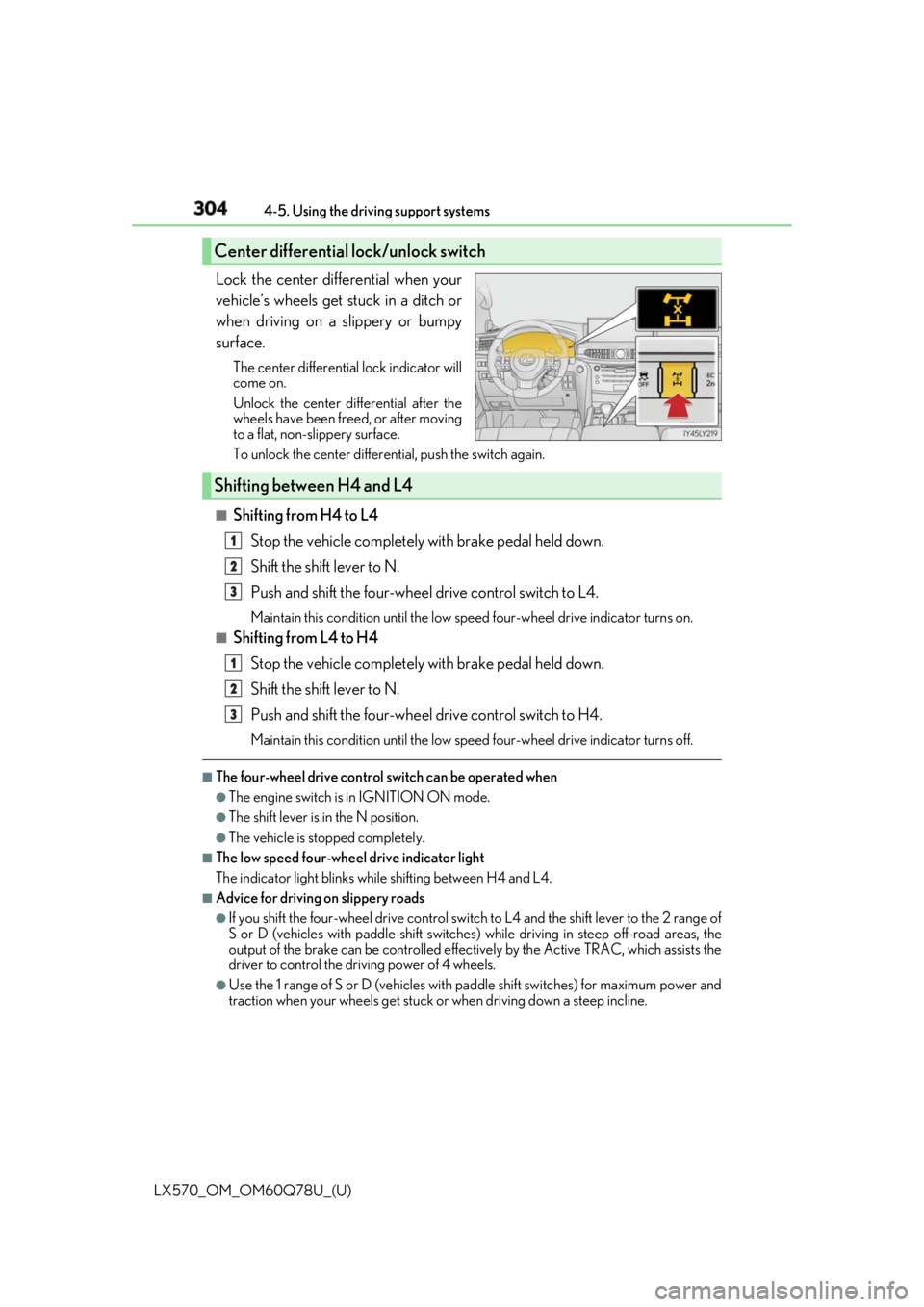
Lock the center differential when your
vehicle’s wheels get stuck in a ditch or
when driving on a slippery or bumpy
surface. The center differential lock indicator will
come on.
Unlock the center differential after the
wheels have been fr eed, or after moving
to a flat, non-slippery surface.
To unlock the center differential, push the switch again.
■
Shifting from H4 to L4
Stop the vehicle completely with brake pedal held down.
Shift the shift lever to N.
Push and shift the four-wheel drive control switch to L4. Maintain this condition until the low sp eed four-wheel drive indicator turns on.■
Shifting from L4 to H4
Stop the vehicle completely with brake pedal held down.
Shift the shift lever to N.
Push and shift the four-wheel drive control switch to H4. Maintain this condition until the low sp eed four-wheel drive indicator turns off.■
The four-wheel drive control switch can be operated when ●
The engine switch is in IGNITION ON mode. ●
The shift lever is in the N position. ●
The vehicle is stopped completely. ■
The low speed four-wheel drive indicator light
The indicator light blinks while shifting between H4 and L4.■
Advice for driving on slippery roads ●
If you shift the four-wheel drive control switch to L4 and the shift lever to the 2 range of
S or D (vehicles with paddle shift switches) while driving in steep off-road areas, the
output of the brake can be co ntrolled effectively by the Ac tive TRAC, which assists the
driver to control the driving power of 4 wheels. ●
Use the 1 range of S or D (vehicles with pa ddle shift switches) for maximum power and
traction when your wheels get stuck or when driving down a steep incline.Center differential lock/unlock switch
Shifting between H4 and L4 1
2
3
1
2
3
Page 305 of 628

LX570_OM_OM60Q78U_(U) 3054-5. Using the driving support systems
4
Driving ■
The center differential lock indicator light
The indicator light blinks while locking/unlocking the center differential.■
The center differential lock/unlock switch can be operated when ●
The engine switch is in IGNITION ON mode. ●
The vehicle speed is less than 62 mph (100 km/h). ■
Locking/unlocking the center differential●
When the four-wheel drive control switch is in L4 with the center differential locked,
VSC is automatically turned off. (The center differential lock and VSC OFF indicator
lights come on.) ●
If the operation is not completed, the center di fferential lock indicato r blinks. If the indi-
cator light does not turn off when unlocking the center diff erential, drive straight ahead
while accelerating or decelera ting, or drive in reverse.●
If the center differential lock/unlock is no t completed within 5 se conds while the cruise
control system is on, cancel the cruise control system.■
If the low speed four-wheel driv e indicator light or the center differential lock indicator
light blinks ●
If the low speed four-wheel drive indicator lig ht continues to blink when using the four-
wheel drive control switch, st op the vehicle completely, move the shift lever to N and
operate the switch again. ●
If the shift lever is moved before the low speed four-wheel drive indicator turns on/off,
the transfer mode may not be shifted completely. The transfer mode disengages both
the front and rear driveshafts from the po wertrain and allows the vehicle to move
regardless of the shift position. (At this time , the indicator blinks and the buzzer sounds.)
Therefore, the vehicle is free to roll even if the automatic transmission is in P. You or
someone else could be seriously injured. You must complete the shifting of the transfer
mode.
To complete the shifting, stop the vehicle co mpletely, return the shift lever to N, and
confirm that the shift was completed (the indicator turns on/off). ●
If the engine coolant temperature is too low, the four-wheel drive control system may
not be able to shift. When the engine is warmer operate the switch again.
If the low speed four-wheel drive indicator light or the center differential lock indicator
light continues to blink even after attempting the above, there may be a malfunction in
the engine, the brake system or the four-wheel drive system. In this case, you may not be
able to shift between H4 and L4, and the cent er differential lock may not be operable.
Have the vehicle inspected by your Lexus dealer immediately.
Page 320 of 628

320
LX570_OM_OM60Q78U_(U) 4-5. Using the driving support systems
■
Displaying the Multi-terrain Monitor screen
The Multi-terrain Monitor screen will be displayed when the VIEW switch is
pressed while the engine switch is in IGNITION ON mode. When the vehicle speed exceeds a certain value for a specific amount of time, the
display returns to the navigation or information display screen.
The amount of time that the Multi-terrain Monitor is displayed differs depending
on conditions such as the vehicle speed. ( → P. 325)
VIEW switch
DisplayUsing the Multi-terrain Monitor screen 1
2
Page 407 of 628

LX570_OM_OM60Q78U_(U) 4075-3. Using the air conditio ning system and defogger
5
Interior features ■
Using automatic mode
Fan speed is adjusted automatically according to the temperature setting and the ambi-
ent conditions.
Therefore, the fan may stop for a while until wa rm or cool air is ready to flow immediately
after the is pressed or on the control screen is selected. ■
Operation of the air conditioning system in Eco drive mode ●
In the Eco drive mode, the air conditioning sy stem is controlled as follows to prioritize
fuel efficiency
• Engine speed and compressor operation controlled to restrict heating/cooling
capacity
• Fan speed restricted when automatic mode is selected ●
To improve air conditioning performa nce, perform the following operations
• Adjust the fan speed
• Turn off Eco mode ■
Using the voice command system
Air conditioning system can be operated using voic e commands. For details, refer to the
“NAVIGATION SYSTEM OWNER’S MANUAL”. ■
Fogging up of the windows ●
The windows will easily fog up when the hu midity in the vehicl e is high. Selecting
will dehumidify the air from the outlets and defog the windshield effectively. ●
If you turn off, the wind ows may fog up more easily.●
The windows may fog up if the recirculated air mode is used. ■
Outside/recirculated air mode ●
When driving on dusty roads such as tunnels or in heavy traffic, set the outside/recircu-
lated air mode button to the recirculated air mode. This is effective in preventing out-
side air from enteri ng the vehicle interior. During cooling operation, setting the
recirculated air mode will also cool the vehicle interior effectively. ●
Outside/recirculated air mode may automa tically switch depending on the tempera-
ture setting or the inside temperature. ■
When the outside temperature exceeds 75 ° F (24 ° C) and the air conditioning system
is on ●
In order to reduce the air co nditioning power consumption, the air conditioning system
may switch to recirculated air mode automatically.
This may also reduce fuel consumption. ●
Recirculated air mode is selected as a defaul t mode when the engine switch is turned to
IGNITION ON mode. ●
It is possible to switch to outside air mode at any time by pressing .■
Automatic mode for air intake control
In automatic mode, the system detects exhaust gas and other pollutants and automati-
cally switches between outside air and recirculated air modes.
When the dehumidification function is off, and the fan is operating, turning automatic
mode on will activate the dehumidification function.
Page 408 of 628
408 5-3. Using the air conditioning system and defogger
LX570_OM_OM60Q78U_(U) ■
When the outside temperature is low
The dehumidification function may not operate even when is selected. ■
Micro dust and pollen filter ●
In order to prevent the windows from fogging up when the outside air is cold, the fol-
lowing may occur.
• Outside air mode does not swit ch to recirculated air mode.
• The air conditioning system operates automatically.
• The operation cancels after 1 minute. ●
In rainy weather, the windows may fog up. Press . ■
The rear window defogger, outside rear vi ew mirror defogger and windshield wiper de-
icer can be operated when
The engine switch is in IGNITION ON mode. ■
When the windshield wiper de-icer is on
The windshield wiper de-icer will automatically turn off after approximately 15 minutes.■
Ventilation and air conditioning odors ●
To let fresh air in, set the air conditioning system to the outside air mode. ●
During use, various odors from inside and outside the vehicle may enter into and accu-
mulate in the air conditioning system. This may then cause odor to be emitted from the
vents. ●
To reduce potential odors from occurring:
• It is recommended that the air conditioning system be set to outside air mode prior
to turning the vehicle off.
• The start timing of the blower may be dela yed for a short period of time immediately
after the air conditioning system is started in automatic mode.■
While the cool box is on (if equipped)
The front air conditioning sy stem cannot be turned off.■
Air conditioning filter
→ P. 501 ■
Customization
Settings (e.g. Exhaust gas sensor sensitivity) can be changed.
(Customizable features: → P. 580)
WARNING ■
To prevent the windshield from fogging up ●
Do not use during cool air operation in extremely humid weather. The differ-
ence between the temperature of the outside air and that of the windshield can cause
the outer surface of the windshield to fog up, blocking your vision.■
To prevent burns ●
Do not touch the rear view mirror surfaces when the outside rear view mirror defog-
gers are on. ●
Do not touch the glass at lower part of the windshield or to the side of the front pillars
when the windshield wiper de-icer is on.
Page 414 of 628
414 5-3. Using the air conditioning system and defogger
LX570_OM_OM60Q78U_(U)
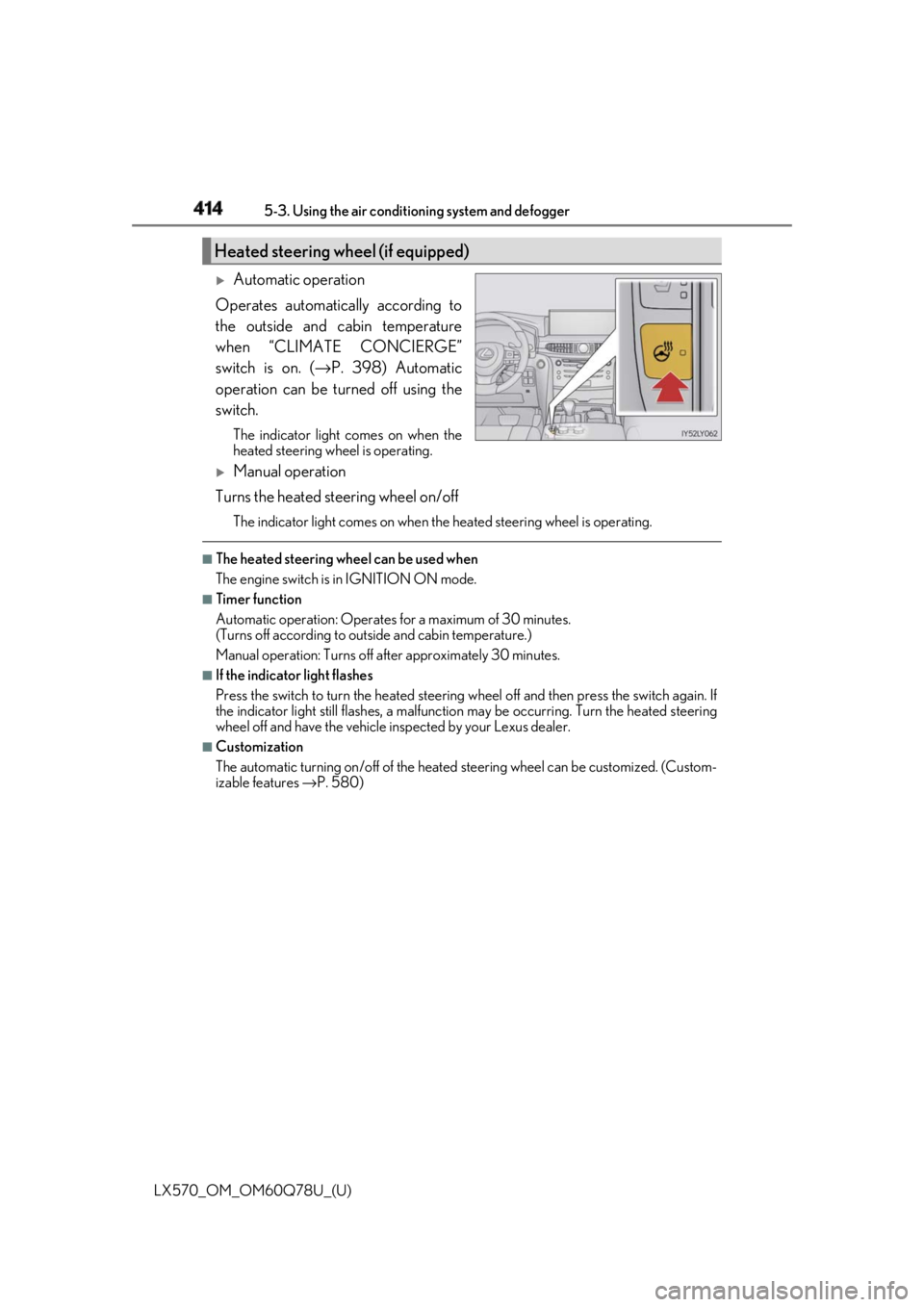
Automatic operation
Operates automatically according to
the outside and cabin temperature
when “CLIMATE CONCIERGE”
switch is on. ( → P. 398) Automatic
operation can be turned off using the
switch. The indicator light comes on when the
heated steering wheel is operating.
Manual operation
Turns the heated steering wheel on/off The indicator light comes on when the heated steering wheel is operating. ■
The heated steering wheel can be used when
The engine switch is in IGNITION ON mode. ■
Timer function
Automatic operation: Operates for a maximum of 30 minutes.
(Turns off according to outside and cabin temperature.)
Manual operation: Turns off after approximately 30 minutes. ■
If the indicator light flashes
Press the switch to turn the heated steering wheel off and then press the switch again. If
the indicator light still flashes, a malfunction may be occurri ng. Turn the heated steering
wheel off and have the vehicle inspected by your Lexus dealer. ■
Customization
The automatic turning on/off of the heated steering wheel can be customized. (Custom-
izable features → P. 580)Heated steering wheel (if equipped)
Page 416 of 628
416 5-3. Using the air conditioning system and defogger
LX570_OM_OM60Q78U_(U) ■
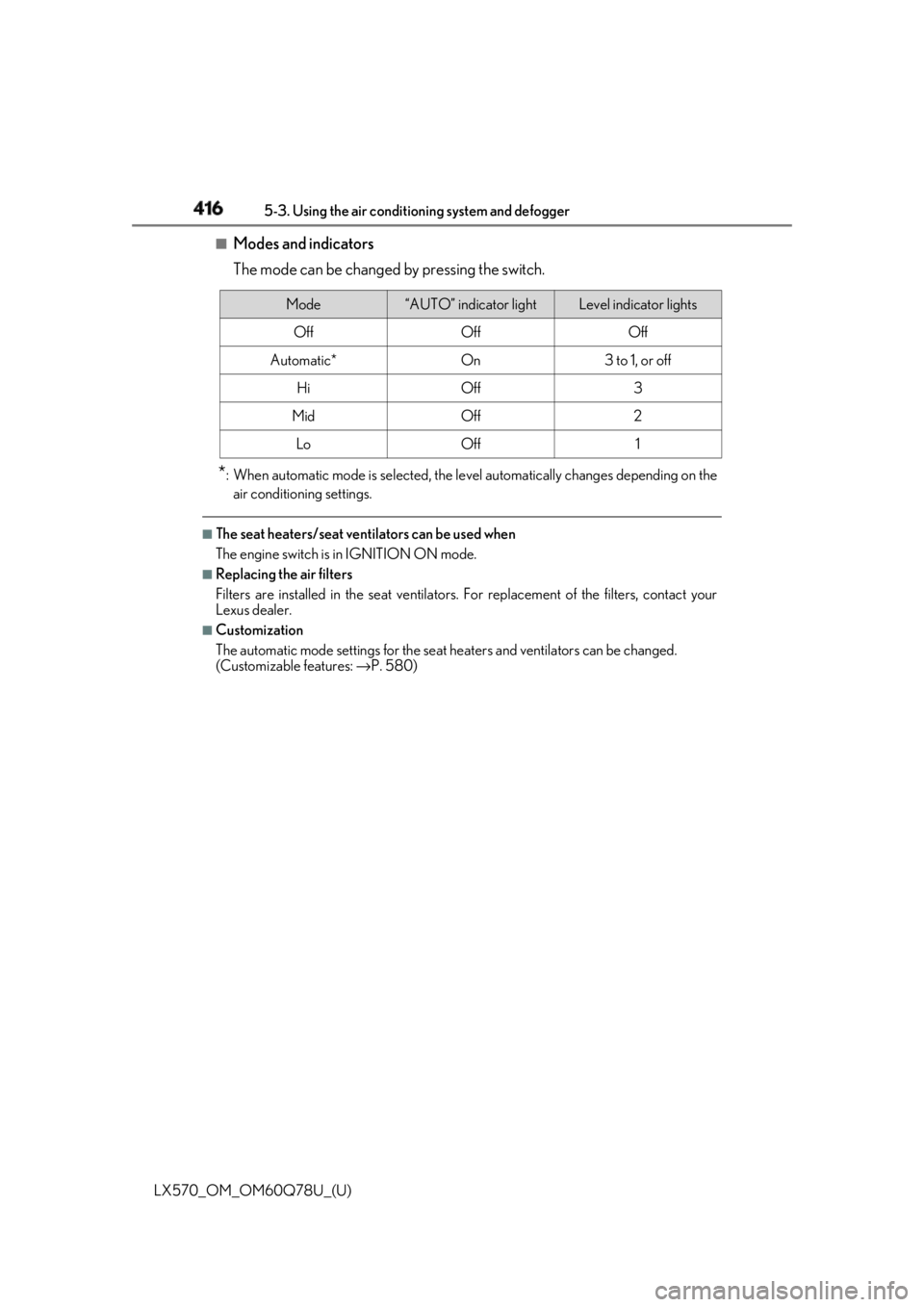
Modes and indicators
The mode can be changed by pressing the switch.
* : When automatic mode is selected, the leve l automatically change s depending on the
air conditioning settings. ■
The seat heaters/seat vent ilators can be used when
The engine switch is in IGNITION ON mode. ■
Replacing the air filters
Filters are installed in the se at ventilators. For replacement of the filters, contact your
Lexus dealer. ■
Customization
The automatic mode settings for the seat heaters and ventilators can be changed.
(Customizable features: → P. 580)Mode “AUTO” indicator light Level indicator lights
Off Off Off
Automatic* On 3 to 1, or off
Hi Off 3
Mid Off 2
Lo Off 1
Page 434 of 628
434
LX570_OM_OM60Q78U_(U) 5-6. Using the other interior features■
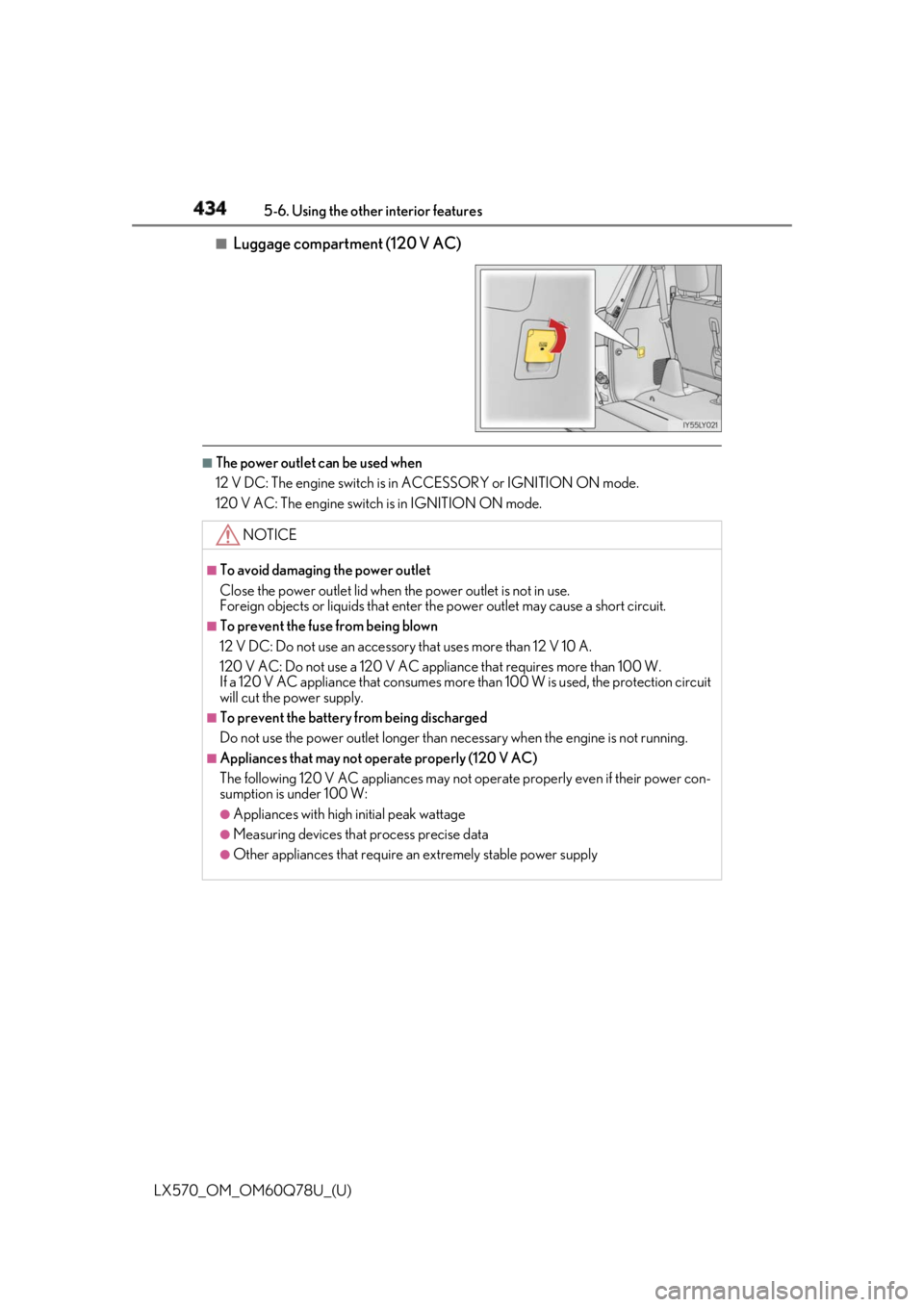
Luggage compartment (120 V AC) ■
The power outlet can be used when
12 V DC: The engine switch is in ACCESSORY or IGNITION ON mode.
120 V AC: The engine switch is in IGNITION ON mode.
NOTICE ■
To avoid damaging the power outlet
Close the power outlet lid when the power outlet is not in use.
Foreign objects or liquids that enter th e power outlet may cause a short circuit.■
To prevent the fuse from being blown
12 V DC: Do not use an accessory that uses more than 12 V 10 A.
120 V AC: Do not use a 120 V AC applia nce that requires more than 100 W.
If a 120 V AC appliance that consumes more than 100 W is used, the protection circuit
will cut the power supply. ■
To prevent the battery from being discharged
Do not use the power outlet longer than necessary when the engine is not running. ■
Appliances that may not operate properly (120 V AC)
The following 120 V AC appliances may not operate properly even if their power con-
sumption is under 100 W: ●
Appliances with high initial peak wattage●
Measuring devices that process precise data ●
Other appliances that require an extremely stable power supply
Page 437 of 628
LX570_OM_OM60Q78U_(U) 4375-6. Using the other interior features
5
Interior features ■
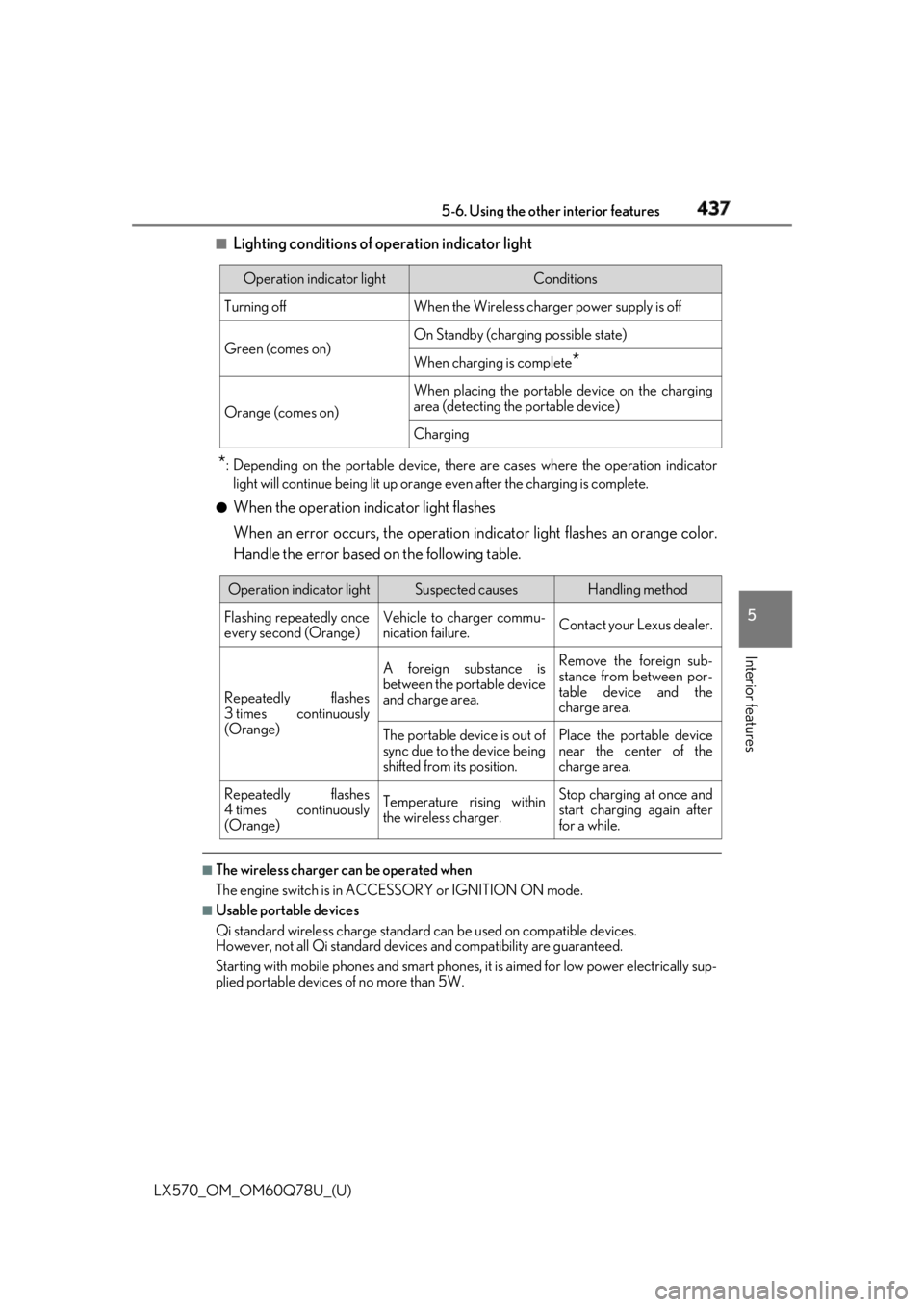
Lighting conditions of operation indicator light
* : Depending on the portable device, there are cases where the operation indicator
light will continue being lit up orange even after the charging is complete.●
When the operation indicator light flashes
When an error occurs, the operation in dicator light flashes an orange color.
Handle the error based on the following table.
■
The wireless charger can be operated when
The engine switch is in ACCESSORY or IGNITION ON mode. ■
Usable portable devices
Qi standard wireless charge standard can be used on compatible devices.
However, not all Qi st andard devices and compatibility are guaranteed.
Starting with mobile phones and smart phones, it is aimed for low power electrically sup-
plied portable devices of no more than 5W.Operation indicator light Conditions
Turning off When the Wireless charge r power supply is off
Green (comes on) On Standby (chargin g possible state)
When charging is complete
*Orange (comes on) When placing the portable device on the charging
area (detecting the portable device)
Charging
Operation indicator light Suspected causes Handling method
Flashing repeatedly once
every second (Orange) Vehicle to charger commu-
nication failure. Contact your Lexus dealer.
Repeatedly flashes
3 times continuously
(Orange) A foreign substance is
between the portable device
and charge area. Remove the foreign sub-
stance from between por-
table device and the
charge area.
The portable device is out of
sync due to the device being
shifted from its position. Place the portable device
near the center of the
charge area.
Repeatedly flashes
4 times continuously
(Orange) Temperature rising within
the wireless charger. Stop charging at once and
start charging again after
for a while.
Page 454 of 628

454
LX570_OM_OM60Q78U_(U) 5-6. Using the other interior features■
When contacting the response center
You may be unable to contact the resp onse center if the network is busy.■
Safety Connect backup battery depletion
An exclusive backup battery is built in to assist the Automatic Collision Notification,
which is activated when impact above a certain level is applied to the vehicle, or when the
airbags operate. This battery is a primary ba ttery, and cannot be recharged. The red LED
indicator will flash to indicate that the battery should be replaced.
The backup battery will need to be replaced if the Automatic Collision Notification oper-
ates for 60 seconds or more. For re placement, consult yo ur Lexus dealer.
When the engine switch is turned to IGNITION ON mode, the red indicator
light comes on for 2 seconds then turns off. Afterward, the green indicator light
comes on, indicating that the service is active.
The following indicator light patterns indicate specific system usage conditions: ●
Green indicator light on = Active service ●
Green indicator light flashing = Safety Connect call in process●
Red indicator light (except at vehicle start-up) = System malfunction (contact
your Lexus dealer) ●
No indicator light (off) = Safety Connect service not active ■
Automatic Collision Notification
In case of either airbag deployment or severe rear-end collision, the system is
designed to automatically call the re sponse center. The responding agent
receives the vehicle’s location and attempts to speak with the vehicle occu-
pants to assess the level of emergency. If the occupants are unable to commu-
nicate, the agent automatically treats the call as an emergency, contacts the
nearest emergency services provider to describe the situation, and requests
that assistance be sent to the location. ■
Stolen Vehicle Location
If your vehicle is stolen, Safety Conn ect can work with local authorities to
assist them in locating and recovering the vehicle. After filing a police report,
call the Safety Connect response ce nter at 1-800-25-LEXUS (1-800-255-
3987) and follow the prompts for Safety Connect to initiate this service.
In addition to assisting law enforcemen t with recovery of a stolen vehicle,
Safety-Connect-equipped vehicle locatio n data may, under certain circum-
stances, be shared with third parties to locate your vehicle. Further informa-
tion is available at Lexus.com.Safety Connect LED light Indicators
Safety Connect services