lights LEXUS LX570 2018 Service Manual
[x] Cancel search | Manufacturer: LEXUS, Model Year: 2018, Model line: LX570, Model: LEXUS LX570 2018Pages: 628, PDF Size: 12.38 MB
Page 234 of 628

234
LX570_OM_OM60Q78U_(U) 4-3. Operating the lights and wipers■
If no windshield washer fluid sprays
Check that the washer nozzles are not blocked if there is washer fluid in the windshield
washer fluid reservoir.
WARNING ■
Caution regarding the use of wind shield wipers in “AUTO” mode
The windshield wipers may operate unexpectedly if the sensor is touched or the wind-
shield is subject to vibration in “AUTO” mo de. Take care that your fingers etc. anything
else does not become caught in the windshield wipers. ■
Caution regarding the use of washer fluid
When it is cold, do not use the washer fl uid until the windshield becomes warm. The
fluid may freeze on the windshield and cause lo w visibility. This may lead to an accident,
resulting in death or serious injury.
NOTICE ■
When the windshield is dry
Do not use the wipers, as they may damage the windshield. ■
When the washer fluid tank is empty
Do not operate the switch continually as the washer fluid pump may overheat. ■
When there is no washer fluid spray from the nozzle
Damage to the washer fluid pump may be cau sed if the lever is pulled toward you and
held continually. ■
When a nozzle becomes blocked
Do not try to clear it with a pin or other object. The nozz le will be damaged.
Page 235 of 628
235
LX570_OM_OM60Q78U_(U) 4-3. Operating the lights and wipers
4
Driving
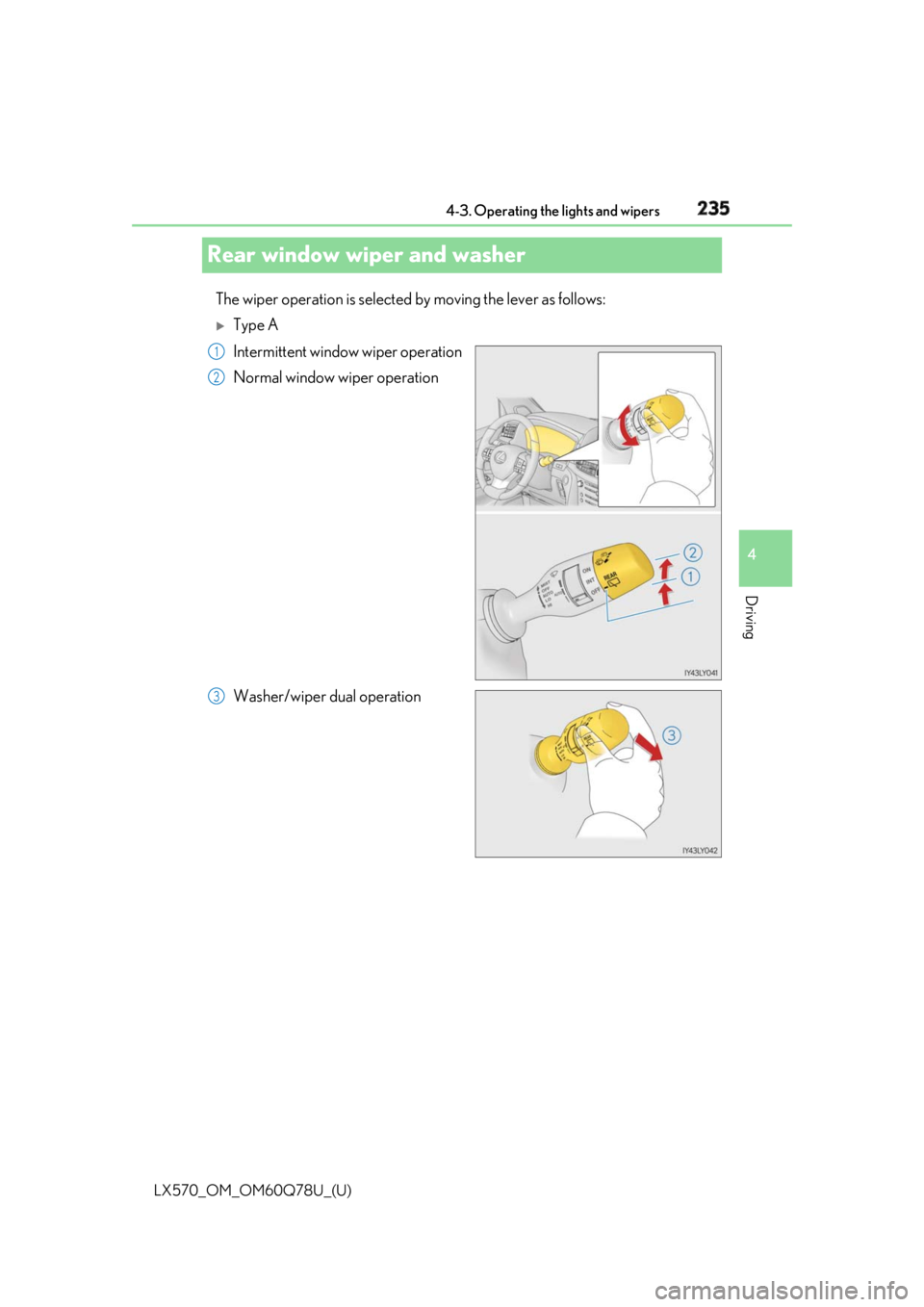
Rear window wiper and washer The wiper operation is selected by moving the lever as follows:
Type A
Intermittent window wiper operation
Normal window wiper operation
Washer/wiper dual operation 1
2
3
Page 236 of 628
236
LX570_OM_OM60Q78U_(U) 4-3. Operating the lights and wipers
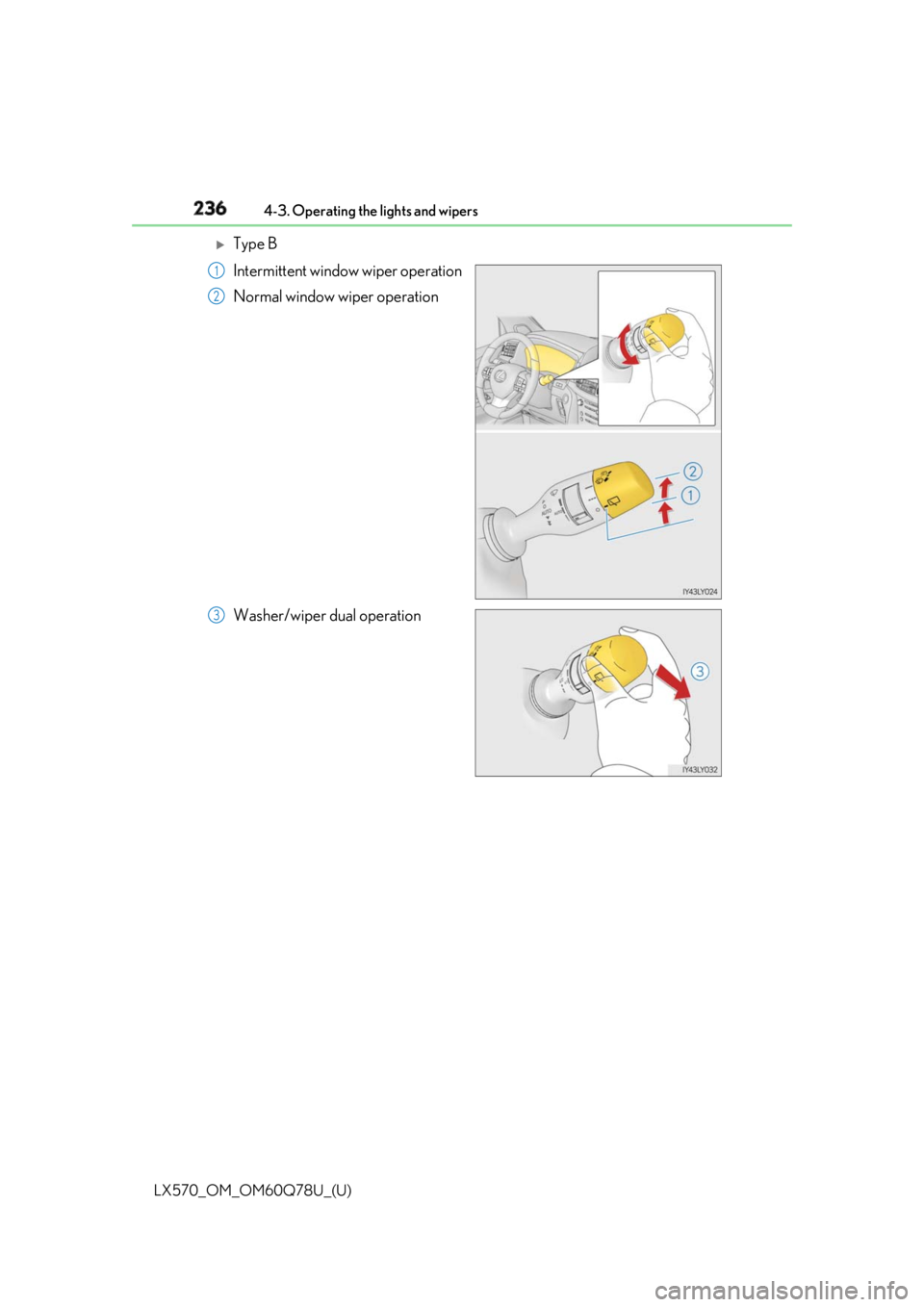
Type B
Intermittent window wiper operation
Normal window wiper operation
Washer/wiper dual operation 1
2
3
Page 237 of 628

LX570_OM_OM60Q78U_(U) 2374-3. Operating the lights and wipers
4
Driving ■
The rear window wiper and washer can be operated when
The engine switch is in IGNITION ON mode. ■
If no washer fluid sprays
Check that the washer nozzles ar e not blocked if there is washer fluid in the washer fluid
reservoir. ■
Dripping prevention wiper sweep
After washing and wiping operation several times, the wipers operate one more time
after a short delay to prevent dripping. ■
Effect of vehicle and shift position on wiper operation
Type A
With or selected, the rear window wiper sweeps once when you shift the
shift lever to R while windshield wipers operating or with 17 seconds from their deactiva-
tion.
Type B
With or selected, the rear window wiper sweeps once when you shift the
shift lever to R while windshield wipers operating or with 17 seconds from their deactiva-
tion. ■
Customization
Settings (e.g. drip prevention function) can be changed.
(Customizable features → P. 580)
NOTICE ■
When the rear window is dry
Do not use the wiper, as it may damage the rear window. ■
When the washer fluid tank is empty
Do not operate the switch continually as the washer fluid pump may overheat.
Page 238 of 628
238
LX570_OM_OM60Q78U_(U) 4-3. Operating the lights and wipers
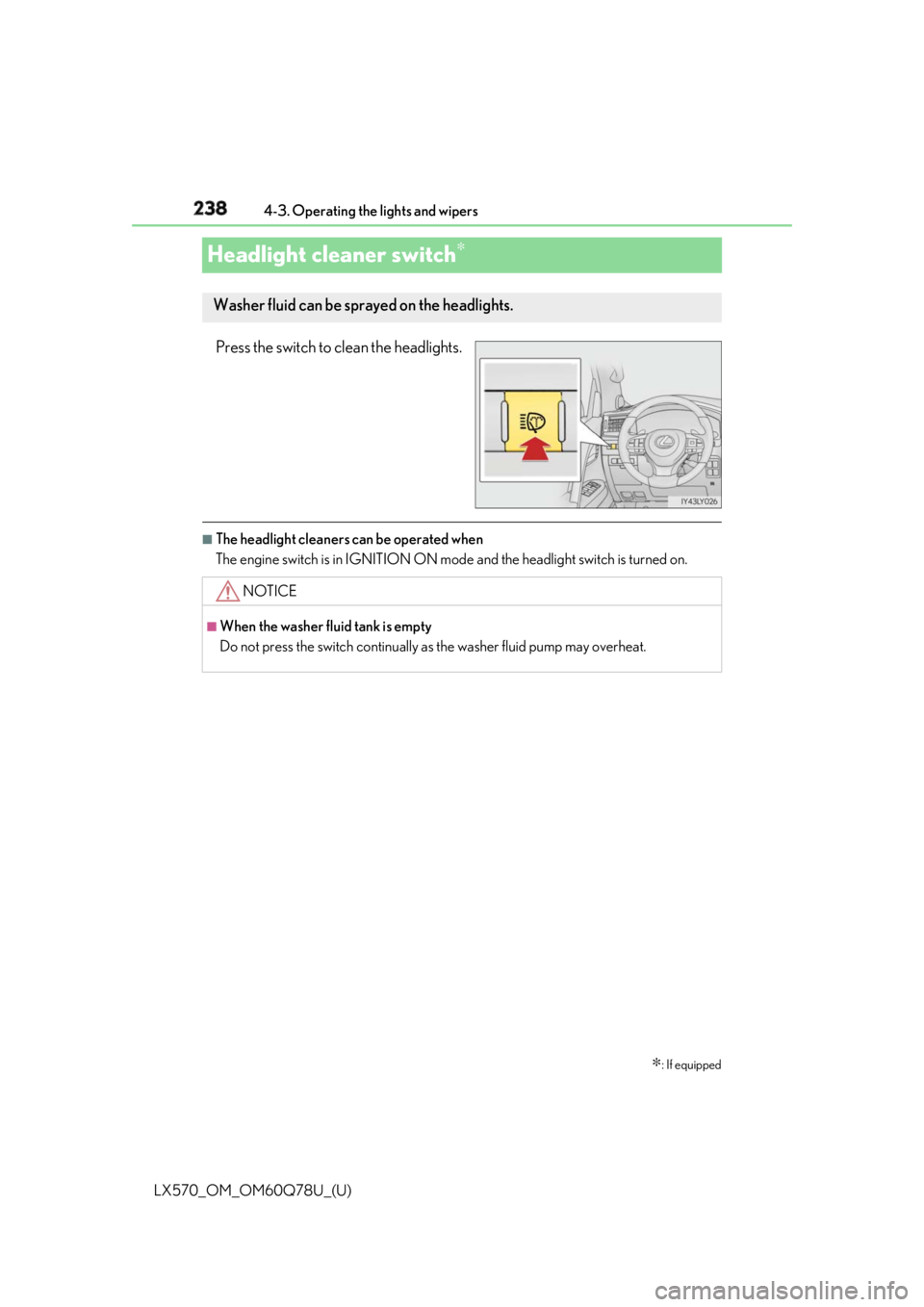
Headlight cleaner switch ∗
Press the switch to clean the headlights. ■
The headlight cleaners can be operated when
The engine switch is in IGNITION ON mode and the headlight switch is turned on.
∗ : If equippedWasher fluid can be spra yed on the headlights.
NOTICE ■
When the washer fluid tank is empty
Do not press the switch continually as the washer fluid pump may overheat.
Page 245 of 628

LX570_OM_OM60Q78U_(U) 2454-5. Using the driving support systems
4
Driving WARNING ■
To avoid malfunction of the camera sensor
Observe the following precautions.
Otherwise, the camera sensor may not oper ate properly, possibly leading to an acci-
dent resulting in deat h or serious injury.●
Keep the windshield clean at all times.
• If the windshield is dirty or covered with an oily film, water droplets, snow, etc.,
clear the windshield.
• If a glass coating agent is applied to the wi ndshield, it will still be necessary to use
the windshield wipers to remove water droplets, etc. from the area of the wind-
shield in front of the camera sensor.
• If the inner side of the windshield where th e camera sensor is installed is dirty, con-
tact your Lexus dealer.
●
If the part of the windshield in front of the camera sensor is fogged up or covered with
condensation or ice, use the windshield de fogger to remove the fog, condensation or
ice. ( → P. 399)●
If water droplets cannot be properly removed from the area of the windshield in front
of the camera sensor by th e windshield wipers, replace the wiper insert or wiper
blade.
If the wiper inserts or wiper blades need to be replaced, contact your Lexus dealer.●
Do not attach window tinting to the windshield. ●
Replace the windshield if it is damaged or cracked.
If the windshield needs to be re placed, contact your Lexus dealer.●
Do not get the camera sensor wet. ●
Do not allow bright lights to shine into the camera sensor.●
Do not dirty or damage the camera sensor.
When cleaning the inside of the windshield , do not allow glass cleaner to contact the
lens. Also, do not touch the lens.
If the lens is dirty or damaged, contact your Lexus dealer. ●
Do not subject the camera sensor to a strong impact. ●
Do not attach objects, such as stickers, trans-
parent stickers, etc., and so forth, to the outer
side of the windshield in front of the camera
sensor (shaded area in the illustration).
A: From the top of the windshield to approxi-
mately 0.4 in. (1 cm) below the bottom of the
camera sensor
B: Approximately 7.9 in. (20 cm) (Approxi-
mately 4.0 in. (10 cm) to the right and left
from the center of the camera sensor)
Page 246 of 628

246
LX570_OM_OM60Q78U_(U) 4-5. Using the driving support systems
WARNING ●
Do not change the installation position or direction of the camera sensor or remove it. ●
Do not disassemble the camera sensor. ●
Do not modify any components of the vehi cle around the camera sensor (inside rear
view mirror, et c.) or ceiling.●
Do not attach any accessories that may obst ruct the camera sensor to the hood, front
grille or front bumper. Contact your Lexus dealer for details.●
If a surfboard or other long object is to be mounted on the roof, ma ke sure that it will
not obstruct the camera sensor. ●
Do not modify the head lights or other lights.
Page 258 of 628

258
LX570_OM_OM60Q78U_(U) 4-5. Using the driving support systems
• If a vehicle ahead is carrying a load which protrudes past its rear bumper
• If a vehicle ahead is irregularly shap ed, such as a tractor or side car
• If the sun or other light is shin ing directly on a vehicle ahead
• If a vehicle cuts in front of your ve hicle or emerges from beside a vehicle
• If a vehicle ahead makes an abrupt maneuver (such as sudden swerving, accelera-
tion or deceleration)
• When suddenly cutting behind a preceding vehicle
• When driving in inclement we ather such as heavy rain, fog, snow or a sandstorm
• When the vehicle is hit by water, sn ow, dust, etc. from a vehicle ahead
• When driving through steam or smoke
• When driving in a place where the surrounding brightness changes suddenly, such
as at the entrance or exit of a tunnel
• When a very bright light, such as the sun or the headlights of on coming traffic, shines
directly into the camera sensor
• When the surrounding area is dim, such as at dawn or dusk, or while at night or in a
tunnel
• After the engine has started the vehicle has not been driven for a certain amount of
time
• While making a left/right turn and for a few seconds after making a left/right turn
• While driving on a curve and for a few seconds after driving on a curve
• If your vehicle is skidding
• If the wheels are misaligned
• If a wiper blade is blocking the camera sensor
• The vehicle is wobbling.
• The vehicle is being driven at extremely high speeds.• If a vehicle ahead has extremely high
ground clearance
• When a vehicle ahead is not directly in front
of your vehicle
• If the front of the vehicle is raised or low-
ered
Page 263 of 628
LX570_OM_OM60Q78U_(U) 2634-5. Using the driving support systems
4
Driving
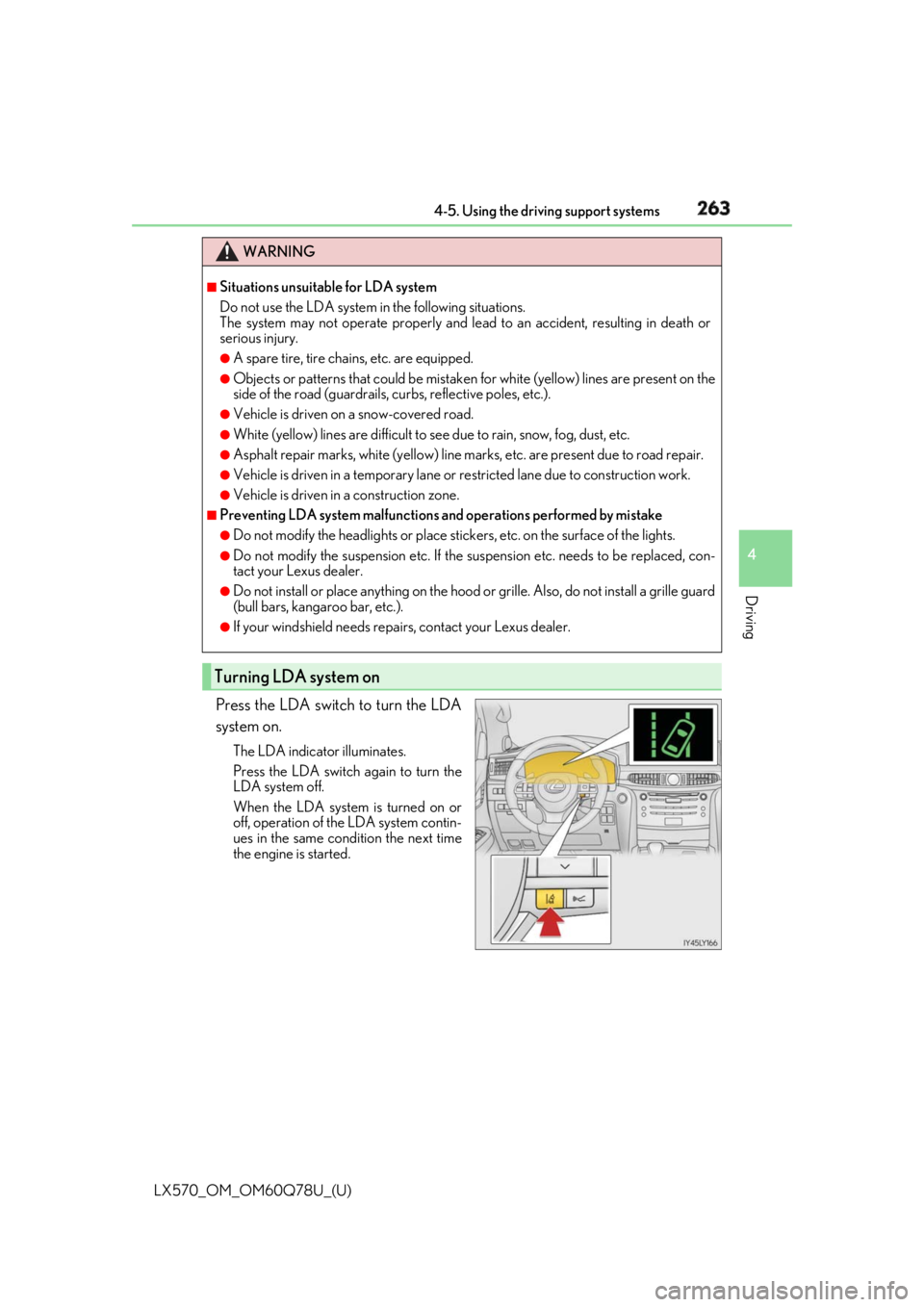
Press the LDA switch to turn the LDA
system on. The LDA indicator illuminates.
Press the LDA switch again to turn the
LDA system off.
When the LDA system is turned on or
off, operation of the LDA system contin-
ues in the same cond ition the next time
the engine is started. WARNING ■
Situations unsuitable for LDA system
Do not use the LDA system in the following situations.
The system may not operate properly and lead to an accident, resulting in death or
serious injury. ●
A spare tire, tire chains, etc. are equipped. ●
Objects or patterns that could be mistaken for white (yellow) lines are present on the
side of the road (guardrails, cu rbs, reflective poles, etc.).●
Vehicle is driven on a snow-covered road. ●
White (yellow) lines are difficult to see due to rain, snow, fog, dust, etc.●
Asphalt repair marks, white (y ellow) line marks, etc. are present due to road repair.●
Vehicle is driven in a temporary lane or restricted lane due to construction work.●
Vehicle is driven in a construction zone. ■
Preventing LDA system malfunctions and operations performed by mistake ●
Do not modify the headlights or place stickers, etc. on the surface of the lights.●
Do not modify the suspension etc. If the suspension etc. needs to be replaced, con-
tact your Lexus dealer. ●
Do not install or place anything on the hood or grille. Also, do not install a grille guard
(bull bars, kangaroo bar, etc.). ●
If your windshield needs repair s, contact your Lexus dealer.
Turning LDA system on
Page 266 of 628

266
LX570_OM_OM60Q78U_(U) 4-5. Using the driving support systems■
Conditions in which functions may not operate properly
In the following situations, the camera sensor may not detect white (yellow) lines and var-
ious functions may not operate normally. ●
There are shadows on the road that run parallel with, or cover, the white (yellow) lines. ●
The vehicle is driven in an ar ea without white (yellow) lines, such as in front of a tollgate
or checkpoint, or at an intersection, etc.●
The white (yellow) lines are cracked, “Botts ’ dots”, “Raised pavement marker” or stones
are present. ●
The white (yellow) lines cannot be seen or are difficult to see due to sand, etc. ●
The vehicle is driven on a road surface that is wet due to rain, puddles, etc. ●
The traffic lines are yellow (which may be more difficult to recognize than lines that are
white). ●
The white (yellow) lines cross over a curb, etc. ●
The vehicle is driven on a bright surface, such as concrete. ●
The vehicle is driven on a surface that is bright due to reflected light, etc. ●
The vehicle is driven in an area where the brightness changes suddenly, such as at the
entrances and exits of tunnels, etc.●
Light from the headlights of an oncoming vehicle, the sun, etc. enters the camera.●
The vehicle is driven where the road diverges, merges, etc. ●
The vehicle is driven on a slope. ●
The vehicle is driven on a road which t ilts left or right, or a winding road.●
The vehicle is driven on an unpaved or rough road. ●
The vehicle is driven around a sharp curve. ●
The traffic lane is excessively narrow or wide. ●
The vehicle is extremely tilted due to carry ing heavy luggage or having improper tire
pressure. ●
The distance to the preceding vehicle is extremely short. ●
The vehicle is moving up and down a large am ount due to road conditions during driv-
ing (poor roads or road seams). ●
The headlight lenses are dirty and emit a faint amount of light at night, or the beam axis
has deviated. ●
The vehicle has just changed lane s or crossed an intersection.