key LEXUS LX570 2018 Workshop Manual
[x] Cancel search | Manufacturer: LEXUS, Model Year: 2018, Model line: LX570, Model: LEXUS LX570 2018Pages: 628, PDF Size: 12.38 MB
Page 548 of 628

548 7-2. Steps to take in an emergency
LX570_OM_OM60Q78U_(U) WARNING ■
When using the mechanical key and operating the power windows or moon roof
Operate the power window or moon roof afte r checking to make sure that there is no
possibility of any passenger having any of their body parts caught in the window or
moon roof.
Also, do not allow children to op erate the mechanical key. It is possible for children and
other passengers to get caught in the power window or moon roof.
Page 549 of 628
549
LX570_OM_OM60Q78U_(U) 7
When trouble arises 7-2. Steps to take in an emergency
If the vehicle battery is discharged If you have a set of jumper (or booster) cables and a second vehicle with a 12-volt
battery, you can jump start your Lexus following the steps below.
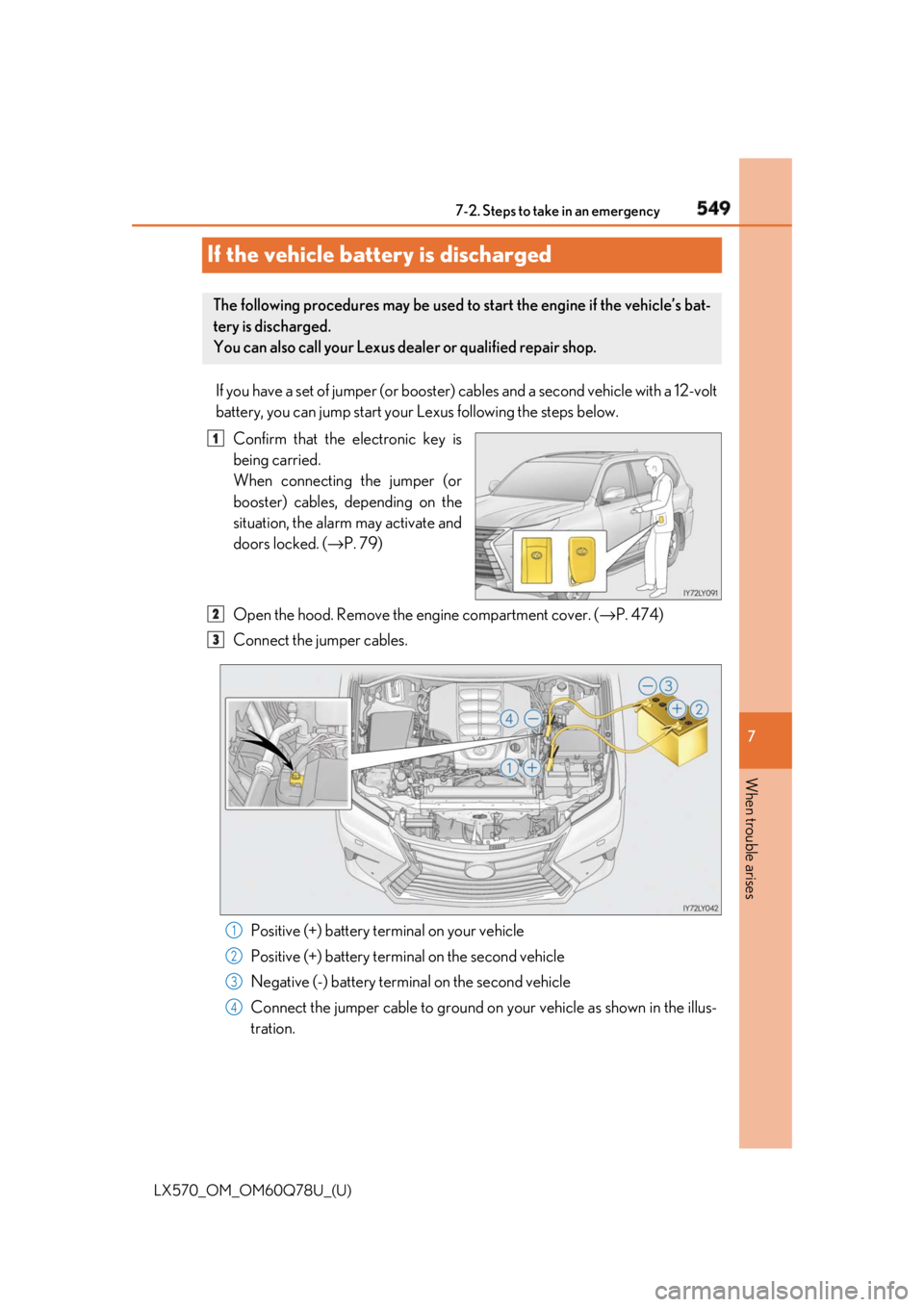
Confirm that the electronic key is
being carried.
When connecting the jumper (or
booster) cables, depending on the
situation, the alarm may activate and
doors locked. ( → P. 79)
Open the hood. Remove the engine compartment cover. ( → P. 474)
Connect the jumper cables.
Positive (+) battery terminal on your vehicle
Positive (+) battery termin al on the second vehicle
Negative (-) battery terminal on the second vehicle
Connect the jumper cable to ground on your vehicle as shown in the illus-
tration.The following procedures may be used to start the engine if the vehicle’s bat-
tery is discharged.
You can also call your Lexus dealer or qualified repair shop. 1
2
3
1
2
3
4
Page 582 of 628

582
LX570_OM_OM60Q78U_(U) 8-2. Customization■
Smart access system with push-button start ( → P. 132) and wireless remote
control ( → P. 110)
■
Door lock ( → P. 115)Function Default setting Customized
setting
Operation signal (Emer-
gency flashers) On Off O — O
Adjust the volume of confir-
mation buzzer sounds
when the vehicle is locked
or unlocked 5 Off
O — O
1 to 7
Open door warning func-
tion (when locking the vehi-
cle) On Off — — O
Time elapsed before auto-
matic door lock function is
activated if door is not
opened after being
unlocked 60 seconds Off
O — O30 seconds
120 seconds 1 2 3
Function Default setting Customized
setting
Unlocking using a mechan-
ical key Driver’s door
unlocked in one
step, all doors
unlocked in two
steps All doors unlocked
in one step — — O
Automatic door lock Shifting the shift
lever to position
other than P Off
O — OVehicle speed is
approximately
12 mph (20 km/h)
or higher
Automatic door unlock Shifting the shift
lever to P Off
O — O
Driver’s door is
opened 1 2 3
Page 583 of 628
LX570_OM_OM60Q78U_(U) 5838-2. Customization
8
Vehicle specifications ■
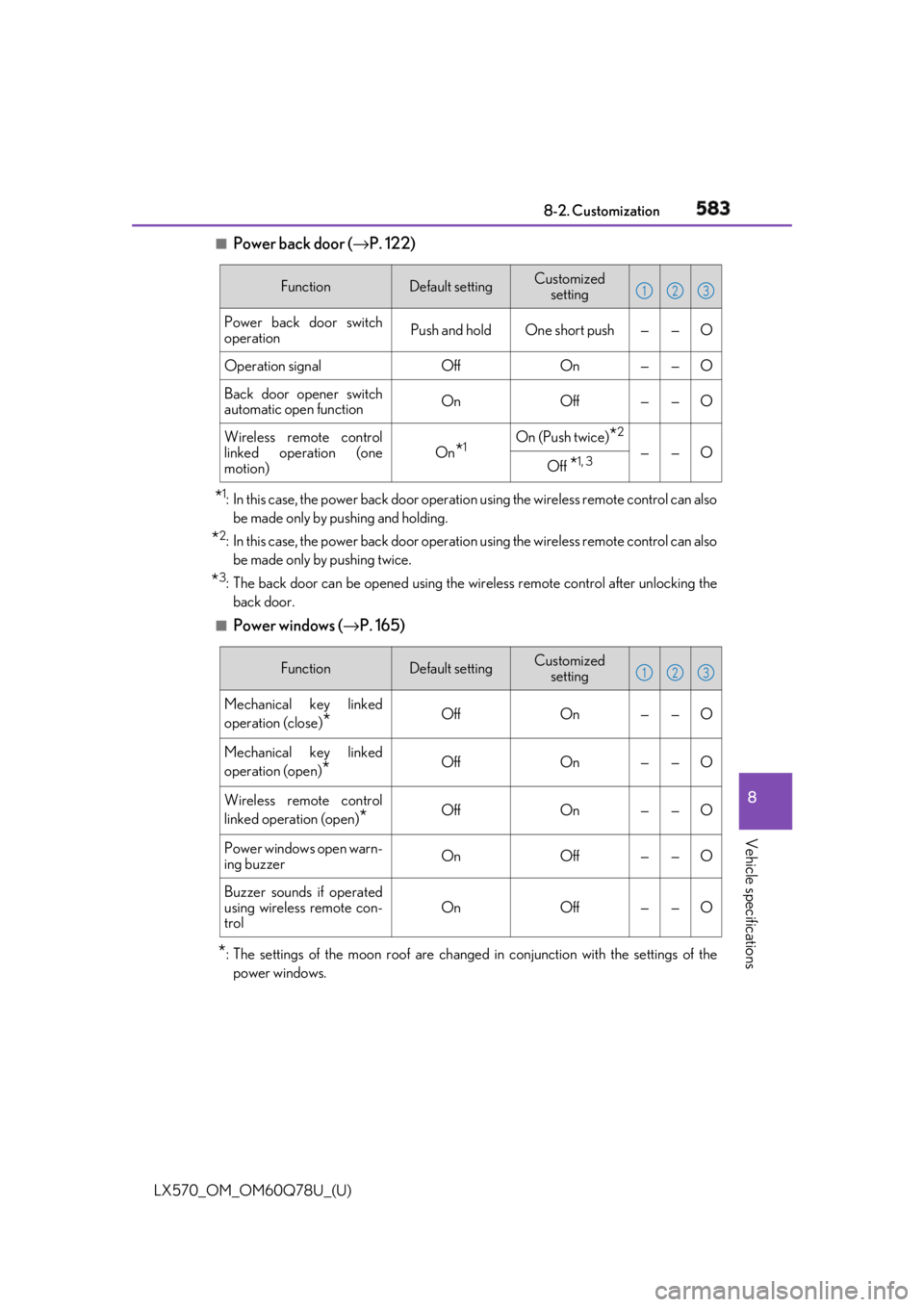
Power back door ( → P. 122)
* 1
: In this case, the power back door operation using the wi reless remote control can also
be made only by pushing and holding.
* 2
: In this case, the power back door operation using the wi reless remote control can also
be made only by pushing twice.
* 3
: The back door can be opened using the wireless remote control after unlocking the
back door.■
Power windows ( → P. 165)
* : The settings of the moon roof are change d in conjunction with the settings of the
power windows. Function Default setting Customized
setting
Power back door switch
operation Push and hold One short push — — O
Operation signal Off On — — O
Back door opener switch
automatic open function On Off — — O
Wireless remote control
linked operation (one
motion) On
* 1
On (Push twice)
* 2
— — O
Off
* 1, 3 1 2 3
Function Default setting Customized
setting
Mechanical key linked
operation (close)
* Off On — — O
Mechanical key linked
operation (open)
* Off On — — O
Wireless remote control
linked operation (open)
* Off On — — O
Power windows open warn-
ing buzzer On Off — — O
Buzzer sounds if operated
using wireless remote con-
trol On Off — — O 1 2 3
Page 584 of 628
584
LX570_OM_OM60Q78U_(U) 8-2. Customization■
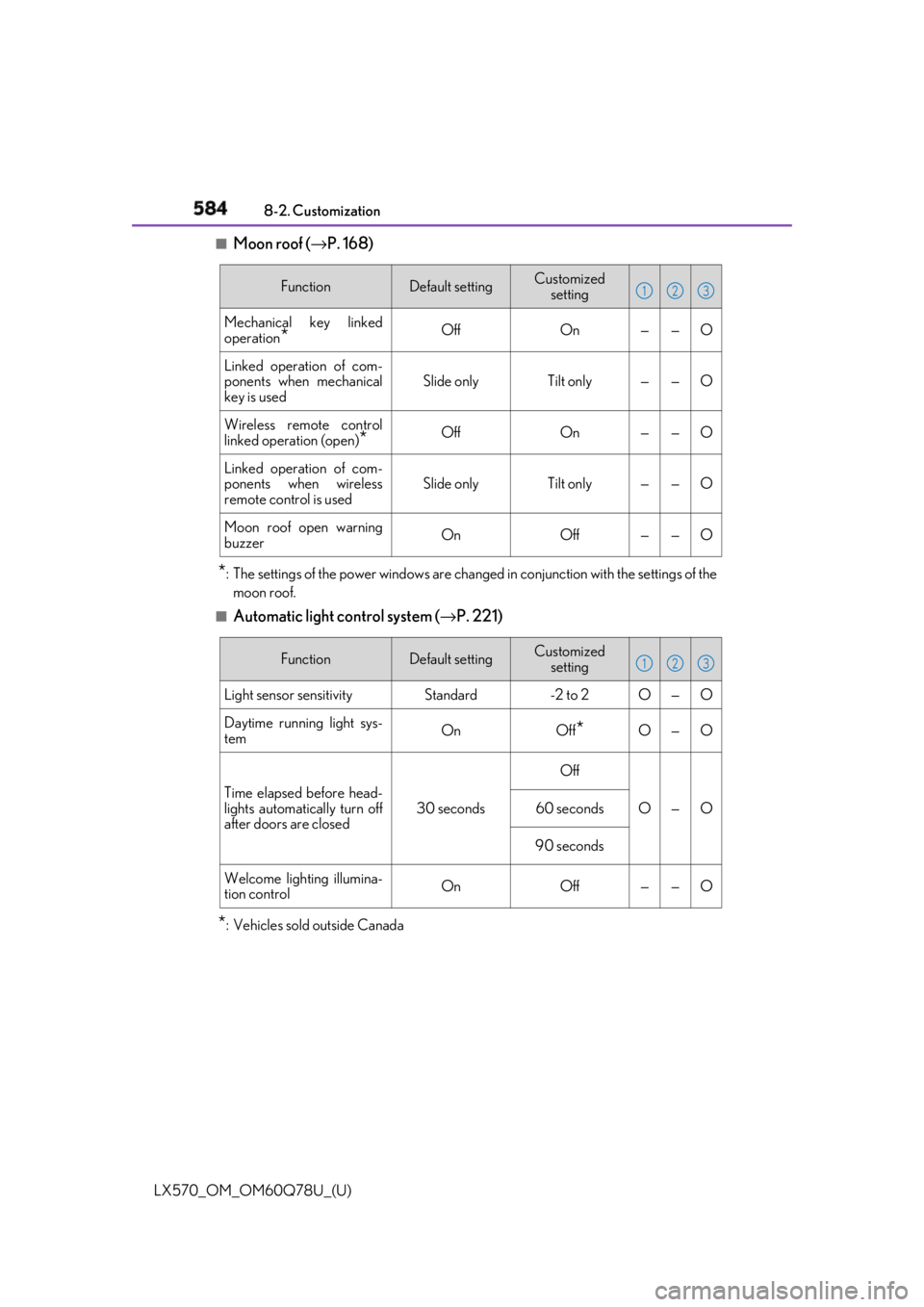
Moon roof ( → P. 168)
* : The settings of the power windows are chan ged in conjunction with the settings of the
moon roof.■
Automatic light control system ( → P. 221)
* : Vehicles sold outside Canada Function Default setting Customized
setting
Mechanical key linked
operation
* Off On — — O
Linked operation of com-
ponents when mechanical
key is used Slide only Tilt only — — O
Wireless remote control
linked operation (open)
* Off On — — O
Linked operation of com-
ponents when wireless
remote control is used Slide only Tilt only — — O
Moon roof open warning
buzzer On Off — — O 1 2 3
Function Default setting Customized
setting
Light sensor sensitivity Standard -2 to 2 O — O
Daytime running light sys-
tem On Off
* O — O
Time elapsed before head-
lights automatically turn off
after doors are closed 30 seconds Off
O — O60 seconds
90 seconds
Welcome lighting illumina-
tion control On Off — — O 1 2 3
Page 585 of 628
LX570_OM_OM60Q78U_(U) 5858-2. Customization
8
Vehicle specifications ■
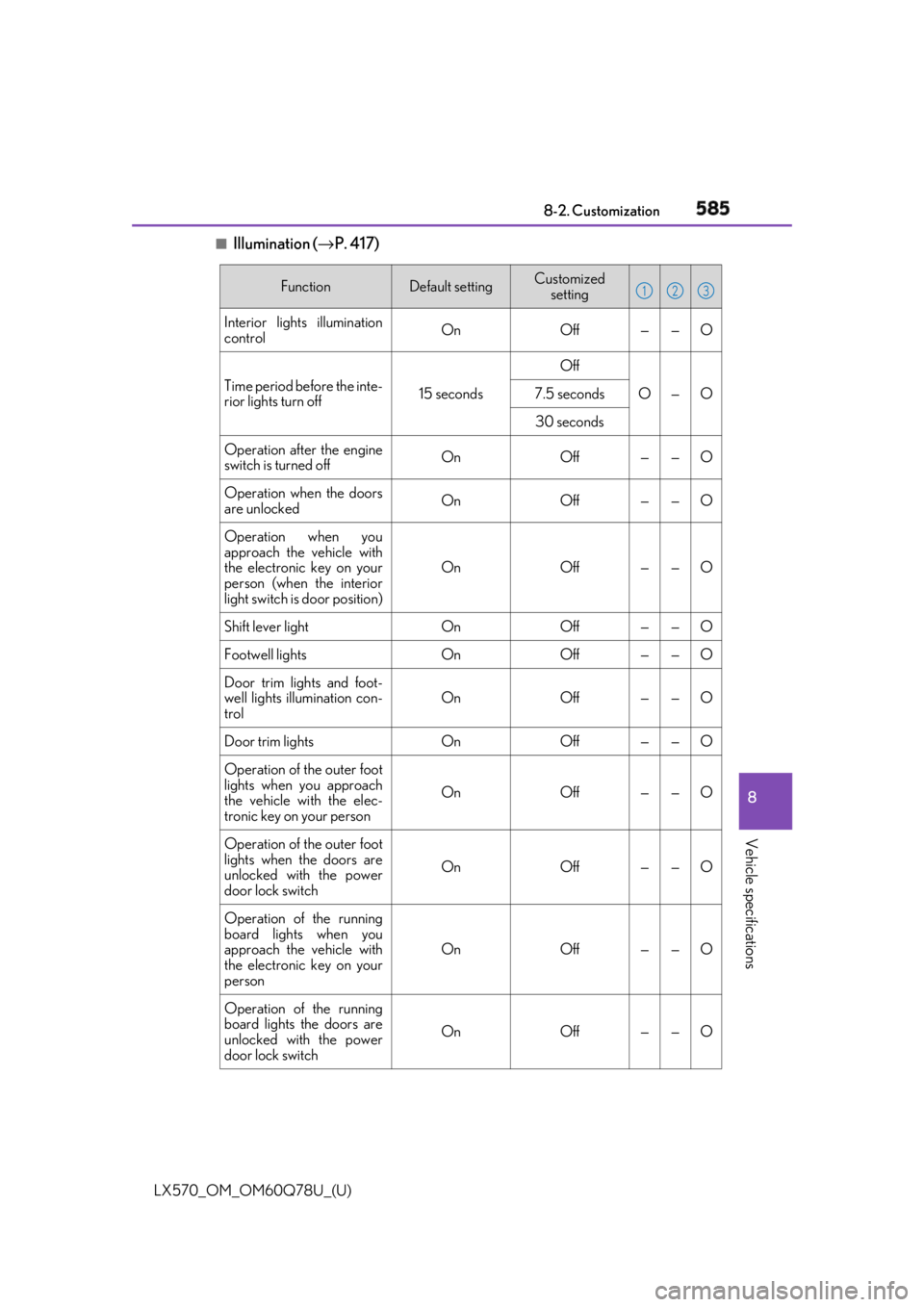
Illumination ( → P. 417)Function Default setting Customized
setting
Interior lights illumination
control On Off — — O
Time period before the inte-
rior lights turn off 15 seconds Off
O — O7.5 seconds
30 seconds
Operation after the engine
switch is turned off On Off — — O
Operation when the doors
are unlocked On Off — — O
Operation when you
approach the vehicle with
the electronic key on your
person (when the interior
light switch is door position) On Off — — O
Shift lever light On Off — — O
Footwell lights On Off — — O
Door trim lights and foot-
well lights illumination con-
trol On Off — — O
Door trim lights On Off — — O
Operation of the outer foot
lights when you approach
the vehicle with the elec-
tronic key on your person On Off — — O
Operation of the outer foot
lights when the doors are
unlocked with the power
door lock switch On Off — — O
Operation of the running
board lights when you
approach the vehicle with
the electronic key on your
person On Off — — O
Operation of the running
board lights the doors are
unlocked with the power
door lock switch On Off — — O 1 2 3
Page 608 of 628

608 What to do if... (Troubleshooting)
LX570_OM_OM60Q78U_(U)What to do if... (Troubleshooting) ●
If you lose your mechanical keys, ne w genuine mechanical keys can be made
by your Lexus dealer. ( → P. 112)●
If you lose your electronic keys, the risk of vehicle theft increases significantly.
Contact your Lexus dealer immediately. ( → P. 114)●
Is the electronic key battery weak or depleted? ( → P. 503)●
Is the engine switch in IGNITION ON mode?
When locking the doors, turn the engine switch off. ( → P. 206)●
Is the electronic key left inside the vehicle?
When locking the doors, make sure that you have the electronic key on your
person. ●
The function may not operate properly du e to the condition of the radio wave.
( → P. 134)
●
Is the child-protector lock set?
The rear door cannot be opened from in side the vehicle when the lock is set.
Open the rear door from outside and then unlock the child-protector lock.
( → P. 118)If you have a problem, check the foll owing before contacting your Lexus
dealer.
The doors cannot be locked, unlocked, opened or closed You lose your keys
The doors cannot be locked or unlocked
The rear door cannot be opened
Page 609 of 628
609What to do if... (Troubleshooting)
LX570_OM_OM60Q78U_(U) ●
Did you press the engine switch while firmly depressing the brake pedal?
( → P. 205)●
Is the shift lever in P? ( → P. 205)●
Is the electronic key anywhere detectable inside the vehicle? ( → P. 133)●
Is the steering wheel unlocked? ( → P. 208)●
Is the electronic key battery weak or depleted?
In this case, the engine can be started in a temporary way. ( → P. 547)●
Is the battery discharged? ( → P. 549)●
Is the engine switch in IGNITION ON mode?
If you cannot release the shift lever by depressing the brake pedal with the
engine switch in IGNITION ON mode ( → P. 215)If you think something is wrong The engine does not start
The shift lever cannot be shifted from P even if you depress the brake
pedal
Page 611 of 628
611What to do if... (Troubleshooting)
LX570_OM_OM60Q78U_(U) ●
Is the electronic key left inside th e vehicle or the moon roof opened?
Check the message on the multi-information display. ( → P. 528)●
When a warning light turns on or a wa rning message is displayed, refer to
P. 520, 528.
●
Stop the vehicle in a safe place and repl ace the flat tire with the spare tire.
( → P. 532)●
Try the procedure for when the vehicle becomes stuck in mud, dirt, or snow.
( → P. 555)A warning buzzer sounds when leaving the vehicle
A warning light turns on or a warning message is displayed
When a problem has occurred If you have a flat tire
The vehicle becomes stuck
Page 614 of 628

614 Alphabetical index
LX570_OM_OM60Q78U_(U) Care ................................................. 458, 461
Aluminum wheels ............................. 458
Exterior................................................... 458
Interior ...................................................... 461
Radar sensor ....................................... 366
Seat belts ................................................462
Cargo capacity....................................... 186
Cargo hooks ...........................................427
Cargo net hooks ....................................427
CD player
* Chains .......................................................383
Child restraint system............................ 57
Booster seat definition....................... 58
Booster seat installation.....................69
Convertible seat definition .............. 58
Convertible seat installation ............ 67
Front passenger occupant
classification system ........................ 50
Infant seat/convertible seat
definition................................................ 58
Infant seat/convertible seat
installation ..............................................65
Installing CRS with
LATCH system .................................. 63
Installing CRS with seat belt ............65
Installing CRS with top tether
strap.......................................................... 70
LATCH system...................................... 63 Child safety .................................................56
Airbag precautions................................ 41
Back door precautions..................... 127
Battery precautions ............... 483, 551
Child-protectors ................................... 118
Child restraint system......................... 57
How your child should wear
the seat belt .......................................... 34
Installing child restraints .................... 62
Moon roof precautions ...................... 171
Power window lock switch.............165
Power window precautions ........... 167
Rear door child-protectors ............. 118
Removed key battery
precautions .......................................504
Safety information................................. 56
Seat belt extender precautions ......37
Seat belt precautions .......................... 36
Seat heater precautions ................... 413
Child-protectors ..................................... 118
Cleaning ........................................ 458, 461
Aluminum wheels ..............................458
Exterior ...................................................458
Interior .......................................................461
Radar sensor........................................ 366
Seat belts................................................ 462
Climate concierge switch................. 398
Clock..........................................................432
Coat hooks ..............................................443
Compass ...................................................... 91
Condenser...............................................479
Cool box .................................................. 430C