cruise control LEXUS LX570 2018 Owners Manual
[x] Cancel search | Manufacturer: LEXUS, Model Year: 2018, Model line: LX570, Model: LEXUS LX570 2018Pages: 628, PDF Size: 12.38 MB
Page 3 of 628

3 1
8765432
LX570_OM_OM60Q78U_(U) 94-1. Before driving
Driving the vehicle ...................... 174
Cargo and luggage ................... 182
Vehicle load limits ...................... 186
Trailer towing ................................187
Dinghy towing ............................. 204
4-2. Driving procedures
Engine (ign ition) switch ........... 205
Automatic transmission ........... 210
Turn signal lever ........................... 217
Parking brake ............................... 218
4-3. Operating the lights
and wipers
Headlight switch .......................... 221
Automatic High Beam............. 224
Fog light switch ........................... 229
Windshield wipers and
washer ...........................................231
Rear window wiper and
washer ......................................... 235
Headlight cleaner switch........ 238
4-4. Refueling
Opening the fuel tank cap ..... 239 4-5. Using the driving support
systems
Lexus Safety System+ .............. 242
PCS (Pre-Collision
System) ....................................... 249
LDA (Lane Departure
Alert) .............................................. 261
Dynamic radar cruise
control with full-speed
range ............................................ 269
Cruise control .............................. 281
Driving mode select
switch ........................................... 284
Intuitive parking assist.............. 287
4-Wheel AHC (Active
Height Control
Suspension)............................... 295
Four-wheel drive system ........ 303
Crawl Control (with Turn
Assist function) ........................ 307
Multi-terrain Se lect.....................312
Multi-terrain Monitor.................316
BSM (Blind Spot Monitor)..... 363
• BSM function......................... 367
• RCTA function........................ 371
Driving assist systems ...............377
4-6. Driving tips
Winter driving tips..................... 382
Off-road precautions............... 3864
Driving
Page 8 of 628

8
LX570_OM_OM60Q78U_(U)For your information Please note that this manual applies to all models and explains all equipment, including
options. Therefore, you may find some expl anations for equipment not installed on your
vehicle.
All specifications provided in this manual are current at the time of printing. However,
because of the Lexus policy of continual pr oduct improvement, we reserve the right to
make changes at any time without notice.
Depending on specifications, th e vehicle shown in the illust rations may differ from your
vehicle in terms of color and equipment.
Approximately five hours after the engine is turned off, you may hear sound coming from
under the vehicle for several minutes. This is the sound of a fuel evaporation leakage
check and, it does not indicate a malfunction.
A wide variety of non-genuine spare parts and accessories for Lexus vehicles are cur-
rently available in the market. You should kn ow that Toyota does not warrant these prod-
ucts and is not responsible fo r their performance, repair, or replacement, or for any
damage they may cause to, or adverse effect they may have on, your Lexus vehicle.
This vehicle should not be modified with non-genuine Lexus products. Modification with
non-genuine Lexus products could affect its performance, safety or durability, and may
even violate governmental regulations. In addition, damage or performance problems
resulting from the modification may not be covered under warranty.
The installation of a mobile two-way radio system in your vehicle could affect electronic
systems such as: ●
Multiport fuel injection system/seque ntial multiport fuel injection system●
Lexus Safety System+ ●
Cruise control system ●
Anti-lock brake system ●
SRS airbag system ●
Seat belt pretensioner system Be sure to check with your Lexus dealer for precautionary measures or special instruc-
tions regarding installation of a mobile two-way radio system.Main Owner’s Manual
Noise from under vehicle after turning off the engine
Accessories, spare parts and modification of your Lexus
Installation of a mobile two-way radio system
Page 20 of 628
20 Pictorial index
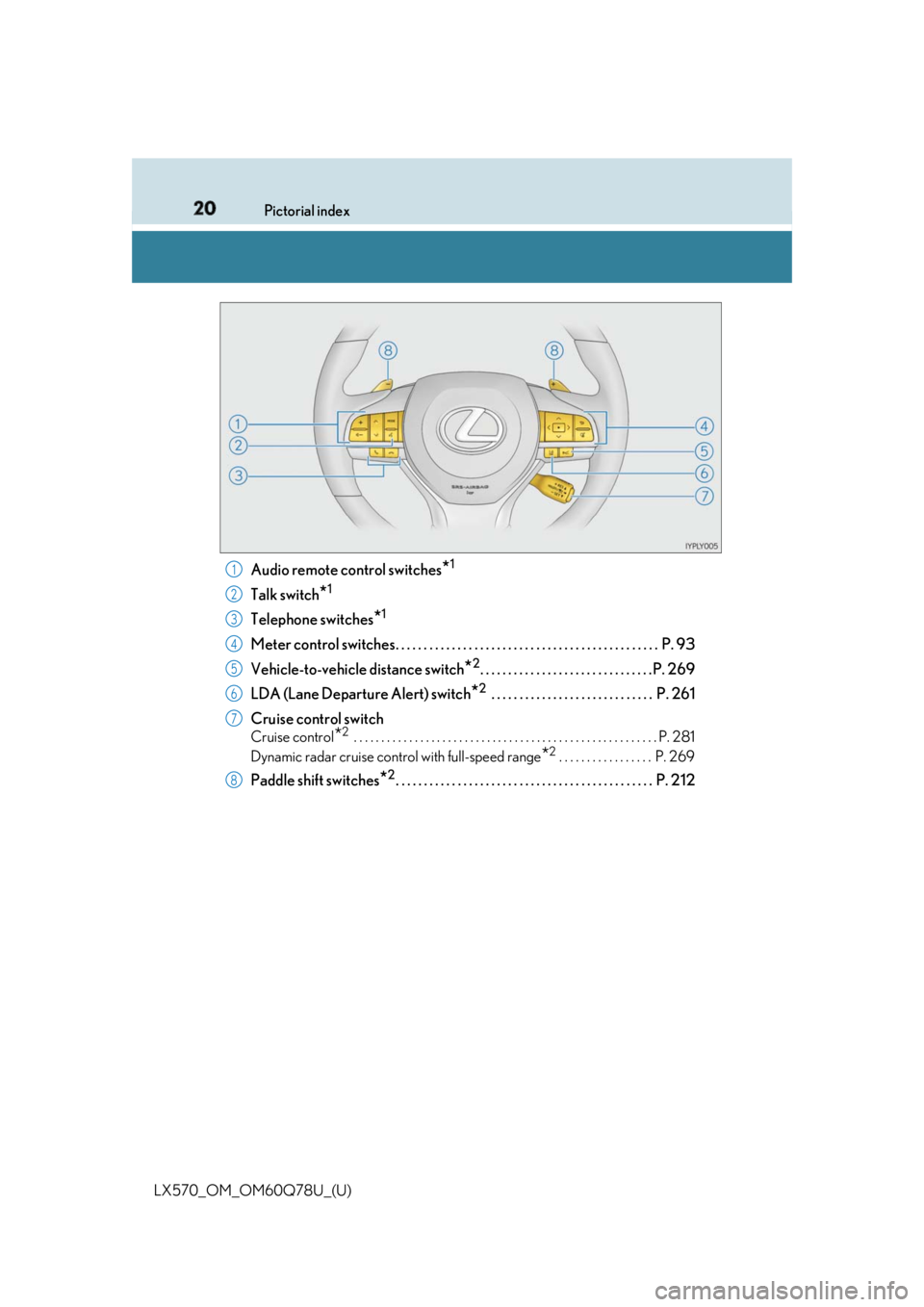
LX570_OM_OM60Q78U_(U) Audio remote control switches
* 1
Talk switch
* 1
Telephone switches
* 1
Meter control switches. . . . . . . . . . . . . . . . . . . . . . . . . . . . . . . . . . . . . . . . . . . . . . . P. 93
Vehicle-to-vehicle distance switch
* 2
. . . . . . . . . . . . . . . . . . . . . . . . . . . . . . .P. 269
LDA (Lane Departure Alert) switch
* 2
. . . . . . . . . . . . . . . . . . . . . . . . . . . . . P. 261
Cruise control switch Cruise control
* 2
. . . . . . . . . . . . . . . . . . . . . . . . . . . . . . . . . . . . . . . . . . . . . . . . . . . . . . . P. 281
Dynamic radar cruise control with full-speed range
* 2
. . . . . . . . . . . . . . . . . P. 269
Paddle shift switches
* 2
. . . . . . . . . . . . . . . . . . . . . . . . . . . . . . . . . . . . . . . . . . . . . . P. 2121
2
3
4
5
6
7
8
Page 85 of 628

LX570_OM_OM60Q78U_(U) 852. Instrument cluster
2
Instrument cluster The indicators inform the driver of the op erating state of the vehicle’s various sys-
tems.
Indicators Turn signal indicator
( → P. 217) (if equipped)
LDA indicator ( → P. 261)(U.S.A.)
Headlight indicator
( → P. 221)
* 1, 2
Slip indicator ( → P. 378)
(Canada)
Tail light indicator
( → P. 221)
* 1
VSC OFF indicator
( → P. 378)
Headlight high beam
indicator ( → P. 222) Multi-terrain Select
indicator ( → P. 312)
Automatic High Beam
indicator ( → P. 224)
* 1
Crawl Control indicator
( → P. 307)
Fog light indicator
( → P. 229) Automatic transmission
second start indicator
( → P. 210)
* 1
Eco Driving Indicator
Light ( → P. 87) Low speed four-wheel
drive indicator light
( → P. 303)
Cruise control indicator
( → P. 281, 269) Center differential lock
indicator ( → P. 304)
Cruise control “SET”
indicator ( → P. 281, 269) * 1
Easy access mode
indicator ( → P. 295)
(if equipped) Dynamic radar cruise
control indicator
( → P. 269) Intuitive parking assist
indicator ( → P. 287)
Page 92 of 628

92
LX570_OM_OM60Q78U_(U) 2. Instrument cluster
Driving assist system information (if equipped) Select to display the operational status of the following systems:
• Dynamic radar cruise control with full-speed range ( → P. 269)
When the vehicle is in constant speed control mode ( → P. 277), the menu
icon will change to .
• LDA (Lane Departure Alert) ( → P. 261)
Warning message display Select to display warning messages and me asures to be taken if a malfunction is
detected. ( → P. 528)
Settings display Select to change the meter display settings and the operation settings of some
vehicle functions. ( → P. 96)
Page 101 of 628
LX570_OM_OM60Q78U_(U) 1012. Instrument cluster
2
Instrument cluster Driving assist system status display area (if equipped) Select to display the operational status of the following systems:
• Dynamic radar cruise control with full-speed range ( → P. 269)
• LDA (Lane Departure Alert) ( → P. 261)
• Intuitive parking assist ( → P. 287)
Displayed content is the same as that disp layed on the multi-information display. For
details, refer to the explanations of each system.
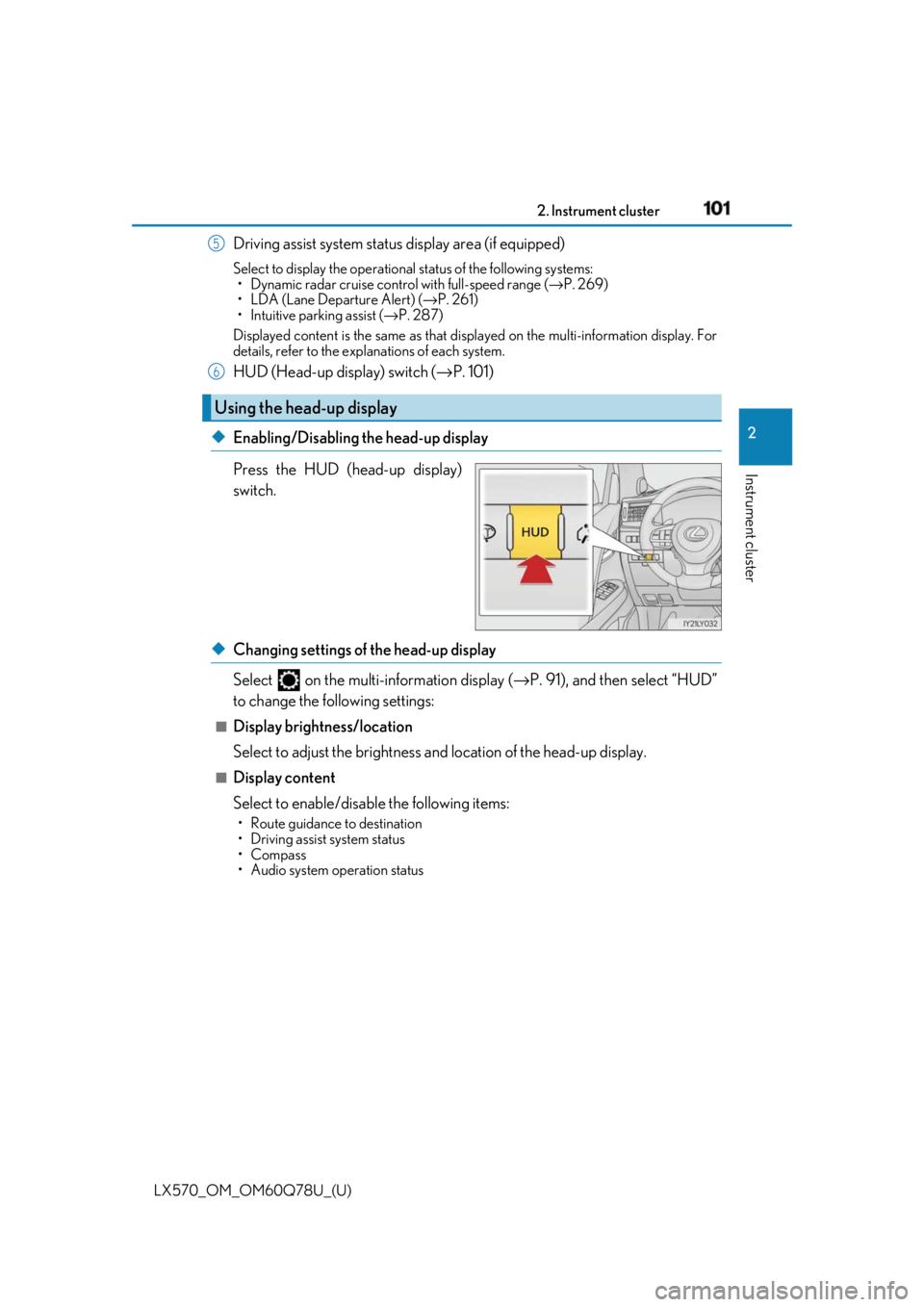
HUD (Head-up display) switch ( → P. 101)
◆ Enabling/Disabling the head-up display
Press the HUD (head-up display)
switch.
◆ Changing settings of the head-up display
Select on the multi-information display ( → P. 91), and then select “HUD”
to change the following settings: ■
Display brightness/location
Select to adjust the brightness and location of the head-up display. ■
Display content
Select to enable/disable the following items: • Route guidance to destination
• Driving assist system status
•Compass
• Audio system operation statusUsing the head-up display 5
6
Page 102 of 628

102
LX570_OM_OM60Q78U_(U) 2. Instrument cluster
Displays the following multi-in formation display linked icons:
: Master warning icon
Displayed when a warning message is displayed on the multi-information
display. ( → P. 528)
: Information icon
Displayed when a suggestion/advice po p-up display is displayed on the
multi-information display. ( → P. 91)
Displays the following items in the appropriate situation: ■
Warning/Message (if equipped)
Displays the following system warning/messages: • Pre-collision warning (pre-collision system)
• Notification message (Dynamic radar cruise control with full-speed range)■
Audio system operation status
Displayed when the audio system is operated. ■
Outside temperature
Displayed in the following situations: • When the engine switch is turned to IGNITION ON mode
• When the low outside temperature indicator is flashing
Displayed content is the same as that di splayed on the multi-information display.
( → P. 88)
Displays the following items which ar e linked to the navigation system:■
Route guidance to destination
Displayed when the navigation system is performing route guidance. When
approaching an intersecti on, an arrow will be displayed to indicate the sug-
gested direction of travel. ■
Compass
Displays the direction of travel.Warning and information icons
Message display area
Navigation system-linked display area
Page 173 of 628

173
LX570_OM_OM60Q78U_(U) 4 Driving4-1. Before driving
Driving the vehicle ...................... 174
Cargo and luggage .................... 182
Vehicle load limits ....................... 186
Trailer towing ................................ 187
Dinghy towing .............................204
4-2. Driving procedures
Engine (ignition) switch .......... 205
Automatic transmission............ 210
Turn signal lever........................... 217
Parking brake ............................... 218
4-3. Operating the lights
and wipers
Headlight switch .......................... 221
Automatic High Beam ............. 224
Fog light switch ...........................229
Windshield wipers and
washer........................................... 231
Rear window wiper and
washer..........................................235
Headlight cleaner switch ....... 238
4-4. Refueling
Opening the fuel tank cap......239 4-5. Using the driving support
systems
Lexus Safety System+ .............. 242
PCS (Pre-Collision
System)........................................ 249
LDA (Lane Departure
Alert) ..............................................261
Dynamic radar cruise
control with full-speed
range ............................................ 269
Cruise control .............................. 281
Driving mode select
switch ........................................... 284
Intuitive parking assist .............. 287
4-Wheel AHC (Active
Height Control
Suspension) ............................... 295
Four-wheel drive system ........303
Crawl Control (with Turn
Assist function)......................... 307
Multi-terrain Select .................... 312
Multi-terrain Monitor ................ 316
BSM (Blind Spot Monitor) ..... 363
• BSM function ......................... 367
• RCTA function........................371
Driving assist systems .............. 377
4-6. Driving tips
Winter driving tips .....................382
Off-road precautions ...............386
Page 202 of 628

202
LX570_OM_OM60Q78U_(U) 4-1. Before driving
WARNING ■
Trailer towing precautions ●
To tow a trailer safely, use extreme care an d drive the vehicle in accordance with the
trailer’s characteristics and operating condit ions. Failure to do so could cause an acci-
dent resulting in death or serious injury. Vehicle stability and braking performance are
affected by trailer st ability, brake setting and performanc e, and the hitch. Your vehicle
will handle differently when towing a trailer. ●
Set the vehicle height to the “LO” mode and turn off the 4-Wheel AHC when you
connect a trailer, otherwise the vehicle height may change due to the automatic level-
ing function, and you may catch part of your body in the vehicle, resulting in an acci-
dent. ( → P. 295)■
To avoid accident or injury ●
Do not exceed the TWR, unbraked TWR, GCWR, GVWR or GAWR. ●
If the gross trailer weight is over 2000 lb. (907 kg), a sway control device with suffi-
cient capacity is required. ●
If the gross trailer weight is over 5000 lb. (2268 kg), a weight distributing hitch with
sufficient capacity is required. ●
Adjust the tongue weight within the approp riate range. Place heavier loads as close
to the trailer axle as possible. ●
Do not exceed 65 mph (104 km/h), the posted towing speed limit or the speed limit
for your trailer as set forth in your trai ler owner’s manual, whichever is lowest. Slow
down sufficiently before making a turn, in crosswinds, on wet or slippery surface, etc.
to help avoid an accident. If you experien ce a vehicle-trailer in stability from reducing
a certain speed, slow down and make sure you keep your vehicle speed under the
speed of which you expe rience the instability.●
Do not make jerky, abrupt or sharp turns. ●
Do not apply the brakes suddenly as you ma y skid, resulting in jackknifing and loss of
vehicle control. This is especially true on wet or slippery surfaces.●
Do not exceed the trailer hitch assembly weight, gross vehicle weight, gross axle
weight and trailer tongue weight capacities. ●
Do not use cruise control (if equipped) or dynamic radar cruise control with full-
speed range (if equipped) when trailer towing. ●
Slow down and downshift before descending steep or long downhill grades. Do not
make sudden downshifts while descending steep or long downhill grades. ●
Vehicle-trailer instability is more likely on steep long down hills. Before descending
steep or long downhill grades, slow down and downshift. Do not make sudden down-
shifts when descending steep or long do wnhill grades. Avoid ho lding the brake pedal
down too long or applying the brakes too frequently. This could cause the brakes to
overheat and result in reduced braking efficiency.
Page 214 of 628

214
LX570_OM_OM60Q78U_(U) 4-2. Driving procedures■
Paddle shift switches (if equipped) ●
When the “-” paddle shift switch is operated in the D position, a shift range will be auto-
matically selected. The highest gear of the first shift rang e will be one gear lower than
the gear in use during normal D position driving. ●
Automatic deactivation of shift range selection in the D position
Shift range selection in the D position will be deactivated in the following situations:
• When the vehicle comes to a stop
• If the accelerator pedal is depressed for long er than a certain period of time in one
shift range■
Driving on a downhill
On declines, there may be case where the ve hicle shifts down automatically to obtain
engine braking. As a result of the down shifting, the engine speed may increase.■
Second start mode automatic deactivation
Second start mode is automatically deactivated if the engine is turn ed off after driving in
second start mode. ■
S mode
When the shift range is 7 or lower, holding th e shift lever toward “+” sets the shift range to
8. ■
AI-SHIFT
AI-SHIFT automatically selects the suitable gear according to driver performance and
driving conditions.
AI-SHIFT automatically operates when the shift lever is in the D position. (Shifting the
shift lever to the S position cancels the function.) ■
When driving with cruise control or dynamic radar cruise control with full-speed range
activated
Even when performing the following actions with the intent of enabling engine braking,
engine braking will not activate because crui se control or dynamic radar cruise control
with full-speed range will not be canceled.●
While driving in D position (vehicles with paddle shift switches) or S mode, downshift-
ing to 7, 6, 5 or 4. ( → P. 269, 281)●
When switching the driving mode to sport mode while driving in D position. ( → P. 284)■
Shift lock system
The shift lock system is a system to prevent ac cidental operation of the shift lever in start-
ing.
The shift lever can be shifted from P only when the engine switch is in IGNITION ON
mode and the brake pedal is being depressed.