reset LEXUS LX570 2018 Owners Manual
[x] Cancel search | Manufacturer: LEXUS, Model Year: 2018, Model line: LX570, Model: LEXUS LX570 2018Pages: 628, PDF Size: 12.38 MB
Page 18 of 628

18 Pictorial index
LX570_OM_OM60Q78U_(U) ■ Switches
Outside rear view mirror switches . . . . . . . . . . . . . . . . . . . . . . . . . . . . . . . . . . P. 162
Window lock switch . . . . . . . . . . . . . . . . . . . . . . . . . . . . . . . . . . . . . . . . . . . . . . . . . P. 165
Door lock switches . . . . . . . . . . . . . . . . . . . . . . . . . . . . . . . . . . . . . . . . . . . . . . . . . . . P. 117
Power window switches . . . . . . . . . . . . . . . . . . . . . . . . . . . . . . . . . . . . . . . . . . . . . P. 165
Driving position memory buttons . . . . . . . . . . . . . . . . . . . . . . . . . . . . . . . . . . . . P. 151
Automatic High Beam switch . . . . . . . . . . . . . . . . . . . . . . . . . . . . . . . . . . . . . . .P. 224
Headlight cleaner switch
* . . . . . . . . . . . . . . . . . . . . . . . . . . . . . . . . . . . . . . . . . P. 238
HUD (Head-up display) switches
* . . . . . . . . . . . . . . . . . . . . . . . . . . . . . . . . . . P. 100
Easy access mode switch . . . . . . . . . . . . . . . . . . . . . . . . . . . . . . . . . . . . . . . . . . . . P. 297
Instrument panel light control dial . . . . . . . . . . . . . . . . . . . . . . . . . . . . . . . . . . . P. 89
Odometer/trip meter and trip meter reset button . . . . . . . . . . . . . . . . . . P. 89 1
2
3
4
5
6
7
8
9
10
11
Page 19 of 628
19Pictorial index
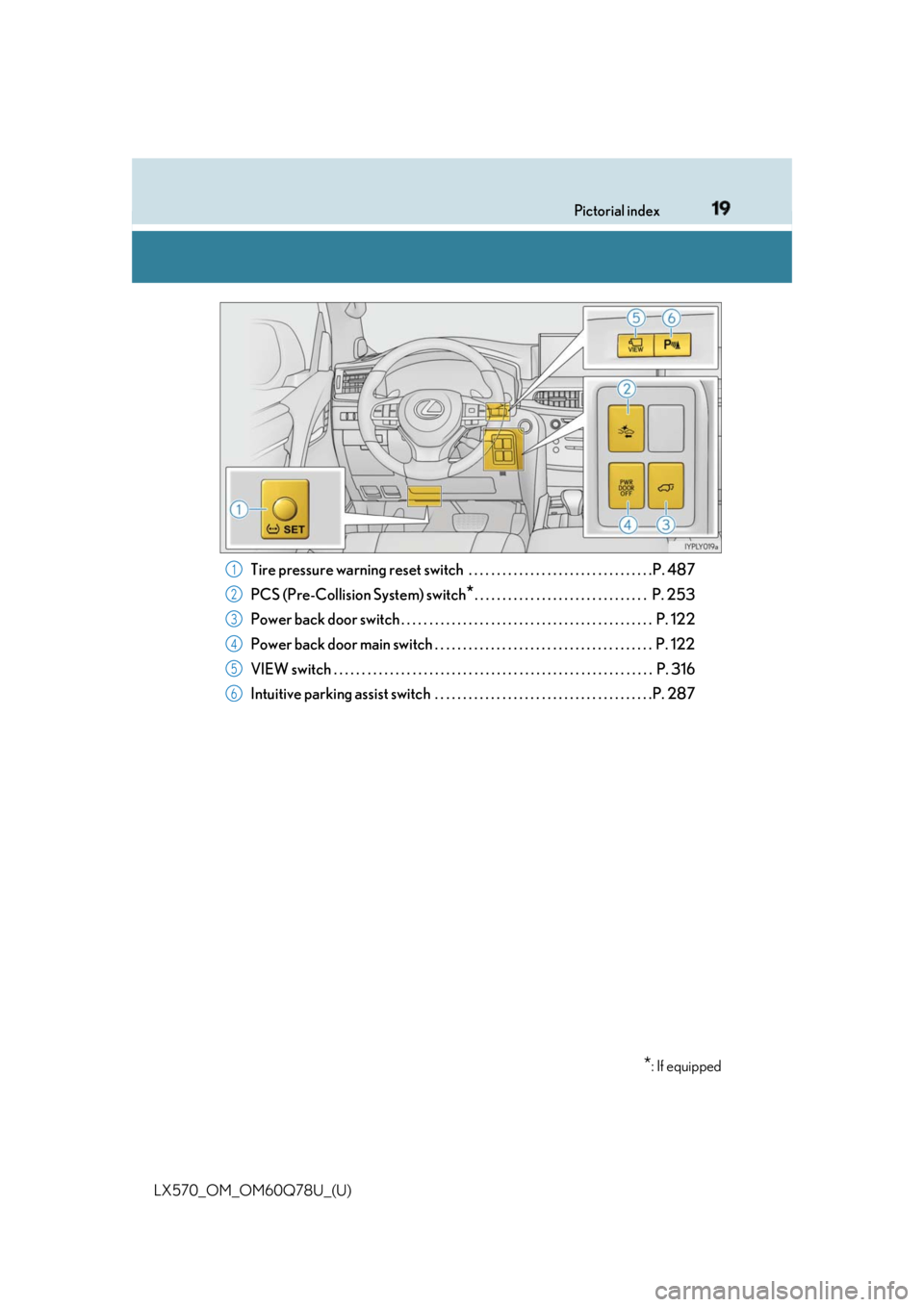
LX570_OM_OM60Q78U_(U) Tire pressure warnin g reset switch . . . . . . . . . . . . . . . . . . . . . . . . . . . . . . . . .P. 487
PCS (Pre-Collision System) switch
* . . . . . . . . . . . . . . . . . . . . . . . . . . . . . . . P. 253
Power back door switch . . . . . . . . . . . . . . . . . . . . . . . . . . . . . . . . . . . . . . . . . . . . . P. 122
Power back door main switch . . . . . . . . . . . . . . . . . . . . . . . . . . . . . . . . . . . . . . . P. 122
VIEW switch . . . . . . . . . . . . . . . . . . . . . . . . . . . . . . . . . . . . . . . . . . . . . . . . . . . . . . . . . P . 316
Intuitive parking assist switch . . . . . . . . . . . . . . . . . . . . . . . . . . . . . . . . . . . . . . .P. 287
* : If equipped1
2
3
4
5
6
Page 89 of 628
LX570_OM_OM60Q78U_(U) 892. Instrument cluster
2
Instrument cluster Odometer and trip meter display Odometer:
Displays the total distance the vehicle has been driven
Trip meter:
Displays the distance the vehi cle has been driven since the meter was last reset. Trip
meters A and B can be used to record an d display different distances independently.
Shift position and shift range display Displays the selected shift posi tion or selected shift range ( → P. 210)
4-Wheel AHC display Display the status of 4-Wheel AHC (Active Height Control Suspension). ( → P. 295)
Outside temperature Displays the outside temperature within the range of -40 ° F (-40 ° C) to 122 ° F
(50 ° C). Low outside temperature indicator comes on when the ambient temperature
is 37 ° F (3 ° C) or lower.
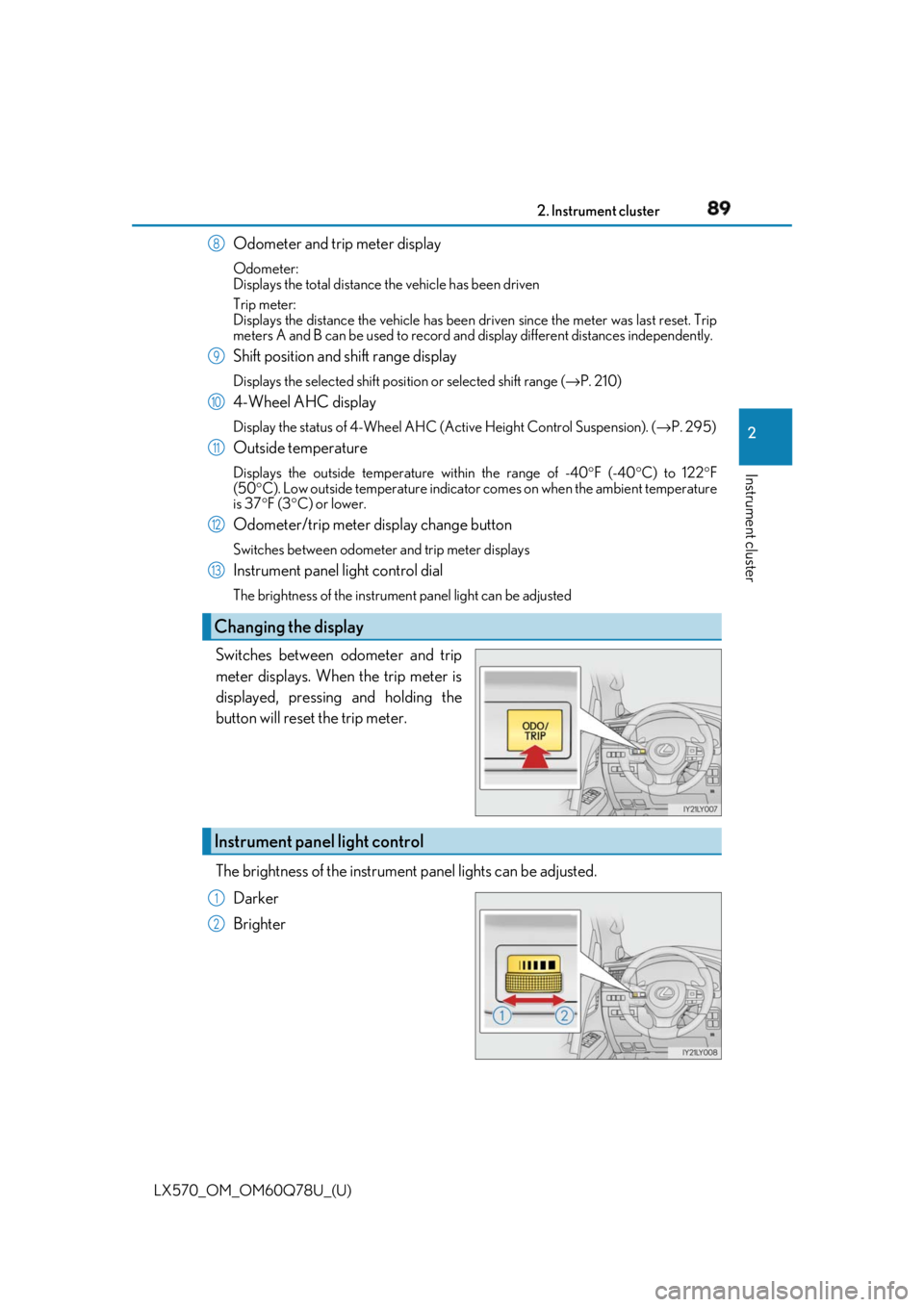
Odometer/trip meter display change button Switches between odometer and trip meter displays
Instrument panel light control dial The brightness of the instrument panel light can be adjusted
Switches between odometer and trip
meter displays. When the trip meter is
displayed, pressing and holding the
button will reset the trip meter.
The brightness of the instrument panel lights can be adjusted.
Darker
BrighterChanging the display 8
9
10
11
12
13
Instrument panel light control 1
2
Page 93 of 628
LX570_OM_OM60Q78U_(U) 932. Instrument cluster
2
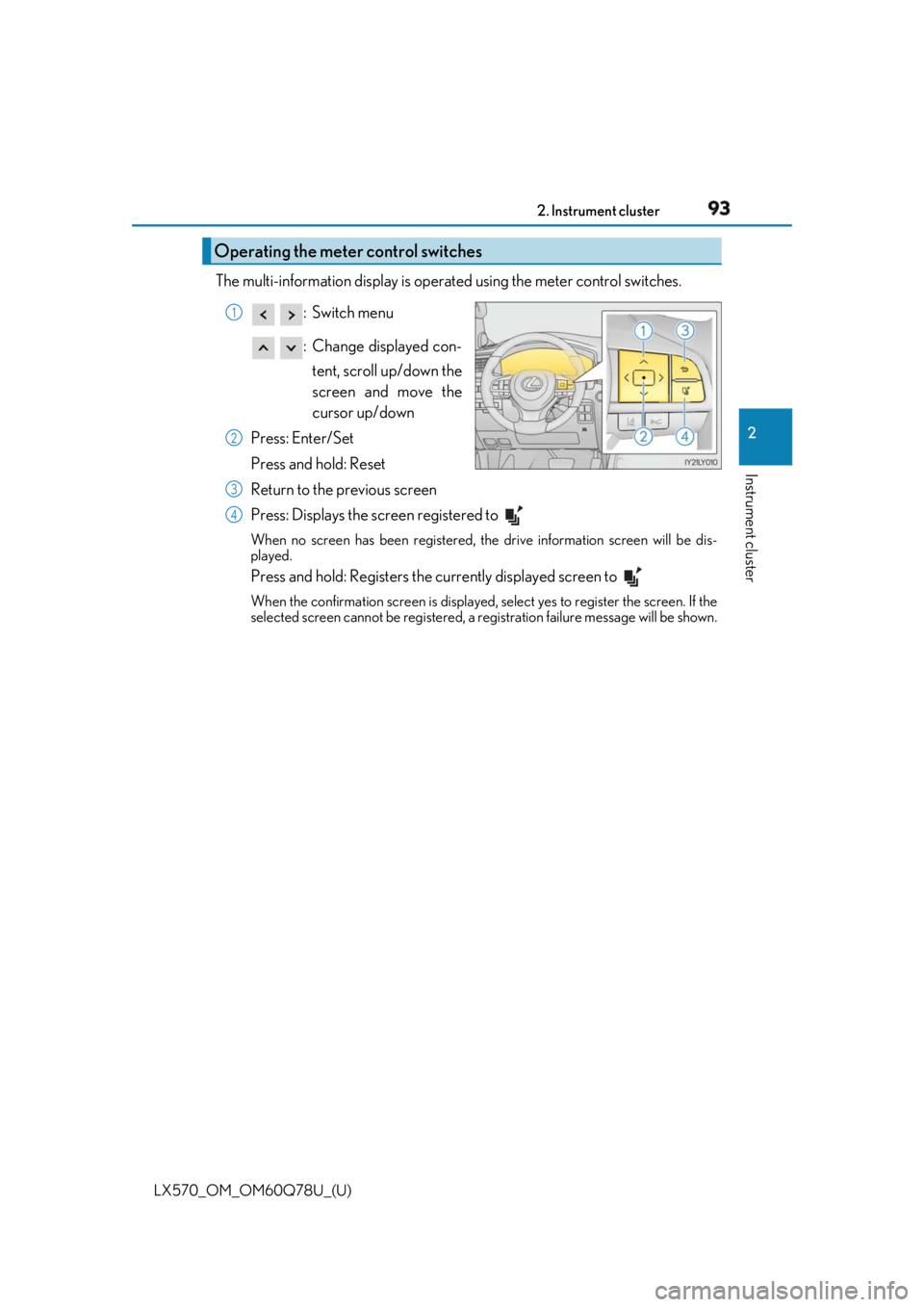
Instrument cluster The multi-information display is operated using the meter control switches.
:Switch menu
: Change displayed con-
tent, scroll up/down the
screen and move the
cursor up/down
Press: Enter/Set
Press and hold: Reset
Return to the previous screen
Press: Displays the screen registered to When no screen has been registered, th e drive information screen will be dis-
played.
Press and hold: Registers the currently displayed screen to When the confirmation screen is displayed, select yes to register the screen. If the
selected screen cannot be registered, a registration failure me ssage will be shown.Operating the meter control switches 1
2
3
4
Page 94 of 628

94
LX570_OM_OM60Q78U_(U) 2. Instrument cluster
■
Drive information
4 of the following items can be register ed and displayed as the drive informa-
tion 1 and the drive information 2 (2 items on each screen).
Refer to P. 96 for the registration me thod of the drive information 1 and the
drive information 2. ●
Current fuel consumption (bar type/value type)
Displays the current rate of fuel consumption. ●
Average fuel consumption (after reset
* 2
/after start/after refuel)
* 1
Displays the average fuel consumption since the function was reset, the
engine was started, and the vehicle was refueled, respectively. ●
Average vehicle speed (after reset
* 2
/after start)
Displays the average vehicle speed si nce the function was reset and the
engine was started, respectively. ●
Elapsed time (after reset
* 2
/after start)
Displays the elapsed time since the function was reset and the engine was
started, respectively. ●
Distance (driving range/after start)
Displays the estimated maximum distance that can be driven with the
quantity of fuel remaining.
• This distance is computed based on your average fuel consumption.
As a result, the actual distance that can be driven may differ from that
displayed.
• When only a small amount of fuel is added to the tank, the display may
not be updated.
When refueling, turn the engine switch off. If the vehicle is refueled with-
out turning the engine switch off, the display may not be updated.
* 1
: Use the displayed average fuel consumption as a reference.
* 2
: The function can be reset by pressing for longer than 1 second when the item to
reset is displayed. If there is more than on e item that can be rese t, the item selection
screen will appear.Drive information
Page 96 of 628
96
LX570_OM_OM60Q78U_(U) 2. Instrument cluster
The settings of some features can be changed by using the meter control
switches. ■
Setting procedure
For functions that can be enabled or disabled, the function switches between
on and off each time is pressed. ■
Setting items ●
LDA (Lane Departure Alert)
*Select to set up LDA. ( → P. 580)
• Alert method
• Alert sensitivity
• Sway warning
• Sway sensitivity ●
BSM (Blind Spot Monitor)
Select to set up BSM. ( → P. 580)
•BSM on/off
• RCTA (Rear Cross Traffic Alert) on/off ●
Head-up display
*Select to set up Head-up display. ( → P. 580)
• Display brightness/location
• Display content ●
Scheduled maintenance
Select to reset the message indi cating maintenance is required.●
Oil maintenance
*Select to reset the engine oil maintenance informationSettings display
Page 98 of 628

98
LX570_OM_OM60Q78U_(U) 2. Instrument cluster■
Eco Driving Indicator
■
When disconnecting and reco nnecting battery terminals
The drive information will be reset (only items that can be reset manually). ■
Pop-Up display
The pop-up display is displayed on the multi- information display according to the operat-
ing conditions of the following functions: ●
Route guidance display of the navigation system-linked system●
Incoming call display of the hands-free phone system (if equipped)
The pop-up display function can be disabled. ( → P. 96)■
Tire inflation pressure ●
It may take a few minutes to display the tire inflation pressure after the engine switch is
turned to IGNITION ON mode. It may also take a few minutes to display the tire infla-
tion pressure after inflation pressure has been adjusted.●
“---” may be displayed if the tire information cannot be determined due to unfavorable
radio wave conditions. ●
Tire inflation pressure changes with temperat ure. The displayed values may also be dif-
ferent from the values measured using a tire pressure gauge. ■
When setting up the display
Stop the vehicle in a safe place, apply the pa rking brake, and shift the shift lever to P. ■
Suspension of the settings display
In the following situations, the settings disp lay using the meter control switches will be
suspended. ●
When a warning message appears on the multi-information display●
When the vehicle begins to move ■
Liquid crystal display
Small spots or light spots may appear on the display. This phenomenon is characteristic
of liquid crystal displays, and there is no problem continuing to use the display.Eco Driving Indicator Light ( → P. 87)
Eco Driving Indicator Zone Display
Suggests the Zone of Eco driving with current
Eco driving ratio based on acceleration.
Eco driving ratio based on acceleration
If the acceleration exceeds Zone of Eco driv-
ing, the right side of Eco Driving Indicator
Zone Display will illuminate.
Zone of Eco driving 1
2
3
4
Page 103 of 628

LX570_OM_OM60Q78U_(U) 1032. Instrument cluster
2
Instrument cluster ■
Head-up display
The head-up display may seem dark or hard to see when viewed through sunglasses,
especially pola rized sunglasses.
Adjust the brightness of the head-up display or remove your sunglasses.■
When the battery is disconnected
The customize settings of the head-up display will be reset.■
Display brightness ●
The brightness of the head-up display can be adjusted on of the multi-information
display. Also, it is automatically adju sted according to the ambient brightness.●
When the vehicle is stopped, the display may dim temporarily. This is not a malfunction. ■
Enabling/disabling of the head-up display
If the head-up display is disabled, it will rema in disabled when the engine switch is turned
off then back to IGNITION ON mode. ■
Head-up display automatic position adjustment
If the display position is recorded into memory, the head-up display will be automatically
adjusted to the desired position. ( → P. 151)
WARNING ■
Before using the head-up display ●
Check that the position and brightness of the head-up display image does not inter-
fere with safe driving. Inco rrect adjustment of the image’s position or brightness may
obstruct the driver’s view and lead to an acc ident, resulting in de ath or serious injury.●
Do not continuously look at the head-up di splay while driving as you may fail to see
pedestrians, objects on the road, etc. ahead of the vehicle. ■
Caution for changing settings of the head-up display
As the engine needs to be running while changing the settings of the head-up display,
ensure that the vehicle is parked in a place with adequate ventilation. In a closed area
such as a garage, exhaust gases including harmful carbon monoxide (CO) may collect
and enter the vehicle. This may lead to death or a serious health hazard.
Page 106 of 628

106
LX570_OM_OM60Q78U_(U) 2. Instrument cluster
Press the “MENU” button on the Remote To uch, then select “Info” on the “Menu”
screen, and then select “Fuel Consumption”. ■
Trip information
If the “Past Record” screen is disp layed, select “Trip Information”.
Resetting the consumption data
Fuel consumption in the past 15
minutes
Current fuel consumption
Average vehicle speed since the
engine was started.
Elapsed time since the engine
was started.
Cruising range ( → P. 107)Average fuel consumption for the past 15 minutes is divided by color into past
averages and averages attained since the engine switch was last turned to IGNI-
TION ON mode. Use the displayed average fuel consumption as a reference.
The image is an example only, and may va ry slightly from actual conditions.Fuel consumption 1
2
3
4
5
6
Page 107 of 628
LX570_OM_OM60Q78U_(U) 1072. Instrument cluster
2
Instrument cluster ■
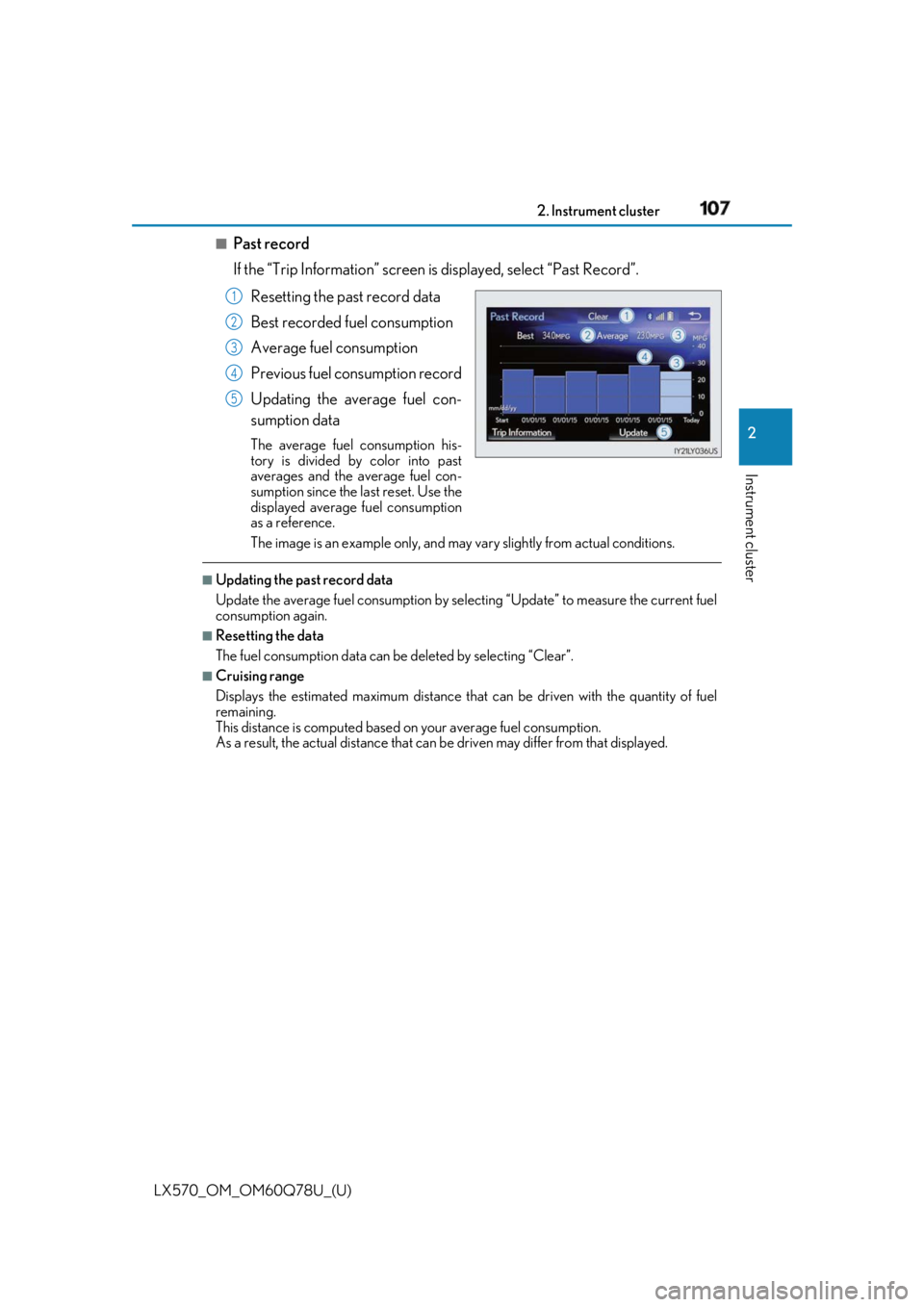
Past record
If the “Trip Information” screen is displayed, select “Past Record”.
Resetting the past record data
Best recorded fuel consumption
Average fuel consumption
Previous fuel consumption record
Updating the average fuel con-
sumption data The average fuel consumption his-
tory is divided by color into past
averages and the average fuel con-
sumption since the last reset. Use the
displayed average fuel consumption
as a reference.
The image is an example only, and may va ry slightly from actual conditions.■
Updating the past record data
Update the average fuel cons umption by selecting “Update” to measure the current fuel
consumption again. ■
Resetting the data
The fuel consumption data can be deleted by selecting “Clear”. ■
Cruising range
Displays the estimated maximum distance that can be driven with the quantity of fuel
remaining.
This distance is computed based on your average fuel consumption.
As a result, the actual distance that can be driven may differ from that displayed.1
2
3
4
5